How to fix
Kernel Panic error
on Windows
Resolve your Kernel Panic error with proven solutions for Windows 10 and Windows 11. Quick fixes and expert-tested methods await you!


What causes How to fix Kernel Panic error on Mac?
- Software conflicts
- Not enough RAM
- Not enough hard drive space
- Outdated drivers and plugins
- Conflicting applications
- Broken disk permissions
Repairs Windows system files, removes malware, and restores a clean OS state — without reinstalling.
Help! When I close my laptop without shutting down, once I open it the system seems to be shut down without my permission. It starts from the beginning with the apple logo on the screen. Also, this Kernel Panic error occurs from time to time. I have no idea why or what should I do. Can you offer any solutions or what can be the reason for the particular "You need to restart your computer" message?
The particular Kernel Panic Error on Mac is not a vital issue, but when the screen goes black and delivers the message about restarting but is not providing the particular reason scares the hell out of the user.[ref en-1] This warning indicates that the issue is Kernel Panic, not the random shutdown or restart of the system.
Applications might also crash during such instances and macOS encounters a critical error. If it happens rarely, it is not causing much trouble. However, regular Kernel Panic and system crashes - a sign for damaged hardware. Such an issue might lead to useless devices and other problems.[ref en-2]
Kernel Panic Error on Mac can be caused by many things, but most of the cases are related to software conflicts. There might be not enough RAm or hard drive space, outdated drivers, and plugins can trigger such issues. Also, conflicting applications, broken disk permissions, or incompatible programs and features lead to crashes and particular shutdown issues.
Users shouldn't panic and think about malware issues and the worst possible scenarios.[ref en-3] There is no possible malware that could get on the macOS and trigger such a particular Kernel Panic error on Mac. If you suffer these problems - investigate further before doing anything else, altering settings can be the trigger for other problems not the solution for system crashes.

How to fix Kernel Panic Error on Mac
It is possible to fix Kernel Panic Error on Mac by updating the particular version of the operating system because many Kernel Panic errors are reported from 10.15.4 version devices only. Going for 10.15.6 Beta versions can mean that the issue is resolved automatically. Test this by updating it. If not fixed - rely on the methods below.
When it comes to compatibility issues and Kernel Panic Error on Mac there is a possibility that some o the programs interfere with others or the particular macOS components, so you can at least try to optimize the system using a PC optimizer compatible with your device. It may seem that macOS doesn't need any of this, but there are many thring that operating system creators cannot see and avoid.
Repair disk permissions
- Restart the device holding Command and R at the same time.
- Launch Disk Utility.
- Click First Aid and then Repair Disk Permissions.
Make sure that there is enough space to fix Kernel Panic Error on Mac
- Click on the Apple logo and open the menu.
- Choose About this Mac.
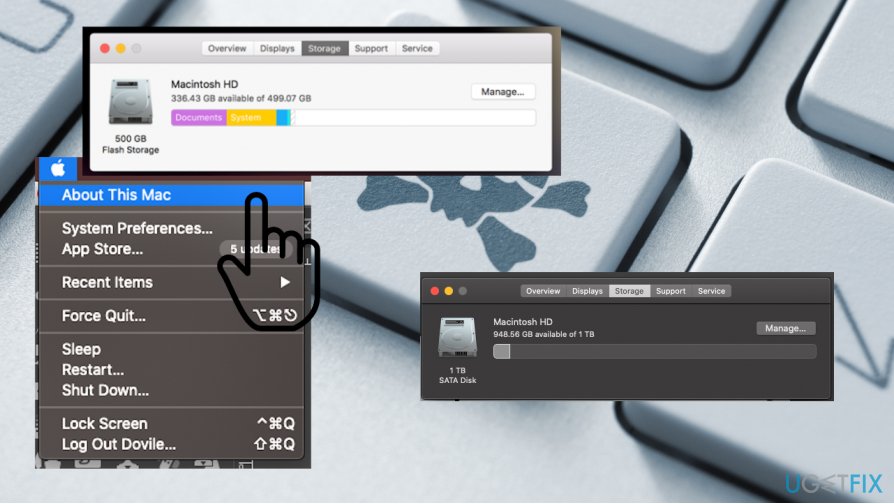
How to fix kernel panic error on mac storage - Switch to the Storage tab to see is there enough space left.
View Kernel Panic logs to fix Kernel Panic Error
- Start your device and on the Finder menu click Go.
- Then Go to Folder and enter /Library/Logs/DiagnosticReports and click Go.
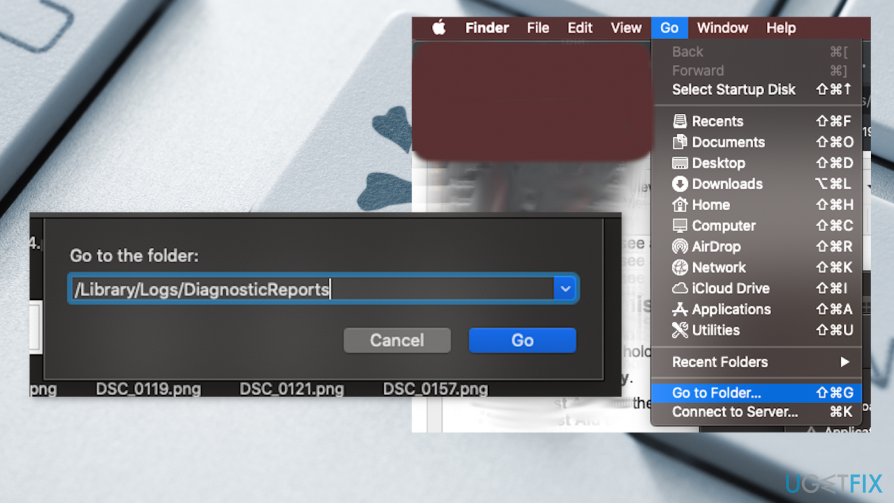
How to fix kernel panic error on mac logs report - You can select the Finder Panic log here.
- Double-click it and the file is going to be open via Console.
- Identify the faulty one and fix the reason.
Bottom line
To fix the Kernel Panic error on Mac, consider updating your operating system, especially if you are using version 10.15.4. Upgrading to the 10.15.6 Beta version may resolve the issue automatically. If these solutions do not work, further investigation into hardware issues may be necessary.
Frequently asked questions
No, Kernel Panic is specific to macOS systems; however, Windows 10 and Windows 11 may experience similar critical errors like the Blue Screen of Death.
You should check for hardware issues, update your drivers, and run system diagnostics to identify and resolve the problem.
To minimize the risk of critical errors, ensure your system is updated, maintain regular backups, and use reliable antivirus software.




Report an issue
What's wrong with this guide? We review every report and update or remove content.
Report received — thank you. We'll review and fix it.
You need a free account to submit a report.
Be the first to comment