How to fix
Dragon age inquisition crash on startup
on Windows
Resolve Dragon Age Inquisition startup crashes on Windows 10 or 11 with expert-tested fixes and detailed guides. Get back to gaming in minutes!


What causes How to fix Dragon age inquisition crash on startup?
- Background services interfering
- Missing files
- Administrative privileges required
- Third-party programs or antivirus blocking
- Graphic settings issues
- Nvidia's 3D Vision causing crashes
Repairs Windows system files, removes malware, and restores a clean OS state — without reinstalling.
Hello. I run into a problem. I get the error on Dragon Age: Inquisition crash on startup. I did some changes to the antivirus programs, repaired, installed them from scratch, and this still crashes on startup on my Windows 10 laptop. The error messages not appearing, but the problem remains the same. Can I get some answers or more possible solutions?
Dragon age inquisition crash on startup reportedly when users try to launch the game on Windows 10 devices. Users try to run the game repeatedly and the issue persists. It can be triggered by background services or missing files. Certain elements that require administrative privileges to function properly can keep the game from launching.
Dragon Age: Inquisition crash on startup is the issue that users and game fans[ref en-1] encounter commonly. This is the fantasy RPG game that features 3D graphics and amazing storylines set in the universe of Dragon Age. It is not immune to various issues and especially when the Windows operating system has bugs and vulnerabilities, particularly Update problems.[ref en-2]
Various forums fill up with questions about this Dragon age inquisition crash on startup. The problem occurs when the game is started, and there might be various reasons for this problem. As well as solutions. Some console issues have been addressed multiple times, but there are some PC problems that need to get fixed.
Some people that search for solutions and want to fix Dragon Age: Inquisition crash on startup state that the issue appears just after the launch, and others report problems with the game start in a particular game region. There are particular triggers that can cause this crashing like third-party program/ antivirus blocking or graphic settings, game bugs,[ref en-3] OS issues.

Many reasons can cause this Dragon Age: Inquisition crash on startup problem:
- Nvidia's 3D Vision crashing the game. This is the problem when the update enables the 3D vision on supporting PC, so this can cause the crash in the SkyHold region in particular.
- Built-in Origins menu problem. The platform has a menu that is enabled by default with supported apps, but this built-in menu is known for triggering no error message crashes.
- Graphics settings issue. Users state that crash on the desktop gets fixed when the graphics settings get set to Automatic.
- The full-screen optimizations feature should provide smooth gameplay, but it can interfere with certain elements of the game.
- VSync and Tesselation settings crashing the game. This is the problem with two particular graphics settings that can be changed and fix the issue with a game crash this way. You should set Vsync to Adaptive and Tesselation to Medium.
- The Lunge bug. This issue causes a game to crash when the player upgrades the character or companion to Effortless Lunge Skill. This particular issue is mainly is related to modest GPU cards.
- Overlocked GPU and RAM. Slightly underclocked RAM modules or GPU can fix the issue with the game crash.
- Background services that run and cause the issue. Third-party apps can trigger problems that keep the game from functioning.
- Missing files or data that got corrupted. Any file that is altered or missing can trigger the launching issue.
How to fix Dragon Age: Inquisition crash on startup
Dragon Age: Inquisition crash on startup issue solutions rely on particular setting alterations, so you can be sure that malware is not the problem in this case. You can try to check particular system files or issues related to other functions or programs with PC repair tools or optimizers like [d1] that can fix such problems automatically. You may get rid of some issues and then can rely on more difficult methods needed to fix the problem.
Of course, it is not that easy to fix Dragon Age: Inquisition crash on startup because some settings require alterations and interference. You should follow instructions and try at least a few methods to be sure that the issue got fixed. You might need to follow all of them until you find the one that is needed for your issues. Be patient.
Perform a clean Windows boot
- You can ensure that there are no programs that interfere with Dragon Age by rebooting the PC. Press the Windows key and R at the same time.
- Input MSConfig on the text box and click OK.
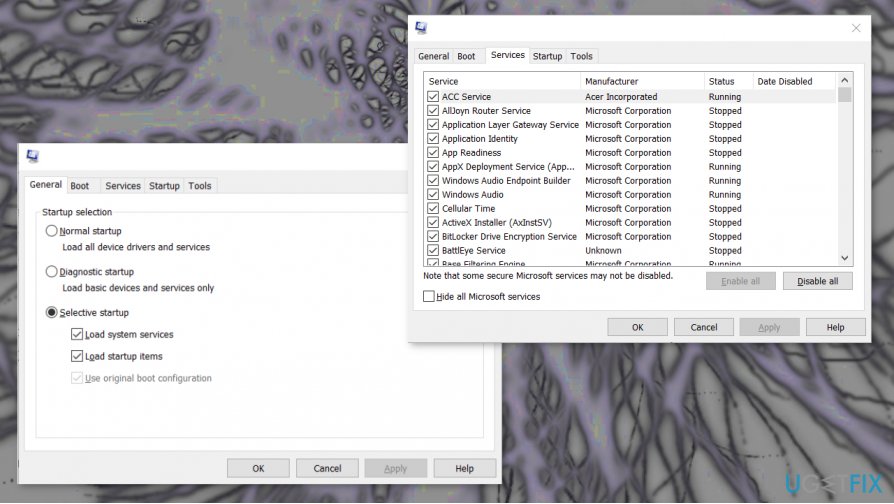
How to fix dragon age inquisition crash on startup msconfig - Select the Selective startup radio button in the General tab.
- Un-check the Load startup items box.
- Choose the Load system services and Use original boot configuration options if not selected already.
- Select Hide all Microsoft services box.
- Click the Disable all button.
- Apply all the changes.
- Click OK to exit the window and Restart the computer.
Reinstall the Direct X and VC Redist to fix Dragon Age: Inquisition crash on startup
- These pieces are provided with the dame and can be found on the game installation folder. It is possible that the version that is installed on your device is triggering the issue with Dragon age inquisition crash on startup.
- Go to C:\\Program Files (x86)\\Origin Games\\Dragon Age Inquisition\\__Installer\\directx\\redist
- Run the DXSetup.exe file and replace the previous versions.
- Then go to C:\\Program Files (x86)\\Origin Games\\Dragon Age Inquisition\\__Installer\\vc.
- Run all the VCRedist.exe files and replace previous versions.
- Restart the PC and check if the issue occurs.
Turn off the Origin's in-game menus
- Open Origin's window and login if needed.
- Click the menu to select Application Settings.
- Choose the Origin In-Game tab.
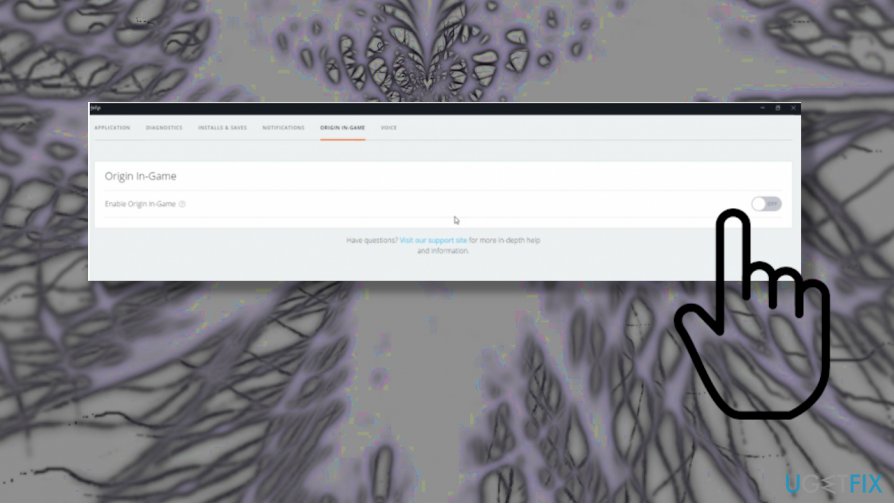
How to fix dragon age inquisition crash on startup enable - Click the off option near the Enable Origin In-Game.
Disable full-screen optimizations
- Open the installation folder and right-click the game executable.
- Choose Properties and click on the Compatibility tab.
- Inside, check the Disable Full Screen Optimizations box.
- Apply settings and run the game again to check.
Uninstall the 3D Vision driver to fix Dragon Age: Inquisition crash on startup
- Open the Run window.
- Type appwiz.cpl and click OK to open the uninstaller.
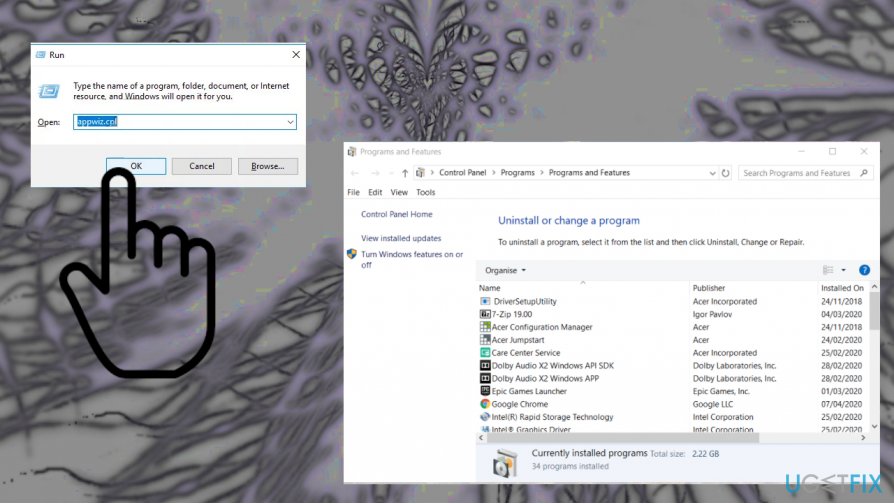
How to fix dragon age inquisition crash on startup appwiz - Select the Nvidia 3D Vision Driver on the software list and click Uninstall.
- Confirm with Yes and remove 3D Vision.
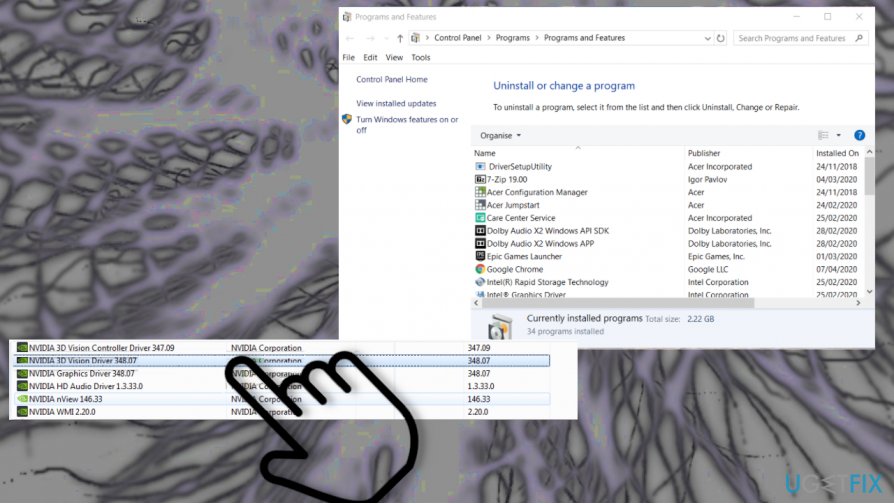
How to fix dragon age inquisition crash on startup nvidia - Restart the desktop or laptop after uninstalling.
Change launch settings to fix Dragon age inquisition crash on startup
- Press Windows and E buttons to launch File Explorer.
- Navigate to the game's installation folder.
- Then right-click on the main DAI executable and choose Properties.
- Click on the Compatibility tab and check Run as Administrator box below.
- Check Run this program in Compatibility Mode for. Select the different versions of Windows from the menu.
- Save settings and exit the window.
- Check if the issue occurs.
Bottom line
To fix the Dragon Age: Inquisition crash on startup, users can try adjusting antivirus settings, ensuring administrative privileges, and checking graphic settings. If these solutions do not resolve the issue, further troubleshooting may be necessary.
Frequently asked questions
Start by ensuring your graphics drivers are up to date and verify the game files through the game launcher. Additionally, check if your Windows 10 or Windows 11 is updated to the latest version.
Try running the game in compatibility mode for Windows 7 or 8, and lower the graphics settings if possible. You can also disable any overlays from applications like Discord or GeForce Experience that may interfere.
Yes, ensure your PC meets the minimum system requirements, including a compatible processor, adequate RAM, and sufficient graphics memory, as specified by the game. Running on systems below these requirements can lead to crashes.




Report an issue
What's wrong with this guide? We review every report and update or remove content.
Report received — thank you. We'll review and fix it.
You need a free account to submit a report.
Be the first to comment