How to fix
Fallout 4 crashing on startup
on Windows
Resolve Fallout 4 startup crashes on Windows 10 or 11 with expert-tested solutions. Get back to gaming quickly and enjoy seamless performance!


What causes How to fix Fallout 4 crashing on startup?
- Damaged or corrupted files
- Driver errors
- Software issues
- Hardware issues
- Incompatible settings
Repairs Windows system files, removes malware, and restores a clean OS state — without reinstalling.
Hello. I have an issue with a fresh install of the game. I got it newly installed on my laptop and wanted to get back to playing it, as I had a pause of not playing it for a few months. But I encounter sudden crashes every time I run the game. It launches and immediately crashes on startup. I cannot do anything, it takes a few seconds or so and it fails. Help me fix this Fallout 4 crashing on startup issue or say what I can do. Please!
Fallout 4 crashing on startup issue got revealed by various users[ref en-1] online. The problem is universal and not caused by any malware[ref en-2] or particular incompatibility with the OS or other programs. However, the problem might occur on various devices and systems for different reasons.
It is possible that deleting some files or folders could fix the issue temporarily, but the problem reported by many users and according to them it is not a particular OS thing, so it is not associated with Windows updates or faulty data.[ref en-3] However, troubleshooting is needed for this issue of Fallout 4 crashing on startup because eliminating any file cannot ensure that the cause of this crashing is fixed.
This is a common Fallout 4 error, so people can encounter this sudden crash pretty often. The launching loop keeps users from enjoying the game and brings up many concerns about the device in general. But it is possible to fix Fallout 4 crashing on startup on your Windows or Xbox device.
Fallout 4 crashing on startup can appear on Windows 10 or Windows 7 devices and reasons can range from software to hardware issues or even driver errors that are not that easy to resolve. Damaged or corrupted files, drivers, and settings can be blamed for the startup error and other requirements, when not met can trigger the issue with various applications, including video games.
How to fix Fallout 4 crashing on startup
Fallout 4 crashing within seconds on startup is the issue appearing on the game that is available on various platforms like PlayStation, Xbox One, and Microsoft Windows. The success of the game is not helping to avoid issues with errors and issues. The problem has persisted for a while, so there are many possible causes that you need to consider before going for any of the solutions in particular.
One of the methods that should help you to fix Fallout 4 crashing on startup - file repair and troubleshooting. Tools like [d1] can provide help for you when file corruption and damage are the reason for the crash of the game. Such optimizers or otherwise known as system tools can show, find, and repair damaged OS data and clear any additional problems out of the way. Disabling your AV tools or any other third-party programs might also help to solve the problem.
Update graphics drivers
- Open Device Manager.
- Expand Display adapters and right-click the display driver and choose to Update the driver.
- Choose whether or not to Search automatically for updated driver software.
- Follow the steps and allow drivers to get updated.
Solve mouse acceleration issue to fix Fallout 4 crashing on startup
- Go to C:\\Users\\username\\Documents\\My Games\\Fallout4
- Locate file names Fallout4Prefs.ini and open it.
- You need to change iPresentinterval =1 to iPresentinterval =0.
- Then save the option and close the window.
- Relaunch the PC and steam again.
Change the resolution
- Right-click on the Desktop to open the Display settings.
- Under the Display options, find Advanced display settings.
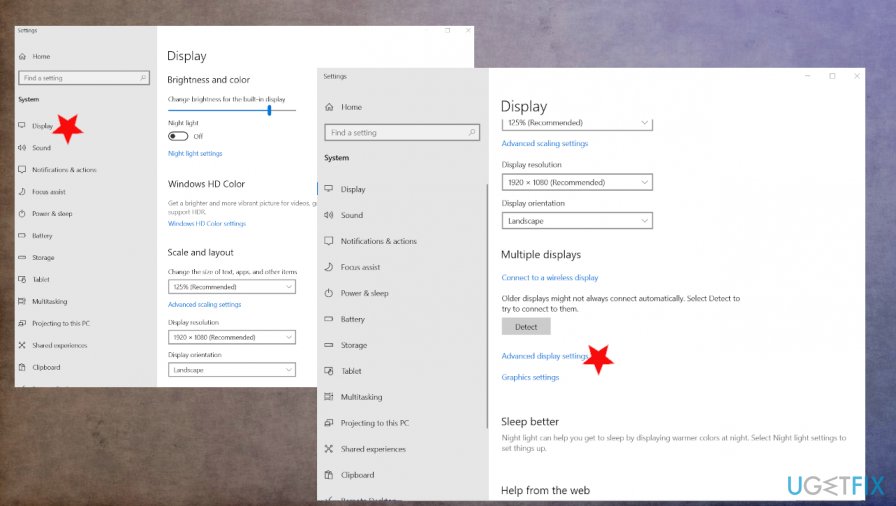
How to fix fallout 4 stuck on startup resolution display - Change resolution to wanted or recommended.
- Change the same resolution for Fallout 4 too.
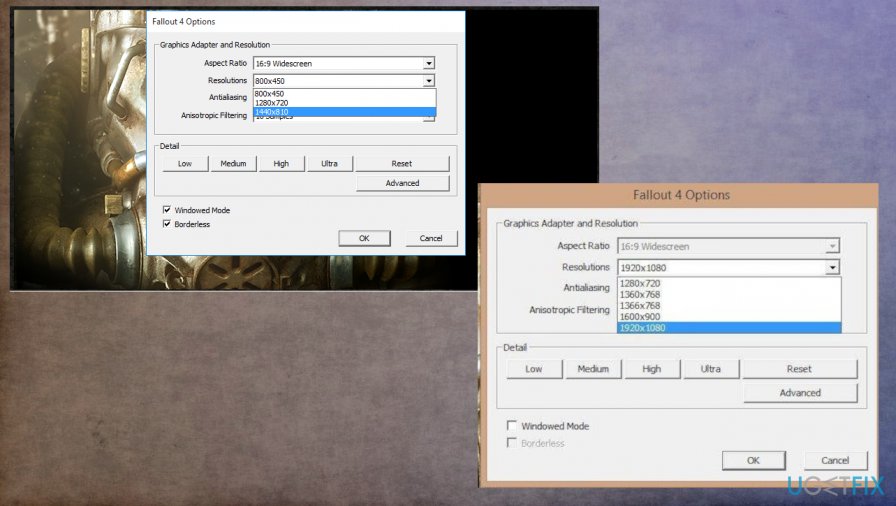
How to fix fallout 4 stuck on startup resolution
Make settings changes to fix Fallout 4 crashing on startup
- Run windowed mode and the borderless option.
- Go to power/battery settings and run the game to high-performance mode.
Bottom line
To fix Fallout 4 crashing on startup, users can try deleting certain files or folders, updating drivers, and ensuring system requirements are met. If these steps do not resolve the issue, further troubleshooting may be necessary.
Frequently asked questions
First, ensure that your graphics drivers are updated and verify the game files through Steam. If the issue persists, try launching the game in compatibility mode for Windows 7 or 8.
Yes, you can try disabling full-screen optimizations or running the game as an administrator in Windows 11. Additionally, check for any Windows updates that might improve compatibility.
Common causes include outdated graphics drivers, corrupted game files, or conflicting software running in the background on Windows 10 or Windows 11.




Report an issue
What's wrong with this guide? We review every report and update or remove content.
Report received — thank you. We'll review and fix it.
You need a free account to submit a report.
Be the first to comment