How to fix
“The Server Stumbled” Error Code 0x801901F7
on Windows
Resolve the "Server Stumbled" error code 0x801901F7 on Windows 10 and 11 easily. Get expert-tested solutions and troubleshoot like a pro!

What causes How to fix “The Server Stumbled” Error Code 0x801901F7 on Windows?
- Overloaded Microsoft’s Servers
- Damaged registries
- Virus infection
- Outdated drivers
- Software conflicts
Repairs Windows system files, removes malware, and restores a clean OS state — without reinstalling.
Yesterday I could access Windows Store without any obstacles, but now it’s crashed. Whenever I try to launch it, it says “The Server Stumbled.” At the bottom of the page the code of an error is given 0x801901F. Could you please explain why this is happening?
If you are using Windows OS, then you must have used Windows Store at least once. Actually, we believe that you are using it at least once in a week since Windows Store is the place where you can get various applications that are compatible with Windows OS and can improve your experience in various ways. Thus, the emergence of “The Server Stumbled” or Error Code 0x801901F7 when trying to launch the store may become a big deal for you. This error typically shows up on Windows 10 OS, but other Windows types are not resistant to 0x801901F7 error either.
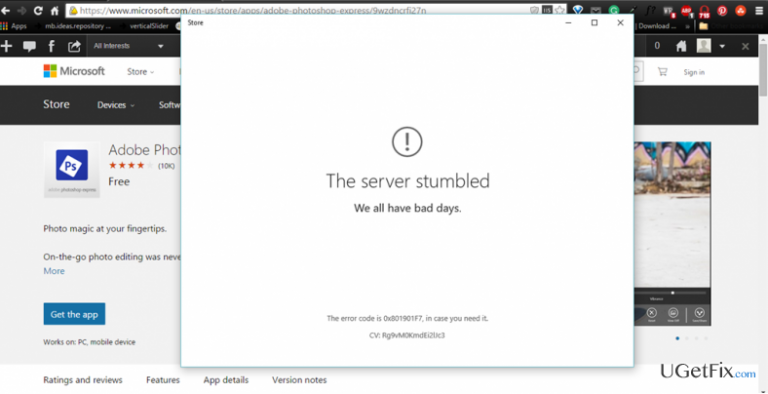
In some of the cases, this bug may appear due to overloaded Microsoft’s Servers. Nevertheless, in most of the cases, this Windows Store error is triggered by side effects of your OS, for example, damaged registries, virus infection, outdated drivers/software, and similar. Therefore, if you have received the message shown below while running Windows Store for the first time, you should close the Store and try to access it a little bit later in case the error is caused by overloaded servers. If reopening Windows Store did not help to fix 0x801901F7 error, then try to implement some manual system repair steps that can help to restore Windows Store performance.
The server stumbled
We all have bad days.
The Error Code 0x801901F7, in case you need it.
How to fix "The Server Stumbled" Error Code 0x801901F7 on Windows?
Method 1. Clear Windows Store Cache
- Click Windows key + R, type wsreset.exe in the run dialogue box, and hit Enter.
- Windows Store should open along with the Command Prompt window.
- You don’t have to do anything else except wait until the system resets Windows Store cache automatically.
- Once done, close Command Prompt window and reboot your PC.
Method 2. Remove Windows Store Database Files
In case clearing Windows Store cache did not fix 0x801901F7 bug, the next thing you can try is to delete the files from Windows Store database. For that, you have to perform these steps:
- Go to C:\Windows\SoftwareDistribution\DataStore\DataStore.edb.
- Remove DataStore.edb file from this location.
- Run Windows Store and check it 0x801901F7 error code is gone.
- If it’s not, close all programs and restart you PC .
- After that, try launching the store again. Everything should work OK. If not, go to the following fix.
Method 3. Disable/Reset Proxy
- Go to Start -> Settings -> Network & Internet -> Proxy.
- On this window you should locate the slide that is set on ON. Slide it to OFF to turn off Proxy.
- After that, reconnect your Internet and try to open Windows Store.
- If it throws “The Server Stumbled” error again, then press Windows key + X to open Command Prompt (Admin).
- Type netsh winhttp reset proxy and press Enter.
- Once done, close Command Prompt and try to launch Windows Store.
Method 4. Change Windows Update Properties
- Click Ctrl + Alt + Delete simultaneously to open Task Manager.
- Open Services and click on Open Services at the bottom of the page.
- Here you have to find Windows Update option and double click on it.
- When the drop down menu appears, select Automatic, click Apply, and OK to save the changes.
- After that, click Windows key + R, type wsreset.exe in the run dialogue box, and hit Enter.
- This command will prompt Windows system to clean Windows Store cache automatically. Therefore, wait until this process is done and then reboot your PC.
Bottom line
To fix the 'The Server Stumbled' error code 0x801901F7, you can try clearing the Windows Store cache using the wsreset.exe command or removing Windows Store database files. If these methods do not resolve the issue, consider further manual system repair steps or check back later if the problem is due to server overload.
Frequently asked questions
This error typically occurs due to connectivity issues, corrupted system files, or problems with Windows Update services on Windows 10.
To fix this error on Windows 11, try running the Windows Update Troubleshooter and resetting your network settings.
Yes, you can often resolve the 0x801901F7 error by executing commands like SFC and DISM in the Command Prompt to repair system files.




Report an issue
What's wrong with this guide? We review every report and update or remove content.
Report received — thank you. We'll review and fix it.
You need a free account to submit a report.
Be the first to comment