How to fix
Denuvo driver error code 2148204812
on Windows
Resolve Denuvo driver error code 2148204812 on Windows 10 and 11 effortlessly. Get expert-tested solutions to fix the issue in minutes.


What causes How to fix Denuvo driver error code 2148204812?
- Software conflict with Valorant's Vanguard anti-cheat engine
- Software piracy
- Incorrect verification process of a certificate
- Issues with the signature issuer in corporate environments
Repairs Windows system files, removes malware, and restores a clean OS state — without reinstalling.
Hello. Every time I try to open Pro Evolution Soccer 2018, I receive an error "Failed to start Denuvo driver. Error code: 2148204812." I am not sure what I can do, so I would be grateful if you could help me with this. Thanks.
Users typically receive Denuvo driver error 2148204812 on their Windows machines whenever they try to launch a game, such as Pro Evolution Soccer 2018 or Football Manager 2018. Nonetheless, some users reported that they received the error not only when launching games but also regular applications.
First of all, one might think that the Denuvo driver is a system or app component that allows a better performance of certain hardware (this is usually the purpose of a driver[ref en-2] on a Windows computer). However, the Denuvo driver is actually a piece of software responsible for DRM (Digital Rights Management).
DRM is a type of protection measure that is implemented by software developers to prevent piracy and unsolicited tampering with certain files or components of a program. Thus, for an app to be launched, the driver is meant to be initiated as well.
When something goes wrong, and it can't be launched, users might experience Denuvo driver error 2148204812 and would not be able to launch the game or app.
Speaking of reasons, there are several of those why players see this error. First of all, it could be software conflict (namely, Valorant's Vanguard anti-cheat engine). Thus, uninstalling it could solve the issue. In other cases, the error could be a sign of software piracy. Many users who pirated games reported the error.
Additionally, users also experienced the same error code with a different message, namely, "A certificate was explicitly revoked by its issuer. Error code 2148204812. In this instance, the root cause of the issue differs completely, although it also has to do with the incorrect verification process of a certificate within a certain app. This error is more common within corporate environments (there could be problems with the signature issuer), hence we are not going to focus on it.
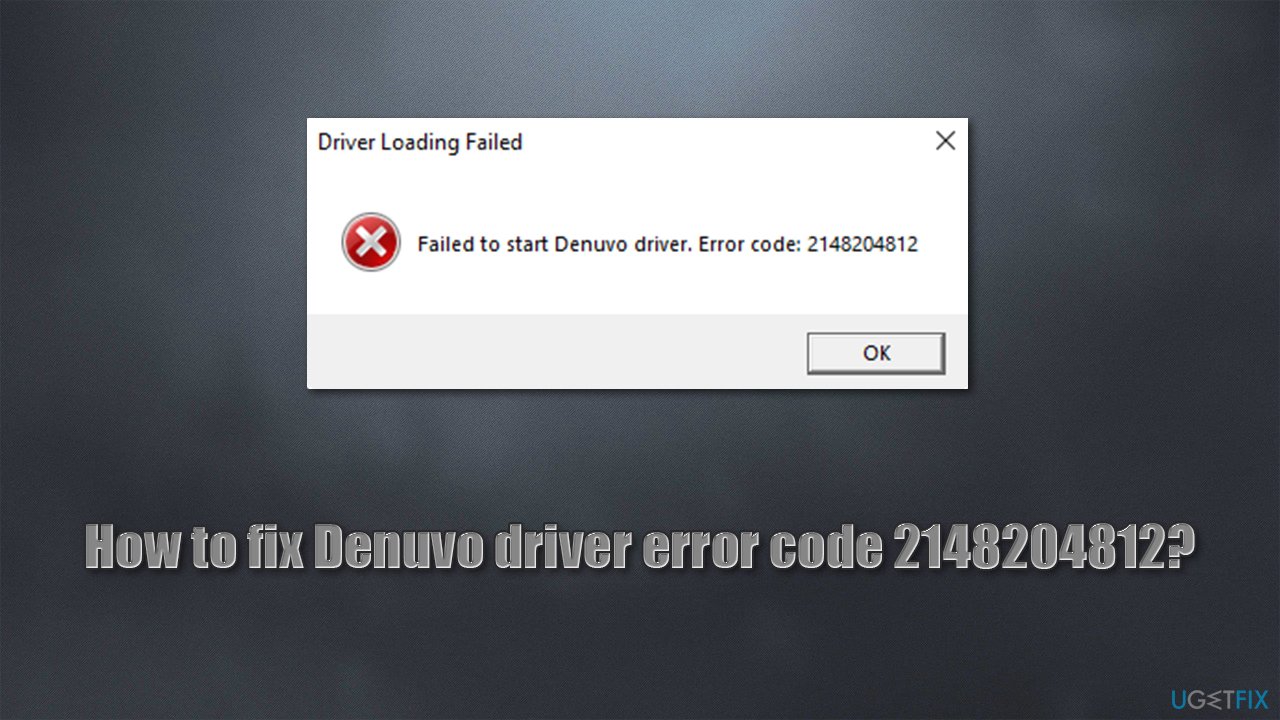
If you are having a problem with a game or another application, on the other hand, several fixes could be useful to you. As evident, we will not discuss solutions for pirated versions of games, as we do not support or tolerate illegal software use.
Before you proceed with the steps below, we strongly recommend running a scan with powerful PC repair software [d1]. It can fix the most common Windows issues, resolving BSODs, registry[ref en-3] errors, and other issues automatically.
Solution 1. Reinstall the game
There are several ways how you can uninstall the game - you can use a game client such as Steam or simply remove the app via the Control Panel. You can use the Apps and Features section to make it easy:
- Right-click on Start and pick Apps and Features
- Find the game from the list and select Uninstall > Uninstall
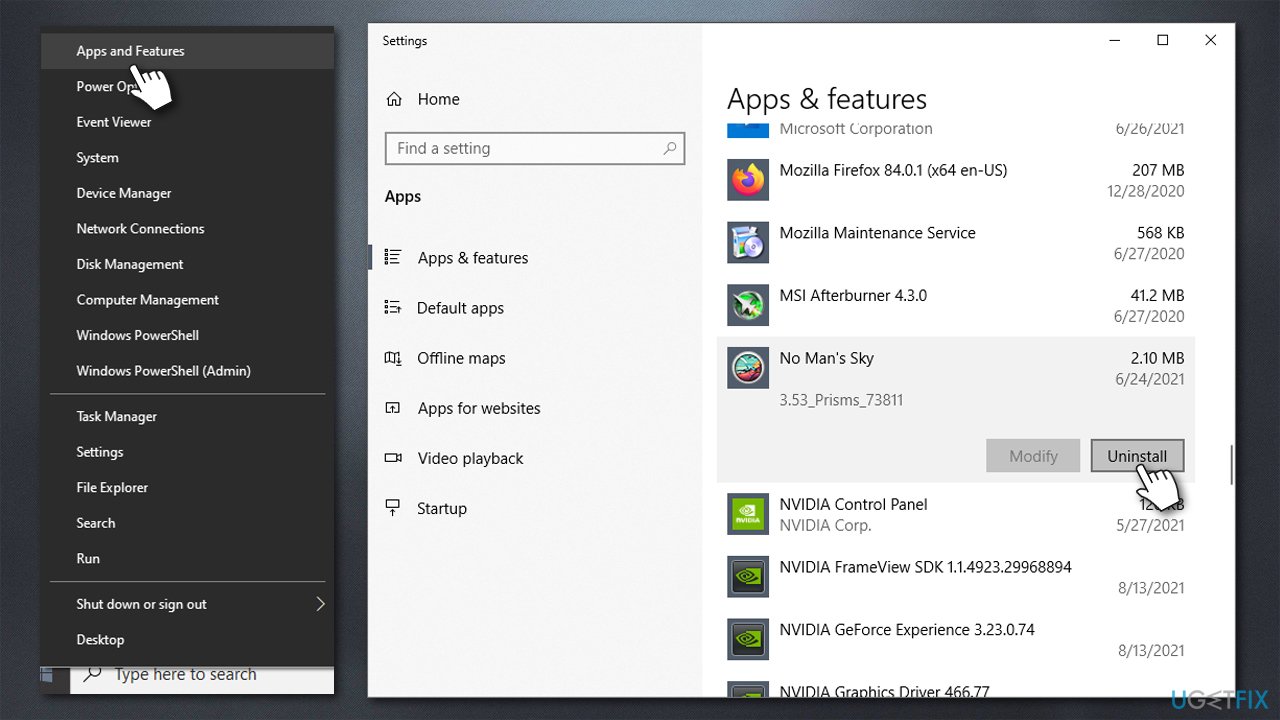
How to fix denuvo driver error code 2148204812 reinstall the game - Restart your PC
- Re-download and install the game anew.
Solution 2. Uninstall Vanguard/Valorant
If you use Valorant on the same computer where you receive the error code 2148204812, it could be due to the software conflict. Vanguard is Valorant's anti-cheat engine installed at the kernel - highest - level (which is essentially a rootkit and has been heavily criticized for security and privacy reasons).
If you are not currently playing Valorant, you should uninstall the game and the anti-cheat fully and see that that helped you solve the issue. Here's how:
- Open system tray
- Right-click on Vanguard icon and select Exit Vanguard
- Open Apps and Features and find Riot Vanguard entry
- Select Uninstall > Uninstall
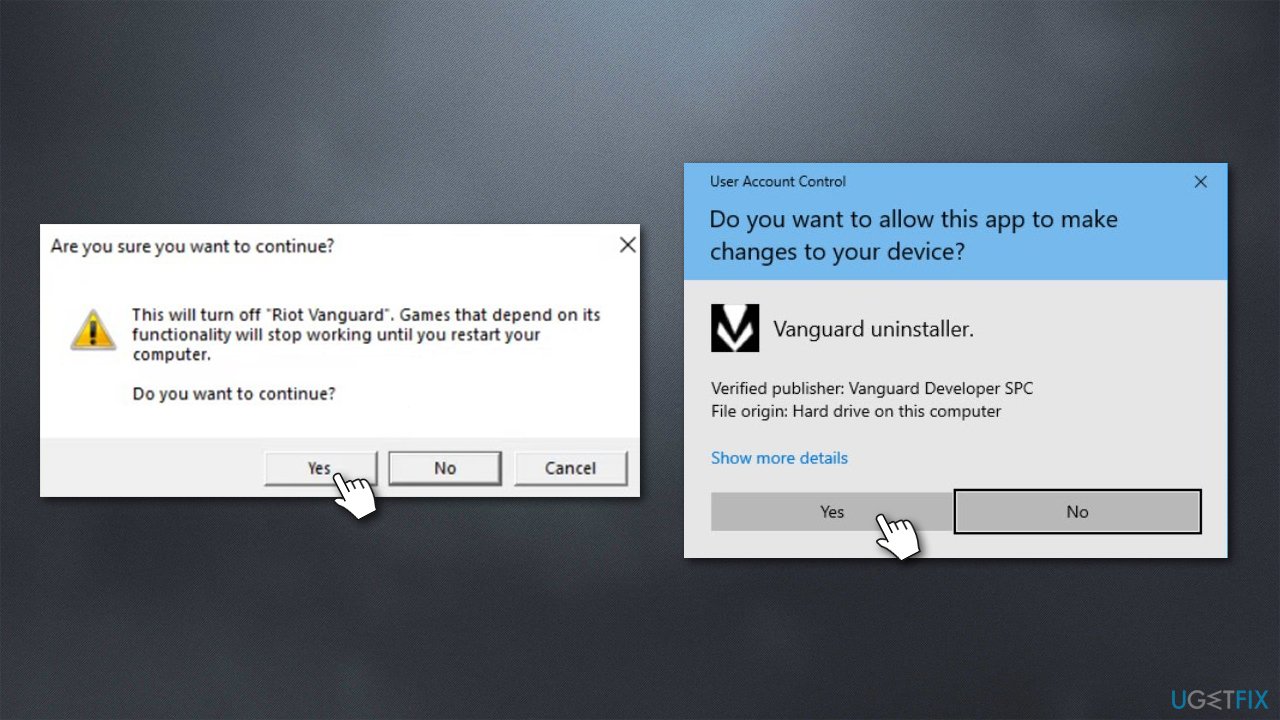
How to fix denuvo driver error code 2148204812 uninstall vanguard - When User Account Control shows up, click Yes.
- Restart your system.
Solution 3. Uninstall the latest Windows update [workaround]
Some users said that they started experiencing the error after a Windows update. In such a case, uninstalling the latest update could help you solve the issue. Keep in mind that this is not always possible due to time limitations. It is also not recommended to keep your system outdated due to software vulnerabilities,[ref en-1] so you should not consider this method as a permanent solution.
- Type Control Panel in Windows search and hit Enter
- Go to Programs > Uninstall a program
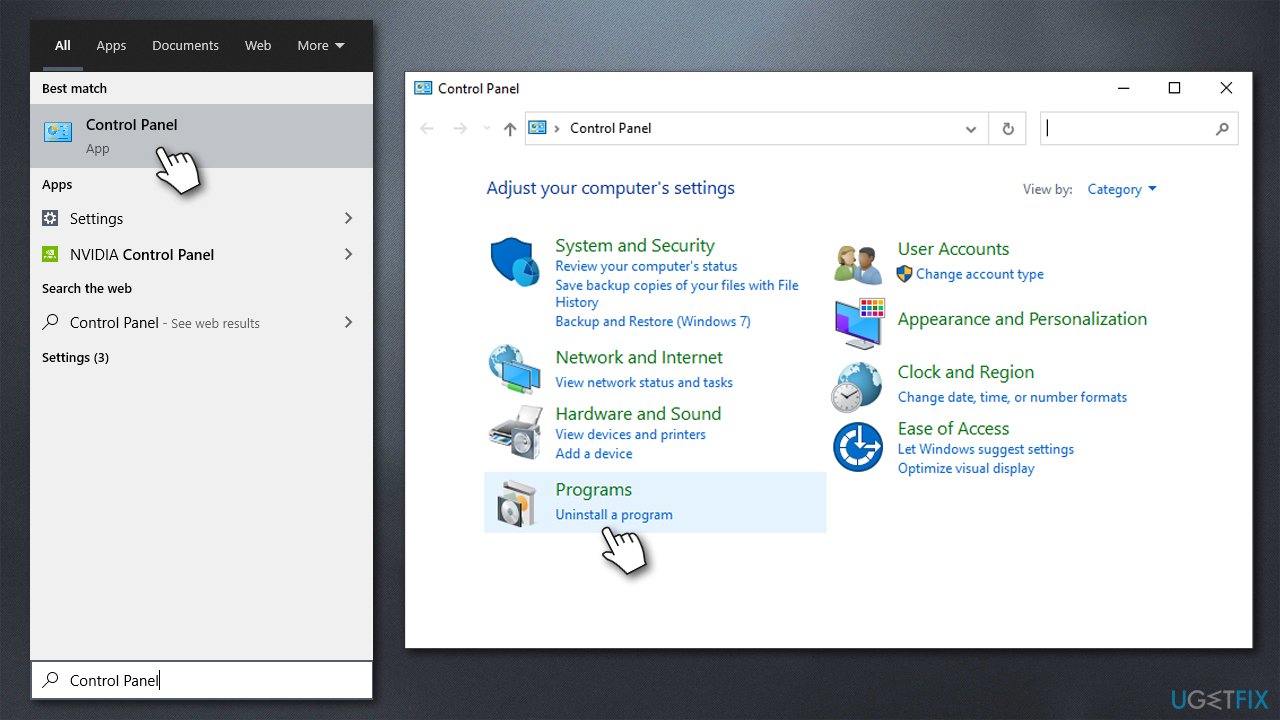
How to fix denuvo driver error code 2148204812 access control panel - Select View installed updates on the left
- Sort all the installed updates by date
- Right-click on the newest installment and pick Uninstall
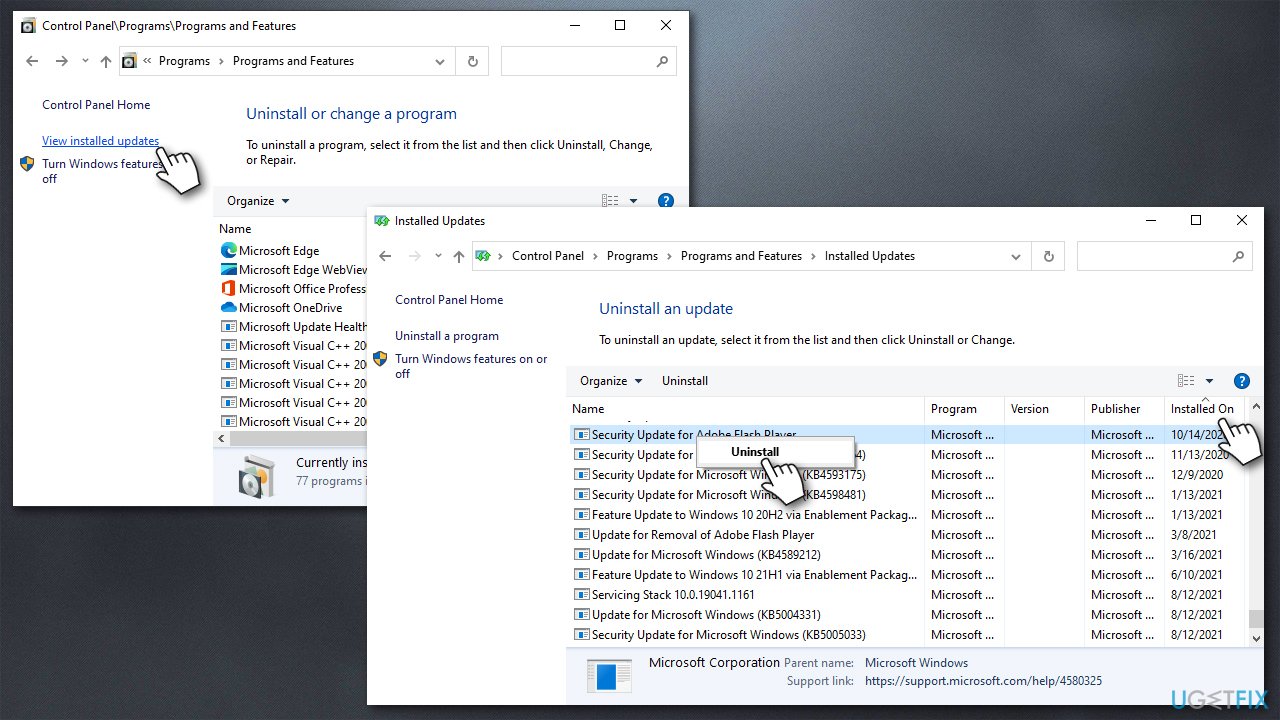
How to fix denuvo driver error code 2148204812 uninstall the latest updates - Once done, restart your PC.
Solution 4. Contact game support
As we previously mentioned, if you are using an illegal version of an app or a game, you won't find answers for that here, and this method will not work for you. Otherwise, contacting the technical support of the game that is not launching is one of the best solutions you can get.
Every game has a technical support team that could be contacted in one way or another - emails are usually used. Thus, find a genuine support email and write a message to staff - you might have to provide a game verification code/purchase receipt to receive the help, however.
Bottom line
To resolve the Denuvo driver error code 2148204812, consider uninstalling conflicting software like Valorant's Vanguard anti-cheat engine. If the issue persists, ensure that the software is not pirated and check for certificate verification problems. If none of these solutions work, further investigation may be required.
Frequently asked questions
This error typically occurs due to compatibility issues with the Denuvo driver, corrupted game files, or outdated system drivers on your Windows 10 or Windows 11 PC.
To update the Denuvo driver, go to Device Manager on your Windows 10 or Windows 11 system, find the Denuvo driver, right-click it, and select 'Update driver' to search for the latest version.
If reinstalling the Denuvo driver does not fix the error, try verifying the integrity of your game files through the game launcher or consider updating your Windows 10 or Windows 11 to the latest version.




Report an issue
What's wrong with this guide? We review every report and update or remove content.
Report received — thank you. We'll review and fix it.
You need a free account to submit a report.
Be the first to comment