How to fix
Microsoft Office 2016/365 Installation Error 30174-4
on Windows
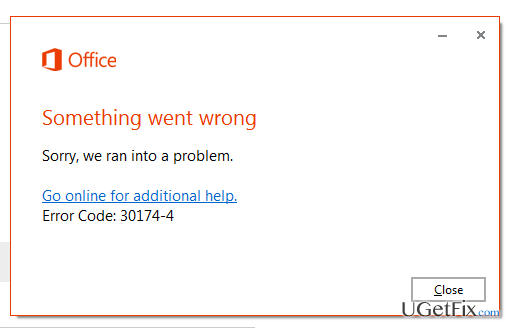
10 minutes Windows 8, Windows 10 When I attempt to download Office Home & Business 2013 on my laptop, which runs Windows 8., I’m getting an error message, which says “Something went wrong” and indicates an error code 30174-4. What is interesting that I can’t find Microsoft Office on my PC, but it’s listed on…

What causes How to Fix Microsoft Office 2016/365 Installation Error 30174-4?
- Error code 30174-4 indicates an installation issue with Microsoft Office Suite.
- The installation setup is disrupted due to unsuccessful connection with Microsoft servers.
- Firewall settings may prevent the installation of Microsoft Office Suite.
- Proxy settings may interfere with the installation process.
- Corrupted registries or missing system files could influence the error during installation.
Repairs Windows system files, removes malware, and restores a clean OS state — without reinstalling.
When I attempt to download Office Home & Business 2013 on my laptop, which runs Windows 8., I'm getting an error message, which says “Something went wrong” and indicates an error code 30174-4. What is interesting that I can’t find Microsoft Office on my PC, but it’s listed on my programs. No matter what tasks I intend to perform with it, for example uninstall, the same error occurs. Could you please help?
“Something went wrong” with an error code 30174-4 is a Microsoft Office Suite related error, which typically emerges when computer users try to install Home & Business 2013, Office 365 or Office 2016 packages. This error is not limited to Windows 10 or another Windows version, so any of Windows users trying to download and run one of the above mentioned Office packages might face error code 30174-4 pop-up. The installation setup is disrupted at some point due to the unsuccessful connection with Microsoft servers. Upon further investigations, it has been found out that this issue may pertain to the settings of the firewall or proxy, which prevent installation of the latest Microsoft Office Suite. Therefore, to fix Office 2016/365 Installation Error 30174-4, you should reset Firewall's settings.
How to Fix Microsoft Office 2016/365 Installation Error 30174-4?
Before you get started with the fixes, our greatest recommendation would be to initiate a thorough system scan with a system optimizer, such as [d1]. This way, you will ensure that the system does not contain corrupted registries, outdated software, missing system files, and similar inconsistencies that may influence 30174-4 error during Office installation and other system-related errors. Once you finish with the scan, here’s what you have to do:
Fix 1. Windows Firewall
If you are using Windows Firewall, our recommendation would be to disable it temporarily until Microsoft Office suite will be installed. To disable Firewall, you have to
- Click Win key + X and select System.
- Navigate to Control Panel and go to the System and Security.
- Select Windows Firewall and slide the toggle to Off.
- If this task requires an administrator password, type it and press OK.
In case you are not allowed to turn off Windows Firewall, disconnect from the network and try to perform the steps mentioned above one more time. Once done, try to install Microsoft Office.
Fix 2. Third-Party Firewall
If you are using a third-party Firewall, it’s not sufficient to disable it. To work around Microsoft Office 2016/365 Installation Error 30174-4, you will have to create an exception under its settings so that the firewall stop blocking Office. As an example, we will provide the instructions how to create an exception on Sophos Firewall. These steps are very similar regarding the majority of third-party web blockers and firewalls.
- Open Sophos firewall and select Web Protection.
- Then navigate to Filtering Options and select Misc.
- In the Transparent Mode Skiplists, create the following exceptions:
destinations were officecdn.microsoft.com for the first one and officecdn.microsoft.com.edgesuite.net both as dns host
Bottom line
To fix the Microsoft Office 2016/365 Installation Error 30174-4, you should reset your Firewall settings and consider temporarily disabling Windows Firewall during installation. If these solutions do not resolve the issue, running a thorough system scan with a system optimizer may help identify and fix underlying problems.
Frequently asked questions
The error 30174-4 typically occurs due to an incomplete installation or conflicts with existing Office installations. Issues with internet connectivity or insufficient disk space can also trigger this error.
To fix the error, try using the Microsoft Support and Recovery Assistant tool, or manually uninstall any previous Office versions before attempting a fresh installation.
Ensure your Windows 10 system is fully updated and that you have a stable internet connection before starting the installation process to minimize the risk of encountering error 30174-4.




Report an issue
What's wrong with this guide? We review every report and update or remove content.
Report received — thank you. We'll review and fix it.
You need a free account to submit a report.
Be the first to comment