How to fix
Error Code 0xc0000225
on Windows
Easily resolve error code 0xc0000225 on Windows 10. Our expert-tested guide ensures a quick fix with clear steps and zero traces left.


What causes How to Fix Error Code 0xc0000225 on Windows 10?
- Missing Boot Configuration Data (BCD) file
- Corrupted Boot Configuration Data (BCD) file
- Power outage
- Disk write errors
- Boot sector malware
Repairs Windows system files, removes malware, and restores a clean OS state — without reinstalling.
A couple of days ago I’ve received a pop-up alert in the Action Center saying: "Security and Maintenance Restart to Repair drive Errors". Well, believing that the issue will be resolved, I restarted my PC, but instead of logging onto my desktop, I was stuck at a Blue screen claiming: “Your PC needs to be repaired. An unexpected error has occurred. Error code: 0xc0000225.” I restarted the system several times and eventually logged onto my desktop. I’m afraid this message may reoccur, so could someone tell me what could be the problem?
Many people are making a fuss on Microsoft discussion forums about an Error Code 0xc0000225, which follows an Action Center notification "Security and Maintenance Restart to Repair drive Errors" and a system reboot.[ref en-1] This message is exhibited in the form of Blue Screen of Death (BSOD).
It locks the screen completely and the only action that can be performed with the system is another reboot. While Error Code 0xc0000225 tend to show up on older Windows versions (7, 8, and 8.1), its new wave of emergency has been recorded and this time, the bug affects Windows 10 OS. It is possible that recent updates[ref en-2] could fix the problem with occurring Error Code 0xc0000225.
However, one of the most common causes of this Error Code 0xc0000225 is missing or corrupted Boot Configuration Data BCD file. Power outage, disk write errors or boot sector malware[ref en-3] and errors made while configuring the BCD can be the reason behind this error on your Windows device.
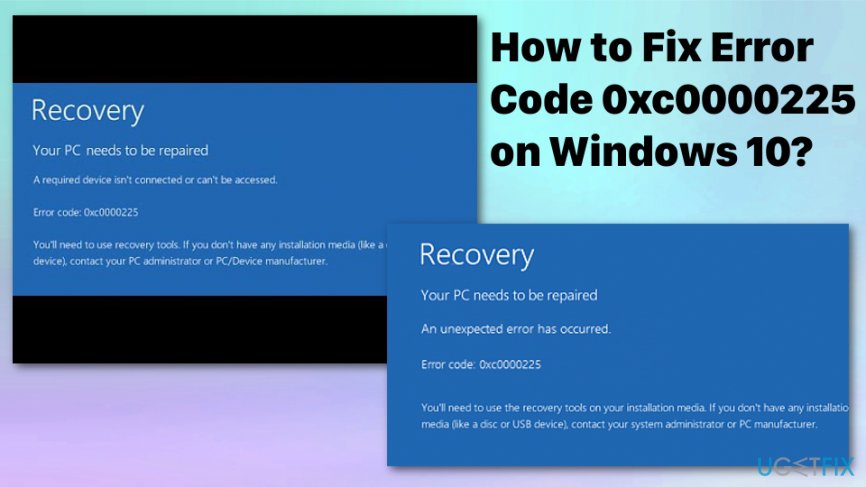
The message displayed on the Blue Screen of Death:
Recovery
Your PC/Device needs to be repaired
The application or operating system could not be loaded because a required file is missing or contains errors.
File: \\windows\\system32\\boot\\winload.exe
Error code: 0xc0000225
You’ll need to use recovery tools.
Ways to fix Blue Screen of Death with Error Code 0xc0000225
Troubleshooting windows updates or repairing corrupted files could work for the software issues regarding the Error Code 0xc0000225. However, there is a possibility of malware which is affecting more than you may think. In this case, you should give a try for [d1]. It will scan the system for malware, registry issues, corrupted system files, and similar inconsistencies that might have caused this fatal system error. In case you cannot boot up your PC, you should try the solution given below.
Media creation tool for Error Code 0xc0000225
Perform a hard reboot and try to boot your PC in a normal way. If after that you could not access your PC, then you should use another PC for downloading and creating a Media Creation tool (here). Once the file is downloaded, perform the following steps:
- As soon as you download a Media Creation tool, run it.
- Click Accept the T&C to proceed.
- On the next screen, select Create Installation Media for another PC.
- After that, select language, architecture, and edition.
- Select what installation media you prefer using, i.e. USB Flash Drive and ISO file. Click on the USB Flash Drive selection and plug in a USB that has at least 8 GB of free space.
- Lastly, open the drive and click Next. Media Creation tool will download Windows 10 upgrade on USB, which you can now use for upgrading the machine.
- When you create a bootable USB, plug it into the PC that is showing an Error Code 0xc0000225 BSOD.
- Then click any key to boot from the USB. Select Repair Your Computer at the bottom of the screen.
- Click Troubleshoot and then go to Advanced options.
- Opt for Command Prompt and type the following commands in the run dialogue. Besides, press Enter after each of them:
diskpart
list volume
select volume 2
assign letter=Z
exit
bcdboot C:\\windows /s Z: /f UEFI - Once done, close command prompt and reboot your PC.
Rebuild BCD to fix Error Code 0xc0000225 BSOD
- Open the Command Prompt with administrative rights and enter the following commands:
Bootrec/ scanosBootrec/ fixmbr
Bootrec/ fixboot
Bootrec /rebuildbcd
- Press Enter after each. This should help rebuild booth configuration data files and eventually fix the error by restoring and fixing the default settings.
Run a system file check
- Yet again open Command Prompt.
- Enter sfc /scannow
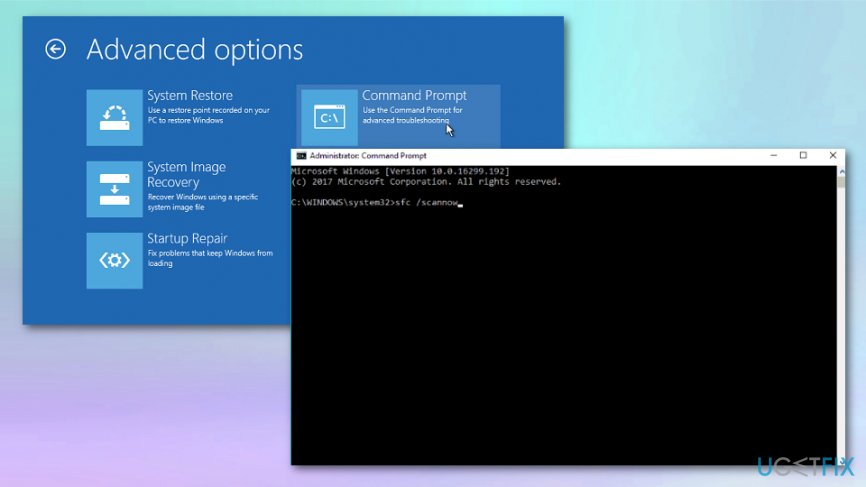
How to fix error code 0xc0000225 on windows 10 sfc scan - The system will automatically scan all the system files and finds corrupted ones, After this, you should restart the device and the Error Code 0xc0000225 should be fixed.
Reset and restore PC
- Navigate to Advanced options of Troubleshooting.
- Select System Restore.
- Pick the more recent point before the error.
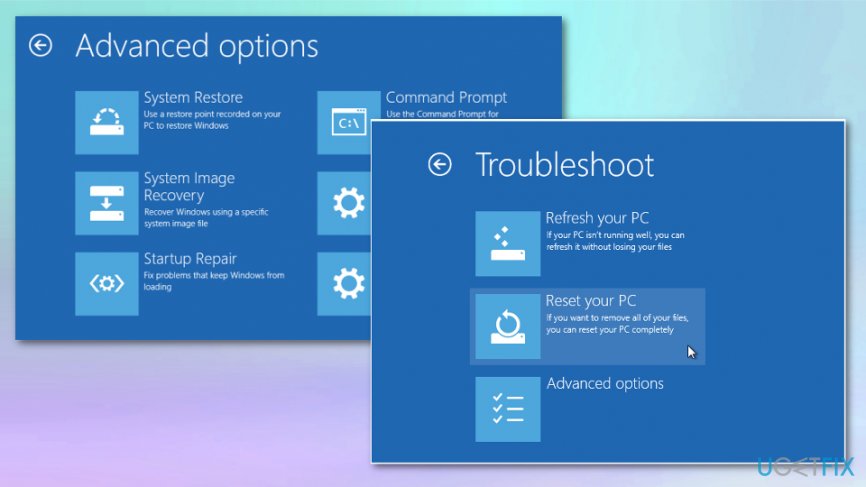
How to fix error code 0xc0000225 on windows 10 system restore - You can also choose Reset this PC in the same Troubleshooting menu if you have no recent restore points to choose from.
Bottom line
To fix Error Code 0xc0000225, you can troubleshoot Windows updates, repair corrupted files, or check for malware. If these methods do not resolve the issue, consider using recovery tools to restore your system.
Frequently asked questions
Error code 0xc0000225 typically occurs due to a corrupted boot configuration or damaged system files that prevent Windows 10 from loading properly.
You can fix error code 0xc0000225 by booting into the Windows Recovery Environment and using the 'Startup Repair' option to automatically fix issues that prevent Windows 10 from starting.
Yes, you can repair the boot configuration data by accessing the Command Prompt in the Windows Recovery Environment and running the command 'bootrec /rebuildbcd'.




Report an issue
What's wrong with this guide? We review every report and update or remove content.
Report received — thank you. We'll review and fix it.
You need a free account to submit a report.
Be the first to comment