How to fix
“Some Settings Are Managed By Your Organization” Bug
on Windows
Resolve the "Some Settings Are Managed By Your Organization" error on Windows 10 effortlessly. Get expert-tested solutions and fix it in minutes!


What causes How to fix “Some Settings Are Managed By Your Organization” Bug on Windows 10?
- User selected that the PC is owned by an organization
- Faulty configuration during the upgrade process
- Windows 10 bug
- Limited access to settings and features due to system configuration
- Accidental modification of crucial settings
Repairs Windows system files, removes malware, and restores a clean OS state — without reinstalling.
Last night I upgraded from Windows 8.1 to Windows 10 and noticed that the app notifications are disabled. The checkbox is greyed out. At the top of the screen, an error message that reads "Some settings are managed by your organization" is provided. That seems to be strange to me because my Dell PC is not assigned to any organization. It’s my home PC and the only user is me. Am I the only person who experiences this type of bug? Please help!
"Some Settings Are Managed By Your Organization" is a Windows 10 notification. Luckily, its occurrence does not indicate an error or system malfunctioning. This message is configured by Windows 10 system when the user attempts to modify the settings and features with the limited access.[ref en-1]
That’s not a new feature as all Windows versions had and have a pack of settings and features that are configured by organizations to limit users’ access. Usually, these settings are crucial for the system’s performance and the accidental/unreasoned modification of them can cause serious damage to the operating system and the data stored on it.
Mostly it occurs when the PC owner is upgrading the OS to Windows 10 that is causing tons of different issues too.[ref en-2] The user should notice a business-specific option, which asks “who owns this PC?” The two possible answers are either you or your organization. Both answers are correct. However, if you select that the PC is owned by an organization, you may not be allowed to access/modify some settings and which is why you may now receive a "Some Settings Are Managed By Your Organization" warning.
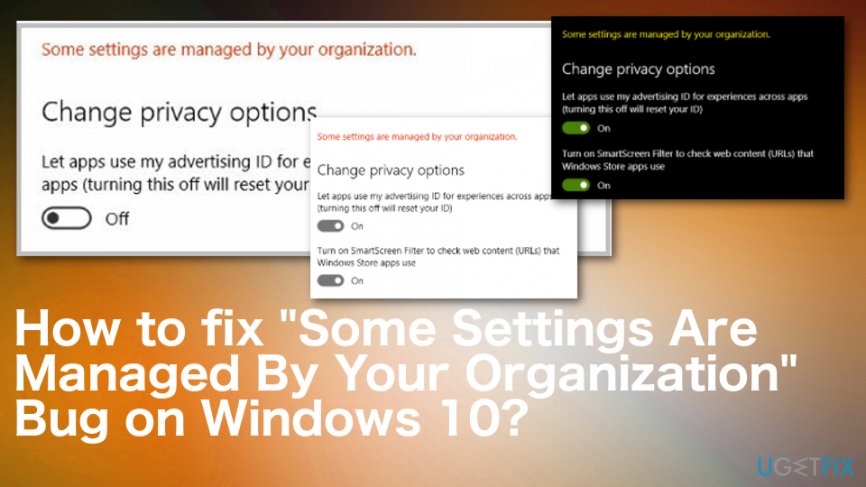
However, sometimes this message may occur due to some faulty configuration during the upgrade process, or due to a Windows 10 bug. As a consequence, your access to certain settings/features, in your case app notifications, may be limited by a nonexistent organization. In this particular case, the "Some Settings Are Managed By Your Organization" might be treated as an error message. Luckily, there is a quite easy way to reconfigure Windows 10 settings and fix "Some Settings Are Managed By Your Organization" error easily.
Ways to fix "Some Settings Are Managed By Your Organization" Issue on Windows 10
This bug/error may occur due to different reasons, so there are different solutions. However, not everything can be the same. You may need to update the OS to the latest version of Windows 10 and the bug is fixed, or manual solutions may the best for you. Nevertheless, the first step should be a system check with [rev id=”Reimage”] and see if there is something else that can affect the device like corrupted files or even malware.[ref en-3]
Fix "Some Settings Are Managed By Your Organization" by editing the Group Policy settings
To get access to the features and settings on your Windows 10 OS and fix "Some Settings Are Managed By Your Organization" error permanently, you should access Group Policy Editor using administrative privileges and change some settings. Thus, do the following:
- Click on Win key + S and type gpedit.msc.
- Right-click on the search result and select Run as Administrator.
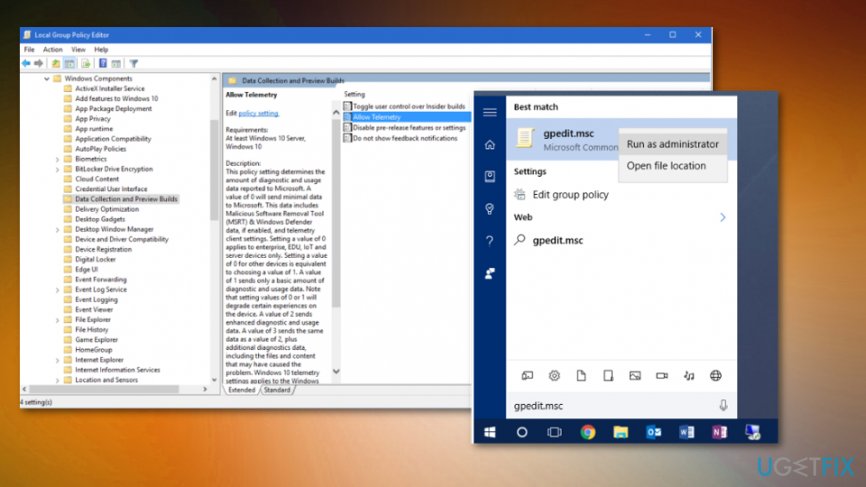
How to fix some settings are managed by your organization bug on windows 10 gpedit - Using the left pane, navigate to Computer Configuration -> Administrative Templates -> Windows Components -> Data and Preview Builds.
- Locate the Allow Telemetry option on the right and double-click it.
- Click Enabled.
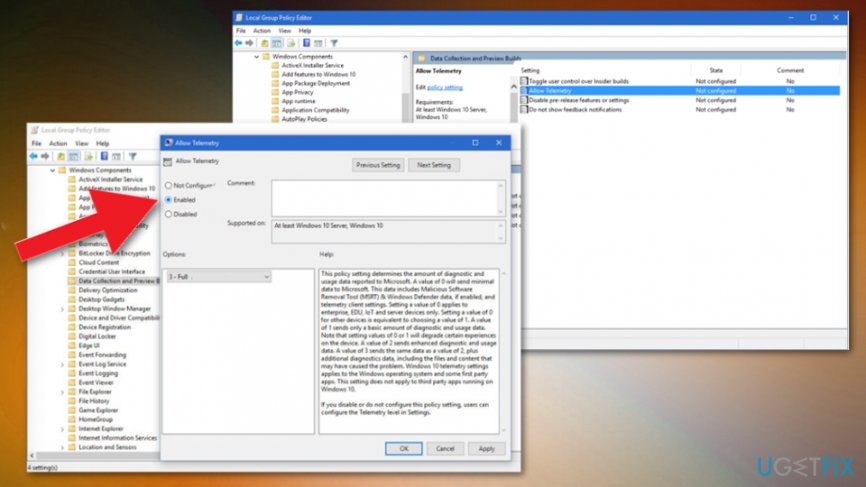
How to fix some settings are managed by your organization bug on windows 10 gpedit enabled - After that, find the drop-down menu on the Options and select Full.
- Click OK to save the changes.
- After that, double-click on Allow Telemetry in the Group Policy Editor.
- Select Not Configured and hit OK.
- Close Group Policy Editor and navigate to the location, which prevented the settings/features you could not access due to the “Some Settings Are Managed By Your Organization.”
Solve "Some Settings Are Managed By Your Organization" issue via Registry Editor
- Press Win key + R, type gpedit.msc, right-click on the results and select Run as Administrator.
- Using the left pane navigate to User Configuration -> Administrative Templates -> Start Menu and Taskbar.
- Find Turn off all balloon notifications option and set it to Disabled.
Bottom line
To fix the 'Some Settings Are Managed By Your Organization' issue, you can reconfigure Windows 10 settings by checking the ownership option or addressing any faulty configurations. If these solutions do not work, consider further troubleshooting or seeking additional support.
Frequently asked questions
This message typically appears due to group policies set by an organization or changes made by third-party software that alter system settings. It can also occur after a Windows update that modifies user permissions.
You can fix this by accessing the Local Group Policy Editor or the Registry Editor to remove unwanted policies or settings. Ensure you back up your data before making changes.
Resetting Windows 10 can resolve this issue by restoring default system settings, but it's a more drastic measure that will remove installed applications. It's recommended to try other troubleshooting steps before opting for a reset.




Report an issue
What's wrong with this guide? We review every report and update or remove content.
Report received — thank you. We'll review and fix it.
You need a free account to submit a report.
Be the first to comment