How to fix
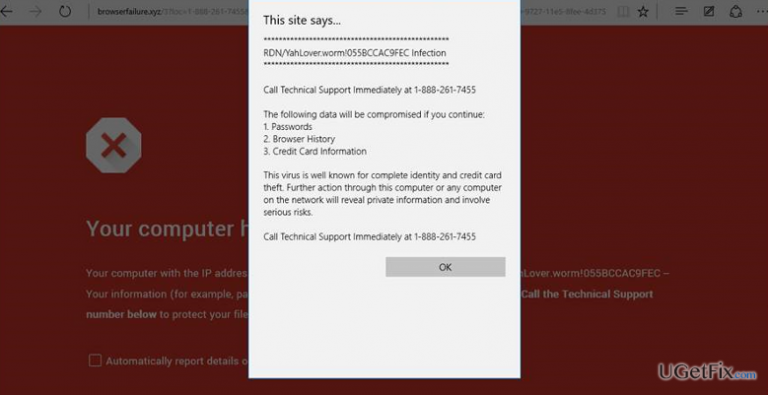
RDN/YahLover.worm!055BCCAC9FEC error pop-up
on Windows
Resolve the RDN/YahLover.worm!055BCCAC9FEC error pop-up on Windows 10 and Windows 11 effortlessly. Expert-tested solutions to fix it in minutes.

What causes How to Fix RDN/YahLover.worm!055BCCAC9FEC error pop-up?
- Infection with a potentially unwanted program (PUP)
- Adware installation via bundled installers
- Downloading third-party software from untrustworthy sources
- Malicious web browser extension injected into Microsoft Edge
- Fake tech-support-scam alerts freezing the web browser
- Blocking of Task Manager by the adware
Repairs Windows system files, removes malware, and restores a clean OS state — without reinstalling.
Tecolah.com. RDM/Trojan.Worm!055BCCAC9FEC pop-up alert blocks Microsoft Edge from time to time and urges me to call the number provided unless I don’t care to get my passwords, logins, and other personal data damaged. Each time this happens, I force the system to shut down and then reboot it. I have tried to open Task Manager, but it’s not working. Could you please help me ASAP?
If your web browser’s screen gets stuck with the RDN/YahLover.worm!055BCCAC9FEC pop-up generated by web-alrt-phsng-atck.xyz URL, it means that your PC has been infected with a potentially unwanted program (PUP), known as aware. The message is classified as Rogue Tech-Support-Scam due to the fact that it contains fake information to intimidate people and prompt them to contact a pretend-to-be Microsoft-certified technician.
Usually, the message is generated by web-alrt-phsng-atck.xyz, but the URL may vary. It is stated that information related to the passwords, credit card details, and web browsing history will be damaged and stolen. However, that’s just a trick that scammers use to make people dial a high-priority telephone number provided on the pop-up and get into the trap of scammers who may seek to establish a connection with your PC remotely and, furthermore, steal personal information like credit card details, passwords, full name, etc. Therefore, do not fall for believing in RDN/YahLover.worm!055BCCAC9FEC fake pop-up under any circumstances.
As we have already pointed out, RDN/YahLover.worm!055BCCAC9FEC scam is triggered by an adware. Typically, this type of cyber threats spread via bundled installers. In other words, if you download a third-party software via untrustworthy source and select Quick installation setup, you may inadvertently agree to install a whole pack of programs, including RDN/YahLover.worm!055BCCAC9FEC adware. It injects a malicious web browser extension into Microsoft Edge, which then initiates fake tech-support-scam alerts. According to users’ reports, it turns out that the alert freezes the web browser and blocks Task Manager, which is why the PC’s screen gets stuck. Even them, DO NOT call the given number. Instead of that, perform the steps to fix RDN/YahLover.worm!055BCCAC9FEC error given down below:
How to Fix RDN/YahLover.worm!055BCCAC9FEC error pop-up?
If RDN/YahLover.worm!055BCCAC9FEC pop-up prevents you from opening Task Manager, then you may have to force your PC to shut down. After that, boot the system into Safe Mode and remove the potentially unwanted program without a delay. For that, perform these steps:
- Open the list of programs that have been recently installed. For this purpose, navigate to:
Start > Control Panel > Programs and Features > Add/Remove Programs (Windows 7, XP).
Right-click on Win key > select Control Panel > Uninstall a Program (Windows 8, 10). - Carefully check what programs have been recently installed. The best way to do that is to sort the programs by date. Select unknown programs and click Uninstall. To confirm the removal, click OK/Uninstall.
As an alternative to manual RDN/YahLover.worm!055BCCAC9FEC removal, we would recommend using [d1], which is a PC optimizer with an inbuilt Avira Antivir engine. Therefore, it will remove all potentially unwanted programs and ensure that the leftovers and corrupted system files will be deleted alongside. When the adware is terminated, make sure to reset your web browser! Otherwise, the malicious web browser extension will remain active and invoke RDN/YahLover.worm!055BCCAC9FEC ads all over again. Judging from the people's reports, this scam is currently targeting Windows 10 users who are using Microsoft Edge. However, other web browsers may be affected as well, which is why we'll provide links to the websites explaining how to reset all the most popular web browsers.
How to reset Microsoft Edge?
How to reset Internet Explorer?
How to reset Mozilla Firefox?
How to reset Google Chrome?
If, unfortunately, you have already called the number provided on the fake security alert, make sure that you terminate the adware ASAP. After that, report Microsoft about the scam and change the passwords of your Facebook account, banking account, email account, and others. Besides, run a full system scan with a trusted antivirus to delete all malicious software that might have been injected by hackers.
Bottom line
To fix the RDN/YahLover.worm!055BCCAC9FEC error pop-up, you should remove the adware, uninstall any suspicious programs, and reset your web browser settings. If these steps do not resolve the issue, consider seeking professional assistance.
Frequently asked questions
To remove the RDN/YahLover.worm!055BCCAC9FEC error on Windows 10, run a full system scan using Windows Defender or a reputable antivirus program. Additionally, ensure that your Windows is up to date to protect against such threats.
Yes, you can prevent the RDN/YahLover.worm!055BCCAC9FEC error by regularly updating your antivirus software, avoiding suspicious downloads, and enabling Windows Defender's real-time protection on Windows 11.
No, it is not safe to ignore the RDN/YahLover.worm!055BCCAC9FEC error as it indicates a potential malware infection that can harm your Windows system. Promptly addressing it will help protect your data and system performance.




Report an issue
What's wrong with this guide? We review every report and update or remove content.
Report received — thank you. We'll review and fix it.
You need a free account to submit a report.
Be the first to comment