How to fix
KernelBase.dll Error
on Windows
Resolve KernelBase.dll errors on Windows 10 and 11 quickly and effectively. Follow our expert-tested solutions for a hassle-free experience. Fixed in mi…

What causes How to Fix KernelBase.dll Error on Windows?
- Accidental removal of KernelBase.dll file
- Virus infection
- Corrupted Windows Registry entries
- Hardware issues (rare)
Repairs Windows system files, removes malware, and restores a clean OS state — without reinstalling.
Yesterday a couple of programs started crashing when I try to launch them. In all of the instances, I get a pop-up reporting a missing kernelbase.dll. I tried running sfc / scannow, but it showed nothing. Could you please recommend some fixes?
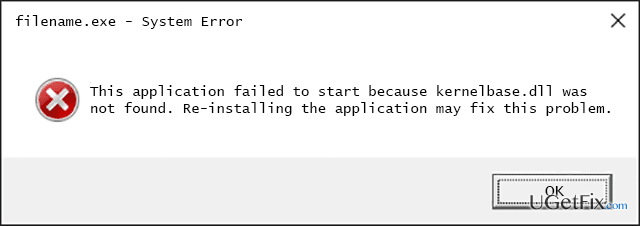
KernelBase.dll is the system file of Windows Operating System, which serves various Windows applications and services. Therefore, if it gets deleted or damaged, launching some programs or performing certain activities on the OS may end up with “The file kernelbase.dll is missing,” “This application failed to start because kernelbase.dll was not found. Re-installing the application may fix this problem,” “Cannot find [PATH]\kernelbase.dll” and similar error messages. In most of the cases, KernelBase.dll error is triggered by:
- Accidental removal of KernelBase.dll file;
- Virus infection;
- Corrupted Windows Registry entries;
- Hardware issues (rare);
In general, KernelBase.dll Not Found and other similar problems indicate the fact that the Windows Operating system lacks proper maintenance. Therefore, we will try to help you fix this bug and restore your PC’s stability. We will provide a list of methods that may help you to fix KernelBase.dll, so please try them one-by-one starting from the most primitive one.
How to Fix KernelBase.dll Error on Windows?
“The file kernelbase.dll is missing” error can show up on all Windows versions, including, but not limited to Windows 8 and 10. Nevertheless, the fixes of this bug do not differ according to the type of the operating system.
NOTE: if you have found recommendations to install kernelbase.dll file on its own from the third-party download source, please DO NOT use this recommendation. Dll and .exe file downloads are commonly misused by hackers to spread virus or malware infections.
Before you get started with the KernelBase.dll error fixes, reboot your PC and start the system in Safe Mode. Then perform the following steps:
- If you suspect that you might have removed this file, go to the Recycle Bin and look for it there using search. If it's there, click it and select Restore.
- In case the KernelBase.dll was damaged by a virus or malware, make sure to run a full system scan with a professional anti-malware.
- If KernelBase.dll error pop-up emerges during the startup of a particular application, it's advisable to remove that application and reinstall it.
- If KernelBase.dll Not Found pop-up shows up during Windows startup, the problem may be related to the old driver. Therefore, open Device Manager and look for the drivers marked with a yellow exclamation mark. It means that this particular driver is malfunctioning. Right-click on it and select Update Driver Software. After that, reboot the system.
- KernelBase.dll failure might also be influenced by incorrectly installed system's updates. Therefore, if you have recently installed any updates, it's advisable to reset them. For this purpose, you should use a System Restore Point or navigate to the Settings -> Security and Update -> Update History and undo the latest updates there. Once done, install the available updates anew.
- Run sfc /scannow command. Click Win key + R, type regedit, type sfc / scannow in the Registry Editor, and press Enter. SinceKernelBase.dll is one of the Microsoft files, its copy should be located in System File Checker.
Finally, if you have performed these steps and none of them helped, our last recommendation would be to run a thorough system scan with [d1]. This piece of software is recognized as a PC optimization tool, meaning that it will fix the Registries, which may also be the culprit of KernelBase.dll, eliminate malicious or potentially unwanted programs from the system, replace missing/damaged system files, including KernelBase.dll, and initiate other maintaining procedures.
Bottom line
To fix the KernelBase.dll error, you can start by checking the Recycle Bin for the file, running a full system scan for viruses, and ensuring your Windows Registry is not corrupted. If these methods do not resolve the issue, consider rebooting your PC in Safe Mode and trying other troubleshooting steps.
Frequently asked questions
The KernelBase.dll error can be caused by corrupt system files, incompatible software, or malware infections affecting the Windows operating system.
You can repair the KernelBase.dll file by running the System File Checker tool; open Command Prompt as an administrator and type 'sfc /scannow'.
No, downloading KernelBase.dll from third-party websites is risky and can lead to further issues; it's best to fix the error through built-in Windows troubleshooting tools.




Report an issue
What's wrong with this guide? We review every report and update or remove content.
Report received — thank you. We'll review and fix it.
You need a free account to submit a report.
Be the first to comment