How to fix
Windows store error code: 0x80070006
on Windows
Resolve Windows Store error code 0x80070006 quickly and effortlessly. Follow our expert-tested solutions for Windows 10 and 11, fixed in minutes!

What causes How to fix Windows store error code: 0x80070006?
- Malfunctioning Windows Update services
- Anti-virus software interference
- Corrupted Windows Registries
- Damaged system files
- Issues with saving apps to Micro SD Card
Repairs Windows system files, removes malware, and restores a clean OS state — without reinstalling.
I’ve been trying to search for Windows Updates the whole day, but each attempt ends up with the error code 0x80070006. I tried running sfc /scannow and install the updates manually, but the error gets back again and again. Can someone help?
0x80070006 error (also known as Error Code 0x80070006 - 0x2000C) is the issue that was encountered a couple of years ago when Windows 10 operating system was presented to users. Luckily, this bug has been fixed, and now people can install Windows 10 without receiving the error message.
However, the System error code 0x80070006 is still circulating the Internet and tends to show up when searching for Windows updates or trying to install the updates.
However, several people have reported that the error 0x80070006 prevents them from downloading apps via Windows Store[ref en-2] and saving them in Micro SD Card[ref en-3]. In this case, try to save the apps to the main drive. This way, most of the people managed to fix this bug on the Windows Store. In case you are encountering it when using Windows Update service, you should try to perform the steps indicated below.

Windows Store Error Code: 0x80070006 fix
Usually, Windows Update errors are triggered by malfunctioning Windows Update services or anti-virus software. Therefore, make sure that your PC is fully optimized by running a full scan with [d1]. It will check Windows Registries[ref en-1], replace damaged system files (if there are any), and remove potentially unwanted or malicious software. If the issue continues to interrupt you, try performing methods to fix this error.
Method 1. Run Windows Update Troubleshooter to fix error 0x80070006
Windows Update Troubleshooter is a tool developed by Microsoft, the purpose of which is to detect and fix Windows Update service-related problems. Unfortunately, but the troubleshooter often fails to detect the bugs. In this case, try the next fixes:
- Click Win key + X and select Control Panel.
- Type Troubleshooter and select Troubleshooting from the search results.
- Select System and Security and click on Fix problems with Windows Updates.

Fix error - Wait for the process to complete and then check if the error reoccurs on Windows Updates.
Method 2. Disable Antivirus and check Windows Firewall Settings
Antivirus software, especially the one that belongs to third-party developers, often conflict with the internal Windows apps and prevent Windows Updates from downloading. Therefore, we would recommend you to disable your antivirus temporarily and, additionally, check if Windows Firewall settings are correct.
- Click Win key + R, type Firewall.cpl, and press OK.
- Select Turn Windows Firewall On or Off option.
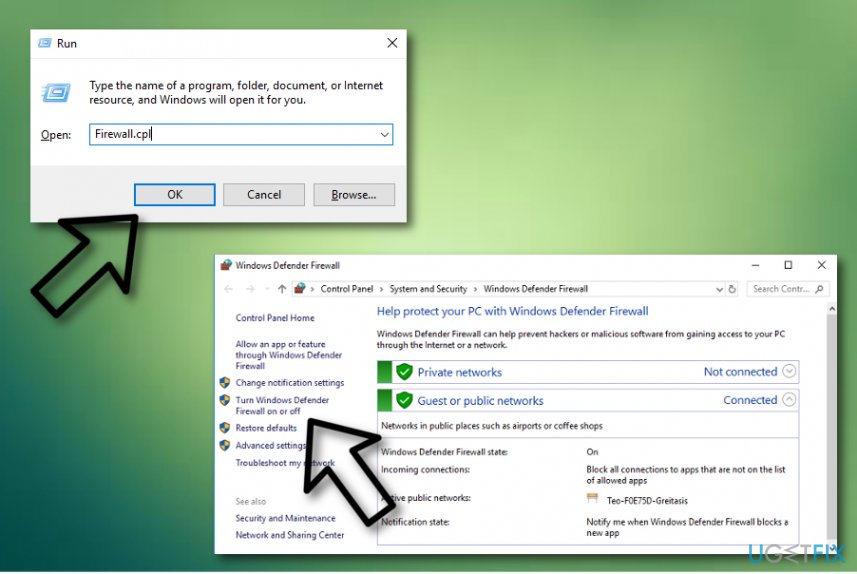
Error fix - Go to Private Network Settings and select Turn off Windows Firewall (not recommended).
- Once done, navigate to the Public Network Settings and select Turn off Windows Firewall (not recommended).
- Click OK to save the changes.
Method 3. Reset Windows Update Components for 0x80070006 error fix
NOTE: before performing the steps indicated below, it's advisable to make registry backups.
- Right-click Win key and select Command Prompt (Admin).

Fix error message - If a UAC shows up, click OK to proceed.
- By typing the following commands you will stop BITS, Windows Update, Cryptographic, MSI Installer services. Don't forget to press Enter after each of them:
net stop bits
net stop wuauserv
net stop appidsvc
net stop cryptsvc - Then type Del "%ALLUSERSPROFILE%\\Application Data\\Microsoft\\Network\\Downloader\\qmgr*.dat” command to delete qmgr*.dat files.
- Once done, copy and paste cd /d %windir%\\system32 command and press Enter to execute the command.
- To re-register BITS and Windows Update files, you will have to type all the commands (followed by Enter) provided below:
regsvr32.exe atl.dll
regsvr32.exe urlmon.dll
regsvr32.exe mshtml.dll
regsvr32.exe shdocvw.dll
regsvr32.exe browseui.dll
regsvr32.exe jscript.dll
regsvr32.exe vbscript.dll
regsvr32.exe scrrun.dll
regsvr32.exe msxml.dll
regsvr32.exe msxml3.dll
regsvr32.exe msxml6.dll
regsvr32.exe actxprxy.dll
regsvr32.exe softpub.dll
regsvr32.exe wintrust.dll
regsvr32.exe dssenh.dll
regsvr32.exe rsaenh.dll
regsvr32.exe gpkcsp.dll
regsvr32.exe sccbase.dll
regsvr32.exe slbcsp.dll
regsvr32.exe cryptdlg.dll
regsvr32.exe oleaut32.dll
regsvr32.exe ole32.dll
regsvr32.exe shell32.dll
regsvr32.exe initpki.dll
regsvr32.exe wuapi.dll
regsvr32.exe wuaueng.dll
regsvr32.exe wuaueng1.dll
regsvr32.exe wucltui.dll
regsvr32.exe wups.dll
regsvr32.exe wups2.dll
regsvr32.exe wuweb.dll
regsvr32.exe qmgr.dll
regsvr32.exe qmgrprxy.dll
regsvr32.exe wucltux.dll
regsvr32.exe muweb.dll
regsvr32.exe wuwebv.dll - To reset Winsock, type netsh winsock reset and netsh winhttp reset proxy commands. Press Enter after each of them as usually.
- Finally, restart BITS, Windows Update, Cryptographic, MSI Installer services by entering the following commands each followed by Enter:
net start bits
net start wuauserv
net start appidsvc
net start cryptsvc
Method 4. Update your computer manually
- Start your PC and choose to log in as Administrator;
- Click on Start ---> All programs ---> Accessories ---> System Tools;
- After that, choose System Restore;
Error message fixing - Pick the "Restore my computer to an earlier time" variant and press on the Next button;
- Choose the most recently used system restore option from the given list and select Next;
- When a confirmation window shows up, again click Next;
- Once the process is finished, reboot your PC.
Bottom line
To fix the error code 0x80070006, you can run the Windows Update Troubleshooter, perform a full system scan, and ensure that apps are saved to the main drive. If these methods do not resolve the issue, consider seeking further assistance or exploring additional troubleshooting steps.
Frequently asked questions
This error code typically indicates that there's an issue with the Windows Store app or your account settings on Windows 10 or Windows 11.
You can try resetting the Windows Store cache by running the command 'wsreset.exe' in the Run dialog, which may help fix the error.
Yes, you can perform a system file check by running 'sfc /scannow' in the Command Prompt to repair any corrupted files that may be causing the error.




Report an issue
What's wrong with this guide? We review every report and update or remove content.
Report received — thank you. We'll review and fix it.
You need a free account to submit a report.
Be the first to comment