How to fix
Error #3658fa4378de167
on Windows
Resolve Error #3658fa4378de167 on Windows 10 and 11 easily with our expert-tested solutions and tips for seamless performance. Fixed in minutes!

What causes How to fix Error #3658fa4378de167?
- Fake notification
- Scam campaign
- Extortion attempt
- Randomly generated error code
- Pop-up from malicious websites
Repairs Windows system files, removes malware, and restores a clean OS state — without reinstalling.
Hello, dear people. I need a piece of advice ASAP. I was using my as I usually do, and then, suddenly, my browser froze and then I received an error message Error # 3658fa4378de167 - it claims that my computer has been blocked. I’m urged to call the provided number before closing the pop-up, but for some reason this seems very fishy to me. I wonder if you could help me to deal with this error? Thanks in advance.
Error # 3658fa4378de167 is a common fake notification that you may encounter on Google Chrome, Safari, Internet Explorer, Mozilla Firefox, or any other browser. The pop-up is a part of a scam campaign that aims to extort money from you, so you should definitely not call the provided number.
Online scams have been prevalent for years now, and crooks are doing everything to make users believe their lies. Error # 3658fa4378de167 is one of them - the error code something that somebody randomly typed on their keyboard, compiled a bogus message, and placed it on various domains across the internet. Unfortunately, bad actors successfully scam millions of people daily, although people are becoming more aware of the issue now. Additionally, law enforcement made several arrests associated with tech support scams.[ref en-1][ref en-2]
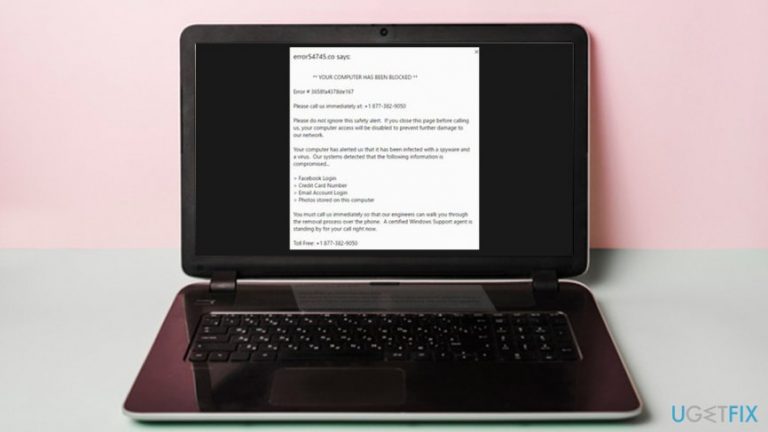
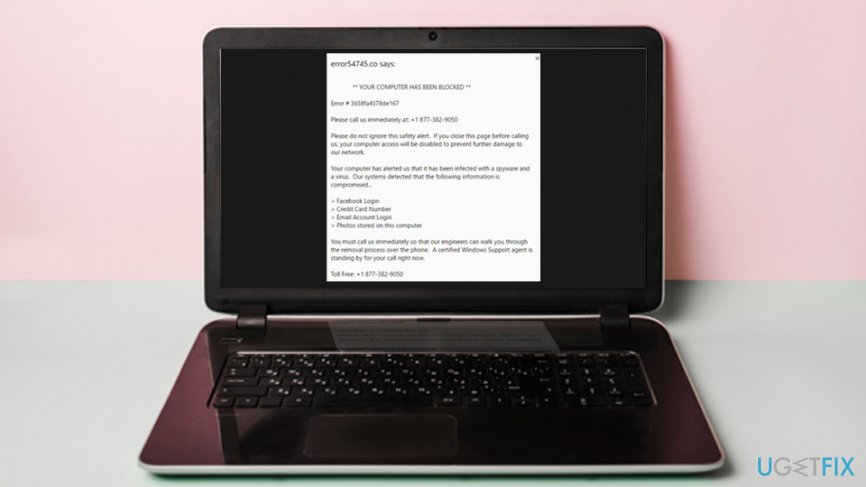
The fake Error # 3658fa4378de167 pop-up usually claims the following:
** YOUR COMPUTER HAS BEEN BLOCKED **
Error #3658fa4378de167
Please call us immediately at: +1 877-382-9050
Please do not ignore this safety alert. If you close this page before calling us, your computer access will be disabled to prevent further damage to our network.
Your computer has alerted us that it has been infected with a spyware and a virus. Our systems detected that the following information is compromised…
> Facebook Login
> Credit Card Details
> Email Account Login
> Photos stored on this computer
You must contact us immediately so that our engineers can walk you through the removal process over the phone. A certified Windows Support agent is standing by for your call right now.
Toll Free: +1 877-382-9050
There are many indicators of Error #3658fa4378de167 being fake. Next time, if you encounter similar claims, pay attention to the following:[ref en-4]
- Microsoft does not provide and contact numbers in the official error messages;
- Microsoft can not block your computer for any reason (it would be illegal);
- Browser scanners cannot detect malware on your computer - you need dedicated software for that;
- The compiled text often includes grammar/spelling errors, so watch out for those;
- You should not believe any message that randomly pops up on your screen and claims virus infections or other bogus statements.
However, bad actors often use various attributes in order to make users believe their lies. For example, they use logos, styling, design, and other features that look identical to those of Microsoft. This is not hard to achieve and requires very basic site building knowledge. Unfortunately, these factors are sometimes enough to trick users into calling criminals, as they are trying to remove Error # 3658fa4378de167. Do not call the provided number, as crooks may ask for payment for bogus tech support services or ask for remote access to your PC and install malware.
Tech support scams have been one of the most lucrative illegal businesses - that's why it is booming. The particular Error # 3658fa4378de167 has multiple versions, as the wording differs slightly, and the pop-up may also indicate different error codes or simply random characters, including # FXX07, # 268D3, DW6VB36, and many others. As evident, there is no need to fix Error # 3658fa4378de167, as it is bogus. However, there might be something more you have to do in order to get rid of fake alerts that spam your browsers.
While you might visit a malicious scam page that displays the Error #3658fa4378de167 pop-up accidentally, persistent redirects and ads on all sites that you visit might indicate trouble - namely, adware[ref en-3] infection. Thus, if you received the fake notification, it is worth checking your computer to make sure ad-supported software will not bug you in the future.
Below you will find ways to fix Error # 3658fa4378de167, or, rather, how to get rid of adware that directs you to scam sites that display fake alerts.
Remove Error # 3658fa4378de167 scam automatically
The easiest way to eliminate adware-type infections is to scan the system for malware. To ensure the malware is being recognized by the security software, make sure to use a professional tool with an updated virus database. Our recommendation would be [rev id=Reimage] - it can not only detect and remove malware from your machine but also fix real Windows errors you may encounter during the operation of your computer. Note that the application is a complementary software and should be used along with anti-malware, which could stop the incoming computer infections.
Step 1. Uninstall potentially unwanted programs via Control Panel
If you are careful enough, you will know which programs should not be installed on your system. If you are savvy enough, you can visit the Control Panel section and get rid of PUPs that redirect you to sites like Error # 3658fa4378de167. Here's how to do it:
- Press Ctrl + Shift + Esc to open Task Manager and terminate your web browser’s process (this is only needed if you cannot shut down your browser in a usual way)
- Type in Control Panel into Cortana's search box and hit Enter
- Select Programs > Uninstall a program
- Here, you will find the list of the installed applications. Look through every entry carefully and get rid of anything you do not remember installing by right-clicking it and selecting Uninstall
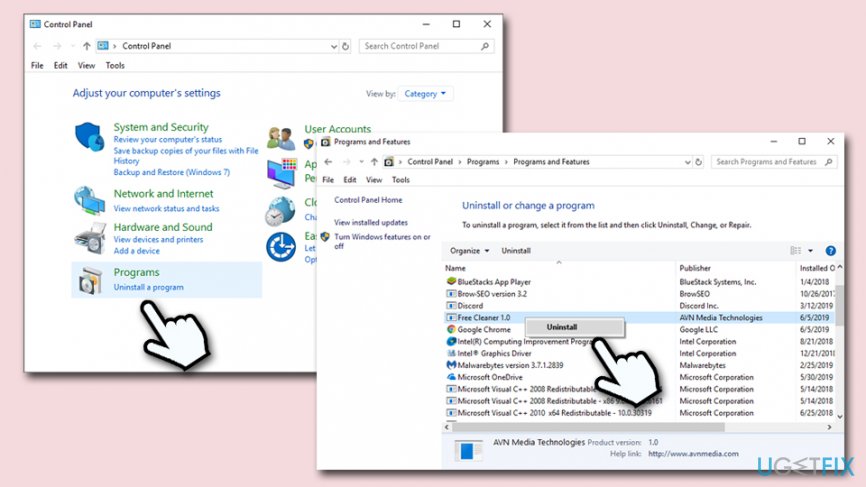
How to fix error 3658fa4378de167 uninstall pups from control panel - Follow the on-screen instructions to complete the removal process
Step 2. Reset Google Chrome
- Open Chrome and click Menu > Settings
- From the Settings menu, scroll down and pick Advanced
- Once you find Reset and clean up section, click on Restore settings to their original defaults
- Confirm the action with Reset settings
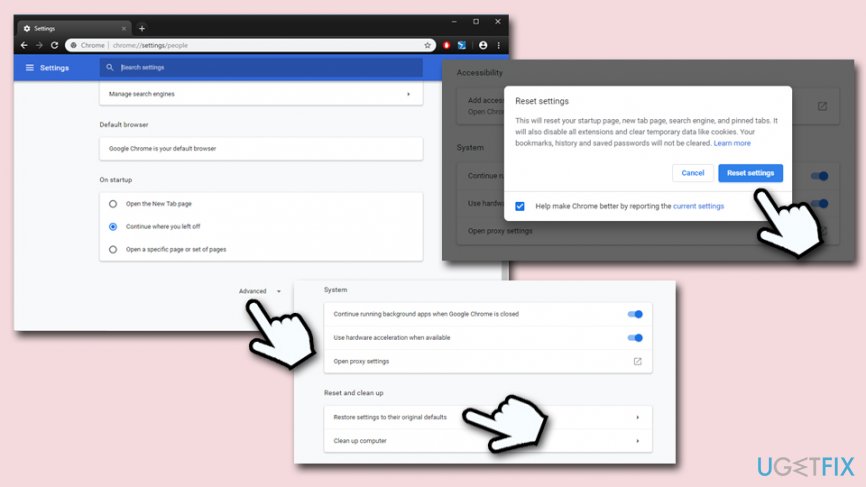
How to fix error 3658fa4378de167 reset google chrome
Step 3. Reset MS Edge
- In your MS Edge browser, click Menu and select Privacy & security
- Under Clear browsing data, pick Choose what to clear
- Pick everything (you can leave passwords) and click on Clear
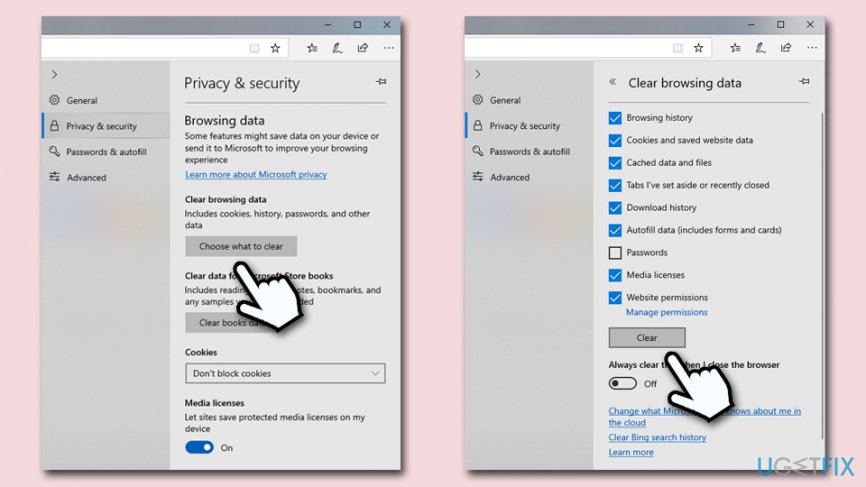
How to fix error 3658fa4378de167 reset ms edge
Step 4. Reset Mozilla Firefox
- In Firefox browser, go to Menu > Help
- Pick Troubleshooting Information
- Click on Refresh Firefox… (under the Give Firefox a tune up)
- Proceed with Refresh Firefox
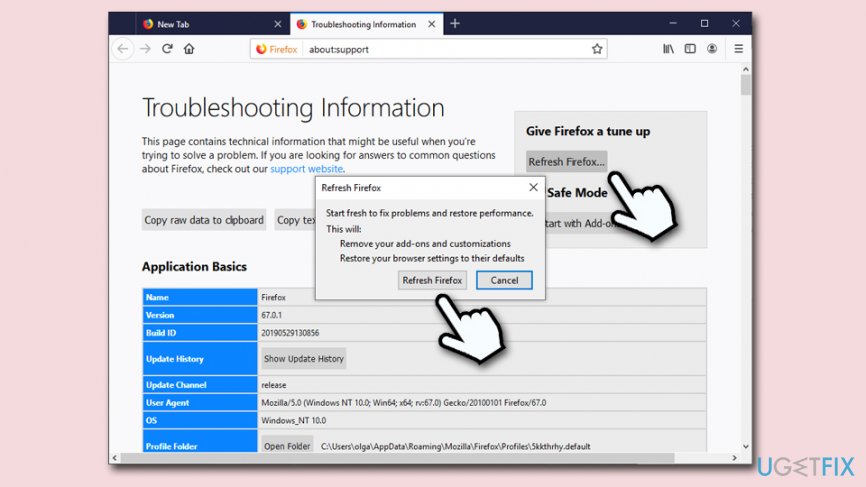
How to fix error 3658fa4378de167 reset firefox
Step 5. Reset Internet Explorer
- Launch Internet Explorer and click on Gear icon
- Select Internet Options and pick Advanced tab
- Click Reset
- Once the new window opens, check Delete personal settings and click Reset once again
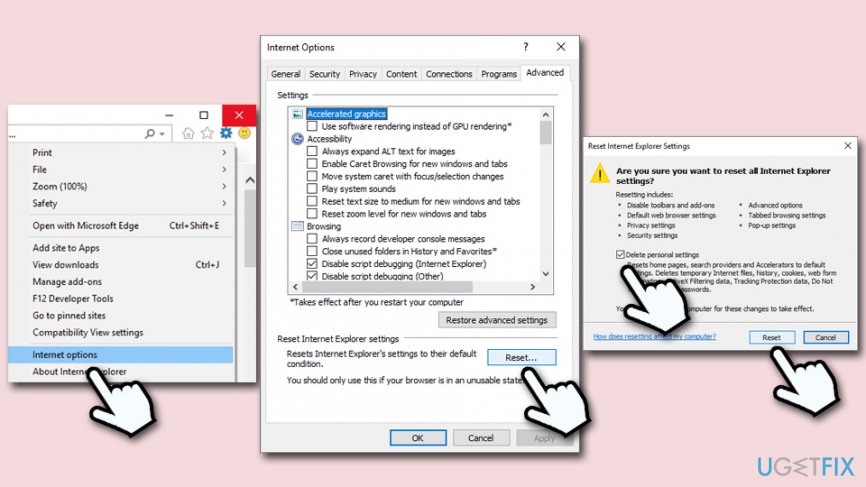
How to fix error 3658fa4378de167 reset internet explorer
This should conclude Error # 3658fa4378de167 removal from all your browsers.
Bottom line
Error #3658fa4378de167 is a scam designed to trick users into calling a fraudulent number. To resolve this issue, do not call the number provided and close the pop-up immediately. If the problem persists, consider running a malware scan or seeking professional help.
Frequently asked questions
Error #3658fa4378de167 is typically caused by corrupted system files or conflicts with installed applications. Running a system file checker can help identify and resolve the underlying issues.
To troubleshoot this error on Windows 11, try performing a clean boot to eliminate software conflicts, and then check for any pending updates. Additionally, running the Windows Troubleshooter may provide further insights.
To prevent Error #3658fa4378de167 from recurring on Windows 10, ensure that your system is regularly updated and perform routine maintenance, such as disk cleanup and virus scans. Keeping drivers updated can also minimize the risk of such errors.




Report an issue
What's wrong with this guide? We review every report and update or remove content.
Report received — thank you. We'll review and fix it.
You need a free account to submit a report.
Be the first to comment