How to fix
Easy Anti-Cheat error 30005 (Create File Failed with 32) when launching games
on Windows
Resolve the Easy Anti-Cheat error 30005 on Windows 10 and 11 effortlessly. Get back to gaming with expert-tested solutions and zero traces left.


What causes How to fix Easy Anti-Cheat error 30005 (Create File Failed with 32) when launching games?
- Problem with the sys file
- Issues with game verification
- Easy Anti-Cheat service disabled
- Anti-virus or anti-malware software blocking EAC
Repairs Windows system files, removes malware, and restores a clean OS state — without reinstalling.
Can anyone help me to resolve an issue I'm having with Apex Legends? Every time I attempt to start the game, I receive an error that says, "Couldn't start the game. Error Code: 30005 (CreateFile failed with 32.)"
Easy Anti-Cheat (EAC) is a third-party software used by many game developers to prevent cheating in online games. It works by monitoring the game's memory and detecting any attempts to modify it, thereby preventing players from using cheats or hacks that give them an unfair advantage. Despite its usefulness, EAC can sometimes cause serious issues when gaming, such as error 30005 (Create File Failed with 32).
This error can occur when launching various games, including New World, Warhammer Vermintide, Elden Ring, and Fortnite, among others. There are several possible causes for the 30005 (Create File Failed with 32) error, including issues with the sys file, game verification, the EAC service being disabled, and anti-virus or anti-malware software blocking the EAC service from accessing the internet.
One possible cause of the error is a problem with the sys file located inside the main folder where Easy Andti-Cheat has been installed. This file only contains the launch data of a particular game at a particular time, and if it prevents the software from creating another file, the error may be triggered.
Another possible cause of the error is a problem with game verification. It is important that all game files are verified by the EAC service before the game is launched, and if the game has been installed through Steam, the file integrity also needs to be verified.
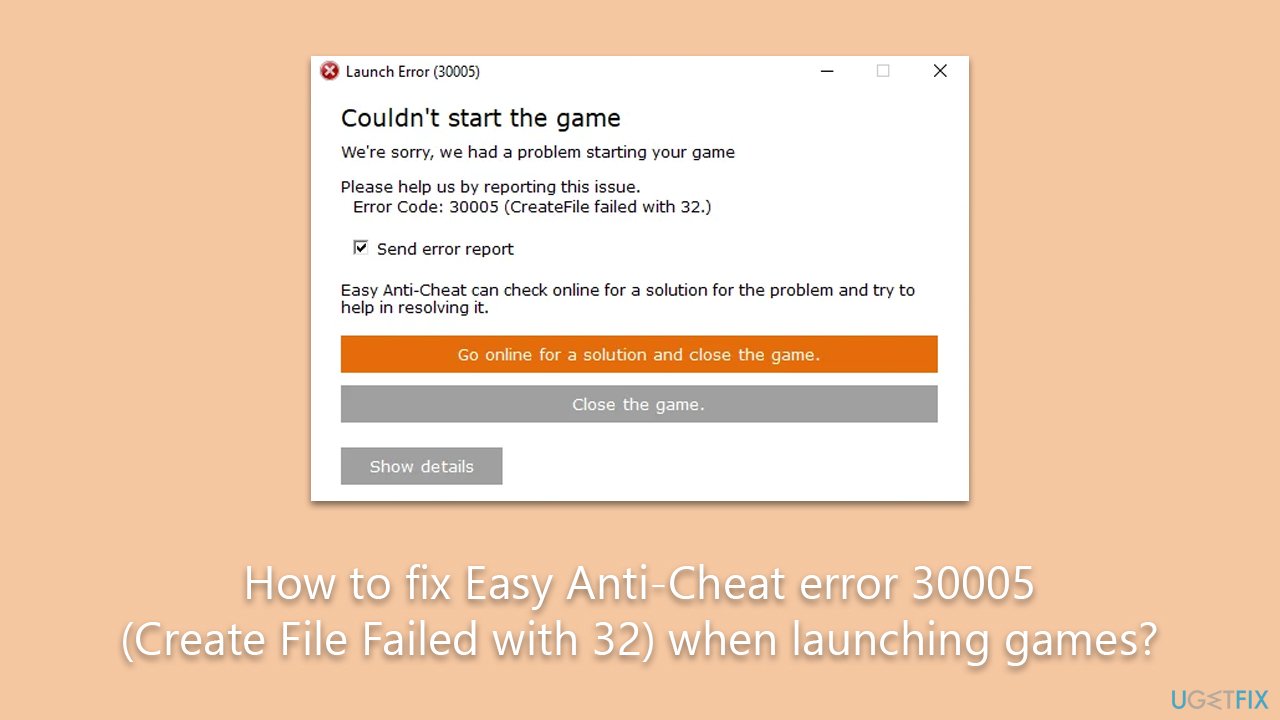
Additionally, the Easy Anti-Cheat service may have been disabled by the user or by optimization software, which can trigger the 30005 (Create File Failed with 32) error. Games associated with the protection require this service to be up and running before they can be launched.
Finally, it is possible that anti-virus or anti-malware software installed on the computer may be blocking the EAC service from accessing the internet, leading to the error. In this case, disabling the software temporarily or adding exceptions for the EAC service may help to fix the 30005 (Create File Failed with 32) error. Below we provide all the manual steps, although we recommend running the PC repair tool [d1] to resolve any underlying Windows issues automatically.
Fix 1. Repair or reinstall Easy Anti-Cheat
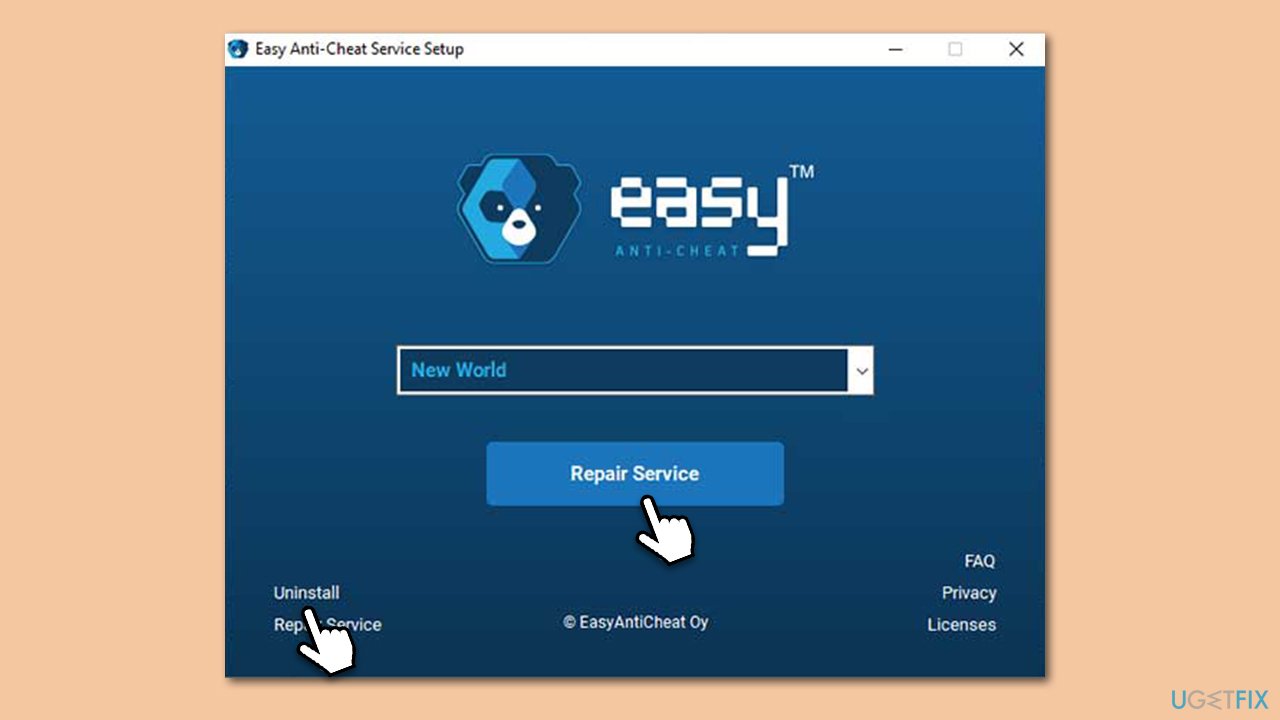
As mentioned, the related service could cause issues with EAC, causing launch errors. Try repairing the component as follows:
- Press Win+E to open File Explorer.
- Navigate to the following location:
C:\Program Files (x86)\EasyAntiCheat - Click on EasyAntiCheat.exe/EasyAntiCheat_Setup.exe.
- When User Account Control shows up, click Yes.
- From the drop-down menu, select the game you are having issues with.
- Click Repair Service and follow the prompts.
- If that does not help, choose the Uninstall option and then reinstall it again.
Fix 2. Delete the SYS file
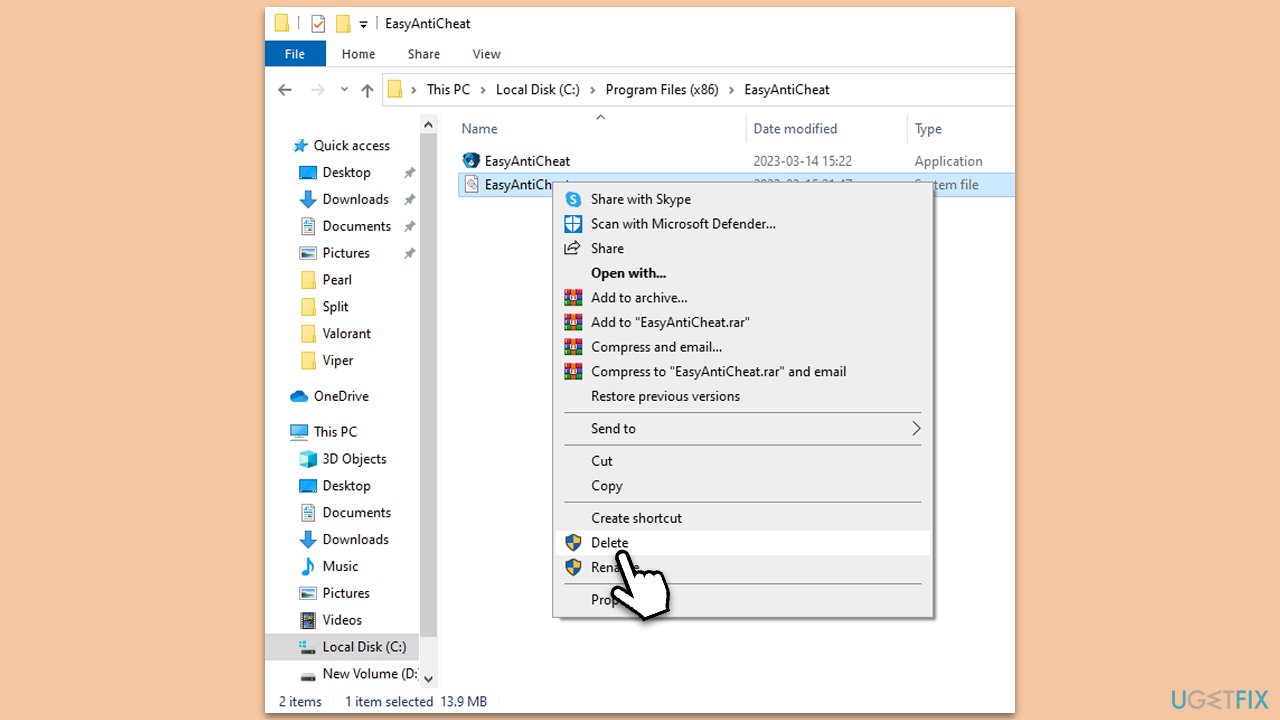
Another simple method that helped many users to fix error 30005 (Create File Failed with 32) is deleting the SYS file.
- Press Win+E to open File Explorer.
- Navigate to the following location:
C:\Program Files (x86)\EasyAntiCheat - Here, you should see EasyAntiCheat.sys file.
- Delete it by pressing Shift + Del or right-clicking and selecting Delete.
Fix 3. Enable Easy Anti-Cheat service
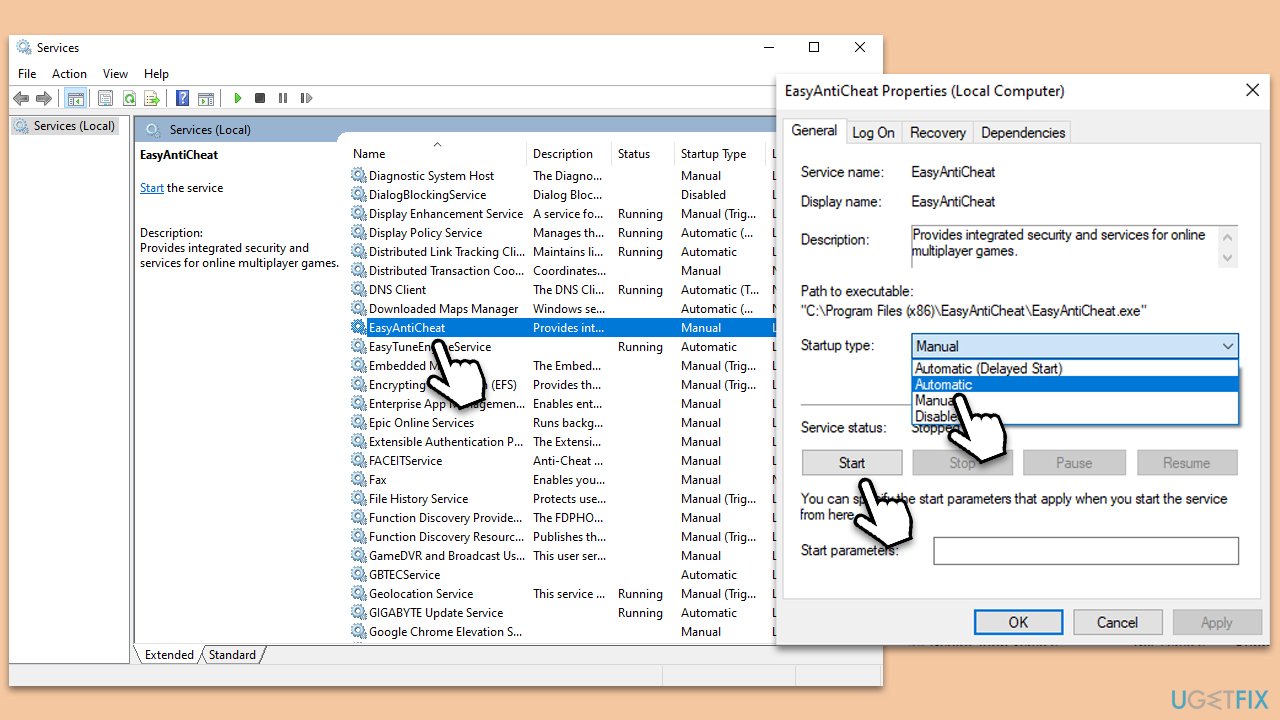
- Type Services in Windows search and press Enter.
- Scroll down to find Easy Anti-Cheat service.
- Double-click the service to open Properties.
- Under Startup type, select Automatic from the drop-down menu.
- Click Start, Apply, and OK.
Fix 4. Update your GPU drivers
Drivers are essential software components that enable communication between the hardware and the operating system, and outdated or corrupted drivers can cause various issues, including errors when launching games with EAC protection.
To update your drivers, you should either employ an automatic driver updater such as [rev id="DriverFix"] or visit the official website of your GPU manufacturer and install drivers manually.
Fix 5. Disable third-party antivirus
Temporarily disabling third-party anti-malware software may help to resolve Easy Anti-Cheat (EAC) error 30005 (Create File Failed with 32) when launching games. This is because some anti-malware software may block the EAC service from accessing the internet, which can trigger the error.
If the anti-malware software is blocking the EAC service, it can prevent the game from launching. Disabling the software temporarily or adding exceptions for the service may help to resolve the issue. Kaspersky is one of the security apps known to be causing this particular error.
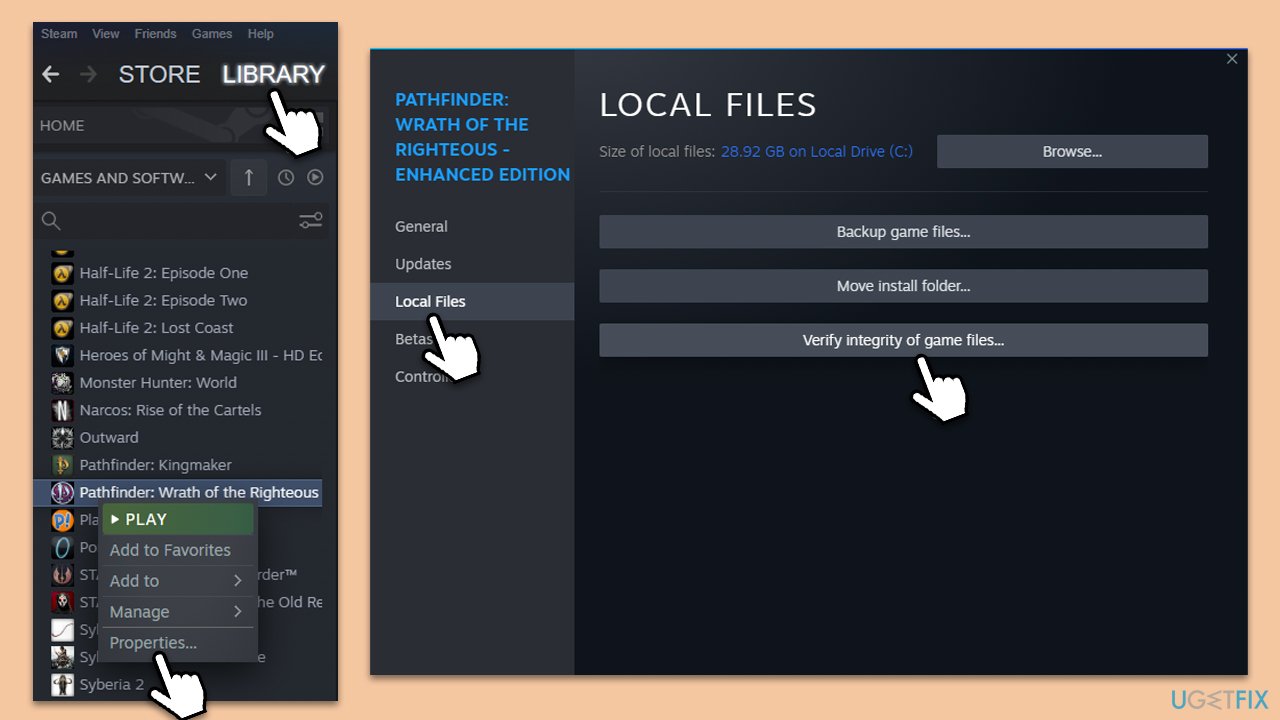
Fix 6. Repair game files
- Launch the gaming platform you are using, for example, Steam.
- Go to your Library and select the game in question.
- Right-click and pick Properties.
- Go to the Local Files section and click Verify integrity of game files.
- Wait till the files are repaired, and try launching the game.
Bottom line
To fix the Easy Anti-Cheat error 30005, verify the game files, ensure the EAC service is enabled, and check your anti-virus settings. If these steps do not resolve the issue, consider reinstalling Easy Anti-Cheat or the game itself.
Frequently asked questions
Easy Anti-Cheat error 30005 occurs when the anti-cheat system is unable to create necessary files, often due to permission issues or conflicts with other software on your Windows system.
To fix this error on Windows 11, try running the game as an administrator, or reinstall Easy Anti-Cheat through the game installation directory to ensure it has the correct permissions.
Yes, software such as antivirus programs or system optimizers can interfere with Easy Anti-Cheat, so temporarily disabling them may help resolve the error on Windows 10.




Report an issue
What's wrong with this guide? We review every report and update or remove content.
Report received — thank you. We'll review and fix it.
You need a free account to submit a report.
Be the first to comment