How to fix
Outlook Exchange error 80090016 (Trusted Platform Module has malfunctioned)
on Windows
Resolve the Outlook Exchange error 80090016 on Windows 10 and 11 effortlessly. Follow our expert-tested solutions to get it fixed in minutes!


What causes How to fix Outlook Exchange error 80090016 (Trusted Platform Module has malfunctioned)?
- Trusted Platform Module malfunction
- Corrupted Ngc folder
- Issues with Windows ability to set up a PIN
- System volume problems
- Malware damage
Repairs Windows system files, removes malware, and restores a clean OS state — without reinstalling.
Whenever I try to add another email account to Outlook, I receive an error 80090016, saying that "Your computer's Trusted Platform Module has malfunctioned." Please advise on how to resolve this.
Outlook, a renowned service from Microsoft, is more than just an email client. It's a comprehensive suite of webmail, tasks, contacts, and calendaring services, making it a vital tool in today's fast-paced world. Whether it's a company keeping up with business correspondence or an individual organizing personal engagements, Outlook's role is undeniably crucial. It's offered in two primary forms: a web-based version and an application installed on Windows computers, catering to diverse user preferences.
Unfortunately, even this robust tool isn't immune to issues. Users may occasionally face disruptions in their routine due to errors, one of which is known as the 80090016 error. This error specifically crops up when users try to add a new mail account to their Outlook, creating an unexpected hindrance.
Accompanied by the message, "Something went wrong - Trusted Platform Module has malfunctioned," the error 80090016 points towards a problem in Windows' ability to set up a PIN for your device. The error's technical origin lies within the system volume of your computer, particularly with the Ngc folder. This folder, when corrupted, can cause the described issue, impeding the system's ability to effectively create or use a PIN. This, in turn, can cause complications when you're trying to expand your Outlook capabilities by adding new accounts.
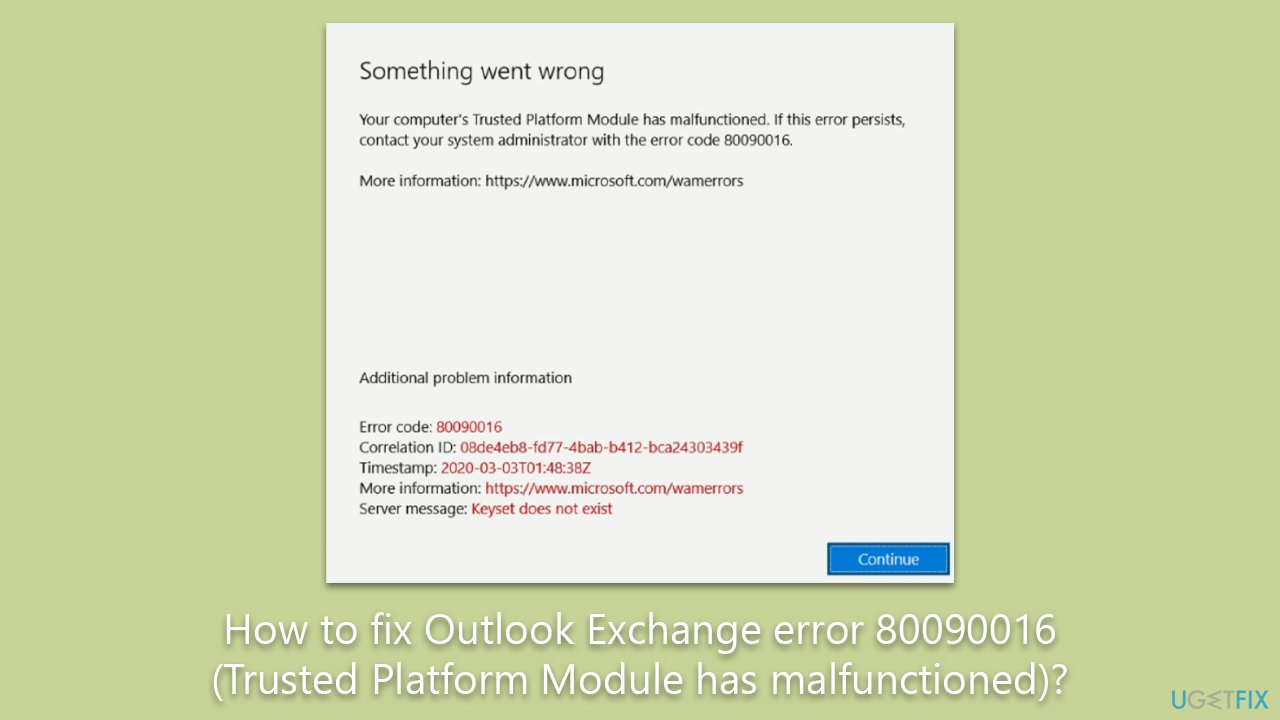
Luckily, there are ways you can fix the annoying 80090016 (Trusted Platform Module has malfunctioned) error. There are ample solutions available to rectify this issue. Manual strategies to tackle this error, for instance, are elaborated on in the subsequent sections of this article.
For a convenient and efficient solution to system irregularities that could contribute to issues like the 80090016 error, consider employing a PC repair tool like [d1]. This tool scans your system, identifying and repairing corrupted files and registries, clearing unnecessary junk, and mitigating any damage caused by malware.
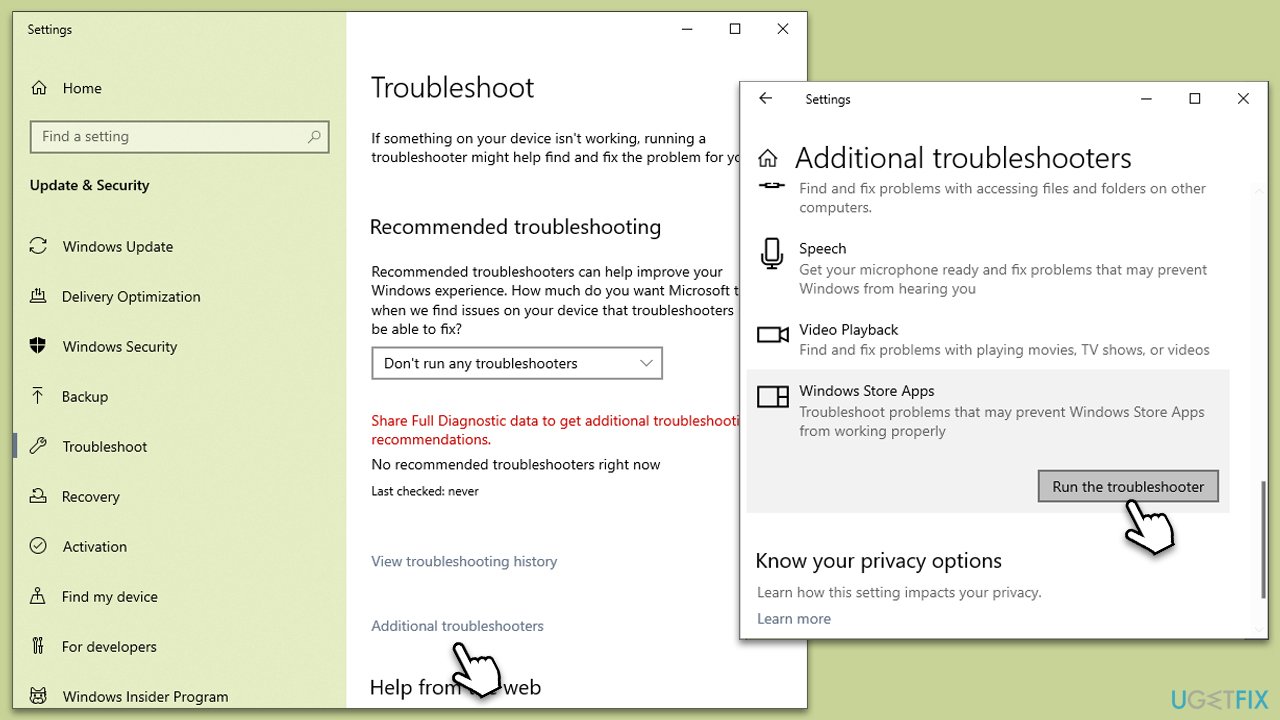
Fix 1. Run Windows Store Apps troubleshooter
We recommend starting with a troubleshooter that can detect and sometimes repair issues related to Windows apps.
- Type troubleshoot into the Windows search bar, then press Enter.
- In the options that appear, select Additional troubleshooters or Other troubleshooters (depending on your Windows version).
- Scroll through the list until you locate Windows Store Apps, then click on Run the troubleshooter/Run.
- Wait as the process runs to completion, then apply any recommended changes to resolve the issue.
Fix 2. Update Windows
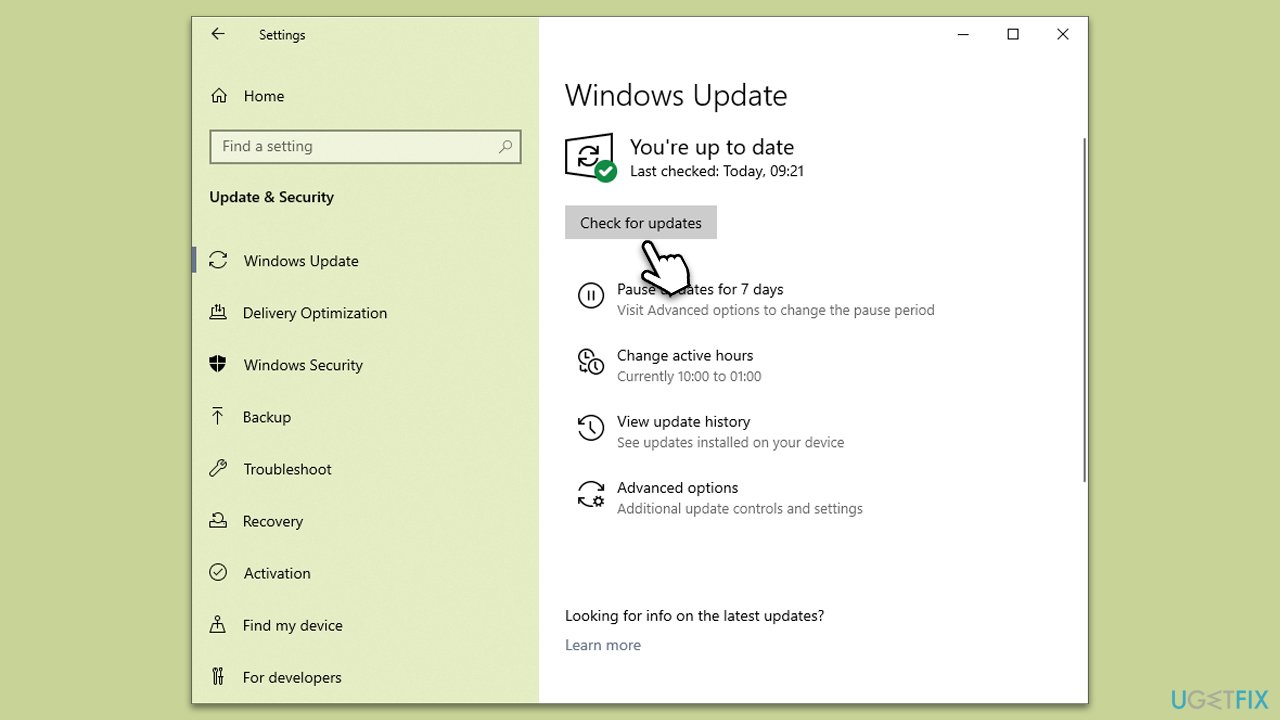
Outdated Windows versions can sometimes be the root of such issues. Ensure your Windows version is up-to-date.
- Type Update in Windows search and press Enter.
- On the right side of the window, click Check for Updates.
- Wait till all the files are downloaded and installed.
- Install all the optional updates as well.
- Restart your device when done.
Fix 3. Clear Ngc folder
Since the issue stems from corruption in the Ngc folder, resetting it might solve the problem. The Ngc folder holds all the data related to the PIN. Resetting it can help re-establish the PIN configuration correctly.
- Press Win + E on your Keyboard to open File Explorer.
- Navigate to the following location:
C:\Windows\ServiceProfiles\LocalService\AppData\Local\Microsoft - Locate the Ngc folder and rename it to Ngc.old.
- Restart your computer. Windows will recreate the Ngc folder on startup.
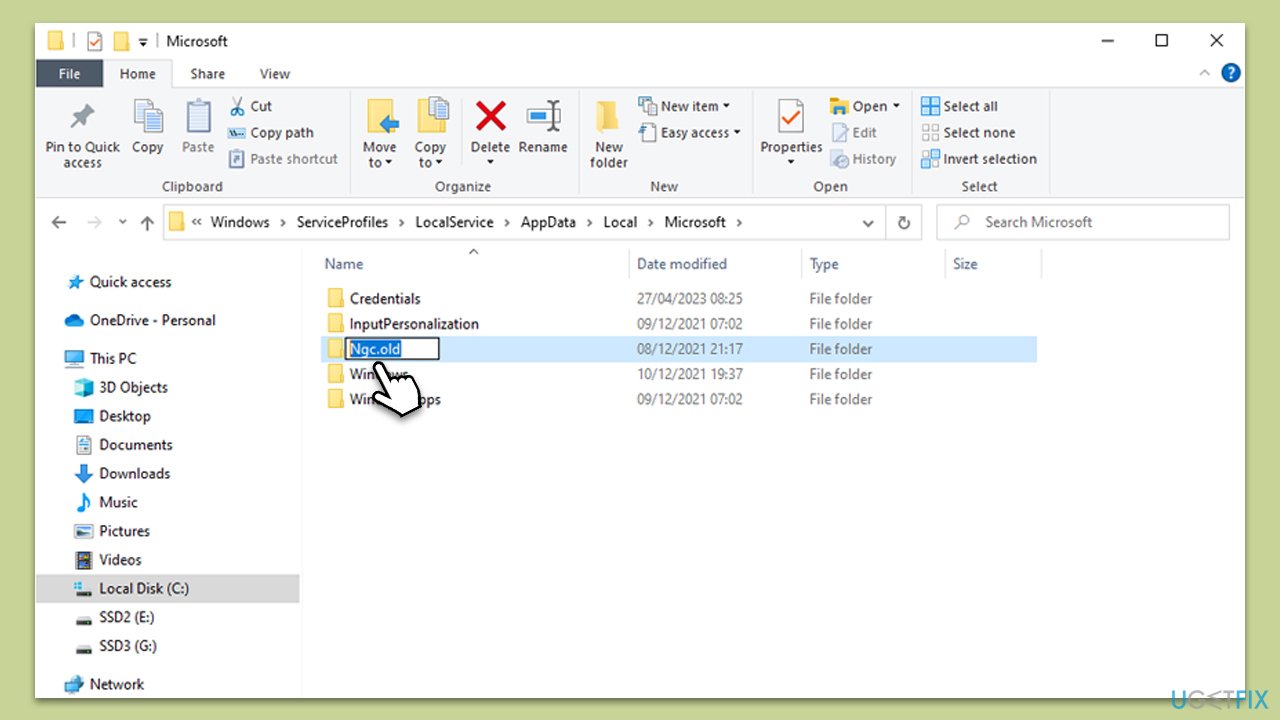
Note: if renaming the folder didn't work, you should try deleting the contents of Ngc folder instead. If you do not have permission to do so, right-click on the Ngc folder and click Properties> Security > Advanced. Type your username and click Check Names, and hit OK. Check the Replace owner on sub containers and objects’ box, click Apply, and OK.
Fix 4. Clear the TPM
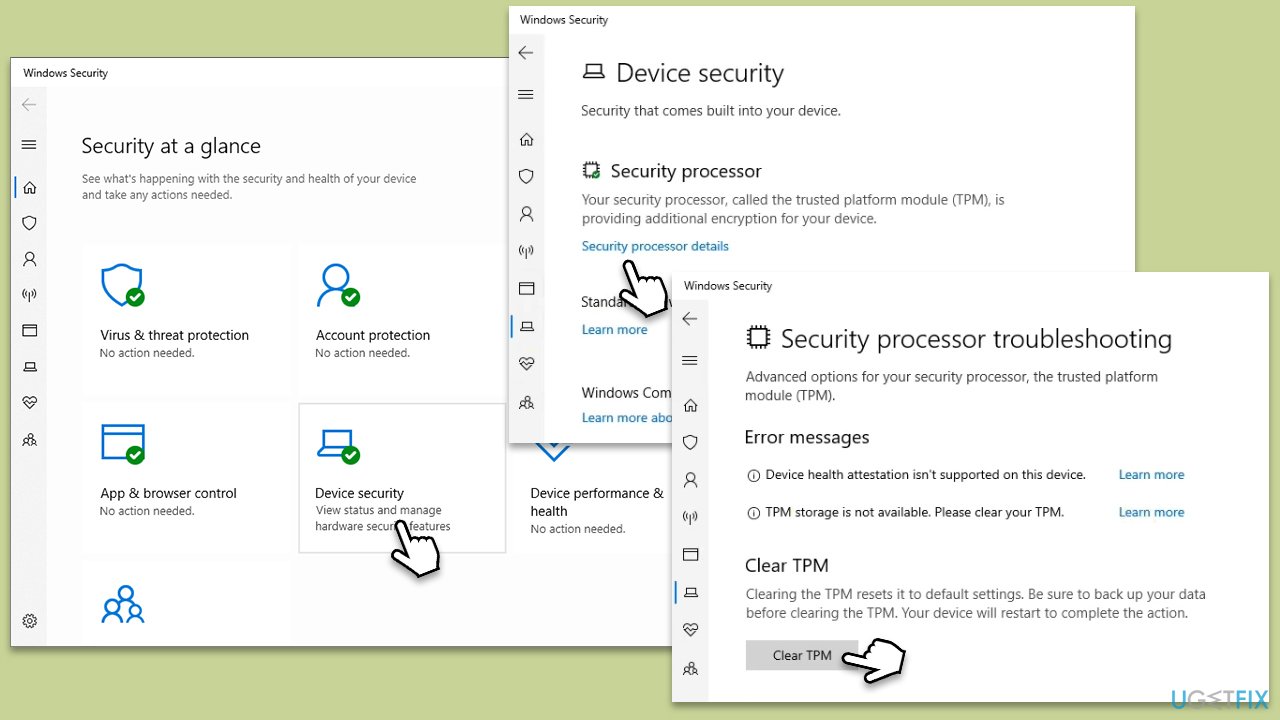
The Trusted Platform Module (TPM) is a hardware component used for security functions, and sometimes, clearing it can resolve this issue. Remember, this step may affect the functioning of applications that depend on TPM.
- Open the Windows Security app.
- Navigate to Device Security.
- In the Security processor section, click on Security processor details.
- Click on Security processor troubleshooting, then click on Clear TPM.
- Confirm the action and follow the prompts to clear the TPM.
Fix 5. Rename BrokerPlugin folder
Another method to resolve the 80090016 error involves renaming the BrokenPlugin folder. This folder, part of the system's infrastructure, may occasionally have faulty or corrupted files. Renaming prompts Windows to create a new folder in its place during the next system startup, which can fix the error.
- First, log into a different admin account. Create one if you don't have it.
- Open File Explorer and navigate to the following location:
C:\Users\USERNAME\AppData\Local\Packages\Microsoft.AAD.BrokerPlugin_cw5n1h2txyewy - Rename this folder to Microsoft.AAD.BrokerPlugin_cw5n1h2txyewy.old.
- Now log back to your main account and open Outlook.
- Enter your credentials - you might get the TPM error again, but you should ignore it as Outlook continues to load.
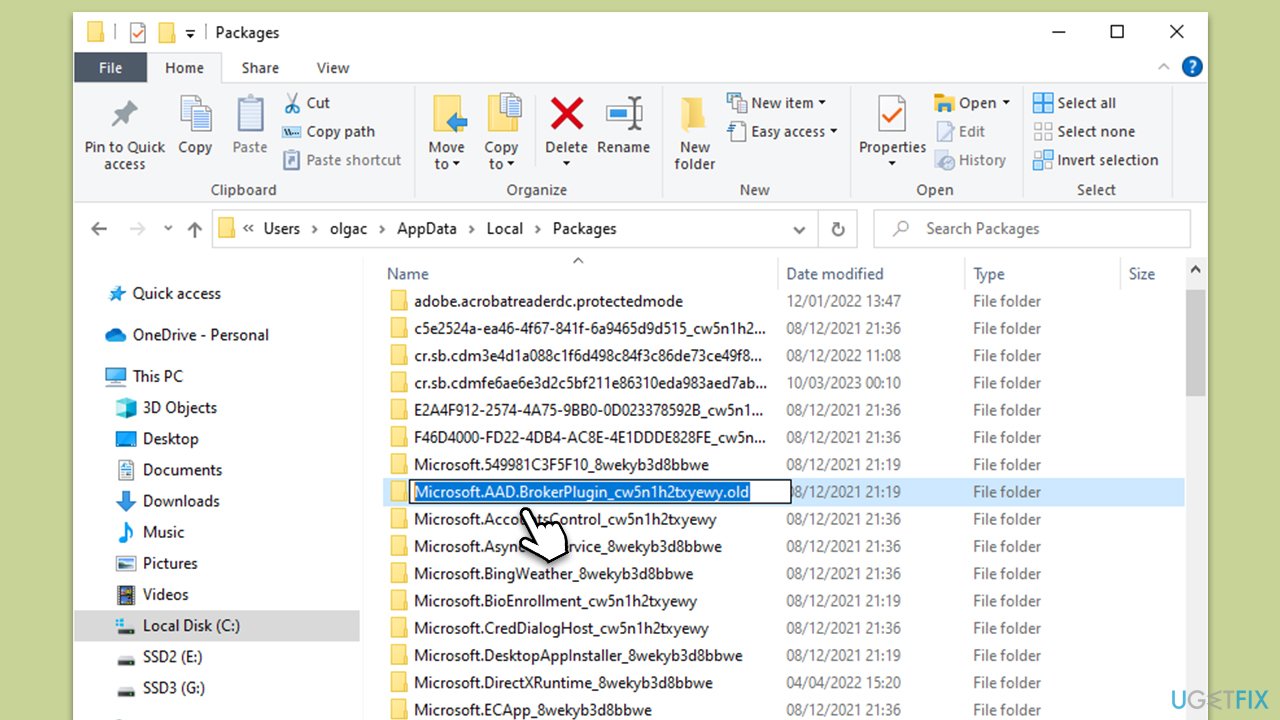
Note: some users reported deleting contents of Microsoft.AAD.BrokerPlugin_cw5n1h2txyewy helped them solve the issue.
Bottom line
To fix the 80090016 error, you can run Windows Store Apps and consider using a PC repair tool to identify and repair corrupted files. If these solutions do not resolve the issue, further troubleshooting may be necessary.
Frequently asked questions
The error 80090016 indicates a malfunctioning Trusted Platform Module (TPM), which can prevent Outlook from accessing encrypted data. This typically occurs when the TPM is not initialized or is experiencing issues.
To reset the TPM, open the TPM Management tool by typing 'tpm.msc' in the Windows search bar, then select 'Clear TPM' under the Action menu. After rebooting, you may need to reinitialize your TPM and restore any necessary keys.
Yes, ensure that your Windows 10 or Windows 11 is fully updated, as Microsoft often releases patches that can resolve issues related to TPM and Outlook. Additionally, check for updates to Microsoft Office to ensure compatibility.




Report an issue
What's wrong with this guide? We review every report and update or remove content.
Report received — thank you. We'll review and fix it.
You need a free account to submit a report.
Be the first to comment