How to fix
“Something went wrong while attempting to sign you in” Steam error
on Windows
Resolve the "Something went wrong while attempting to sign you in" Steam error on Windows 10/11 quickly and effectively. Expert-tested solutions await!


What causes How to fix “Something went wrong while attempting to sign you in” Steam error in Windows?
- Network connectivity problems
- Temporary outages or maintenance sessions of Steam
- Corrupted application data or caches
- Conflicts with third-party products like antivirus programs or firewalls
Repairs Windows system files, removes malware, and restores a clean OS state — without reinstalling.
I'm unable to log in to Steam for some reason. The error message says "Something went wrong while attempting to sign you in" but that does not tell me much. What is "Something"? Where do I even begin?
"Something went wrong while trying to sign you in" Steam error messages show up every time a user tries to log into their account through Windows. These types of errors are really irritating because one will be locked out from the library of different games that are accommodated on Steam, updates, and community features. A lot of people have encountered this message while trying to log in, without being shown what causes this problem, hence being unable to advance.
The "Something went wrong while trying to sign you in" error can be attributed to several factors. These include some of the most common reasons: network connectivity problems where Steam cannot connect to its servers due to a weak and unstable internet connection. Another probable reason would be temporary outages or maintenance sessions of Steam.
Sometimes, corrupted application data or caches are the reason for not being able to log in successfully. Added to this, several third-party products like antivirus programs or firewalls will conflict with your tries and block Steam's connection.
Even though this "Something went wrong while attempting to log you in" error can hamper Steam's provided services, there are a few probable ways that may restore functionality: a stable internet connection, a clean cache of Steam, or adjusting some settings via a Firewall program.
The [d1] repair tool can find and fix more fundamental problems with your operating system that may be the cause of this "Something went wrong while attempting to sign you in" error.

Fix 1. Check internet connection
A weak or unstable internet connection is one of the most common reasons for the "Something went wrong while attempting to sign you in" error.
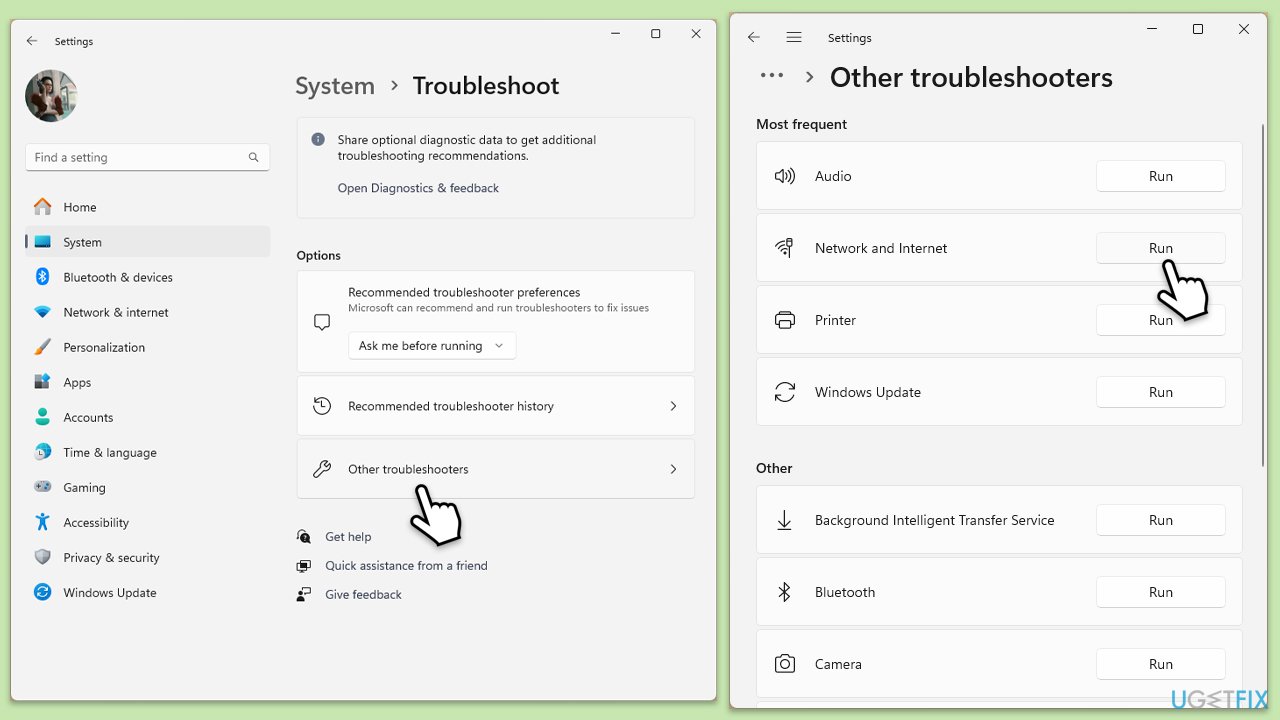
- Type Troubleshoot in Windows search and press Enter.
- Select Other troubleshooters.
- Find Network & Internet troubleshooter from the list and select Run.
- Wait till the process is finished and apply the offered fixes.
- Restart your computer.
On Windows 10:
- Right-click on Start and pick Settings.
- Go to the Network & Internet section.
- On the right side, find the Advanced network settings section.
- Click Network troubleshooter and wait.
- The fixes should be automatically applied.
Fix 2. Restart Steam
A simple restart of Steam may resolve temporary issues that are causing login problems.
- Close the Steam client completely by clicking Exit in the Steam menu.
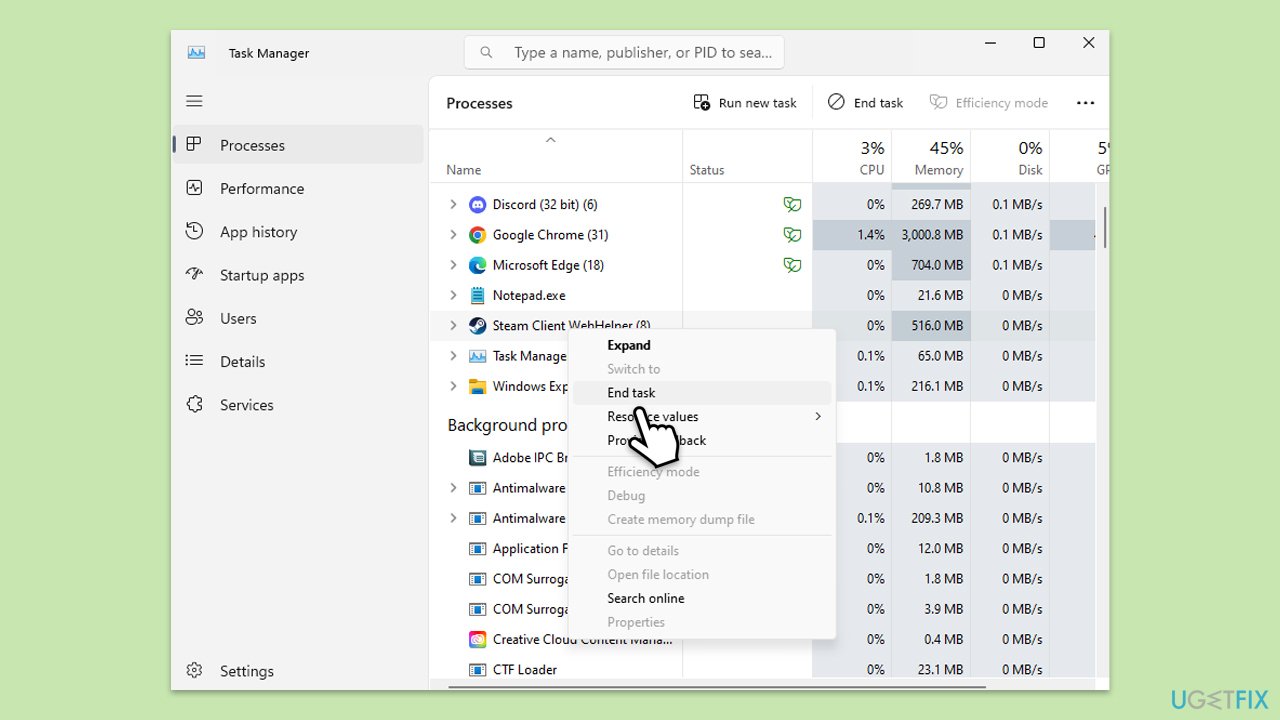
- Press Ctrl + Shift + Esc to open Task Manager and ensure no Steam processes are running.
- Relaunch Steam and attempt to log in or start the game again.
Fix 3. Check Steam server status
Sometimes, the issue is on Steam's end, such as during server maintenance or outages.
- Visit the official website that monitors the Steam server status.
- If there’s an ongoing outage, wait for Steam to resolve the issue.
Fix 4. Clear Steam caches
Corrupted cache files can interfere with Steam's ability to log in properly.
- Open the Steam app.
- Go to Steam > Settings.
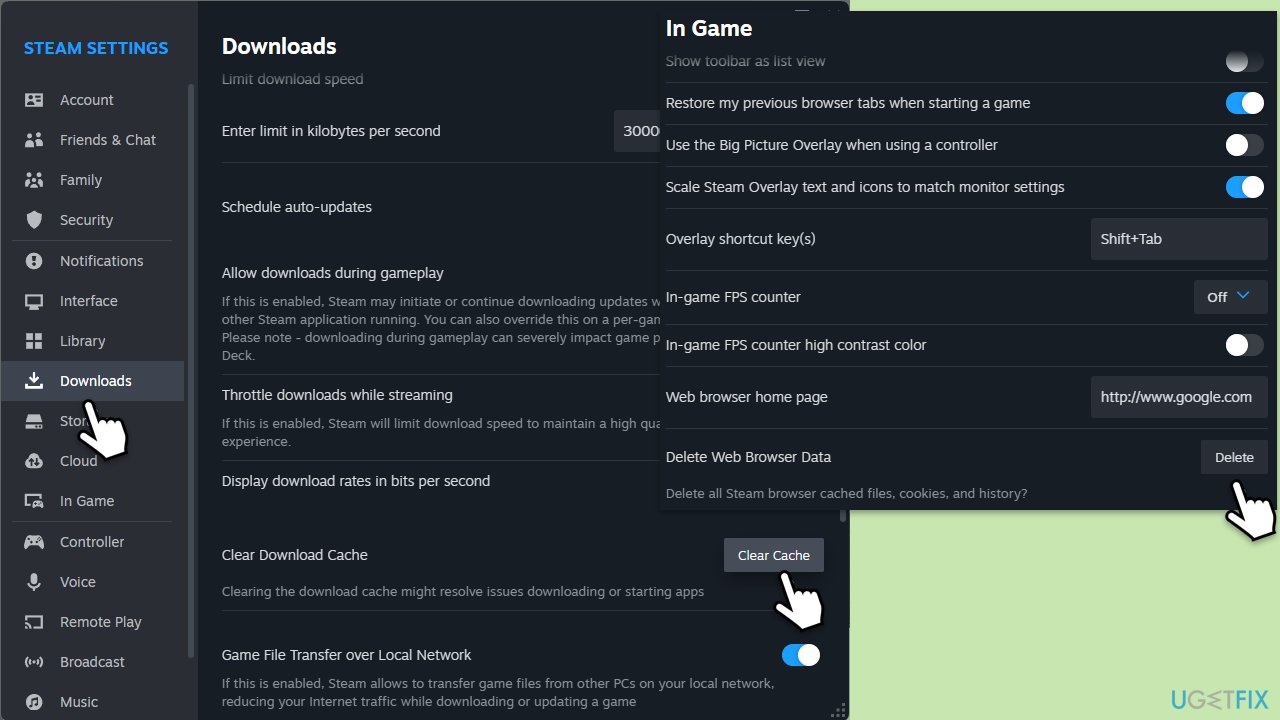
- Select the Downloads section on the left.
- Scroll down to the Clear Download cache section.
- Click Clear Cache.
- Next, go to the In Game section on the left.
- Under Delete web browser data, click on Delete.
Fix 5. Disable antivirus or firewall temporarily
Your security software might be blocking Steam from accessing the internet.
- Disable your antivirus software from its main dashboard, usually accessible via the system tray icon.
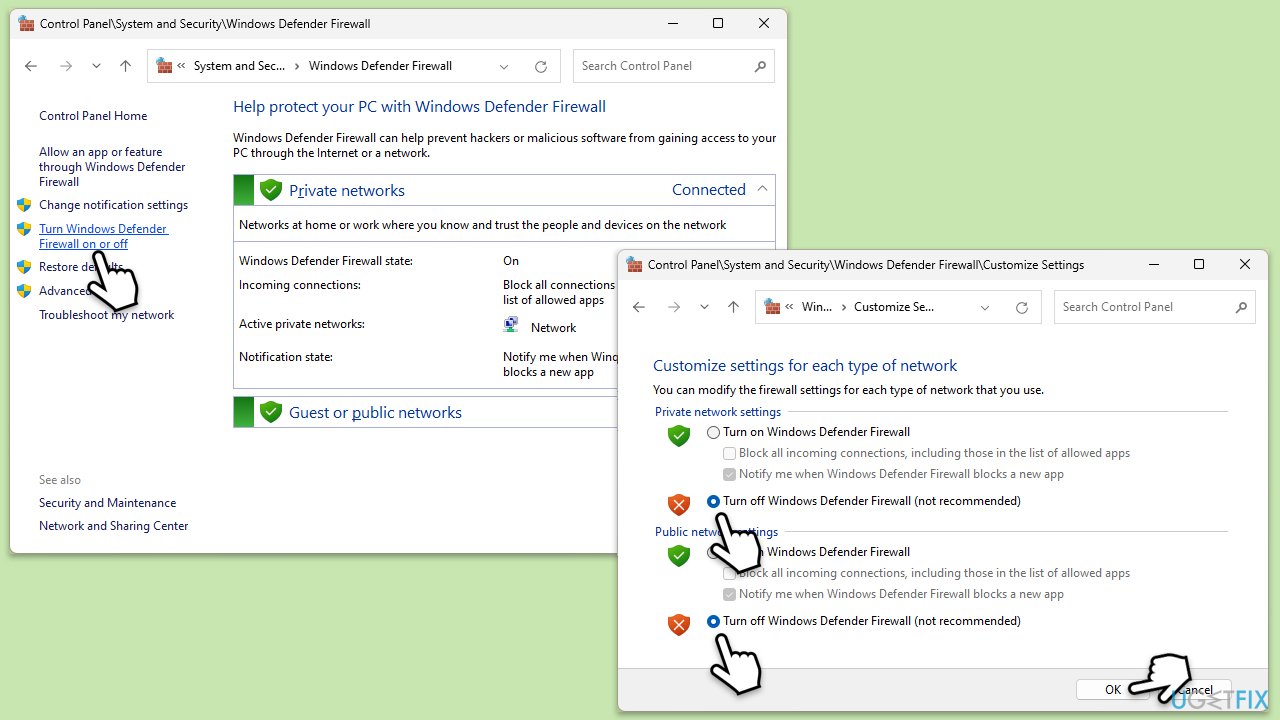
- In Windows search, type firewall. Select Windows Defender Firewall.
- Click on Turn Windows Defender Firewall on or off.
- Select Turn off Windows Defender Firewall for both private and public network settings. Remember to turn these back on after testing.
Fix 6. Flush DNS
Flushing the DNS cache can resolve network-related issues that prevent Steam from connecting.
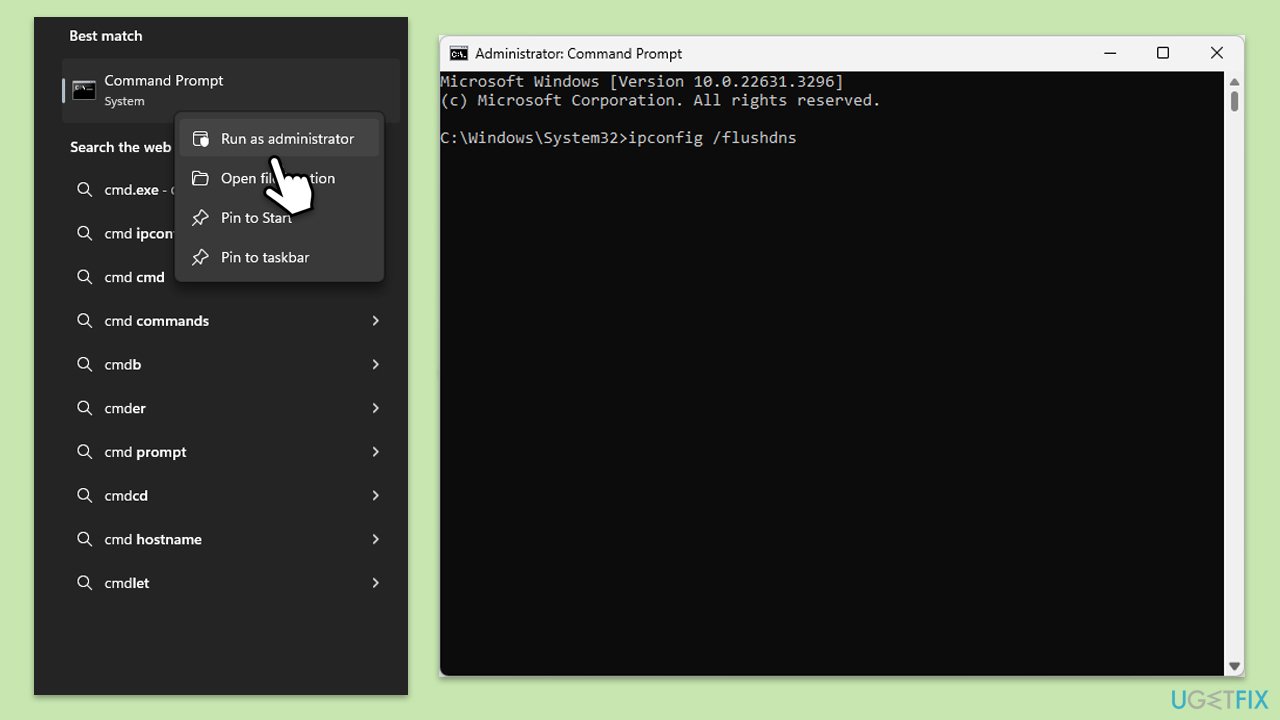
- Type cmd in Windows search.
- Right-click on Command Prompt result and pick Run as administrator.
- When the User Account Control window shows up, click Yes.
- In the new window, copy and paste the following commands, pressing Enter each time:
ipconfig /flushdns
ipconfig /registerdns
ipconfig /release
ipconfig /renew
netsh winsock reset - Reboot your device to implement the changes.
Fix 7. Synchronize time and date
Ensure that your computer's time is set correctly.
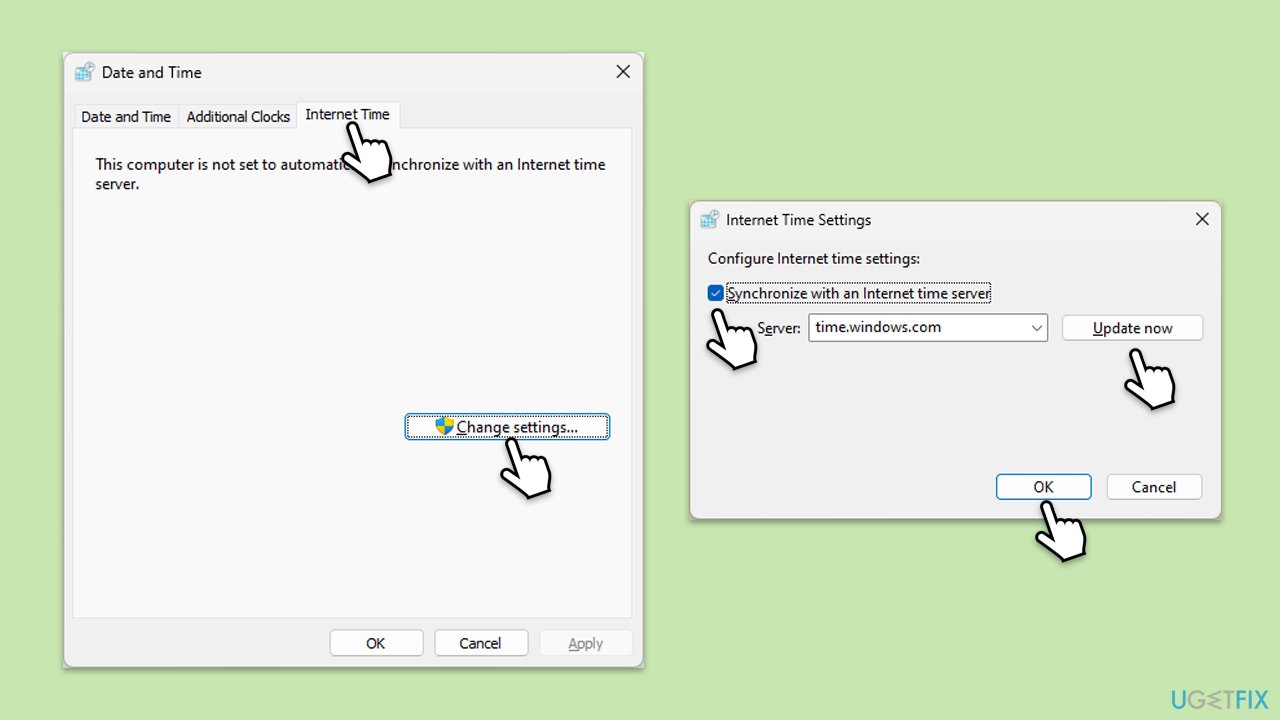
- Type in Control Panel in Windows search and press Enter.
- Go to Clock and Region and click on Date and Time.
- Pick the Internet Time tab and select Change Settings.
- Make sure that the Synchronize with an Internet time server box is ticked.
- Click Update now and OK.
Fix 8. Reinstall Steam
Reinstalling Steam can resolve issues caused by corrupted installation files.
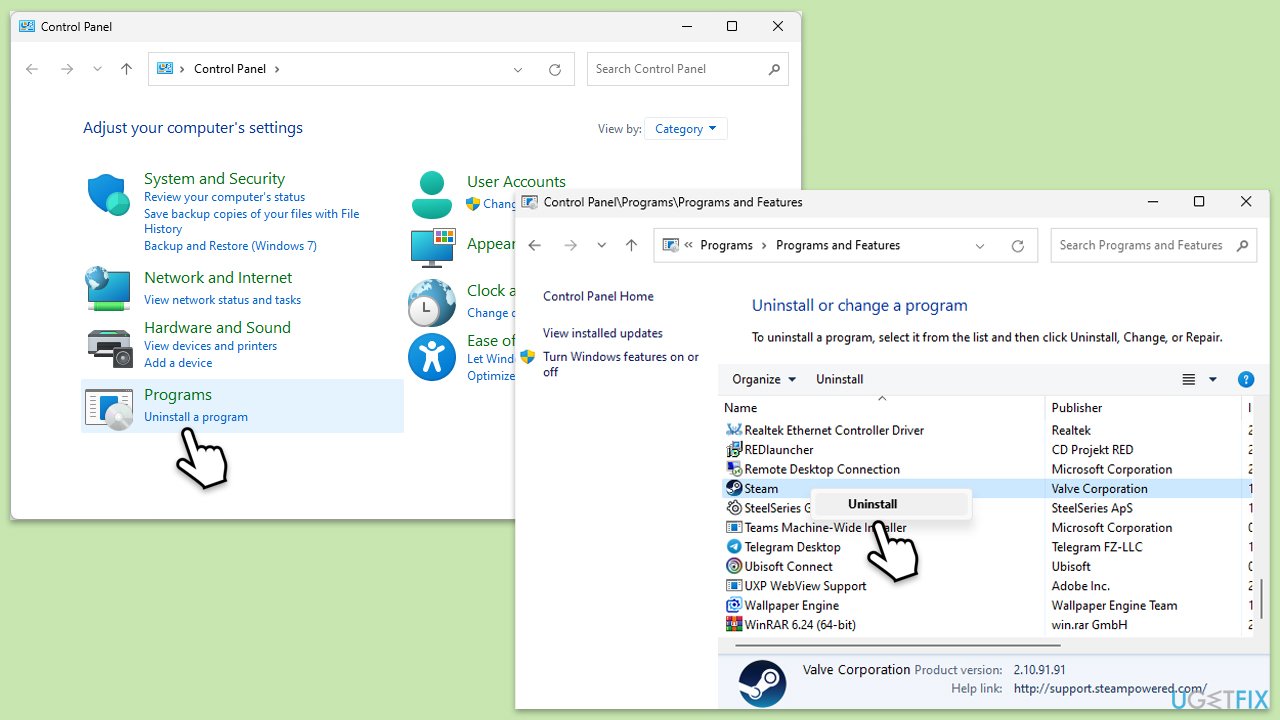
- Type Control Panel in Windows search and press Enter.
- Go to Programs > Uninstall a program.
- Find Steam in the list and select Uninstall.
- Follow the prompts to remove Steam from your system.
- After uninstallation, restart your computer.
- Download the latest version of Steam from the official website.
- Run the installer and follow the instructions to install Steam.
Bottom line
To fix the "Something went wrong while attempting to sign you in" error, ensure you have a stable internet connection, clear the Steam cache, and adjust settings in your firewall. If these solutions do not resolve the issue, consider using a repair tool to identify and fix deeper problems with your operating system.
Frequently asked questions
First, ensure your internet connection is stable, then try restarting Steam or your computer. If the problem persists, consider clearing the Steam cache or reinstalling the application.
Check for updates to both Windows 11 and the Steam client, as outdated software may cause issues. Additionally, disabling any VPN or proxy services can help resolve the sign-in error.
Yes, ensure that your Windows Firewall or antivirus software isn't blocking Steam; you may need to create exceptions for it. Also, verify that the date and time settings on your Windows 10 or Windows 11 device are correct.




Report an issue
What's wrong with this guide? We review every report and update or remove content.
Report received — thank you. We'll review and fix it.
You need a free account to submit a report.
Be the first to comment