How to fix
Windows 10 activation error code 0xC004F034
on Windows
Resolve Windows 10 activation error code 0xC004F034 quickly. Gain access to your system with expert-tested solutions and clear screenshots. Fixed in min…


What causes How to fix Windows 10 activation error code 0xC004F034?
- Upgrading from older Windows versions (Windows 7, 8, 8.1) to Windows 10
- Overloaded Microsoft servers during activation
- Incorrect license key entered by the user
- Installation of third-party software causing issues
- Missing crucial system files for activation
Repairs Windows system files, removes malware, and restores a clean OS state — without reinstalling.
I upgraded from Windows 8.1 to Windows 10, but I get an error code 0xC004F034 when I try to activate. I can’t see an option to phone in for activation. Could you please help?
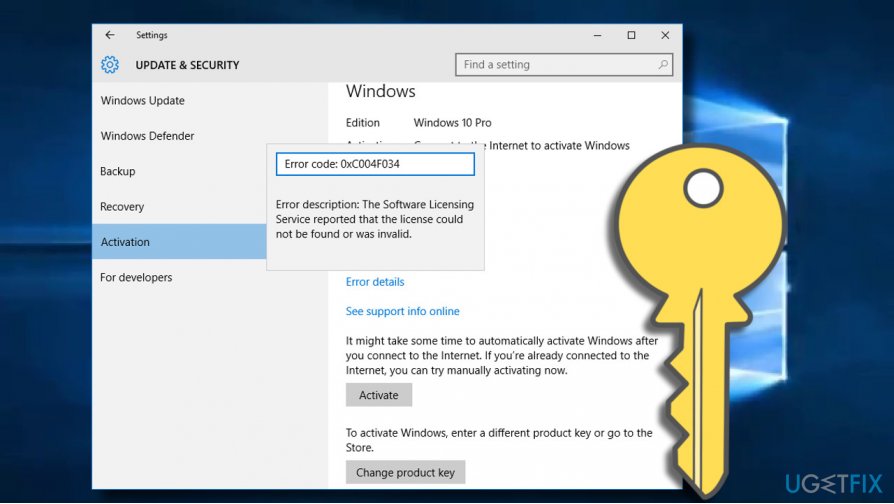
The Error Code 0xC004F034 is a Windows 10 activation[ref en-1] bug. It occurs when the PC’s owner upgrades the system from older Windows versions (Windows 7, 8, 8.1) to Windows 10 and navigates to the Settings -> Update & Security -> Activation -> Activate.
Windows 10 activation error code 0xC004F034 is not a critical system error that does affect the ability to install or activate the OS. This is the system vulnerability that occurred on the first week of this particular update because of the overloaded server due to the huge number of downloads.
The Windows 10 activation process fails with an error code 0xC004F034 and the PC’s owner is restricted from a part of Windows 10 features[ref en-2] and cannot sign into Windows account. The mentioned error code usually means that the user entered the wrong license key. However, Microsoft admitted that the problem is more often at Microsoft’s server’s end, which may get too overloaded after the release of updates and other Microsoft support products.
Therefore, if you cannot activate Windows due to the 0xC004F034 error, we would recommend postponing the activation for at least a couple of hours or the whole day. If you need to activate right now, we’ll provide a couple of alternative methods that you can try for activation.
Methods to get rid of activation error code 0xC004F034
Before the activation and other methods, we would recommend you to check if the Date and Time settings are correct. Besides, the problem may also happen after the installation of third-party software or some missing system files, which are crucial for completing Windows activation. In this case, [d1] PC optimization tool can be of use. The tool will check for any Windows inconsistencies and fix them. Besides, try to disable anti-virus[ref en-3] programs temporarily. If not helpful employ methods listed below.
Remove files from the Download folder and continuously click Activation button
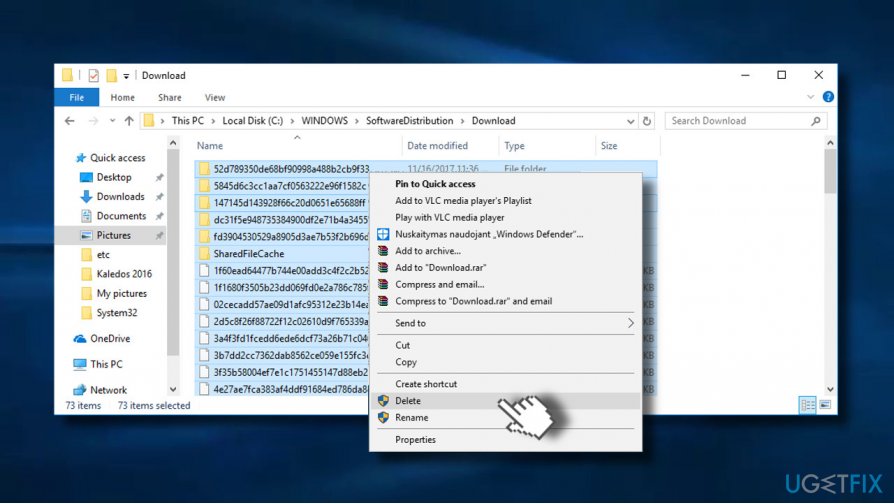
Many people reported that they managed to fix 0xC004F034 error by removing the content of the C:\\Windows\\SoftwareDistribution\\Download and then clicking on the Activation button, which you can find under Settings -> Update & Security -> Activation. Click the button continuously and see if the error is gone.
Activate Windows using Phone Activation
1. Press Windows key + R, type SLUI 4, and press Enter.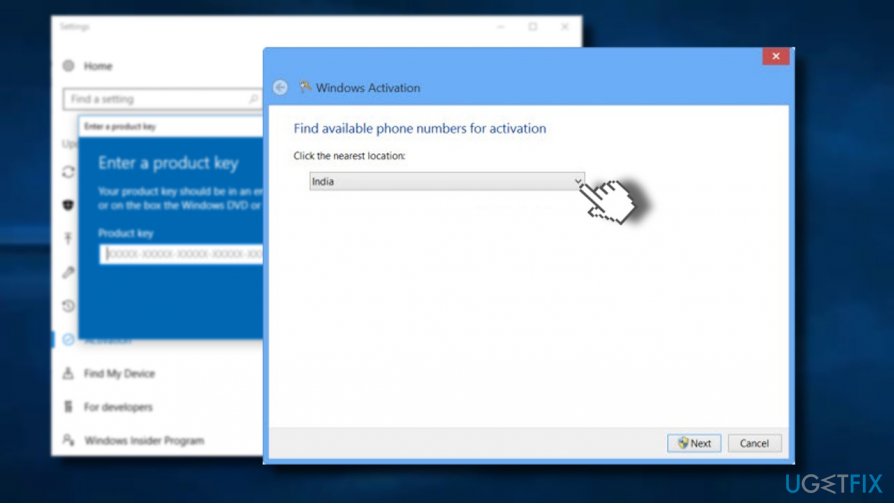
Disable firewall and VPN
If you are using one of these tools, you may need to disable them and update the OS then. When the activation is done, you can enable them again.
Bottom line
To fix the activation error code 0xC004F034, check the Date and Time settings, remove files from the Download folder, and try clicking the Activation button multiple times. If the issue persists, consider using a PC optimization tool and temporarily disabling anti-virus programs.
Frequently asked questions
The error code 0xC004F034 indicates that Windows 10 is unable to find a valid product key for activation, often due to issues with the key itself or the activation server.
To resolve the 0xC004F034 error on Windows 11, ensure that you are using a legitimate product key and try activating Windows through the Settings app or by running the activation troubleshooter.
Reinstalling Windows 10 may resolve the activation error 0xC004F034 if the issue is related to corrupt system files, but make sure to have your product key ready for reactivation.




Report an issue
What's wrong with this guide? We review every report and update or remove content.
Report received — thank you. We'll review and fix it.
You need a free account to submit a report.
Be the first to comment