How to fix
Windows Update error 0x80070bc2
on Windows
Resolve the Windows Update error 0x80070bc2 quickly and easily. Follow our expert-tested guide for Windows 10 and 11 to get your updates running smoothly!

What causes How to fix Windows Update error 0x80070bc2?
- Corruption of Windows Update services
- Compromised Windows update files
- System's restart blocking update processes
- Corrupted registry entries
- Damaged or missing system files
Repairs Windows system files, removes malware, and restores a clean OS state — without reinstalling.
Hello. I have an Acer laptop with Windows 10 V-1709 installed. I noticed that the Windows Update gives an error 0x80070bc2 error and keeps failing to install cumulative update KB4048955. The same happened with the KB4043961 error before. Could you please help?
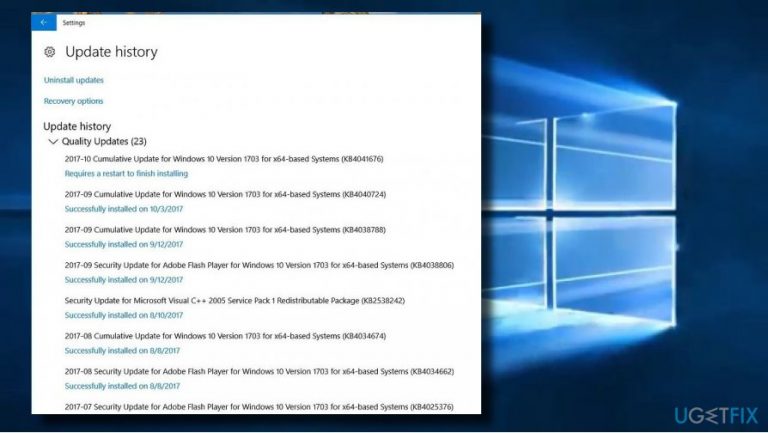
People come across the error code 0x80070bc2 when checking Windows Update[ref en-1] history. For many, it occurred when trying to install Windows 10 Cumulative Updates KB4043961 and KB4048955.
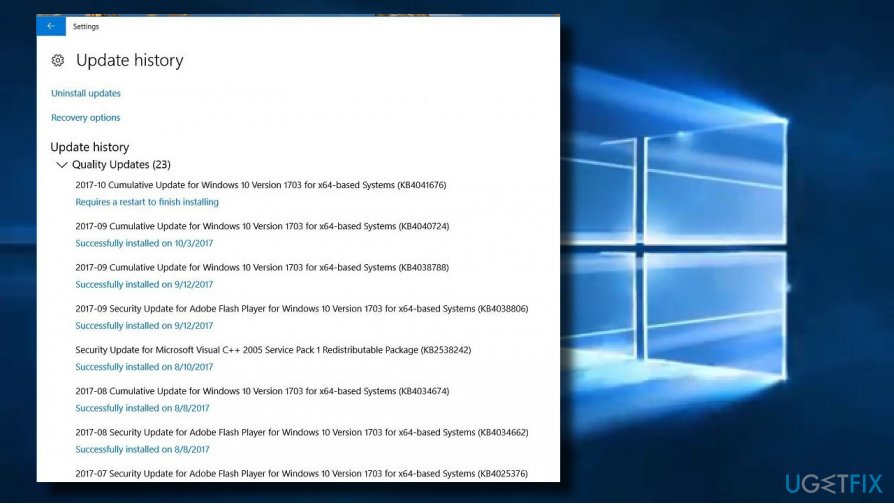
When opened, Windows Update history indicates the fact that Cumulative Update KB4048955 “Requires a restart to finish installing.” That’s a kind of a loop because after restart, the update shows the 0x80070bc2 error and reports that the update failed to install. That’s a vicious circle because the no matter how many times the user tries to install the update, the same sequence of events occur.
There are many different problems that may trigger the Windows Update error 0x80070bc2. In most of the case, the error stems from the corruption of Windows Update services or compromised Windows update files.[ref en-2] In this case, it does not seem that the error 0x80070bc2 is caused by faulty KB4043961 and KB4048955 updates because hundreds of thousands of people installed it successfully.
Actually, the reason of the bug may be related to the system’s restart during which some update processes are blocked. In this case, we would strongly recommend you to run a scan with [d1] optimization utility. It will scan the system for corrupted registry entries, damaged or missing system files, and check if it’s not infected with malware.[ref en-3]
If automatic 0x80070bc2 error fix did not work, try the following methods.
Set Windows Update services to Automatic
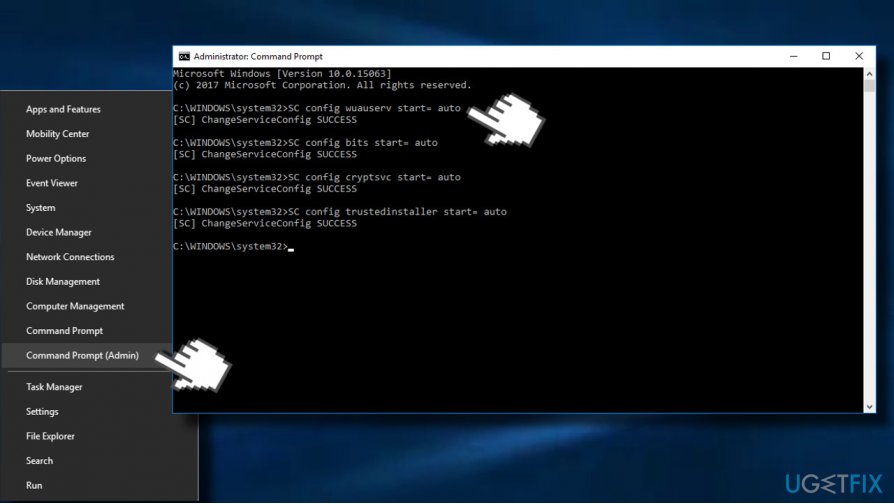
- Right-click on Windows key and select Command Prompt (Admin).
- Type the following commands in Command Prompt window. To execute them, press Enter after each one.
SC config wuauserv start= auto
SC config bits start= auto
SC config cryptsvc start= auto
SC config trustedinstaller start= auto - Finally, restart your PC and try to install the update that was previously returning the 0x80070bc2 error.
Run Windows Update Troubleshooter
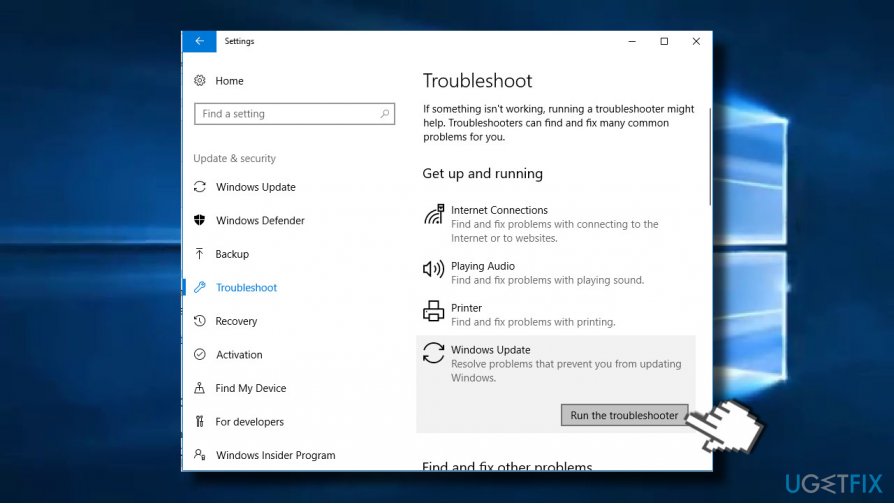
- Press Windows key + I and open Update & Security section.
- Select Troubleshoot and find Windows Update.
- Click Windows Update and select Run troubleshooter.
The scan may take up to 10 minutes. You should get a window with scan results and notification if Windows managed to fix the problems automatically.
Reset Windows Update Components
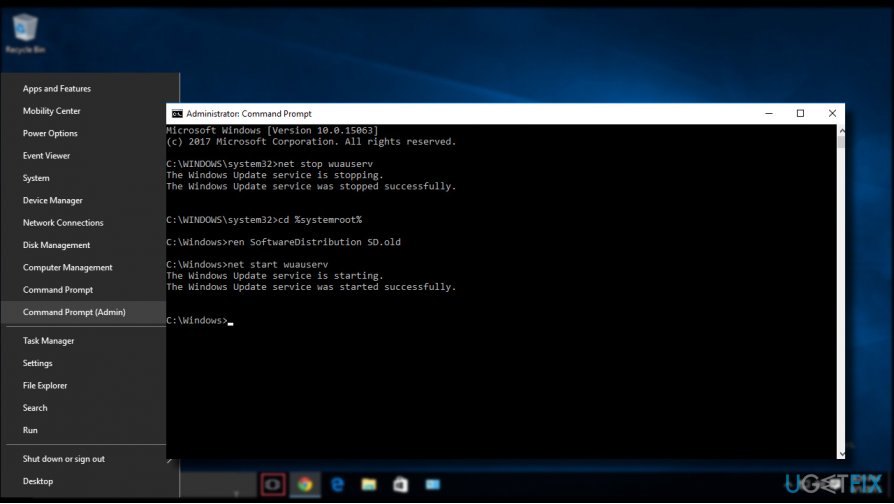
- Right-click Windows key and select Command Prompt (Admin).
- If a UAC shows up, click OK to proceed.
- By typing the following commands you will stop BITS, Windows Update, Cryptographic, MSI Installer services. Don't forget to press Enter after each of them:
net stop bits
net stop wuauserv
net stop appidsvc
- Then type Del "%ALLUSERSPROFILE%\\Application Data\\Microsoft\\Network\\Downloader\\qmgr*.dat” command to delete qmgr*.dat files.
- Once done, copy and paste cd /d %windir%\\system32 command and press Enter to execute the command.
- To re-register BITS and Windows Update files, you will have to type all the commands (followed by Enter) provided below:
regsvr32.exe atl.dll
regsvr32.exe urlmon.dll
regsvr32.exe mshtml.dll
regsvr32.exe shdocvw.dll
regsvr32.exe browseui.dll
regsvr32.exe jscript.dll
regsvr32.exe vbscript.dll
regsvr32.exe scrrun.dll
regsvr32.exe msxml.dll
regsvr32.exe msxml3.dll
regsvr32.exe msxml6.dll
regsvr32.exe actxprxy.dll
regsvr32.exe softpub.dll
regsvr32.exe wintrust.dll
regsvr32.exe dssenh.dll
regsvr32.exe rsaenh.dll
regsvr32.exe gpkcsp.dll
regsvr32.exe sccbase.dll
regsvr32.exe slbcsp.dll
regsvr32.exe cryptdlg.dll
regsvr32.exe oleaut32.dll
regsvr32.exe ole32.dll
regsvr32.exe shell32.dll
regsvr32.exe initpki.dll
regsvr32.exe wuapi.dll
regsvr32.exe wuaueng.dll
regsvr32.exe wuaueng1.dll
regsvr32.exe wucltui.dll
regsvr32.exe wups.dll
regsvr32.exe wups2.dll
regsvr32.exe wuweb.dll
regsvr32.exe qmgr.dll
regsvr32.exe qmgrprxy.dll
regsvr32.exe wucltux.dll
regsvr32.exe muweb.dll
regsvr32.exe wuwebv.dll - To reset Winsock, type netsh winsock reset and netsh winhttp reset proxy commands. Press Enter after each of them as usually.
- Finally, restart BITS, Windows Update, Cryptographic, MSI Installer services by entering the following commands each followed by Enter:
net start bits
net start wuauserv
net start appidsvc
net start cryptsvc
Install the Update Manually
Navigate to the official update catalog and download the needed update manually. Click on this link to access the catalog and type the code of the update into the search bar and press Enter. Now click Download button next to the entry of the update. Once the update is downloaded, try to install it.
Bottom line
To fix the Windows Update error 0x80070bc2, you can set Windows Update services to Automatic and run the Windows Update Troubleshooter. If these methods do not resolve the issue, consider running a scan with an optimization utility to check for further system problems.
Frequently asked questions
The error 0x80070bc2 typically indicates that there is an issue with the Windows Update service, often related to system files or update components being corrupted. This can occur on both Windows 10 and Windows 11.
To fix error 0x80070bc2 on Windows 10, try running the Windows Update Troubleshooter and resetting the Windows Update components manually. Make sure to restart your computer after applying these changes.
Yes, you can fix error 0x80070bc2 on Windows 11 by using the System File Checker and DISM tools to repair corrupted files without losing any personal data. Always ensure you have a backup before making significant changes.




Report an issue
What's wrong with this guide? We review every report and update or remove content.
Report received — thank you. We'll review and fix it.
You need a free account to submit a report.
Be the first to comment