How to fix
“iTunes Store is unable to process purchases” error
on Windows
Resolve the "iTunes Store is unable to process purchases" error on Windows 10/11 effortlessly. Fix it in minutes with our expert-tested solutions!


What causes How to fix “iTunes Store is unable to process purchases” error?
- Insufficient credit for purchases
- Apple server outage
- Issues with the user's device
- Problems with the user's Apple ID
- App-related issues
Repairs Windows system files, removes malware, and restores a clean OS state — without reinstalling.
Hello. What does “The iTunes Store is unable to process purchases at this time” message mean and how can I fix it? Currently, my iTunes credit exceeds $100, so what the hell does that mean?
At the end of March 2018, Apple iTunes Store[ref en-1] users from all around the world started reporting an outage of “The iTunes Store is unable to process purchases at this time” error message.[ref en-2][ref en-3] It's a regular iTunes Store warning, which usually appears when the user attempts to purchase something when the credit is insufficient.
However, the current “The iTunes Store is unable to process purchases at this time” error message on iTunes emerge when Apple users want to open apps, so practically all apps are rendered useless by the current iTunes Store error.
Soon after Apple customers and iOS users tweeted at Apples Support, the company officially approved an outage for the Apple TV, the iBooks Store, the iTunes Store, iTunes U, the App Store and the Volume Purchase Program.[ref en-4]
The issue approximately started at 3:04 p.m. Users are not only disallowed to make the purchases but block most of the apps downloaded from iTunes. Apple Support changed the System Status page to resolved at 4:49 p.m, but people keep reporting “The iTunes Store is unable to process purchases at this time” error.

Although this time the “The iTunes Store is unable to process purchases at this time” error is at Apple's end, your device might also be the culprit, so you should also try to fix your device. Follow these tips:
Tips on how to fix “The iTunes Store is unable to process purchases at this time” error
Massive Apple's outage for iTunes have been registered in 2016 and 2017, so there's nothing surprising. While in most of the cases the problem is at Apple servers' end, sometimes the issue may be resolved by merely resigning your account or resetting your Apple ID.
IMPORTANT: do not rush to sign out from your account if you can't remember its password.
Check Apple System Status
Each time you encounter problems with Apple TV, the iBooks Store, the iTunes Store, iTunes U, the App Store, the Volume Purchase Program and other services based on Apple servers, open the official Apple System Status website and check what the status of the needed system is.
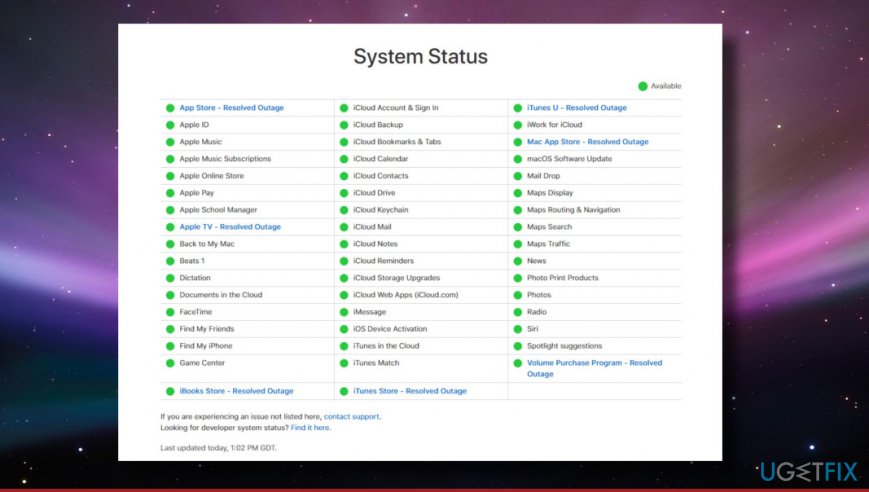
Check your credit
If you attempt to make a payment, but can't do that because of “The iTunes Store is unable to process purchases at this time” error, check your credit balance.
Open App Store or iTunes and sign in using your Apple ID. You can also use Touch ID. If you have a credit balance, the sum will be indicated below your Apple ID.
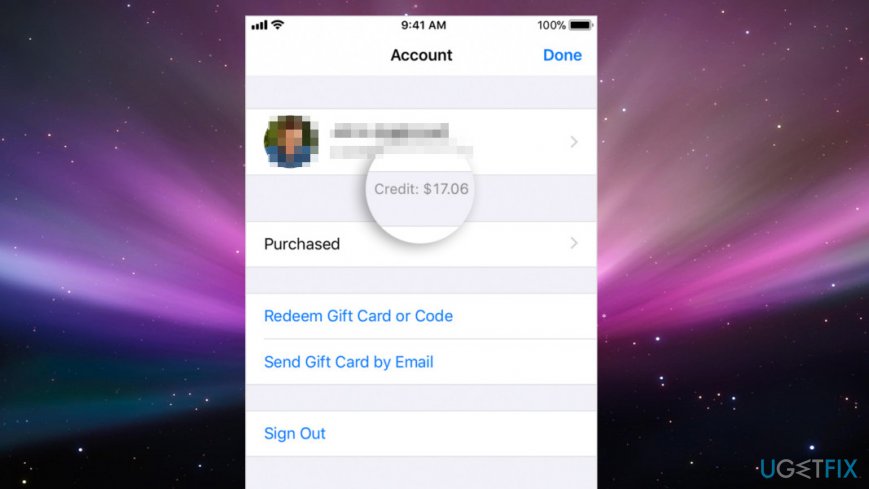
Resign to your account
This method should work if you see an error message saying that "Credit card processing is temporarily unavailable."
- Open Settings and tap on iCloud.
- Scroll down and select Sign Out.
- After that, try to resign to your account and check if iTunes started to work again.
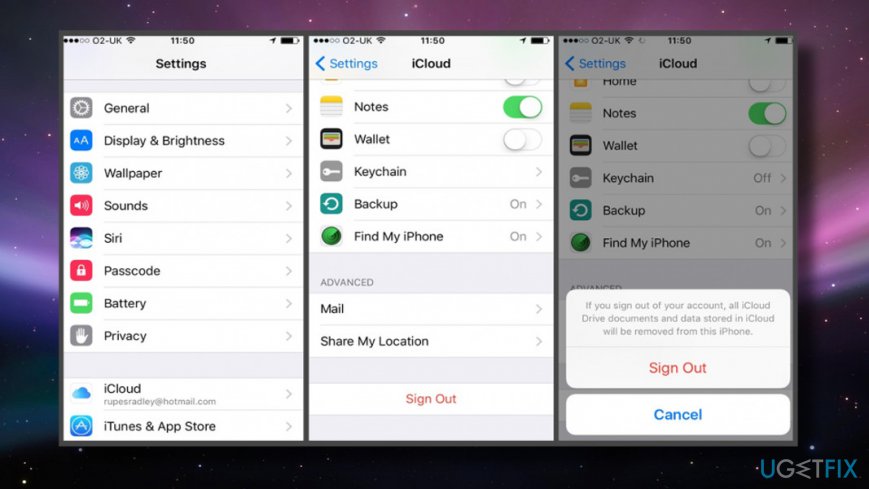
Sign out from icloud
Install the latest version of iOS
If it turns out that the “The iTunes Store is unable to process purchases at this time” pop-up shows up due to the problems on your iPhone, iPad, iPod Touch, follow these steps:
- Tap Settings and open General tab.
- Click Software Update to check whether there's a new version of your iOS available.
- If you received an update, click Install button.
Check Date and Time settings
- Click on Apple menu at the top left corner of the screen.
- Open System Preferences and select Date & Time.
- Check if the time, especially Time Zone, is set correctly.
- Enable the Set date and time automatically option.
Disable Firewall
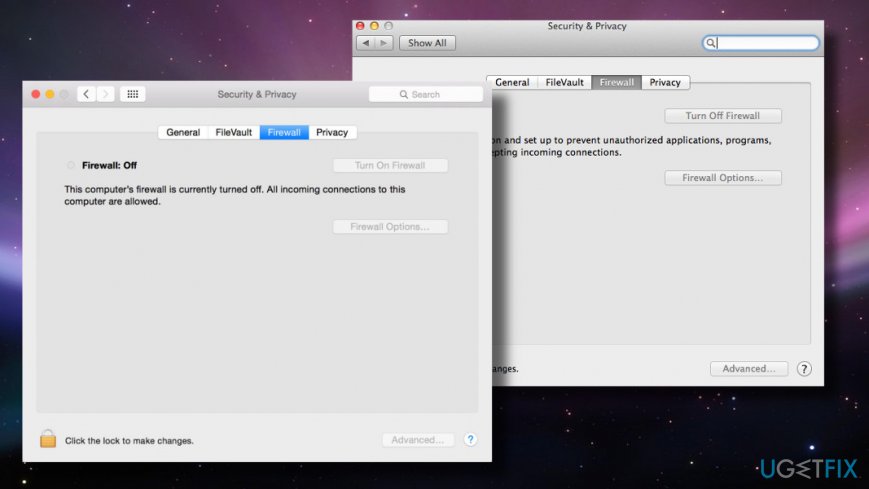
Firewall might be the reason why you can't access or use iTunes as usually. This applies to devices provided by employers in particular since they may have a network firewall enabled, which blocks iTunes Store by default.
- Click on Apple menu at the top left corner of the screen.
- Open System Preferences and select Security & Privacy.
- Click on Firewall tab.
- Type in administrator's password if required.
- If the firewall is set to block incoming connections, change it. Allowing incoming connections should fix “The iTunes Store is unable to process purchases at this time” error and similar iTune problems.
Bottom line
To fix the "iTunes Store is unable to process purchases" error, check the Apple System Status, try resigning your account, or resetting your Apple ID. If these steps do not resolve the issue, consider waiting for Apple to address the server problems.
Frequently asked questions
Try updating iTunes to the latest version, as outdated software can cause processing errors. Additionally, check your internet connection and ensure that Windows 10 firewall settings are not blocking iTunes.
Ensure that your Windows 11 is fully updated and then restart your computer to refresh system settings. If the error persists, consider signing out of your iTunes account and signing back in.
Yes, you can try resetting your network settings and clearing the iTunes cache, which often resolves the purchase error without needing to reinstall. Make sure to also check for any pending Windows updates.




Report an issue
What's wrong with this guide? We review every report and update or remove content.
Report received — thank you. We'll review and fix it.
You need a free account to submit a report.
Be the first to comment