How to fix
Elara app is keeping system from restarting
on Windows
Resolve the Elara app issue preventing your Windows 10 or Windows 11 from restarting easily. Get back to normal with expert-tested solutions!

What causes How to fix Elara app is keeping system from restarting?
- App has gone corrupted
- Outdated ELARA app
- Compromised ELARA app after Windows update
- Touchpad driver issues
- ELARA app not functioning properly
Repairs Windows system files, removes malware, and restores a clean OS state — without reinstalling.
Hello. I upgraded to Windows 10 April 2018 Update yesterday. Since then, I cannot restart or shut down my PC as I keep getting an error, which says: "ELARA app is keeping the system from closing or restarting." What is this app used for?
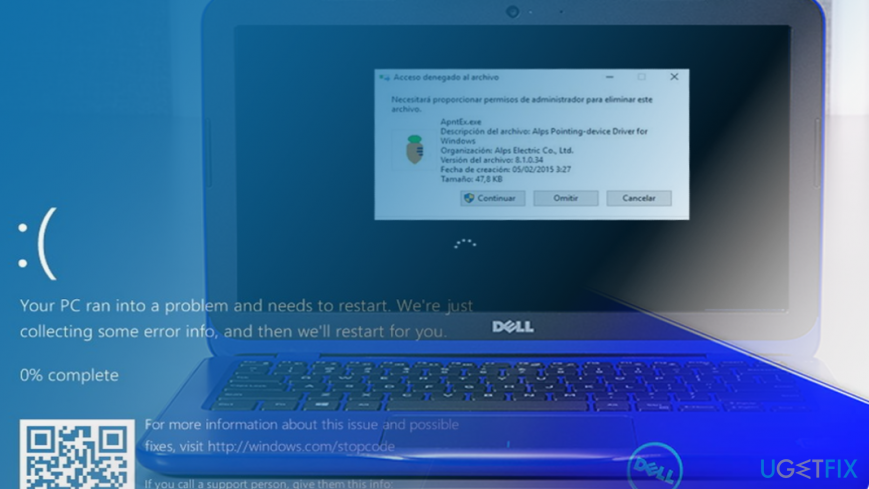
"ELARA app is keeping the system from closing or restarting" is an error message that can show up on Windows laptops and notebooks with ELARA app[ref en-1] installed. It means that the app has gone corrupted and can no longer function. As a consequence, the device's owner may not be allowed to shutdown/restart/sign out. In addition to "ELARA app is keeping the system from closing or restarting" alert, the user may notice touchpad unresponsiveness and other touchpad related issues.
The ELARA app is oriented to Dell devices, especially older laptops with inbuilt touchpads. It is known since 2015 and emerges along with Windows 10 release. The official name for ELARA would be Alps Pointing-device Driver for Windows,[ref en-2] while the corresponding executable file is called Apntext.exe. Typically, it can be found under C:\\Program Files\\DellTPaddirectory or C:\\Program Files\\Apoint2K directory. The section after Program Files may differ according to laptop's model.
It's important to stress the fact that ELARA app is not malicious. It's responsible for a smooth touchpad's performance. Therefore, if the app gets out of order, it may result in abnormal touchpad's behavior, as well as ELARA app keeping the system from closing or restarting.
The exact culprit of the Elara App is Preventing Shutdown/Restarting/Sign out error is not clear. In case it happened soon after updating to upgrading Windows, it might be that the ELARA app has been compromised or got outdated.
Therefore, the first option you have to fix ELARA app is keeping the system from closing or restarting error is to update Windows and its touchpad drivers. If that failed to work, try to reinstall the touchpad driver, but do not eliminate the ELARA app individually. This way, you may damage the touchpad's performance even more seriously.
If neither update nor reinstall of drivers helped, fix ELARA app shutdown problems via Registry Editor.[ref en-3] We will provide step-by-step instructions on how to perform the fixes.
NOTE: if you are getting an excessive amount of pop-up ads or web browser exhibits other arbitrary behavior, it might be that ELARA adware has been installed on your PC. In this case, you should run a full system scan with [d1].
Update OS and touchpad drivers
- Press Windows key + I to open Settings app.
- Heed to Update and Security section and click Check for Updates button.
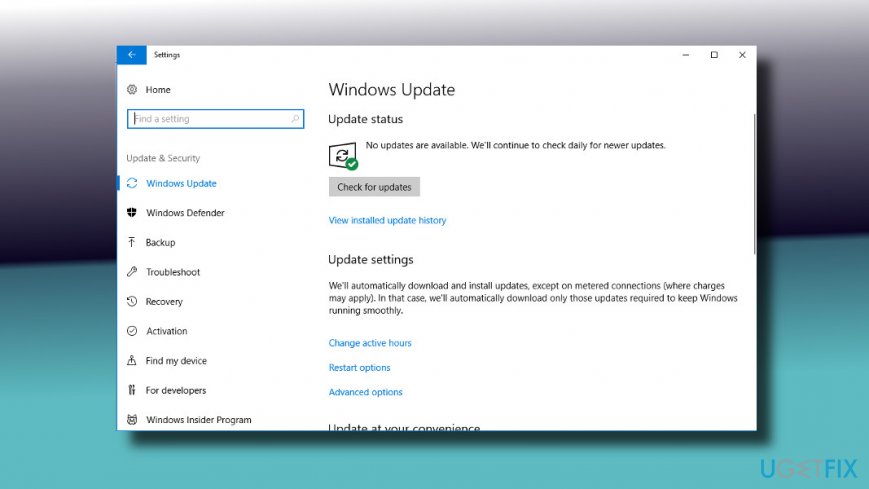
- Finally, wait for the system to install all pending updates automatically.
- After that, right-click on Windows key and select Device Manager.
- Open Mouse and other pointing devices section.
- Now right-click on each driver and select Update driver.
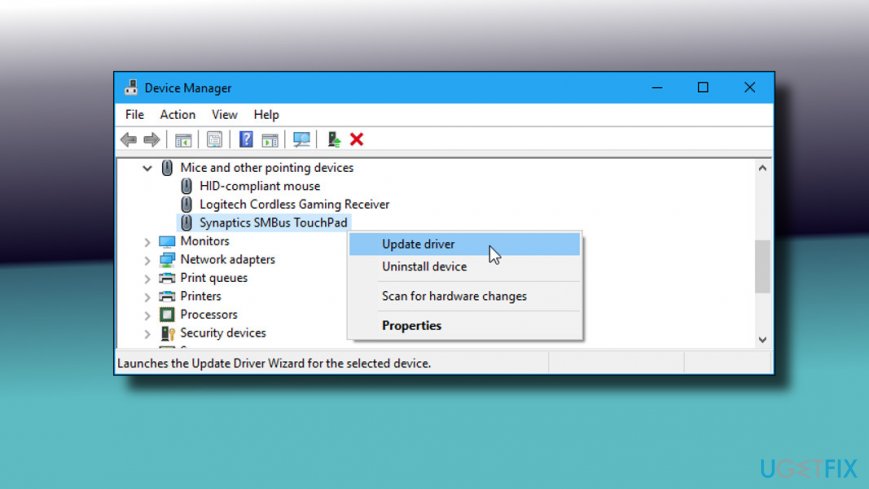
- Click Search automatically for updated driver software.
Create Registry Key
- Press Windows key + R, type regedit, and press Enter.
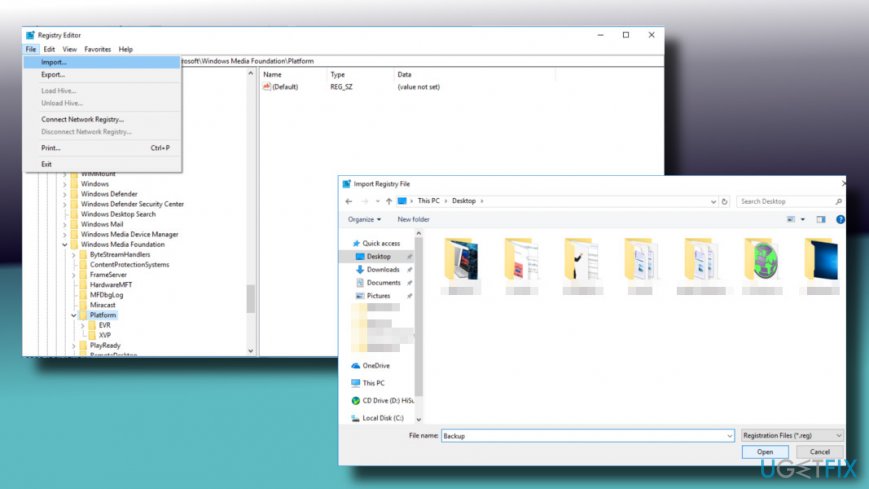
- Click File and select Import.
- In the Import Registry File dialog box, select the location where you want to save the copy of the Registry.
- Once selected, click Open.
- Now navigate to the HKEY_CURRENT_USER\\Control Panel\\Desktop key using the left pane.
- Right-click on an empty place at the right side of the window and select New -> DWORD (32-bit) Value.
- Name the new key as AutoEndTasks and set its value to 1.
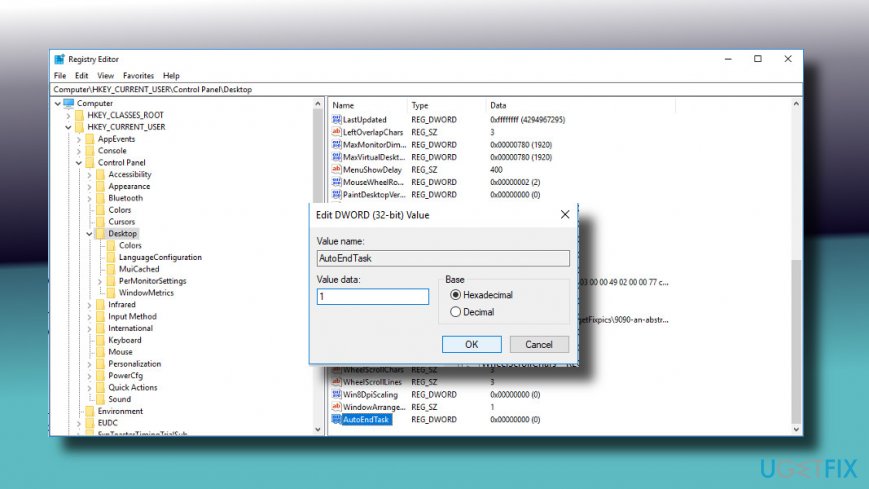
- Click OK to save the changes.
- Close Registry Editor.
Check if the problem has been solved. If you keep getting the "ELARA app is keeping the system from closing or restarting," please let us know, so that we could investigate your case individually.
Bottom line
To fix the ELARA app preventing shutdown or restart, you should first update Windows and its touchpad drivers. If that does not resolve the issue, try reinstalling the touchpad driver without removing the ELARA app. If neither of these solutions works, consider using the Registry Editor to address the shutdown problems.
Frequently asked questions
You can disable the Elara app from starting up with Windows by accessing Task Manager, navigating to the Startup tab, and disabling it. Additionally, consider updating or reinstalling the Elara app to resolve any underlying issues.
You can check for any problematic behavior by opening the Event Viewer and looking for error logs related to the Elara app. If errors are found, it may indicate that the app is malfunctioning and needs attention.
Yes, you can uninstall the Elara app by going to Settings > Apps > Apps & features, selecting Elara from the list, and clicking on 'Uninstall'. This should help eliminate any conflicts it has with your system.




Report an issue
What's wrong with this guide? We review every report and update or remove content.
Report received — thank you. We'll review and fix it.
You need a free account to submit a report.
Be the first to comment