How to fix
YouTube running slow
on Windows
Resolve YouTube's slow performance on Windows 10 or 11 with expert-tested solutions. Boost streaming speed and enjoy seamless viewing—fixed in minutes!


What causes How to fix YouTube running slow?
- Overloaded servers
- Internet/Router issues
- Browser cache
- Outdated flash player
- Issues with graphics drivers
Repairs Windows system files, removes malware, and restores a clean OS state — without reinstalling.
Hey, I really enjoy watching videos on YouTube. I also am subscribed to many channels that I follow. In other words - I spend a lot of time on YouTube. I have a good internet provider which allows me up to 100 Mbps download speed. Unfortunately, YouTube videos have been running extremely slow recently. I have not changed anything on my system, so I have no clue why this is happening. Can you help me?
YouTube is the most popular video-sharing domain, with it being the third most visited website in the world. Since 2005, the company grew rapidly and was sold to Google for $1.65 billion in 2006.[ref en-1] In 2007, it started rolling out advertisements, which allowed the company to prosper and gain even more revenue, resulting in better service and experience for users, yet slow Youtube issues as well.
Despite its popularity, users still encounter problems with this popular video platform. People reported video stuttering, buffing for a long time, as well as not loading at all. It is understandable to a degree, as YouTube's servers are always under strain (billions of users tune in to stream videos continually). However, there are many ways to fix slow YouTube, so keep reading.
The most common reason for videos loading slowly is due to overloaded servers.[ref en-2] YouTube users the most advanced technology when it comes to data storage and streaming. Nevertheless, even the best state-of-the-art technologies can sometimes malfunction and cause loading issues. Thus, if the internet is running fine and only YouTube running slow, it is highly likely that the servers are under high pressure and struggle to cope. Simply be patient and came back later.

Other most common problems that cause YouTube slow issue include:
- Internet/Router issues
- Browser cache[ref en-3]
- Outdated flash player[ref en-4]
- Issues with graphics drivers, etc.
Slow loading programs, error messages, and frequent BSoDs may be a consequence of malware infection. Therefore, although highly unlikely, you should scan your machine with reputable anti-virus tool (we recommend [d1]) which could determine if the malicious software does not cause the issue.
Our team prepared few solutions to fix YouTube running slow, try it one after another and you will be able to enjoy videos again.
This video is a good way to start fixing this issue:
[youtube UxT5upt1Ik8]
Solution 1. Change the address of the video to fix slow Youtube problem
This fix is quite strange, but many users reported it fixing all problems with (certain) videos. The trick is to change the "www" part of the address into "ca." For example, turn http://www.youtube.com/watch?v=[random] into http://ca.youtube.com/watch?v=[random]. It is not clear why this method works, as there is no difference how the video is delivered based on language preferences
Solution 2. Clear browser cache to get rid of slow Youtube issue
Every time you visit a website, your browser stores information about it so that it can open the site quickly next time you visit. Although this function is useful and can dramatically speed up browsing, it can also clutter your temporary folder and make the system slow. Thus, it is always useful to clear cached files from time to time:
- Click on Google Chrome menu at the top right corner of your browser
- Go to More Tools > Clear browsing data
- Now select Advanced mode and tick Cookies and other site data + Cached images and files
- Click Clear Data
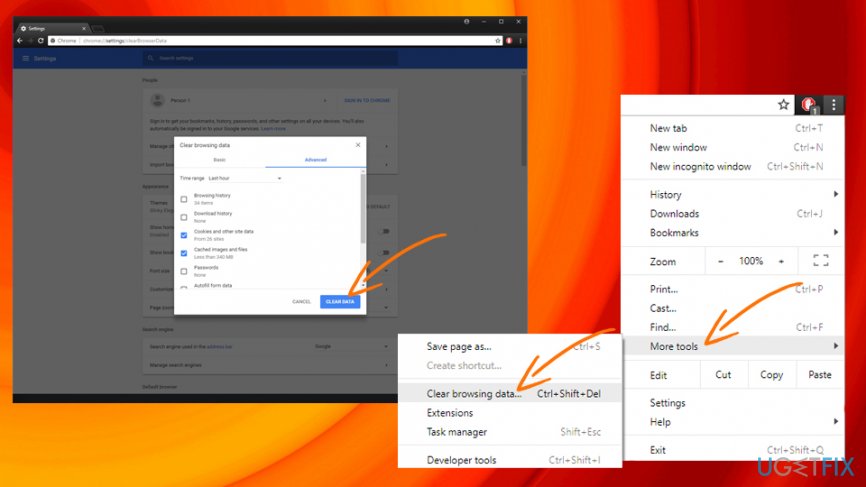
Youtube running slow clear cache
Solution 3. Update Adobe Flash
Typically, the newest versions of browsers use HTML5, which already have flash implemented. You can check if your browser is using HTML5 here. Nevertheless, if your browser is not compatible, merely update Adobe Flash manually:
- Go to official Flashplayer website
- Click on Install Now button
- Proceed with on-screen instructions and restart your browser
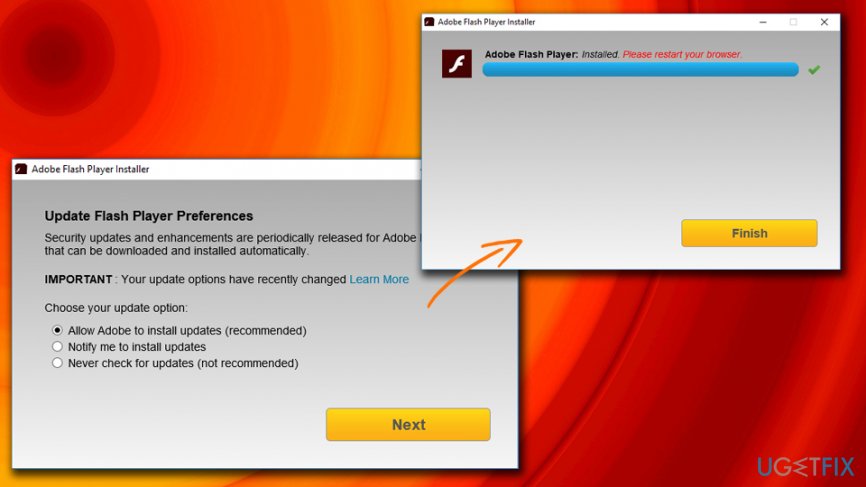
Youtube running slow update adobe flash
Solution 4. Pick lower quality settings
If YouTube is experiencing heavy traffic, your videos will run slow. You can not improve traffic, but you can lower the quality of the video you are watching the following way:
- Open a YouTube video
- Click on Settings and then Quality
- Choose the lowest settings possible, for example, 144p
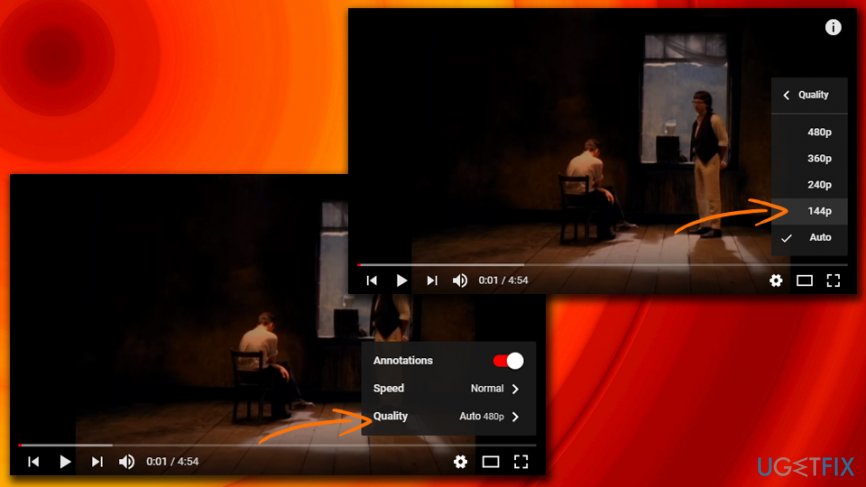
Youtube running slow lower video quality
Solution 5. Update your graphics drivers
If your graphics card drivers are out of date, it means that they cannot handle the latest utilizations implemented by YouTube. Thus, it is essential to check if your drivers need updating:
- Type Device Manager into the search box
- Expand Display adapters and choose the graphics card
- Right-click on it and click Update Driver
- Select Search automatically for updated driver software and wait till Windows finishes to install the latest driver
- Reboot your PC
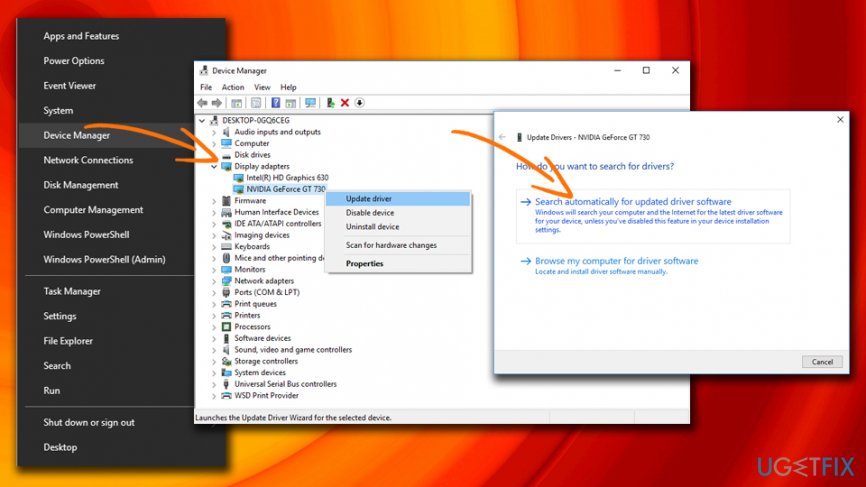
Youtube running slow update graphics drivers
Keep in mind that drivers need to be constantly updated, be it graphics drivers or any others. To keep your system up to date, we recommend using [d1] - all drivers can be updated just with one click.
Bottom line
To fix slow YouTube, you can try checking your internet connection, clearing your browser cache, updating your flash player, and ensuring your graphics drivers are up to date. If these solutions do not resolve the issue, consider scanning your machine for malware with a reputable anti-virus tool.
Frequently asked questions
YouTube may run slow due to a poor internet connection, outdated browser, or excessive cache and cookies. Checking your network speed and clearing your browser data can help improve performance.
To speed up YouTube on Windows 11, try disabling any browser extensions that may interfere with video playback and updating your browser to the latest version. Additionally, lowering the video quality can also help if your internet connection is slow.
If YouTube is buffering on Windows 10, ensure your internet connection is stable, and try restarting your router. You can also try using a different browser or clearing the browser cache to resolve the issue.




Report an issue
What's wrong with this guide? We review every report and update or remove content.
Report received — thank you. We'll review and fix it.
You need a free account to submit a report.
Be the first to comment