How to fix
XAudio2_6.dll is missing
on Windows
Resolve the XAudio2_6.dll missing error on Windows 10 effortlessly. Follow our expert-tested solutions to restore audio functionality in minutes.

What causes How to fix XAudio2_6.dll is missing from Windows 10?
- Problems with DirectX
- Issues with audio drivers
- Potential virus infection
- Malware disguising as legitimate software
- Bugs within DirectX
Repairs Windows system files, removes malware, and restores a clean OS state — without reinstalling.
Hello. I am experiencing a problem with my gaming computer. Every time I am trying to launch any game, the PC shows the following error message: "XAudio2_6.dll is missing. Try to restart the application and see if it fixes the problem" and the game does not launch at all. Is there any solution for this problem?
Several users reported XAudio2_6.dll is missing issue on the forums. Some users claimed that they are unable to launch any games, and others said that the error makes their game crash.[ref en-1] It can be a massive problem because the constant crashing prevents games from running smoothly. Nevertheless, it is relatively easy to fix XAudio2_6.dll is missing from Windows 10.
DLLs are dynamic link library[ref en-2] files used by all Windows operating systems. Similarly to .exe files, DLLs help Windows to execute specific commands to ensure proper function of certain features, for example, running a game. The XAudio2_6.dll is missing error usually occurs due to problems with DirectX or audio drivers.
DirectX is a collection of application programming interfaces[ref en-3] (APIs) and is essential for Windows to run any video game. Therefore, if some bugs within it exist, it can cause games to crash by showing an error message.
Although it is most likely that DirectX problems are causing XAudio2_6.dll issues, there is a chance that your machine is infected with a virus. Some malware[ref en-4] is capable of disguising well and displaying no symptoms at all. Nevertheless, users are bound to encounter several error messages (Blue screen of death stop error is some cases), and XAudio2_6.dll is missing from Windows 10 might be one of them.
Therefore, to make sure that the culprit is not a virus, we advise users to scan their computers using reputable security software, such as [d1]. Sneaky infections might block the operation of an anti-malware program, so you might have to run it in Safe Mode with Networking. Besides, this tool is also capable of fixing several computer issues automatically.
If you do not wish to buy the repair tool, you should keep on reading for XAudio2_6.dll is missing from Windows 10 fix.
This video will help you with this problem:
[youtube P8TXThDcMcU]
Fix 1. Update DirectX to the newest version
Quite often, DirectX is included with games that are installed. Therefore, if you are having problems with a specific game only, you might try to install the provided version inside the game's directory. If the error is affecting multiple games, you should simply install the newest version. To do that, visit the official Microsoft website and download the latest DirectX, which would update all versions below 9.0c.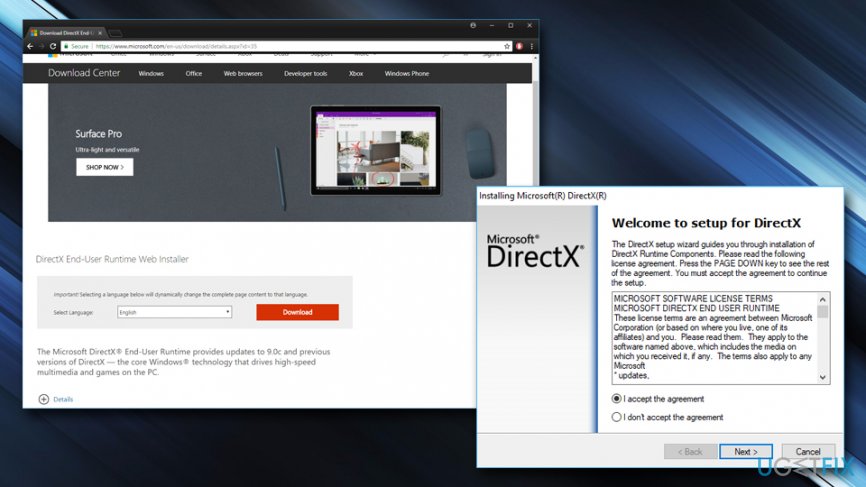
Fix 2. Update audio drivers
Some users reported that updating sound drivers helped them to fix XAudio2_6.dll is missing error. You can upgrade them manually by using the instructions below or by installing third-party software that will automatically update everything. We suggest using [rev id=”Smart Driver Updater”]. Follow these steps if you want to update drivers yourself:
- Right-click on Start button and select Device Manager
- Expand Sound, video and game controllers tab
- Right-click your audio device and choose Update driver
- Then, pick Search automatically for updated driver software.
- Let Windows find and install drivers for you
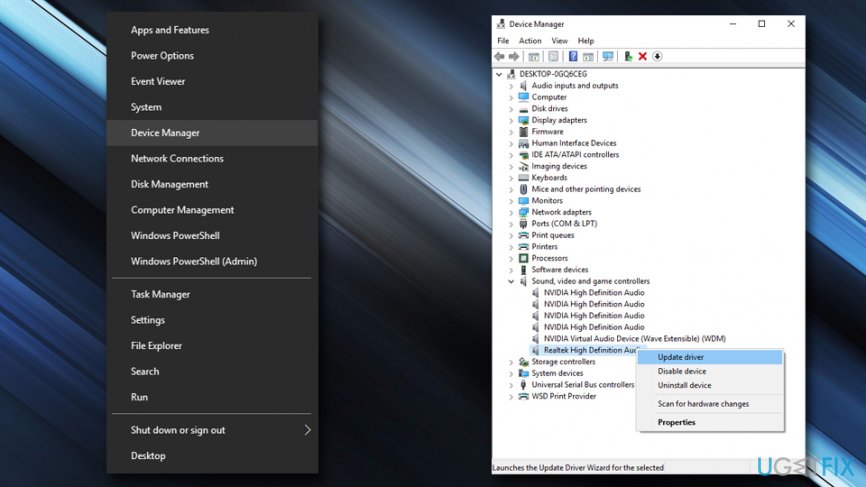
Xaudio2 6 dll is missing update driver
Fix 3. Install the latest Windows updates
In some cases, people forget to update the Windows operating system which can cause several issues, including XAudio2_6.dll is missing error. Thus, make sure your system is up to do the following way:
- Right-click on the Start button and select Settings
- Scroll down and pick Updates and security
- Click on Check for updates
- Let Windows to install the required updates and restart your computer
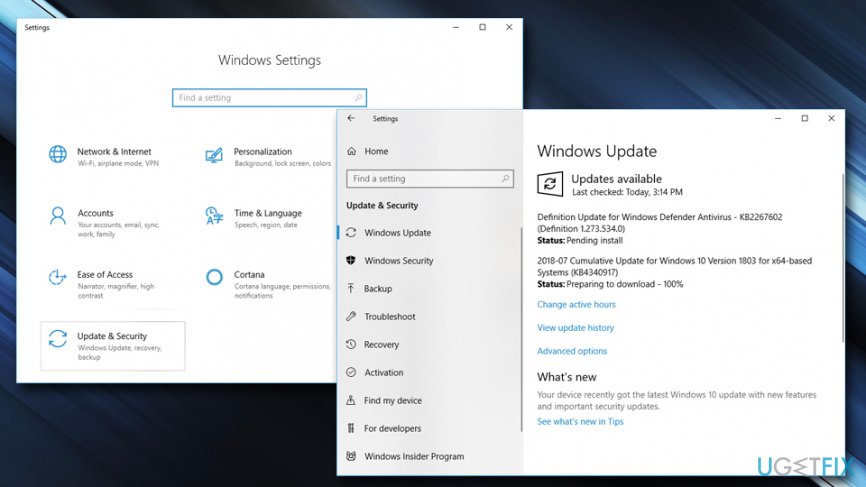
Xaudio2 6 dll is missing update windows
Fix 4. Register XAudio2_6.dll with Microsoft Register Server manually
DLL files usually register with Microsoft Register Server automatically. But in some cases, the process might fail. Therefore, re-register the file manually:
- Right-click on the Start button and select Command Prompt (Admin) or PowerShell (Admin)
- Enter regsvr32 /u XAudio2_6.dll line into the active window and hit Enter
- Then copy regsvr32 /i XAudio2_6.dll and paste into Command Prompt or PowerShell
- Close down the application and see if your game keeps crashing
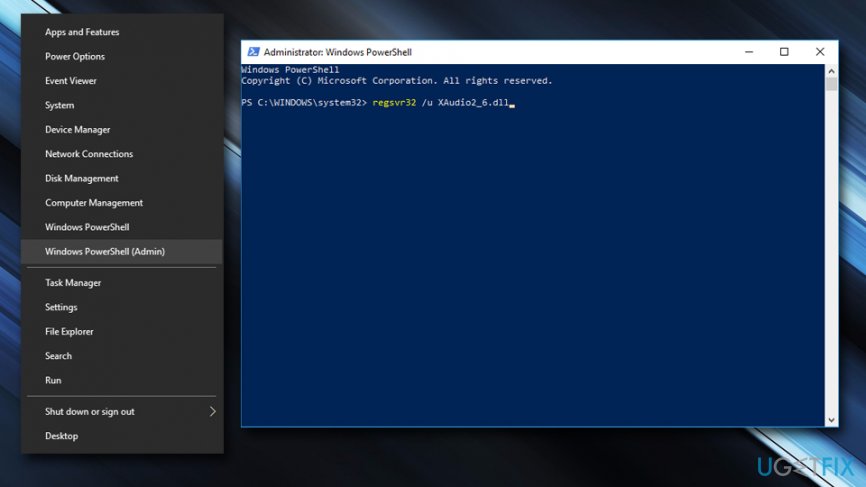
Xaudio2 6 dll is missing microsoft register
Bottom line
To fix the XAudio2_6.dll missing error, users should scan their computers for viruses using reputable security software, update DirectX, and ensure audio drivers are up to date. If these solutions do not resolve the issue, consider running the anti-malware program in Safe Mode with Networking or seeking further assistance.
Frequently asked questions
The XAudio2_6.dll missing error commonly occurs due to incomplete game installations, corrupted system files, or outdated audio drivers in Windows 10.
You can download the XAudio2_6.dll file from a reputable DLL repository, then place it in the game's installation folder or the C:\Windows\System32 directory on Windows 10.
Yes, running the System File Checker (sfc /scannow) can help repair corrupted system files, including the XAudio2_6.dll file, which may resolve the error on Windows 10.




Report an issue
What's wrong with this guide? We review every report and update or remove content.
Report received — thank you. We'll review and fix it.
You need a free account to submit a report.
Be the first to comment