How to fix
Api-ms-win-core libraryloader l1-1-1.dll is missing from your computer
on Windows
Resolve the api-ms-win-core libraryloader l1-1-1.dll error on Windows 10 and 11 easily. Follow our expert-tested solutions for a quick fix!

What causes How to fix api-ms-win-core libraryloader l1-1-1.dll is missing from your computer?
- Missing api-ms-win-core-libraryloader-l1-1-1.dll file
- Corrupt system files
- Issues with Windows 10 Upgrade Assistant
- Problems after Windows 10 Fall Creators Update
- Relocation of necessary DLL files
Repairs Windows system files, removes malware, and restores a clean OS state — without reinstalling.
Hello there. I recently tried to update to Windows 10 (I know I'm late... but I loved Windows 7), and I could not achieve that as I always get the "api-ms-win-core libraryloader l1-1-1.dll is missing from your computer" error message. Is there any way this can be fixed? I tried rebooting, but it does not help. Thanks in advance.
Windows 10 Upgrade Assistant is a software designed by Microsoft to make the upgrade from Windows 7, 8 or 8.1 to Windows 10 easier. The app consists of a simple GUI[ref en-1] that allows users to perform an upgrade, as well as create an ISO[ref en-2] in case the device has no internet connection.
In some cases, users reported that as soon as the download of all the files needed for the upgrade is completed, they encounter api-ms-win-core libraryloader l1-1-1.dll is missing error, which prevents them from continuing the installation. This can be especially frustrating, as using the newest operating system becomes impossible.
The error message states the following:
Windows10UpgraderApp.exe - System Error
The program can’t start because api-ms-win-core-libraryloader-l1-1-1.dll is missing from your computer. Try reinstalling the program to fix this problem.
While the api-ms-win-core-libraryloader-l1-1-1.dll error indicates that the file is missing, it does not hint on where the file is located or whether or not other attributes causing this error are missing. If you want a quick solution, we recommend you download and install [d1]. This application is capable of replacing all corrupt files on the system, as it is compiled of 25,000 up-to-date Windows files.[ref en-3]
The api-ms-win-core-libraryloader-l1-1-1.dll error started to occur after Windows 10 Fall Creators Update was released. Therefore, the issue was blamed on the Upgrade Assistant, which Microsoft patched shortly after. However, users reported that they still encounter the problem. However, our team compiled a list of solutions that might help you fix the api-ms-win-core-libraryloader-l1-1-1.dll error is missing from your computer error. As we already mentioned, you can also use an automatic solution [d1], although the software is not free.
Solution 1. Copy the wimgapi.dll file
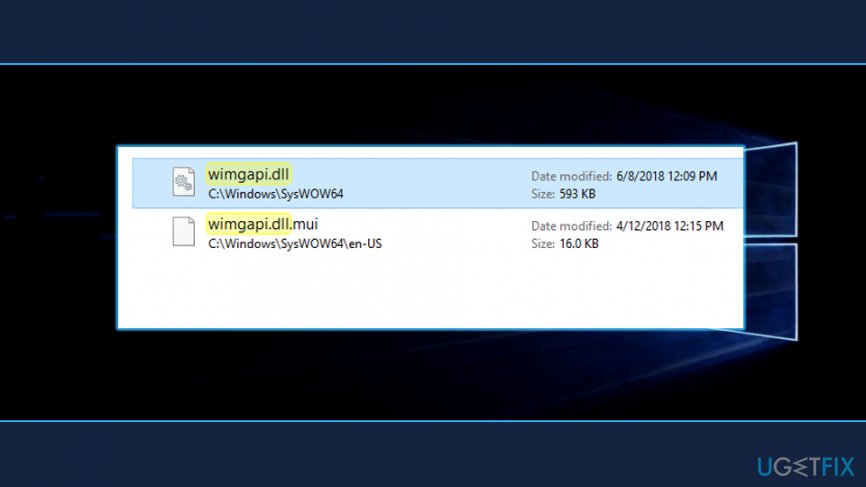
Multiple users said that the api-ms-win-core-libraryloader-l1-1-1.dll error was fixed as soon as they relocated wimgapi.dll file:
- Go to C:\\Windows\\System32 and locate wimgapi.dll library file
- Right-click on it and select Copy
- Go to C:\\Windows10Upgrade folder and paste it by pressing Ctrl + V
- Restart your computer
Solution 2. Install Microsoft Visual C ++ Redistributable
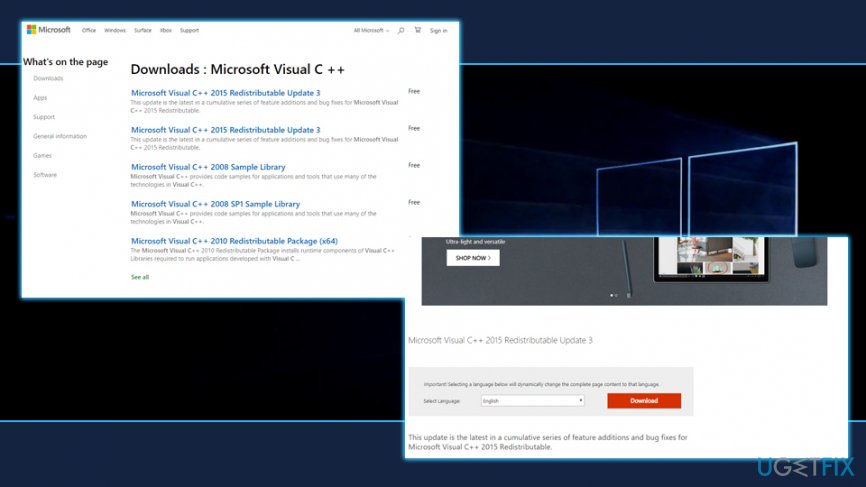
Visual C ++ is an important part of Windows. If it is outdated or missing, it might cause the api-ms-win-core-libraryloader-l1-1-1.dll is missing error. Therefore, go to Windows official Microsoft Visual C ++ download site and update it (make sure you download the latest version).
Solution 3. Update all the drivers on your computer
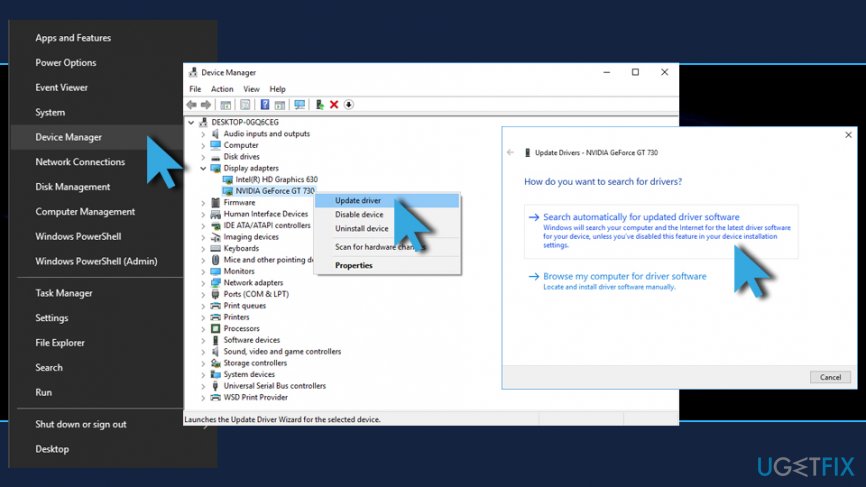
Drivers are vital for computer operation - they ensure that software and hardware communicate correctly. In some cases, these tiny files get corrupted or outdated. In such a case, users can encounter several errors, including api-ms-win-core-libraryloader-l1-1-1.dll is missing. To upgrade drivers, follow these steps:
- Right-click on the Start button and choose Device Manager
- Expand any (for example, Display adapters) category and select the device
- Right-click on it and pick Update Driver
- Select Search automatically for updated driver software and wait for Windows to install the updates
- Restart your computer
If you think that this process might take too long, we recommend you download and install [rev id=”Smart Driver Updater”], which would update your drivers automatically with one button click.
Bottom line
To fix the 'api-ms-win-core-libraryloader-l1-1-1.dll is missing' error, you can try copying the wimgapi.dll file from C:\Windows\System32 or use an automatic solution that replaces corrupt files. If these methods do not resolve the issue, consider reinstalling the program or seeking further assistance.
Frequently asked questions
This error typically occurs when the DLL file is corrupted, deleted, or incompatible with your Windows 10 installation. It can also arise from issues with system files or third-party software conflicts.
You can restore the missing DLL by downloading it from a trusted source and placing it in the C:\Windows\System32 folder. However, it's recommended to run the System File Checker tool to repair any underlying issues.
Yes, reinstalling the application that triggers the error can resolve the issue, as it may replace any missing or corrupt DLL files associated with that program. Ensure your Windows 11 is up to date before proceeding.




Report an issue
What's wrong with this guide? We review every report and update or remove content.
Report received — thank you. We'll review and fix it.
You need a free account to submit a report.
Be the first to comment