How to fix
“Error NSPOSIXErrorDomain” on Safari browser
on Windows
Resolve the "Error NSPOSIXErrorDomain" on Windows 10 and 11 effortlessly. Our expert-tested solutions ensure your Safari runs smoothly in minutes!

What causes How to fix “Error NSPOSIXErrorDomain” on Safari browser?
- Connection problem
- Software packages blocking internet access
- Third-party firewall program
- Internet security application
- Malware presence
Repairs Windows system files, removes malware, and restores a clean OS state — without reinstalling.
Hello, when I try to access a website on my server from Safari 11, I get a message "The operation couldn't be completed" followed with the protocol error NSPOSIXErrorDomain:100. My other browsers work perfectly but Safari is not loading the website. How can I fix this error?
NSPOSIXErrorDomain error is a common protocol error message that appears on Safari browser. Receiving this error can be especially frustrating when you are browsing the web as it disables you from reaching your desired domains. Fortunately, there are a few reasons you may encounter this error and also a few ways how to fix it.
As we have already mentioned, the NSPOSIXErrorDomain error occurs in Safari browser on MacOS[ref en-2] devices. In most cases, this message is only displayed on Safari while other browsers work perfectly. Many users report that this problem occurs after the system upgrade or the internet access gets limited on all browsers at the time.
When this error occurs, you may see this or similar message on the screen:
Safari Can't Open the Page
Safari can't open the page. The error is: "The operation couldn't be completed. Protocol error " (NSPOSIXErrorDomain:100)
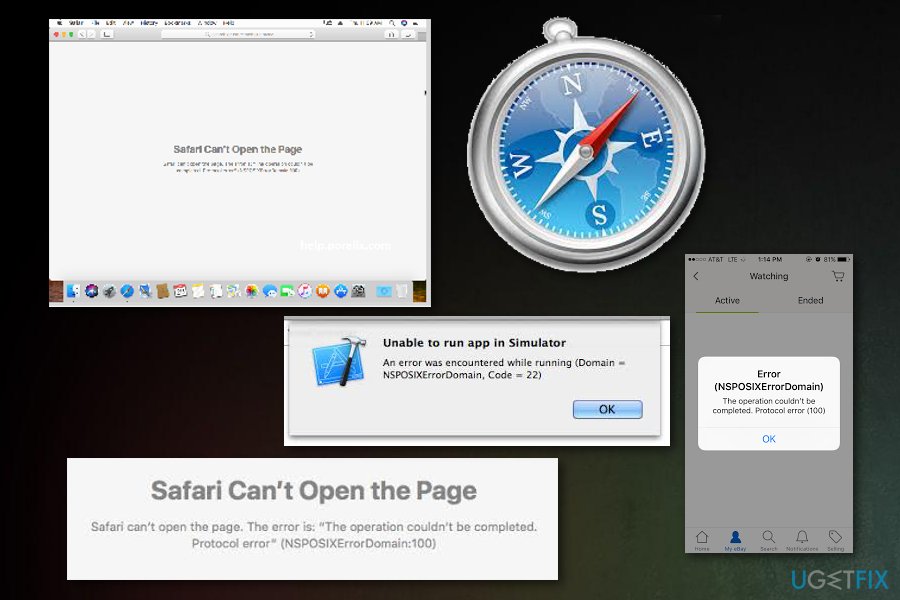
NSPOSIXErrorDomain error can occur whenever you try to access the internet on your browser but there are a few different reasons for this. Probably, the main issue is the connection problem but there might be a different reason this error occurs on your screen.
There is also a possibility that one of the software packages on your device are blocking the access to the Internet or keep some applications from accessing the web. The error can also be associated with a third-party firewall program or an internet security application on your device. One of Intego's Mac applications (e.g. Net Nanny or VirusBarrier) can cause this error too.
Ways to get rid of NSPOSIXErrorDomain error
NSPOSIXErrorDomain error code can affect one of your browsers, few of them or even disable the Internet connection in general. To fix the particular issue and use your applications properly, check your firewall or internet security applications. Note that malware[ref en-3] can also be related to this issue, so a full scan with [d1] is also recommended. If a scan returns no valuable information, follow methods below. You may need to try them all or at least a few to get rid of NSPOSIXErrorDomain error completely.
Method 1: Remove security applications and third-party firewall
Various third-party applications can block the access to the internet for some applications. You need to remove computer security programs and other products to make sure that this error is not occurring again. However, make sure you find alternative security software to stay safe online.[ref en-1]
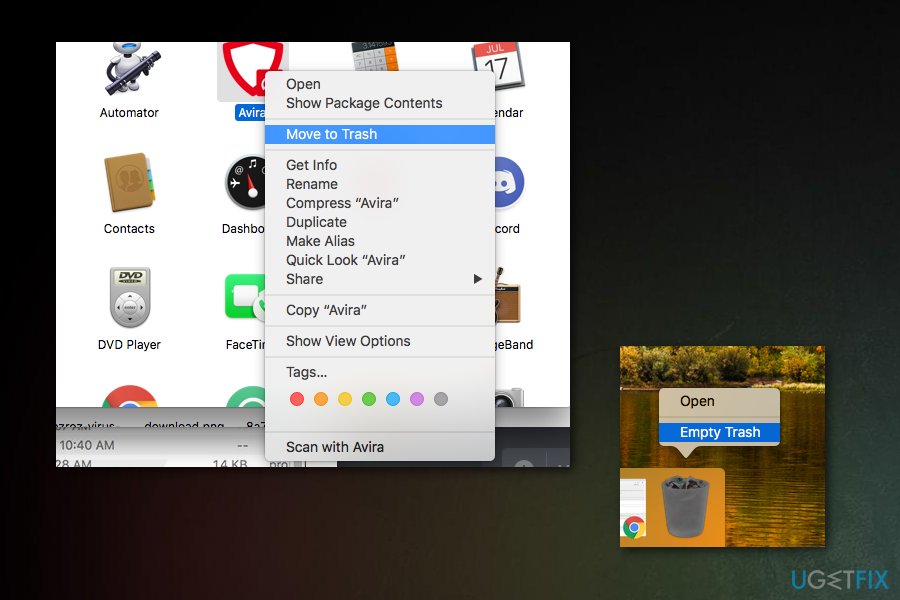
Uninstall third-party firewalls, antivirus and other internet security programs.
- Open Finder and go to Applications, chose the particular program, right-click and select Move to Trash.
- Then empty the Trash.
- Use uninstaller apps that are recommended to use by application developers and remove the program with associated files completely off the system.
After all of this uninstalling, reboot your device by going on the Apple logo in the top menu bar and select Restart. Then, try to launch a browser and visit the page you had issues with again. Sometimes, replacing your security software with alternative applications may be enough to forget about seeing NSPOSIXErrorDomain error again.
Method 2: Uninstall Intego applications from Mac
Specific applications developed for Mac computers, known as Intego, can also cause issues related to the NSPOSIXErrorDomain error code. In most cases, the error occurs after system updates. If there are Intego applications related to parental control or Internet security, the error may occur. Net Nanny or VirusBarrier are the most common applications related to this error.
To fix the issues, you need to remove these apps. If you have encountered NSPOSIXErrorDomain error and have Intego applications installed on the device, uninstall existing programs and associated files from MacOS.
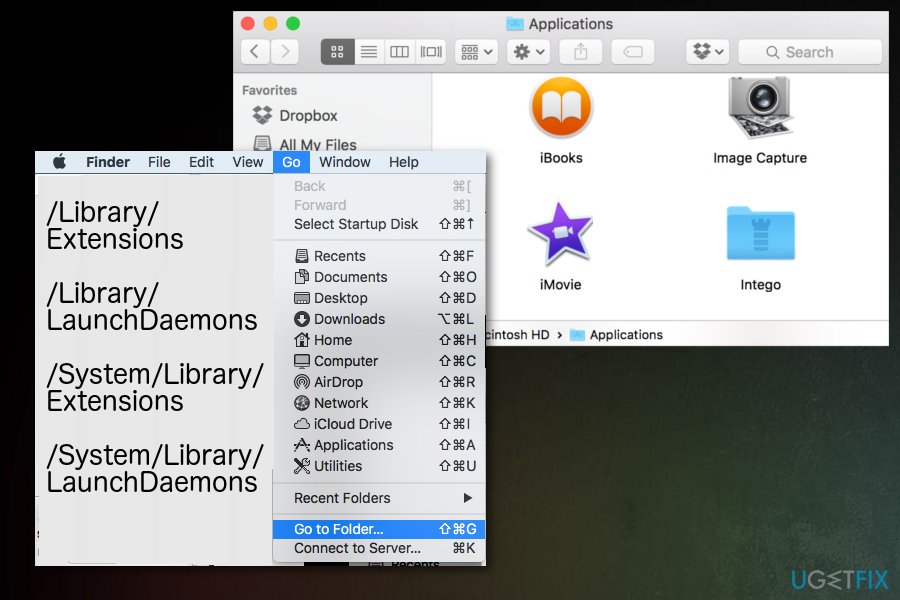
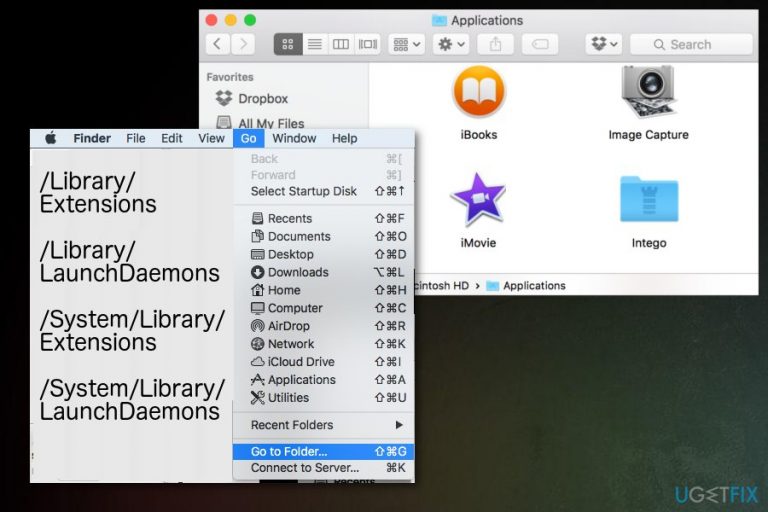
- Launch Finder;
- Click Go in the menu bar at the top of the screen;
- Click Go to Folder and type paths listed below ;
- Check each folder for files associated with Intego.
Search for these paths:
- /Library/Extensions
- /Library/LaunchDaemons
- /System/Library/Extensions
- /System/Library/LaunchDaemons
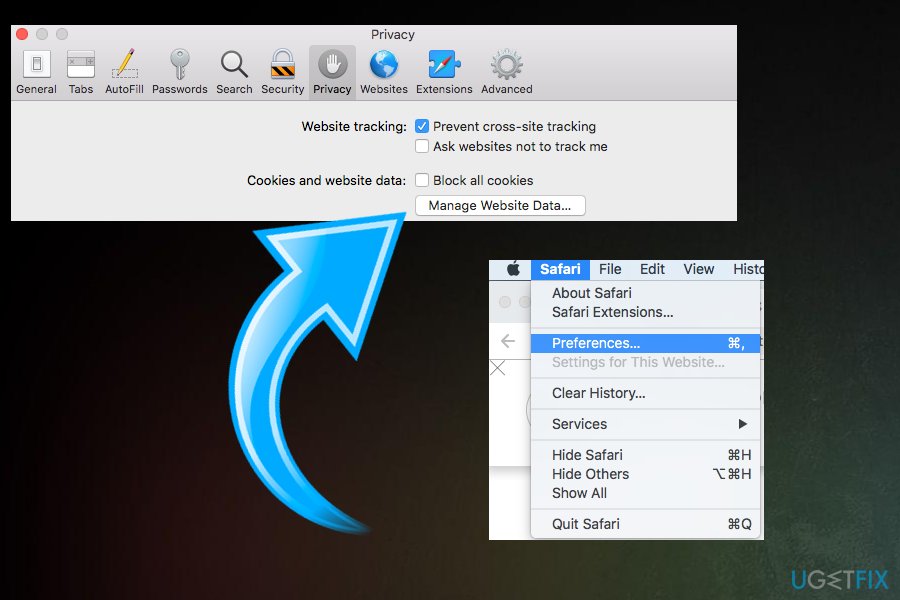
Method 3: Change direct Safari settings
If you have been having the NSPOSIXErrorDomain error issue related to the only one particular domain, this method might be the most helpful for you:
- Go to Safari browser and Preferences;
- Select Privacy and Details/More data;
- Find the concerning domain and clear cookies by clicking Remove.
Bottom line
To fix the NSPOSIXErrorDomain error, check your firewall and internet security applications, as they may be blocking access. Additionally, ensure that no malware is present on your device. If none of these solutions work, consider further troubleshooting or seeking professional assistance.
Frequently asked questions
The 'Error NSPOSIXErrorDomain' typically indicates a network connectivity issue or a problem with Safari's access to the internet on Windows 10. You can try resetting your network settings or reinstalling Safari to resolve the issue.
To troubleshoot this error on Windows 11, ensure that your firewall or antivirus isn't blocking Safari's internet access, and check your DNS settings. If the problem persists, consider clearing Safari's cache and cookies.
Yes, you can attempt to fix 'Error NSPOSIXErrorDomain' by updating Safari to the latest version and checking for Windows updates. Additionally, resetting Safari's preferences may help resolve the error.




Report an issue
What's wrong with this guide? We review every report and update or remove content.
Report received — thank you. We'll review and fix it.
You need a free account to submit a report.
Be the first to comment