How to fix
Remove Find my iPhone activation lock without the previous owner
on Windows
Unlock your device effortlessly and remove the Find My iPhone activation lock without the previous owner. Expert-tested methods await, fixed in minutes.

What causes How to remove Find my iPhone activation lock without the previous owner?
- Previous owner did not remove Activation lock
- Device is still linked to the previous owner's iCloud account
- Factory reset was performed without removing Find my iPhone
- New owner cannot contact the previous owner
- Device was purchased from a reseller who did not unlock it
Repairs Windows system files, removes malware, and restores a clean OS state — without reinstalling.
Hello, I have a problem with an Activation lock on an iPhone. I have recently bought this phone from another person and was told that a factory reset was already performed for it. Was hoping to not have any trouble using it and happily paid the agreed amount. However, now, when I try to access it, I see the "Find my iPhone activation" lock active. Unfortunately, I can no longer contact the previous owner, so I am locked out of my new phone! Please help me.
iPhones, iPads, and other Apple gadgets are known for their sleek quality and great usability, although they are also known to be more pricey than Android devices. Unfortunately, this fact alone makes Apple products quite attractive to thieves, so Activation Lock is there to protect you from them. If somebody takes your phone without permission, they cannot access the phone unless they remove the Activation lock from it.
This scenario is also common to genuine users who purchased an iPhone from somebody else. As soon as the device is used for the first time, it is connected to iCloud, where a unique identifier of the device and the Apple ID are sent to (essentially, they are merged together, preventing unauthorized access). Activation lock is also related to another security feature called Find my iPhone, and both are often used together.
After first setting up the phone, most users will not even know that these features are activated, and, at some point, sell their device. The new owners will not be able to access their phones unless they remove Find my iPhone activation lock with the help of the previous owner's credentials. In some cases, resellers will even deliberately not remove Find my iPhone activation lock and charge extra for it.[ref en-1]
The issue of how to remove Find my iPhone activation lock without the previous owner is constantly bugging people even in 2020. It may take days or weeks for those money-driven people to fix the problem, so stay away from such scammers[ref en-2] and try other methods that allow removing Find my iPhone activation lock without the previous owner for free.
How to remove Find my iPhone activation lock without a previous owner
To remove Find my iPhone activation lock for free, you may try to get help from the previous owner and their Apple ID passwords. However, this is impossible to get, in most cases, although it can be the best solution when you erased your own device. However, people who got their devices pre-owned cannot know who was the owner since the reseller is not the one that used this iPhone or iPad. You can try the methods listed below to fix the issue and unlock Find my iPhone activation lock for good.
Remove Find my iPhone activation lock with owners help remotely
- Go to iCloud official site and enter the Apple ID. Or the owner does that on his device.
- Tap on the Find my iPhone web app and launch it.
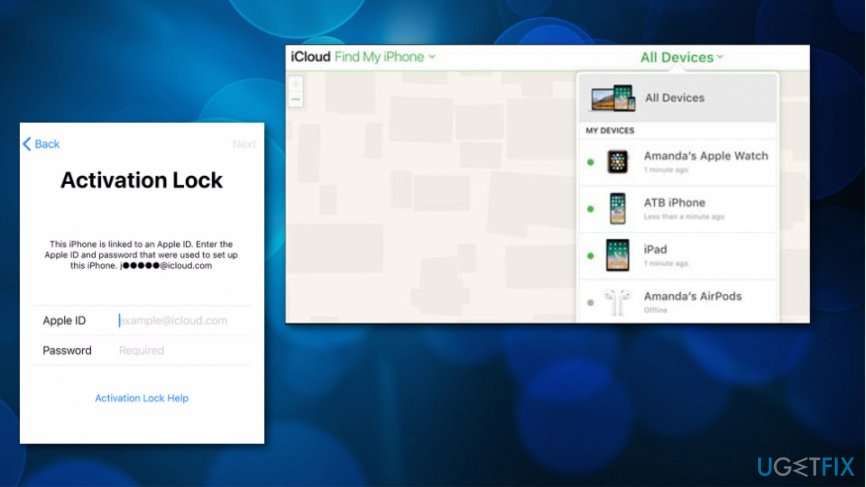
How to remove find my iphone activation lock without the previous owner icloud - Click the All Devices button at the menu bar.
- You or the person should select the devices needed to be deleted.
- Select Remove from Account.
- This method works for people that erased their own devices.
Erase phone using Find my iPhone application
- Launch the Find My iPhone app.
- This where you again need to put your or the owner's Apple ID.
- Select the device and choose Erase iPhone.
Use third-party software to remove Find my iPhone activation lock without the previous owner
You can try unlocking the device and removing iCloud account as well. There are a few tools that allow doing so. Your iPhone should be activated and the data backed up if you want to recover something from the device.
Nevertheless, we will not provide any examples of these services, as most are hardly legal, as they abuse iOS vulnerabilities in order to conduct a successful intrusion. In other cases, the apps or services might not be safe at all (include malware,[ref en-4] for example), so please be aware that this method is not secure to use. Note that there are also paid services that can do this for you, although not all of them are legitimate as well.
Bypass Find my iPhone activation lock
- Tap on the Home button and select Wi-fi settings.
- There on the list tap the i button.
- Go to the settings of this network and input the new DNS according to your location:
If in USA/North America, put in the new DNS 104.154.51.7
If in Europe, put in the new DNS 104.155.28.90
If in Asia, put in the new DNS 104.155.220.58
If in other areas, put in the new DNS 78.109.17.60
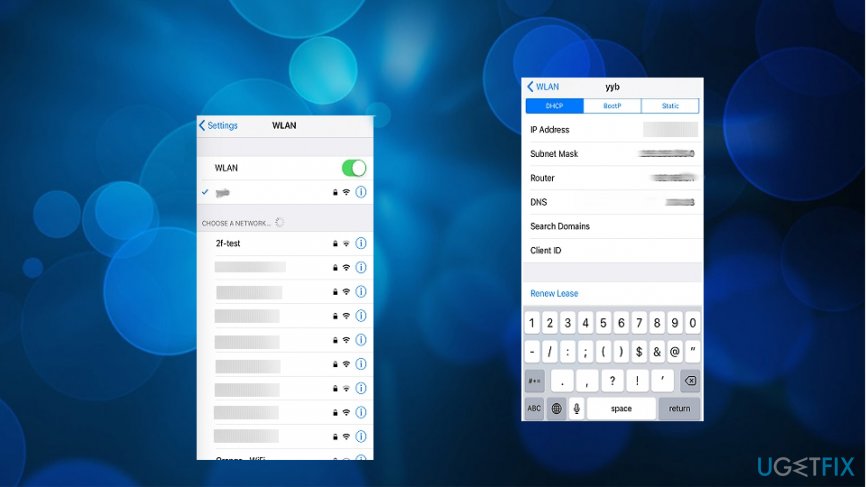
How to remove find my iphone activation lock without the previous owner dns
Contact Apple Support for help
In case you have a proof of the purchase, you can most likely remove Find my iPhone activation lock without the previous owner with the help of Apple Support. Thus, if you bought your iPhone on eBay, Amazon, or another place that shows the money trail, you can count it as proof.
Print our purchase order or have it accessible on a mobile device and go to your local Apple Store. Explain the situation, and tell them that you would like to remove Find my iPhone activation lock to be able to use the device you purchased legally. They will unlock it for you. Additionally, you can try this method by calling Apple Support as well, although this might be a bit more difficult to prove.
For future reference, always make sure that an iPhone or iPad you are purchasing is not locked in the first place. Since you can warrant some of your online purchases (many stores offer money-back guarantees if the goods do not meet the requirements), face-to-face sales are not protected by such insurance. Thus, during the process, turn on the phone and make sure that "Set up your iPhone" screen shows up upon launching it instead of the lock screen.
Bottom line
To remove the Find my iPhone activation lock, you may need to contact Apple Support for assistance or use third-party services that claim to unlock the device. If these methods do not work, consider returning the device to the seller or seeking a refund.
Frequently asked questions
No, bypassing the Find My iPhone activation lock requires specific tools that are not natively available on Windows 10 or Windows 11.
Yes, there are third-party tools that claim to remove the activation lock, but their effectiveness and safety can vary, so proceed with caution.
If you cannot reach the previous owner, you may need to contact Apple Support for assistance, as they have the means to help with activation lock issues.




Report an issue
What's wrong with this guide? We review every report and update or remove content.
Report received — thank you. We'll review and fix it.
You need a free account to submit a report.
Be the first to comment