
mfc140.dll was not found: restoring the ANSI MFC library the right way
mfc140.dll is the ANSI, or multibyte, build of Microsoft Foundation Classes version 14: the framework that draws the windows, dialogs and toolbars of many older-style desktop programs. It is not a Windows system file. Microsoft ships it inside the Visual C++ Redistributable, and installing or repairing that package is the clean way to bring it back.

Prefer to fix it yourself? The manual steps follow.
Download mfc140.dll the official way
14.51.36247.0Run Microsoft's Visual C++ Redistributable, version 14.51.36247.0. The same installer that sets up the C++ runtime also writes the MFC libraries, mfc140.dll included, into the system folders and registers them, so later updates and repairs can find and replace them.
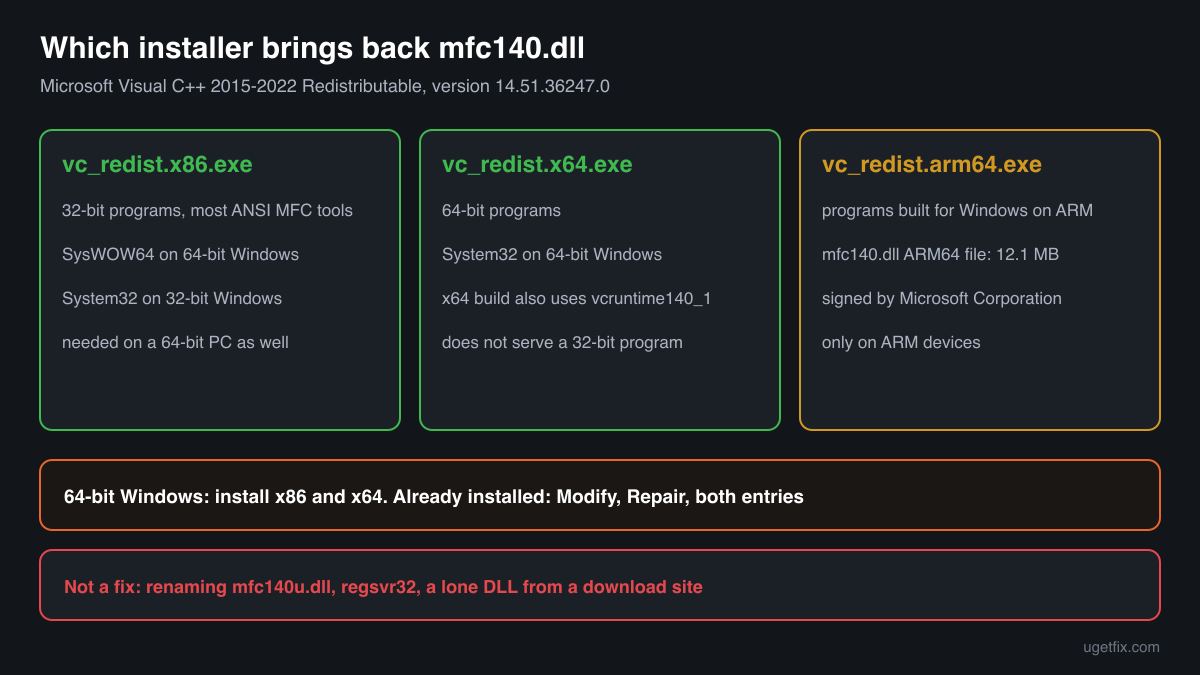
A 64-bit PC normally needs the x86 and the x64 package side by side. Programs that still use the ANSI MFC library are often old 32-bit code, and a 32-bit program only accepts the 32-bit mfc140.dll from SysWOW64. If you install x64 alone, the message usually stays.
Use “DLL files only” when a program expects its libraries beside its .exe, or when the installer cannot run on a PC: the ZIP holds mfc140.dll and the Visual C++ runtime files it loads, version 14.51.36247.0, extracted from Microsoft's installer without any change. You need a free uGetFix account to download. Signing in or registering takes about a minute, and then you return to this page.
On October 17, 2026 we downloaded each installer from Microsoft and extracted it to read the files inside. The download pages give the size and SHA-256 checksum of every installer, so you can check that your saved copy is identical. The installers come from Microsoft's own server (aka.ms).
Step by step
- Read the full error text first. Write down whether it says “was not found”, “ordinal” or “not designed to run on Windows”, and which program showed it. The name matters too: mfc140.dll and mfc140u.dll are different files, and only the one in your message is the one the program wants.
- Install both packages from the links above. Run vc_redist.x86.exe first, then vc_redist.x64.exe. On a 64-bit PC this covers 32-bit and 64-bit MFC programs at once. If the installer reports that a newer version is already present, close it and go to the repair step.
- Repair an existing installation. In Settings, Apps, Installed apps, search for “Visual C++”. Open the menu beside each “Microsoft Visual C++ 2015-2022 Redistributable” or “Microsoft Visual C++ v14 Redistributable” entry, choose Modify, then Repair. Repair the x86 entry as well as the x64 one, then restart Windows.
- Check the program's own folder. Open the folder that holds the program's .exe. If an mfc140.dll sits there, Windows uses it before the one in System32 or SysWOW64. An outdated or broken private copy makes the program fail while every other MFC program works. Reinstall or update that program so it writes a good copy, or ask its publisher.
- Still the same message: rule out the program. If both packages are freshly installed and repaired and only one program still fails, the program itself is the likely cause. Look for an update, reinstall it to a fresh folder, and confirm with its maker that it runs on the Visual C++ 2015-2022 runtime.
What not to do
Do not grab a lone mfc140.dll from a DLL download site.
You get one file of unknown version and origin, without the runtime it needs and without anything that will update it later. Copies passed around on such sites are a known route for altered libraries. When a program really needs the loose file in its folder, use “DLL files only” above, and test any copy you already have with the checker below.
Do not rename mfc140u.dll to mfc140.dll.
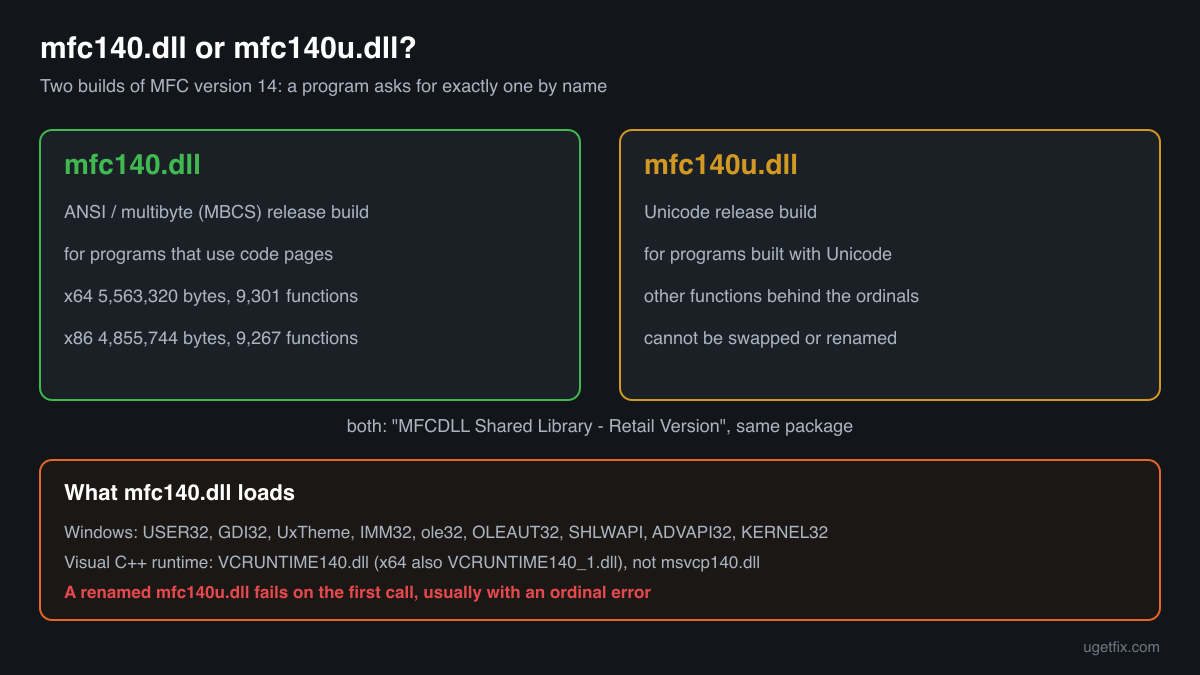
The Unicode and the ANSI MFC libraries contain different functions under different numbers. A renamed file loads, then fails on the first function the program asks for, usually with an ordinal error instead of the original message.
Do not register it with regsvr32.
mfc140.dll is a library that programs link to directly. It has no DllRegisterServer entry point, so regsvr32 only reports an error and changes nothing.
Do not copy it into System32 or SysWOW64 yourself.
The Windows Installer does not know a file you placed by hand, so a later redistributable update may skip it and leave an outdated copy behind. Getting the folders the wrong way round, a 64-bit file in SysWOW64 or a 32-bit file in System32, also causes a 0xc000007b or “not designed to run” error.
Check the copy on your PC
Pick the mfc140.dll you want to check. Your browser computes its checksums and compares them with 18 builds we know: the files of the current official redistributable, the builds indexed from Windows images and the older copies found on PCs.
The file stays on your computer. Nothing is uploaded: the checksum is computed locally.
Found mfc140.dll in Downloads, Temp, AppData or beside a program you never installed? Then the question is whether that copy is genuine, not how to replace a missing file. How to tell if mfc140.dll is malware, on 2-Spyware
The error messages and what each one means
The same missing or broken file can produce several different texts. Match the wording you see to the right cause before you change anything.
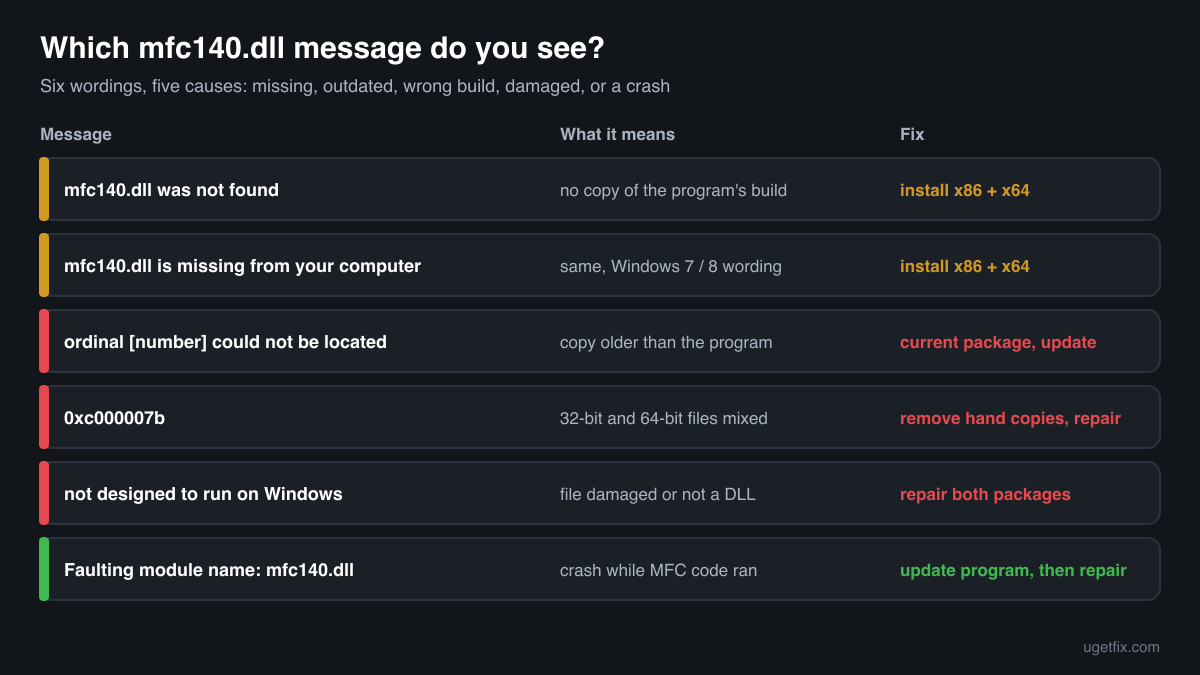
The code execution cannot proceed because mfc140.dll was not found. Reinstalling the program may fix this problem.
Windows 10 and Windows 11 wording. Windows looked in the program's folder and in the system folders and found no mfc140.dll of the program's build. Install the redistributable: x86 and x64 on a 64-bit PC.
The program can't start because mfc140.dll is missing from your computer. Try reinstalling the program to fix this problem.
The Windows 7 and Windows 8 wording of the same situation. The fix is identical: install the current x86 and x64 packages.
The ordinal [number] could not be located in the dynamic link library MFC140.dll.
MFC programs call the library's functions by number (ordinal), not by name. The mfc140.dll that loaded is older than the one the program was built against and lacks that number. Install the current redistributable, and if the program carries its own older copy, update or reinstall the program.
The application was unable to start correctly (0xc000007b). Click OK to close the application.
A 32-bit program found a 64-bit mfc140.dll, or the reverse, usually because a file was copied by hand into the wrong folder or into the program's folder. Remove hand-placed copies, then repair both redistributable packages.
mfc140.dll is either not designed to run on Windows or it contains an error. Error status 0xc000012f.
A file with the right name is present but cannot be loaded: it is truncated, damaged on disk, or not a real Windows library. Repair both packages and delete any mfc140.dll you added to the program's folder yourself.
Faulting module name: mfc140.dll
An entry in Event Viewer, Windows Logs, Application, after a crash. The library was found and loaded, and the program failed while MFC code was running, for example while opening a window or a dialog. Update the program first, then install the current redistributable so it runs on Microsoft's latest MFC fixes.
File facts for the current official version
Read from the files inside Microsoft's installers, version 14.51.36247.0. MFCDLL Shared Library - Retail Version, Microsoft Corporation.
| Build | Version | Size | Exported functions | Signed by |
|---|---|---|---|---|
| x64 | 14.51.36247.0 | 5,563,320 bytes | 9,301 | Microsoft Windows Software Compatibility Publisher |
| x86 | 14.51.36247.0 | 4,855,744 bytes | 9,267 | Microsoft Windows Software Compatibility Publisher |
| ARM64 | 14.51.36247.0 | 12,066,144 bytes | 9,286 | Microsoft Corporation |
- SHA-256 · x64
b784303d86232a1b316c79839aa78bf631b4fc182e55d9d947688adb066dff26- SHA-256 · x86
32650fb886bf4a721a55883140fdaba285fb3829b91f3e4940e56fb8d2023410- SHA-256 · ARM64
88a8b5e1842a19b5d14701d8cd0eb8a5604b968f9b6d71c201d26f802563e496
After installation, the 64-bit mfc140.dll is in C:\Windows\System32 and the 32-bit one in C:\Windows\SysWOW64; on 32-bit Windows the 32-bit file is in System32. Microsoft describes the file as “MFCDLL Shared Library - Retail Version”, the same text as its Unicode twin, so the name is the only quick way to tell them apart in Properties. Every build exports over 9,200 functions, the MFC classes for frames, dialogs, controls, documents and printing, and programs reach them by ordinal. The x64 and x86 files are signed by Microsoft Windows Software Compatibility Publisher, the ARM64 file by Microsoft Corporation.
What mfc140.dll itself depends on
mfc140.dll sits on top of the Windows user interface. Its import table names the Windows libraries for windows and painting (USER32.dll, GDI32.dll), themes (UxTheme.dll), input methods (IMM32.dll), COM and OLE (ole32.dll, OLEAUT32.dll), and paths, registry and memory (SHLWAPI.dll, ADVAPI32.dll, KERNEL32.dll). The ARM64 build also imports dwmapi.dll and PROPSYS.dll. Windows supplies every one of them.
Of the Visual C++ runtime, mfc140.dll imports VCRUNTIME140.dll, and the x64 build VCRUNTIME140_1.dll as well. It does not need msvcp140.dll. A program that uses MFC may still ask for msvcp140.dll on its own account, which is why one fix for the whole set, the redistributable, works better than chasing files one error at a time.
VCRUNTIME140_1.dllVCRUNTIME140.dllADVAPI32.dllapi-ms-win-crt-convert-l1-1-0.dllapi-ms-win-crt-filesystem-l1-1-0.dllapi-ms-win-crt-heap-l1-1-0.dllapi-ms-win-crt-math-l1-1-0.dllapi-ms-win-crt-multibyte-l1-1-0.dllapi-ms-win-crt-runtime-l1-1-0.dllapi-ms-win-crt-stdio-l1-1-0.dllapi-ms-win-crt-string-l1-1-0.dllapi-ms-win-crt-time-l1-1-0.dllapi-ms-win-crt-utility-l1-1-0.dlldwmapi.dllGDI32.dllIMM32.dllKERNEL32.dllole32.dllOLEAUT32.dllPROPSYS.dllSHLWAPI.dllUSER32.dllUxTheme.dllThe api-ms-win-crt entries are the Universal C Runtime. Windows 10 and Windows 11 include it and Windows Update services it; the Visual C++ package does not replace it.
What the redistributable installs
Runtime files of the x64 installer, version 14.51.36247.0: 13 libraries installed and updated together. mfc140.dll is one of the two biggest, next to mfc140u.dll. The same Microsoft package also carries the rest of MFC, such as the Unicode library and the per-language resource files (mfc140enu.dll and its siblings).
| File | Microsoft's description | Size |
|---|---|---|
concrt140.dll | Microsoft® Concurrency Runtime Library | 365 KB |
mfc140.dll | MFCDLL Shared Library - Retail Version | 5,433 KB |
msvcp140.dll | Microsoft® C Runtime Library | 628 KB |
msvcp140_1.dll | Microsoft® C Runtime Library _1 | 35 KB |
msvcp140_2.dll | Microsoft® C Runtime Library _2 | 268 KB |
msvcp140_atomic_wait.dll | Microsoft® C Runtime Library _atomic_wait | 56 KB |
msvcp140_codecvt_ids.dll | Microsoft® C Runtime Library _codecvt_ids | 30 KB |
vcamp140.dll | Microsoft® C++ AMP Runtime | 408 KB |
vccorlib140.dll | Microsoft ® VC WinRT core library | 342 KB |
vcomp140.dll | Microsoft® C/C++ OpenMP Runtime | 208 KB |
vcruntime140.dll | Microsoft® C Runtime Library | 174 KB |
vcruntime140_1.dll | Microsoft® C Runtime Library | 49 KB |
vcruntime140_threads.dll | Microsoft® C Runtime Library | 38 KB |
Older versions of mfc140.dll found on PCs
Many programs install mfc140.dll into their own folder and never update it, so old builds stay on PCs for years. A public DLL catalogue lists 10 of these copies, from version 14.0.23026.0 to 14.25.28508.3, and the table shows their checksums so you can identify yours.
The current redistributable installs 14.51.36247.0, which is newer than every build listed here. A match points to an older Microsoft release, but users supplied the list and nobody verified it, so check for the Microsoft signature as well. If you get an ordinal error and your copy is in this list, the copy is too old: install the current package and update the program that brought it.
| Version | Build | Size | MD5 | SHA-1 |
|---|---|---|---|---|
14.25.28508.3 | 64-bit | 5.3 MB | 390118bae3062633edcee4dfffe9ba20 | f5a96bb4e525d3ef65bb7367e8db8ce9fa24a0b3 |
14.25.28508.3 | 32-bit | 4.6 MB | 4b9941864214a7bb96d3704420c2d28c | 05acf3d57a349dcf29bc68a7a6f0dec6d971b940 |
14.24.28127.4 | 64-bit | 5.5 MB | 64fcc1c770b0b3c8321f2ff94e5c2673 | cc1bb4b8b2a4fe45d4d48ea525f2fbf75f19e5eb |
14.16.27024.1 | 64-bit | 5.5 MB | 512c74b9d1570e35dfc405d97cfa6334 | 4654ec5a08637be3e97cd9ad9732752ac85e0472 |
14.16.27012.6 | 32-bit | 4.5 MB | e9503911178352a473eeba6ab0768ff7 | b5f037668d7d6e7fb3fec27b6c1fb8c7c78fc7c2 |
14.14.26405.0 | 64-bit | 5.6 MB | 1fba734b4505b3a65a6929685db38d2b | 102adea6dcdf272e8db5bdd813b9e1b1873baebb |
14.12.25810.0 | 32-bit | 4.6 MB | 44184a8d86bf984dc1f098f072abb630 | 012c0d8cc9b11777d525d05cde31df70ddc43474 |
14.11.25325.0 | 64-bit | 5.8 MB | f53e0add5f77cef33262aa204376da2f | c4a411d1ff34d41d6228ec805da8700c195f03dd |
14.0.23026.0 | 64-bit | 5.4 MB | 9c83661fde6951342aeb95c88d4d653a | 9886ba3639b347ec88959d7b9ffb3fe9c2b71b9f |
14.0.23026.0 | 32-bit | 4.2 MB | 7a0cec41caccef925f5d34a84b9f2e45 | 0448a668257a6e1ff7864bc63538486ed18f2fea |
Copies uploaded by users to a public DLL catalogue, read on 14 October 2026. Checksums are shown for identification only. We do not offer these copies for download and have not checked each against Microsoft's signature.
Questions people ask
Is mfc140.dll the same as mfc140u.dll?
No. Microsoft's naming table for MFC defines MFCversion.DLL as the ANSI or MBCS release build and MFCversionU.DLL as the Unicode release build. mfc140.dll is therefore the multibyte library and mfc140u.dll the Unicode one. A program is compiled against one of them and asks for that exact name. The redistributable installs both, so one fix covers either message.
Which programs still use mfc140.dll?
Programs whose code was written for code pages rather than Unicode, built with Visual Studio 2015 or later and linked to MFC dynamically. These are often long-lived business, engineering and hardware tools that were moved to a newer compiler without changing how they handle text. You do not need to know which one it is: installing both packages serves them all.
Which Visual C++ version does mfc140.dll need?
MFC version 14, which is what the 140 means. Visual Studio 2015, 2017, 2019 and 2022 all build against it, and the current Visual C++ 2015-2022 (v14) Redistributable serves programs from any of them. An error that names mfc120.dll, mfc110.dll or mfc100.dll is about an older MFC version with its own redistributable.
The error names mfc140d.dll. What is that?
The D marks the ANSI debug build of MFC, which Microsoft's naming table lists next to the release build. Debug libraries exist for developers testing their own code and are not part of any redistributable for end users. The program you started was built in debug mode; ask its publisher for the release build.
Why do I have mfc140.dll and still get the error?
Usually because the copy you have is not the one the program can use. A 32-bit program ignores the 64-bit file in System32, and an old copy in the program's own folder wins over a new one in the system folders. Install the x86 and x64 packages, then update the program or remove a copy you placed beside it yourself.
Is the mfc140.dll on my PC safe?
A copy signed by Microsoft in System32, SysWOW64 or the folder of a program you installed is the genuine library. Use the checker on this page to compare a copy you are unsure about with the known builds; the 2-Spyware link above covers where suspicious copies turn up.
Related guides
mfc140.dll was not found: restoring the ANSI MFC library the right way
Referencemfc140u.dll is missing or will not load: the MFC library and how to restore it
Sources
- Microsoft: Latest supported Visual C++ Redistributable downloads
- Winbindex, the Windows binaries index (m417z)
File data read on October 17, 2026.

The editors who write and check uGetFix guides and reference pages. File facts are read from Microsoft's own installers and documentation, and every page shows the date its data was read.
Questions and experiences
Ask about this page: members and our editors answer. Reading is open; writing needs a free account.
…