
msvcp110.dll is missing: reinstall the Visual C++ 2012 C++ library from Microsoft
msvcp110.dll is the C++ Standard Library of Microsoft Visual C++ 2012. Programs and games compiled with Visual Studio 2012 load it by name at startup, and it never comes with Windows itself or with a newer Visual C++ package. To end the error, install or repair Microsoft's Visual C++ 2012 Update 4 Redistributable, in both the x64 and the x86 build on 64-bit Windows.

Prefer to fix it yourself? The manual steps follow.
Download msvcp110.dll the official way
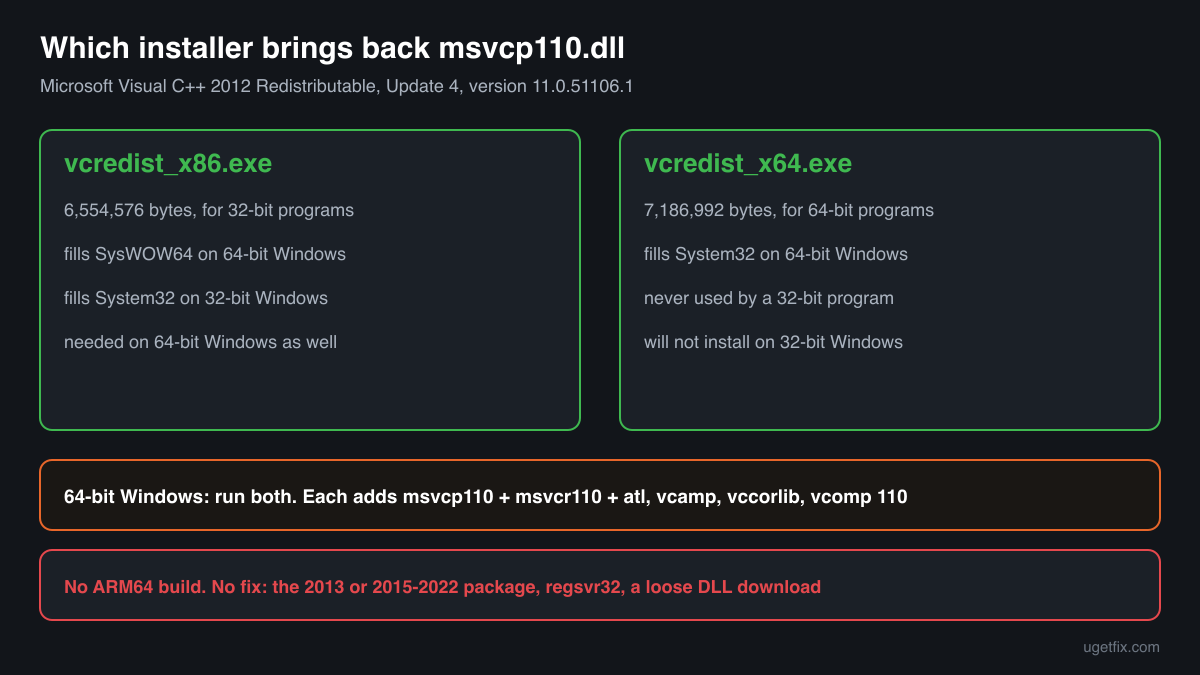
11.0.51106.1Install the Microsoft Visual C++ 2012 Redistributable, Update 4. It contains msvcp110.dll version 11.0.51106.1, the last build Microsoft released for this runtime. Along with it the installer adds msvcr110.dll, the C runtime that msvcp110.dll cannot work without, and four other 2012 libraries, and it records the set so that Repair and Uninstall in Windows can handle it later.
On 64-bit Windows run both installers. The x86 package puts the 32-bit msvcp110.dll in SysWOW64, and that is the only copy a 32-bit program will load. Plenty of games and tools from the Visual Studio 2012 years are 32-bit, so a PC with only the x64 package often still shows the error.
“DLL files only” is meant for a program that wants the runtime in its own folder, or for a PC where the Microsoft installer will not start. Each ZIP contains msvcp110.dll together with msvcr110.dll and the other Visual C++ 2012 libraries, version 11.0.51106.1, taken out of Microsoft's installer without any change. You need a free uGetFix account to download. Sign in or register, which takes about a minute, and you come back to this page.
Both installers were downloaded from Microsoft's server on October 17, 2026 and unpacked file by file. The download pages show the size and SHA-256 checksum we recorded, so you can confirm your download is the same file. Both buttons lead to download.microsoft.com, to the Update 4 packages Microsoft links for Visual C++ 2012.
Step by step
- Check which 2012 packages you have. Open Settings, Apps, Installed apps and type “2012” in the search box. You want two entries: “Microsoft Visual C++ 2012 Redistributable (x64)” and “Microsoft Visual C++ 2012 Redistributable (x86)”. A 2013 or 2015-2022 entry does not count, because those packages install other file names.
- An entry is missing: install it. Download the missing installer above, or both if neither is listed, and run it. 32-bit Windows needs the x86 package only. If setup asks for a restart, restart before you open the program again.
- Both entries are there: run setup again, then Repair. Running the Update 4 installer over an earlier 2012 release updates msvcp110.dll to 11.0.51106.1. If setup says this version is already installed, return to Installed apps, click the three dots beside each 2012 entry, choose Modify and then Repair. The runtime files are written again and nothing in your programs changes.
- A game shows the error: run the installers it brought. Many games keep the Visual C++ 2012 installers in a subfolder named _CommonRedist, Redist or Support. Start both vcredist files there. A launcher's Verify or Repair option for the game does the same job.
- The error is about a single program: look beside its .exe. If the program's own folder holds a msvcp110.dll, Windows uses that one before the copy in System32 or SysWOW64. A damaged copy, or one of the wrong build, keeps the error alive after the redistributable is fixed. Reinstall the program, or move that copy out once both packages are installed and see whether it starts.
- Still not working: read the message again. “Was not found”, “is either not designed to run on Windows”, 0xc000007b and “procedure entry point” errors each have a different cause. Match yours in the error messages section below.
What not to do
Avoid single-file DLL downloads.
A loose msvcp110.dll from a download site comes without msvcr110.dll, without a version you can trust, and without any record Windows could repair. If its build differs from the msvcr110.dll already on the PC, the two can fail together with an entry point error. When a program really needs the files in its folder, take “DLL files only” above, and test any copy you have with the checker below.
Do not expect a newer Visual C++ package to provide it.
Visual C++ 2015-2022 installs msvcp140.dll and Visual C++ 2013 installs msvcp120.dll. A program built with Visual Studio 2012 asks for msvcp110.dll and nothing else, so only the 2012 package helps. Several Visual C++ years can be installed side by side, and keeping them all is normal.
Do not drop the file into System32 or SysWOW64 by hand.
Windows does not know about a file copied there, so setup and Repair may not replace it. On 64-bit Windows the 32-bit file belongs in SysWOW64; put it in System32 instead and 64-bit programs that load it fail with 0xc000007b.
Do not run regsvr32 msvcp110.dll.
The file is a code library, not a COM component, and it has no DllRegisterServer function. regsvr32 only shows an error that the entry point was not found and changes nothing.
Do not clean out the extra copies.
A disk search can turn up msvcp110.dll in game and program folders. Those programs installed their copies on purpose and look for them there, so deleting one breaks that program without freeing any real space.
Check the copy on your PC
Select the msvcp110.dll on your PC. Your browser works out its checksums and compares them with 14 known builds: the final Visual C++ 2012 files from Microsoft, the copy indexed in Windows images and older versions found on PCs.
Nothing is uploaded. The checksum is calculated on your own computer.
Found msvcp110.dll somewhere odd, such as directly in AppData\Roaming, in Temp or in Downloads, or hidden? That is a question of whether the file is genuine, not of how to replace it. Is msvcp110.dll genuine or malware? See the 2-Spyware page
What each msvcp110.dll error message tells you
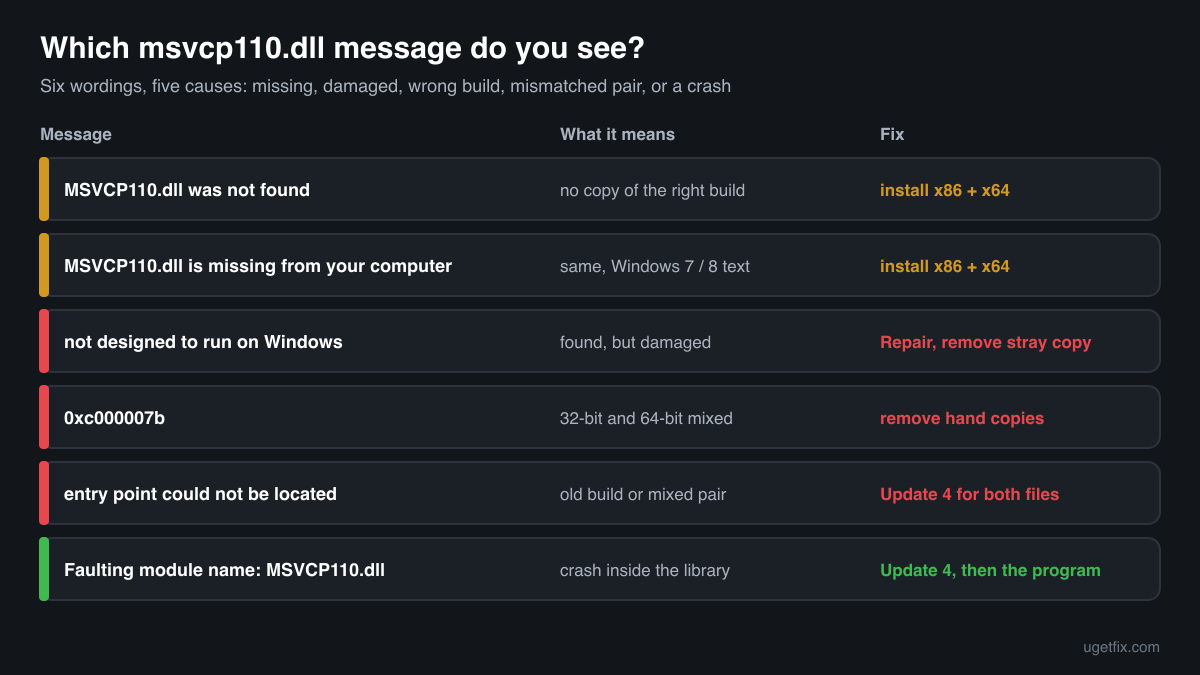
Windows uses different wording for different faults. Here are the messages as Windows writes them, with what each means.
The code execution cannot proceed because MSVCP110.dll was not found. Reinstalling the program may fix this problem.
The Windows 10 and Windows 11 text. The program's folder, System32 and SysWOW64 contain no msvcp110.dll of the program's architecture. Install the Visual C++ 2012 Update 4 packages, both builds.
The program can't start because MSVCP110.dll is missing from your computer. Try reinstalling the program to fix this problem.
Windows 7 and Windows 8 word the same fault this way. The fix is the same: both 2012 packages.
MSVCP110.dll is either not designed to run on Windows or it contains an error. Try installing the program again using the original installation media or contact your system administrator or the software vendor for support.
A copy exists but Windows could not load it, because it is damaged, incomplete or built for the other architecture. Run Repair on the 2012 packages and remove any copy that was placed beside the program by hand.
The application was unable to start correctly (0xc000007b). Click OK to close the application.
32-bit and 64-bit files are mixed: a 64-bit program loaded the 32-bit msvcp110.dll or the other way round. A hand-copied file in System32 or in the program's folder is the usual cause. Remove it and reinstall both packages.
The procedure entry point could not be located in the dynamic link library MSVCP110.dll.
The file loaded, but it lacks a function the program expects, which points to an early 2012 build or to msvcp110.dll and msvcr110.dll from different releases. Install Update 4 so both files are 11.0.51106.1, and remove older private copies beside the program.
Faulting module name: MSVCP110.dll
This line sits in Event Viewer, Windows Logs, Application, after a program closed without warning. The library was present and the crash happened in code running inside it. Bring the runtime up to Update 4 first; if the crash stays, the program itself needs an update or a reinstall.
File facts for the final Visual C++ 2012 build
Read from the files in Microsoft's Visual C++ 2012 Update 4 installers, version 11.0.51106.1. Microsoft® C Runtime Library, Microsoft Corporation.
| Build | Version | Size | Exported functions | Signed by |
|---|---|---|---|---|
| x64 | 11.0.51106.1 | 661,456 bytes | 1,591 | Microsoft Corporation |
| x86 | 11.0.51106.1 | 535,008 bytes | 1,591 | Microsoft Corporation |
- SHA-256 · x64
27f394ae01d12f851f1dee3632dee3c5afa1d267f7a96321d35fd43105b035ad- SHA-256 · x86
c8d5572ca8d7624871188f0acabc3ae60d4c5a4f6782d952b9038de3bc28b39a
On 64-bit Windows, setup copies the x64 msvcp110.dll to C:\Windows\System32 and the x86 one to C:\Windows\SysWOW64. That looks backwards, but System32 is the folder for 64-bit files and SysWOW64 the one for 32-bit files. On 32-bit Windows there is no SysWOW64, and the x86 file goes to System32.
What msvcp110.dll itself depends on
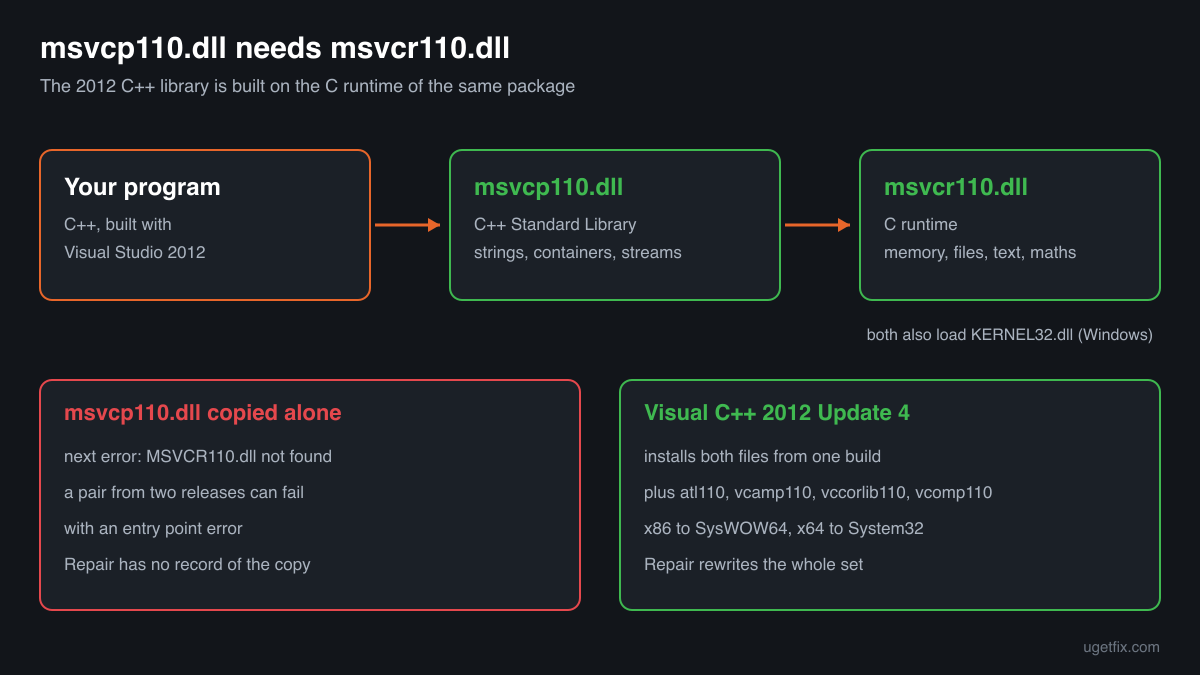
Every DLL carries an import table, the list of other DLLs Windows has to load first. The official msvcp110.dll lists two: KERNEL32.dll, which is part of every Windows installation, and MSVCR110.dll, the Visual C++ 2012 C runtime. The C++ library is built on top of the C runtime, so msvcp110.dll cannot load if msvcr110.dll is absent.
That explains a common chain of errors. Copy msvcp110.dll alone into a folder and the next start asks for MSVCR110.dll. Copy that too, from another source, and two files from different releases can disagree on their functions. The 2012 redistributable installs both from one build, so they always match.
MSVCR110.dllKERNEL32.dllMSVCR110.dll comes from the same Visual C++ 2012 package as msvcp110.dll. KERNEL32.dll belongs to Windows and is serviced only by Windows Update: never download or replace it.
What the Visual C++ 2012 Update 4 redistributable installs
The runtime libraries inside the x64 installer: 6 files installed, repaired and removed together. msvcp110.dll is version 11.0.51106.1.
| File | Microsoft's description | Size |
|---|---|---|
atl110.dll | ATL Module for Windows | 188 KB |
msvcp110.dll | Microsoft® C Runtime Library | 646 KB |
msvcr110.dll | Microsoft® C Runtime Library | 829 KB |
vcamp110.dll | Microsoft® C++ AMP Runtime | 376 KB |
vccorlib110.dll | Microsoft ® VC WinRT core library | 346 KB |
vcomp110.dll | Microsoft® C/C++ OpenMP Runtime | 135 KB |
Older msvcp110.dll versions found on PCs
Programs that bundle their own Visual C++ 2012 runtime leave msvcp110.dll in their folders, and those copies are never updated. A public DLL catalogue has collected 11 such copies, from version 11.0.40825.2 to 11.0.61135.400. The table gives the checksums of each so you can find yours.
Update 4 installs 11.0.51106.1. The catalogue also lists a higher number, 11.0.61135.400, which Microsoft's Update 4 installers do not contain; the catalogue does not say where that copy came from. If the check on this page matches your file to this list, look at its Microsoft signature, since the list is not verified, then install the redistributable above. A program uses the System32 or SysWOW64 copy unless it keeps one in its own folder.
| Version | Build | Size | MD5 | SHA-1 |
|---|---|---|---|---|
11.0.61135.400 | 64-bit | 645 KB | 1b221fd4e9c398efd03e8704cb6367f7 | 1b0439e8d7f51401cd1d46ee1a27c7cffc1faea9 |
11.0.61135.400 | 32-bit | 522 KB | 42da811079c45bd6bfb0c46f83c7f89e | 1f81609d2e4da7541e4e978ccb5a156c9caa3eea |
11.0.51106.1 | 64-bit | 645 KB | 7caa1b97a3311eb5a695e3c9028616e7 | 2a94c1cecfb957195fcbbf1c59827a12025b5615 |
11.0.51106.1 | 32-bit | 522 KB | 3e29914113ec4b968ba5eb1f6d194a0a | 557b67e372e85eb39989cb53cffd3ef1adabb9fe |
11.0.50727.1 | 64-bit | 655 KB | 19e314536125936fd5d80aee1a1062c5 | 692db453b771b8ef59fe0ce251332dfba7ed6d00 |
11.0.50727.1 | 64-bit | 645 KB | 349b1d5d8d1b5a7b10bcd01470bd5f64 | cd6f2f507f9481803d6d808cef09546a44f96e21 |
11.0.50727.1 | 64-bit | 655 KB | 452993f1cc9388fe5032dfc182ad14f8 | 2a2a8386d3f70bdc576d913883651c796d6a3e5a |
11.0.50727.1 | 32-bit | 522 KB | ab09ce954c647f3c2b4328b57d519996 | 63f3de90362bba6f106367bac56566f952666d39 |
11.0.50522.1 | 32-bit | 492 KB | 20c0afa9589cfea14ea0ef8cba67f93b | a948a47bf6c8e62ea1a43394a21654f4126e6bdd |
11.0.50214.1 | 64-bit | 604 KB | 26f0d5b1e6d1511dbb119725b05b4cb3 | 03670245134dd319f65cb44fe4fc5579b1e3ceb0 |
11.0.40825.2 | 64-bit | 594 KB | 8f4cb6b7845c926024b1b10feaa6a1a5 | f0e13d32bbdab59e9c369e1c7d35f5592546d70c |
Copies that users uploaded to a public DLL catalogue, read on 17 October 2026. The checksums help you identify a file. We do not offer these copies, and we did not check each one against Microsoft's signature.
Questions people ask
What is msvcp110.dll used for?
It holds the C++ Standard Library of Visual C++ 2012: strings, containers such as vectors and maps, streams, threads and exceptions. A program written in C++ with Visual Studio 2012 calls these functions from msvcp110.dll instead of carrying its own copy. The 110 refers to toolset version 11.0, the version number of Visual Studio 2012.
I have Visual C++ 2015-2022 installed. Why is msvcp110.dll still missing?
Each Visual C++ generation has its own file names. The 2015-2022 package brings msvcp140.dll, the 2013 package msvcp120.dll, and only the 2012 package brings msvcp110.dll. A newer runtime never replaces an older one. Install the Visual C++ 2012 Update 4 x64 and x86 packages next to what you have.
The error names msvcp110.dll. Do I also need msvcr110.dll?
Yes. msvcp110.dll imports msvcr110.dll, so it cannot load without it, and a program that uses one almost always uses both. You do not have to fetch them separately: the Visual C++ 2012 redistributable installs the pair, from the same build, along with atl110.dll, vcamp110.dll, vccorlib110.dll and vcomp110.dll.
Is Visual C++ 2012 still safe to install?
Yes, when a program needs it. Microsoft lists Visual C++ 2012 among the runtimes that are no longer supported, so it receives no new fixes. The Update 4 installers are still on Microsoft's server and are signed by Microsoft. Choose them over an older 2012 setup bundled with a program, so you get the final 11.0.51106.1 build.
Is msvcp110.dll part of Windows?
Not in a way programs can use. Winbindex lists one build, 11.00.60605.1, inside some Windows 10 images from 1809 to 20H2 and in Windows 11 24H2, but gives no folder for it, and a program that reports the file missing did not find it. Programs get msvcp110.dll from the Visual C++ 2012 redistributable or from their own folder.
Can msvcp110.dll be malware?
The genuine file is a Microsoft library signed by Microsoft Corporation. The name has been misused: in 2025 a fake free VPN tool wrote a hidden msvcp110.dll into AppData\Roaming to run an information stealer. Test your copy with the checker on this page, and for the security side read the 2-Spyware page linked above.
Can I delete msvcp110.dll to save space?
No. The x64 file is about 650 KB, so deleting it saves almost nothing, while every program that uses the shared Visual C++ 2012 runtime stops starting. If you no longer use any such program, uninstalling the 2012 redistributable from Installed apps is the clean way to remove it.
Related guides
msvcp110.dll is missing: reinstall the Visual C++ 2012 C++ library from Microsoft
FixHow to fix "DLL is either not designed to run on Windows or it contains an error"?
Sources
- Microsoft: Latest supported Visual C++ Redistributable downloads
- Winbindex, the Windows binaries index (m417z)
File data read on October 17, 2026.

The editors who write and check uGetFix guides and reference pages. File facts are read from Microsoft's own installers and documentation, and every page shows the date its data was read.
Questions and experiences
Ask about this page: members and our editors answer. Reading is open; writing needs a free account.
…