
msvcr100.dll is missing: how to put the Visual C++ 2010 runtime back
msvcr100.dll is the C runtime of Microsoft Visual C++ 2010. Games and programs built with Visual Studio 2010 cannot start without it, and Windows does not install it for you. Newer Visual C++ packages do not contain it either. The fix is Microsoft's Visual C++ 2010 Redistributable, usually both the x64 and the x86 edition, not a loose DLL from a download site.

Prefer to fix it yourself? The manual steps follow.
Download msvcr100.dll the official way
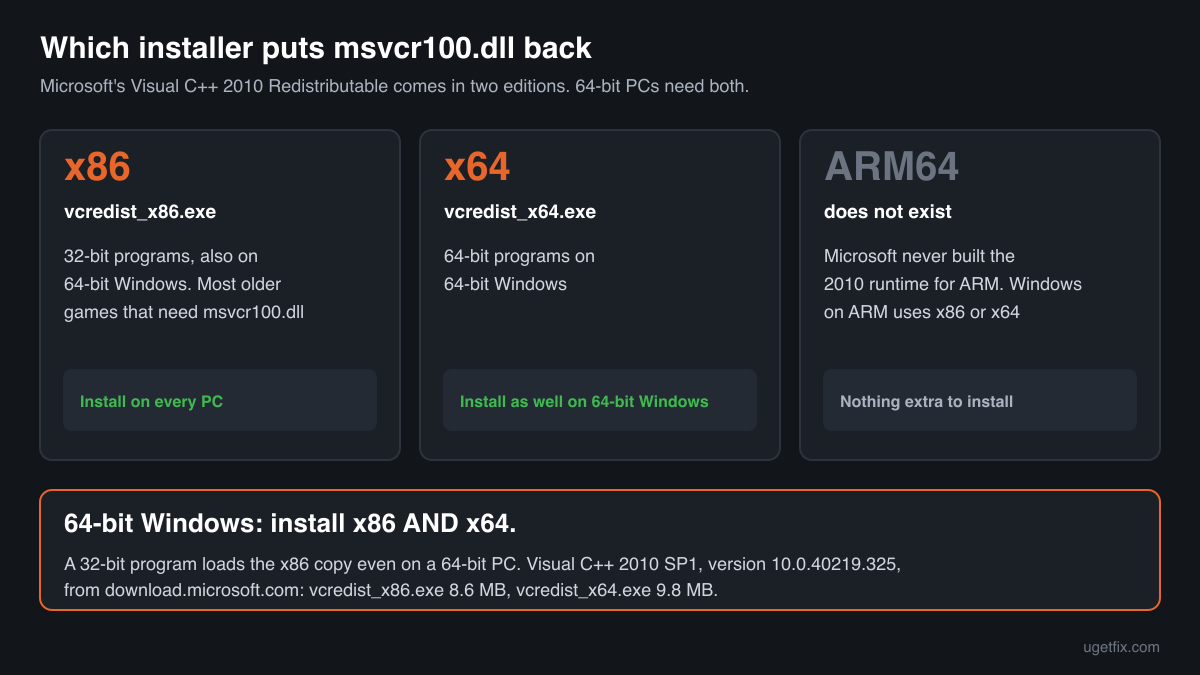
10.0.40219.325Install the Microsoft Visual C++ 2010 Service Pack 1 Redistributable, version 10.0.40219.325. This is the last build Microsoft released for the 2010 runtime: the MFC security update of the SP1 package. It puts msvcr100.dll and the three other 2010 libraries into the Windows folders and registers them, so a later repair can restore them.
On 64-bit Windows install both editions. Most programs that still ask for msvcr100.dll are older 32-bit games and tools, and they load the x86 copy even on a 64-bit PC. If you install only x64, those programs keep showing the same error.
“DLL files only” is for a program that wants the runtime in its own folder, or a PC where the installer will not run: msvcr100.dll with msvcp100.dll, atl100.dll and vcomp100.dll (version 10.0.40219.325), unpacked unchanged from Microsoft's 2010 installer. A free uGetFix account is needed to download. Sign in, or create one in a minute, and you come straight back here.
We downloaded these installers from Microsoft on October 14, 2026 and unpacked them. The tables below list the size and SHA-256 checksum of each msvcr100.dll inside, so you can compare what you have. The installers come from Microsoft's own download server (download.microsoft.com). Microsoft lists the 2010 package as no longer supported, but keeps these links on its Visual C++ downloads page because programs still need it.
Step by step
- See which 2010 packages you have. Open Settings, Apps, Installed apps and type “Visual C++ 2010” in the search box. You are looking for “Microsoft Visual C++ 2010 x64 Redistributable” and “Microsoft Visual C++ 2010 x86 Redistributable”. The 2015-2022 entries do not count here: they hold a different runtime.
- One or both are missing: install them. Run the x86 installer and, on 64-bit Windows, the x64 installer from the links above. Accept the licence, let each finish, then start the program again. Restart Windows if an installer asks for it.
- Both are there: repair them. In Installed apps open the menu next to each 2010 entry and choose Modify (on older Windows, Change). The 2010 setup opens in maintenance mode; choose Repair. Do this for the x86 entry first, since that is the one most older programs use.
- The installer says a version is already present. Running the same installer again also opens maintenance mode. Choose Repair there. If setup fails outright, restart Windows, install pending Windows updates and run the installer again as administrator.
- Only one program fails: check its own folder. Some games ship msvcr100.dll next to their .exe. Windows loads that copy before the one in the Windows folders, so a damaged or wrong-architecture private copy keeps the error alive. Reinstall the game, or in Steam use Properties, Installed files, Verify integrity of game files.
- Still failing: read the exact message. “Was not found”, “not designed to run on Windows” and the 0xc000007b error mean different things. The messages section below explains each.
What not to do
Do not take msvcr100.dll from a DLL download site.
A single file from such a site has no reliable version, may be the x64 build when your program needs x86, and arrives without msvcp100.dll, which most programs that use msvcr100.dll also load. Nothing checks that it is Microsoft's. If a program needs the loose files, use “DLL files only” above, which comes unchanged from Microsoft's installer, and the check below for a copy you already have.
Do not install a newer Visual C++ package and expect it to help.
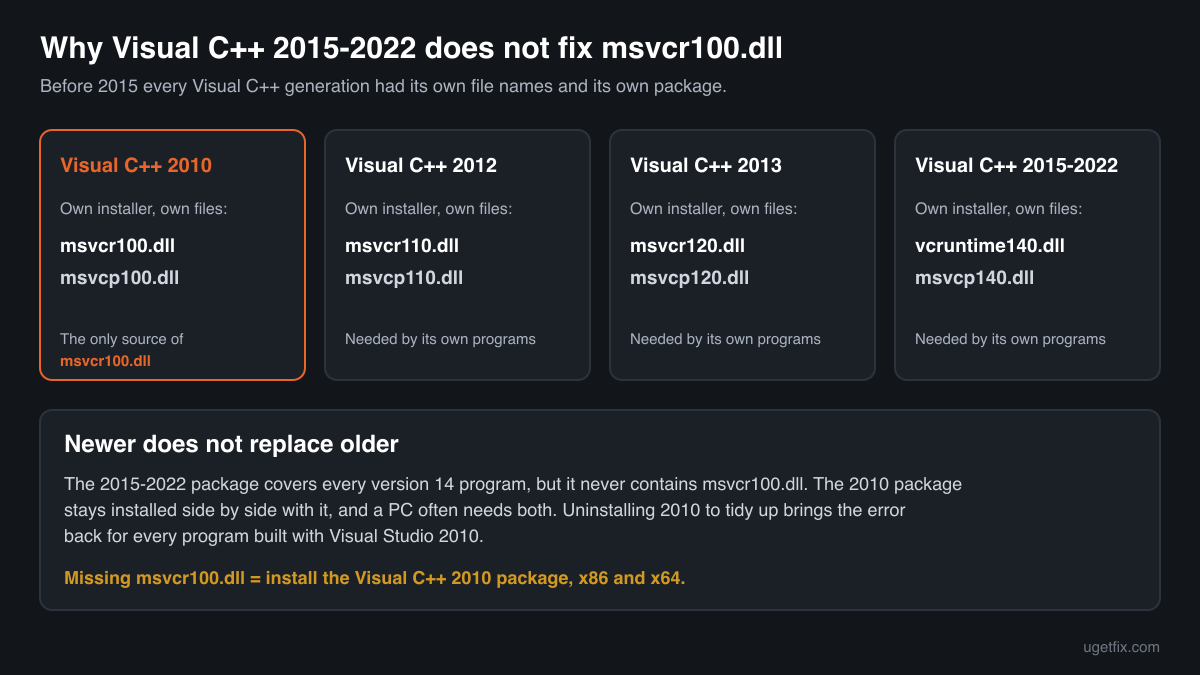
The 2015-2022 redistributable installs vcruntime140.dll and msvcp140.dll. It never contains msvcr100.dll and it does not replace the 2010 package. Each Visual C++ generation before 2015 has its own installer and they live side by side.
Do not copy the 64-bit file into SysWOW64, or the 32-bit file into System32.
SysWOW64 holds 32-bit files and System32 the 64-bit ones. A file in the wrong folder gives the 0xc000007b error instead of the missing-file one. The installer puts each build where it belongs.
Do not run regsvr32 on it.
msvcr100.dll is a plain C library, not a COM component. It has no registration entry point and regsvr32 can only fail on it.
Do not uninstall the 2010 package to tidy up.
It looks old next to the newer entries in Installed apps, but every program built with Visual Studio 2010 depends on it. Removing it brings the error back for all of them at once.
Check the copy on your PC
Choose the msvcr100.dll you have. Its checksums are calculated in your browser and compared with 30 builds we know: the files inside Microsoft's 2010 installers and the older versions found on PCs.
The file stays on your computer. Nothing is uploaded: the checksum is computed locally.
3 genuine programs have been documented loading a planted copy of msvcr100.dll. Found a msvcr100.dll you did not expect, in Downloads, Temp, AppData, C:\Users\Public or next to a program you do not recognise? That is a security question, not a missing-file one. How to tell if msvcr100.dll is malware, on 2-Spyware
The error messages and what each one means
Windows words these errors differently depending on what went wrong. These are the texts as Windows shows them.
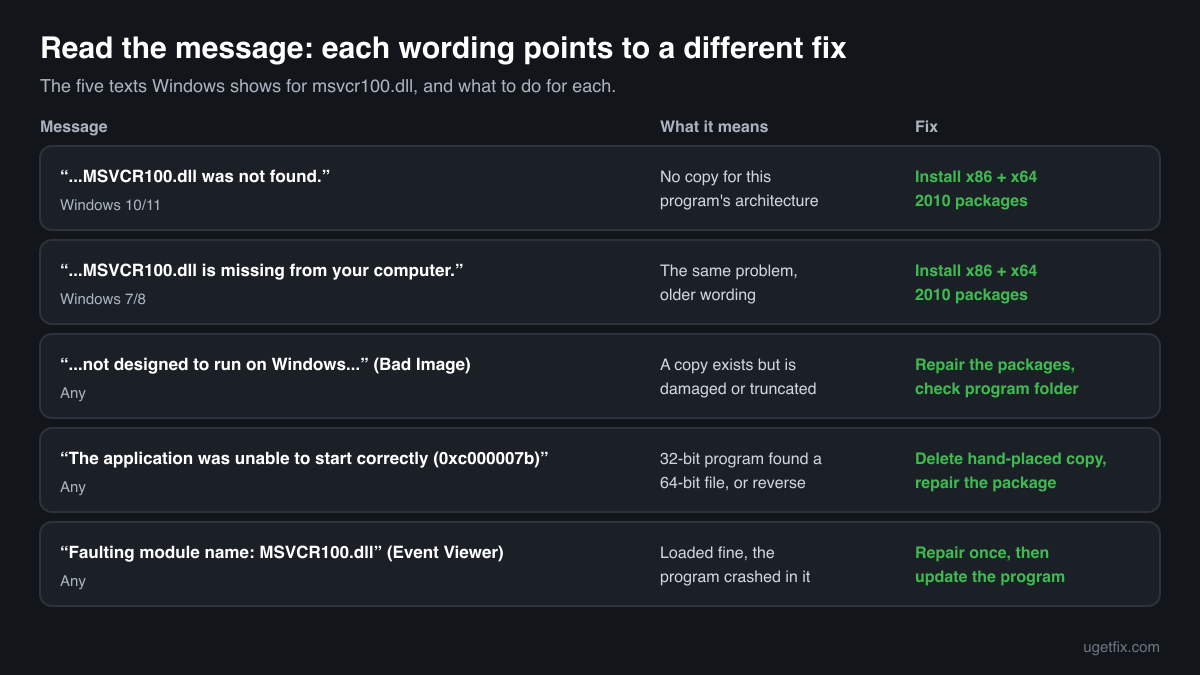
The code execution cannot proceed because MSVCR100.dll was not found. Reinstalling the program may fix this problem.
The Windows 10 and Windows 11 wording. No copy for this program's architecture was found in its folder or in the Windows folders. Install the Visual C++ 2010 Redistributable, x86 and x64.
The program can't start because MSVCR100.dll is missing from your computer. Try reinstalling the program to fix this problem.
The same situation in the wording of Windows 7 and 8. Same fix.
MSVCR100.dll is either not designed to run on Windows or it contains an error. Try installing the program again using the original installation media or contact your system administrator or the software vendor for support.
Shown in a window titled “Bad Image”. A file was found but could not be loaded: it is damaged or truncated, often after a disk error or a copy placed by hand. Repair both 2010 packages and remove any stray copy in the program's folder.
The application was unable to start correctly (0xc000007b). Click OK to close the application.
A 32-bit program found a 64-bit msvcr100.dll, or the other way round. Typical after someone copied a downloaded DLL into System32 or SysWOW64, or into the program's folder. Delete the hand-placed copy, then repair the matching 2010 package.
Faulting module name: MSVCR100.dll
A line in the Application log of Event Viewer after a crash. The runtime loaded and the program crashed while running code inside it. The cause is usually in the program or in what it was given to process, such as a damaged save file or mod. Repair the 2010 packages once, then look at the program: update it, or verify its files.
File facts for the last official version
Read from the files inside Microsoft's Visual C++ 2010 SP1 installers, version 10.0.40219.325. Microsoft® C Runtime Library, Microsoft Corporation.
| Build | Version | Size | Exported functions | Signed by |
|---|---|---|---|---|
| x64 | 10.0.40219.325 | 829,264 bytes | 1,591 | Microsoft Corporation |
| x86 | 10.0.40219.325 | 773,968 bytes | 1,621 | Microsoft Corporation |
- SHA-256 · x64
ae3cb6c6afba9a4aa5c85f66023c35338ca579b30326dd02918f9d55259503d5- SHA-256 · x86
8793353461826fbd48f25ea8b835be204b758ce7510db2af631b28850355bd18
- Where the genuine msvcr100.dll belongs
C:\Windows\System32C:\Windows\SysWOW64
After installation on 64-bit Windows the x64 file is in C:\Windows\System32 and the x86 file in C:\Windows\SysWOW64. On 32-bit Windows the x86 file is in System32. The names are historical: System32 holds the 64-bit files. In the file's own properties the original file name reads msvcr100_clr0400.dll, a naming quirk of Microsoft's build, not a sign of tampering.
What msvcr100.dll itself depends on
msvcr100.dll sits at the bottom of the 2010 runtime. Its import table lists a single library, KERNEL32.dll, which is part of every Windows installation. It does not need any other Visual C++ file to load.
It works the other way round: msvcp100.dll, the C++ library of the same package, needs msvcr100.dll. That is why a program can report msvcp100.dll as missing first and, after someone copies that file in by hand, msvcr100.dll next. Installing the package puts all of them in place at once.
KERNEL32.dllKERNEL32.dll is a core Windows file and is never the part that is missing. If an error names it together with msvcr100.dll, the program is too old or too new for the Windows version, not short of a runtime.
What the 2010 redistributable installs
The runtime payload of the x64 installer, version 10.0.40219.325: 4 files that are installed and repaired together. The x86 installer carries the same four files in their 32-bit builds.
| File | Microsoft's description | Size |
|---|---|---|
atl100.dll | ATL Module for Windows | 155 KB |
msvcp100.dll | Microsoft® C Runtime Library | 594 KB |
msvcr100.dll | Microsoft® C Runtime Library | 810 KB |
vcomp100.dll | Microsoft® C/C++ OpenMP Runtime | 56 KB |
Older versions of msvcr100.dll found on PCs
Games and programs from the Visual Studio 2010 years often installed their own copy of msvcr100.dll, and those copies stay on PCs for a long time. A public DLL catalogue has collected 28 such copies, from version 10.0.20327.1 to 10.0.40219.473. The table lists each with its checksums, so you can tell which one you have.
The installer above carries 10.0.40219.325, the last build Microsoft released. A copy with an older 10.0 version number works, but it misses the fixes of the later builds. If the check on this page finds your file in this list, confirm the Microsoft signature (the list itself is not verified), then install or repair the 2010 package so that programs without a private copy get the current file.
| Version | Build | Size | MD5 | SHA-1 |
|---|---|---|---|---|
10.0.40219.473 | 64-bit | 809 KB | f86b5057928fddd315f9a9f46357003e | 63f5ed1d5ee84c5ca7c229f9f38a51c383d9ba39 |
10.0.40219.473 | 32-bit | 758 KB | ef3e115c225588a680acf365158b2f4a | ecda6d3b4642d2451817833b39248778e9c2cbb0 |
10.0.40219.455 | 32-bit | 758 KB | 32fc1a3bfd9bedbf2dd73d65b40c2034 | be2618ea8db2a0e69a21e260407b1b18360f74ad |
10.0.40219.325 | 64-bit | 809 KB | 2e3bc2aa4993b7d96d357e44140f45d8 | f421447ae3ab15e2b7930e1b286ccf9c6a49a01c |
10.0.40219.325 | 64-bit | 809 KB | 366fd6f3a451351b5df2d7c4ecf4c73a | 50db750522b9630757f91b53df377fd4ed4e2d66 |
10.0.40219.325 | 32-bit | 758 KB | 0e37fbfa79d349d672456923ec5fbbe3 | 4e880fc7625ccf8d9ca799d5b94ce2b1e7597335 |
10.0.40219.325 | 32-bit | 758 KB | 3919dde594c8d7c3e60395d2cd8f6a76 | 2be8bcc5ebf551e47b3bfc2181b3e976dc417e03 |
10.0.40219.325 | 32-bit | 758 KB | 6f17b78dbfd2475e8fef6af6e2bf117e | 0f9b8a40f446896ab4e7bc578220c5d0a808e45b |
10.0.40219.325 | 32-bit | 768 KB | 6f2cfba612b5048cbd8fede35de17449 | c0365d0d42375d2d631c60b1120edeb7f9a66d0f |
10.0.40219.325 | 32-bit | 758 KB | 70c457a24b662791855a8ffe5390990d | ce3608dabd2775b3b09f6a7c499e440ab9b15e96 |
10.0.40219.325 | 32-bit | 768 KB | 7155ac124a65252e7f4b4e241503b3f7 | d92b51b0c3e38cd7fed8b1ff030635cb5186f35c |
10.0.40219.325 | 32-bit | 758 KB | a404cd0270cb6a57402c27652c6b207d | 9928d08631e95cb3b5db6f182414e56dd6de3391 |
10.0.40219.325 | 32-bit | 758 KB | b2a3ffb9e84ea8e4f309d463bccce9f7 | cbf77dba2d1c17692b491f82cc52b64903b281b4 |
10.0.40219.325 | 32-bit | 758 KB | c6d397daed04ae821d6c60ffe297da51 | c58feae728ff0a17feee4f37c6e5710d55f0b1bb |
10.0.40219.325 | 32-bit | 758 KB | dc0213118e61e5ca865092109860792c | 6893178885bcd24df4d688bb585f2cbfdc1754bd |
10.0.40219.325 | 32-bit | 758 KB | ed5ee5c5746d04781cd394ed4a07cdea | 52a2e9e27fb340d9fd066b587266c21c1fa23570 |
10.0.40219.1 | 64-bit | 819 KB | 7d2be35053f902b9d357ebc036a7e7de | c39e7b265b01441639572c76666c80ed1e62711f |
10.0.40219.1 | 64-bit | 809 KB | df3ca8d16bded6a54977b30e66864d33 | b7b9349b33230c5b80886f5c1f0a42848661c883 |
10.0.40219.1 | 32-bit | 758 KB | 7c415be3cb962cb0fba89f566048b82c | 46f020dd57e7b81f97a2a57cb761693c9be091dd |
10.0.40219.1 | 32-bit | 758 KB | bf38660a9125935658cfa3e53fdc7d65 | 0b51fb415ec89848f339f8989d323bea722bfd70 |
10.0.31118.1 | 32-bit | 758 KB | 8707bbfd4be7c2ff8bfce19b3122b5ba | f9ab5455eb0340eedb29e33bf2df58f359bd2dbe |
10.0.30319.460 | 64-bit | 809 KB | 23ddd075ac31d22f94ca2fd0d1c207b5 | f904062a0199392e697b58c5bf23f6ebaa0ddf1e |
10.0.30319.460 | 32-bit | 748 KB | 2b92a88e329f4845d31941967a3baa90 | bbf341e7ed9947de0b5d84d93ca0bc4c8beb5500 |
10.0.30319.415 | 32-bit | 748 KB | 397fc81bd0fb460508a680c5f825ff9b | be1ca0824f53ad0521e66c356908b84d5716458c |
10.0.30319.1 | 64-bit | 809 KB | aed6d63cfa5a3ef7021af9c457fee994 | f6ad746ef520b03df6cf0f5a2512d0df964c4688 |
10.0.30319.1 | 32-bit | 748 KB | 67ec459e42d3081dd8fd34356f7cafc1 | 1738050616169d5b17b5adac3ff0370b8c642734 |
10.0.20506.1 | 32-bit | 737 KB | 0e8888aadab9669d06f55767f2ccaf7b | 4a1917b4fbda7705782216594fc912e41e76465a |
10.0.20327.1 | 32-bit | 748 KB | 53e17c3eedcb0479971fbbe99fa9c0a0 | 87e3e49cf24ea5762e8e4eefdea750d4e365907d |
Copies uploaded by users to a public DLL catalogue, read on 14 October 2026. We list their checksums so you can identify a file; we do not offer them for download and we did not verify each one against Microsoft's signature.
Questions people ask
Is msvcr100.dll a virus?
The genuine file is a Microsoft library signed by Microsoft Corporation and is harmless. Attackers have used the same name for their own files, so the name alone proves nothing. Check your copy with the tool on this page; where a suspicious copy sits and how the name has been abused is covered on the security page linked above.
I have Visual C++ 2015-2022 installed. Why is msvcr100.dll still missing?
Because that package contains a different runtime. From 2015 on, Microsoft uses one shared version 14 runtime with new file names (vcruntime140.dll, msvcp140.dll). Older generations kept their own names and installers: msvcr100.dll comes only with the 2010 package, msvcr110.dll with 2012 and msvcr120.dll with 2013. A PC often needs several of them side by side.
What is the difference between msvcr100.dll and msvcp100.dll?
Both come from the same 2010 package. msvcr100.dll is the C runtime: memory, files, strings, maths. msvcp100.dll is the C++ Standard Library and is built on top of it. A program written in C needs only msvcr100.dll, one written in C++ usually needs both, which is why the two errors often appear one after the other.
The 2010 package is out of support. Is it safe to install?
Yes, from Microsoft's own links. Out of support means Microsoft no longer releases updates for it; the last build, 10.0.40219.325, already includes the final security update. The package itself does nothing until a program that needs it starts. Install it when a program asks for it rather than out of habit.
I installed both packages and the error is still there. What now?
Look in the folder of the program that fails. A damaged or wrong-architecture msvcr100.dll there is loaded before the Windows copies. Rename it (for example to msvcr100.old), start the program again, and if it now runs, delete the renamed copy. If the program then reports another file, reinstall the program itself.
Will System File Checker (sfc /scannow) restore it?
Usually not. System File Checker repairs files that Windows itself owns, and msvcr100.dll in System32 and SysWOW64 belongs to the Visual C++ 2010 package. Repairing or reinstalling that package is the direct fix. Run sfc only when errors name Windows files as well.
Related guides
How to fix "DLL is either not designed to run on Windows or it contains an error"?
Sources
- Microsoft: Latest supported Visual C++ Redistributable downloads
- Winbindex, the Windows binaries index (m417z)
File data read on October 14, 2026.

The editors who write and check uGetFix guides and reference pages. File facts are read from Microsoft's own installers and documentation, and every page shows the date its data was read.
Questions and experiences
Ask about this page: members and our editors answer. Reading is open; writing needs a free account.
…