
msvcrt.dll error: why it appears and how to fix it the right way
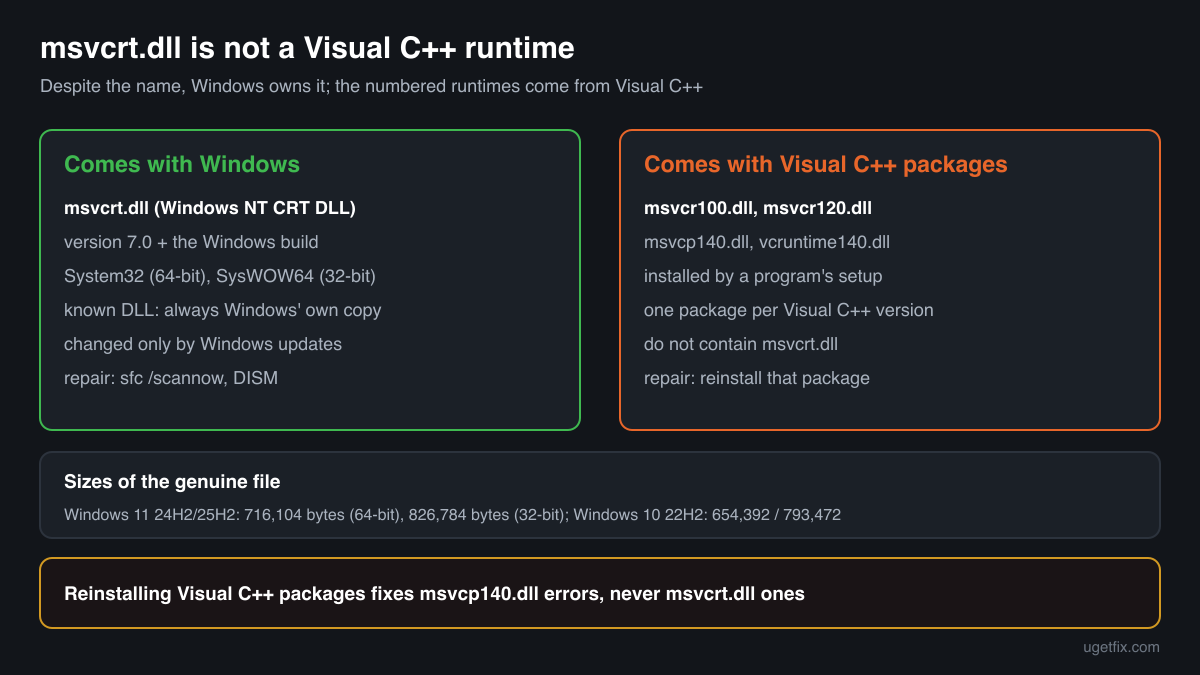
msvcrt.dll is the Windows NT CRT DLL, the C runtime library that Windows itself and many older programs use for text, files, memory and time. Despite its name it is not part of the Visual C++ Redistributable: Windows ships it and keeps it updated. When a program reports a msvcrt.dll error, the file is rarely damaged. Usually the program crashed inside it, or it expects a function your Windows does not have.

Prefer to fix it yourself? The manual steps follow.
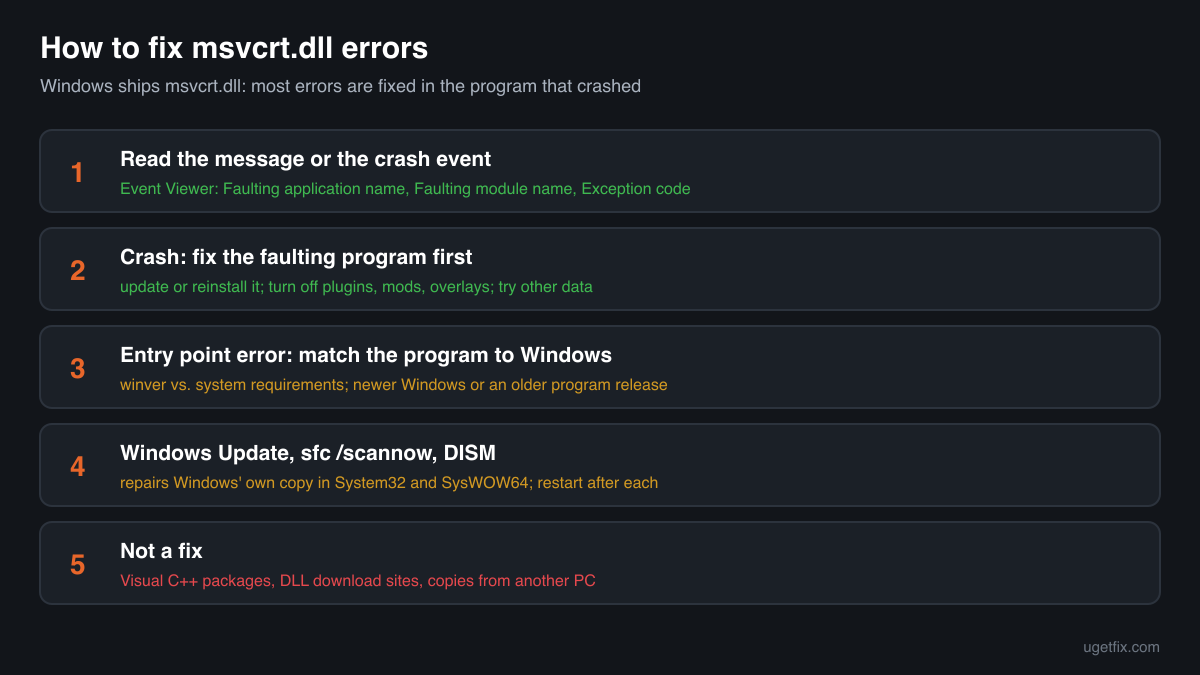
How to fix msvcrt.dll errors
Start with the exact message, because each kind has its own fix. If a program crashes and Event Viewer names msvcrt.dll as the faulting module, the program failed while it was using the C runtime, almost always because of its own bug, a damaged installation, an add-on or bad data: update or reinstall that program. If the message says a procedure entry point could not be located in msvcrt.dll, the program was built for a newer Windows than yours: update Windows or use a program version that supports it. Only when many unrelated programs fail, or msvcrt.dll is reported missing, is Windows' own copy the problem: then run Windows Update, sfc /scannow and DISM.
Do not download msvcrt.dll from a DLL site and do not reinstall the Visual C++ Redistributables hoping to replace it. They do not contain this file. Windows always loads its own copy from System32 or SysWOW64, so a file placed in a program folder is ignored, and one forced into the Windows folders can break Windows itself.
Step by step
- Read the whole message, or find the crash event. A message box that names an entry point or says the file was not found tells you which kind of error you have. If the program simply closes, open Event Viewer (type eventvwr in the Start menu), go to Windows Logs, Application, and find the red Error event from Application Error at the time of the crash. Note three lines: Faulting application name, Faulting module name and Exception code.
- Crash with msvcrt.dll as the faulting module: look at the program first. The Faulting application name line shows the real problem. msvcrt.dll is only where the program was when it went wrong, for example while copying text, reading a file or freeing memory it had already damaged. Install the newest version or patch of that program, or uninstall it, restart and install it again so that its own files are replaced.
- Turn off what loads into the program. Plugins, mods, overlays, screen recorders, macro tools and older shell extensions run inside the program and use the same C runtime. Disable them, or start the program without them, and test again. If the crash happens only with one document, save file, project or profile, the data is damaged: try another file or reset the program's settings.
- Entry point error: match the program to your Windows. Press Windows key + R, type winver and press Enter to see your Windows version and build. A message such as The procedure entry point _time32 could not be located in the dynamic link library msvcrt.dll means the program asks for a C runtime function that your Windows release does not have. Check the program's system requirements, then update Windows or install an older release of the program that still supports your system.
- Install Windows updates and restart. Open Settings, Windows Update, install everything that is offered, including optional quality updates, and restart. Windows updates are the only official way msvcrt.dll changes: they replace it with the current build for your Windows release.
- Run System File Checker. Type cmd in the Start menu, right-click Command Prompt and choose Run as administrator. Run sfc /scannow and wait until it reaches 100%. It compares protected Windows files, msvcrt.dll in System32 and SysWOW64 included, with the stored originals and repairs any that are damaged or missing. Restart afterwards.
- If System File Checker cannot repair everything, run DISM. In the same administrator window run DISM /Online /Cleanup-Image /RestoreHealth. It repairs the component store that System File Checker takes its originals from, using Windows Update. When it finishes, run sfc /scannow once more and restart.
- Many programs crash at random: check memory and drivers. If unrelated programs crash in msvcrt.dll with different exception codes, the cause is usually below them. Run Windows Memory Diagnostic (type mdsched in the Start menu), remove any memory overclock or XMP profile for a test, and update the chipset and graphics drivers from the PC or motherboard maker.
- Still failing: repair Windows in place. On Windows 11, Settings, System, Recovery offers Fix problems using Windows Update, which reinstalls the current version of Windows and keeps your files, apps and settings. On Windows 10 the same result comes from running Microsoft's installation media and choosing to keep personal files and apps.
Download the genuine msvcrt.dll for your Windows version
Each file below is Microsoft's own msvcrt.dll for one Windows release, fetched from Microsoft's own server and checked against Winbindex, the index of the files in Windows images and updates. Use them to compare: to confirm that a msvcrt.dll you have is genuine, or to see which build your release should have. Copying one into a program folder changes nothing, because Windows loads msvcrt.dll only from its own folders, and replacing the file in System32 or SysWOW64 by hand can leave Windows unable to start. Repair the real file with the steps above.
Older Windows releases
A free uGetFix account is needed to download. Sign in, or create one in a minute, and you come straight back here.
What not to do
Do not reinstall every Visual C++ Redistributable for this file.
Advice to reinstall the Visual C++ packages fixes errors about msvcp140.dll, vcruntime140.dll or msvcr100.dll, which those packages install. msvcrt.dll is not in any of them: it belongs to Windows, and only Windows updates, System File Checker and DISM replace it.
Do not copy msvcrt.dll from another PC or another Windows.
The file is built for one Windows release and works with the rest of that release. A copy from Windows XP, 7 or another build does not add functions to your system, and Windows does not use it from a program folder anyway.
Do not download it from a DLL collection site.
You cannot tell which Windows release or architecture the file comes from, or whether it was changed. Such sites also suggest placing it in System32, which is exactly where a wrong file does the most damage. Compare with the genuine files above instead.
Do not take ownership of System32 to replace the file.
Guides that tell you to change the owner and permissions of msvcrt.dll remove the protection Windows puts on its own files. Many Windows components use this library, so a wrong copy there breaks far more than the one program. System File Checker repairs the file without touching permissions.
Do not blame msvcrt.dll for one program's crashes.
When only one program crashes with this module, replacing Windows files will not help, because the fault is in the program, its add-ons or its data. Fix that program first, and turn to Windows only if other programs fail too.
Check the copy on your PC
Choose the msvcrt.dll you are unsure about, for example one you found outside the Windows folders. Its checksum is calculated in your browser and compared with 152 Microsoft builds of the file from Windows releases and updates.
The file stays on your computer. Nothing is uploaded: the checksum is computed locally.
Found a msvcrt.dll outside System32 and SysWOW64, for example in Downloads, Temp, AppData or next to a program? Windows does not use a copy there. Whether it is harmless is a security question, not an error one. Is the msvcrt.dll you found genuine? On 2-Spyware
The error messages and what each one means
The wording tells you which problem you have. These are the texts Windows and Event Viewer show, with the file and typical function names filled in.
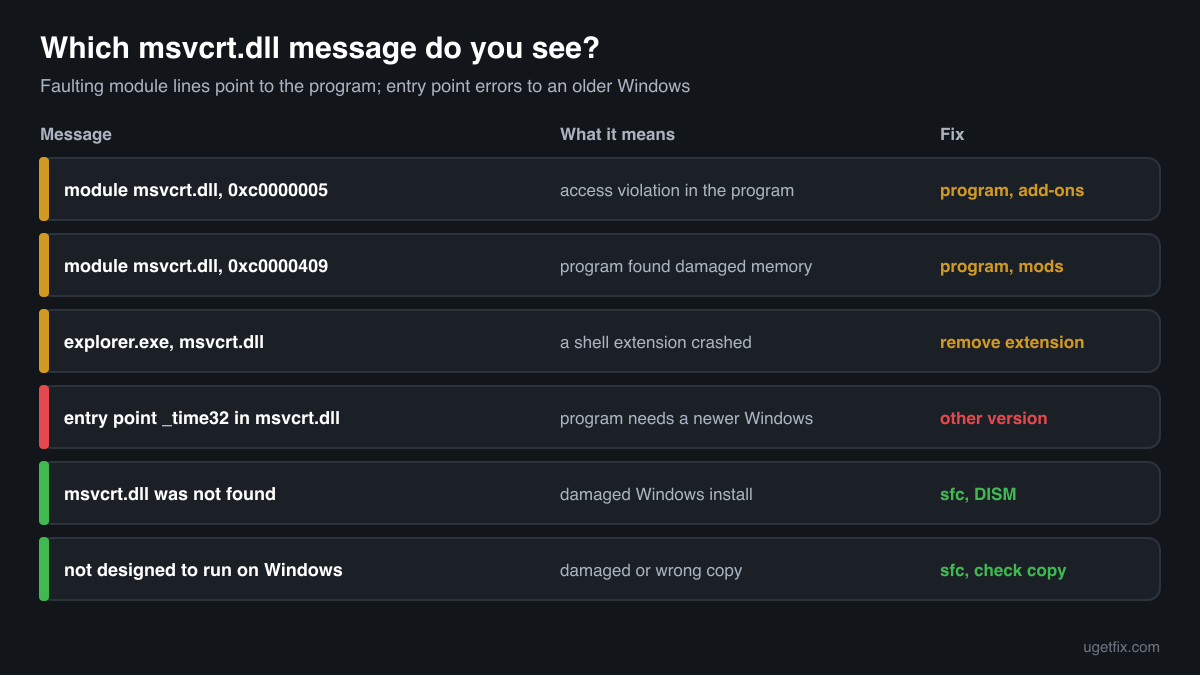
Faulting module name: msvcrt.dll, Exception code: 0xc0000005
An access violation: the program read or wrote memory it should not, while a C runtime function was working for it. The fault is in the program named on the Faulting application name line, its plugins or its data. Update or reinstall it, disable its add-ons, and run a memory test if many programs show the same.
Faulting module name: msvcrt.dll, Exception code: 0xc0000409
The program stopped itself because it detected damaged memory, such as an overrun buffer, or a call it could not continue. Again the program is at fault: update it, remove mods or plugins, and try with a fresh settings file.
The procedure entry point _time32 could not be located in the dynamic link library msvcrt.dll.
The program needs a C runtime function that the msvcrt.dll of your Windows release does not provide. Messages like this, with names such as memmove_s, _wcsftime or __CxxFrameHandler3, appear mostly when a newer program runs on an old Windows. Fix: a program version that supports your Windows, or a newer Windows.
The code execution cannot proceed because msvcrt.dll was not found.
Rare on a working PC, because Windows itself needs the file. It points to a damaged Windows installation, or to a program that changed its own search path badly. Run sfc /scannow and DISM, then reinstall the program.
msvcrt.dll is either not designed to run on Windows or it contains an error.
Windows found a msvcrt.dll it cannot load, usually a damaged or wrong copy. Find where the file is: in System32 or SysWOW64, repair it with System File Checker; anywhere else, it is a copy Windows does not need, so check it with the tool on this page.
Faulting application name: explorer.exe, Faulting module name: msvcrt.dll
File Explorer crashed in the C runtime, most often because of a shell extension: a context menu entry, a preview handler or a thumbnail provider from another program. Uninstall or update the program that added it, then run sfc /scannow if the crash continues.
File facts
msvcrt.dll describes itself as Windows NT CRT DLL. It holds the standard C functions, such as printf, fopen, malloc, strcpy and time, for Windows components and for programs written against it. The name comes from the Microsoft Visual C++ runtime of the 1990s; Microsoft later declared it an operating system DLL, to be used only by Windows components, and newer Visual C++ versions ship their own numbered runtimes instead, such as msvcr100.dll and vcruntime140.dll. Many older programs and some tools built with other compilers still load msvcrt.dll, which is why it appears in so many crash reports. What Windows reports for the genuine file:
- Description in the file
- Windows NT CRT DLL
- Where the genuine msvcrt.dll belongs
C:\Windows\SysWOW64C:\Windows\System32
On 64-bit Windows, System32 holds the 64-bit file and SysWOW64 the 32-bit one used by 32-bit programs. msvcrt.dll is a known DLL (registry key HKEY_LOCAL_MACHINE\SYSTEM\CurrentControlSet\Control\Session Manager\KnownDLLs), so Windows maps its own copy into every program and never takes one from a program's folder. The genuine file is signed by Microsoft and has a version number beginning with 7.0, followed by the Windows build. Unusually, the 32-bit file is larger than the 64-bit one: in Windows 11 24H2 and 25H2 the 64-bit file is 716,104 bytes and the 32-bit file 826,784 bytes; in Windows 10 22H2 they are 654,392 and 793,472 bytes.
msvcrt.dll versions by Windows release
Every Windows release has its own build of msvcrt.dll, delivered with Windows updates. Winbindex lists 130 distinct Microsoft builds; the table shows the newest one indexed for each release and the update that delivered it.
| Windows release | File version | Delivered by | Size, 64-bit |
|---|---|---|---|
| Windows 11 26H1 | 7.0.28000.3231 | KB5127646, October 13, 2026 | 716,144 bytes |
| Windows 11 25H2 | 7.0.26100.9711 | KB5127648, October 13, 2026 | 716,104 bytes |
| Windows 11 24H2 | 7.0.26100.9711 | KB5127648, October 13, 2026 | 716,104 bytes |
| Windows 11 23H2 | 7.0.22621.6931 | KB5093998, June 9, 2026 | 691,600 bytes |
| Windows 11 22H2 | 7.0.22621.6931 | KB5093998, June 9, 2026 | 691,600 bytes |
| Windows 11 21H2 | 7.0.22000.1 | original release | 673,896 bytes |
| Windows 10 22H2 | 7.0.19041.7802 | KB5126657, October 13, 2026 | 654,392 bytes |
| Windows 10 21H2 | 7.0.19041.7802 | KB5126657, October 13, 2026 | 654,392 bytes |
| Windows 10 21H1 | 7.0.19041.7802 | KB5126657, October 13, 2026 | 654,392 bytes |
| Windows 10 20H2 | 7.0.19041.7802 | KB5126657, October 13, 2026 | 654,392 bytes |
| Windows 10 2004 | 7.0.19041.7802 | KB5126657, October 13, 2026 | 654,392 bytes |
| Windows 10 1909 | 7.0.18362.1 | original release | 638,072 bytes |
Older copies of msvcrt.dll found on PCs
Public DLL catalogues have collected 22 copies of msvcrt.dll uploaded from PCs, from version 6.0.8397.0 to 7.0.19041.1. Many come from Windows XP, Vista, 7, 8 and 8.1, and one copy with version 6.0 describes itself as Microsoft (R) C Runtime Library. The table lists each with its checksums, so you can tell which one you have.
None of these replaces the file your Windows ships: the newest build indexed for Windows is 7.0.28000.3231, and each release keeps its own. If the check on this page finds your file in this list, it is most likely an older Microsoft build that a program installer or a person copied somewhere. Windows does not use it; remove the copy if nothing needs it.
| Version | Build | Size | MD5 | SHA-1 |
|---|---|---|---|---|
7.0.19041.1 | 64-bit | 625 KB | 6297ca08c873060692ff97074895fa95 | c869a6346418947c640e00809d352c6dc1b3a7b0 |
7.0.18362.1 | 64-bit | 625 KB | 36354d9b5b0a58a4b9a19103852c00a2 | 0ea4b3cfb14e49cec0d42ff0f1fa989e69647a8f |
7.0.18362.1 | 32-bit | 758 KB | 14c8b0d022cdd56939e5385cbcab60a6 | b47a20174d1dab0e2901c42bfbed251be633280c |
7.0.17763.475 | 64-bit | 625 KB | dd0349151478b48ffce769b50f8cdd33 | eca51f7d37874cf1029bc2fe3b0cf0e8cdf71e8e |
7.0.16299.98 | 64-bit | 614 KB | 9ea584cf32e03abcdadabcbf953f5398 | 3de1ff09800ab18d529a201430e44c529e2aa653 |
7.0.14393.0 | 64-bit | 625 KB | 94ef9321c287fc1b179419e662996a41 | 1566d902f2d68a5b44c9e3b8806fd729efd528d8 |
7.0.14393.0 | 32-bit | 758 KB | 2b3053473d66ad4c34e05b4ab4a9636e | 145907aae59316b8279f3e045cb1fa381b5868f8 |
7.0.10586.0 | 64-bit | 614 KB | 780c11bd61d4e35424759ac22a5f3f05 | ea8f119efb13b4c26a64d3c7d13328234e4f55ca |
7.0.10586.0 | 32-bit | 758 KB | 28e17ed88e49348d817c03ab61a331cc | 8d2a172340aba87ab7338e242cbe8e572cca57e3 |
7.0.9600.17415 | 64-bit | 676 KB | d80c5d199b7700b89dbdc52ab58c7519 | 53de9125257a78d71d7f1c569fe051f73d6b4d1f |
7.0.9600.17415 | 32-bit | 778 KB | 6465a029e543ca5ae3547b74cfe9293e | a82f25aac0515636d0d0415a45c5d6df2d2daf5b |
7.0.9600.16384 | 32-bit | 758 KB | 6eba4aa97ba64ceb363c1c8ce12214f9 | 133fb05bab85125e11f9d92e45930d03664d740e |
7.0.9200.16384 | 32-bit | 696 KB | b59e9810f8a416b9e5354834f26969d4 | aa3b421be1b8f9d1a3bdfeee1ff3fb46323dc0b4 |
7.0.7601.17744 | 32-bit | 676 KB | 9dc80a8aaaaac397bdab3c67165a824e | df2756c114ca2d3b2b16d459a93f285924a55202 |
7.0.6002.18551 | 32-bit | 666 KB | 17af64d727545f2804f6e6d998327e3f | 7ebd8c09611ea271e2720a69f91e529cbcca3498 |
7.0.6001.18000 | 64-bit | 604 KB | 11db261e8ee318ca41498300327cb5f2 | c6c8a4c8b96df33baf77a8cbef1f1c93b7bab95b |
7.0.6001.18000 | 32-bit | 666 KB | 04cbeaa089b6a752b3eb660bee8c4964 | 3eaf10eee39d373512c6301c3dd03be49c713959 |
7.0.2600.5512 | 32-bit | 338 KB | 7df5cf86d9c13e74d507928c0d0336b4 | 7e41ce590fd46c84b05bd8fab83ea4980676b16e |
7.0.2600.5512 | 32-bit | 338 KB | 93110f6b8428aa84ccdabdb710a502ef | 04faafc105fd7a0c863e1a33c8446f5a895cf231 |
7.0.2600.2180 | 32-bit | 338 KB | a2645a79b4988f4939cfbd796280289c | 74b2f5258cab058c803861042ca799d969672626 |
7.0.2600.1106 | 32-bit | 317 KB | 886a6c3c185aaedecd00477f72279b07 | 73a3113ec540613bfca8e21402236600159da6ad |
6.0.8397.0 | 32-bit | 256 KB | 0b9c183d1565b48fa6e5d1d3d4b86bcc | 69697324c1e7ad80215fb07ecf6d786e378c568f |
Copies uploaded by users to a public DLL catalogue, read on 14 October 2026. We list their checksums so you can identify a file; we do not offer them for download and we did not verify each one against Microsoft's signature.
Questions people ask
Will reinstalling the Visual C++ Redistributable fix msvcrt.dll?
No. The Visual C++ packages install numbered runtimes such as msvcr100.dll, msvcp140.dll and vcruntime140.dll. msvcrt.dll is a Windows file and is not in any of them. Reinstalling them helps only if the error names one of those numbered files. For msvcrt.dll, fix the program that crashed, then use Windows Update, sfc /scannow and DISM.
Why does Event Viewer say msvcrt.dll is the faulting module?
Because the program crashed while a C runtime function was carrying out its request, for example copying text into memory the program had already damaged. msvcrt.dll is where the crash was noticed, not what caused it. The Faulting application name line shows which program to update, reinstall or run without its add-ons.
Can I download msvcrt.dll to fix the error?
No. Windows uses only its own copy from System32 and SysWOW64, so a downloaded file in a program folder is ignored, and one forced into the Windows folders can stop Windows components from working. Download a genuine copy only to compare it with a file you have, and repair the real file with sfc /scannow.
What does "procedure entry point could not be located in msvcrt.dll" mean?
The program asked for a function by name and the msvcrt.dll of your Windows release does not contain it. The program was built for a newer Windows, or it brought a library made for one. Check its system requirements, then update Windows or install a release of the program that supports your system. Replacing msvcrt.dll does not help.
What is the difference between msvcrt.dll and msvcr100.dll or vcruntime140.dll?
msvcrt.dll is the C runtime that belongs to Windows and changes only with Windows updates. msvcr100.dll, msvcr120.dll, ucrtbase.dll and vcruntime140.dll are the runtimes of specific Visual C++ versions or the Universal C Runtime. Programs choose which one they use when they are built, and an error names the one that failed.
Why is there a msvcrt.dll in a program's folder?
Some old installers copied it there, and some portable tools carry it. Windows ignores that copy because msvcrt.dll is a known DLL loaded from System32 or SysWOW64. If the program works, leave it or remove it; if you do not know where the file came from, check it with the tool on this page.
Is msvcrt.dll a virus?
The copies in System32 and SysWOW64 are genuine Windows files that Windows needs. Malware calls msvcrt.dll like any other program and has no reason to replace it. A file with this name in Downloads, Temp or AppData is not Windows' copy: check it with the tool on this page and read the security page linked above.
Related guides
msvcrt.dll error: why it appears and how to fix it the right way
FixHow to fix Entry Point Not Found error in Windows?
Sources
- Winbindex, the Windows binaries index (m417z)
- Microsoft Learn: Use the System File Checker tool to repair missing or corrupted system files
File data read on October 17, 2026.

The editors who write and check uGetFix guides and reference pages. File facts are read from Microsoft's own installers and documentation, and every page shows the date its data was read.
Questions and experiences
Ask about this page: members and our editors answer. Reading is open; writing needs a free account.
…