
How to fix Entry Point Not Found error in Windows?

Prefer to fix it yourself? The manual steps follow.
- 8methods
- 5 to 60 minutes
- Intermediate
Applies to Windows 11 and Windows 10, any program or game that shows a window titled with its .exe name and Entry Point Not Found, including Zoom, Apache httpd.exe and svchost.exe
8 methods in this guide
Hello, I need help. Whenever I try to open programs, I get an error titled program name.exe - Entry Point Not Found. This is rather annoying, since I can't use half of the programs on my PC. Is there anything that can be done about this?
Entry Point Not Found means a program asked a DLL for a function by name, and the copy of the DLL that Windows loaded does not have it. The DLL is usually there, but it is the wrong version. Read the program and the DLL named in the window first: they tell you which fix to start with.
Look at the window. If the DLL in the path sits in the program's own folder, update or reinstall that program (Fix 1). If it is vcruntime140.dll, msvcp140.dll or an api-ms-win-crt file, install the latest Visual C++ Redistributable, x86 and x64 (Fix 3). If many programs fail at once and the DLL is in C:\Windows\System32, repair Windows with DISM and SFC (Fix 6).
| Error | Program.exe - Entry Point Not Found: "The procedure entry point FunctionName could not be located in the dynamic link library", followed by the name or path of a DLL. |
|---|---|
| Where it appears | The moment you start a program, a game or an installer, before its own window opens. Windows stops the program and shows this message instead. |
| Main cause | A version mismatch: the program was built against a newer (or different) copy of the DLL than the one Windows found. Often a half-finished update or an old copy of the DLL left in another folder. |
| Fastest fix | Update or reinstall the program named in the title (Fix 1). For a Visual C++ runtime DLL, install the latest Redistributable (Fix 3). |
| Also written as | entry point not found, error entry point not found, the procedure entry point not found, entry not found, the procedure entry point could not be located in the dynamic link library. |
| Affects | Any Windows version. On Windows 7 and old Windows 10 builds it is often a program that needs a function only newer Windows has. |
| Not the cause | A missing DLL. When the file itself is missing, Windows shows a different message, which says that the code execution cannot proceed because the DLL was not found. |
| Time to fix | 5 to 15 minutes for Fixes 1 to 4. 20 to 60 minutes for the Windows repairs (Fixes 6 to 8). |
Facts checked on 16 October 2026. Steps written for Windows 11 (25H2 and 26H2) and Windows 10 22H2.
What the Entry Point Not Found error means
A DLL (dynamic link library) is a file of ready-made functions that programs share. Windows itself has thousands of them, and most programs bring their own. Each function has a name, its entry point. When a program starts, Windows loads the DLLs it needs and looks up every function the program asks for.
How the window reads (the names change with the program)
Program.exe - Entry Point Not Found
The procedure entry point FunctionName could not be located in the dynamic link library
C:\Program Files\Program\Library.dll- The title names the program that failed, for example
Zoom.exe,httpd.exe,svchost.exeorSetup.exe. - The function name after "entry point" is the piece of code the program wanted, for example
DecodePointeror a long C++ name full of@and?signs. - The last line names the DLL, often with its full path. This is the copy Windows actually loaded, and the path is the most useful clue on the page.
- The meaning: the DLL was found, but this copy does not contain that function. It is older, newer or from a different product than the program expects.
Several copies of the same DLL often exist on one PC. Microsoft's documentation of the DLL search order says Windows looks in the program's own folder first, then in C:\Windows\System32, then the Windows folder, the current folder and finally the folders in the PATH variable. A wrong copy in any earlier place wins over the right one later.
What causes the Entry Point Not Found error, from most to least common
Most often, a program update stopped half way and left new program files next to old DLLs, or the other way round. Less often, a shared runtime such as Visual C++ is older than the program needs, or another program put its own copy of the DLL in a folder Windows searches first. Rarely, Windows system files are damaged or Windows is too old for the program.
| Cause | How often | How to tell from the window | Fix |
|---|---|---|---|
| The program's own files do not match (broken or half update). | Most often | The DLL path is inside the program's folder, such as C:\Program Files\Zoom\bin. | Fix 1, or Fix 2 for a Store app |
| The Visual C++ runtime is too old or damaged. | Often | vcruntime140.dll, vcruntime140_1.dll, msvcp140.dll, ucrtbase.dll or api-ms-win-crt-*.dll. | Fix 3 |
| A stray copy of the DLL in another folder. | Sometimes | The path points to a folder of another program, a PATH folder or the program's folder holds a file that belongs in System32. | Fix 4 |
| Windows is older than the program needs. | Sometimes | KERNEL32.dll or another System32 DLL on Windows 7, 8.1 or an old Windows 10 build. | Fix 5 |
| Damaged Windows system files. | Rarely | A System32 DLL on current Windows, many programs fail, or svchost.exe in the title. | Fix 6, then Fix 7 or Fix 8 |
- Typical DLLs readers see.
msvcrt.dll,api-ms-win-core-libraryloader-l1-1-1.dll,SQLite.dll,libcryptoandlibsslfiles, and the Visual C++ files above. Programs that showed it include iTunes, Photoshop, Trillian, Zoom and games such as Grand Theft Auto V. - Why it started after an update. A new version of the program or a new Windows update changed one side of the pair. The other side stayed old.
- It is rarely a virus. A DLL from a known program in its own folder is normal. A DLL with a system name, such as
kernel32.dll, sitting outsideC:\Windowsdeserves a scan: How to scan for malware with Microsoft Defender
How to fix the Entry Point Not Found error in Windows
Read the DLL name and path in the window, then start with the fix in your row of the table. Fixes 1 to 4 deal with the program and the DLL it loads, and work for most readers. Fixes 5 to 8 repair Windows itself, for when the DLL is a Windows file.
| What the window shows | Start with |
|---|---|
| A DLL inside the program's own folder, or one program fails after its update | Fix 1 |
| A Microsoft Store app or a built-in Windows app fails | Fix 2 |
vcruntime140.dll, msvcp140.dll, ucrtbase.dll or api-ms-win-crt-*.dll | Fix 3 |
A DLL in another program's folder, or httpd.exe and other developer tools | Fix 4 |
KERNEL32.dll or another System32 DLL on Windows 7, 8.1 or an old Windows 10 | Fix 5 |
A System32 DLL on current Windows, many programs fail, or svchost.exe in the title | Fix 6 |
Fix 1. Update or reinstall the program named in the window title
10 minutesLow riskOne program fails, the DLL sits in that program's folder, or the error started right after the program updated itself.
Most programs ship their own DLLs. When an update is interrupted, the new program file ends up next to an old DLL that lacks the new function. A clean install of the current version puts matching files back together.
- Note the program name from the title of the window, for example Zoom.exe.
- Check whether the program has a newer version on its maker's website. If it has, download it there.
- Uninstall the program in Settings > Apps > Installed apps on Windows 11, or Settings > Apps > Apps & features on Windows 10.
- Restart the PC, so that no old DLL stays loaded in memory.
- Install the version you downloaded and start the program again.
All the ways to remove a program, including one that is not in the list: Uninstall a program or app in Windows
Most programs keep your settings and files in your user folder, and a reinstall does not touch them. For a game, check that your saves are in the cloud or copy the save folder first.
It worked if: The program starts and shows its own window instead of Entry Point Not Found.
If not: If the same window appears on a fresh install, the DLL comes from somewhere else: check the path again and go to Fix 3 or Fix 4.
Fix 2. Repair or reset the app in Settings
5 minutesLow riskThe app comes from the Microsoft Store or is a built-in Windows app, so Settings shows Advanced options for it.
For Store apps Windows keeps a clean copy of the package. Repair checks and replaces the app's files, which brings back a matching set of DLLs. Reset also clears the app's data, so try Repair first.
- Open Installed apps. Select Start > Settings > Apps > Installed apps.
- Open the app's advanced options. Find the app in the list, select the three dots next to it and select Advanced options. Some apps do not have this option: for those, see the section about desktop programs below.
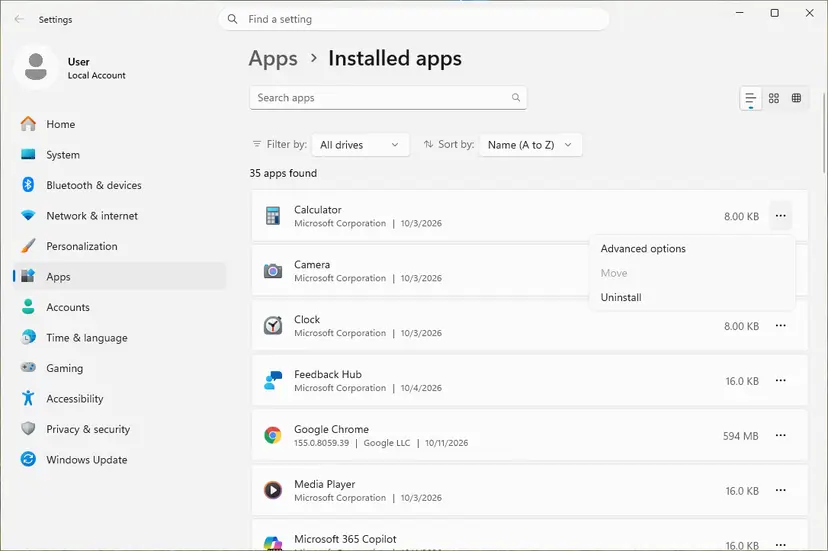
The three dots next to an app open Advanced options. Screenshot: Windows 11 26H2. - Repair first. On the page that opens, select Repair if it is there. The app's data stays. Open the app and check whether it works.
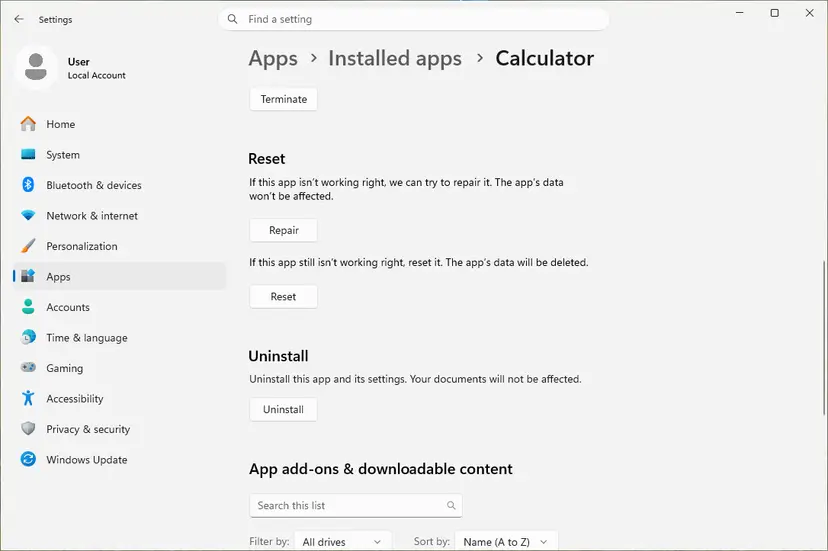
Repair keeps the app data. Reset deletes it. Screenshot: Windows 11 26H2. - Reset if Repair did not help. Select Reset. This deletes the app's data on this PC, including sign-in details and settings. Open the app and set it up again.
These steps were written for Windows 11 25H2 and 26H2. The full page with the other versions and what each result means: How to repair or reset an app in Windows
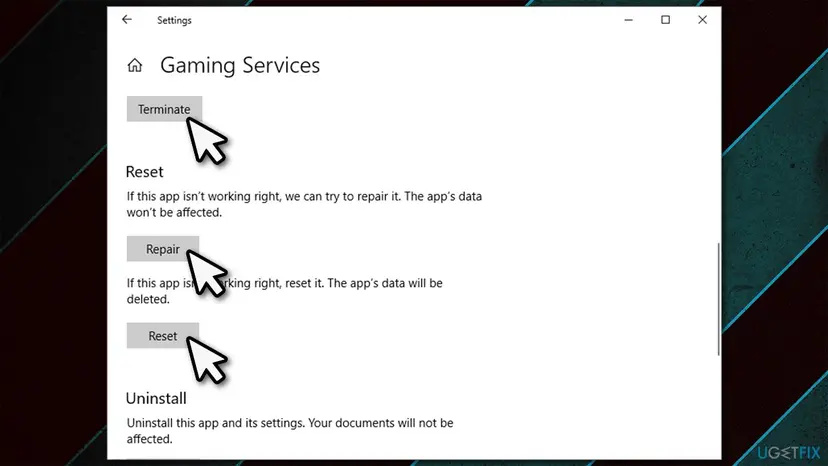
It worked if: A check mark appears next to Repair, and the app opens without the error.
If not: Use Reset next. If that fails too, uninstall the app and install it again from the Microsoft Store (Fix 1).
Fix 3. Install the latest Microsoft Visual C++ Redistributable, x86 and x64
5 minutesLow riskThe DLL is vcruntime140.dll, vcruntime140_1.dll, msvcp140.dll, ucrtbase.dll, concrt140.dll or an api-ms-win-crt file.
These DLLs belong to the Microsoft C and C++ runtime. Microsoft says the Redistributable on the PC must be at least as recent as the build tools the program was made with. A program built with newer tools asks for functions an older runtime does not have, which is exactly this error.
- Open Microsoft's page Microsoft Visual C++ Redistributable latest supported downloads on learn.microsoft.com.
- Download
vc_redist.x64.exeandvc_redist.x86.exe. On an ARM64 PC, the x64 package also contains the ARM64 files. - Run each file. If it offers Repair, select Repair; otherwise select Install.
- Restart the PC and start the program again.
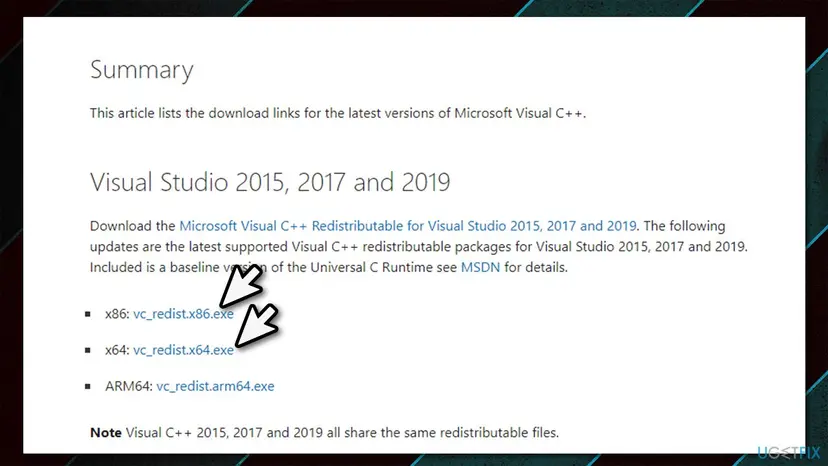
The full repair, including .NET: How to repair Microsoft Visual C++ Redistributable and .NET Framework. A closer look at one of these files: the vcruntime140_1.dll guide.
It worked if: The installer ends with Setup Successful or a finished repair, and the program starts.
If not: If the window still names a Visual C++ DLL, look at its path: a copy in the program's own folder overrides the one in System32, so go to Fix 4.
Fix 4. Find and move aside a stray copy of the DLL
15 minutesRead the warningThe path in the window points to another program's folder, or the program brings an old copy of a Windows or Visual C++ DLL, or the program is a developer tool such as Apache httpd.exe.
Windows takes the first copy it finds in its search order: the program's folder, System32, the Windows folder, the current folder, then every folder in PATH. An old copy left by another program or an installer wins over the right one. Moving it aside lets Windows find the correct file.
The other copy may belong to a program you still use, and that program may stop working without it. Never touch files in C:\Windows\System32 or C:\Windows\SysWOW64 in this fix. Rename the stray copy instead of deleting it, so you can undo the change by renaming it back.
- Write down the DLL name and the full path from the window.
- Press Win + R, type
cmdand press Enter. - Type this command with your DLL name and press Enter. It lists every copy in the current folder and in the
PATHfolders.where Library.dll - Compare the list with the path in the window. A copy in the folder of another program, or in a folder such as
C:\Toolsor an old PHP or Python folder, is the suspect. - If the window named a copy inside the failing program's folder, and the same DLL also exists in
C:\Windows\System32, that program copy is the suspect. - Close all programs, open the suspect's folder in File Explorer and rename the file, for example from
Library.dlltoLibrary.dll.old. - Start the failing program again.
It worked if: The program starts. Windows found the correct copy of the DLL.
If not: Rename the file back to its old name. If another program breaks after the rename, rename it back and reinstall the failing program instead (Fix 1).
Fix 5. Update Windows when the program needs a newer Windows function
30 to 120 minutesLow riskThe DLL is KERNEL32.dll, USER32.dll or another System32 file, and the PC runs Windows 7, 8.1 or an old Windows 10 build.
Programs keep using new Windows functions. On an older Windows the function was never there, so no repair can add it. Microsoft notes that the latest Visual C++ runtime supports only Windows 10 and 11 and Windows Server 2016 and later, so new programs often stop working on older systems.
- Press Win + R, type
winverand press Enter. Note the Windows version and build. - Open Settings > Windows Update on Windows 11, or Settings > Update & Security > Windows Update on Windows 10, and select Check for updates.
- Install every update, restart, and check again until nothing is left.
- On Windows 10, install the feature update to version 22H2 or move to Windows 11 when it is offered.
- Start the program again.
- Windows 10 support ended on 14 October 2025. Windows 10 22H2 still runs most programs, but new versions may require Windows 11.
- Windows 7 and 8.1 get no updates. If the program's current version needs a newer Windows, install an older version the maker still lists for your system, or upgrade Windows.
- When updates keep failing: Run the Windows Update troubleshooter
It worked if: winver shows a current version, and the program starts.
If not: If Windows is current and the window still names a System32 DLL, repair the system files in Fix 6.
Fix 6. Repair Windows system files with DISM and SFC
20 to 30 minutesNo riskThe DLL is in C:\Windows\System32 or SysWOW64 on current Windows, many programs fail at once, or svchost.exe is in the title.
When a Windows DLL is damaged or replaced by a wrong version, every program that uses it can fail. DISM repairs the store of Windows components, and SFC then replaces damaged system files from that store with the correct version.
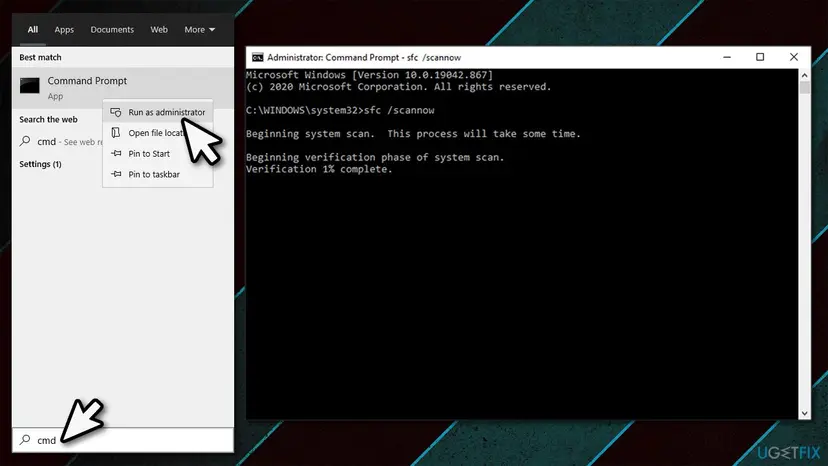
- Open an elevated command window. Right-click Start and select Terminal (Admin), or type cmd in the search box, right-click Command Prompt and select Run as administrator. Select Yes when Windows asks for permission.
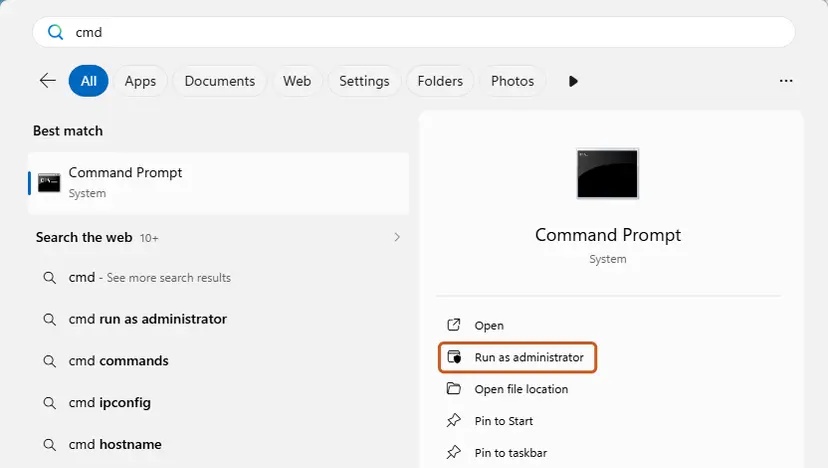
Search for cmd and choose Run as administrator. Screenshot: Windows 11 26H2. - Run DISM first. Type the command below and press Enter. DISM downloads clean copies of damaged components from Windows Update, so it can take several minutes. Wait until it says The operation completed successfully.
DISM.exe /Online /Cleanup-Image /RestoreHealth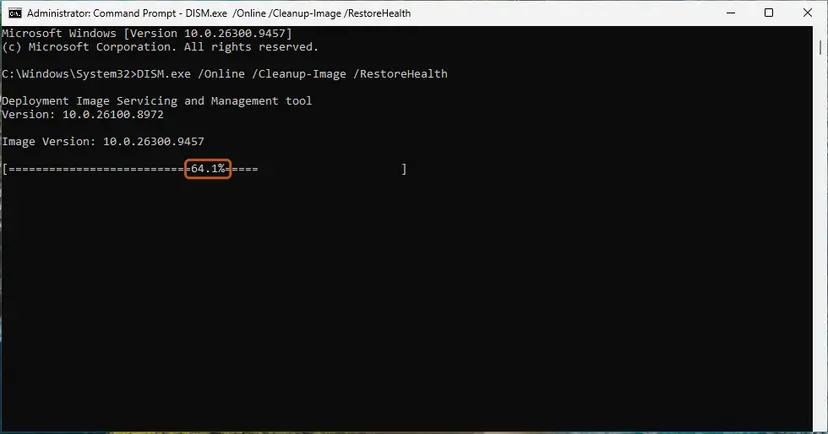
DISM /RestoreHealth running. Screenshot: Windows 11 26H2. - Run System File Checker. In the same window, type the command below and press Enter. Do not close the window until the verification reaches 100%.
sfc /scannow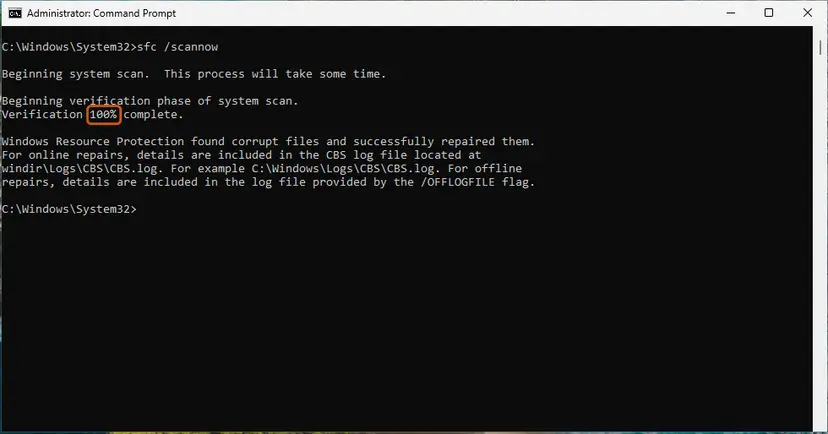
sfc /scannow at 100%. Screenshot: Windows 11 26H2. - Read the result and restart. Compare the last message with the table below this guide, then restart the PC so that repaired files are loaded.
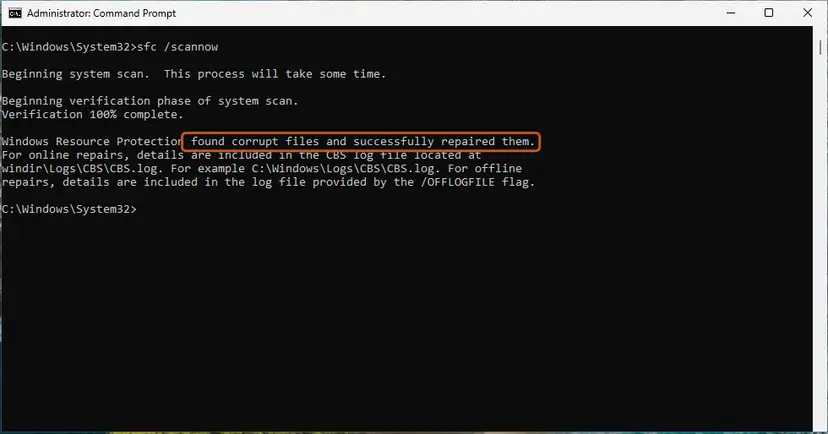
The result line tells you what SFC did. Screenshot: Windows 11 26H2.
These steps were written for Windows 11 24H2 and 25H2. The full page with the other versions and what each result means: Run DISM and SFC to repair Windows system files
It worked if: SFC reports that it found no integrity violations or that it repaired files. After a restart, the programs start.
If not: If SFC could not repair some files, or the error began after a recent change, go to Fix 7. If there is no restore point, use Fix 8.
Fix 7. Undo a recent change with System Restore
20 minutesRead the warningThe error started after a specific day: a Windows update, a driver, a new program or a cleaner tool.
System Restore takes Windows files, drivers, programs and settings back to a restore point, without touching your documents and photos. If a recent install replaced a DLL, going back to a point before it brings the old copy back.
Programs and updates installed after the restore point are removed, and drivers return to their older versions. Your personal files stay. Note what you installed recently, so that you can install it again later.
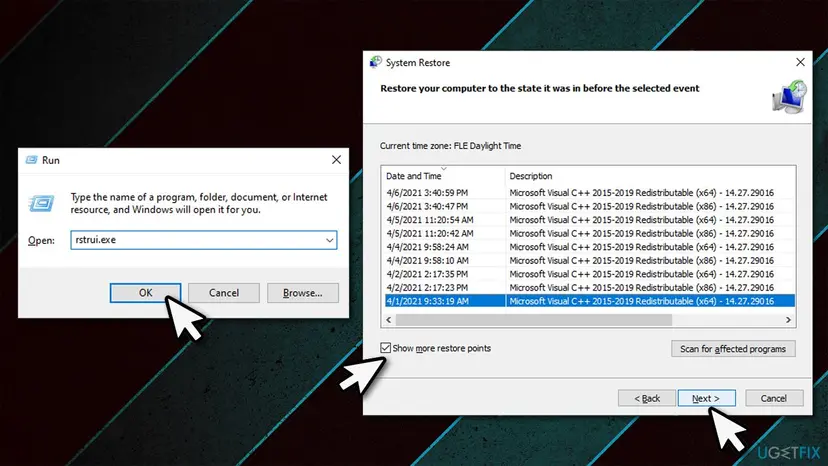
- Open System Restore. Press Windows+R, type the command below and press Enter. You can also open Control Panel > Recovery > Open System Restore. If a first page opens, select Next.
rstrui.exe - Choose a restore point. Select a restore point from a time before the problem started. The Description often names the event, such as a driver or app install. If the one you need is missing, select Show more restore points (shown only when there are more).
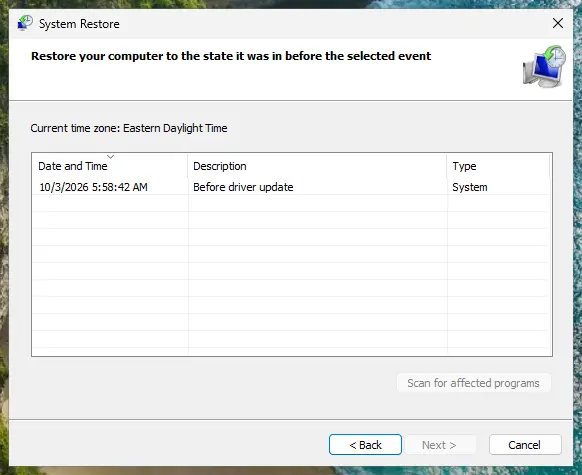
Pick a restore point from before the problem started. Screenshot: Windows 11 26H2. - See what will change. Select Scan for affected programs. The upper list shows programs and drivers that will be removed; the lower list shows those that might come back and may need to be reinstalled. Select Close.
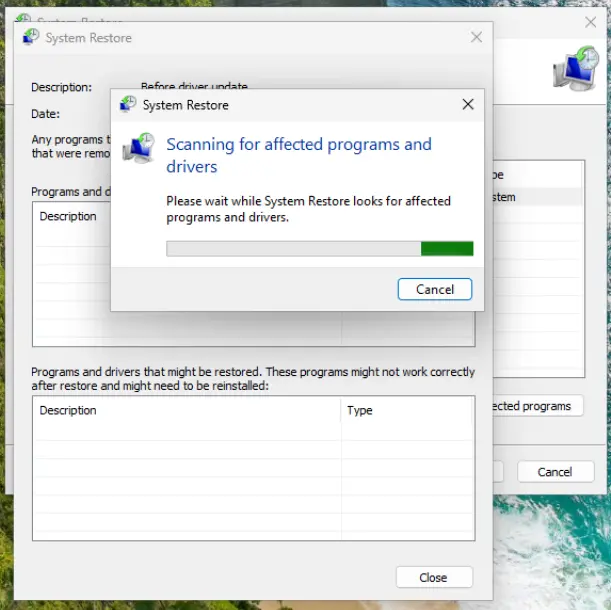
The scan lists programs and drivers the restore removes or brings back. Screenshot: Windows 11 26H2. - Start the restore. Select Next, check the summary and select Finish. Windows restarts and applies the restore point. Do not turn the PC off.
- Check the result. After sign-in Windows reports whether the restore succeeded. Check whether the problem is gone.
These steps were written for Windows 11 and Windows 10 (the steps are the same). The full page with the other versions and what each result means: Undo recent changes with System Restore
It worked if: Windows restarts with a message that System Restore completed, and the program starts.
If not: If there is no restore point or the restore fails, reinstall Windows in place with Fix 8.
Fix 8. Reinstall Windows in place and keep your files and apps
1 to 2 hoursRead the warningFixes 5 to 7 did not help, many programs show the error, or Windows Setup itself shows Setup.exe - Entry Point Not Found.
An in-place reinstall writes a fresh copy of every Windows file over the old one and keeps your files, apps and most settings. It replaces any damaged or wrong system DLL that SFC could not fix. Starting setup from fresh media also avoids a broken setup file.
The option to keep files and apps is the normal choice, but setup replaces Windows itself. Copy important files to an external drive or to the cloud before you start: Back up your files (Windows Backup, File History, Time Machine)
- Open Recovery in Settings. Open Settings > System > Recovery. Next to Fix problems using Windows Update, select Reinstall now. This keeps your apps, files and settings.
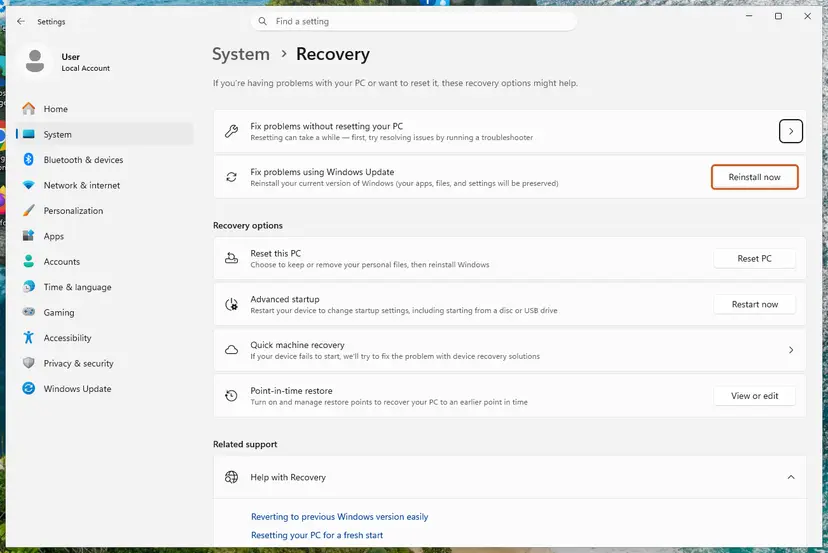
Fix problems using Windows Update reinstalls the current version and keeps apps, files and settings. Screenshot: Windows 11 26H2. - Start the reinstall. Choose whether the PC may restart on its own 15 minutes after the installation, then select OK.
- Wait and restart. Windows Update downloads and installs a repair copy of your current Windows version. Keep the PC plugged in and online, and restart it when asked.
- If that did not help: Reset PC. Back in Settings > System > Recovery, next to Reset this PC, select Reset PC. This keeps your personal files but removes installed apps and settings.
- Choose Keep my files. Select Keep my files. Do not select Remove everything.
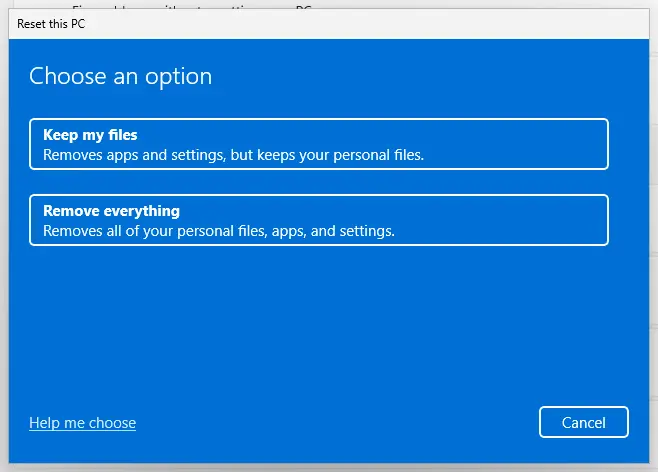
Keep my files removes apps and settings but keeps personal files. Screenshot: Windows 11 26H2. - Choose where Windows comes from. Select Cloud download to download a fresh copy of Windows, or Local reinstall to use the files already on the PC (faster, but may not include the latest updates).
- Reset. Review the summary and select Reset. The PC restarts several times.
These steps were written for Windows 11 22H2 and later. The full page with the other versions and what each result means: Reinstall Windows without losing files
It worked if: Windows starts with your files and apps in place, and the programs open without the error.
If not: Collect the details in "If the Entry Point Not Found error is still there" and contact the program's maker or Microsoft support.
If the Entry Point Not Found error is still there
Collect the facts that decide the next step. Most cases that survive the fixes above are a second copy of the DLL that nobody has found yet, or a program version that needs a newer Windows.
- Take a photo of the window with the function name and the DLL path visible.
- Run
winverand note the Windows version and build. - Note the program's version, from its About page or from Installed apps.
- Open Event Viewer > Windows Logs > Application and look for an Application Error from the same minute. It names the faulting module, which is often the same DLL.
- Send these four things to the program's support. They know which DLL version their program needs.
| What you find | What it points to |
|---|---|
| The DLL path is in the program's folder | The program's own files. Fix 1, then the maker's support. |
The DLL path is in another program's folder or a PATH folder | A stray copy. Fix 4. |
| A System32 DLL, and many programs fail | Windows itself. Fix 6, then check the disk: Check a disk for errors (chkdsk) |
| A System32 DLL on Windows 7 or 8.1 | Windows is too old for this program version. Fix 5. |
How to keep the Entry Point Not Found error from coming back
The error comes back whenever two halves of a program get out of step. Let updates finish, and keep DLLs where their installers put them.
- Let program and Windows updates finish, and restart when asked.
- Install software from its maker's website or the Microsoft Store.
- Keep the Visual C++ Redistributable up to date, both x86 and x64.
- Keep Windows on a supported version.
- Do not download single DLL files from DLL websites.
- Do not copy DLLs between program folders or into System32.
- Do not add other programs' folders to
PATHwithout a reason. - Do not run registry cleaners or DLL fixers.
Frequently asked questions
What does "The procedure entry point could not be located in the dynamic link library" mean?
It means the program asked a DLL for a function by name, and the copy of that DLL Windows loaded does not contain it. The word after "entry point" is the function, and the last line names the DLL. The file is there, but it is a different version from the one the program was built with. That is why reinstalling the program, updating the Visual C++ runtime or removing a stray copy of the DLL usually fixes it, while downloading the DLL from a website usually does not.
Is Entry Point Not Found the same as a missing DLL error?
No. When a DLL is missing, Windows says that the code execution cannot proceed because the file was not found. Entry Point Not Found means the file was found, but it is the wrong version. The fixes overlap, since both are often solved by reinstalling the program or the Visual C++ Redistributable. But for Entry Point Not Found the path in the window matters more, because it shows which copy Windows took. Missing DLL guides on this site, such as the one for xlive.dll, cover the other case.
How do I fix Zoom.exe Entry Point Not Found?
Zoom brings its own DLLs in its program folder, so the usual cause is an interrupted Zoom update that left old and new files together. Uninstall Zoom in Installed apps, restart the PC, download the current installer from Zoom's own website and install it again, as in Fix 1. If the window names a Visual C++ DLL, install the latest Redistributable first (Fix 3). On Windows 7 or an old Windows 10 build, the current Zoom may need a newer Windows; we could not confirm which versions Zoom still supports there.
What about httpd.exe Entry Point Not Found in Apache?
Apache's httpd.exe and its modules load many DLLs, such as the OpenSSL libraries. When PHP, another web stack or an old Apache left different versions of the same files in a folder Windows searches, httpd.exe can pick the wrong one. Run where with the DLL name from the window, as in Fix 4, and look for copies outside the Apache bin folder. Also make sure Apache, PHP and the Visual C++ runtime are all builds for the same architecture, x64 or x86, as their makers state.
Why does svchost.exe show Entry Point Not Found?
svchost.exe is the Windows process that runs services, so this window means a Windows system DLL does not match the rest of Windows. It points to damaged system files or a broken update, not to a single program. Run DISM and SFC (Fix 6) first. If the error started after an update or an install, use System Restore (Fix 7). An svchost.exe outside C:\Windows\System32 or C:\Windows\SysWOW64 is not the Windows file, so scan the PC with Microsoft Defender in that case.
Should I download the DLL from a DLL website?
No. A DLL site cannot know which version your program needs, and the wrong version causes exactly this error. Such files can also be old, changed or carry malware. Placing a downloaded file in System32 can break other programs too. Get DLLs only from the installer of the program they belong to, from the Microsoft Visual C++ Redistributable, or from Windows itself through SFC, DISM or an update.
Does re-registering the DLL with regsvr32 fix it?
No. regsvr32 only registers COM components, by calling a function called DllRegisterServer inside the DLL. It does not change which functions the DLL contains, so it cannot add a missing entry point. Many DLLs are not COM components at all, and regsvr32 then shows its own message that the entry point DllRegisterServer was not found. That message is a different problem, explained in our ExplorerFrame.dll guide. The old version of this page suggested regsvr32, which was wrong.
Can I fix Entry Point Not Found on Windows 7?
Often only partly. Windows 7 left support on 14 January 2020, and Microsoft's latest Visual C++ runtime supports only Windows 10 and 11. Many current programs therefore ask for functions Windows 7 does not have, and the window then names KERNEL32.dll or another system DLL. Reinstalling or repairing cannot add them. Use an older version of the program that its maker still lists for Windows 7, or move to a supported Windows. For program files that are only damaged, Fixes 1 and 3 still work on Windows 7.
The message is in another language. Is it the same error?
Yes. Windows translates the title and the sentence into the language of the PC, so readers in Arabic who search حل مشكلة entry point not found, which means a solution to the problem, see the same window. The program name, the function name and the DLL path are never translated. Read those three, compare them with the table of causes on this page and follow the same fixes.
Sources
Did this fix work?
One click, no account. It tells the next reader which guides are worth their time.
Questions and experiences: fix Entry Point Not Found error in Windows
Still broken, or found a fix we did not cover? Ask here: members and our editors answer. Reading is open; writing needs a free account.
…