
Use System Restore in Windows 11 and Windows 10
System Restore returns system files, the registry, drivers and installed programs to the state they were in when a restore point was made. Your personal files are not affected.
- Time
- 15 to 45 minutes, including restarts
- Level
- Easy
- You need
- An administrator account and at least one restore point. From the recovery environment on an encrypted PC: your BitLocker recovery key.
Before you start
- Programs and drivers installed after the restore point will be removed; programs removed after it may come back. Note what you installed recently.
- Save your work: Windows restarts during the restore.
Windows 11 and 10
Steps written for Windows 11 and Windows 10 (the steps are the same).
Open System Restore
Press Windows+R, type the command below and press Enter. You can also open Control Panel > Recovery > Open System Restore. If a first page opens, select Next.
rstrui.exeChoose a restore point
Select a restore point from a time before the problem started. The Description often names the event, such as a driver or app install. If the one you need is missing, select Show more restore points (shown only when there are more).
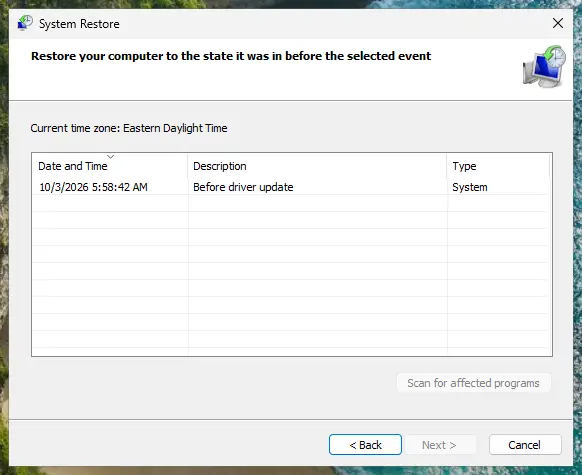
Pick a restore point from before the problem started. Screenshot: Windows 11 26H2 See what will change
Select Scan for affected programs. The upper list shows programs and drivers that will be removed; the lower list shows those that might come back and may need to be reinstalled. Select Close.
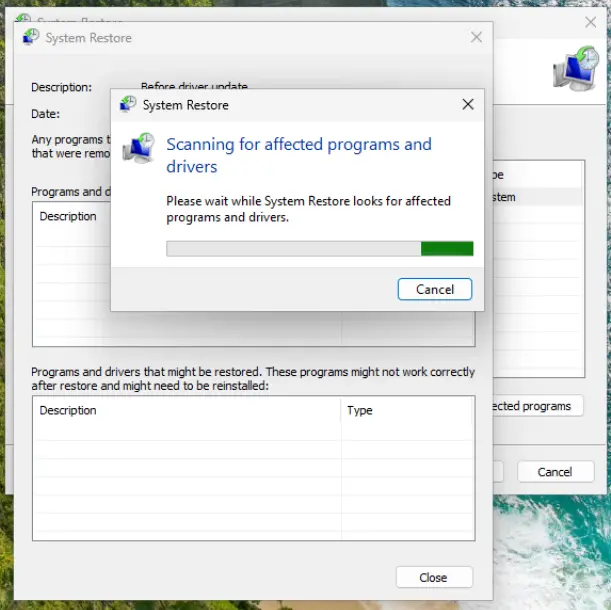
The scan lists programs and drivers the restore removes or brings back. Screenshot: Windows 11 26H2 Start the restore
Select Next, check the summary and select Finish. Windows restarts and applies the restore point. Do not turn the PC off.
Check the result
After sign-in Windows reports whether the restore succeeded. Check whether the problem is gone.
Windows will not start
Steps written for Windows 11 and Windows 10, from the Windows Recovery Environment.
When Windows keeps failing to start, it usually opens the recovery environment by itself. Otherwise use step 1.
Open the recovery environment
On the sign-in screen or in the Start menu, select Power, hold Shift and select Restart. For other ways, see Start Windows or a Mac in Safe Mode.
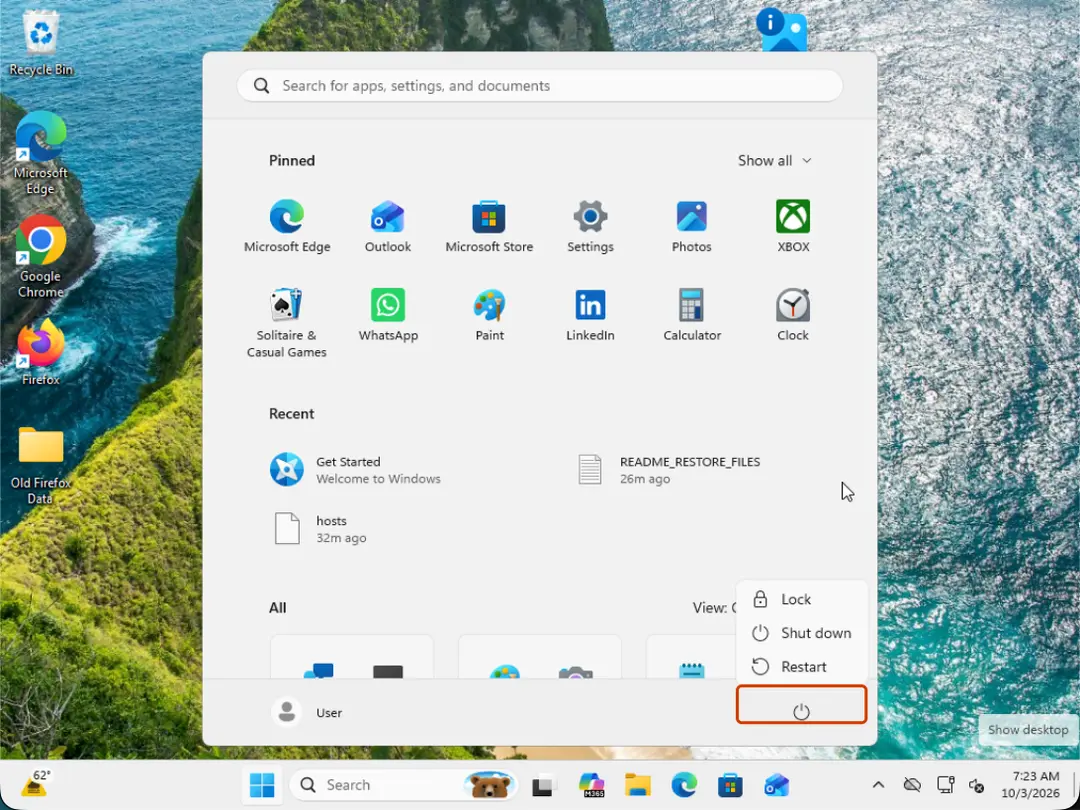
Hold Shift while you select Restart. Screenshot: Windows 11 26H2 Go to Advanced options
Select Troubleshoot > Advanced options.
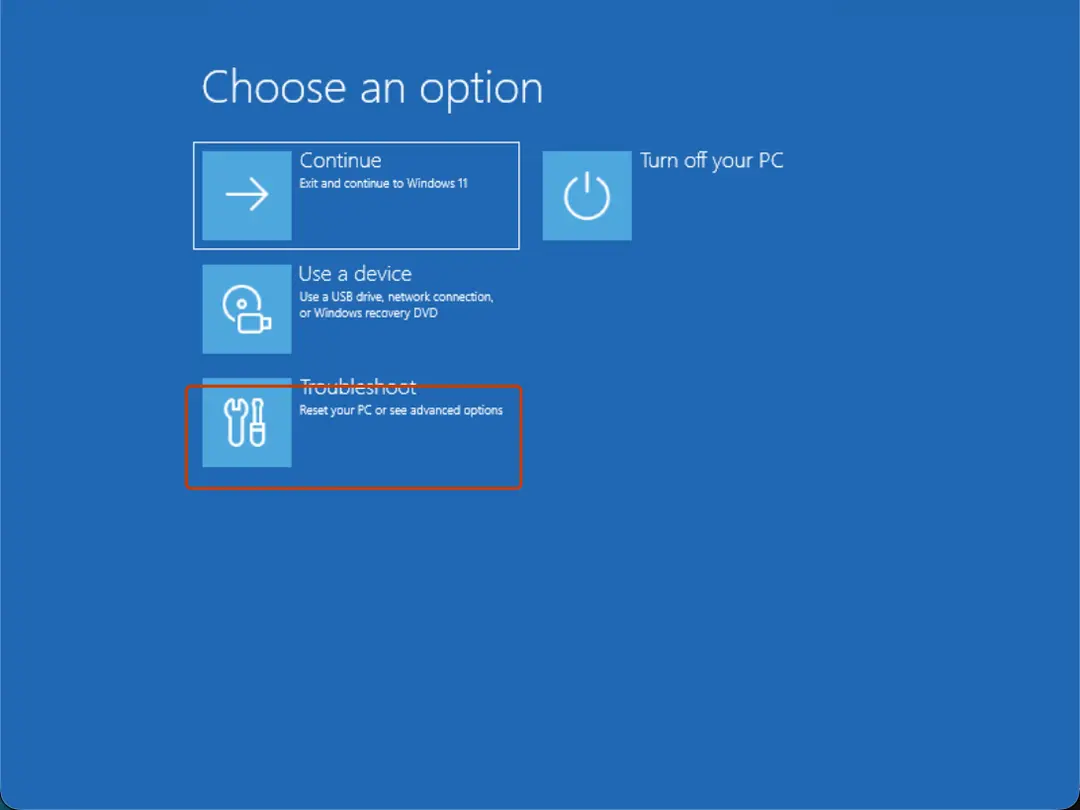
Choose an option: Troubleshoot. Screenshot: Windows 11 26H2 Select System Restore
Select System Restore. If the drive is encrypted, enter your BitLocker recovery key when asked.
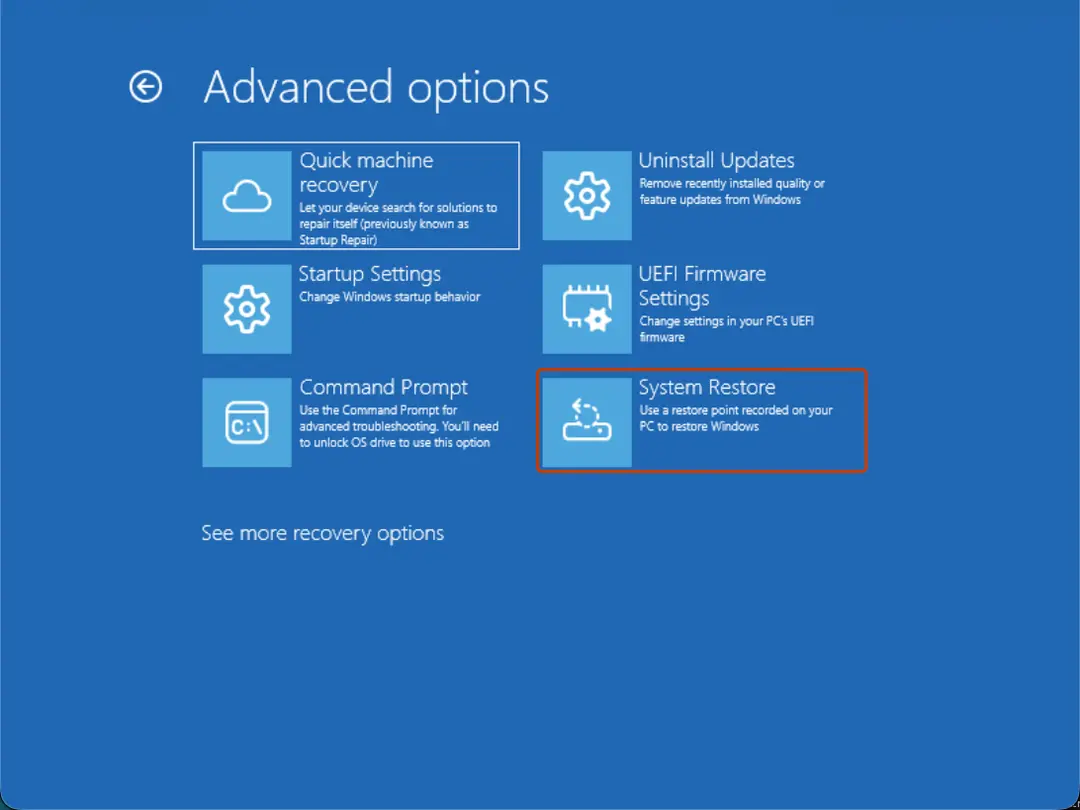
Advanced options: System Restore. Screenshot: Windows 11 26H2 Choose a restore point and finish
Select a restore point from before the problem, optionally Scan for affected programs, then select Next and Finish.
Restart
When the restore is done, select Restart.
Create a restore point
Steps written for Windows 11 and Windows 10.
Microsoft does not turn System Protection on by default. Turn it on and make a restore point before you change drivers, the registry or system settings.
Open System Protection
Select Start, type Create a restore point and open the result. This opens System Properties on the System Protection tab.
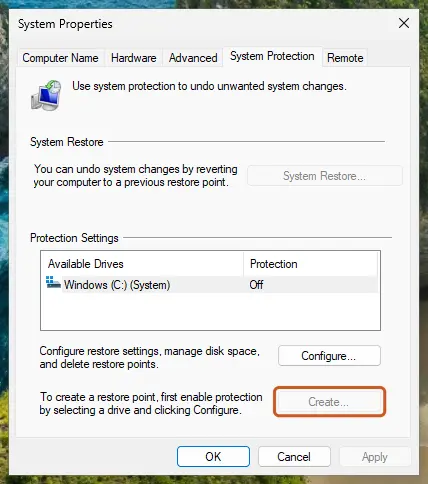
While protection is Off for the drive, Create is unavailable. Screenshot: Windows 11 26H2 Turn on protection if it is Off
Select the Windows drive, select Configure, choose Turn on system protection, set the disk space with the slider and select Apply.
Create the restore point
Back on the tab, select Create, type a description (for example the change you are about to make) and select Create.
If there are no restore points
System Restore can only use restore points that exist. If the list is empty, System Protection was off; turn it on for next time (the Create a restore point tab). To fix the current problem, use the other repair methods in your guide, such as Run DISM and SFC to repair Windows system files, or reinstall Windows while keeping your files: Reinstall Windows without losing files.
If System Restore fails
- Try a different, older restore point.
- Run it from the recovery environment (the Windows will not start tab), where Windows and your programs are not running.
Used in 157 guides
How to fix Windows keeps adjusting input device volume automatically
How to uninstall Bonjour on Windows 11 and 10
How to fix the BthA2DP.sys blue screen (BSOD) in Windows 11 and 10
How to fix Event ID 161 Volmgr error in Windows 11 and 10
How to enable Client License Service (ClipSVC) if it's not starting?
How to fix "ELARA app is keeping the system from closing or restarting" in Windows
Taskhostw.exe high CPU usage: what it is and how to fix it
How to fix Application error 0xc0150004 in Windows?
How to fix the bthmodem.sys blue screen (BSOD) in Windows
How to fix mouse double-clicking on a single click?
How to fix the FAST_ERESOURCE_PRECONDITION_VIOLATION blue screen (0x1C6) in Windows
How to fix Exception on Invalid Stack Black Screen error in Windows?
How to fix error code 0xe06d7363 on Windows?
What are brown box icons on my pictures and how to remove them in Windows?
STTub30.sys incompatible driver: how to turn Memory integrity back on in Windows 11 and 10
How to fix Blue Screen error 0xc00002e3 in Windows 10?
How to fix Entry Point Not Found error in Windows?
How to fix the WdFilter.sys blue screen (BSOD) on Windows
How to fix File System error (-1073741818) in Windows?
How to fix the 0x000000BE blue screen error (ATTEMPTED_WRITE_TO_READONLY_MEMORY) in Windows
How to fix the IntcAudioBus.sys blue screen (BSOD) in Windows
How to fix missing default Power Plans and CsEnabled option?
How to fix the Reference By Pointer BSOD (0x18) in Windows 10 and 11
[Solved] Cannot shrink a volume beyond the point where any unmovable files are located
How to fix "DllRegisterServer failed with error code 0x80070715" error in Windows?
How to fix the rtwlane.sys blue screen error in Windows 11 and 10
How to fix ".exe has stopped working" error on Windows 10 and Windows 11?
How to fix Windows update error 0x80188309?
How to fix BSOD 139 (KERNEL_SECURITY_CHECK_FAILURE) in Windows
Error 1053: The service did not respond to the start or control request in a timely fashion
How to fix Local Security Policy missing in Windows 10?
How to fix System Restore error 0xc000a004 in Windows?
How to fix cdp.dll error in Windows?
How to fix ucrtbase.dll application error on Windows?
How to fix KernelBase.dll causes application crashes in Windows?
How to fix 0x80070425 error in Windows?
How to fix the K7Sentry.sys blue screen (BSOD) error in Windows
How to fix secur32.dll error in Windows?
Microsoft AC Adapter driver missing in Windows 11 and 10: how to fix it
How to fix the Microcode Revision Mismatch BSOD in Windows
How to fix error 0x80041010 in Windows?
How to fix "Unknown Hard Error" on Windows 10?
How to fix "DLL is either not designed to run on Windows or it contains an error"?
How to fix "Please insert the external storage media and press OK" error in Windows 10?
How to fix Microsoft Store error 0x80073D23 in Windows?
How to fix the nt_wrong_symbols.sys BSOD on Windows 10 and 11
How to fix Desktop is not refreshing automatically in Windows?
How to fix D3d12.dll missing or not found error in Windows?
How to fix "The display settings could not be saved" error in Windows?
How to fix the vgk.sys blue screen error in Windows
How to fix File System Error (-1073741515) in Windows 10?
How to fix Windows stuck in Recovery Mode?
How to fix the ci.dll blue screen (BSOD) error in Windows
How to fix the nvhda64v.sys blue screen (BSOD) in Windows
How to fix Windows 10 stuck at "Choose your keyboard layout" screen?
How to fix the ACPI.sys error and blue screen in Windows
[Fix] AutoIt Error "Line 0: Error Opening the File" on Windows
How to fix 0x80090027 (PIN isn't available) error in Windows
How to fix iGoSwServer.exe application crash on Windows?
How to fix blue screen error code 133 (DPC_WATCHDOG_VIOLATION) in Windows
Microphone Boost missing in Windows 11 and 10: why it is not showing and how to fix it
How to fix Bluetooth fails to connect (Event ID 16) in Windows 11 and 10
How to fix screen resolution settings greyed out in Windows?
How to fix File system error (-2147163901) in Windows?
How to fix "Search for app in the Store?" error on Windows?
How to fix "ExplorerFrame.dll was loaded but the entry-point DllRegisterServer was not found"?
How to fix Event ID 7023 error in Windows?
How to fix the SYSTEM_LICENSE_VIOLATION (0x9A) blue screen in Windows 10 and 11
[Fix] Can't disable HDR in Windows
How to fix the bhtsddr.sys blue screen (BSOD) in Windows
How to fix System Restore error code 0x81000202 in Windows?
How to fix the fvevol.sys blue screen (BSOD) error in Windows
How to fix File System Error (-1073741521) in Windows?
How to fix ArmouryCrate.UserSessionHelper.exe - Application Error in Windows?
How to fix Service Control Manager Error 7001 in Windows?
How to fix error code 0xc0000242 when Windows will not start
How to fix File System error (-1073741792) in Windows?
How to fix Windows login error 0x80090011
How to fix the amdkmdag.sys error (blue screen) in Windows 10 and 11
How to fix Windows update error 0x80004002?
How to fix 0xc0000139 BSOD error in Windows?
How to fix Cellular option missing in Windows?
How to fix File System error (-2144927439) in Windows?
How to fix "The resource loader cache doesn't have loaded MUI entry" 0x80073B01 in Windows
How to fix KB5060999 fails to install in Windows 11?
How to fix KB5058499 fails to install in Windows 11?
How to fix the session 1 initialization failed BSOD (SESSION1_INITIALIZATION_FAILED, 0x6D)
How to fix error code 0x800704b3 in Windows?
How to fix socket error 10013 in Windows?
How to fix the Netwsw00.sys BSOD in Windows
How to fix mso20win32client.dll Bad Image error in Windows?
How to fix "BITS service failed to start. Error 0x80004015" in Windows?
How to fix File System Error (-2018374635) in Windows?
How to fix Event ID 86: CertificateServicesClient-CertEnroll in Windows?
How to fix Windows boot error code 0xc0000229 (BlInitializeLibrary failed)
How to fix the mtkwl6ex.sys blue screen (BSOD) in Windows
How to fix Windows 11 upgrade error 0x80070002 - 0x20007?
How to fix "The digital signature for this file couldn't be verified" (0xc0000428) in Windows
How to fix "The application was unable to start correctly" 0xc000102 error in Windows?
How to fix KB5060842 fails to install in Windows 11?
How to fix KB5060533 fails to install in Windows 10?
How to fix the rtux64w10.sys blue screen (BSOD) in Windows
How to fix 0xC0000719 error in Windows?
How to fix "An error occurred while applying security information" in Windows?
How to fix "Error 1067: The process terminated unexpectedly" in Windows?
How to fix Event ID 7000 in Service Control Manager?
How to fix RAVCpl64.exe System Error in Windows?
How to fix File System error (-2144926975) in Windows?
How to fix "dxcore.dll is either not designed to run on Windows or it contains an error"?
How to fix "Can't open this item. It might have been moved, renamed, or deleted" on Windows
How to fix the envirtahci.sys blue screen (BSOD) in Windows
How to fix File System error (-1073740791) in Windows?
How to fix "Unable to delete all specified values" Registry Editor error in Windows?
How to fix Realtek audio issues after the Windows 11 24H2 update
How to fix VMware "Failed to start the virtual machine" error in Windows?
How to fix ESIF TYPE: ERROR MODULE: IPF TIME error in Windows?
How to fix "The previous system shutdown was unexpected" event on Windows?
How to fix the I01 initialization failed BSOD (IO1_INITIALIZATION_FAILED, 0x69) in Windows
How to fix Windows Security shows blank screen?
How to fix SynTPEnh.exe application error in Windows?
How to fix "Windows cannot determine the settings for this device" (Code 34) in Windows
0xc00d36fa "Can't play" error in Windows 11 and 10: how to fix it
How to fix "The driver may be corrupted or missing. (Code 39)" in Windows
How to fix Windows update error 0x800f0905?
How to fix logonUI.exe error in Windows?
How to fix Error 1068: The dependency service or group failed to start in Windows?
How to fix 0x800700aa error in Windows?
Your credentials could not be verified: how to fix it in Windows?
How to fix KB5063878 fails to install in Windows 11?
[Fix] Error 1075: The dependency service does not exist or has been marked for deletion
How to fix "The data area passed to a system call is too small" error in Windows?
How to enable or disable the taskbar overflow menu in Windows 11
How to fix Event ID 10010 DistributedCOM error in Windows?
How to fix AacAmbientLighting.exe - Application error in Windows?
How to fix "Incorrect function" error in Windows?
How to fix the NetAdapterCx.sys blue screen (BSOD) in Windows
How to fix StartMenuExperienceHost.exe error in Windows?
How to fix "Cloud Files Diagnostic Event Listener" failed to start with error 0xC0000022?
How to fix evr.dll missing or not found in Windows?
How to fix Windows update KB5066835 not installing on Windows?
How to fix Camera app error 0xA00F4293 in Windows?
[Fix] DCOM got error "1084" attempting to start the service in Windows
How to fix the WIN32K_CRITICAL_FAILURE (0x164) blue screen in Windows
How to fix Microsoft Store error 0x80073D01?
How to fix the MUI_NO_VALID_SYSTEM_LANGUAGE (0x12A) blue screen in Windows
How to fix Fatal Error C0000022 on Windows?
How to fix black squares behind folder icons in Windows?
How to fix AMDRSServ.exe - System Error in Windows?
How to fix winmm.dll missing or not found error in Windows?
How to fix printing error 0x000003e3?
How to fix Windows update error 0x80070433?
How to fix MicrosoftSecurityApp.exe Bad Image Error 0xc0e90002 in Windows?
How to fix OneCore-DeviceAssociationService error ID 3503 in Windows?
How to fix Microsoft Office error code 30015-25 (1006) in Windows?
How to fix "Your Internet security settings prevented one or more files from being opened"?
How to fix Event ID 6008 "The previous system shutdown was unexpected" in Windows?
How to fix NVIDIA Installer cannot continue error code 0xE6000000 in Windows?
Sources
- Microsoft Support: System Restore (read Oct 3, 2026)
- Microsoft Support: System Protection (read Oct 3, 2026)
- Microsoft Support: Windows Recovery Environment (read Oct 3, 2026)