
How to fix error code 0x800704b3 in Windows?

Prefer to fix it yourself? The manual steps follow.
- 8methods
- 5 to 45 minutes
- Intermediate
Applies to Windows 11 and Windows 10 opening a shared folder, a NAS, a mapped drive, and in rarer cases local drives or apps
8 methods in this guide
Hello. When I try to open Discord, I receive the 0x800704b3 error code. How can I fix this?
Error code 0x800704b3 is Windows system error 1203: the path you opened was typed incorrectly, does not exist, or no network provider on your PC accepted it. Check the path and the computer name first. Stopped network services, a disabled SMB 2 client and leftover VPN or security add-ons cause most of the rest.
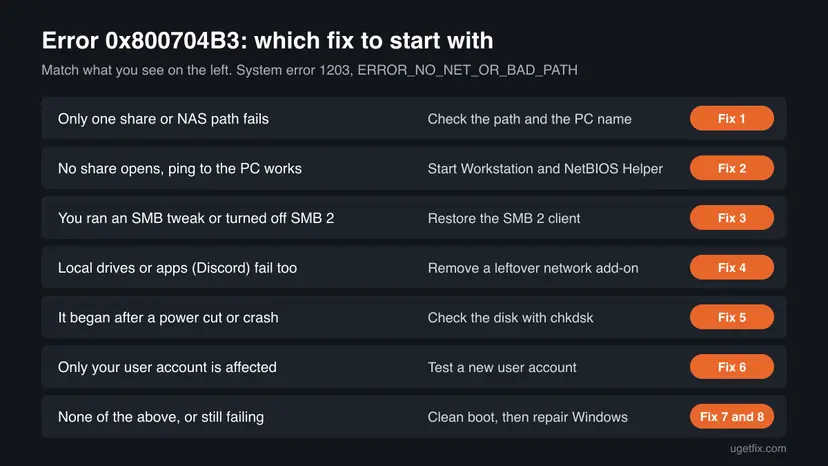
Type the computer part alone, such as \\NAS, and check the exact path (Fix 1). If no share opens at all, start the Workstation and TCP/IP NetBIOS Helper services (Fix 2) and undo any tweak that turned off the SMB 2 client (Fix 3). If even local drives or apps such as Discord show the code, remove a leftover VPN, firewall or file system add-on (Fix 4).
| Error | Network Error: "Windows cannot access \\Name\Share." Details: Error code: 0x800704b3. The network path was either typed incorrectly, does not exist, or the network provider is not currently available. |
|---|---|
| Where it appears | File Explorer or the Run box when you open \\server\share, when a mapped drive reconnects, in Command Prompt as system error 1203, and on some PCs when you open a local drive, msconfig or an app such as Discord. |
| Main cause | Windows has no working network client for that path: a wrong path, a stopped Workstation or NetBIOS Helper service, or a disabled SMB 2 client. |
| Fastest fix | Open \\server alone and compare the path letter by letter (Fix 1), then run sc query lanmanworkstation to see whether the SMB client runs (Fix 2). |
| Also written as | 0x800704b3, 0x800704B3, error 0x800704b3, error code: 0x800704b3, 800704b3, system error 1203, ERROR_NO_NET_OR_BAD_PATH, erro 0x800704b3, código de error 0x800704b3. |
| Affects | Windows 11 and Windows 10, all editions. Older reports go back to Windows 7 and 8.1, including during update installs. |
| Microsoft's status | Not a bug and no update fixes it. It is a standard Windows error, listed by Microsoft as error 1203 (0x4B3). |
| Time to fix | 2 minutes for a wrong path. 10 to 20 minutes for services or SMB settings. Up to an hour for a repair install. |
| Where the cause is logged | Event Viewer, Windows Logs > System, source Service Control Manager: a service that failed or is disabled. Network share errors also land in Applications and Services Logs > Microsoft > Windows > SMBClient. |
Facts checked on 15 October 2026. Steps written for Windows 11 (25H2 and 26H2) and Windows 10 22H2.
What error code 0x800704b3 means
The window is titled Network Error and starts with "Windows cannot access" and the path you typed. Under it you read: "Check the spelling of the name. Otherwise, there might be a problem with your network. To try to identify and resolve network problems, click Diagnose." Select See details to read the code.
Error code: 0x800704b3. The network path was either typed incorrectly, does not exist, or the network provider is not currently available. Please try retyping the path or contact your network administrator.
The code decodes in two parts. 0x8007 marks a plain Windows error, and 0x4B3 is 1203 in decimal. Microsoft's list of system error codes gives 1203 exactly the text above. Its name in the Windows headers is ERROR_NO_NET_OR_BAD_PATH: no network provider on your PC accepted the path. A network provider is the client part of Windows, or of an add-on such as a VPN, that knows how to open a path like \\server\share.
| Code or text | System error | What it tells you |
|---|---|---|
| 0x800704b3, "The network path was either typed incorrectly, does not exist, or the network provider is not currently available" | 1203, ERROR_NO_NET_OR_BAD_PATH | No client on your PC took the path. Look at your own PC first. |
| 0x80070035, "The network path was not found" | 53, ERROR_BAD_NETPATH | The client tried, but did not reach the other computer. |
| 0x80070043, "The network name cannot be found" | 67, ERROR_BAD_NET_NAME | The other computer answered, but has no share by that name. |
| 0x800704cf, "The network location cannot be reached" | 1231, ERROR_NETWORK_UNREACHABLE | There is no route to that network at all. |
That is why 0x800704b3 points at your own PC more often than the other codes do. With 0x80070043 the other side answered, and our 0x80070043 guide covers that case. With 1203 the request often never left your PC.
Why 0x800704b3 appears: causes in order
Most often the path itself is wrong, or the computer name does not resolve. Less often the Windows file sharing client is stopped: the Workstation service, the TCP/IP NetBIOS Helper service, or the SMB 2 driver that a forum tweak turned off. Rarely, a VPN, firewall or file system add-on leaves a broken network provider behind, and then even local drives or apps can show the code.
| Cause | How often | How to tell | Fix |
|---|---|---|---|
| Wrong path, wrong computer name or a drive mapped to a path that is gone | Most often | Other shares open; \\server alone lists shares but not yours, or does not open by name but opens by IP address. | Fix 1 |
| Workstation or TCP/IP NetBIOS Helper service stopped or disabled | Often | No network share opens at all, yet the internet works and ping to the other PC answers. | Fix 2 |
| SMB 2 client turned off by a tweak, or SMB 1 forced | Sometimes | It began after you ran sc.exe config commands from a forum, or after a "network discovery" tip. | Fix 3 |
| A VPN, third-party firewall, antivirus or file system add-on (HFS+, APFS, cloud drive) | Sometimes | Local drives, msconfig or apps such as Discord also show 0x800704b3, often after installing or removing such a tool. | Fix 4 |
| File system damage after a power cut or a skipped disk check | Rarely | Windows started a drive scan at boot and you skipped it; folders that worked before now fail. | Fix 5 |
| A damaged user profile | Rarely | The same PC opens the path from another account. | Fix 6 |
| Another startup program or damaged system files | Rarely | None of the signs above fit. | Fix 7 and Fix 8 |
Discord is not a network share, so Discord itself does not cause this code. When an app on a local drive shows 0x800704b3, Windows is failing to open a path through its network providers. That points to Fix 4 (a broken add-on) or Fix 5 (disk damage). We found no Discord help page that names this code.
How to fix error code 0x800704b3 in Windows
Fix 1 takes two minutes and solves the most common case. Fixes 2 and 3 repair the Windows file sharing client. Fix 4 is for PCs where local drives and apps fail too. Fixes 5 to 8 go from a disk check to a repair install that keeps your files.
| What you see or have | Start with |
|---|---|
| One share, NAS or mapped drive fails, others open. | Fix 1 |
| No network share opens, but the internet works. | Fix 2 |
You ran sc.exe config commands or an SMB tweak before it started. | Fix 3 |
| Local drives, msconfig or apps such as Discord show the code. | Fix 4 |
| It started after a power cut and a skipped disk scan. | Fix 5 |
| Another user account on the same PC works. | Fix 6 |
| Nothing above fits, or the error stays. | Fix 7, then Fix 8 |
Fix 1. Check the path, the computer name and old mapped drives
2 minutesNo riskEveryone with this error, before changing any setting.
Error 1203 literally says the path may be typed incorrectly or may not exist. A typo, a computer that was renamed, or a mapped drive that still points to an old server are the quickest things to rule out.
- Press Win + R, type only the computer part, for example
\\NASor\\192.168.1.20, and press Enter. - If the name fails but the IP address opens, the name does not resolve. Use the IP address for now, or fix the name on the router or NAS.
- If the computer opens, compare its list of shares with your path, letter by letter. Hidden shares ending with
$never show in the list. - Open Command Prompt and run
net use. Look for drives with the status Unavailable or Disconnected. - Remove a stale drive with
net use Z: /delete(use your letter) and map it again with the correct path.
Check the computer and your mapped drives (Command Prompt)
ping NAS
net view \\NAS
net use- A path needs two backslashes and no spaces at the start:
\\server\share, not\server\shareor//server/share. - A share name with spaces needs quotes in Command Prompt:
"\\NAS\Team Files". - If a shortcut or an app setting stores the path, correct it there too.
It worked if: The share opens, or net view lists it and you can map it again.
If not: If ping answers but \\server alone still shows 0x800704b3, the client on your PC is the problem. Go to Fix 2.
Fix 2. Start the Workstation and TCP/IP NetBIOS Helper services
10 minutesLow riskNo network share opens at all, while the internet works.
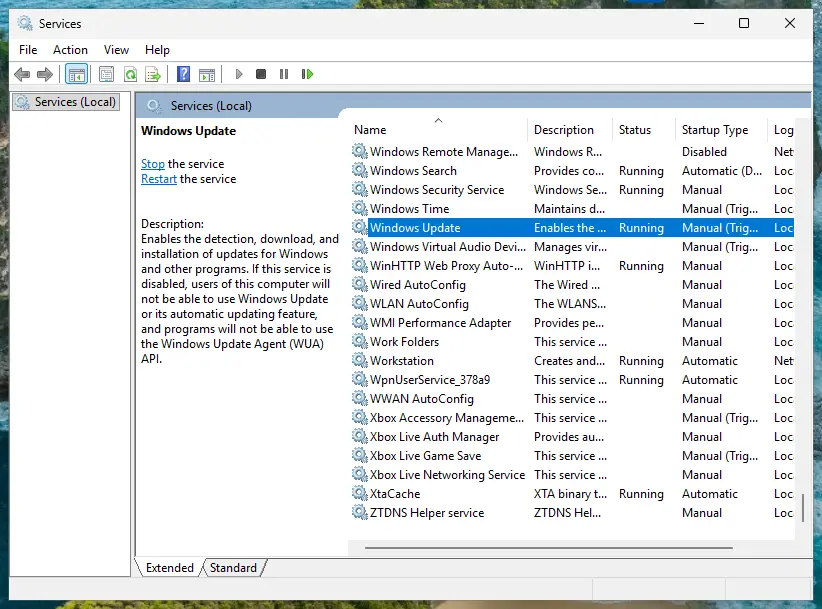
The Workstation service (LanmanWorkstation) is the Windows file sharing client. When it or the TCP/IP NetBIOS Helper (lmhosts) is stopped or disabled, no provider can take a \\server path, which is exactly error 1203.
- Press Win + R, type
services.mscand press Enter. - Open Workstation. Set Startup type to Automatic and select Start if it is stopped.
- Do the same for TCP/IP NetBIOS Helper. Automatic or Manual (Trigger Start) are both normal; Disabled is not.
- Restart the PC and open the share again.
Check and start the services from Command Prompt (as administrator)
sc query lanmanworkstation
sc query lmhosts
net start lanmanworkstation
net start lmhosts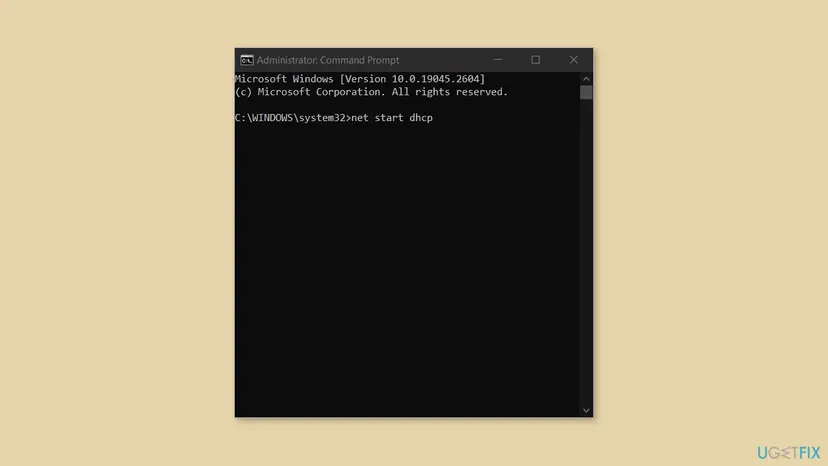
net start command works the same way in an administrator Command Prompt. Windows 10 shown; Windows 11 is identical.In one reported case the NetBIOS Helper could not be started from Services at all and showed "The system could not find the specified path". The user compared the registry with a working PC and set the Start value under HKEY_LOCAL_MACHINE\SYSTEM\CurrentControlSet\Services\lmhosts from 4 (disabled) to 2 (automatic). Back up the registry first: Back up the registry before editing it
Change only the Start value named above. A wrong registry edit can stop Windows from starting, so keep the backup until the PC has restarted and the share opens.
It worked if: sc query lanmanworkstation shows STATE: 4 RUNNING, and the share opens after the restart.
If not: If Workstation fails to start with a dependency error, go to Fix 3.
Fix 3. Restore the SMB 2 client after an SMB tweak
10 minutesRead the warningWorkstation will not start, or the error began after you ran sc.exe config commands or an SMB 1 tip from a forum.
A widely copied tip makes Workstation depend on SMB 1 and turns off the SMB 2 driver mrxsmb20. SMB 1 is not installed by default on current Windows, so the PC is left with no working SMB client and every share fails with 0x800704b3.
A wrong dependency stops the Workstation service from starting. Write down the output of the two sc.exe qc commands below before you change anything, so you can put the old values back.
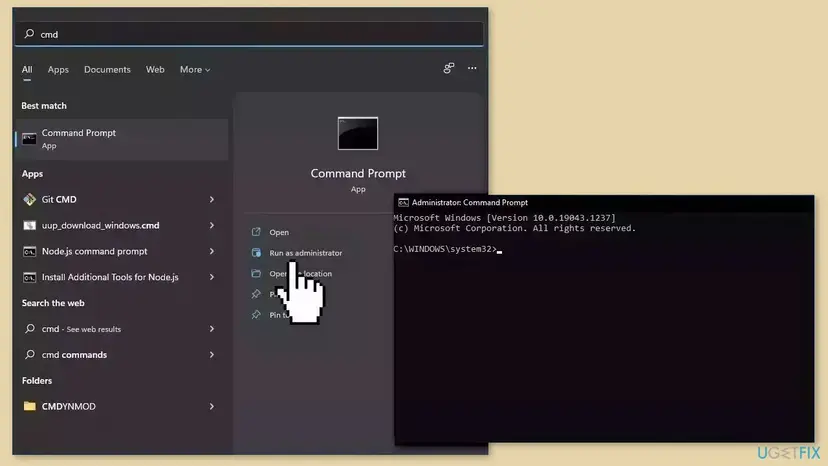
- Open Command Prompt as administrator.
- Run
sc.exe qc mrxsmb20. If START_TYPE says DISABLED, the SMB 2 client is off. - Run
sc.exe qc lanmanworkstationand read the DEPENDENCIES lines. You need MRxSmb20 among them. - Press Win + R, type
optionalfeaturesand check whether SMB 1.0/CIFS File Sharing Support is ticked. This decides which command you use next. - Run the commands below that match your PC, then restart.
SMB 1.0 is NOT installed (the default on Windows 11 and current Windows 10)
sc.exe config mrxsmb20 start= auto
sc.exe config lanmanworkstation depend= bowser/mrxsmb20/nsi
SMB 1.0 IS installed
sc.exe config mrxsmb20 start= auto
sc.exe config lanmanworkstation depend= bowser/mrxsmb10/mrxsmb20/nsi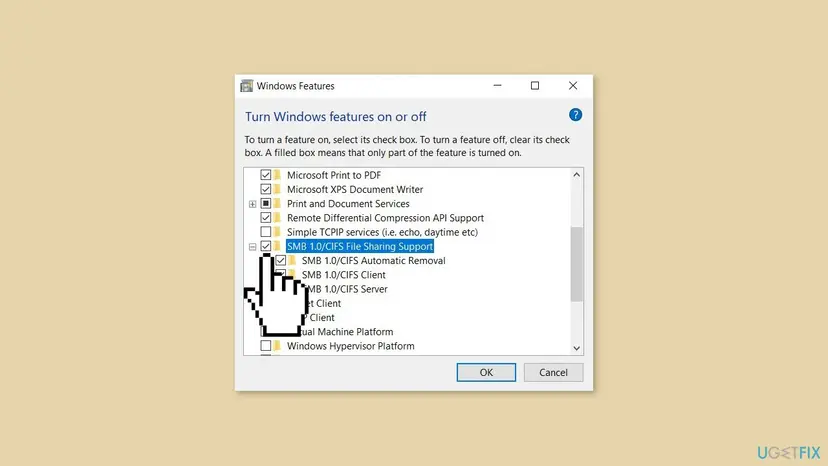
Do not install SMB 1.0 to make an old device work unless there is no other way. It is an old protocol without modern protection. Updating the NAS or router firmware so it speaks SMB 2 or 3 is the better fix.
It worked if: After the restart, sc query lanmanworkstation shows RUNNING and shares open again.
If not: If the values were already correct, this was not the cause. Put back anything you changed and go to Fix 4.
Fix 4. Remove a VPN, firewall or file system add-on that breaks paths
15 minutesLow riskLocal drives, msconfig or apps such as Discord show 0x800704b3, or it began after you installed or removed a VPN, a third-party security suite or a drive tool.
Error 1203 means no network provider accepted the path. VPN clients, third-party firewalls and tools that read Mac drives (HFS+ or APFS) hook into the same layer. A damaged or half-removed one can make Windows reject even ordinary paths.
- Write down every VPN, third-party antivirus or firewall, cloud drive and Mac drive tool you installed around the time the error began.
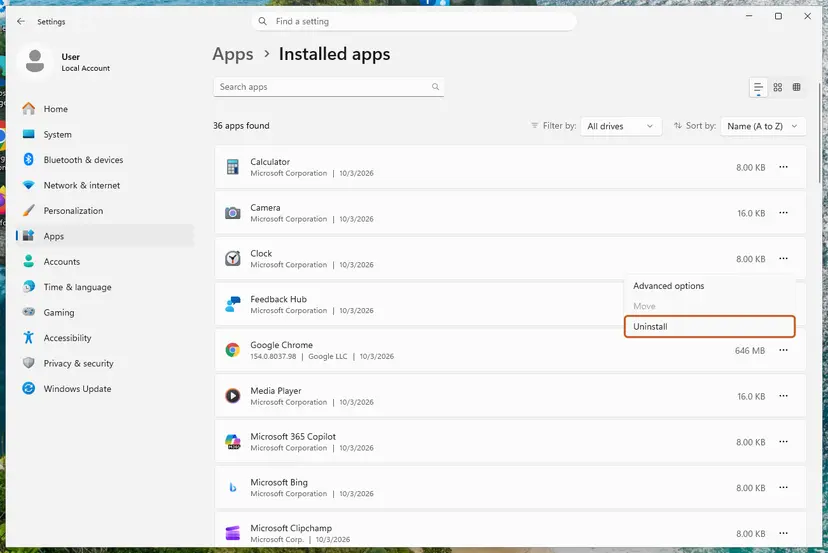
- Uninstall them one at a time and restart after each: Uninstall a program or app in Windows
- If the maker offers a removal or cleanup tool, run it after the uninstall, because some leave their network part behind.
- Test the share, the local drive or the app after every restart.
- When the error is gone, install the latest version of the tool you need again, or switch to another one.
- Mac drive tools
- Paragon Software lists error 0x800704b3 in its knowledge base for apps started from an HFS+ drive. If an app fails only on such a drive, copy it to an NTFS drive or update the driver.
- Your antivirus
- Microsoft Defender stays on when you remove a third-party suite, so the PC is not left unprotected.
- If you cannot tell what changed
- Go back to a restore point from before the error: Undo recent changes with System Restore
It worked if: After the restart that follows the right uninstall, local drives and apps open normally and shares open again.
If not: If removing them changed nothing, reinstall what you need and go to Fix 5.
Fix 5. Check the disk after a power cut or a skipped scan
10 minutes to start, longer on a large hard diskLow riskThe error started after a power cut, a crash or a drive scan at startup that you skipped.
On Microsoft Q&A, a Windows 10 user got 0x800704b3 on a work folder right after a power cut and a drive repair that was skipped at boot. File system damage can make a folder path fail, and chkdsk is the tool that finishes that repair.
- Open Command Prompt as administrator. Type cmd in the search box on the taskbar, right-click Command Prompt and select Run as administrator. Select Yes when Windows asks for permission.
- Scan the drive without changing anything. Type the command below and press Enter. Replace C: with another drive letter to check that drive. This scan only reports; it does not fix anything.
chkdsk C: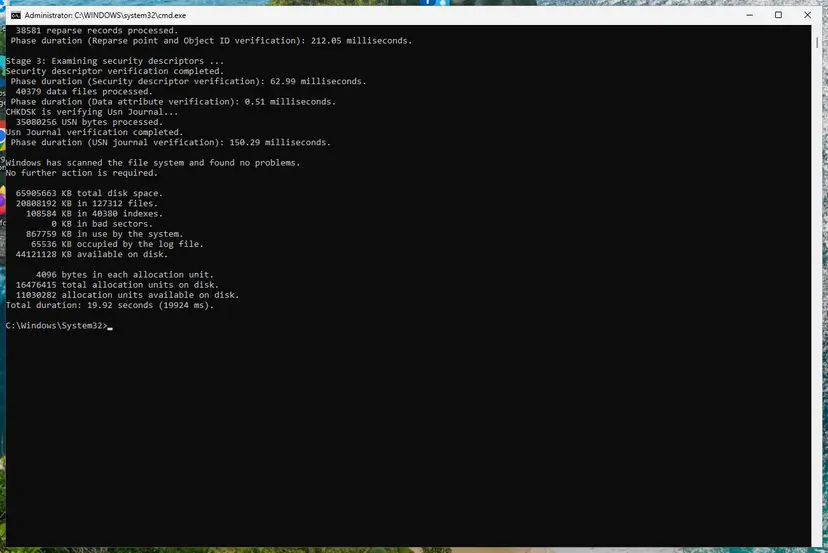
A clean result: no problems found and 0 KB in bad sectors. Screenshot: Windows 11 26H2. - If errors were found, run the repair. Run chkdsk with /f to fix file system errors. On the Windows drive (C:) chkdsk cannot lock the drive while Windows is running, so it offers to check it at the next restart.
chkdsk C: /f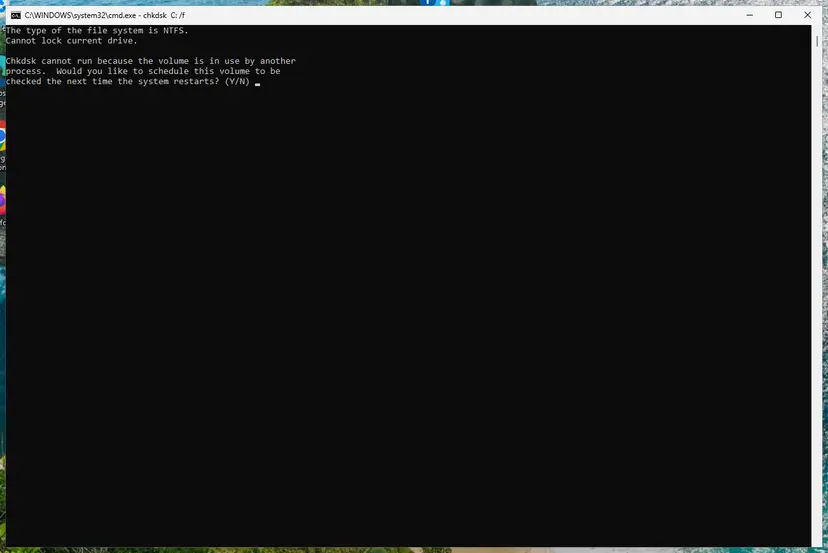
On the system drive chkdsk /f asks to run at the next restart. Screenshot: Windows 11 26H2. - Schedule the check and restart. Type Y and press Enter, then restart the PC. chkdsk runs before Windows starts. Do not turn the PC off while it runs.
- Read the result after the restart. The report of a check made at startup is not shown on the desktop. Open PowerShell and run the command below to see it, or open Event Viewer (eventvwr.msc) > Windows Logs > Application and filter by the sources Chkdsk and Wininit.
Get-WinEvent -FilterHashtable @{LogName='Application'} | Where-Object { $_.ProviderName -match 'wininit' } | Select-Object -First 1 | Format-List TimeCreated, Message
These steps were written for Windows 11 and Windows 10 (the steps are the same). The full page with the other versions and what each result means: Check a disk for errors (chkdsk)
If the failing folder is on a NAS or another PC, run the check on that machine, or use the NAS disk check in its admin page. Back up important files before a repair if the disk makes noises or files keep disappearing.
It worked if: chkdsk reports that it found no problems, or that it fixed them, and the folder opens after the restart.
If not: If chkdsk reports bad sectors, copy your files off the drive first and plan to replace it. Otherwise go to Fix 6.
Fix 6. Test a new user account
10 minutesLow riskOther people on the same PC can open the path, or you want to know if your profile is the cause.
Mapped drives, saved credentials and some network settings live in your user profile. If a fresh account opens the path, Windows itself is fine and the problem is stored in your profile.
- Open Other users. Open Settings > Accounts > Other users. You can also press Windows key + R and run the command below.
ms-settings:otherusers - Add an account. Next to Add other user, select Add account.
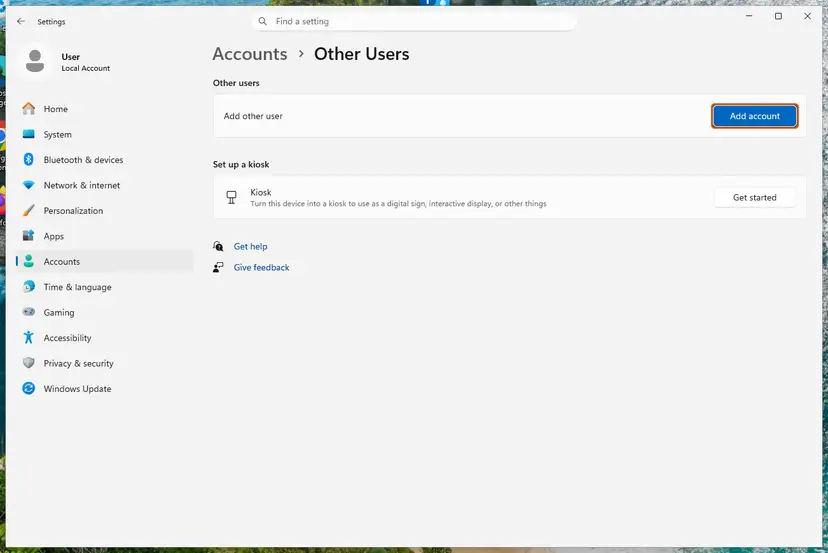
Add account is next to Add other user. Screenshot: Windows 11 26H2. - Skip the Microsoft account. Select I don't have this person's sign-in information.
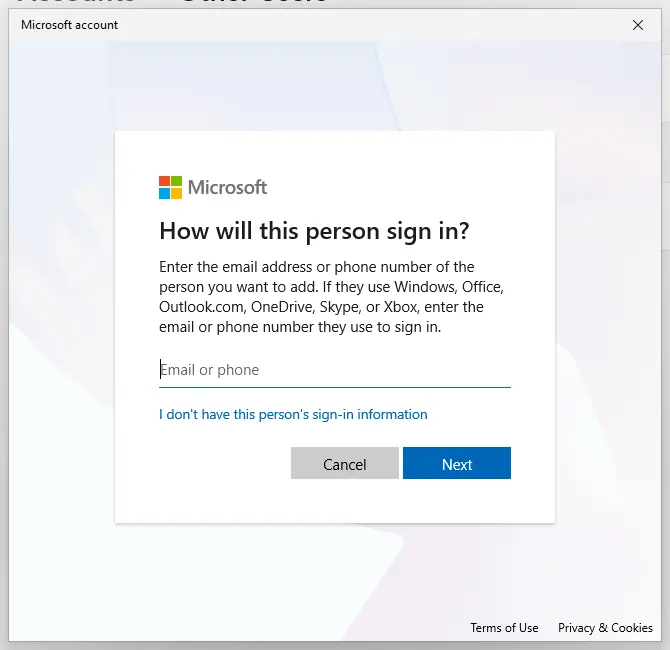
The link for a local account is under the email box. Screenshot: Windows 11 26H2. - Choose a local account. Select Add a user without a Microsoft account.
- Name the account. Type a user name and, if you want one, a password. If you set a password, Windows also asks for answers to security questions. Select Next.
- Make it an administrator (optional). Back in Other users, select the new account, then Change account type next to Account options. Choose Administrator and select OK. For testing a problem, a standard account is usually enough.
- Sign in to the new account. Open Start, select your account picture and choose the new account. The first sign-in takes a few minutes while Windows sets up the profile.
These steps were written for Windows 11 24H2, 25H2 and 26H2. The full page with the other versions and what each result means: Create a new user account to test a problem
Sign in to the new account and open the same path. If it works there, you can move your files to the new account and keep using it, or remove the old saved credentials in Control Panel > User Accounts > Credential Manager > Windows Credentials and map the drives again.
It worked if: The path opens in the new account, which confirms that the old profile holds the fault.
If not: If the new account shows the same error, the cause is system wide. Delete the test account and go to Fix 7.
Fix 7. Clean boot to find a conflicting program
15 minutesLow riskNone of the fixes above found the cause.
A clean boot starts Windows with only Microsoft services. If the error goes away, a third-party service is taking part in the path handling and you can find it by turning services back on in groups.
- Open System Configuration. Select Search on the taskbar, type msconfig and select System Configuration from the results.
- Hide Microsoft services. On the Services tab, select the Hide all Microsoft services check box. Only services from other companies stay in the list.
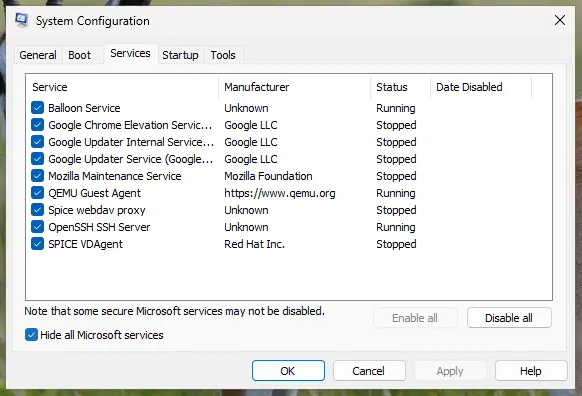
With Hide all Microsoft services ticked, only third-party services stay in the list. Screenshot: Windows 11 26H2. - Disable the remaining services. Select Disable all, then select Apply.
- Open Task Manager. On the Startup tab of System Configuration, select Open Task Manager.
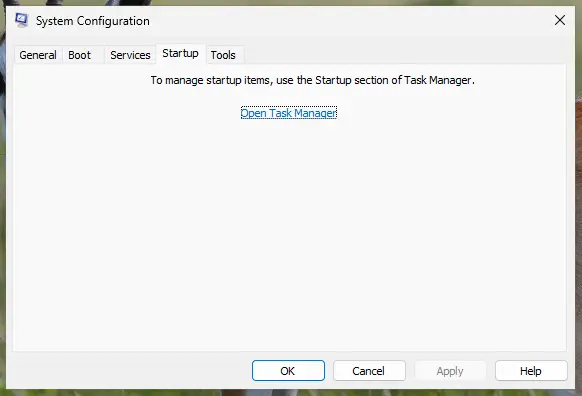
The Startup tab only links to Task Manager. Screenshot: Windows 11 26H2. - Disable the startup apps. On the Startup apps tab in Task Manager, select each item whose status is Enabled and select Disable. Write down or take a screenshot of the items you disable: you need the list to turn them back on.
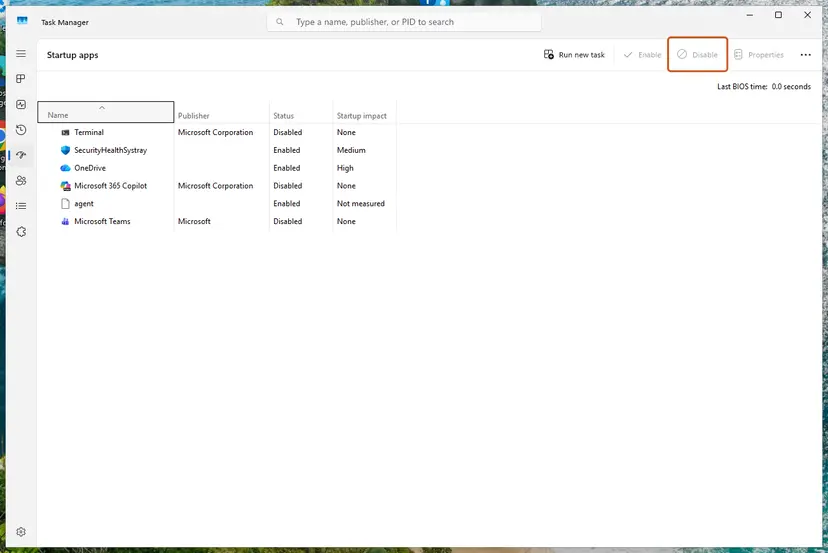
Select an app, then Disable. Screenshot: Windows 11 26H2. - Confirm the changes. Close Task Manager. On the Startup tab of System Configuration, select OK.
- Restart and test. Restart the PC. Windows now starts in a clean boot environment: try again the thing that failed (run the app, install the update, uninstall the program).
These steps were written for Windows 11 25H2 and 26H2. The full page with the other versions and what each result means: How to perform a clean boot in Windows
It worked if: In the clean boot state the share or app opens. Turning services back on half at a time shows which one causes it.
If not: If the error stays in a clean boot, undo it as the procedure shows and go to Fix 8.
Fix 8. Repair Windows: system files, then an in-place repair install
15 minutes for SFC and DISM, about an hour for a repair installLow riskLast step, when every fix above checked out and the error stays on every account.
If a Windows network component itself is damaged, SFC and DISM can replace it. A repair install puts back all of Windows and keeps your files and apps.
- Open Command Prompt as administrator and run the system file check. Step by step: Run DISM and SFC to repair Windows system files
- Restart the PC and open the path again.
- If the error stays, download Microsoft's installation media and start setup.exe from inside Windows.
- Choose to keep personal files and apps, then select Install. Step by step: Reinstall Windows without losing files
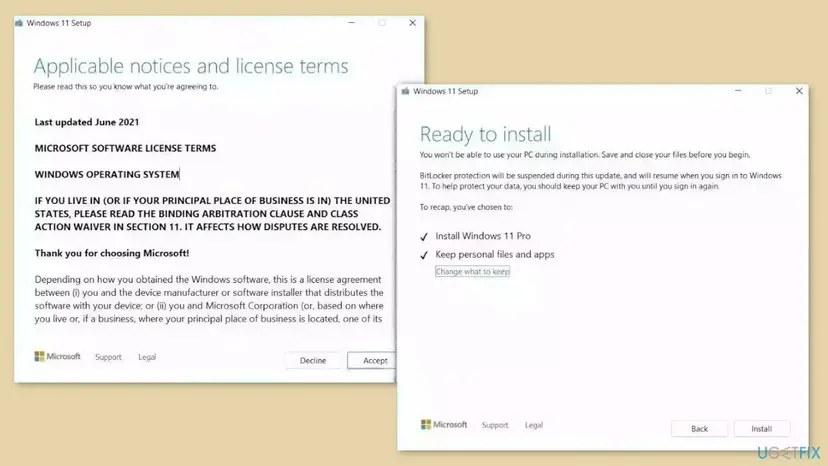
Windows 10 left support on 14 October 2025. A repair install keeps a Windows 10 PC working, but security updates now come only through Extended Security Updates.
It worked if: After the repair install, Windows starts with your files and apps, and the path opens.
If not: Collect the details under "Still not working" below and ask your administrator or the device maker.
If error 0x800704b3 is still there
Collect these facts before you ask for help. They show whether the path, the client on your PC or the other device is at fault.
- The exact path, and the output of
ping server,net view \\serverandnet use. - The output of
sc query lanmanworkstation,sc.exe qc lanmanworkstationandsc.exe qc mrxsmb20. - Your Windows version: press Win + R and type
winver. - Event Viewer, Windows Logs > System: errors from Service Control Manager about Workstation or TCP/IP NetBIOS Helper.
- A list of VPN, security and drive tools installed now or recently removed.
- When it is hardware: chkdsk reports bad sectors, a NAS that does not answer
pingafter a restart, or no link light on the network port. No Windows setting fixes those.
How to stop 0x800704b3 from coming back
- Map drives with the exact path and remove them when a server is renamed.
- Let Windows finish a drive scan after a power cut.
- Remove VPN and security tools with their maker's uninstaller or cleanup tool.
- Keep NAS and router firmware current so they work with SMB 2 or 3.
- Run
sc.exe configtweaks from forums that turn offmrxsmb20. - Turn SMB 1.0 on to make an old device visible.
- Disable the Workstation or NetBIOS Helper service to speed up Windows.
- Turn off the firewall or antivirus as a fix.
Frequently asked questions
What does error code 0x800704b3 mean?
It is Windows system error 1203, ERROR_NO_NET_OR_BAD_PATH. The text says the network path was either typed incorrectly, does not exist, or the network provider is not currently available. In practice no network client on your PC accepted the path. The usual reasons are a wrong path, a stopped Workstation or NetBIOS Helper service, a disabled SMB 2 client, or a broken VPN or security add-on. Fix 1 rules out the path in two minutes.
How do I fix 0x800704b3 on Windows 11?
The steps are the same as on Windows 10. Check the path (Fix 1), then make sure the Workstation and TCP/IP NetBIOS Helper services run (Fix 2) and that the SMB 2 client is on (Fix 3). On Windows 11 24H2 and later a NAS that needs guest access or cannot sign its traffic usually fails with 0x80070035 or 0x80070043 instead, so if your code changes after these fixes, see our guide on error 0x80070035.
Why does Discord or another app show error 0x800704b3?
An app on a local drive should not need a network path, so the code means Windows is sending the request through a network provider that fails. A half-removed VPN, a third-party firewall or a Mac drive tool is the most likely cause (Fix 4). A damaged file system after a power cut is the second (Fix 5). Reinstalling Discord alone rarely helps when other apps or drives also show the code.
Why can't I open my C drive with error 0x800704b3?
Users on Reddit and Microsoft's forums report this when local drives, msconfig and most apps fail at once. That pattern points at something that sits between Windows and every path: a broken network or file system add-on, or system file damage. Try Fix 4 first, then Fix 5 and Fix 8. Sign in to another account (Fix 6) to see whether only your profile is affected.
Does the Diagnose button or the network troubleshooter fix 0x800704b3?
Rarely. Diagnose checks your adapter, address and internet connection. With 0x800704b3 the internet usually works and the fault is the file sharing client or the path, which the troubleshooter does not repair. Run it once if nothing on the network works at all. On current Windows 11 the troubleshooters open in the Get Help app. Otherwise go straight to Fix 1 and Fix 2.
Should I turn off SMB 1.0 or the firewall to fix it?
No. Removing SMB 1.0 is good for security, but on its own it does not fix error 1203. What matters is that the SMB 2 client is on and that Workstation depends on it (Fix 3). Turning the firewall off leaves the PC open and does not fix the path. If you suspect it, pause protection for one short test only: Turn off Microsoft Defender protection for a moment
Can 0x800704b3 appear during a Windows Update?
Yes. Reports from Windows 7, 8.1 and 10 describe update installs that stopped with this code, usually on PCs where local drives also failed. The cause is then the same broken provider or damaged system files, not the update. Work through Fix 4, Fix 7 and Fix 8, then run Windows Update again.
Is this page about "erro 0x800704b3" and "código de error 0x800704b3" too?
Yes. Erro and código de error mean "error" and "error code" in Portuguese and Spanish. The code and system error 1203 are the same on every language version of Windows; only the message text is translated. Every fix here applies, but the menu names in the steps are the English ones, so look for the same place in your language.
Is error code 10 or "WinoBit 3.4 software error" the same problem?
No. Error code 10 is a Device Manager message that a device cannot start, which is a driver problem and has nothing to do with network paths. We found no link between WinoBit 3.4 and this Windows code; this page is only about Windows error 0x800704b3. If a program you do not know asks you to pay or install something to fix this error, do not.
Sources
- Microsoft Learn: System Error Codes (1000-1299) (learn.microsoft.com)
- Microsoft Q&A: To eliminate error code 0x800704B3 (learn.microsoft.com)
- Born's Tech and Windows World: Windows (Network) error 0x800704B3 (borncity.com)
Did this fix work?
One click, no account. It tells the next reader which guides are worth their time.
Questions and experiences: fix error code 0x800704b3 in Windows
Still broken, or found a fix we did not cover? Ask here: members and our editors answer. Reading is open; writing needs a free account.
…