
How to fix Windows activation error 0xC004F213?

Prefer to fix it yourself? The manual steps follow.
- 8methods
- 5 to 30 minutes
- Easy
Applies to Windows 11 and Windows 10 Home and Pro, after a hardware change, a reinstall or an upgrade
8 methods in this guide
Error code 0xC004F213 means Windows reported that no product key was found on your device, so it cannot match a licence to this PC. It usually follows a hardware change such as a new motherboard, or a reinstall where the licence was not linked. Start with the Activation troubleshooter, then enter your key.
Open Settings > System > Activation (Windows 10: Settings > Update & Security > Activation) and select Troubleshoot. If your licence was linked to your Microsoft account, choose I changed hardware on this device recently and sign in. If you have a product key, select Change product key and enter it. A preinstalled licence does not move to a new motherboard.
| Error | 0xC004F213: "Windows reported that no product key was found on your device." Microsoft lists it in its activation error table. |
|---|---|
| Where it appears | The Activation page in Settings, or a notification, with the line Error code: 0xC004F213. Windows 10 users also report it during an upgrade. |
| Main cause | Windows cannot find a licence that matches the hardware. Microsoft says a significant hardware change, such as a new motherboard, can cause this. |
| Fastest fix | The Activation troubleshooter with your Microsoft account (Fix 1), or Change product key if you bought a key (Fix 2). |
| Affects | Windows 11 and Windows 10, Home and Pro. The edition you install must match the edition you own. |
| Not the same as | 0xC004F211 (hardware changed) and 0xC004F215. They sit in the same Microsoft table or family but have their own guides. |
| When it is not free to fix | When Windows came preinstalled and you replaced the motherboard yourself. Microsoft says you may need to buy a new licence. |
| Time to fix | 5 to 30 minutes for the settings fixes. Phone or support contact takes longer. |
Facts checked on 16 October 2026. Steps written for Windows 11 (25H2 and 26H2) and Windows 10 22H2.
What Windows activation error 0xC004F213 means
Microsoft's list of activation errors gives this code one line: "Windows reported that no product key was found on your device." The same table row covers 0xC004F211, the hardware-changed error. So Microsoft treats both as one situation: Windows looked for a licence that matches this PC and found none.
A Windows licence is associated with your device hardware. Microsoft states that significant hardware changes, like replacing the motherboard, can prevent Windows from locating a matching license when the device restarts. Windows keeps running, but it shows as not activated until you give it a licence it accepts.
| What you see | Where | What it tells you |
|---|---|---|
| Windows reported that no product key was found on your device. Error code: 0xC004F213 | Activation page, or a notification after a restart or update | No key and no matching digital licence was found for this hardware. |
| Windows isn't activated, or an Activate Windows watermark | Desktop and Settings | Only the result. Open the Activation page to read the code. |
| The same code during an upgrade to Windows 10 | Setup or the first sign-in after the upgrade | Users report it here too. Treat it the same way: find the key or licence you used before. |
Many people who upgraded for free never typed a key, so the message about a product key confuses them. A digital licence is how Windows recognises your PC. It lives on Microsoft's servers, tied to your hardware and, if you linked it, to your Microsoft account. When the hardware changes, the link breaks, and you need the troubleshooter or the key you originally used.
Why error 0xC004F213 appears, from most to least common
Every cause below is a version of the same fact: the licence Windows knows about does not match what it sees now. The table orders them by how often readers describe them and tells you how to recognise each one.
| Cause | How often | How to tell |
|---|---|---|
| A new motherboard, or a rebuilt PC, after which the digital licence no longer matches. | Most often | The error started right after the repair or upgrade of the hardware. |
| A reinstall of Windows where the licence was never linked to a Microsoft account. | Often | Before the reinstall the Activation page said only activated with a digital license. |
| A different edition than the one you own, for example Home installed on a Pro licence. | Sometimes | The edition on the Activation page differs from your receipt or Store order. |
| A key was used for the upgrade and you no longer enter it after the reinstall. | Sometimes | You have a key card or an email, but never typed it again. |
| A very recent update or activation servers that are busy. | Rare | The error came right after an update with no hardware change. Users report that it cleared by itself. |
Users also say they saw other errors, such as blue screens, next to this one. We found no Microsoft source linking damaged system files to 0xC004F213, so this guide does not treat file repair as a fix for it.
Find out which licence the PC had before the change
Microsoft sorts activation into two methods, a product key or a digital licence, and the fix depends on which one you have. Think back to how you got Windows, then use the table.
| How you got Windows | What you have | After the error |
|---|---|---|
| Free upgrade from an earlier Windows that was activated | Digital licence | Reactivate with the troubleshooter if it was linked to your Microsoft account (Fix 1). |
| Bought in the Microsoft Store app | Digital licence on the buying account | Same as above, signed in with the buying account. |
| Boxed or digital copy with a 25-character key | Product key | Enter the same key again (Fix 2). |
| Windows came preinstalled on a PC or laptop | Manufacturer licence for that device | Does not move to a new motherboard you fitted yourself (Fix 8). |
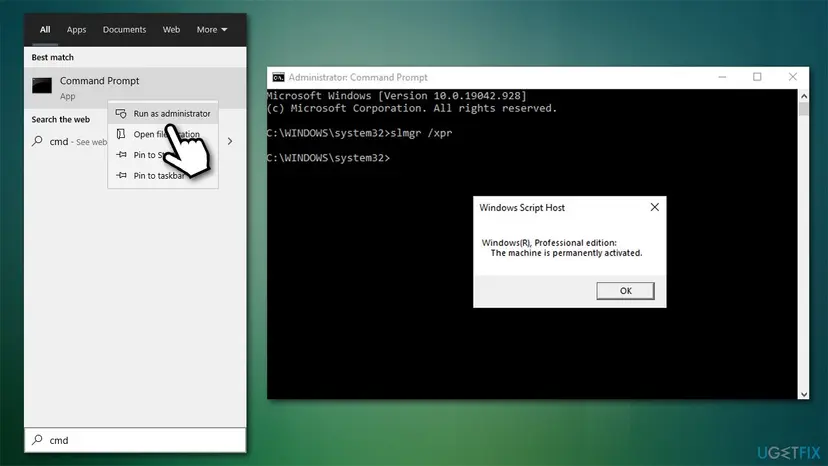
To see what Windows reports now, open Command Prompt as administrator and run the command below. The date it shows is the activation expiry, not your product key, so it tells you whether Windows still believes it is activated.
Command Prompt as administrator
slmgr /xpr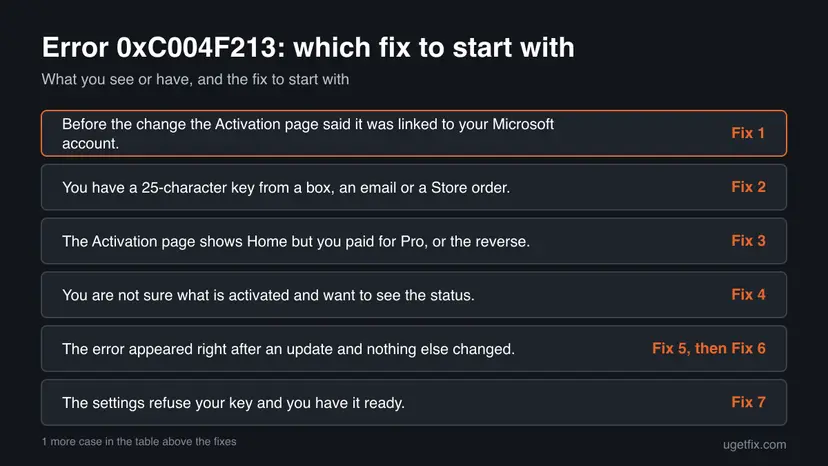
How to fix Windows activation error 0xC004F213
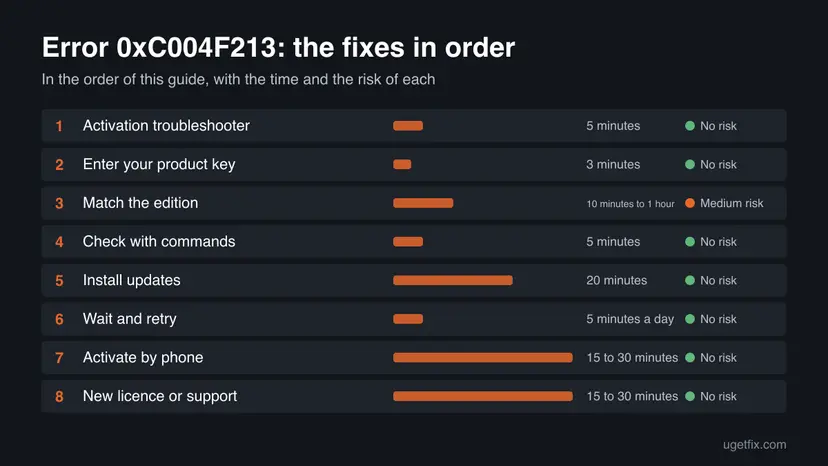
Fixes 1 and 2 reactivate the licence you already own, in the order Microsoft gives them. Fixes 3 and 4 check the edition and what Windows currently reports. Fixes 5 and 6 are the old, weaker suggestions, kept because readers ask about them. Fixes 7 and 8 are for when the settings cannot help.
| What you see or have | Start with |
|---|---|
| Before the change the Activation page said it was linked to your Microsoft account. | Fix 1 |
| You have a 25-character key from a box, an email or a Store order. | Fix 2 |
| The Activation page shows Home but you paid for Pro, or the reverse. | Fix 3 |
| You are not sure what is activated and want to see the status. | Fix 4 |
| The error appeared right after an update and nothing else changed. | Fix 5, then Fix 6 |
| The settings refuse your key and you have it ready. | Fix 7 |
| Windows came preinstalled and you replaced the motherboard yourself. | Fix 8 |
Fix 1. Reactivate with the Activation troubleshooter and your Microsoft account
5 minutesNo riskYour digital licence was linked to your Microsoft account before the change.
Microsoft offers this path for exactly the situation in the error: a licence that no longer matches the hardware. The troubleshooter looks up licences linked to your account and moves one to this device.
You need an internet connection and an administrator account. Microsoft says the troubleshooter works only with the Microsoft account that was linked to the licence, and appears only while Windows is not activated.
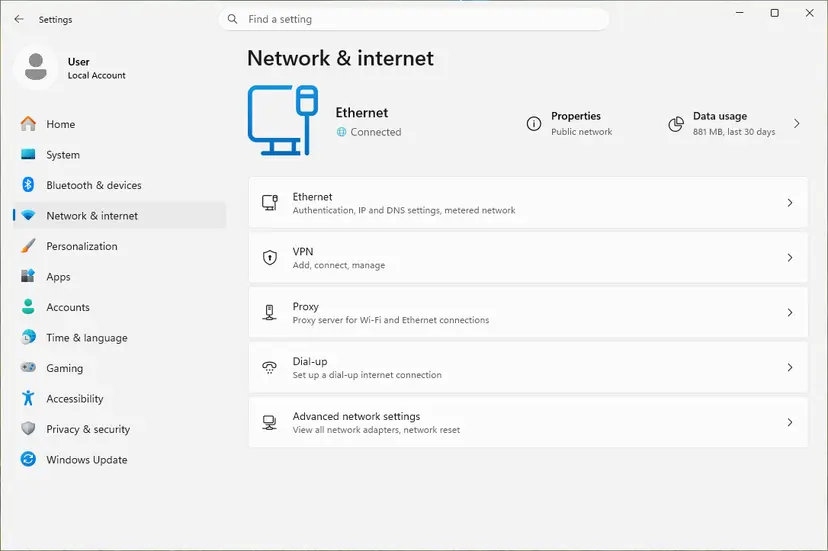
- Sign in to Windows with an administrator account.
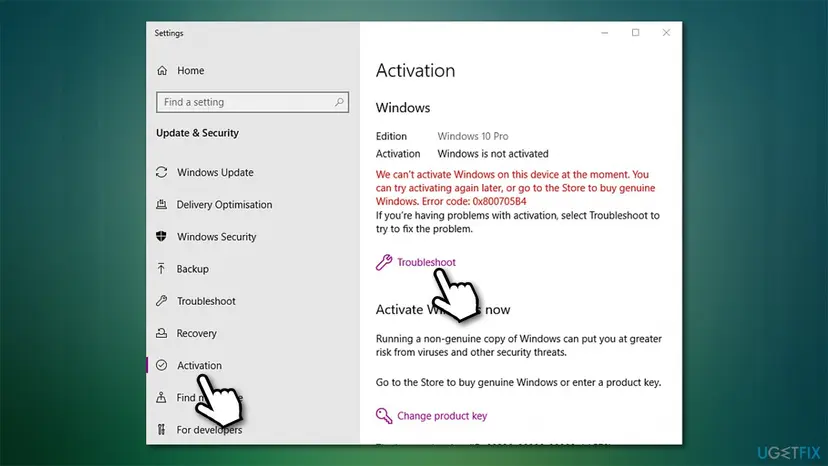
- Open Settings > System > Activation. On Windows 10 it is Settings > Update & Security > Activation.
- Select Troubleshoot. The troubleshooter reports that Windows can't be activated on your device.
- Select I changed hardware on this device recently, then Next.
- Enter the Microsoft account linked to the licence and select Sign in.
- In the list of devices, tick This is the device I'm using right now, then select Activate.
Sign in with the same Microsoft account you linked to the licence. A second or older account will show an empty list.
It worked if: The Activation page says Windows is activated with a digital license, ideally linked to your Microsoft account.
If not: If you never linked an account or the PC is not listed, go to Fix 2 if you own a key, otherwise to Fix 8.
Fix 2. Enter the product key you used before
3 minutesNo riskYou bought a key, or upgraded using one, and the licence was not linked to an account.
Microsoft says that if Windows was not preinstalled and you used a product key, you need that same key again after the hardware change. Entering it gives Windows the licence it could not find.
Look for the key on the box card, in the confirmation email or in your Microsoft Store order. A digital licence from a free upgrade has no key to type, so use Fix 1 for that.
- Open Settings > System > Activation. On Windows 10: Settings > Update & Security > Activation.
- Select Change product key.
- Type the 25-character key and select Next.
- Select Activate if Windows asks, and wait for the result.
A Home key does not activate Pro and the reverse. If Windows says the key is for another edition, go to Fix 3.
It worked if: The Activation page shows Windows is activated and the error is gone.
If not: If the key is refused, check it for typing errors and that it is for your edition, then go to Fix 3.
Fix 3. Make the installed edition match the licence
10 minutes to 1 hourRead the warningThe Activation page shows an edition that differs from the one you own.
Microsoft says your digital licence and product key reactivate only if the edition, Home or Pro, is the same before and after the change. A Home install cannot take a Pro licence.
| Your licence | Installed now | What to do |
|---|---|---|
| Pro | Home | Run the troubleshooter from Fix 1 and use the Pro upgrade option it offers. |
| Home | Pro | Install Home from installation media and skip the key at setup; see the warning below. |
A clean installation removes apps, settings and files from the system drive. Back up first: Back up your files (Windows Backup, File History, Time Machine).
- Compare the edition on the Activation page with your receipt, key card or Store order.
- If the licence is Pro and Home is installed, run Troubleshoot and follow the Pro upgrade option.
- If the licence is Home and Pro is installed, back up your files and create installation media from Microsoft's Windows download page.
- At setup choose the edition you own and select I don't have a product key when asked.
- After setup, sign in with the Microsoft account linked to the licence and run Fix 1.
It worked if: The edition on the Activation page matches your licence, and the status becomes activated.
If not: If you cannot tell which edition you bought, ask Microsoft support (Fix 8) with your order or key card.
Fix 4. Check what Windows reports with slmgr and the firmware key
5 minutesNo riskYou are unsure whether Windows is activated, or whether the PC has a key stored in its firmware.
These built-in checks show the state Windows sees. They do not fix the error, but they tell you whether the problem is a missing key or only a stale display. The old guide mixed up what the two commands show.
- Type cmd in the taskbar search, right-click Command Prompt and select Run as administrator. Accept the User Account Control prompt.
- Run the command that shows when activation expires. It does not show your key.
slmgr /xpr - Right-click Start and open Terminal (Admin) or Windows PowerShell (Admin).
- Ask Windows for the key stored in the PC's firmware, which OEM machines carry. An empty result means none is stored.
(Get-CimInstance -Query 'select * from SoftwareLicensingService').OA3xOriginalProductKey
Older advice used wmic path softwarelicensingservice get OA3xOriginalProductKey. It returns the same field, but newer Windows 11 builds may not include wmic, so the PowerShell line is the safer choice.
It worked if: A box says the machine is permanently activated, or it names an expiry. The second command prints a key or nothing.
If not: If a firmware key appears, enter it with Change product key in Fix 2. If nothing appears, continue with Fix 1 or Fix 8.
Fix 5. Install every pending Windows update
20 minutesNo riskThe error appeared after an upgrade and Windows is not fully up to date.
Microsoft's activation help tells people who upgraded for free to run the latest Windows version, because it includes improvements to activation and its troubleshooting. We found no source tying a specific update to this code, so treat this as a cheap check.
Updating can take a while and needs a restart. Windows 10 22H2 left support on 14 October 2025, so on Windows 10 it is also worth planning a move to Windows 11.
- Open Settings > Windows Update. On Windows 10: Settings > Update & Security > Windows Update.
- Select Check for updates and wait for the scan.
- Install everything offered, including cumulative, security and optional updates.
- Restart the PC when Windows asks.
- Open the Activation page and check the status again.
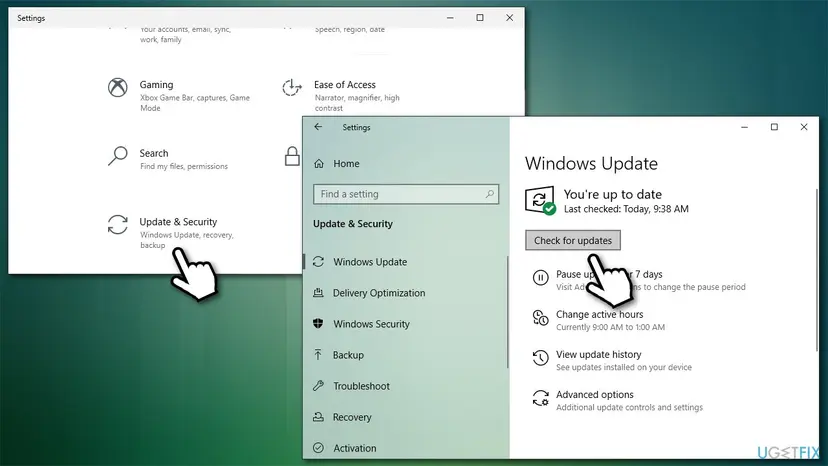
If the update will not install, follow Install an update from the Microsoft Update Catalog.
It worked if: Windows Update says you are up to date, and the Activation page may now show a valid status.
If not: If it still shows 0xC004F213, return to Fix 1 or Fix 2.
Fix 6. Wait a short time and try again
5 minutes a dayNo riskThe error showed up right after an upgrade and you have no hardware change to blame.
The old guide said Microsoft's activation servers can be busy after an upgrade. We found no Microsoft statement or time figure for that, so treat it as a user report, not a rule.
- Keep the PC connected to the internet and signed in.
- Restart it once a day and open the Activation page.
- Select Troubleshoot or Activate now if the page offers it.
- If the error remains after a few days, stop waiting and use Fix 1, 2 or 8.
If you replaced the motherboard, the licence will not match later either. Use Fix 1 or Fix 2 instead.
It worked if: Windows activates by itself after a restart, with no change on your side.
If not: Move on to the next fix. Do not wait longer than a few days.
Fix 7. Activate by phone with the Windows activation wizard
15 to 30 minutesNo riskYou have your product key, Settings will not activate online and you want a different route.
The wizard opened by slui 4 is the phone activation route that old guides list. Microsoft documents phone activation for Windows 7 and 8.1. We could not confirm from its pages that it still works for Windows 10 or 11, so treat it as a last try.
- Have your Windows product key ready.
- Press Win + R, type
slui 4and press Enter. - Select your country or region and select Next.
- Dial the phone number shown for your country.
- Follow the spoken instructions and type the confirmation ID in the wizard.
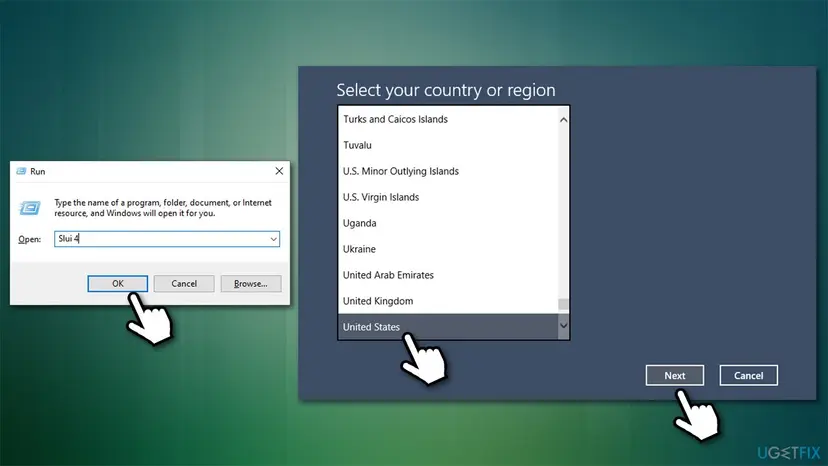
Never call a number from a search result or an advert. The wizard lists the real number for your country.
It worked if: The phone system gives a confirmation ID, and Windows activates after you enter it.
If not: If the line cannot activate Windows, go to Fix 8 and contact Microsoft support.
Fix 8. Buy a new licence or ask Microsoft support
15 to 30 minutesNo riskWindows came preinstalled and you replaced the motherboard, or Fixes 1 to 4 did not work.
Microsoft says that if Windows came preinstalled and you replaced the motherboard, you may need to purchase a new licence. For other cases its reactivation page ends with customer support, who can check a purchase that your account does not show.
| Who changed the motherboard | What to do |
|---|---|
| You did, and Windows was preinstalled | Buy a new licence: Settings > System > Activation, then Go to Microsoft Store. |
| The PC maker, as a repair | Microsoft says the PC should reactivate. If it does not, ask the maker for the key card. |
| You, and you have a retail key or a linked account | Use Fix 1 or Fix 2 first. |
- Collect your proof: the order email, the account it was bought with and a photo of any key card.
- Write down the exact message and the code 0xC004F213.
- Open Microsoft's contact page at support.microsoft.com/contactus and choose Windows activation.
- Send the facts in one message, and keep the reply.
Keys sold far below the retail price and tools that claim to activate Windows can be revoked, contain malware or both. They are not a fix for this error.
It worked if: Windows shows as activated after you enter the new key or apply the licence support gives you.
If not: On a work or school PC, ask the administrator. Such PCs are normally activated by the organisation, not by a personal key.
If error 0xC004F213 is still there
When none of the fixes worked, the question is whether the licence may move to this hardware. Collect the facts below before you contact anyone, so the answer comes quickly.
| What to check | Where | What it tells you |
|---|---|---|
| Activation status and expiry | slmgr /xpr in Command Prompt as administrator | Whether Windows believes it is activated. |
| Edition | Settings > System > Activation | Home and Pro licences do not cross. |
| Linked account | Activation page status line | Whether your Microsoft account is linked to the licence. |
| Firmware key | The PowerShell line in Fix 4 | Whether the PC carries a manufacturer key. |
- Retail key or Store purchase, and still refused: Microsoft support with the facts from the table.
- Preinstalled licence and you changed the board: a new licence, or the PC maker if they did the repair.
- Work or school PC: your administrator.
One reader tried that first and still got the error. A reinstall on the same hardware asks the same licence question and gets the same reply. It helps only when the wrong edition was installed.
How to avoid error 0xC004F213 at the next hardware change
Microsoft calls linking your Microsoft account to the digital licence essential, because that is what makes the troubleshooter work later. It takes one minute, and it must happen while Windows is still activated on the old hardware.
- Open the Activation page before the change. If it says only activated with a digital license, select Add an account and sign in.
- Keep the key card, the shop email or the Store order where you can find it.
- Reinstall the same edition after a repair.
- Ask a repair shop whether the new board keeps the maker's licence.
- Do not remove the old PC from your Microsoft account before the new setup is activated.
- Do not run activator tools from forums or videos.
- Do not buy keys at a fraction of the retail price.
- Do not assume the free upgrade needs no record. Link it to your account.
Frequently asked questions
What does error code 0xC004F213 mean?
Microsoft's list of Windows activation errors gives the message "Windows reported that no product key was found on your device." It means Windows could not find a key or digital licence that matches this PC. Microsoft explains that a licence is associated with the hardware, and that a significant change such as a new motherboard can stop Windows from locating a matching licence after a restart. Windows keeps working but shows as not activated.
Why does it ask for a product key if I upgraded for free?
A free upgrade produces a digital licence, not a key you typed, so the message sounds wrong. The licence is stored with Microsoft and matched to your hardware. When the hardware changes, the match fails and Windows reports that no key was found. The fix is to use the licence through the troubleshooter with your Microsoft account, or the key you used earlier if you have one.
Can I fix 0xC004F213 for free?
Often yes. A digital licence linked to your Microsoft account can be reactivated with the Activation troubleshooter at no cost, and a retail key you own can be entered again. It is not free when Windows came preinstalled and you replaced the motherboard yourself. Microsoft says you may then need to purchase a new licence, because the manufacturer licence belongs to the original device.
Is 0xC004F213 different on Windows 10 and Windows 11?
The code and its meaning are the same. The path differs: Windows 11 uses Settings > System > Activation, Windows 10 uses Settings > Update & Security > Activation. The troubleshooter's hardware option needs Windows 10 version 1607 or later. Windows 10 22H2 left support on 14 October 2025, so consider moving to Windows 11 after you reactivate.
What is the difference between 0xC004F213 and 0xC004F211?
Microsoft puts them in one table row. 0xC004F211 says the hardware of your device changed. 0xC004F213 says no product key was found on your device. The causes and fixes overlap, since both involve a licence that no longer matches the PC. If you see 0xC004F211, use its own guide, which goes deeper into hardware changes and the troubleshooter.
Do slmgr /xpr and wmic show my product key?
No. slmgr /xpr shows the activation expiry, so it tells you whether Windows is permanently activated, not which key was used. The wmic or PowerShell command reads the key stored in the PC's firmware, which only machines that shipped with Windows have. On a PC upgraded for free, or built from parts, that result is usually empty.
Will reinstalling Windows fix 0xC004F213?
Usually not. A reinstall on the same hardware asks Windows the same licence question and gets the same answer. One reader reported that a reinstall changed nothing. It helps only when the wrong edition was installed, for example Home instead of Pro. In that case install the edition you own, skip the key at setup if you have a digital licence, and sign in to your Microsoft account.
Should I wait a few days for the error to go away?
Only if nothing else changed. The old guide suggested waiting, since activation servers may be busy after an upgrade, but we found no Microsoft statement or time frame for that. Restart the PC and check the Activation page once a day. If you replaced hardware, waiting changes nothing, so use the troubleshooter or your key instead.
Does a work or school PC need a new licence for 0xC004F213?
That is for the organisation to decide. Work and school PCs are usually activated through the organisation's own systems, not a personal key. Do not enter a personal key or buy a licence in the Microsoft Store. Send your administrator the error code, the exact message and a note of what changed on the PC.
Is it safe to use an activator tool or a cheap key?
No. Keys sold far below the retail price and tools that claim to activate Windows can be revoked later, and some contain malware. They do not repair the licence record that triggered the error. Use the troubleshooter, your own key, a new licence from the Microsoft Store, or Microsoft support instead.
Sources
- Microsoft Support: Get help with Windows activation errors (support.microsoft.com)
- Microsoft Support: Reactivating Windows after a hardware change (support.microsoft.com)
- Microsoft Support: Activate Windows (support.microsoft.com)
Did this fix work?
One click, no account. It tells the next reader which guides are worth their time.
Questions and experiences: fix Windows activation error 0xC004F213
Still broken, or found a fix we did not cover? Ask here: members and our editors answer. Reading is open; writing needs a free account.
…