
How to fix Event ID 86: CertificateServicesClient-CertEnroll in Windows?

Prefer to fix it yourself? The manual steps follow.
- 6methods
- 5 minutes to identify, 20 to 40 minutes when crashes need a check
- Intermediate
Applies to Windows 11, Windows 10
6 methods in this guide
Hello. Today I encountered a Blue Screen error. Then I noticed an Event ID 86: CertificateServicesClient-CertEnroll in the Event Viewer. The error keeps appearing from time to time. How do I fix this?
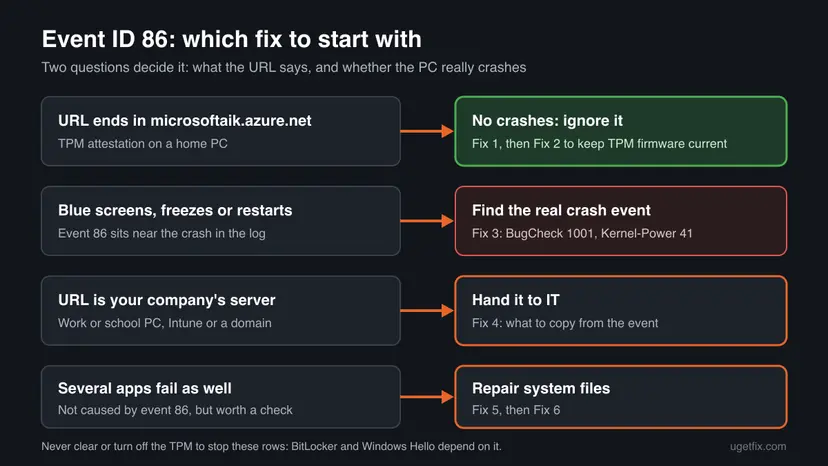
Event ID 86 from CertificateServicesClient-CertEnroll means Windows tried to get a certificate for your TPM chip from a Microsoft service, and the request failed with Not Found (404). On a home PC it is safe to ignore and it does not cause blue screens. Read the URL in the event first, then look for the real crash event if your PC crashes.
On a home PC, Event 86 only says that Windows could not get an attestation certificate for its TPM (the URL ends in microsoftaik.azure.net). Nothing is broken and you can leave it. Confirm the URL with Fix 1. If the PC really shows blue screens, the cause is another event: find it with Fix 3. On a work PC with your company's URL, send the event to IT (Fix 4).
| Error | Source CertificateServicesClient-CertEnroll (Microsoft-Windows-CertificateServicesClient-CertEnroll), Event ID 86, level Error: SCEP Certificate enrollment initialization for Local system via https://AMD-KeyId-....microsoftaik.azure.net/templates/Aik/scep failed. |
|---|---|
| Where it appears | Event Viewer, from time to time and often after startup. It is only in the log: Windows shows no message on the screen. |
| Main cause | Windows asks a Microsoft service for an AIK (Attestation Identity Key) certificate for the TPM, and the service answers that this TPM's authority does not exist: Not found (404). 0x80190194. |
| Fastest fix | None needed on a home PC. Check the URL in the event (Fix 1). Keep Windows and the BIOS updated (Fix 2). For crashes, read the crash event instead (Fix 3). |
| Also written as | Event 86, id=86, CertEnroll error 86, "SCEP certificate enrollment initialization failed", HTTP_E_STATUS_NOT_FOUND, 0x80190194, -2145844844. |
| Affects | Windows 11 and Windows 10 PCs with a TPM, reported most often with AMD processors (AMD-KeyId in the URL) and with VMware virtual machines that have a virtual TPM (vmw-keyid). |
| Vendor status | Broadcom (VMware) documents it as an AIK enrollment against a Microsoft endpoint that does not exist and refers to Microsoft. We found no Microsoft fix or article for home PCs. |
| Time to fix | 5 minutes to confirm it is harmless. 20 to 40 minutes when you need to trace a crash. |
Facts checked on 15 October 2026. Steps written for Windows 11 (25H2 and 26H2) and Windows 10 22H2.
What Event ID 86 CertificateServicesClient-CertEnroll means
CertEnroll is the part of Windows that requests certificates. One of its jobs on a PC with a TPM (Trusted Platform Module, the security chip or its firmware version in the processor) is to get an attestation certificate for a key inside the TPM. Attestation lets a service check that a key really lives in a real TPM.
Windows sends that request with SCEP, a certificate enrollment protocol, to an address built from the TPM maker and the key ID. When the Microsoft service has no authority for that address, the first step of the request (GetCACaps) gets 404 Not Found, and Windows writes Event 86. This is what a full event looks like, as posted by users on Microsoft Q&A:
Event 86, source CertificateServicesClient-CertEnroll (user report, key ID shortened)
SCEP Certificate enrollment initialization for Local system via
https://AMD-KeyId-907d65e9b5....microsoftaik.azure.net/templates/Aik/scep failed

GetCACaps
GetCACaps: Not Found
{"Message":"The authority "amd-keyid-907d65e9b5....microsoftaik.azure.net" does not exist."}
HTTP/1.1 404 Not Found

Method: GET(453ms)
Stage: GetCACaps
Not found (404). 0x80190194 (-2145844844 HTTP_E_STATUS_NOT_FOUND)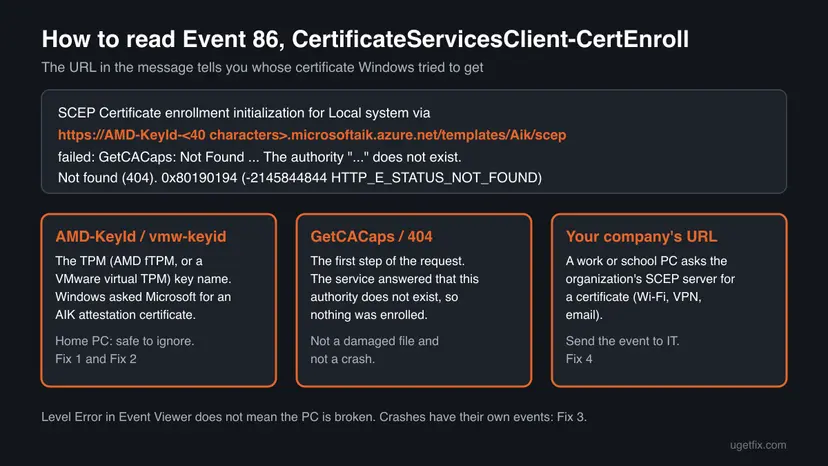
AMD-KeyId-...names a key in an AMD firmware TPM (fTPM). On VMware virtual machines with a virtual TPM the prefix isvmw-keyid-.... We could not confirm the prefixes of other TPM makers.microsoftaik.azure.net/templates/Aik/scepis Microsoft's AIK service. Your PC asked it, the PC was not asked by anyone else.0x80190194is the Windows form of HTTP 404 Not Found. The decimal form-2145844844is the same code.- Level Error is how the source rates its own failure. It does not mean that Windows or your files are damaged.
Why CertEnroll Event 86 appears, most common cause first
| Cause | How it looks | Fix |
|---|---|---|
| Windows tries to enroll a TPM attestation certificate, and Microsoft's service has no authority for this TPM. Most common on home PCs. | The URL ends in microsoftaik.azure.net/templates/Aik/scep, the answer is 404, nothing else is wrong. | Fix 1, then usually nothing |
| The same request from a Windows 11 virtual machine with a virtual TPM. | The URL starts with vmw-keyid or another virtual TPM prefix. | Fix 1 |
| A work or school PC asks the organization's own SCEP server for a certificate, and the request fails. | The URL is a company address, not microsoftaik.azure.net. | Fix 4 |
| A crash or blue screen with another cause, logged at about the same time. | Event 86 sits near BugCheck 1001 or Kernel-Power 41 rows, as in the question above. | Fix 3, then Fix 5 and Fix 6 |
Nothing we read shows that it does. A failed certificate request ends with an entry in the log, it does not stop the system. A volunteer on Microsoft Q&A says the events can be safely ignored on a PC that is not in an Azure managed network. If you see blue screens, the stop code and the BugCheck event tell you the cause (Fix 3).
When you can ignore Event 86 and when to act
- The URL ends in microsoftaik.azure.net and the PC works.
- The rows come every day or two, after startup, with no problem at the same moment.
- You found them while looking through Event Viewer for something else.
- The PC shows blue screens, freezes or restarts: read the crash event (Fix 3).
- The URL is your company's server and Wi-Fi, VPN or email certificates fail (Fix 4).
- Windows Security shows a problem with the security processor (Fix 2).
Users on Microsoft Q&A have tied Event 86 to game crashes and even replaced hardware. In those reports the 86 rows were the visible ones, but nobody showed that they caused the crash. Compare the time of the crash with the time of each 86 row before you change anything.
How to fix Event ID 86: CertificateServicesClient-CertEnroll
Fix 1 takes five minutes and tells you which kind of Event 86 you have. On most home PCs it is also the last step. Fix 2 keeps the TPM firmware and Windows current. Fix 3 is for real crashes, Fix 4 for work PCs, and Fix 5 and Fix 6 for a system that has other faults.
| What you see | Start with |
|---|---|
| Event 86 rows with a microsoftaik.azure.net URL, and the PC works. | Fix 1, then stop |
| The same rows, and you have not updated the BIOS in a long time. | Fix 2 |
| Blue screens, freezes or sudden restarts. | Fix 3 |
| The URL is your company's server. | Fix 4 |
| Crashes started right after a Windows update. | Fix 6 |
| Several apps fail and SFC was never run. | Fix 5 |
Fix 1. Read the URL in Event 86 and check that nothing is broken
5 minutesNo riskEveryone who found these rows, before changing anything.
Event 86 has one part that changes: the address Windows tried. A microsoftaik.azure.net address means TPM attestation, which a home PC does not need, so the row explains itself.
- Press Win + X and select Event Viewer.
- Select Action > Create Custom View, choose By source, tick CertificateServicesClient-CertEnroll, type
86in the event ID box and select OK. Give the view a name. - Open the newest row and read the General tab. Note the URL after via.
- If the URL ends in
microsoftaik.azure.net/templates/Aik/scep, this is the TPM attestation request. If it is a company address, go to Fix 4. - Check the time of the rows against the time of any crash you saw. If they do not match and the PC works, you are done.
The same list in PowerShell: right-click Start, select Terminal (Admin) and run the command below. It reads the log and changes nothing.
PowerShell: the last 20 Event 86 rows from CertEnroll with time and URL
Get-WinEvent -FilterHashtable @{ ProviderName='Microsoft-Windows-CertificateServicesClient-CertEnroll'; Id=86 } -MaxEvents 20 |
  Format-List TimeCreated, Message
We had no PC with these rows to run the command against. If it returns nothing while Event Viewer shows rows, use the custom view from the steps.
It worked if: You see microsoftaik.azure.net in the URL, the rows do not line up with any crash, and you can leave them.
If not: If the PC crashes, go to Fix 3. If the URL is your company's, go to Fix 4.
Fix 2. Check the TPM and update Windows, the BIOS and the chipset driver
15 to 30 minutesRead the warningThe rows name your TPM and the BIOS or Windows has not been updated for months, or you want to be sure the TPM itself is fine.
On AMD PCs the firmware TPM is part of the BIOS, so a BIOS update is the only way to update it. A Microsoft Community support specialist answering an AMD Event 86 report recommended installing the latest updates first. It may not stop the rows, but it rules out an old TPM firmware.
A power cut during the update can damage the board's firmware. Use your PC maker's own tool and instructions, plug a laptop in, and back up your files first. If BitLocker is on, have the recovery key at hand: some firmware updates make Windows ask for it once.
- Press Win + R, type
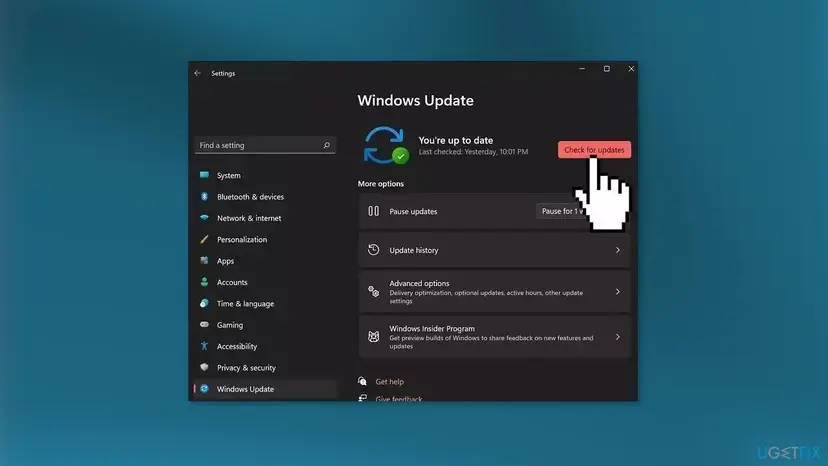
tpm.mscand press Enter. Under Status, check that it says The TPM is ready for use, and note the Manufacturer Name and Specification Version. - Open Settings > Windows Update (Windows 10: Settings > Update & Security > Windows Update), select Check for updates, install everything and restart.
- Press Win + R, type
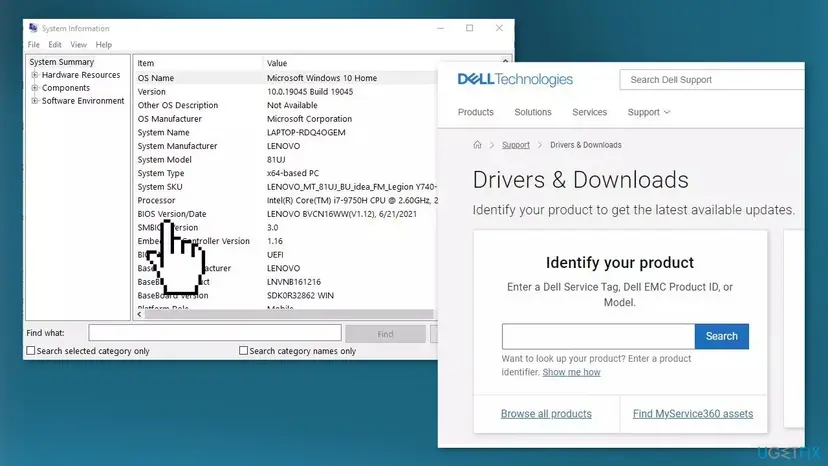
msinfo32and press Enter. Note System Model and BIOS Version/Date. - On your PC or motherboard maker's support page, look up that model. Install a newer BIOS with the maker's tool, and the latest chipset driver (for AMD boards, the AMD chipset driver).
- Restart, then run the Fix 1 command again after a day of normal use.
A support reply on Microsoft Q&A pointed to TPM troubleshooting, which includes clearing it. Clearing removes the keys that BitLocker, Windows Hello PINs and some sign-ins rely on, and Windows 11 expects a TPM 2.0. Event 86 is not worth that.
It worked if: tpm.msc says the TPM is ready, Windows and the BIOS are current, and the PC works. The 86 rows may still appear, which is fine.
If not: If tpm.msc reports a problem with the TPM, contact the PC maker. If the PC crashes, go to Fix 3.
Fix 3. Find the event that really explains the blue screen or restart
10 to 20 minutesNo riskThe PC shows blue screens, freezes or restarts on its own, and you found Event 86 near the crash.
A blue screen writes its own stop code, and a sudden restart writes its own events. Event 86 is a network request that failed, so reading the crash events is the fastest way to the real cause, such as the DPC_WATCHDOG_VIOLATION the reader above may have seen.
- In Event Viewer, open Windows Logs > System and select Filter Current Log.
- Type
41,1001,6008in the event ID box and select OK. - Open the row at the time of the crash. BugCheck 1001 holds the stop code, Kernel-Power 41 says the PC restarted without a clean shutdown, EventLog 6008 says the shutdown was unexpected.
- Press Win + R, type
perfmon /reland press Enter. Reliability Monitor shows crashes, updates and driver installs day by day. - Search the stop code from BugCheck 1001 and fix that. Ignore the 86 rows while you do.
PowerShell: crash events of the last 14 days
Get-WinEvent -FilterHashtable @{ LogName='System'; Id=41,1001,6008; StartTime=(Get-Date).AddDays(-14) } |
  Format-Table TimeCreated, Id, ProviderName -AutoSize
For the unexpected shutdown events, our guide to Event ID 6008 shows how to read them. If you changed the processor and the PC now warns about the fTPM at startup, see fTPM NV corrupted or structure changed.
It worked if: You have a stop code or a crash pattern, and it points to a driver, a device or a setting, not to Event 86.
If not: If there is no BugCheck and no Kernel-Power row, the PC may have lost power or a part may be failing: see the still-broken section. Then try Fix 5.
Fix 4. On a work or school PC, send the event to your IT team
5 minutesNo riskThe URL in Event 86 is your organization's server, or the PC is managed by Intune or a company domain.
Here Event 86 belongs to the organization's certificate setup, which hands out certificates for Wi-Fi, VPN or email. Only its administrators can change the SCEP server or the profile that points to it.
- Open the Event 86 row from Fix 1 and select the Details tab, then XML View.
- Copy the whole XML, including the URL and the error code.
- Note what fails for you: Wi-Fi, VPN, email or nothing.
- Press Win + R, type
winver, press Enter and note the version and build. - Send all of it to IT. Do not change certificate or TPM settings on a managed PC yourself.
It worked if: IT confirms whether the request is expected and fixes the profile or the server.
If not: If the URL turns out to be microsoftaik.azure.net after all, treat it as on a home PC: Fix 1.
Fix 5. Repair Windows system files with DISM and SFC
15 to 30 minutesNo riskCrashes go on after Fix 3, or several apps also fail, and SFC was never run.
This does not stop the 86 rows, which come from an answer on Microsoft's side. It repairs damaged system files that can cause the crashes found in Fix 3.
- Open an elevated command window. Right-click Start and select Terminal (Admin), or type cmd in the search box, right-click Command Prompt and select Run as administrator. Select Yes when Windows asks for permission.
- Run DISM first. Type the command below and press Enter. DISM downloads clean copies of damaged components from Windows Update, so it can take several minutes. Wait until it says The operation completed successfully.
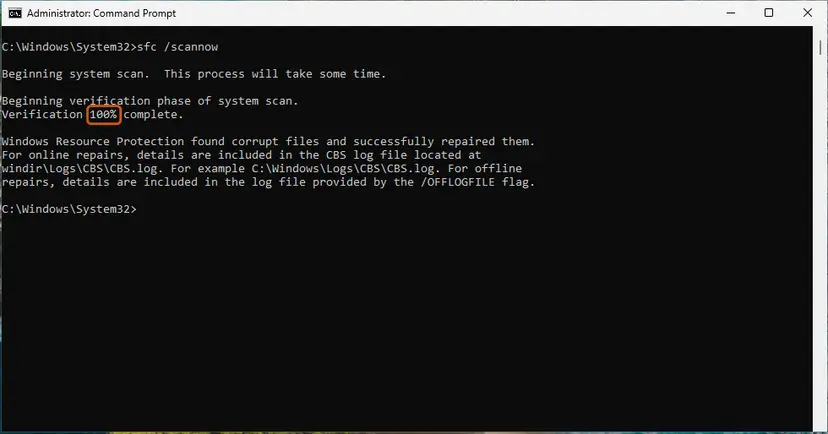
DISM.exe /Online /Cleanup-Image /RestoreHealth - Run System File Checker. In the same window, type the command below and press Enter. Do not close the window until the verification reaches 100%.
sfc /scannow - Read the result and restart. Compare the last message with the table below this guide, then restart the PC so that repaired files are loaded.
These steps were written for Windows 11 24H2 and 25H2. The full page with the other versions and what each result means: Run DISM and SFC to repair Windows system files
It worked if: SFC reports no integrity violations, or that it repaired them, and the crashes stop after a restart.
If not: If crashes started with an update, go to Fix 6.
Fix 6. Remove the last update or go back to a restore point
15 to 30 minutesLow riskBlue screens started on the day a Windows or driver update was installed.
The question above, like many reports, mixes Event 86 with a new crash. If the crash began with an update, removing that update tests the crash directly; the 86 rows will likely stay.
- Press Win + R, type
perfmon /reland press Enter. Find the day the blue screens began and the update installed that day. - Open Settings > Windows Update > Update history (Windows 10: Settings > Update & Security > Windows Update > View update history) and note the KB number installed that day.
- Uninstall that update: How to uninstall a Windows update
- Restart and use the PC as before for a day.
- If the update cannot be removed or the crashes stay, go back to a restore point from before they began: Undo recent changes with System Restore
If nothing helps and the crashes stay, reinstall Windows while keeping your files and apps: Reinstall Windows without losing files
It worked if: The PC runs without blue screens. The 86 rows may still appear and need no action.
If not: If the crashes return, follow the still-broken section.
If the PC still crashes: what to read and what to collect
If the PC still crashes after these fixes, Event 86 is very unlikely to be the reason. Collect these before you contact Microsoft, the PC maker or a repair shop:
- The stop code from BugCheck 1001 or from the blue screen itself.
- The minidump files in
C:\Windows\Minidump, if there are any. - Reliability Monitor (
perfmon /rel): a screenshot of the days with crashes. - The TPM status from
tpm.mscand the BIOS version frommsinfo32. - One Event 86 row in XML View, only to show that you checked it.
| Sign | What to check |
|---|---|
| Crashes also happen in Safe Mode. | Memory and drive: How to test your RAM with Windows Memory Diagnostic and Check a disk for errors (chkdsk). |
| Crashes only under load, such as games. | Graphics driver, temperatures and the power supply. |
| Different stop codes every time. | Memory first, then the motherboard. One Microsoft Q&A user stopped game crashes only by replacing the motherboard. |
| tpm.msc says the TPM is not ready or not found. | The fTPM or TPM setting in the BIOS, and the PC maker's support. |
How to keep CertEnroll Event 86 from leading you the wrong way
- Filter Event Viewer by time and by event ID when you hunt for a crash, so routine rows do not distract you.
- Keep Windows, the BIOS and the chipset driver current, so the TPM firmware stays current too.
- Keep the BitLocker recovery key saved in your Microsoft account or on paper.
- Keep System Protection on for drive C:, so a restore point exists before updates.
- Do not clear or turn off the TPM to stop the rows.
- Do not edit the hosts file or block microsoftaik.azure.net in the firewall; we found nothing that says this is safe.
- Do not buy new hardware because of Event 86 alone.
- Do not reinstall Windows because of these rows: a clean install brings them back on the same TPM.
Frequently asked questions
What is Event ID 86 CertificateServicesClient-CertEnroll?
It is a log entry from the part of Windows that requests certificates. On home PCs it records that Windows asked Microsoft's AIK service at microsoftaik.azure.net for an attestation certificate for the TPM, and the service answered Not Found (404) with code 0x80190194. The URL starts with the TPM maker's key ID, such as AMD-KeyId. No certificate was enrolled, and nothing on the PC depends on it unless an organization manages the device.
Is Event 86 harmful, and can I ignore it?
On a home PC you can ignore it when the URL ends in microsoftaik.azure.net and the PC works. A volunteer answering on Microsoft Q&A says the events only mean that the PC is not in a corporate network managed by Azure. Broadcom describes the same row on VMware virtual machines as an AIK enrollment against a Microsoft endpoint that does not exist. Act only when the URL is your company's or the PC really crashes.
Can Event 86 cause a blue screen or crash on Windows 11?
Nothing we read shows that. A failed certificate request ends with a log entry. Users on Microsoft Q&A report Event 86 next to game crashes and blue screens, but those reports show the rows, not a cause. Find BugCheck 1001 and Kernel-Power 41 at the time of the crash (Fix 3). The stop code in BugCheck 1001, such as DPC_WATCHDOG_VIOLATION, tells you what to fix.
What does SCEP certificate enrollment initialization failed mean?
SCEP is a protocol for requesting certificates, and initialization is its first step, where Windows asks the server what it supports (GetCACaps). Failed means the server did not answer that step. For a microsoftaik.azure.net URL the answer was 404, because the service has no authority for that TPM key. For a company URL, the organization's SCEP server did not answer, which is a question for IT (Fix 4).
Why does the URL say AMD-KeyId?
It is the name Windows builds for a key in an AMD firmware TPM, which is part of the processor and the BIOS. Most home reports of Event 86 come from AMD systems for that reason. It does not mean the AMD processor is faulty. Keep the BIOS and the AMD chipset driver current (Fix 2). On VMware virtual machines the prefix is vmw-keyid, and we could not confirm the prefixes used by other TPM makers.
Should I clear or turn off the TPM to stop Event 86?
No. Clearing the TPM removes its keys, which BitLocker, Windows Hello PINs and some sign-ins use. On a PC with BitLocker you would need the recovery key at the next start. Windows 11 also expects a TPM 2.0. A support reply on Microsoft Q&A pointed to TPM troubleshooting, and users there said the options looked risky. The rows are harmless, so the trade is not worth it.
What is Event ID 87 from CertificateServicesClient-CertEnroll?
It is a different event number from the same source, and we did not research its text for this page. Open it and read the General tab. If it names the same microsoftaik.azure.net URL, the reasoning on this page applies: a failed request from Windows with no effect on a home PC. If it names a company server or a certificate template, give it to IT. Do not apply fixes for 86 to it blindly.
Is Event ID 86 the same on Windows 10?
Yes. The source, text and cause are the same, and so are the fixes; only the Settings paths differ, and the steps give both. Windows 10 left support on 14 October 2025, so it gets no more security fixes. On such a PC, a crash you are chasing is a better reason to move to Windows 11 than Event 86 itself, if the hardware allows it.
I searched id=86 or event 86 in another language. Is it the same?
Event ID 86 means different things from different sources, so check the Source column first. This page is about the source CertificateServicesClient-CertEnroll. In a Russian or Korean Windows, the text is translated but the source, ID and URL stay the same, and the fixes here apply. If the source is something else, such as a disk or network driver, its event 86 has its own meaning.
Sources
- Microsoft Q&A: Event ID 86 AMD CertificateServicesClient-CertEnroll failure (full event text, support specialist reply, user reports) (learn.microsoft.com)
- Microsoft Q&A: I am getting Event 86, CertificateServicesClient-CertEnroll in Event Viewer (safe to ignore outside an Azure managed network) (learn.microsoft.com)
- Broadcom Knowledge Base 414601: Windows 11 VMs with vTPM enabled get SCEP Certificate Enrollment Initialization Failed, Event id 86 (knowledge.broadcom.com)
Did this fix work?
One click, no account. It tells the next reader which guides are worth their time.
Questions and experiences: fix Event ID 86: CertificateServicesClient-CertEnroll in Windows
Still broken, or found a fix we did not cover? Ask here: members and our editors answer. Reading is open; writing needs a free account.
…