
How to uninstall a Windows update
If a problem started right after an update, removing that update can fix it. Your files and apps are not affected, but you lose the security fixes the update brought until you install it again.
- Time
- 5 to 15 minutes plus a restart
- Level
- Easy
- You need
- An administrator account. For the recovery method on an encrypted device, the BitLocker recovery key.
Before you start
- Check when the problem started: in Update history every update has its install date.
- Removing a security update leaves the PC open to the flaws it fixed. Plan to install the update again once the problem is solved.
- If the problem started after an upgrade to a new version of Windows, you can go back to the previous version instead. That option is available for 10 days after the upgrade.
Windows 11
Steps written for Windows 11 25H2 and 26H2.
Open Windows Update
Select Start > Settings > Windows Update.
Open the update history
Under More options, select Update history. Note the KB number and the date of the update you suspect.
Open the list of removable updates
Scroll down to Related settings and select Uninstall updates.
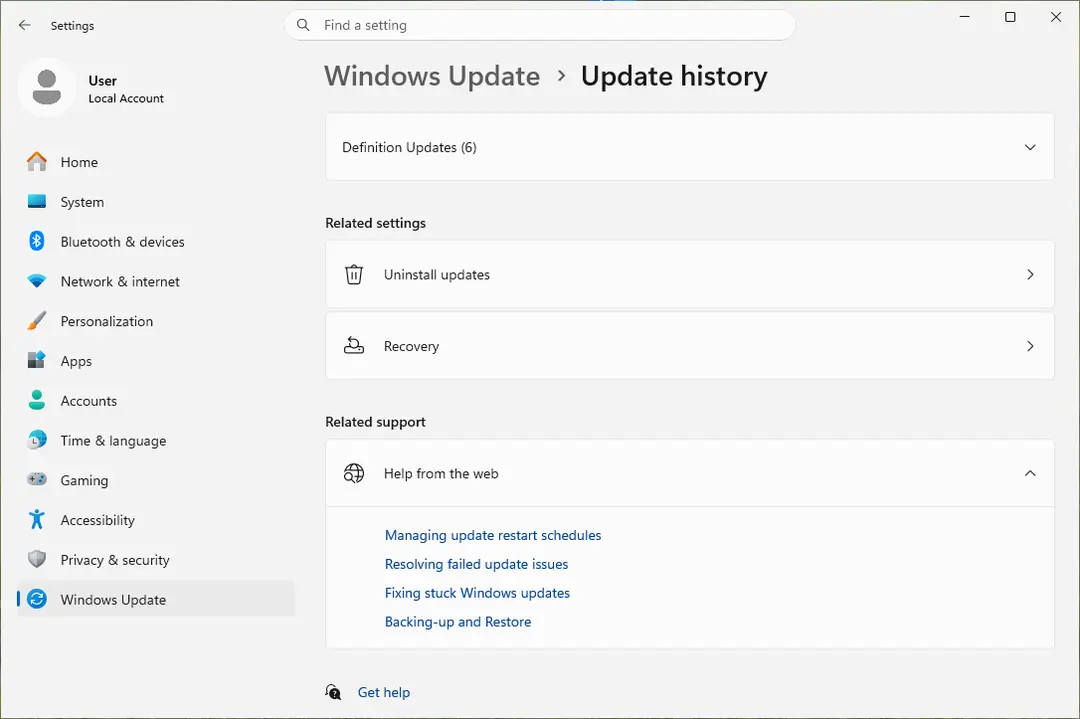
Uninstall updates is under Related settings. Screenshot: Windows 11 26H2 Uninstall the update
Find the update in the list and select Uninstall next to it. If the update is not in the list, Windows does not allow it to be removed this way.
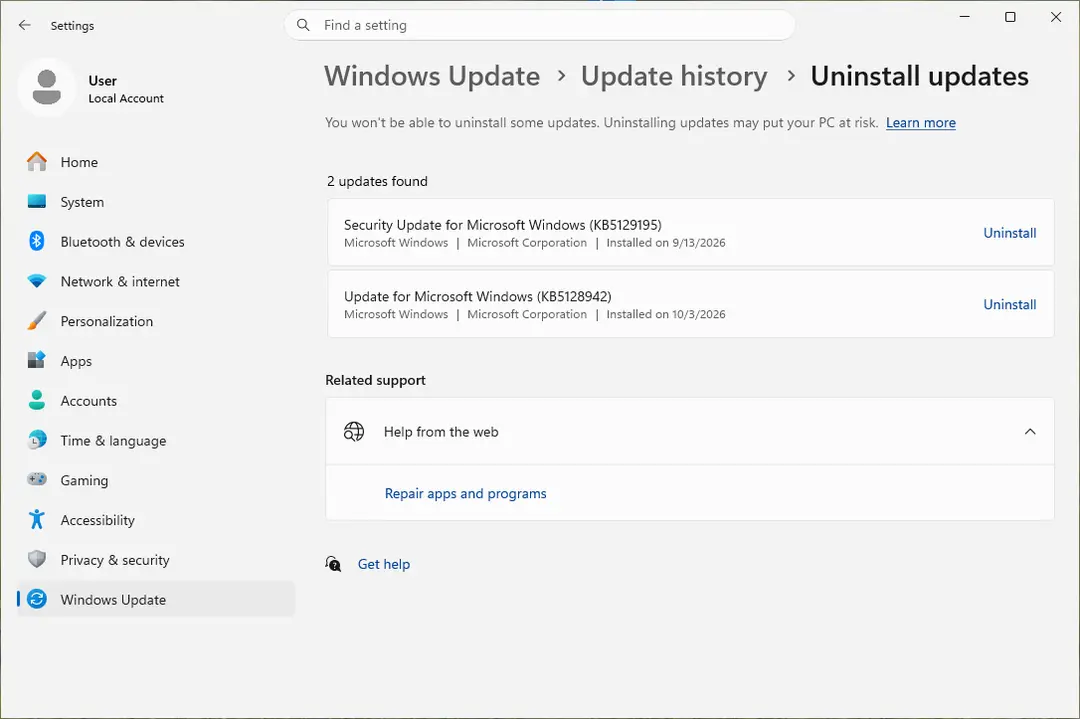
Each removable update has its own Uninstall link. Screenshot: Windows 11 26H2 Pause updates
Go back to Settings > Windows Update and select Pick a date on the Pause updates control. If your PC shows a list there instead, select the pause length you prefer. Without a pause Windows downloads the same update again.
Windows 10
Steps written for Windows 10 22H2.
Microsoft ended support for Windows 10 on October 14, 2025.
Open Windows Update
Select Start > Settings > Update & Security > Windows Update.
Open the update history
Select View update history. Note the KB number and the date of the update you suspect.
Open the list of removable updates
Select Uninstall updates.
Uninstall the update
Select the update you want to remove in the list, then select Uninstall.
Pause updates
Go back to Windows Update and select Pause updates for 7 days. For a longer pause, select Advanced options and choose a date under Pause updates.
Windows will not start
Steps written for Windows 11 and Windows 10, from the Windows Recovery Environment.
If Windows no longer starts after an update, remove the update from the Windows Recovery Environment (Windows RE).
Interrupt the startup twice
Turn the PC on and, as soon as the Windows or manufacturer logo appears, hold the power button until the PC shuts down. Do this twice. If Windows already fails to start several times in a row, it opens the recovery environment on its own.
Open the advanced options
Turn the PC on a third time. On the Automatic Repair screen, select Advanced options.
Open Uninstall Updates
Select Troubleshoot > Advanced options > Uninstall Updates.
Remove the latest update
Select Uninstall latest quality update and follow the instructions. Quality updates are the regular monthly updates.
Start Windows and pause updates
Let the PC restart. Once Windows starts, pause updates as described in the tab for your version of Windows, so the same update is not installed again at once.
Uninstall an update with a command
Open Command Prompt as administrator and run the command below with the number of the update in place of NUMBER (for KB5001234, type 5001234):
wusa /uninstall /kb:NUMBER
On current versions of Windows 11 this often does not work for the monthly cumulative update. Microsoft ships it in one package with the servicing stack update, and wusa cannot remove that package. Microsoft's own instructions for that case use DISM. List the installed packages, find the name of the update's package, then remove it by that name:
DISM /online /get-packagesDISM /Online /Remove-Package /PackageName:NAME
Updates that cannot be removed
- Servicing stack updates. Microsoft states that the servicing stack update cannot be removed from the system after it is installed.
- Updates without an Uninstall option. Microsoft notes that some updates cannot be uninstalled. They do not appear in Uninstall updates.
- A new version of Windows. A version upgrade is undone with the go back option, not from the update list, and only for 10 days.
If the update you suspect cannot be removed, Undo recent changes with System Restore can take Windows back to a restore point made before it was installed.
Why the update comes back and how long you can pause
Windows Update installs missing updates on its own, so a removed update returns with the next check. A pause stops that for a while. On Windows 11 you can pause for up to 35 days from today and extend the pause later. When the pause ends, Windows checks for updates and installs the latest ones. You cannot turn updates off for good, and you should not try: Microsoft warns that a PC without security updates is open to known attacks.
Use the pause to wait for a corrected update, then install it. If the update fails to install, see Run the Windows Update troubleshooter.
How to put the update back
Open Settings > Windows Update (on Windows 10: Settings > Update & Security > Windows Update), resume updates if they are paused and select Check for updates. Windows downloads and installs the update again. To install one specific update by its KB number, see Install an update from the Microsoft Update Catalog.
Used in 93 guides
How to fix Windows update stuck on "Working on updates"?
How to fix ZIP or RAR files extracting slowly in Windows 11?
How to fix Chrome.exe application error in Windows?
How to fix the FAST_ERESOURCE_PRECONDITION_VIOLATION blue screen (0x1C6) in Windows
How to fix Blue Screen error 0xc00002e3 in Windows 10?
How to fix Background Task Host high CPU usage in Windows 11?
How to fix File System error (-1073741818) in Windows?
How to fix the 0x000000BE blue screen error (ATTEMPTED_WRITE_TO_READONLY_MEMORY) in Windows
[Fix] USB-C monitor not detected on Windows 11
How to fix BSOD 139 (KERNEL_SECURITY_CHECK_FAILURE) in Windows
How to fix the Reference By Pointer BSOD (0x18) in Windows 10 and 11
Windows 11 calendar not opening on second monitor: click the clock on any screen
Scanner error WA003-0100: how to fix it on a Brother printer in Windows 11 and 10
How to fix DTS:X Ultra not working on Windows
How to fix cdp.dll error in Windows?
Microsoft AC Adapter driver missing in Windows 11 and 10: how to fix it
How to fix the Microcode Revision Mismatch BSOD in Windows
How to fix "Unknown Hard Error" on Windows 10?
How to fix "DLL is either not designed to run on Windows or it contains an error"?
How to fix "Please insert the external storage media and press OK" error in Windows 10?
How to fix the nt_wrong_symbols.sys BSOD on Windows 10 and 11
How to fix "Your Remote Desktop Services session has ended" error in Windows?
How to fix Desktop is not refreshing automatically in Windows?
How to fix Windows stuck in Recovery Mode?
How to fix the ci.dll blue screen (BSOD) error in Windows
How to fix File System Error (-1073741515) in Windows 10?
How to fix printer error 0x000007d1 in Windows 10?
How to fix "Error 1628: Failed to complete installation" error in Windows?
[Fix] Can't change monitor refresh rate in Windows
How to fix backgroundTaskHost.exe System Error in Windows?
How to fix the ACPI.sys error and blue screen in Windows
How to fix 0x80090027 (PIN isn't available) error in Windows
How to fix screen resolution settings greyed out in Windows?
How to fix "You can't sign in with this account" error in Windows?
How to fix Windows Audio Endpoint Builder high CPU usage?
How to fix Print Spooler (spoolsv.exe) high CPU usage in Windows?
How to fix File System Error (-1073741521) in Windows?
How to fix the fvevol.sys blue screen (BSOD) error in Windows
How to fix "Microsoft Windows App Runtime DynamicDependency LifetimeManager" error in Windows?
How to fix KB5057056 fails to install in Windows 10?
How to fix File System error (-1073741792) in Windows?
How to fix Steam Client WebHelper high CPU usage?
How to fix SPLwow64.exe system error in Windows?
How to fix 0xc0000139 BSOD error in Windows?
How to fix File System error (-2144927439) in Windows?
How to fix "The group or resource is not in the correct state" error on Windows
How to fix the pdc.sys BSOD error in Windows
How to fix KB5058499 fails to install in Windows 11?
How to fix the session 1 initialization failed BSOD (SESSION1_INITIALIZATION_FAILED, 0x6D)
How to fix KB5060999 fails to install in Windows 11?
How to fix mso20win32client.dll Bad Image error in Windows?
How to fix File System Error (-2018374635) in Windows?
How to fix Event ID 86: CertificateServicesClient-CertEnroll in Windows?
How to fix ctfmon.exe system error in Windows?
How to fix "The digital signature for this file couldn't be verified" (0xc0000428) in Windows
How to fix KB5060842 fails to install in Windows 11?
How to fix the rtux64w10.sys blue screen (BSOD) in Windows
How to fix KB5060533 fails to install in Windows 10?
How to fix “This operation is not supported when reserved storage is in use” error in Windows?
How to fix "MMC could not create the snap-in" error in Windows?
How to fix the intelppm.sys blue screen (BSOD) in Windows
How to fix File System error (-1073740791) in Windows?
How to fix "The previous system shutdown was unexpected" event on Windows?
How to fix Windows Security shows blank screen?
How to fix the I01 initialization failed BSOD (IO1_INITIALIZATION_FAILED, 0x69) in Windows
How to fix "Windows cannot determine the settings for this device" (Code 34) in Windows
How to fix "The driver may be corrupted or missing. (Code 39)" in Windows
How to fix Windows update error 0x800f0905?
How to fix logonUI.exe error in Windows?
How to fix KB5063878 fails to install in Windows 11?
How to fix Windows Update error 0x800f0985 in Windows?
How to fix sign in error CAA2000C in Windows?
Laptop battery stuck at 0% in Windows 11 and 10: how to fix it
Headphones detected as speakers in Windows 11 and 10: how to fix it
How to fix "The credentials supplied are not sufficient" printer error in Windows?
How to fix error 0xc0000141 "The application was unable to start correctly" in Windows?
How to fix the NetAdapterCx.sys blue screen (BSOD) in Windows
How to fix StartMenuExperienceHost.exe error in Windows?
How to fix "UE4 Game has crashed and will close" error in Windows?
How to fix Windows update KB5066835 not installing on Windows?
How to fix the WIN32K_CRITICAL_FAILURE (0x164) blue screen in Windows
How to fix the MUI_NO_VALID_SYSTEM_LANGUAGE (0x12A) blue screen in Windows
How to fix network printing error 0x0000007c in Windows?
How to fix printing error 0x00000771 (Operation could not be completed) in Windows?
How to fix "We can't set up mobile hotspot" error in Windows?
How to fix Denuvo driver error code 2148204812?
How to fix Windows stuck on "Updates are underway" screen?
How to fix Corel VideoStudio not opening in Windows?
How to fix OneCore-DeviceAssociationService error ID 3503 in Windows?
How to fix printer error code 0x00000040 in Windows?
How to fix WhatsApp white screen error?
How to fix printing error 0x000003e3?
How to fix Event ID 6008 "The previous system shutdown was unexpected" in Windows?
Sources
- Microsoft Support: How to uninstall a Windows Update (Settings and Windows RE, Windows 11 and 10) (read Oct 11, 2026)
- Microsoft Support: Windows Update FAQ (remove an installed update, pause updates) (read Oct 11, 2026)
- Microsoft Support: Pause updates in Windows (Pick a date, 35 days) (read Oct 11, 2026)
- Microsoft Support: Windows Recovery Environment (ways to open it, Uninstall Updates, BitLocker) (read Oct 11, 2026)
- Microsoft Support: Recovery options in Windows (files and apps are kept; go back within 10 days) (read Oct 11, 2026)
- Microsoft Support: Description of the Windows Update Standalone Installer (wusa switches /uninstall and /kb) (read Oct 11, 2026)
- Microsoft Support: article on security update 2823324 (example of the wusa.exe /uninstall /kb: syntax) (read Oct 11, 2026)
- Microsoft Support: March 21, 2026, KB5085516 for Windows 11 ("If you want to remove the LCU": DISM Remove-Package, the SSU cannot be removed) (read Oct 11, 2026)
- Microsoft Learn: DISM operating system package servicing command-line options (/Get-Packages, /Remove-Package) (read Oct 11, 2026)
- Microsoft Support: Understanding the risks: why you should not uninstall security updates (read Oct 11, 2026)