
How to fix the ci.dll blue screen (BSOD) error in Windows

Prefer to fix it yourself? The manual steps follow.
- 8methods
- 15 to 90 minutes
- Intermediate
Applies to Windows 11 and Windows 10 PCs and laptops, with or without Memory integrity turned on
8 methods in this guide
For some reason, I've been experiencing ci.dll BSOD crashes for several weeks now. I don't know what caused it or how to prevent it from happening.
ci.dll is the Code Integrity module of Windows: it checks every driver and system file before Windows lets it run. When a blue screen says What failed: CI.dll, the fault is usually a third-party driver or failing memory that ci.dll caught. Find that driver first, then test the memory.
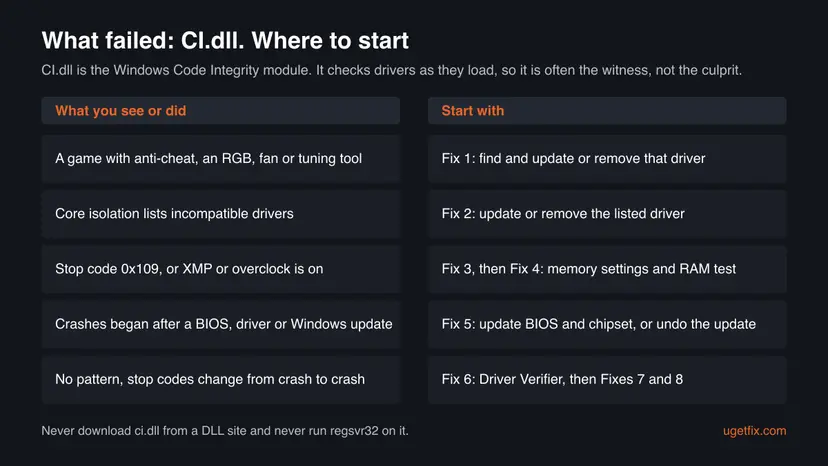
ci.dll is a Microsoft file that checks drivers, not a virus, and the blue screen rarely means the file itself is broken. Most often a third-party driver from a game anti-cheat, an RGB, fan or tuning tool, or failing or overclocked memory is behind it. Find and update or remove that driver first (Fix 1), check Core isolation for incompatible drivers (Fix 2), then test the RAM (Fixes 3 and 4).
| Error | A stop screen (blue, or black on recent Windows 11) with What failed: CI.dll, often with SYSTEM_SERVICE_EXCEPTION, CRITICAL_STRUCTURE_CORRUPTION or PAGE_FAULT_IN_NONPAGED_AREA. This is the ci.dll blue screen people search for. |
|---|---|
| Where it appears | During games, at start while drivers load, or at random on the desktop. It often comes back every few days for weeks. |
| Main cause | A third-party kernel driver that changes or confuses protected Windows code, or memory that corrupts data. ci.dll is the check that notices it. |
| Fastest fix | Read which driver the crash names in Event Viewer or the minidump, and update or remove it (Fix 1). |
| Also written as | cl.dll, Cl.dll failed, ci dll, CI.dll, ci.dll failed. On the stop screen a capital I looks like a small L, so many people search cl.dll. |
| Who makes it | Microsoft. It is the Code Integrity module in C:\Windows\System32\ci.dll, part of every Windows 10 and 11 edition. |
| Vendor status | No known issue is listed for ci.dll itself. Microsoft staff on Q&A advise updating all drivers, the BIOS and chipset drivers first, because the dump cannot show inside Code Integrity. |
| Where the cause is logged | C:\Windows\Minidump (one .dmp file per crash) and Event Viewer, Windows Logs > System, source BugCheck, event ID 1001. |
| Time to fix | 15 minutes to update or remove one driver. A full memory test or Driver Verifier run can take several hours. |
Facts checked on 15 October 2026. Steps written for Windows 11 (25H2 and 26H2) and Windows 10 22H2.
What ci.dll is and why the blue screen names it
ci.dll stands for Code Integrity. Microsoft staff on Microsoft Q&A describe CI.dll as the Code Integrity module, code that runs with core (kernel) permissions. It checks that each driver and protected system file is signed and unchanged before Windows loads it, and keeps checking while Windows runs.
On PCs with Memory integrity on, the same checks run in an isolated, virtualized part of memory. Microsoft explains that this makes it hard for malicious programs to use low-level drivers to take over the PC. So when the stop screen says What failed: CI.dll, ci.dll was running its check when Windows stopped. The check usually found a problem made by something else.
| What you see | What it means |
|---|---|
| What failed: CI.dll (often read as what failed cl.dll) | Code Integrity was running when Windows stopped. A driver or memory fault next to it is the usual cause |
| SYSTEM_SERVICE_EXCEPTION with CI.dll | Kernel code hit an exception while ci.dll handled a request, often one from a third-party driver |
| CRITICAL_STRUCTURE_CORRUPTION (0x109) with CI.dll | Windows found protected kernel code or data changed. Microsoft lists a driver that patched it, a kernel debugger, or failed memory as the causes |
| PAGE_FAULT_IN_NONPAGED_AREA with CI.dll | Code read memory that was not there, which points at a bad driver or bad RAM |
| cl.dll, ci dll, ci.dll failed | The same file and the same error. There is no cl.dll in Windows; it is a capital I read as a small L |
The genuine ci.dll is part of Windows and only Windows' own tools repair it. Do not download it from DLL sites. Running regsvr32 on it, as old guides suggest, does nothing useful: it is not a component that registers.
Why ci.dll crashes: the causes, most common first
Microsoft's reference for bug check 0x109 names three causes: a driver that changed critical kernel code or data, a kernel debugger set up the wrong way, and hardware corruption such as failed memory. Only the first and the last apply to a home PC. The system service exception form follows the same pattern.
| How often | Cause | Sign | Fix |
|---|---|---|---|
| Most often | A third-party kernel driver: game anti-cheat, RGB lighting, fan control, overclocking or monitoring tools, old VPN or virtual drive drivers | Crashes in games or soon after you installed such a tool | Fix 1 |
| Often | A driver that is incompatible with Memory integrity | Core isolation lists incompatible drivers, or a Program Compatibility Assistant banner says a driver cannot load | Fix 2 |
| Often | Memory errors, from an XMP or EXPO profile, an overclock or a failing module | CRITICAL_STRUCTURE_CORRUPTION, stop codes that change, crashes under load | Fixes 3 and 4 |
| Less often | Outdated BIOS or chipset drivers, or a fresh update that does not suit them | Crashes began right after an update | Fix 5 |
| Less often | An unknown driver that only fails under stress | No pattern; Fixes 1 to 5 found nothing | Fix 6 |
| Rarely | Damaged Windows files or a damaged component store | SFC reports files it could not repair | Fixes 7 and 8 |
Programs that load unsigned drivers or patch Code Integrity in memory, such as game cheats and some modding tools, crash Windows here by design. Remove them; no fix on this page makes them safe.
First: read the stop code and the driver from the crash
Because ci.dll is a witness, the most useful facts are the stop code and any third-party driver named in the same crash. Windows stores both. Collect them before you change anything, so you can tell later whether a fix worked.
- Press Win + R, type
eventvwr.mscand press Enter. - Open Windows Logs > System and select Filter Current Log on the right. Type
1001in the event ID box. - Open the newest BugCheck events. Note the stop code (for example
0x0000003bfor SYSTEM_SERVICE_EXCEPTION or0x00000109) and the dates. - Open
C:\Windows\Minidumpand note the.dmpfiles and their dates. A free dump reader shows the drivers listed in each crash; look for names that are not from Microsoft. - Press Win + R, type
perfmon /reland press Enter. Reliability Monitor shows what was installed on the days the crashes started.
Microsoft staff on Q&A found one ci.dll dump that only said memory_corruption, because Code Integrity code cannot be read in the dump. Then Reliability Monitor and the dates of what you installed are the best lead.
How to fix the ci.dll blue screen
Fixes 1 and 2 deal with the drivers that ci.dll checks, which is where this crash usually starts. Fixes 3 and 4 rule out memory. Fixes 5 to 8 are for crashes with no clear lead.
| What you see or what your PC has | Start with | Then |
|---|---|---|
| Crashes in games, or you use RGB, fan, overclocking or monitoring tools | Fix 1 | Fix 2 |
| Memory integrity is off and will not turn on, or a driver is listed as incompatible | Fix 2 | Fix 1 |
| CRITICAL_STRUCTURE_CORRUPTION, XMP or EXPO is on, or the RAM is overclocked | Fix 3 | Fix 4 |
| Crashes began after a BIOS, driver or Windows update | Fix 5 | Fix 1 |
| Stop codes change from crash to crash and nothing above helped | Fix 6 | Fix 7 |
Fix 1. Update or remove the third-party driver behind the crash
15 minutesLow riskThe dump or Reliability Monitor points at a non-Microsoft driver, or the crashes started after you installed a game with anti-cheat or a hardware tool.
Kernel drivers from anti-cheat, lighting, fan and tuning tools work at the same level as ci.dll. Microsoft names a driver that changes kernel code as the first cause of the 0x109 form of this crash.
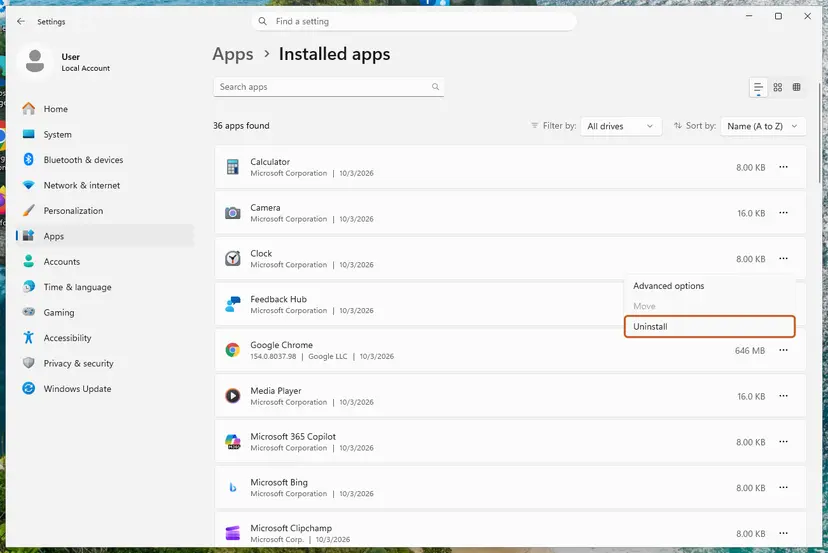
- List the programs you installed in the week before the first crash, using Reliability Monitor and Settings > Apps > Installed apps sorted by date.
- Check the maker's site for each one: game anti-cheat, motherboard RGB or fan software, GPU tuning or monitoring tools, VPN clients and virtual drive tools. Install the newest version.
- If no newer version exists, uninstall the tool: Uninstall a program or app in Windows
- For a device driver named in the dump, open Device Manager and update or roll it back: Update, roll back or reinstall a driver
- Restart and use the PC as you did when it crashed, for example the same game, for a day.
It worked if: No new file appears in C:\Windows\Minidump and no new BugCheck event in Event Viewer.
If not: Go to Fix 2 to let Windows list the drivers it does not trust.
Fix 2. Check Core isolation for incompatible drivers
10 minutesLow riskMemory integrity is off, will not turn on, or Windows showed a banner that a driver cannot load.
Memory integrity is the Code Integrity check run in an isolated environment. Windows lists every installed driver it finds incompatible with it, which is a ready-made list of suspects for a ci.dll crash.
- Open Windows Security and select Device security > Core isolation details.
- Look at the Memory integrity switch. If Windows says you have incompatible drivers, open the list it offers and note each driver file name.
- Find the device or program for each driver. Its maker may offer an updated driver, as Microsoft advises; install it.
- If there is no compatible driver, remove the device or the program that installed it: Uninstall a program or app in Windows
- Turn Memory integrity on and restart. Hardware virtualization must be on in the UEFI or BIOS for the switch to work.
It worked if: Memory integrity stays on after a restart and the crashes stop.
If not: If no driver is listed, go to Fix 3.
Fix 3. Turn off memory overclocks and XMP or EXPO for a test
10 minutesLow riskYour RAM runs with an XMP or EXPO profile, or you overclocked the CPU or memory.
Microsoft names failed memory as a cause of the critical structure corruption crash. Memory that is unstable at its profile speed corrupts protected code, and ci.dll is the check that finds it.
- Restart and enter the UEFI or BIOS setup with the key your PC shows at start, often Del or F2.
- Set the memory profile (XMP, EXPO or DOCP) to Disabled or Auto, and undo any CPU overclock.
- Save and exit, then use the PC normally for two or three days.
- If the crashes stop, turn the profile back on one step slower, or ask the board maker for a BIOS that runs your memory kit at its speed.
It worked if: The PC runs through the games or tasks that used to crash.
If not: Test the memory itself in Fix 4.
Fix 4. Test the RAM with Windows Memory Diagnostic
30 minutes to several hoursLow riskStop codes change from crash to crash, you saw CRITICAL_STRUCTURE_CORRUPTION, or Fix 3 helped only for a while.
Microsoft's own advice for this bug check is to run the Windows Memory Diagnostics tool. A module that returns wrong data breaks the code ci.dll is checking.
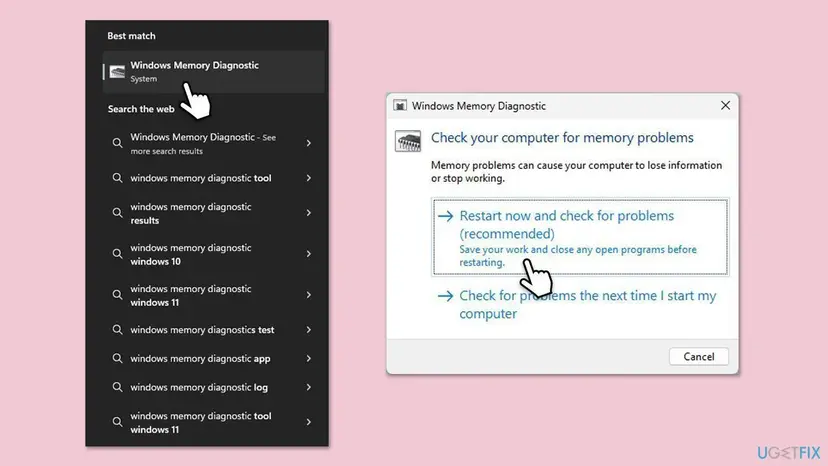
- Save your work, press Win + R, type
mdsched.exeand select Restart now and check for problems. Step by step: How to test your RAM with Windows Memory Diagnostic - After the restart, open Event Viewer, Windows Logs > System, and look for the MemoryDiagnostics-Results entry.
- If it reports errors, test one module at a time to find the bad one, and replace it.
It worked if: The result in Event Viewer says no memory errors were detected.
If not: A clean result does not prove the RAM is perfect, but it makes a driver more likely. Go to Fix 5.
Fix 5. Update the BIOS and chipset drivers, or undo the update that started it
20 to 30 minutesRead the warningThe crashes began after a BIOS, driver or Windows update, or your BIOS and chipset drivers are more than a year old.
Microsoft staff on Q&A advise updating the BIOS and every hardware driver to the newest version for a ci.dll crash, since the dump cannot show inside Code Integrity. An update that arrived just before the first crash is the opposite suspect.
An interrupted BIOS update can leave the PC unable to start, and a BIOS update can ask for the BitLocker recovery key. Save that key from your Microsoft account first and plug a laptop into power. Your files are not touched.
- Press Win + R, type
msinfo32and press Enter. Note System Model or BaseBoard Product and BIOS Version/Date. - Download the newest BIOS and chipset driver from the PC or motherboard maker's support page and install them with the maker's instructions.
- If the first crash came right after an update, open Settings > Windows Update > Update history and compare the dates.
- Remove the Windows update that matches: How to uninstall a Windows update
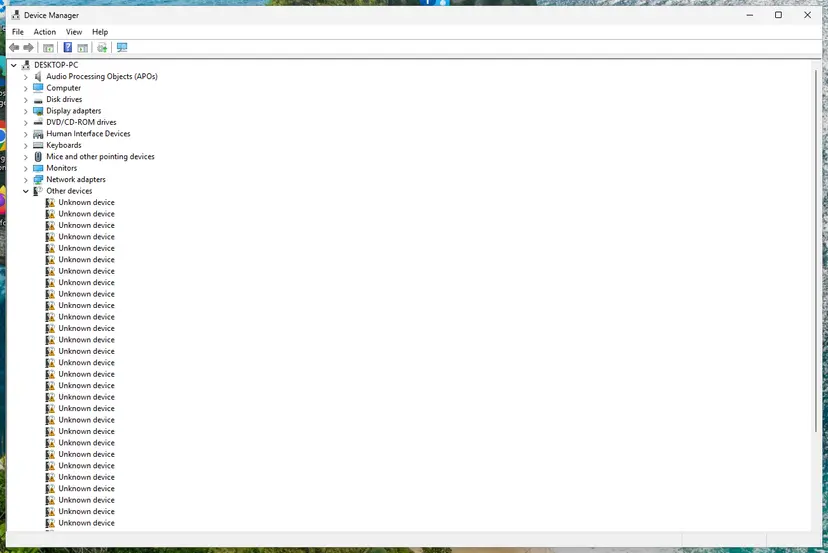
- If a driver came on that date, roll it back on its Driver tab in Device Manager, or use a restore point: Undo recent changes with System Restore
It worked if: No crashes in the conditions that used to cause them.
If not: Install a removed Windows update again after a week, since it carries security fixes. Then go to Fix 6.
Fix 6. Find a hidden faulty driver with Driver Verifier
1 to 2 days of normal useRead the warningThe crashes have no pattern and Fixes 1 to 5 found nothing.
Driver Verifier puts drivers under stress so that a faulty one crashes at once and is named in the dump, instead of breaking the code ci.dll checks later.
Verifier is meant to crash a bad driver, sometimes at start. Create a restore point and back up your files first: Back up your files (Windows Backup, File History, Time Machine). If Windows no longer starts, open Safe Mode, run verifier /reset in an admin Command Prompt and restart.
- Press Win + S, type
verifierand open it as administrator. - Select Create standard settings and Next.
- Select Select driver names from a list, tick only drivers whose provider is not Microsoft Corporation, and select Finish. Choosing all drivers works but crashes more often.
- Restart and use the PC normally. When it crashes, read the newest dump in
C:\Windows\Minidump: it now names the driver. - Turn Verifier off with
verifier /resetin an admin Command Prompt and restart. Then update or remove that driver as in Fix 1.
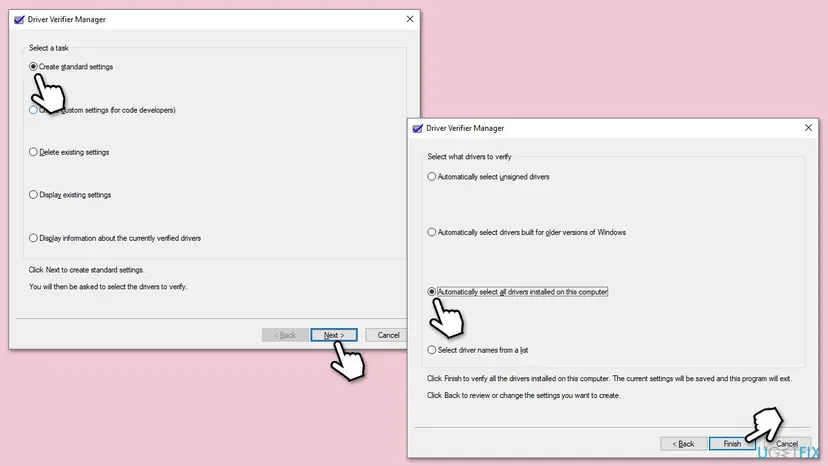
It worked if: Verifier produces a crash that names one third-party driver, or it runs two days with no crash.
If not: Run verifier /reset either way, then go to Fix 7.
Fix 7. Repair Windows system files and check the disk
20 to 40 minutesNo riskWindows starts and SFC has not been run yet, or Event Viewer shows other system files failing.
ci.dll is a protected Windows file. If it or the files it relies on are damaged, DISM and SFC put back clean copies from the component store.
- Right-click Start and select Terminal (Admin).
- Run
DISM.exe /Online /Cleanup-Image /RestoreHealth, thensfc /scannow. Step by step with screenshots: Run DISM and SFC to repair Windows system files - Check the system drive for file system errors: Check a disk for errors (chkdsk)
- Restart the PC when both are done.
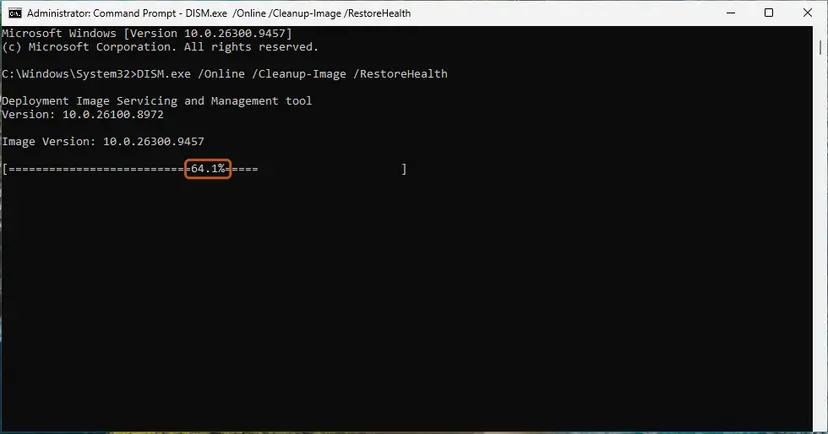
It worked if: SFC reports that it found no integrity violations or that it repaired them.
If not: If SFC says it could not repair some files, go to Fix 8.
Fix 8. Repair-install Windows and keep your files
60 to 90 minutesRead the warningSFC or DISM cannot repair the files, or the crashes go on with healthy memory and no third-party driver to blame.
An in-place repair writes a fresh copy of every Windows file, ci.dll included, while keeping your apps, settings and files.
A repair install keeps your files, but a power cut in the middle can still cost data. Copy important files to another drive and keep your BitLocker recovery key at hand.
- Run the in-place repair with the Windows installation media and keep files and apps: Reinstall Windows without losing files
- After it finishes, install the latest updates, then add back your tools one at a time, newest versions only.
It worked if: Windows starts with your apps and files and the ci.dll crash does not return.
If not: If a clean Windows still crashes, collect the dumps as described below and contact your PC maker.
Still crashing: what to send and to whom
ci.dll is a Microsoft file, but the fix almost always comes from a driver maker, the memory or the PC maker. Collect the facts once and send them to the right place.
- The three newest
.dmpfiles fromC:\Windows\Minidump, zipped. - The stop codes from the BugCheck events and their dates.
- The PC model and BIOS version from
msinfo32, and the memory kit with its profile setting. - The list of incompatible drivers from Core isolation, if any.
- Which fixes above you tried and what happened.
| Where to report | When |
|---|---|
| The game or anti-cheat publisher | Crashes only in one game, or the dump names its driver |
| The tool or device maker | The dump or Core isolation names a driver from their software |
| Your PC, motherboard or memory maker | Memory errors, or crashes that follow a BIOS update |
| Microsoft Q&A or Feedback Hub | Crashes that start with one Windows update and stop when it is removed |
When the memory test fails, the same crash appears with Windows freshly installed, or it follows the RAM to another slot, treat it as hardware and stop changing software.
How to keep the ci.dll blue screen from coming back
- Keep Memory integrity on and check Core isolation after you install hardware tools.
- Install drivers and BIOS updates from the device or PC maker's site.
- Keep only one lighting, fan or tuning tool installed.
- Test memory after you change an XMP or EXPO profile.
- Download ci.dll from DLL sites or run regsvr32 on it.
- Run cheat tools or driver loaders that patch Windows code.
- Leave Memory integrity off to hide a crash.
- Leave Driver Verifier running after the test.
Windows 10 left support on 14 October 2025, so a ci.dll fault found on it will not get new Microsoft fixes. Windows 11 with current drivers and BIOS is the setup that still gets them.
Frequently asked questions
What is ci.dll?
ci.dll is the Code Integrity module of Windows, made by Microsoft and stored in C:\Windows\System32. It checks that drivers and protected system files are signed and unchanged before and while they run. With Memory integrity on, these checks run in an isolated, virtualized part of memory. Windows installs and updates ci.dll itself, so you never need to download it.
Is it cl.dll or ci.dll?
It is ci.dll, with the letter i for Integrity. On the stop screen it is written CI.dll, and a capital I looks like a small L in that font, so many people search for cl.dll, cl.dll failed or cl.dll bsod. Windows has no system file called cl.dll. The error, the cause and the fixes on this page are the same whichever way you read it.
What does ci.dll failed or What failed: CI.dll mean?
It means the What failed line of the stop screen named CI.dll, so Code Integrity was running when Windows stopped. It does not prove the file is broken. ci.dll checks what other drivers do, so a faulty third-party driver or bad memory often ends with its name on the screen. That is why Fixes 1 to 4 help most readers.
How do I fix SYSTEM_SERVICE_EXCEPTION with ci.dll?
Start with the driver, not with ci.dll. Read the dump or Reliability Monitor for a third-party driver, then update or remove it as in Fix 1. Check Core isolation for incompatible drivers in Fix 2. If nothing is named, test the memory in Fixes 3 and 4, and use Driver Verifier in Fix 6 to make the hidden driver show itself.
Why do I get the cl.dll error on Windows 11?
On Windows 11 many PCs run Memory integrity, so Code Integrity checks drivers in an isolated environment and older drivers fail more visibly. Games with kernel anti-cheat and hardware tools are the usual trigger. Newer Windows 11 versions show the stop screen in black rather than blue, but the What failed line and the fixes are the same.
Why do I get the cl.dll error on Windows 10?
The causes on Windows 10 are the same: a third-party driver, unstable memory or outdated BIOS and chipset drivers. One reader on Microsoft Q&A saw CRITICAL_STRUCTURE_CORRUPTION with ci.dll on Windows 10 even after a clean install, and Microsoft staff advised updating every driver and the BIOS. Note that Windows 10 no longer gets security updates since 14 October 2025.
Should I turn off Memory integrity to stop the ci.dll blue screen?
No, not as a fix. Memory integrity protects the PC against malicious low-level drivers, and turning it off only hides the driver problem. Code Integrity still runs without it. Update or remove the incompatible driver that Core isolation lists instead, as Microsoft advises. If no compatible driver exists, the safer choice is to remove the device or program that needs it.
Can I download ci.dll or re-register it with regsvr32?
No. ci.dll is a protected Windows file, and a copy from a DLL site may be the wrong version or carry malware. It is also not a component that regsvr32 can register, so that command does nothing for this crash. If the file is damaged, DISM and SFC in Fix 7 or a repair install in Fix 8 put back a clean copy.
What does cdd.dll failed mean, and is it the same error?
No, cdd.dll is a different Windows file that works with the display driver, although its name looks similar to ci.dll on a stop screen. A cdd.dll crash usually points at the graphics driver: update or cleanly reinstall it from the GPU maker first. If the screen really says CI.dll, follow the fixes on this page.
What does can't get image base of ci.dll mean?
That message does not come from Windows. It is printed by third-party tools that try to load unsigned drivers or patch Code Integrity in memory, such as some game cheat and modding loaders. We could not confirm which tool prints it. Such tools also cause ci.dll blue screens, so the fix is to remove them, as the causes section says.
Sources
- Microsoft Support: Device Security in the Windows Security app (Core isolation, Memory integrity, incompatible drivers, vulnerable driver blocklist) (support.microsoft.com)
- Microsoft Learn: Bug Check 0x109 CRITICAL_STRUCTURE_CORRUPTION (learn.microsoft.com)
- Microsoft Q&A: Windows 10 20H2 BSOD ci.dll (staff answer on the Code Integrity module) (learn.microsoft.com)
Did this fix work?
One click, no account. It tells the next reader which guides are worth their time.
Questions and experiences: fix the ci.dll blue screen (BSOD) error in Windows
Still broken, or found a fix we did not cover? Ask here: members and our editors answer. Reading is open; writing needs a free account.
…