
How to update drivers in Windows 11 and 10 (roll back, reinstall)
Device Manager can update a driver, return to the previous one, or remove it so Windows installs it again. Windows Update offers some drivers as optional updates.
- Time
- 5 to 15 minutes
- Level
- Easy
- You need
- An administrator account.
Before you start
- Get drivers from Windows Update or the website of your PC or device maker. Avoid third-party driver updater programs.
- If you are fixing a network adapter, download its driver first: you may be offline after uninstalling it.
Windows 11
Steps written for Windows 11 24H2 and later.
Open Device Manager
Right-click Start and select Device Manager.
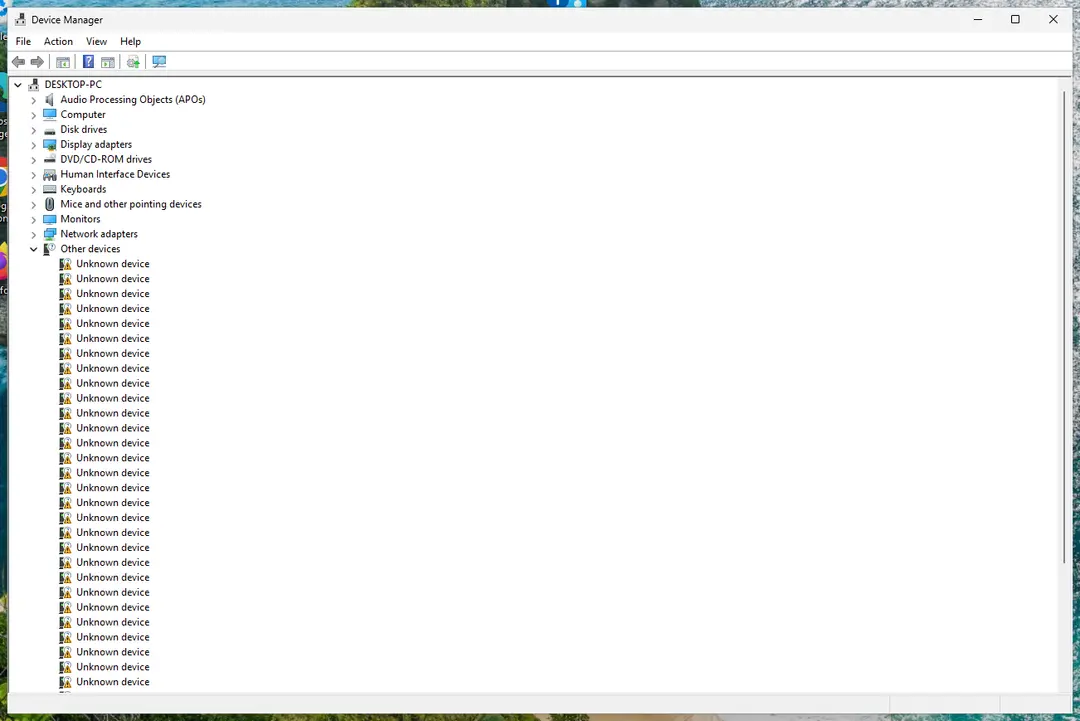
Device Manager lists devices by category; a yellow warning sign marks a device with a problem. Screenshot: Windows 11 26H2 Open the device's Driver tab
Expand the category (for example Display adapters), right-click the device, select Properties and open the Driver tab. Driver Date and Driver Version show what is installed now.
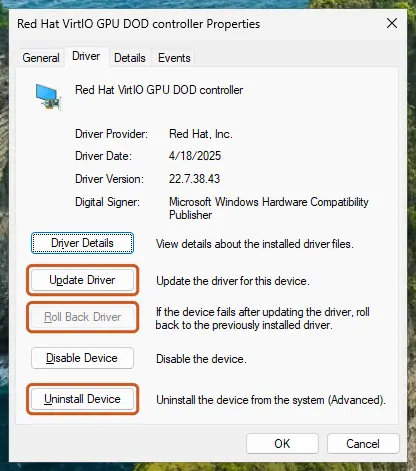
The Driver tab holds all three actions: update, roll back, uninstall. Screenshot: Windows 11 26H2 Update the driver
Select Update Driver and let Windows search automatically. To use a driver you downloaded from the device maker, select Browse my computer for drivers instead and point to the unpacked folder.
Or roll back the driver
If the problem started after a driver update, select Roll Back Driver, choose a reason and select Yes. The button is greyed out when Windows has no earlier driver to return to.
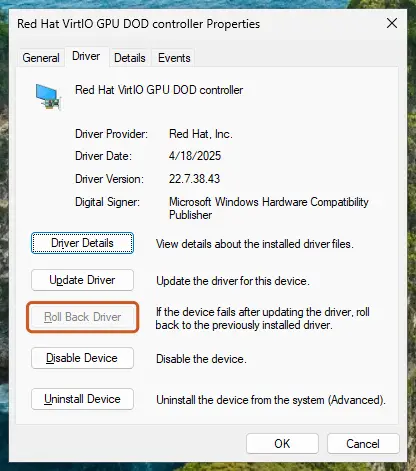
Roll Back Driver is greyed out here because there is no earlier driver. Screenshot: Windows 11 26H2 Or reinstall the driver
Select Uninstall Device. Tick Attempt to remove the driver for this device only if you want Windows to delete the driver package too, then select Uninstall.
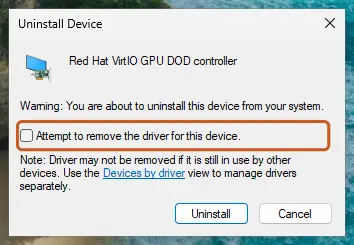
Tick the checkbox only to delete the driver package as well. Screenshot: Windows 11 26H2 Restart
Restart the PC. Windows detects the device again and installs a driver for it.
Check optional driver updates
Open Settings > Windows Update > Advanced options > Optional updates. If driver updates are listed, tick the ones you need and select Download & install.
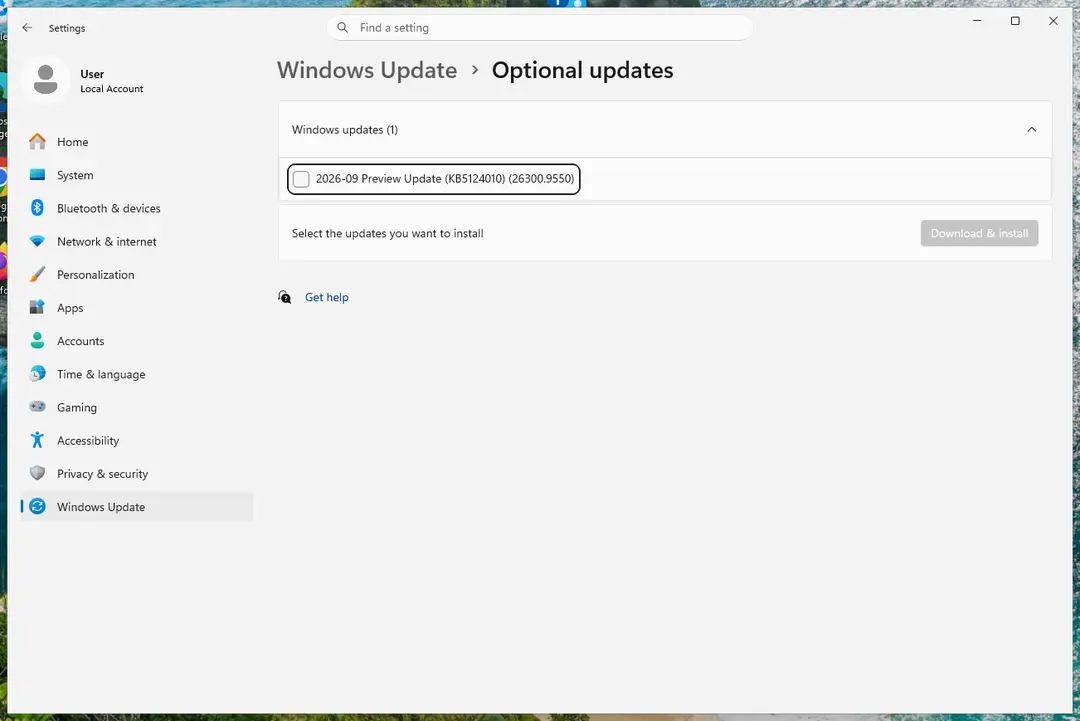
Optional updates on our test PC; driver updates appear here when Windows Update has any for your hardware. Screenshot: Windows 11 26H2
Windows 10
Steps written for Windows 10 22H2.
Device Manager works the same as on Windows 11; only the optional driver updates in Windows Update are in a different place.
Open Device Manager
Right-click Start and select Device Manager.
Open the device's Driver tab
Expand the category (for example Display adapters), right-click the device, select Properties and open the Driver tab. Driver Date and Driver Version show what is installed now.
Update the driver
Select Update Driver and let Windows search automatically. To use a driver you downloaded from the device maker, select Browse my computer for drivers instead and point to the unpacked folder.
Or roll back the driver
If the problem started after a driver update, select Roll Back Driver, choose a reason and select Yes. The button is greyed out when Windows has no earlier driver to return to.
Or reinstall the driver
Select Uninstall Device. Tick Attempt to remove the driver for this device only if you want Windows to delete the driver package too, then select Uninstall.
Restart
Restart the PC. Windows detects the device again and installs a driver for it.
Check optional driver updates
Open Settings > Update & Security > Windows Update and select Check for updates. If View optional updates appears, select it, tick the driver updates you need and select Download and install.
Update, roll back or reinstall?
| Situation | Do this |
|---|---|
| A device stopped working right after an update | Roll back the driver. |
| A device works badly or a program needs a newer driver | Update the driver, preferably with the maker's version. |
| A device shows a yellow warning sign or the driver seems damaged | Uninstall the device and restart so Windows reinstalls it. |
| Windows says the best driver is already installed but the problem stays | Download the latest driver from the maker and use Browse my computer for drivers. |
Find the right driver for an unknown device
In the device's Properties, open the Details tab and select Hardware Ids in the list. The VEN and DEV (or VID and PID) values identify the maker and model; search for them on the maker's website.
If the problem stays
If Windows will not start after a driver change, start it in Safe Mode and roll back the driver there: see Start Windows or a Mac in Safe Mode. Damaged system files can also break drivers: see Run DISM and SFC to repair Windows system files.
Used in 200 guides
How to fix Windows keeps adjusting input device volume automatically
How to fix the BthA2DP.sys blue screen (BSOD) in Windows 11 and 10
How to fix Windows stuck at shutting down screen?
How to fix NVIDIA Container high CPU usage on Windows?
How to fix Event ID 161 Volmgr error in Windows 11 and 10
How to fix "This site can't be reached" in Chrome on Windows?
How to fix BlueStacks not installing in Windows?
How to fix Valheim crashes and errors?
HyperX Cloud Stinger mic not working on Windows: how to fix it
How to adjust bass and treble in Windows 11 with the Equalizer
How to fix "ELARA app is keeping the system from closing or restarting" in Windows
How to fix Discord stuck at gray screen on Windows?
How to fix Microsoft GameInput is crashing the PC?
How to fix Discord stream stuck on loading in Windows?
How to put accents on letters in Windows?
How to fix Roblox high CPU usage in Windows?
How to fix Discord green screen and camera not working in Windows?
How to fix the bthmodem.sys blue screen (BSOD) in Windows
How to fix mouse double-clicking on a single click?
How to clear the print queue when a document is stuck?
How to fix the FAST_ERESOURCE_PRECONDITION_VIOLATION blue screen (0x1C6) in Windows
How to fix LiveKernelEvent 141 crash error?
How to fix Exception on Invalid Stack Black Screen error in Windows?
How to fix Resident Evil Village black screen crash on Steam?
How to fix Xbox app error 0x87e50028 when launching games in Windows?
[Fix] 22H2 Windows 11 update fails with error 0x8007001F-0x3000D
How to fix "You were disconnected from Blizzard services" error in Windows?
STTub30.sys incompatible driver: how to turn Memory integrity back on in Windows 11 and 10
How to fix TPM event id 14 when playing Valorant?
How to fix Wo Long: Fallen Dynasty crashes on Windows?
How to fix Windows update error 0x8007065e?
How to fix Windows update error 0x800F0223?
How to fix "Camera is being used by another application" error in Windows 24H2?
How to fix integrated GPU is being used instead of dedicated GPU in Windows?
How to fix "The network security key isn't correct" error in Windows 11
How to fix LiveKernelEvent 117 error in Windows?
Headset mic picking up PC audio in Windows 11 and 10: why it happens and how to stop it
How to fix the WdFilter.sys blue screen (BSOD) on Windows
wdcsam64.sys stops Memory integrity: how to fix it in Windows 11 and 10
How to fix the IntcAudioBus.sys blue screen (BSOD) in Windows
How to fix the 0x000000BE blue screen error (ATTEMPTED_WRITE_TO_READONLY_MEMORY) in Windows
How to fix Website Online but Isn't Responding to Connection Attempts?
How to fix missing default Power Plans and CsEnabled option?
[Fix] USB-C monitor not detected on Windows 11
How to fix Lenovo Docking Station not detecting monitor in Windows?
How to fix ".exe has stopped working" error on Windows 10 and Windows 11?
How to fix the rtwlane.sys blue screen error in Windows 11 and 10
How to fix SCEP Certificate enrollment initialization failed error in Windows?
How to fix BSOD 139 (KERNEL_SECURITY_CHECK_FAILURE) in Windows
How to fix Windows Error Code 0x800706BE?
How to fix the Reference By Pointer BSOD (0x18) in Windows 10 and 11
How to fix amd_ags_x64.dll missing or not found error in Windows?
How to fix Waves MaxxAudio Service Application high CPU in Windows?
How to fix Windows update error 0xc190011f?
That fingerprint is too similar to one that's already set up: how to fix it in Windows 11
Scanner error WA003-0100: how to fix it on a Brother printer in Windows 11 and 10
How to fix Media Feature Pack not showing up in Feature list in Windows?
How to fix WhatsApp not playing audio messages in Windows?
How to fix "Unable to read from disk - Error Code 1117" error on Windows?
How to fix Kingdom Come Deliverance 2 crashing on Windows?
How to fix IntelliGo Extension 100.1.4.1273 download error in Windows
How to fix "Insufficient Memory" error while using a Canon printer?
How to fix "File record segment is unreadable"?
"A driver can't load on this device": how to fix it in Windows 11 and 10
How to fix Game Bar recording error 0x82323619 in Windows?
How to fix "Epic Games Launcher setup wizard ended prematurely" error in Windows?
How to fix "WLAN Extensibility Module has stopped" network error in Windows
How to fix DTS:X Ultra not working on Windows
How to fix "Incorrect PSK provided for network SSID" in Windows
How to fix "Printer settings could not be saved" error in Windows?
How to fix error 0x80041010 in Windows?
How to fix 0x8900002A error in Windows 10?
How to fix the K7Sentry.sys blue screen (BSOD) error in Windows
How to fix Windows update error 0x8024a22d?
Fix: Allow the computer to turn off this device to save power grayed out in Device Manager
Microsoft AC Adapter driver missing in Windows 11 and 10: how to fix it
How to fix IP Helper service (iphlpsvc) high CPU usage?
How to fix Windows 11 installation error 0xC1900101 - 0x40017?
How to fix Service Host DCOM high CPU usage in Windows?
How to fix the nt_wrong_symbols.sys BSOD on Windows 10 and 11
How to fix Microsoft Designer keyboard not connecting or pairing in Windows 11 and 10
How to fix Forza Horizon 5 error 0xc0000005 in Windows?
How to fix Riot Client not launching in Windows?
How to fix DSOUND.dll is missing or not found error in Windows?
How to fix "The display settings could not be saved" error in Windows?
How to fix the ci.dll blue screen (BSOD) error in Windows
Iqvw64e.sys "A driver cannot load on this device": how to fix it in Windows 11 and 10
How to fix the vgk.sys blue screen error in Windows
[Fix] Can't change monitor refresh rate in Windows
How to fix error 0x80070037 when copying files in Windows?
How to fix webcam error code 0xA00F4243(0xC00D3704) on Windows?
How to fix Windows update error 0xc1900104?
How to fix "Sorry, your PC doesn't meet the hardware requirements for captures" in Windows?
Fix: A connection to the Windows Metadata and Internet Services (WMIS) could not be established
How to fix the ACPI.sys error and blue screen in Windows
How to fix "MSI.CentralServer.exe is abnormal" error in Windows?
Laptop lagging when charging in Windows 11 and 10: how to fix it
How to fix Windows stuck on "Let's connect you to a network" issue?
How to fix screen resolution settings greyed out in Windows?
How to fix Resampledmo.dll is not found or missing in Windows?
How to fix blue screen error code 133 (DPC_WATCHDOG_VIOLATION) in Windows
How to fix mic not working in Phone Link on Windows?
Microphone Boost missing in Windows 11 and 10: why it is not showing and how to fix it
How to fix nvspcap64.dll error in Windows?
How to fix Bluetooth fails to connect (Event ID 16) in Windows 11 and 10
How to fix Windows Audio Endpoint Builder high CPU usage?
How to fix NVIDIA LocalSystem Container stopped working in Windows?
How to fix "Documents are waiting" error when using printer in Windows?
How to fix MSI Afterburner "Failed to start scanning" error in Windows?
How to fix Windows Error Reporting Event ID 1001?
How to fix USB error Code 38: a previous instance of the device driver is still in memory
[Fix] Can't disable HDR in Windows
How to fix "D3D11-compatible GPU is required" error in Windows when launching games?
How to fix ELEX II crashing on startup in Windows 11 and 10
How to fix the bhtsddr.sys blue screen (BSOD) in Windows
How to fix The Last of Us Part I crashes and freezes on Windows?
How to fix Event ID 7023 error in Windows?
How to fix Steam error code 106 in Windows?
How to fix Print Spooler (spoolsv.exe) high CPU usage in Windows?
How to fix the fvevol.sys blue screen (BSOD) error in Windows
How to fix "Your PC can't project to another screen" error in Windows?
How to fix blurry or pixelated text in Chrome?
Make sure your face is centered in the frame: how to fix Windows Hello setup in Windows 11
How to fix Steam Client WebHelper high CPU usage?
How to fix the amdkmdag.sys error (blue screen) in Windows 10 and 11
How to fix SPLwow64.exe system error in Windows?
How to fix Cellular option missing in Windows?
How to fix Windows upgrade error 0x8007007f?
How to fix Windows 11 24H2 update fails to install?
How to fix 0xA00F429F camera error in Windows?
How to take high resolution screenshots in Windows 10/11?
How to fix the pdc.sys BSOD error in Windows
How to fix "Try connecting your device again" Bluetooth error in Windows 11 and 10
How to fix the Netwsw00.sys BSOD in Windows
How to fix "No supported DirectX version found" in Avatar: Frontiers of Pandora?
How to fix EXCEPTION_ACCESS_VIOLATION error on Windows 10?
HtcVComV64.sys stops Memory integrity: how to fix it in Windows 11 and 10
How to fix "Minimum requirements not met" error on Steam?
Gdrv2.sys "A driver cannot load on this device": how to fix it in Windows 11 and 10
How to fix "Your graphics card does not support DirectX 11 features" error?
How to fix the mtkwl6ex.sys blue screen (BSOD) in Windows
"A service installation section in this INF is invalid" in Windows: how to fix it
How to fix Windows 11 upgrade error 0x80070002 - 0x20007?
How to fix "The digital signature for this file couldn't be verified" (0xc0000428) in Windows
How to fix 0x8024200B error on Windows?
How to fix Windows update error 0xc1900131?
How to fix 0xC0000719 error in Windows?
How to fix USB tethering not working in Windows (Remote NDIS based Internet Sharing Device)
How to fix Event ID 566 Kernel-Power error?
How to fix Event ID 7000 in Service Control Manager?
How to fix RAVCpl64.exe System Error in Windows?
AirPods Pro mic not working on Windows 11 and 10: how to fix it
How to fix Camera app error 0xA00F4240 in Windows?
How to fix "Your camera is reporting that it is blocked or turned off" error in Windows?
How to fix File System error (-2144926975) in Windows?
How to fix Bluetooth missing Power Management tab in Windows 11 and 10
How to fix Windows installation error 0xC1900101 - 0x40021?
How to fix Network List Service (netprofm.dll) high CPU in Windows?
How to fix "dxcore.dll is either not designed to run on Windows or it contains an error"?
How to fix AMD driver error 182 in Windows?
How to fix Volmgr 162 error in Windows?
How to fix the intelppm.sys blue screen (BSOD) in Windows
How to fix Victoria 3 crashing or not responding on Windows 11 and 10
How to fix Realtek audio issues after the Windows 11 24H2 update
How to fix "Can't start your camera" error 0xA00F429E in Windows?
How to fix Word error "This image cannot currently be displayed" in Windows?
How to fix wfs.exe missing in Windows?
How to fix 0x0000000d error in Windows?
How to fix GeForce Now error 0xC192000C in Windows?
How to fix "We didn't get any response from the device" Bluetooth error in Windows 11 and 10
How to fix Event ID 46 (Crash dump initialization failed) in Windows?
How to fix Easy Anti-Cheat error 30005 (Create File Failed with 32) when launching games?
How to fix ESIF TYPE: ERROR MODULE: IPF TIME error in Windows?
How to fix "The previous system shutdown was unexpected" event on Windows?
How to fix webcam error code 0xA00F4271 (0x80070001) on Windows?
How to fix "Windows cannot determine the settings for this device" (Code 34) in Windows
How to fix "The driver may be corrupted or missing. (Code 39)" in Windows
0xc00d36fa "Can't play" error in Windows 11 and 10: how to fix it
How to fix "could not allocate sufficient memory" DirectX error in Windows?
How to fix BEX64 error in Windows?
How to fix LiveKernelEvent Code 1a8 in Windows?
How to fix "This Wi-Fi network uses an older security standard" in Windows
How to fix logonUI.exe error in Windows?
How to fix "Unable to install printer" error code 0x00000c1 on Windows 10?
How to permanently disable Handsfree Telephony for a Bluetooth device in Windows 11 and 10
How to fix the RandGrid.sys blue screen (BSOD) in Windows
BrUsbSib.sys incompatible driver: how to fix it and turn Memory integrity back on in Windows
How to fix "The description for Event ID 153 from source nvlddmkm cannot be found" in Windows?
[Fix] Error 1075: The dependency service does not exist or has been marked for deletion
How to fix can't type in WhatsApp desktop app in Windows?
How to fix Windows upgrade error 0xC1900101 - 0x30018?
Laptop battery stuck at 0% in Windows 11 and 10: how to fix it
How to fix Fatal D3D Error in Resident Evil 4 Remake?
How to fix Windows update error 0x80071a2d?
How to fix Kernel-PnP Event ID 411 in Windows?
How to fix "The data area passed to a system call is too small" error in Windows?
Headphones detected as speakers in Windows 11 and 10: how to fix it
Your device is offline. Try a different sign-in method: how to fix it in Windows?
How to fix "Windows is still setting up the class configuration for this device. (Code 56)"
How to fix the NetAdapterCx.sys blue screen (BSOD) in Windows
Sources
- Microsoft Support: Update drivers through Device Manager in Windows (read Oct 3, 2026)
- Microsoft Support: Automatically get recommended and updated hardware drivers (read Oct 3, 2026)