
STTub30.sys incompatible driver: how to turn Memory integrity back on in Windows 11 and 10

Prefer to fix it yourself? The manual steps follow.
- 5methods
- 10 to 20 minutes
- Medium
Applies to Windows 11 and Windows 10 PCs where Windows Security lists STTub30.sys from STMicroelectronics as an incompatible driver
5 methods in this guide
Hello, I have received a message that Core Isolation has an incompatible driver, STTub30.sys (STmicroelectronics), due to which Memory Integrity was disabled. I have installed the latest Windows updates, but I still receive the message. Any ideas on how to fix this? Thanks in advance.
STTub30.sys is the Generic STM USB Driver from an old STMicroelectronics developer kit, and Windows Security marks it as incompatible with Memory integrity. STMicroelectronics offers no updated version, so the fix is to remove its driver package and turn Memory integrity on. Start by checking Installed apps for the program that brought it.
Uninstall DfuSe or the keyboard, lighting or firmware tool that brought the driver, if it is listed (Fix 1). Then delete the STTub30 package from the driver store with pnputil /delete-driver oemNN.inf /uninstall /force, using the published name whose provider is STMicroelectronics (Fix 2). Restart and turn Memory integrity on under Core isolation (Fix 3). Do not copy a replacement STTub30.sys from a download site.
| Error | Memory integrity is off and cannot be turned on because of the incompatible driver STTub30.sys (STMicroelectronics), or the notice "A driver can't load on this device" naming STTub30.sys |
|---|---|
| Where it appears | Windows Security > Device security > Core isolation details, in the list of incompatible drivers |
| Main cause | The Generic STM USB Driver from the STMicroelectronics DfuSe kit (STSW-STM32080), left on the PC by a PC maker's tool or an old firmware updater |
| Fastest fix | Delete the STTub30 package with pnputil and restart (Fix 2), then turn Memory integrity on (Fix 3) |
| Also written as | sttub30.sys, STTub30, sttub30 sys, sttub30 driver, STTub; the package often comes from sttube.inf and is published as an oemNN.inf |
| Affects | Windows 11 (25H2, 26H2) and Windows 10 22H2; users report it mostly on laptops such as MSI and Acer models |
| Vendor status | STMicroelectronics says DfuSe has long been NRND (not recommended for new designs), was meant for development only, and points to the PC maker for a solution |
| Microsoft's view | A blocked driver has a minor vulnerability and is most likely not malicious; look for an updated driver from Windows Update or the maker first |
| Time to fix | 10 to 20 minutes, including two restarts |
Facts checked on 16 October 2026. Steps written for Windows 11 (25H2 and 26H2) and Windows 10 22H2.
What STTub30.sys is and what the incompatible driver message means
STTub30.sys is a kernel mode USB driver from STMicroelectronics with the product name Generic STM USB Driver. It belongs to DfuSe (STSW-STM32080), an old kit for flashing firmware onto STM32 microcontrollers over USB. Keyboards, lighting controllers and other small chips inside a laptop can use that method, which is how a developer driver ends up on a home PC.
Memory integrity (hypervisor-protected code integrity, part of Core isolation) only lets drivers load that meet its rules. Microsoft says a blocked driver has a minor vulnerability and is most likely not malicious. So the message is not a virus warning. It says an old USB driver stands between you and a Windows security feature, and installing Windows updates does not change that, as the reader above found.
- Form 1: Memory integrity is off
- The Memory integrity switch is off and Windows Security asks you to resolve driver incompatibilities; the list names STTub30.sys with STMicroelectronics as the producer
- Form 2: Memory integrity is on
- A notification "A driver can't load on this device" that names STTub30.sys; the device that needs the driver stops working over USB
- Version users report
- 3.0.5.0, product name Generic STM USB Driver; we could not find a newer official version
- Where the file is
C:\Windows\System32\drivers\STTub30.sys, plus a package inC:\Windows\System32\DriverStore\FileRepositorypublished under a name such asoem33.inf; the number differs on every PC- When it appears
- Users report it out of the blue, after a driver update or reinstall, after a Windows feature update, or right after buying the laptop
On its own community forum, an ST technical moderator says the driver was only meant for development, should never have shipped in a production system, and that the PC maker is responsible for a solution. Removing the package is the fix that is in your hands.
Why STTub30.sys blocks Memory integrity, from most to least common
Most often the PC maker or a firmware updater installed the DfuSe driver package once, and it stayed in the driver store with no app in sight. Less often DfuSe Demo or a maker's keyboard, lighting or control center tool is still installed and puts the driver back. Rarely, a leftover service entry still points to the file after the package is gone.
| Cause | How common | What you see | Fix |
|---|---|---|---|
| Driver package left in the driver store, no app installed | Most cases | No ST or DfuSe app in Installed apps, STTub30.sys still listed | Fix 2 |
| DfuSe Demo or a maker's tool still installed | Common | An STMicroelectronics, DfuSe or keyboard tool entry in Installed apps | Fix 1, then Fix 2 |
| Driver removed but Memory integrity left off | Common | Empty incompatible list, switch still off | Fix 3 |
| You still need the DFU device over USB | Less common | A firmware tool fails after the driver is gone | Fix 4 |
| A driver service entry left behind | Rare | pnputil finds no STMicroelectronics package, Windows Security still lists the file | Fix 5 |
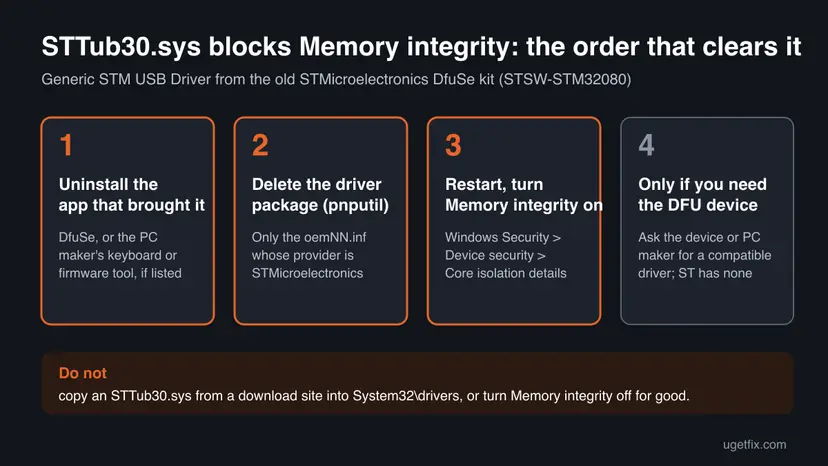
How to fix the STTub30.sys incompatible driver on Windows 11 and Windows 10
Follow Fix 1 to Fix 3 in order. You need an administrator account and about 15 minutes. Fix 4 is for readers who still use the device that needs the driver, and Fix 5 for a file that stays listed after everything else.
| What you see or have | Start with |
|---|---|
| An STMicroelectronics, DfuSe or keyboard firmware tool is in Installed apps | Fix 1 |
| No such app, but STTub30.sys is in the incompatible list | Fix 2 |
| The incompatible list is empty but the switch is still off | Fix 3 |
| "A driver can't load on this device" and you flash STM32 boards or firmware | Fix 4 |
| pnputil finds no STMicroelectronics package, yet the file is still listed | Fix 5 |
Fix 1. Uninstall DfuSe or the tool that installed STTub30.sys
5 minutesLow riskAnyone who finds STMicroelectronics, DfuSe or a maker's keyboard, lighting or firmware tool in the list of installed apps.
An installed app can put the driver package back after you delete it. Removing the app first makes the cleanup in Fix 2 stick. On many PCs nothing is listed, which is normal: then go straight to Fix 2.
- Windows 11: open Settings > Apps > Installed apps. Windows 10: open Settings > Apps > Apps & features.
- Type
DfuSeinto the search box above the list, then trySTMicroelectronicsandSTM. - Select ... next to a matching entry and choose Uninstall, then confirm.
- Restart the PC when the uninstaller finishes.
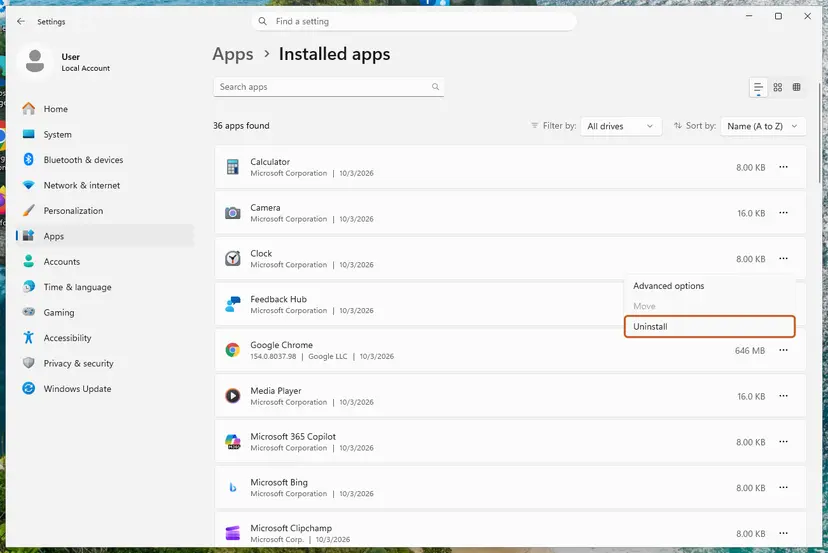
If the PC maker's control center or keyboard tool is the source, uninstalling it removes features such as keyboard lighting until you install its current version from the maker's support page. The general steps are in Uninstall a program or app in Windows.
It worked if: No DfuSe or STMicroelectronics entry is left in Installed apps after the restart.
If not: If Windows Security still lists STTub30.sys, which is common, go on to Fix 2.
Fix 2. Delete the STTub30.sys driver package with pnputil
5 minutes plus a restartRead the warningEveryone who still sees STTub30.sys in the incompatible driver list.
Memory integrity checks the driver packages in the driver store, not only the file in the drivers folder. pnputil deletes the package itself. The /uninstall option also takes it off any device that uses it, and /force deletes it even when a device still uses it.
One user reports that the PC hung on restart after the file was removed. A restore point lets you go back in minutes: Undo recent changes with System Restore. Delete only a package whose provider is STMicroelectronics; another user found that the oem number given in a forum answer was an Xbox driver on their PC.
- Open Windows Security > Device security > Core isolation details and select the link to review incompatible drivers. Note the Published name next to STTub30.sys, for example
oem33.inf. - Right-click Start and select Terminal (Admin) on Windows 11 or Windows PowerShell (Admin) on Windows 10, then select Yes.
- If you did not see a published name, list the third-party drivers with one of the commands below and look for STMicroelectronics under Provider Name.
- Run
pnputil /delete-driver oemNN.inf /uninstall /force, with your own number in place ofoemNN. - If more than one STMicroelectronics package lists STTub30.sys, delete each of them.
- Restart the PC.
Find the STMicroelectronics package (Terminal as administrator)
pnputil /enum-drivers /files

REM Windows 10, or if /files is not accepted:
dism /online /get-drivers /format:table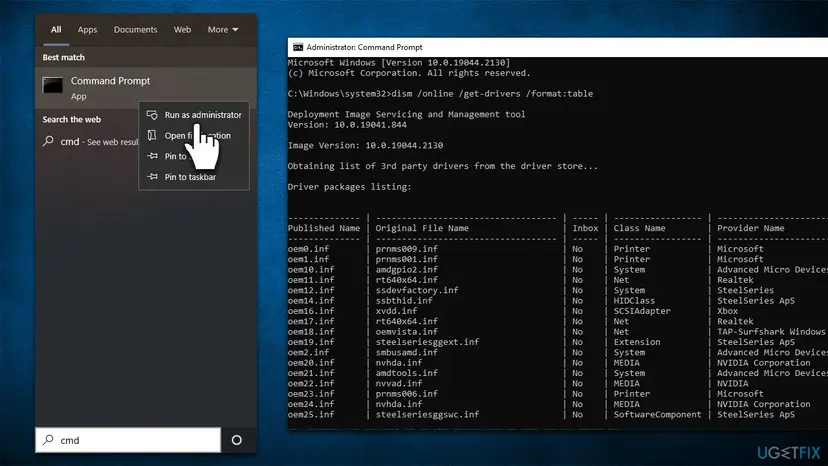
Delete it (replace oem33.inf with your own published name)
pnputil /delete-driver oem33.inf /uninstall /forcepnputil /enum-drivers /files shows which files each package holds, so you can see STTub30.sys inside it. The option needs Windows 11 22H2 or later; on Windows 10 use the DISM line and match the provider.
It worked if: pnputil reports that the driver package was deleted, and after the restart STTub30.sys is gone from the incompatible list.
If not: If pnputil says the package is in use, restart and run it again. If no STMicroelectronics package is listed at all, use Fix 5.
Fix 3. Turn Memory integrity on in Core isolation
3 minutes plus a restartLow riskEveryone, once STTub30.sys is no longer listed.
Removing the driver does not switch the feature on by itself, and the reader's own Windows updates did not either. The switch only stays on once nothing in the incompatible list remains.
- Type
Core isolationinto the search box on the taskbar and open the result. - Or go there by hand. Windows 11: Settings > Privacy & security > Windows Security > Device security > Core isolation details. Windows 10: Settings > Update & Security > Windows Security > Device security > Core isolation details.
- Set Memory integrity to On and select Yes in the User Account Control prompt.
- Restart the PC when Windows Security asks.
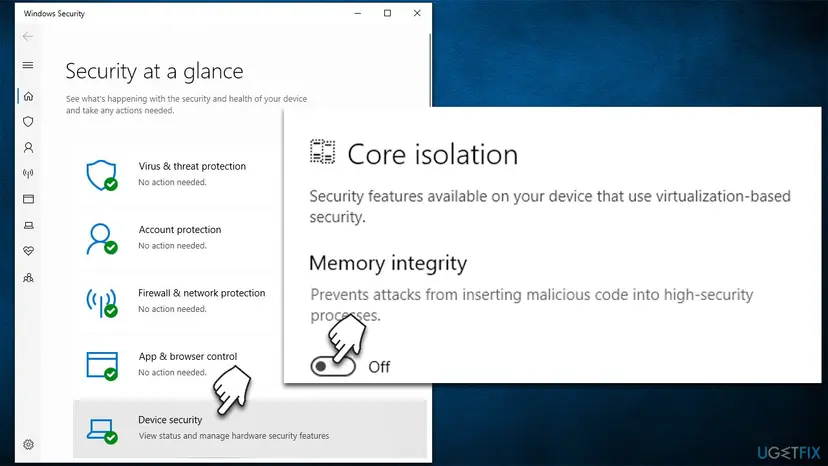
A PC managed by an organisation may have the setting locked, and some older processors cannot run Memory integrity at all. If the whole page is missing, see our guide to the Core isolation "Page not available" error.
It worked if: After the restart Memory integrity shows On and no incompatible drivers are listed.
If not: If the switch turns itself off again, another driver is now listed: read the list, or see Still not working below.
Fix 4. Get a compatible driver if you still need the STM32 DFU device
10 minutesLow riskReaders who flash firmware onto STM32 boards, or whose maker's tool stops working without the driver.
Microsoft's first advice for a blocked driver is an updated, compatible version from Windows Update or the maker. STMicroelectronics has no compatible STTub30.sys, so the answer has to come from the device or PC maker.
- Windows 11: open Settings > Windows Update > Advanced options > Optional updates. Windows 10: open Settings > Update & Security > Windows Update > View optional updates.
- Expand Driver updates and install any entry for your keyboard, lighting or STMicroelectronics device, then restart.
- Open the support page of your laptop or device maker, enter your exact model and download its current control center or firmware tool for your Windows version.
- Install it with Memory integrity on, then open Core isolation again and check that the switch is still on.
- If the maker has nothing newer, contact its support with the details listed under Still not working below.
Updating a device through Device Manager is shown step by step in Update, roll back or reinstall a driver. For your own STM32 development work, ST has moved on from DfuSe to newer tools; we could not confirm which driver each of them installs, so check Core isolation after you install one.
It worked if: The device or tool works and the incompatible list stays empty.
If not: If only the old DfuSe driver works with your device, keep it on a separate PC rather than switching Memory integrity off on your main one.
Fix 5. Remove a leftover STTub30 driver entry with Autoruns
10 minutesRead the warningAdvanced readers whose PC still lists STTub30.sys although pnputil finds no STMicroelectronics package.
A driver can leave a service entry behind that still points to the file. Autoruns, a free Microsoft Sysinternals tool, shows every driver Windows tries to load and can delete that entry.
Deleting an entry in Autoruns removes its registry key. Deleting the wrong driver can stop a device or even Windows from starting. Make a registry backup or restore point first: Back up the registry before editing it.
- Download Autoruns from Microsoft's Sysinternals page on learn.microsoft.com and extract the ZIP file.
- Right-click Autoruns64.exe and select Run as administrator, then Yes.
- Type
STTub30into the filter box at the top. - Check that the entry's image path ends in
STTub30.sysand the publisher is STMicroelectronics. - Right-click that entry, select Delete and confirm.
- Restart the PC and turn Memory integrity on (Fix 3).
It worked if: No STTub30 entry is left in Autoruns, and Memory integrity turns on after the restart.
If not: If the file is still listed, see Still not working below.
STTub30.sys still listed: what to check and who to ask
The incompatible driver list in Windows Security is the most direct log: it names each driver, its published name and its producer. If a different driver shows up after the fix, the same method applies to that driver and its maker, as in our guides to BrUsbSib.sys and wdcsam64.sys.
- The same oem number is back after a restart: an installed tool reinstalled it. Look again in Installed apps (Fix 1) and in the maker's control center.
- The PC hangs on restart after the removal: start Windows Recovery and use the restore point you made: Undo recent changes with System Restore. Then ask the PC maker before you remove the driver again.
- The switch is greyed out: the PC is managed by your organisation or the processor does not support Memory integrity. STTub30.sys does not cause that.
- A tool says it cannot find the device: that is form 2 of the same problem. The old driver is blocked; Fix 4 is the way forward.
Your exact model, your Windows edition and version from winver, a screenshot of the incompatible driver list with STTub30.sys and its published name, and the driver version (often 3.0.5.0). STMicroelectronics itself directs these cases to the PC maker.
Keep Memory integrity on after a firmware or driver update
- Download drivers and control center tools only from your PC or device maker's support page.
- Check Core isolation once after every keyboard, lighting or firmware update.
- Make a restore point before you delete any driver package.
- Copy a replacement STTub30.sys from GitHub or a DLL site into
System32\drivers. - Use "driver updater" tools to look for STTub30.sys.
- Turn Memory integrity off for good to keep an old developer driver.
Windows 10 left support on 14 October 2025. The steps work on Windows 10 22H2, but a PC that stays on Windows 10 no longer gets security fixes, which weighs more than one old USB driver.
Frequently asked questions
What is STTub30.sys?
It is a kernel mode USB driver from STMicroelectronics with the product name Generic STM USB Driver. It belongs to DfuSe (STSW-STM32080), a kit for updating the firmware of STM32 microcontrollers over USB, which ST has long marked as not recommended for new designs. On a home PC it usually arrives with a laptop maker's keyboard, lighting or firmware tool. It is not malware: Microsoft says drivers that Memory integrity blocks have a minor vulnerability and are most likely not malicious.
Is there an STTub30.sys update for Windows 11?
Not from STMicroelectronics. On ST's community forum a technical moderator says the driver was only meant for development and that the PC maker has to provide a solution. Check Windows Update optional updates and your PC or device maker's support page for a current tool (Fix 4). If nothing newer exists and you do not flash firmware, delete the package (Fix 2) and keep Memory integrity on.
How do I update the STTub30.sys driver?
You cannot update it to a compatible official version, because STMicroelectronics publishes none. What works is removing it. Delete the package with pnputil, using the published name Windows Security shows next to STTub30.sys, restart and turn Memory integrity on. If a device you use needs a USB firmware driver, install the current tool for your exact model from its maker, with Memory integrity on, and check Core isolation afterwards.
Can I replace STTub30.sys with the version on GitHub?
We do not recommend it. A file from a third-party repository is not an official release, and a kernel driver runs with the highest rights in Windows. Copying a file into C:\Windows\System32\drivers also leaves the old package in the driver store, which is what Windows Security checks. We could not confirm that such a file is compatible or safe. Deleting the package with pnputil is the clean way.
Is it safe to delete STTub30.sys?
On most PCs, yes, through pnputil. The driver only serves an STM32 device in firmware update mode, so Windows itself does not need it. Make a restore point first, because one user reports a hang on restart after removing it, and delete only the package whose provider is STMicroelectronics. If the maker's keyboard or lighting tool stops updating firmware afterwards, install its current version from the maker.
Why did I get this after installing Windows updates?
Windows updates do not replace third-party drivers like STTub30.sys, so they cannot clear the warning. A feature update or a fresh look at Core isolation can turn the warning up, though, because Windows checks every driver package when Memory integrity is turned on. The driver itself has usually been on the PC since the maker set it up or a firmware tool ran.
What does "A driver can't load on this device" mean for STTub30.sys?
Memory integrity is already on and it stopped STTub30.sys from loading. Windows stays protected, but a device that needs the driver, usually a chip in firmware update mode, will not talk to its tool over USB. Microsoft's advice is to look for an updated driver from Windows Update or the maker first. Turning Memory integrity off is the last option it lists, and it lowers protection for the whole PC.
Should I just turn Memory integrity off?
We do not recommend it for this driver. Memory integrity stops malicious code from getting into the most protected parts of Windows, and Microsoft warns that turning it off on a Secured-core PC takes the device out of that state. Removing the old STMicroelectronics package takes about 15 minutes and keeps the protection. If you really need DfuSe for development, use a separate PC for that work.
I use Windows 10. Do the same steps work?
Yes. On Windows 10 22H2 apps are under Settings > Apps > Apps & features. Core isolation is under Settings > Update & Security > Windows Security > Device security. pnputil /delete-driver works the same, but use dism /online /get-drivers /format:table to find the package, because the /files filter needs Windows 11 22H2. Windows 10 no longer gets security updates since 14 October 2025.
Sources
- Microsoft Support: A driver can't load on this device (support.microsoft.com)
- STMicroelectronics Community: STTub30 and Memory integrity in Windows 11, answers by an ST technical moderator (community.st.com)
Did this fix work?
One click, no account. It tells the next reader which guides are worth their time.
Questions and experiences: STTub30.sys incompatible driver: how to turn Memory integrity back on in Windows 11 and 10
Still broken, or found a fix we did not cover? Ask here: members and our editors answer. Reading is open; writing needs a free account.
…