
How to fix Event ID 7023 error in Windows?

Prefer to fix it yourself? The manual steps follow.
- 6methods
- 5 minutes to read the entry, 5 to 30 minutes to fix the service
- Intermediate
Applies to Windows 11, Windows 10, Windows Server
6 methods in this guide
Hello. My Windows 10 PC kept crashing frequently, so I went to Event Viewer and saw an Event ID 7023 error. What is that about?
Event ID 7023 is logged by Service Control Manager when a service stops and reports an error. The entry names the service and the reason. Often it is harmless, as with SgrmBroker since January 2025; when a feature is broken, restart or re-enable the named service.
Event 7023 says one named service stopped with an error. Open the entry in Event Viewer and note the service and the error on the second line (Fix 1). If it is the System Guard Runtime Monitor Broker, Microsoft says to leave it alone (Fix 2). If it is another service and something does not work, start it again and put back its startup type (Fix 3 and Fix 4).
| Error | Event ID 7023, source Service Control Manager, level Error, in Windows Logs > System: "The <service name> service terminated with the following error:" and a second line with the reason. |
|---|---|
| Where it appears | Only in Event Viewer or a log monitoring tool. Windows shows no window for it; Microsoft calls such an entry silent. You find it while you look for the cause of a crash or a broken feature. |
| Main cause | A service stopped after an update, a failed device or network call, or a disabled dependency. On Windows 10 since 14 January 2025, the most common one is the System Guard Runtime Monitor Broker (SgrmBroker.exe), a known, harmless issue. |
| Fastest fix | Read the service name and the error in the entry (Fix 1). Leave SgrmBroker alone (Fix 2). For other services, start the service again in services.msc (Fix 3). |
| Also written as | 7023, event 7023, event id 7023, 7023 event id, eventid 7023, windows event id 7023, event viewer 7023, event log 7023, error 7023, windows error 7023, service control manager 7023, service control manager error 7023. |
| Often seen with | Event 7000 or 7001 (a service failed to start) and 7031 or 7034 (a service crashed). 7023 is different: the service ran and then stopped with an error code. |
| Affects | Every Windows version with services: Windows 11, Windows 10, Windows Server 2016 and later. The text and the fixes are the same. |
| Microsoft's status | Not one bug. The SgrmBroker entry is a documented known issue of KB5049981, which Microsoft says was addressed in KB5055612. Other 7023 entries belong to the service they name. |
| Time to fix | 5 minutes to read the entry and restart a service. Up to 30 minutes to repair system files. |
Facts checked on 15 October 2026. Steps written for Windows 11 (25H2 and 26H2) and Windows 10 22H2.
What Event ID 7023 from Service Control Manager means
Service Control Manager is the part of Windows that starts and stops services. When a running service stops and hands back an error code, it writes Event ID 7023 to the System log. The first line names the service. The second line is the error the service reported.
An Event ID 7023 entry from Microsoft's documentation (the service name and the error change)
Log Name:      System
Source:        Service Control Manager
Event ID:      7023
Level:         Error
Description:
The Netlogon service terminated with the following error:
%%14
The second line is sometimes plain text, such as "A device attached to the system is not functioning.", and sometimes a number after %%. That number is a Windows error code that Event Viewer did not translate. For small numbers, net helpmsg prints the text: net helpmsg 14 gives "Not enough storage is available to complete this operation."
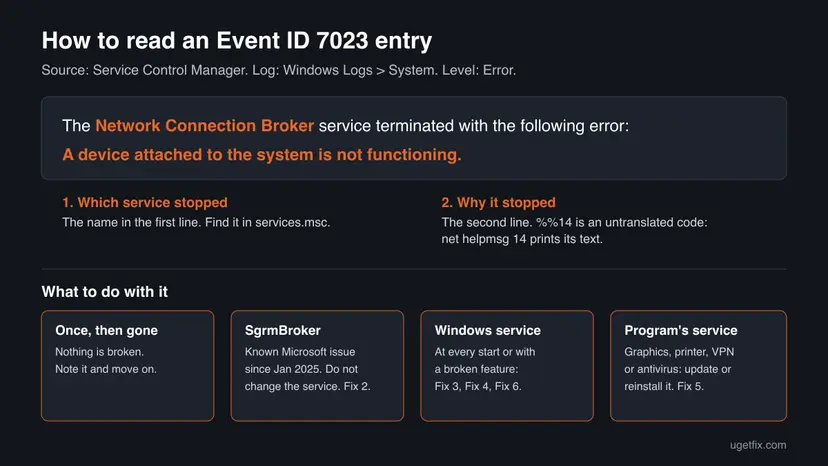
This page is about the entry whose Source is Service Control Manager. The number 7023 also appears as an error code in some programs and devices; those are different problems. Event IDs are the same in every language of Windows, only the text is translated.
Why Event ID 7023 appears, most common cause first
On Windows 10, most new 7023 entries since January 2025 name the System Guard Runtime Monitor Broker. Microsoft confirmed it and said nothing is affected. Next most often a Windows service such as Connected Devices Platform Service or Network Connection Broker stops once because a device, network or dependency was not ready. Less often a program's own service is broken, or Windows files are damaged.
| Cause | How it looks | Fix |
|---|---|---|
| The known SgrmBroker issue after Windows updates of 14 January 2025. | "The System Guard Runtime Monitor Broker service terminated with the following error: %%3489660935" at every start, nothing broken. | Fix 2 |
| A Windows service stopped once at startup or wake. | One entry, the service runs again later, no feature is missing. | None needed, or Fix 3 |
| A Windows service stops every time or is set to Disabled. | Connected Devices Platform, Network Connection Broker or another named service, a feature such as notifications or phone link stops working. | Fix 3, Fix 4 |
| A program's service is broken or left over. | The name belongs to a driver, printer, VPN, antivirus or other program. | Fix 5 |
| Windows files are damaged. | Several Microsoft services stop with errors, or the error is "The specified module could not be found." | Fix 6 |
Event 7023 is a record that a service stopped, not a process that runs. If the PC crashes or restarts, as in the question at the top, the 7023 entry is usually a side effect. Look for event 41 or 6008 and blue screens at the same time, see the last section.
How to fix Event ID 7023 in Windows
Fix 1 takes five minutes and tells you which service stopped and why. Every other fix depends on that name, so start there and use the table to jump.
| What Fix 1 showed | Go to |
|---|---|
| System Guard Runtime Monitor Broker with %%3489660935. | Fix 2 |
| A Windows service that is stopped now, and a feature does not work. | Fix 3 |
| Connected Devices Platform Service or Network Connection Broker, or a service set to Disabled. | Fix 4 |
| A service that belongs to a program, not to Windows. | Fix 5 |
| Several Windows services, or "The specified module could not be found." | Fix 6 |
Fix 1. Find which service stopped and why in Event Viewer
5 minutesNo riskEveryone with Event ID 7023, before changing anything.
Event 7023 is not one error but a report about one service. The fix depends entirely on the service name and the error on the second line, so read them first.
- Press Win + R, type
eventvwr.mscand press Enter. - Open Windows Logs > System, select Filter Current Log in the right pane, type
7023in the <All Event IDs> box and select OK. - Open the newest entries. On the General tab, note the service name in the first line and the error in the second line.
- Check the dates. One entry weeks ago is not a problem; an entry at every start is.
- If the second line is a small number after
%%, open Command Prompt and runnet helpmsgwith that number to read the error text. - In
services.msc, find the service by its name and check its Status and Startup Type.
The same list in PowerShell, as Microsoft filters Service Control Manager events, plus the error text of %%14
Get-WinEvent -FilterHashtable @{LogName='System'; ProviderName='Service Control Manager'; Id=7023} -MaxEvents 20 | Format-List TimeCreated, Message
net helpmsg 14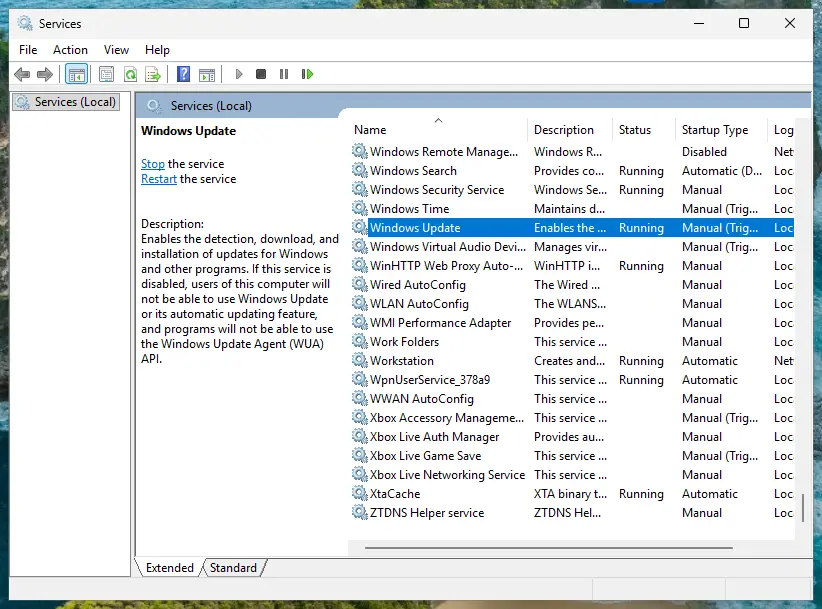
It worked if: You know the service, its error, whether it runs now and how often the entry appears.
If not: If the second line is a large number such as %%3489660935, net helpmsg cannot read it. Search for the service name together with the number, or use the table above to pick a fix by the service.
Fix 2. Leave the System Guard Runtime Monitor Broker (SgrmBroker) entry alone and install updates
2 minutes, plus an update if one is waitingNo riskThe entry reads "The System Guard Runtime Monitor Broker service terminated with the following error: %%3489660935" and nothing on the PC is broken.
Microsoft lists this as a known issue of the Windows 10 update KB5049981 of 14 January 2025. It says the service was made for Microsoft Defender, has not been part of it "for a very long time", that the security level does not change and that SgrmBroker.exe "presently serves no purpose".
Microsoft writes that there is no need to start or configure the service, that doing so might trigger errors, and that you should not uninstall or remove the service or its parts. Users who changed its registry value report new errors from other services after that.
- Press Win + I and open Windows Update (Windows 10: Update & Security > Windows Update).
- Select Check for updates and install what is offered.
- Restart the PC.
- Leave the entry in the log. It needs no action.
Microsoft says the issue is addressed in KB5055612, an April 2025 Windows 10 update. If the entry still appears on an updated PC and nothing is broken, it is still safe to ignore. Windows 10 left support on 14 October 2025, so a Windows 10 PC without Extended Security Updates gets no further changes.
It worked if: The PC works as before. After the update the entry may stop; if it does not, nothing is lost.
If not: If a security feature really does not work, for example Windows Security shows a problem, that has another cause: run a scan with How to scan for malware with Microsoft Defender
Fix 3. Start the stopped service again and let Windows restart it after a failure
5 minutesLow riskThe service from Fix 1 is a Windows service, it is stopped now, and a feature such as notifications, Bluetooth or phone link does not work.
Many services stop once because a device, the network or another service was not ready. Starting the service again brings the feature back, and the Recovery tab makes Windows restart it by itself next time.
- Press Win + R, type
services.mscand press Enter. - Right-click the service from Fix 1 and select Start, or Restart if it shows Running.
- Double-click the service and open the Recovery tab.
- Set First failure, Second failure and Subsequent failures to Restart the Service.
- Select Apply and OK.
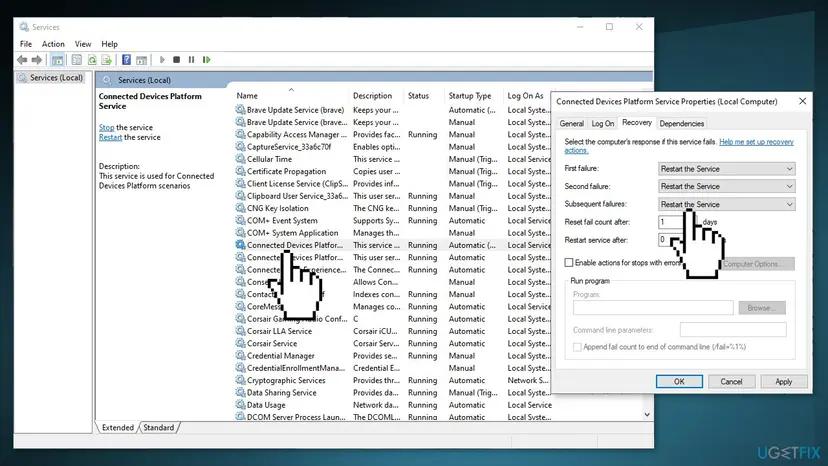
Opening Services and starting a service step by step: Check and restart Windows services With commands, as Microsoft shows for a stopped service: sc query with the service name, then sc start with the same name. The service name is on the General tab, for example CDPSvc or NcbService.
It worked if: The service shows Running and the feature works again. New 7023 entries for it stop or become rare.
If not: If Start is greyed out, the service is Disabled: go to Fix 4. If it fails to start with an error, read that error and check Fix 5 or Fix 6.
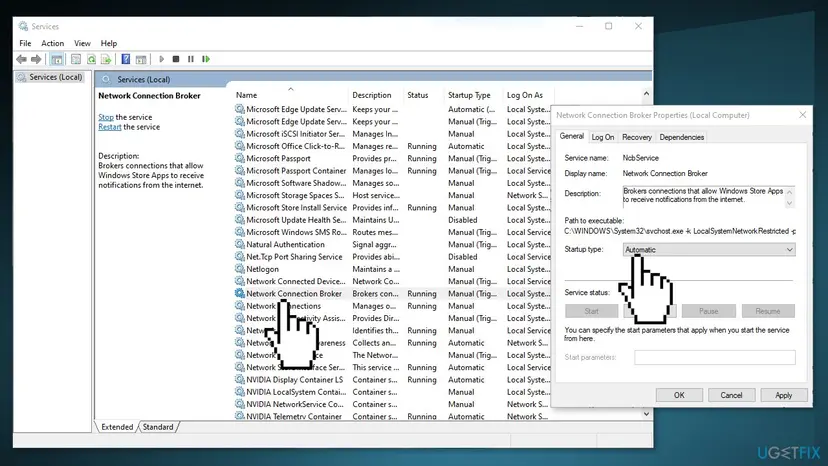
Fix 4. Put back the startup type of Connected Devices Platform Service, Network Connection Broker or another disabled service
5 minutesLow riskThe service from Fix 1 is set to Disabled, or the entries name Connected Devices Platform Service (CDPSvc) or Network Connection Broker (NcbService) at every start.
A tweak tool or a "disable unneeded services" list often switches these two off. Other services and Windows features still call them, so they fail and log 7023. NcbService errors often read "A device attached to the system is not functioning."
- In Services, double-click the service and stay on the General tab.
- For Connected Devices Platform Service, set Startup type to Automatic (Delayed Start).
- For Network Connection Broker, set Startup type to Manual; Windows starts it when an app needs it.
- For another service, set Automatic or Manual, as on a working PC with the same Windows version.
- Select Apply, then Start, then OK.
- Restart the PC and check the System log for new 7023 entries.
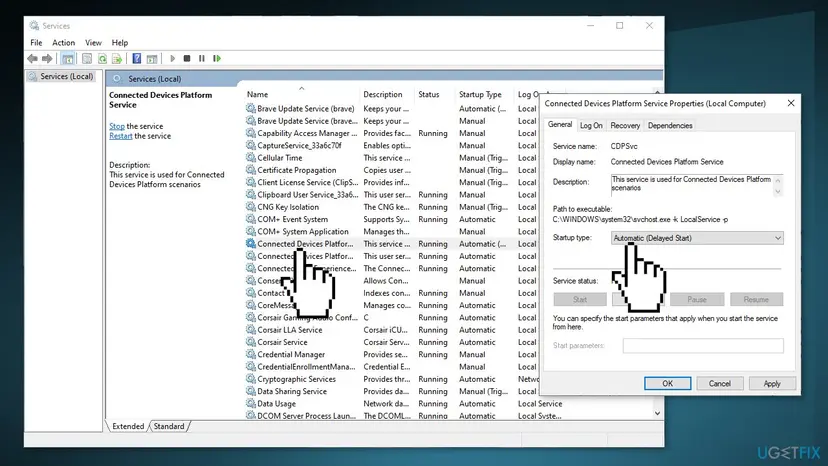
Microsoft's commands for a disabled service, here for Netlogon: sc config NETLOGON start=auto, sc start NETLOGON, sc query NETLOGON. If the service then fails because of a dependency, Microsoft's advice is to do the same for the dependency it names.
It worked if: The service shows Running or starts when needed, and the 7023 entries for it stop after a restart.
If not: If the service goes back to Disabled, a tweak tool or malware changes it: remove the tool and run How to scan for malware with Microsoft Defender If it still stops with an error, go to Fix 6.
Fix 5. Update, repair or remove the program that owns the service
10 minutesLow riskThe service from Fix 1 belongs to a program: a graphics or printer driver, a VPN, an antivirus, an updater or another app.
Windows cannot repair a program's own service. A program that was half removed, or an old version after a Windows update, keeps stopping with an error until the program itself is updated or reinstalled.
- In Services, double-click the service and read Path to executable on the General tab. The folder shows which program it belongs to.
- If the file in that path is missing, the program was removed badly: reinstall it, then remove it with its own uninstaller if you do not need it.
- If the program is still in use, install its newest version from the maker's site or through its own updater.
- For a driver service, update the driver: Update, roll back or reinstall a driver
- Restart the PC and check for new 7023 entries.
Removing a program the normal way: Uninstall a program or app in Windows If the program offers Repair under Settings > Apps > Installed apps (Windows 10: Settings > Apps > Apps & features), try that before a reinstall.
It worked if: After the update or reinstall, the service runs and stops logging 7023, or it is gone together with the program.
If not: If the maker has no newer version, ask its support with the full 7023 text. If the service belongs to nothing you recognize, scan with How to scan for malware with Microsoft Defender
Fix 6. Repair Windows system files with DISM and SFC
15 to 30 minutesNo riskSeveral Microsoft services stop with errors, the error is "The specified module could not be found.", or Fix 3 and Fix 4 did not hold.
A Windows service that loads a damaged or missing system file stops with an error at every start. DISM repairs the store of Windows files, then SFC puts back the damaged ones from it.
- Open an elevated command window. Right-click Start and select Terminal (Admin), or type cmd in the search box, right-click Command Prompt and select Run as administrator. Select Yes when Windows asks for permission.
- Run DISM first. Type the command below and press Enter. DISM downloads clean copies of damaged components from Windows Update, so it can take several minutes. Wait until it says The operation completed successfully.
DISM.exe /Online /Cleanup-Image /RestoreHealth - Run System File Checker. In the same window, type the command below and press Enter. Do not close the window until the verification reaches 100%.
sfc /scannow - Read the result and restart. Compare the last message with the table below this guide, then restart the PC so that repaired files are loaded.
These steps were written for Windows 11 24H2 and 25H2. The full page with the other versions and what each result means: Run DISM and SFC to repair Windows system files
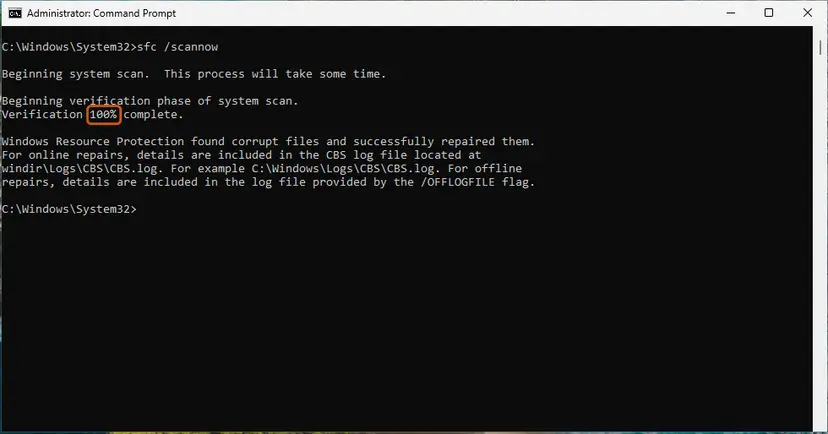
It worked if: SFC reports no integrity violations or says it repaired them, and the service starts after a restart.
If not: If SFC could not repair everything, go back to a restore point from before the first entry: Undo recent changes with System Restore If there is none, a repair install keeps your files: Reinstall Windows without losing files
If Event ID 7023 keeps coming back: what to read and what to collect
Before you ask for help, collect these. They answer the first questions anyone will ask.
- The full text of the 7023 entries, both lines, from the General tab, and how often they appear.
- The output of
sc qcwith the service name: startup type, path and account. - Other Service Control Manager entries at the same second, such as 7000, 7001, 7031 or 7034.
- What changed. Run
perfmon /relto open Reliability Monitor, which lists installs, updates and crashes by day. - Your Windows version and build. Press Win + R, type
winverand note both.
| Sign | What it means |
|---|---|
| The PC crashes, freezes or restarts by itself, and 7023 is one of many entries. | 7023 is a side effect. Look for event 41, event 6008 and blue screens; check memory and disk. |
| Many different services stop at once after waking from sleep. | Often a driver or power problem. Update the chipset, network and graphics drivers. |
| A service named after a device, such as Bluetooth or a printer, stops with a device error. | The device or its driver failed. Reconnect it and update its driver. |
| The service starts by hand but stops again at every boot. | Something it needs is not ready in time. See Event ID 7000 and Event ID 7001. |
Windows 10 left support on 14 October 2025. The event and the fixes are the same on Windows 10 22H2, but a Windows 10 PC without Extended Security Updates no longer gets fixes for its own services.
How to avoid Event ID 7023 in the future
- Install Windows updates; Microsoft fixes known service issues such as SgrmBroker through them.
- Note a service's startup type before you change it.
- Remove programs with their own uninstaller, so their services go too.
- Keep System Protection on for drive C:, so a restore point exists before big changes.
- Do not use "disable unneeded services" lists or tweak tools.
- Do not disable or delete a service just to silence a log entry.
- Do not edit service values in the registry by hand.
- Do not treat every red entry in Event Viewer as a fault; read what it names first.
Frequently asked questions
What does Event ID 7023 mean?
Event ID 7023 means a Windows service stopped and reported an error. Service Control Manager logs it in Event Viewer under Windows Logs > System with the level Error. The first line reads "The <name> service terminated with the following error:", and the second line gives the error, as text or as a number after %%. The event is about the named service only, so the fix depends on which service it is and whether anything on the PC is broken.
Is Event ID 7023 dangerous, or can I ignore it?
Usually you can ignore a single entry, or one that repeats while everything works. The System Guard Runtime Monitor Broker entry is a known Microsoft issue that Microsoft says changes nothing in security or performance. An entry matters when it names a service you need and that feature is broken, for example notifications, Bluetooth, networking or printing. Then fix the named service as Fix 3 to Fix 6 show.
What is the System Guard Runtime Monitor Broker 7023 error %%3489660935?
It is the known issue that appeared on Windows 10 after the updates of 14 January 2025, including KB5049981. Microsoft says SgrmBroker.exe was created for Microsoft Defender, is no longer part of it, and presently serves no purpose; the device's security level does not change. Microsoft asks you not to start, configure, uninstall or remove the service, and says the issue was addressed in KB5055612. Install updates and leave the entry in the log.
What does "The NcbService service terminated with the following error: A device attached to the system is not functioning" mean?
NcbService is the Network Connection Broker, which lets Store apps get notifications from the internet. The message means the service stopped when a network or device call failed, often at startup or after sleep. If notifications and apps work, the entry is harmless. If they do not, set Network Connection Broker to Manual, start it, and restart the PC (Fix 4). If it keeps stopping, repair system files (Fix 6).
What is the difference between Event ID 7023, 7031 and 7034?
All three come from Service Control Manager and are about a service that stopped. Event 7023 means the service stopped and handed back an error code, shown in the entry. Events 7031 and 7034 mean the service crashed without a clean stop. Event 7031 also lists the recovery action Windows took. 7000 and 7001 are different again: the service could not start at all. Fix 1 works for all of them: read the service name first.
Is Event ID 7023 different on Windows 11, Windows 10 or Windows Server 2016?
No. The event text, Event Viewer, Services and the sc commands are the same on Windows 11, Windows 10 and Windows Server 2016 and later, and the fixes on this page work on all of them. Only the services differ: a server runs roles such as Netlogon or the Workstation service that a home PC may not use. The SgrmBroker issue was documented for Windows 10. Windows 10 left support on 14 October 2025.
How do I read a %% number in a 7023 entry?
A number after %% is a Windows error code that Event Viewer did not turn into text. Open Command Prompt and run net helpmsg with the number, for example net helpmsg 14, which prints "Not enough storage is available to complete this operation." Large numbers such as %%3489660935 are not ordinary Win32 codes and net helpmsg cannot read them. Search for the service name together with the number, as with SgrmBroker in Fix 2.
Can Event ID 7023 make my computer crash?
Not by itself. A stopped service does not run, so it cannot crash Windows. A crash and 7023 entries can share one cause, such as a broken driver or damaged system files, and a crash also makes services stop and log errors. If the PC restarts by itself, look for event 41 and event 6008 and blue screens at the same time, and check the signs table in the section above.
The event text is in another language. Is it the same 7023?
Yes, if the Source is Service Control Manager and the Event ID is 7023. Windows translates the text into its own language, but the ID and the meaning stay the same, so the fixes are the same. A Vietnamese, German or Russian system shows the same entry with translated words. A program's own error code 7023, outside Event Viewer, is a different problem.
Sources
- Microsoft Support: January 14, 2025, KB5049981 (OS Builds 19044.5371 and 19045.5371), known issue on SgrmBroker.exe and Event 7023, addressed in KB5055612 (support.microsoft.com)
- Microsoft Learn: Netlogon service isn't starting (Event ID 7023 example with %%14, Get-WinEvent filter for Service Control Manager, sc query, sc config start=auto, sc start) (learn.microsoft.com)
- Microsoft Q&A: Update KB5049981 causes Event ID 7023 for System Guard Runtime Monitor Broker (user reports and the quoted Microsoft bulletin) (learn.microsoft.com)
Did this fix work?
One click, no account. It tells the next reader which guides are worth their time.
Questions and experiences: fix Event ID 7023 error in Windows
Still broken, or found a fix we did not cover? Ask here: members and our editors answer. Reading is open; writing needs a free account.
…