
How to fix "ELARA app is keeping the system from closing or restarting" in Windows

Prefer to fix it yourself? The manual steps follow.
6 methods in this guide
Hello. I upgraded to Windows 10 April 2018 Update yesterday. Since then, I cannot restart or shut down my PC as I keep getting an error, which says: "ELARA app is keeping the system from closing or restarting." What is this app used for?
The ELARA app in this message is the program of an Alps touchpad driver, usually found on older laptops, and it is not malware. When it hangs, Windows cannot shut down, restart or sign out. Choose the force option on the message to get out now, then update or reinstall the touchpad driver.
ELARA is the name Windows shows for the process of an Alps touchpad driver, found in a folder such as C:\Program Files\Apoint2K. It is not a virus, but it can hang and block shutdown. Force the restart once, then check Windows Update, update the touchpad driver, and if that fails uninstall the Alps or Dell touchpad entry in Installed apps.
| Error | "ELARA app is keeping the system from closing or restarting", shown when you shut down, restart or sign out. |
|---|---|
| Where it appears | On the screen Windows shows when a program refuses to close during shutdown, restart or sign out. |
| Main cause | The Alps touchpad driver program (process ApntEx.exe, folder Apoint2K) hangs and does not answer when Windows asks it to close. It often starts after a Windows upgrade. |
| Fastest fix | Choose the force option on the message, then update or reinstall the touchpad driver (Fixes 2 to 4). |
| Also written as | Elara app preventing restart, Apntext.exe, ApntEx.exe, Apoint2K, Alps Pointing-Device Driver. |
| Affects | Windows 10 and Windows 11 laptops with an Alps touchpad. Most reports are from Windows 10 after the April 2018 Update. |
| Is it a virus | No, the genuine program is not malware. Adware can use a similar name, so check its file location (Fix 6). |
| Vendor status | Dell's Alps driver pages that we read list only Windows 8 and Windows XP. We found no Windows 10 or 11 Alps driver there. |
| Time to fix | About 10 to 20 minutes, including one restart. |
Facts checked on 16 October 2026. Steps written for Windows 11 (25H2 and 26H2) and Windows 10 22H2, read against Dell driver pages and Microsoft Q&A reports.
What the ELARA app is and what this message means
The message appears when Windows asks every open program to close and one of them does not answer. Here the program is called ELARA. It belongs to the driver of an Alps touchpad: the files sit in a folder such as C:\Program Files\Apoint2K or C:\Program Files\DellTPad, and the process runs as ApntEx.exe (also written Apntext.exe). The part of the path after Program Files differs by laptop model.
The driver gives the touchpad its extra features, such as scrolling and gestures. Dell's own driver page describes an Alps driver as replacing the standard Microsoft mouse driver with an enhanced one for the touchpad. We could not find Dell or Alps documentation that explains why Windows shows the name ELARA, so we only report that it is the name shown for this driver program.
| What you see | What it means |
|---|---|
| Shutdown, restart or sign out stops with the ELARA message | The driver program is running but not responding to the close request. |
| The touchpad scrolls badly, loses gestures or stops working | The same driver is damaged or does not match your Windows version. |
| Many pop-up ads or a browser that behaves strangely | Possibly unrelated adware that uses the name ELARA. See Fix 6. |
The real ELARA program is part of your touchpad driver, so do not delete its folder by hand. Update or reinstall the driver instead. Removing single files can leave the touchpad working worse than before.
Why the ELARA app blocks shutdown, ranked by how often
The cause is not published by Dell, Alps or Microsoft in the pages we read. Users on the Microsoft Q&A site report the problem on Windows 10, after an upgrade, with the Alps driver still installed. Dell's Alps driver pages list Windows 8 and Windows XP only, so an Alps driver on a newer Windows is often an old driver carried over by the upgrade.
| Cause, most often first | How to tell | Start with |
|---|---|---|
| An old Alps driver carried over by a Windows upgrade, or Windows 10 replacing the driver in the background | The message started right after an upgrade or update. The touchpad may also act oddly. | Fixes 2 and 3 |
| A damaged driver installation | The message appears every time, and updating finds nothing new. | Fix 4 |
| Windows waits for the driver program to answer and gives up too late | The message disappears if you wait or force the restart. | Fix 1, then Fix 5 only if it keeps coming back |
| Adware that borrows the name ELARA | The program is not in the Alps or Dell folder, and ads appear. | Fix 6 |
How to fix the ELARA app blocking shutdown and restart, step by step
Do Fix 1 to get out of the stuck shutdown now. Then do Fixes 2 and 3 to bring Windows and the driver up to date, and Fix 4 if that did not help. Use Fix 5 only as a last resort, and Fix 6 if you see pop-up ads.
| What you see or have | Start with |
|---|---|
| You are stuck on the message right now | Fix 1 |
| The message started after a Windows upgrade or update | Fixes 2 and 3 |
| Updating found nothing, or the touchpad also misbehaves | Fix 4 |
| The message returns after every restart even with the driver reinstalled | Fix 5 |
| Pop-up ads, or the program is not in an Alps or Dell folder | Fix 6 |
Fix 1. Force the shutdown or restart once and close the ELARA process
2 minutesRead the warningYou are looking at the ELARA message now and just need the PC to restart.
The message is Windows waiting for a program that does not answer. Forcing the close ends the program for this session, so the PC can restart and the other fixes can be applied.
Forcing a restart closes every open program without saving. Save your work in the other windows first, or you can lose unsaved changes.
- Select Cancel on the message to return to the desktop and save your open files.
- Press Ctrl + Shift + Esc to open Task Manager.
- On the Processes page, find the Alps touchpad process (
ApntEx.exeor a name with Alps or Apoint), right-click it and select End task. - Restart from Start > Power > Restart.
- If the message appears again, choose the force option on it (the button that restarts or shuts down anyway).
If the screen is frozen, a different way is to open an administrator Command Prompt and run the command below. It restarts at once and also closes programs without asking. Users on Microsoft Q&A report this command for apps that block shutdown.
Administrator Command Prompt
shutdown /r /f /t 0It worked if: The PC restarts without waiting for ELARA. This does not remove the cause, so the message can return at the next shutdown.
If not: If the message comes back at every shutdown, update Windows and the driver in Fixes 2 and 3.
Fix 2. Install all Windows updates
15 minutesLow riskThe message started after a Windows upgrade or a feature update.
Windows can bring a newer touchpad driver or a fix for the old one as part of an update. The old guide listed this first, and Microsoft Q&A reports tie the problem to an upgrade.
- Press Win + I to open Settings.
- Open Windows Update (on Windows 10: Update & Security).
- Select Check for updates and let Windows install everything it offers.
- Open Advanced options > Optional updates and install any driver listed for your touchpad or mouse.
- Restart when Windows asks.
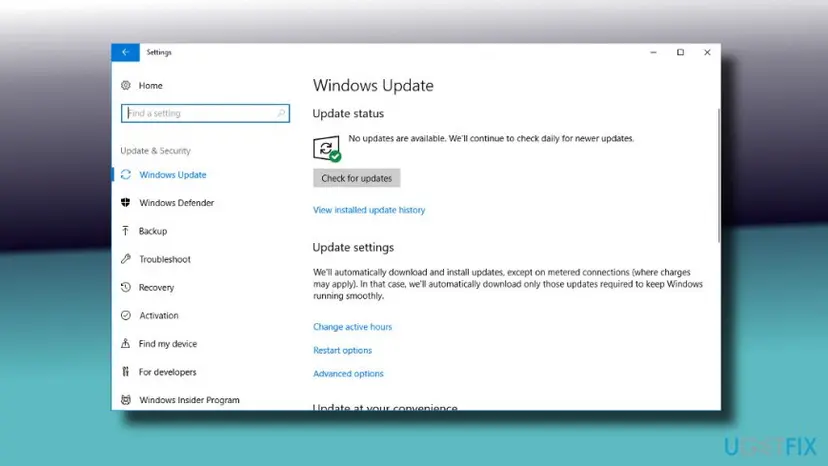
It worked if: Windows shows You're up to date, and the next shutdown no longer shows the ELARA message.
If not: If the message stays, update the touchpad driver itself in Fix 3.
Fix 3. Update the touchpad driver in Device Manager
10 minutesLow riskWindows Update did not help and the touchpad shows in Device Manager.
The ELARA program is part of the driver. A current driver from Windows or from your laptop maker replaces the old Alps program that hangs at shutdown.
In Device Manager open Mice and other pointing devices, right-click each touchpad entry and select Update driver. Then use the library steps below. Dell's Alps pages that we read offer drivers for Windows 8 and Windows XP only, so for a newer Windows get the driver from your laptop maker's support page for your exact model, using your service tag or serial number.
- Open Device Manager. Right-click Start and select Device Manager.
- Open the device's Driver tab. Expand the category (for example Display adapters), right-click the device, select Properties and open the Driver tab. Driver Date and Driver Version show what is installed now.
- Update the driver. Select Update Driver and let Windows search automatically. To use a driver you downloaded from the device maker, select Browse my computer for drivers instead and point to the unpacked folder.
- Or roll back the driver. If the problem started after a driver update, select Roll Back Driver, choose a reason and select Yes. The button is greyed out when Windows has no earlier driver to return to.
- Or reinstall the driver. Select Uninstall Device. Tick Attempt to remove the driver for this device only if you want Windows to delete the driver package too, then select Uninstall.
- Restart. Restart the PC. Windows detects the device again and installs a driver for it.
- Check optional driver updates. Open Settings > Windows Update > Advanced options > Optional updates. If driver updates are listed, tick the ones you need and select Download & install.
These steps were written for Windows 11 24H2 and later. The full page with the other versions and what each result means: Update, roll back or reinstall a driver
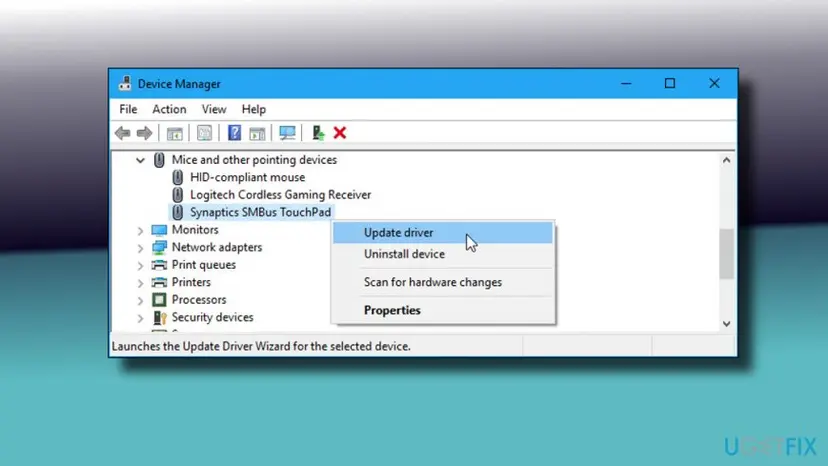
It worked if: Device Manager reports a driver was installed, or says the best driver is already installed. After a restart the ELARA message no longer stops shutdown.
If not: If Windows says the best driver is already installed and the message stays, reinstall the touchpad software in Fix 4.
Fix 4. Uninstall the Alps or Dell touchpad software and let Windows reinstall the driver
10 minutesRead the warningUpdates changed nothing, or the touchpad also scrolls badly.
Users on Microsoft Q&A report that removing the Alps touchpad software ends the message, because Windows falls back to its own pointing driver. Removing the whole entry is safer than deleting the Apoint2K folder by hand.
After removal the touchpad can lose extra features such as two finger scrolling until a newer driver is installed. Plug in a USB mouse first so you can still control the PC.
- Press Win + R, type
appwiz.cpland press Enter. - Find the entry named like Dell Touchpad, ALPS Touch Pad Driver or Alps Pointing-device Driver and select Uninstall.
- Follow the uninstaller and restart the PC.
- Open Settings > Windows Update and select Check for updates so Windows installs a touchpad driver, or install the one from your laptop maker.
- Uninstall from the Start menu. Select Start > All apps and find the app. Right-click it (or press and hold) and select Uninstall.
- Or uninstall in Settings. Select Start > Settings > Apps > Installed apps. Find the app, select More (the three dots) > Uninstall, and confirm.
- Or uninstall from Control Panel. Some programs can only be removed here. Type Control Panel in the search box on the taskbar and open it, then select Programs > Programs and Features. Right-click the program and select Uninstall or Uninstall/Change, then follow the program's own uninstaller.
These steps were written for Windows 11 24H2 and 25H2. The full page with the other versions and what each result means: Uninstall a program or app in Windows
Do not delete the Apoint2K folder or end its services by hand. Microsoft Q&A answers that suggest this are user reports, and the old guide warned that it can damage touchpad behaviour further.
It worked if: The Alps entry is gone from Installed apps, the touchpad moves the pointer, and shutdown no longer shows ELARA.
If not: If the entry is missing but the message returns, check the file location in Fix 6.
Fix 5. Add the AutoEndTasks value so Windows closes stuck programs itself
5 minutesRead the warningThe driver is reinstalled but a hanging program still blocks shutdown, or you cannot change the driver.
The old guide used this setting. It makes Windows end programs that do not close, instead of waiting for you, so it hides the symptom without repairing the driver.
With AutoEndTasks set to 1, Windows closes every program at shutdown without asking, so unsaved work in any app is lost. A wrong registry edit can also cause problems, so export the key first.
We could not confirm AutoEndTasks in Microsoft documentation. Microsoft Q&A users report it, and in one thread it did not work for everyone. Treat it as a last resort.
- Open Registry Editor. Press Windows key + R, type the command below and select OK. Select Yes when Windows asks for permission.
regedit - Select the key. In the left pane, go to the key your guide will change, or paste its path into the address bar under the menu and press Enter.
- Export it. Select File > Export.
- Save the backup. Under Export range, keep Selected branch to save only that key, or choose All for the whole registry. Pick a folder, type a file name and select Save.
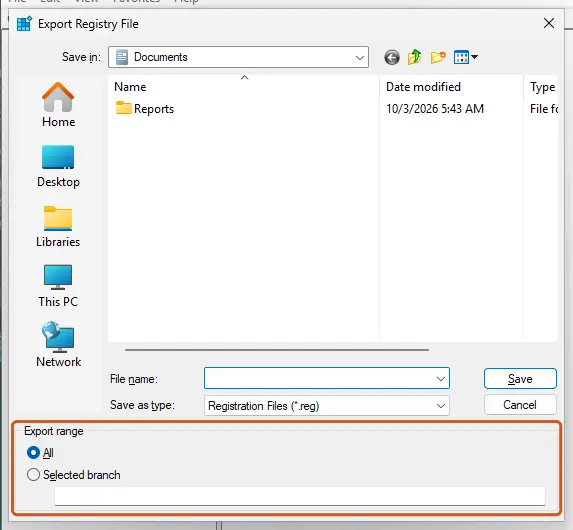
Export range decides whether one key or the whole registry is saved. Screenshot: Windows 11 26H2. - Restore it when needed. In Registry Editor, select File > Import, choose the .reg file and select Open. You can also double-click the file and confirm.
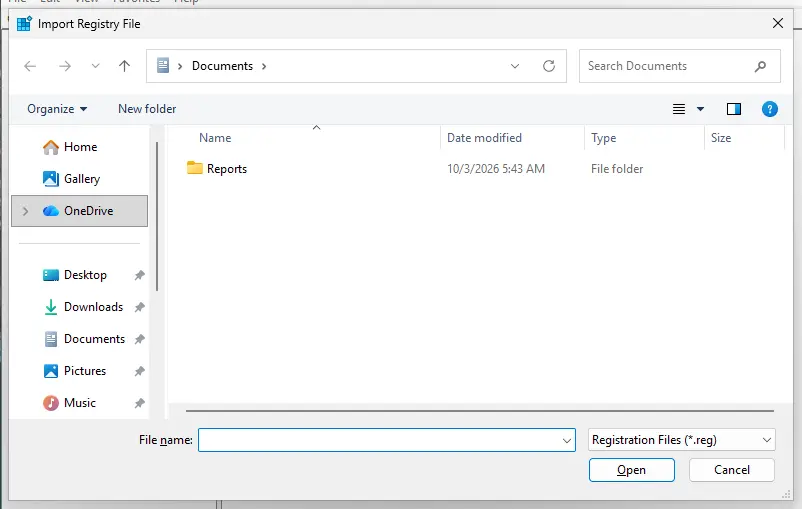
Import writes the saved values back into the registry. Screenshot: Windows 11 26H2.
These steps were written for Windows 11 and Windows 10 (the steps are the same). The full page with the other versions and what each result means: Back up the registry before editing it
- Press Win + R, type
regeditand press Enter. - Go to
HKEY_CURRENT_USER\Control Panel\Desktop. - Right-click an empty place on the right, select New and then String Value. Users report it as a text value, not a DWORD.
- Name it
AutoEndTasksand double-click it. - Set Value data to
1, select OK, close Registry Editor and restart.
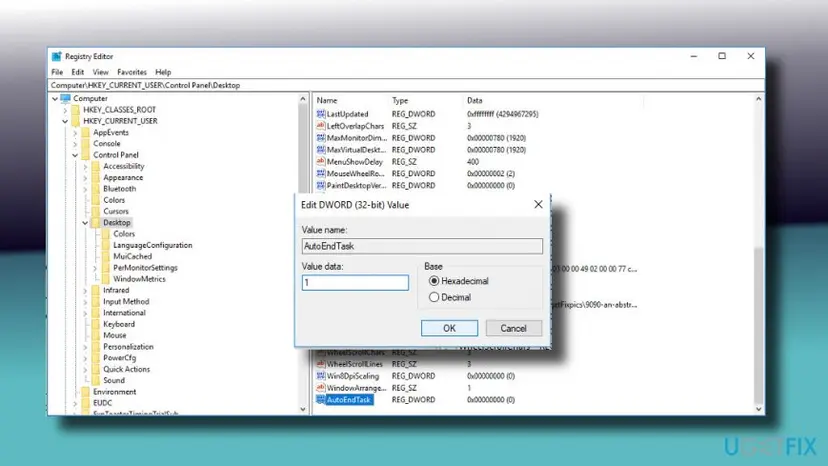
It worked if: Shutdown and restart finish without stopping on ELARA, and programs close by themselves.
If not: Set the value back to 0, or import the backup you exported, then use Fix 4 or Fix 6.
Fix 6. Check that ELARA is the real program and scan for adware
15 minutesLow riskYou see many pop-up ads, odd browser behaviour, or ELARA is not in an Alps or Dell folder.
The genuine ELARA is not malware, but adware can use the same name. Its file location and a Microsoft Defender scan tell the two apart.
- Press Ctrl + Shift + Esc, find the ELARA or ApntEx process, right-click it and select Open file location.
- If the folder is under
C:\Program Files\Apoint2KorC:\Program Files\DellTPad, it is the touchpad driver. Go back to Fix 4. - If the folder is somewhere else, such as AppData or Temp, run the Microsoft Defender scan below and uninstall unknown programs.
- Open Windows Security. Select Start, type Windows Security and open the app.
- Open Virus & threat protection. Select Virus & threat protection. Under Current threats you see when the last scan ran, how long it took and how many files it checked.
- Run a quick scan. Select Quick scan. If Windows Security thinks a deeper scan is needed, it tells you when the quick scan is done.
- Open Scan options. If the quick scan finds nothing and you still suspect an infection, select Scan options under Current threats.
- Run a full scan. Select Full scan and start it. It checks every file and program on the device, so it takes much longer than a quick scan. Leave the PC on until it ends.
- Or scan one folder. To check only a download or a USB drive, select Custom scan in Scan options and choose the folder. You can also right-click a file or folder in File Explorer and select Scan with Microsoft Defender. On Windows 11 you may have to select Show more options first.
- Read Protection history. Go back to the first page of Windows Security and select Protection history. Select a card to expand it and see the details.
These steps were written for Windows 11 25H2 and 26H2, Windows 10 22H2. The full page with the other versions and what each result means: How to scan for malware with Microsoft Defender
It worked if: Defender reports nothing, or removes what it found, and the ads stop.
If not: If Defender finds nothing and the file is in the Alps folder, go back to Fix 4 or Fix 5.
If the ELARA message still stops shutdown
Look at what Windows names when it blocks shutdown. If it is a different program, the cause is that program and the touchpad is not involved. If it names ELARA or Alps again after the driver was reinstalled, the driver came back with Windows Update or a restored backup.
- Check Installed apps again for an Alps or Dell touchpad entry that returned.
- Look for a driver for your exact laptop model on the maker's support page, not a generic driver site.
- Use a USB mouse while you test. If the touchpad is the only thing that fails, the driver is the cause and the hardware is fine.
- If a recent update started the problem, try Undo recent changes with System Restore to a restore point from before it, after saving your files.
When you ask for help, send the exact laptop model, the Windows version and the path of the ELARA file from Task Manager.
How to stop the ELARA message from coming back
- Install the touchpad driver from your laptop maker, not from a driver updater program.
- After a big Windows upgrade, check Installed apps for old touchpad software and update it.
- Save your work before every restart so a forced shutdown costs nothing.
- Keep the AutoEndTasks value off unless you need it, because it closes programs without asking.
Windows 10 left support on 14 October 2025. An old Alps driver on Windows 10 will not get new fixes, so moving to a driver for your model, or to Windows 11 if the laptop supports it, removes the old program from the picture.
Frequently asked questions
What is the ELARA app?
ELARA is the name Windows shows for the program of an Alps touchpad driver. It runs from a folder such as C:\Program Files\Apoint2K or C:\Program Files\DellTPad, and its process is ApntEx.exe, also written Apntext.exe. It controls touchpad features such as scrolling. We could not find Dell or Alps documentation that explains the name ELARA, so treat the name as what Windows displays for this driver program.
What is the ELARA app on Windows 10 and why is it on my computer?
It is installed with the touchpad driver of laptops that have an Alps touchpad, often older ones. Dell's driver pages list Alps touchpad drivers for several Dell models, for Windows 8 and Windows XP. If the app is on your Windows 10 PC, it was installed by the laptop maker or carried over from an earlier Windows version. It is not part of Windows itself.
Is the ELARA app a virus?
The genuine program is not a virus. It is a touchpad driver component. Adware can use the same name, though. Open Task Manager, right-click the process, choose Open file location and check the folder. A folder under C:\Program Files\Apoint2K or DellTPad means the driver. A location in AppData or Temp, or many pop-up ads, means you should scan with Microsoft Defender as in Fix 6.
Can I delete the ELARA app?
Not by deleting files. Removing the Apoint2K folder or single files can damage the touchpad. If you want the program gone, uninstall the whole Alps or Dell touchpad entry in Installed apps as in Fix 4, then let Windows install a driver. Expect the touchpad to lose extra features such as two finger scrolling until you install a newer driver.
Why does the ELARA app prevent my PC from restarting?
Windows asks every program to close before it restarts. The Alps driver program does not answer, so Windows shows the message and waits. Users report this on Windows 10 after an upgrade, often with an old driver. Neither Dell nor Microsoft explains the cause in the pages we read. Forcing the restart gets you out, and updating or reinstalling the driver is the lasting fix.
Is it safe to force the restart when the ELARA message shows?
It is safe for Windows, but any program with unsaved work loses it, because forcing closes everything without asking. Select Cancel first, save your files in the other windows, and then restart. If the message keeps coming back, do not rely on forcing it every time. Update or reinstall the touchpad driver so the program stops hanging.
Will uninstalling the Alps driver break my touchpad?
The touchpad should keep moving the pointer, because Windows uses its own pointing driver, but extra features such as two finger scrolling and gestures may stop until a newer driver is installed. Users on Microsoft Q&A report that uninstalling it ended the problem. Keep a USB mouse ready, and check Windows Update afterwards for a touchpad driver for your model.
Does the ELARA app only affect Dell laptops?
Dell's driver pages that we read list Alps touchpad drivers for Dell models, which matches the Dell folder name DellTPad. The folder Apoint2K is used by Alps drivers, and we did not confirm in these sources which other makers ship it. If your laptop is not a Dell and the message appears, the same steps apply, but get the driver from your own laptop maker.
Does the AutoEndTasks registry value fix the ELARA message?
It can hide the message, because Windows then closes programs that do not answer, but it does not repair the driver. We could not confirm the value in Microsoft documentation, and a Microsoft Q&A user reported that it did not work for them. It also closes every app without asking and can lose unsaved work. Use it last, after exporting the registry key as in Fix 5.
Sources
Did this fix work?
One click, no account. It tells the next reader which guides are worth their time.
Questions and experiences: fix "ELARA app is keeping the system from closing or restarting" in Windows
Still broken, or found a fix we did not cover? Ask here: members and our editors answer. Reading is open; writing needs a free account.
…