
How to fix Steam error code 106 in Windows?

Prefer to fix it yourself? The manual steps follow.
- 7methods
- 2 minutes for the first fix, 15 to 30 minutes when the network adapter or Windows' network stack is at fault
- Easy
Applies to Steam client on Windows 11 and Windows 10
7 methods in this guide
I have an issue with Steam. I can't launch some of my games because of error code 106. Could you help with it?
Steam error code -106 means Steam's built-in browser was told by Windows that the PC has no network connection, so it did not even try to reach Valve. It is rarely a Steam outage. Make sure Windows shows you as connected, exit Steam completely and start it again.
The minus sign matters: -106 is the web engine's code for "The Internet connection has been lost." At the moment the page loaded, Windows reported no connected network. Start with Fix 1: wait until the network icon shows you as connected, exit Steam from its Steam menu, end any steamwebhelper.exe left in Task Manager and start Steam again. If -106 keeps coming back, the connection itself drops: Fixes 2 to 4.
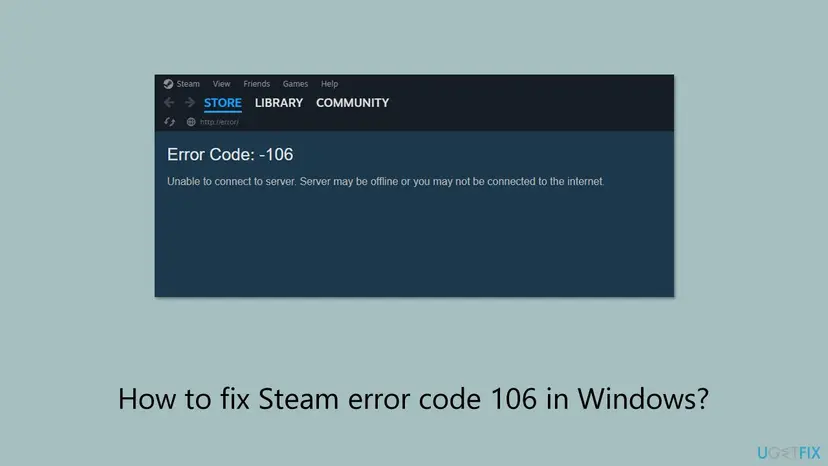
| Error | Page titled Error in place of the Store, Library news or Community: "Error Code: -106" and under it "Unable to connect to server. Server may be offline or you may not be connected to the internet." |
|---|---|
| Where it appears | Inside the Steam client, on the pages its built-in Chromium browser draws (steamwebhelper.exe). The address bar shows http://error/. |
| Main cause | Windows reported the PC as offline when the page loaded: Steam started before Wi-Fi connected, the PC woke from sleep, or the connection dropped for a moment. |
| Fastest fix | Wait until Windows shows Connected, exit Steam fully and start it again (Fix 1). |
| Also written as | Steam error 106, error code 106 Steam, Steam 106 error, steam hata kodu 106, Steam Fehlercode 106, код ошибки 106 стим, steam エラーコード106. |
| What the number is | Chromium's network error INTERNET_DISCONNECTED, number -106, with the comment "The Internet connection has been lost." Chrome shows it as ERR_INTERNET_DISCONNECTED. |
| Valve's status | Not a known Steam bug and no patch. Valve has no support page for -106. Its network troubleshooting page covers outages, the router, Wi-Fi, firewalls and background programs. |
| Affects | The Steam client on Windows 11 and Windows 10 (Windows 10 support ended on 14 October 2025, which does not change this error). |
| Time to fix | 1 to 2 minutes when the network was simply late. 15 to 30 minutes when Wi-Fi keeps dropping or a driver has to be replaced. |
Facts checked on 15 October 2026. Steps written for the Steam client on Windows 11 (25H2 and 26H2) and Windows 10 22H2, read against Chromium's source code and Steam Support.
What Steam error code -106 "Unable to connect to server" means
The Store, the news in the Library and the Community pages in Steam are web pages, shown by a built-in copy of Chromium, the engine of Chrome. When a page fails, Steam draws its own Error page with Error Code: and the number Chromium returned. The sentence under it is the same for many codes, so it says nothing about the real cause.
- The number
-106in Chromium's listnet_error_list.hisINTERNET_DISCONNECTED: "The Internet connection has been lost." We read it there on 15 October 2026.- In plain words
- Chromium believed the PC was offline, so it failed the page at once. No request reached Valve, which is why checking Steam's servers rarely helps.
- Who decides "offline"
- Windows. Chromium asks the system whether any network is connected and trusts the answer. See the next section.
- In Chrome or Edge
- The same state shows as "No internet" with
ERR_INTERNET_DISCONNECTED. You will not see "-106" there. - Close relatives
-105is a failed name lookup,-109an unreachable address,-7a timeout,-102a refused connection. Each has a different cause.
-106 replaces a page, not a game. If games do not start either, the whole PC had no connection when Steam needed one, and the fix is the connection, not the game files. Our guide to Steam error code 2 and the minus codes decodes the other numbers of the same Error page.
How Steam's browser decides the PC is offline, and why that produces -106
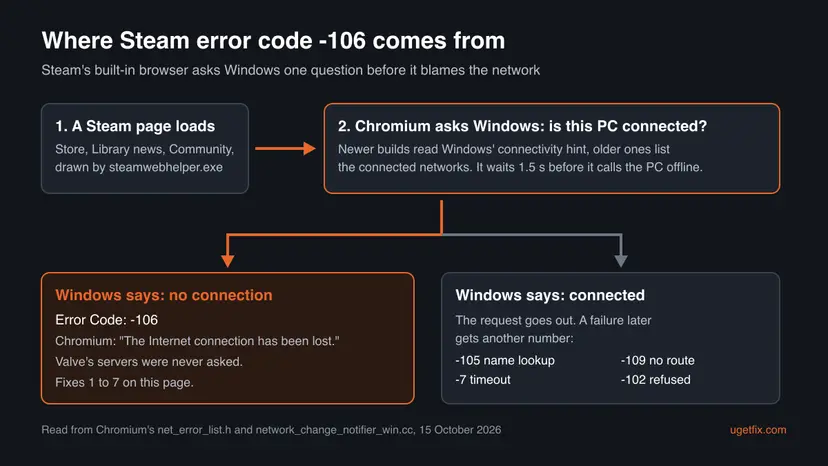
Chromium keeps a small watcher that asks Windows whether the PC is online. On Windows 10 version 2004 and later, newer Chromium builds read Windows' network connectivity hint. A hint of none counts as offline; local access or internet access counts as online. Older builds list the connected networks instead and call the PC offline when there is none.
| Detail | What the code does | What it means for you |
|---|---|---|
| Windows' connectivity hint | Level none or hidden is treated as "no connection". Local access and internet access are treated as connected. | Wi-Fi with no internet still counts as connected, so that case shows other codes. -106 means Windows saw no usable network at all. |
| Delay before "offline" | The watcher waits 1.5 seconds before it reports the PC as offline, and 0.5 seconds before it reports it online again. | A drop that lasts a few seconds is enough. Wi-Fi that reconnects after sleep is a typical case. |
| Start of the program | A newer option lets the watcher start without knowing the state and report "offline" once Windows confirms it. | Steam that starts with Windows can load its first pages before the network is up. |
| Older method's blind spot | Chromium's own comment says none of the tested methods reported offline after ipconfig /release. | What Windows reports and what really works can differ. Restarting Steam makes it ask again. |
Valve does not publish which Chromium version and settings the Steam client uses, so we cannot say which of the two methods your Steam build runs. Both lead to the same advice: the PC must be connected in Windows' own view when Steam loads its pages.
What causes Steam error code 106, from most to least likely
Valve publishes no statistics on this code, so the order is ours. It follows what the offline check in Chromium can react to and how cheap each check is.
| Cause | How to tell | Fix |
|---|---|---|
| Steam loaded before the network. Steam starts with Windows or the PC wakes from sleep, and Wi-Fi connects a few seconds later. | -106 appears right after start or wake. Other apps work a minute later. | Fix 1 |
| Windows really has no connection. Wi-Fi off, airplane mode, a loose cable, a captive portal not passed. | The network icon shows a globe, a cross or no Wi-Fi bars. A browser also fails. | Fix 2 |
| The connection drops for seconds. Weak Wi-Fi, powerline adapters, an overloaded router. | -106 comes and goes during the day. Downloads pause and resume. | Fix 3 |
| The network adapter or its driver. The adapter disconnects after sleep or under load. | Device Manager shows a warning on the adapter, or the problem started after a driver update. | Fix 4 |
| Fast Startup. The PC resumes drivers from a saved state instead of a clean start. | -106 after switching the PC on, never after Restart. | Fix 5 |
| A VPN or virtual adapter. A tunnel that drops, or adapters left by a removed VPN. | A VPN is installed or was used recently. | Fix 6 |
| A damaged network stack. Rare. Windows reports the network wrongly after an update or a removed security suite. | Several programs report no connection while some still work. | Fix 7 |
- Not the cause: a Steam outage. Steam Support says timeout errors on Steam sites point to system-wide downtime. An outage gives timeouts or refused connections, not -106, because the request did leave your PC.
- Not the cause: a firewall. Chromium has a separate code for a request that a firewall most likely blocked:
-138,NETWORK_ACCESS_DENIED. - Not the cause: a wrong clock. A wrong date breaks secure pages with certificate codes such as
-201,CERT_DATE_INVALID, whose comment lists "Our clock is wrong" as one reason.
How to fix Steam error code 106
Fix 1 solves the common case in two minutes. Fixes 2 and 3 find out whether the connection itself is missing or dropping. Fixes 4 to 7 are for a PC that keeps losing its network or reports it wrongly.
| What you see | Start with |
|---|---|
| -106 right after you switched the PC on or woke it from sleep. | Fix 1 |
| The network icon on the taskbar shows a globe, a cross or no bars. | Fix 2 |
| -106 comes back several times a day, often on Wi-Fi. | Fix 3 |
| The adapter has a warning sign, or trouble began after a driver update. | Fix 4 |
| Fails after Shut down and power on, works after Restart. | Fix 5 |
| A VPN app is installed or was removed recently. | Fix 6 |
| Several programs say there is no connection while a browser works. | Fix 7 |
Fix 1. Wait for Windows to connect, then exit and restart Steam
2 minutesNo riskEveryone with -106 starts here, especially right after start-up, wake from sleep or a short network drop.
Chromium decides "offline" from what Windows says, and a page that failed keeps showing its Error page. Closing the window only hides Steam. A full exit ends steamwebhelper.exe, and the new copy asks Windows again once the network is up.
- Look at the network icon on the right of the taskbar. Wait until it shows Wi-Fi bars or a wired network and no globe or cross.
- Open a website in your browser to be sure the connection works.
- In the Steam window, open the Steam menu in the top left corner and select Exit.
- Press Ctrl + Shift + Esc to open Task Manager. If Steam or
steamwebhelper.exeis still listed, select it and choose End task. - Start Steam again and open the Store tab.
Steam can load its first pages before Wi-Fi connects. If -106 greets you only right after start-up, a restart of Steam once the network is up is enough. You can also turn off Steam's start with Windows in Steam's settings so you launch it yourself later.
It worked if: The Store tab loads with its banners and prices, and the Error page with -106 does not return after another restart of Steam.
If not: If the browser fails too, Windows has no working connection: go to Fix 2. If the browser works and Steam still shows -106, go to Fix 4.
Fix 2. Check that Windows itself is connected
5 minutesNo riskThe network icon shows a globe, a cross or no bars, or a browser on this PC fails as well.
-106 is Windows' own "no connection" passed on to Steam. As long as Windows shows no network, no setting in Steam can help, so the status page and Windows' network diagnostics come first.
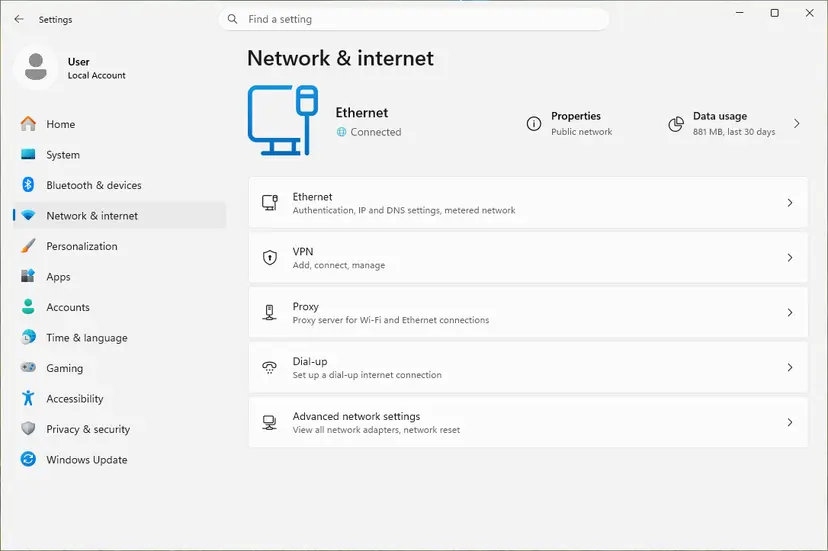
- Check the connection status. Select Start > Settings > Network & internet. The status of your connection is at the top of the page. Select Properties next to the network name to see its details.
- Check that Wi-Fi is on and connected. Select the Network, Sound or Battery icon on the right side of the taskbar. Make sure Wi-Fi is turned on and that your network shows Connected below its name.
- Run the Network troubleshooter. Open the Get Help app and type connect to network and internet in the search bar. Select Run network diagnostics and complete the steps it offers.
These steps were written for Windows 11 25H2 and 26H2. The full page with the other versions and what each result means: How to check your internet connection in Windows
- Airplane mode on a laptop turns Wi-Fi off. Check it in the same taskbar menu.
- Hotel, airport or café Wi-Fi often needs a sign-in page in a browser first. Until you pass it, Windows may report no usable connection.
- Ethernet: a cable that is loose or a port that is off shows as Network cable unplugged or as not connected in Settings.
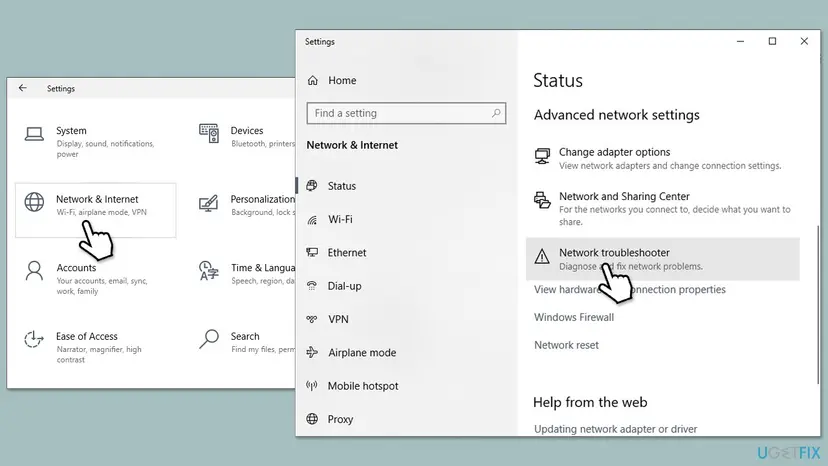
Windows 10 22H2 still has the older Settings page. Open Settings, then Network & Internet, and select Network troubleshooter under Advanced network settings. Step by step for both versions: How to check your internet connection in Windows
It worked if: Settings shows Connected at the top of Network & internet, a website opens, and Steam loads its Store after a restart.
If not: If Windows connects but loses the connection again later, test the line itself in Fix 3.
Fix 3. Test a wired connection and restart the router
10 minutesLow risk-106 comes and goes during the day, mostly on Wi-Fi or powerline adapters.
Chromium calls the PC offline after only 1.5 seconds without a network, so a short Wi-Fi drop is enough for -106. Steam Support says wireless and powerline connections "can cause intermittent failures due to interference" and advises testing with a direct wired connection.
- Exit Steam through Steam and Exit.
- Switch off the modem and the router, wait at least 30 seconds, then switch on the modem first and the router after it.
- If the PC has an Ethernet port, connect it to the router with a cable and turn Wi-Fi off for the test.
- Start Steam and use it as usual for a while: open the Store, the Community and a download.
- If -106 does not return on the cable, the Wi-Fi link is the cause: move closer to the router, change the Wi-Fi band or channel in the router, or keep the cable.
- Only at certain hours. Steam Support: if Steam fails only at certain times of day, your provider may be "blocking or shaping" the connection. Test at another hour and contact the provider.
- Other devices drop too. Phones and TVs on the same Wi-Fi losing the connection point at the router or the provider, not the PC.
- A speed test run while the problem happens can show a weak link, as Steam Support suggests. A test that stops halfway is a sign of the same drops.
It worked if: On the cable Steam runs for hours without the Error page, and the network icon never shows the globe or the cross.
If not: If -106 also appears on a cable, the problem is in the PC: update or reinstall the network adapter driver in Fix 4.
Fix 4. Update, roll back or reinstall the network adapter driver
10 to 15 minutesLow riskThe adapter has a warning sign in Device Manager, the connection drops on cable and Wi-Fi, or the trouble began after a driver update.
Windows reports "connected" or "no connection" from the state of the adapter. A driver that drops the link or loses it after sleep makes Windows report the PC as offline for a moment, which Chromium turns into -106.
Reinstalling a network driver can leave the PC offline. Download the current driver from the PC maker or the adapter maker before you start, and keep it on the desktop.
Open Network adapters in Device Manager and work on your Wi-Fi or Ethernet adapter, not on entries such as VPN or Wi-Fi Direct adapters. Step by step: Update, roll back or reinstall a driver
- Open Device Manager. Right-click Start and select Device Manager.
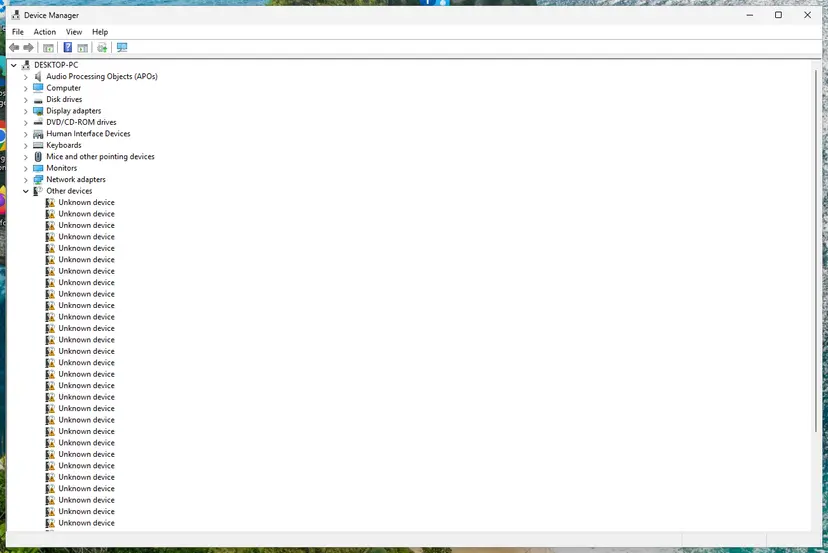
Device Manager lists devices by category; a yellow warning sign marks a device with a problem. Screenshot: Windows 11 26H2. - Open the device's Driver tab. Expand the category (for example Display adapters), right-click the device, select Properties and open the Driver tab. Driver Date and Driver Version show what is installed now.
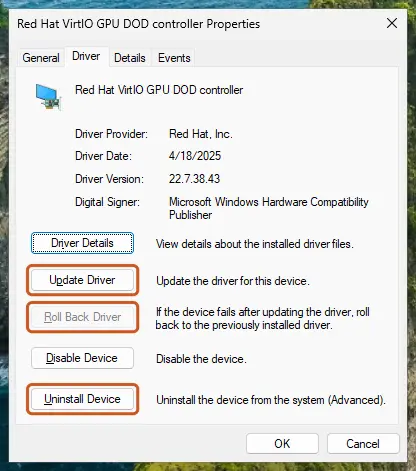
The Driver tab holds all three actions: update, roll back, uninstall. Screenshot: Windows 11 26H2. - Update the driver. Select Update Driver and let Windows search automatically. To use a driver you downloaded from the device maker, select Browse my computer for drivers instead and point to the unpacked folder.
- Or roll back the driver. If the problem started after a driver update, select Roll Back Driver, choose a reason and select Yes. The button is greyed out when Windows has no earlier driver to return to.
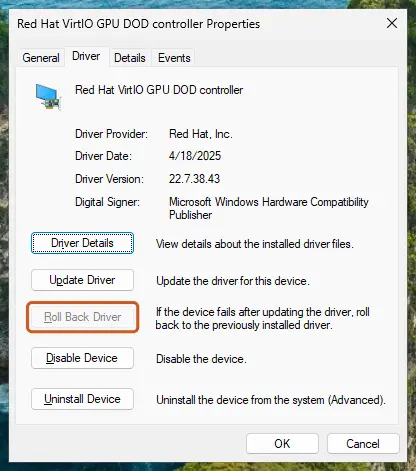
Roll Back Driver is greyed out here because there is no earlier driver. Screenshot: Windows 11 26H2. - Or reinstall the driver. Select Uninstall Device. Tick Attempt to remove the driver for this device only if you want Windows to delete the driver package too, then select Uninstall.
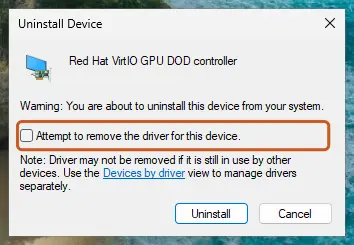
Tick the checkbox only to delete the driver package as well. Screenshot: Windows 11 26H2. - Restart. Restart the PC. Windows detects the device again and installs a driver for it.
These steps were written for Windows 11 24H2 and later. The full page with the other versions and what each result means: Update, roll back or reinstall a driver
It worked if: The adapter shows no warning sign, the connection stays up after sleep, and Steam loads its pages after start-up.
If not: If -106 appears mainly after switching the PC on, turn off Fast Startup in Fix 5.
Fix 5. Turn off Fast Startup
5 minutesLow risk-106 appears after Shut down and power on, but not after Restart.
With Fast Startup, Windows does not start clean after Shut down: it reloads the system and drivers from a saved state. A network adapter that comes back from that state late or wrong can leave Windows reporting no connection while Steam starts.
- Open Power Options. Press Windows key + R, type the command below and select OK.
powercfg.cpl - Open the power button settings. In the left pane, select Choose what the power buttons do.
- Make the shutdown settings editable. Select Change settings that are currently unavailable, then Yes when Windows asks for permission.
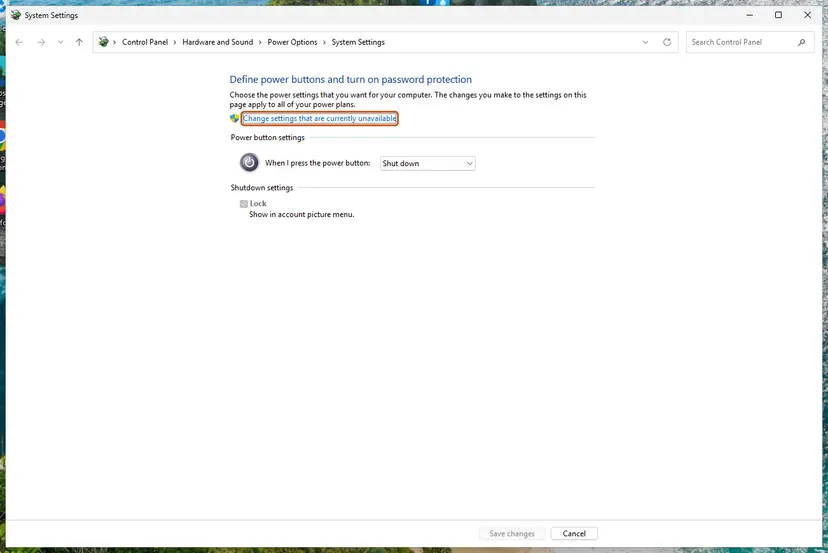
Until you select this link, the shutdown settings are greyed out. Screenshot: Windows 11 26H2. - Clear the Fast Startup box. Under Shutdown settings, clear Turn on fast startup (recommended).
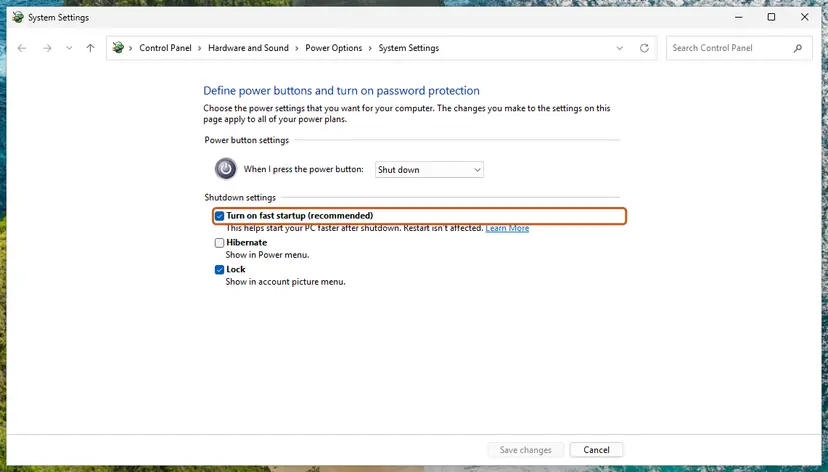
Clear this box to turn Fast Startup off. Screenshot: Windows 11 26H2. - Save. Select Save changes.
- Shut down once. Shut down the PC and start it again. From now on every shutdown is a full one.
These steps were written for Windows 11 and Windows 10 (the steps are the same). The full page with the other versions and what each result means: Turn off Fast Startup
A Restart always starts Windows clean, even with Fast Startup on. That is why the error can vanish after a restart and return the next morning. Step by step: Turn off Fast Startup
It worked if: After the next Shut down and power on, Steam opens its Store without the Error page.
If not: If you use a VPN, check it with Fix 6. Otherwise reset the network stack in Fix 7.
Fix 6. Disconnect the VPN and check for leftover adapters
5 to 10 minutesLow riskA VPN app is installed, starts with Windows, or was removed recently.
A VPN adds its own network adapter and can route all traffic through it. When the tunnel drops or reconnects, Windows can briefly see no usable network. Steam Support lists background programs among the things that stop Steam from connecting.
- Exit Steam through Steam and Exit.
- Disconnect the VPN, then quit the VPN app from its tray icon so it cannot reconnect.
- Start Steam and use it for a while.
- If -106 stays away, reconnect the VPN and test again to see whether the tunnel itself causes the drops.
- If the VPN is the cause, pick another server, exclude Steam in the app's split tunneling setting if it has one, or connect the VPN before you start Steam.
- Removed VPN, still broken. A removed VPN may leave a virtual adapter behind. The network reset in Fix 7 removes leftover adapters.
- A VPN or proxy you did not install. Scan the PC: How to scan for malware with Microsoft Defender
It worked if: With the VPN off, Steam runs without -106, and you know whether the VPN needs another setting.
If not: If no VPN is involved, or -106 stays with the VPN off, reset the network stack with Fix 7.
Fix 7. Reset the Windows network stack
10 minutes plus a restartRead the warningWindows reports no connection in several programs on this PC only, often after a VPN or security suite was removed.
A removed VPN or filter can leave a network driver or a socket layer entry behind that confuses Windows about the connection state. The Winsock and TCP/IP resets return those parts to their defaults, and a full network reset reinstalls the adapters.
The last part of this procedure, Network reset, removes saved Wi-Fi networks, VPN adapters and manual IP or DNS settings. Write down your Wi-Fi password and any manual settings before you start. Your files are not touched.
Start with the commands, which reset Winsock and TCP/IP and fetch a new address. Use the full Network reset at the end only if the commands did not help. Step by step: Reset the network and flush DNS
- Open an elevated command window. Right-click Start and select Terminal (Admin), or type cmd in the search box, right-click Command Prompt and select Run as administrator. Select Yes when Windows asks for permission.
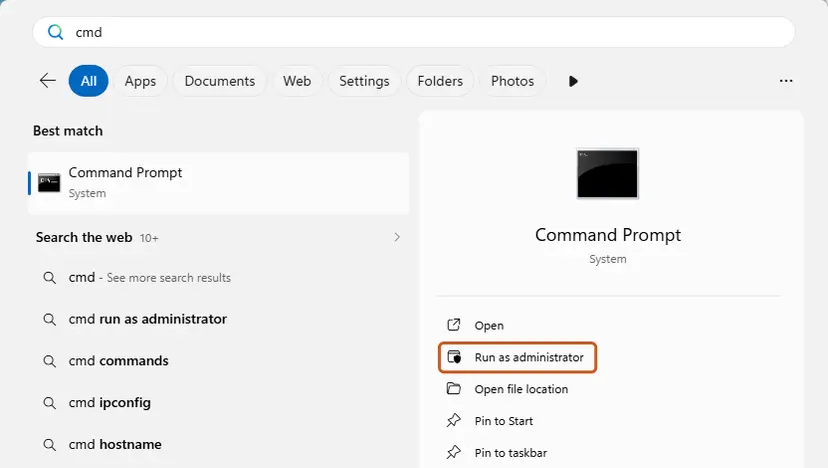
Search for cmd and choose Run as administrator. Screenshot: Windows 11 26H2. - Flush the DNS cache. Type the command below and press Enter. Windows forgets the website addresses it looked up earlier and asks for them again.
ipconfig /flushdns - Reset Winsock. Type the command below and press Enter. It returns the Windows sockets catalog to its default state.
netsh winsock reset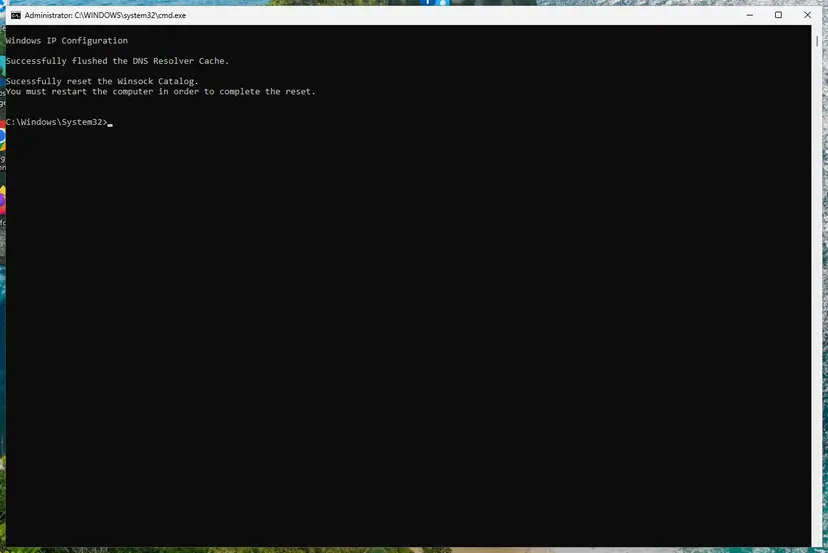
Both commands report success; the Winsock reset asks for a restart. Screenshot: Windows 11 26H2. - Reset TCP/IP. Type the command below and press Enter. If you entered an IP address or DNS server by hand, note it first: you may need to enter it again.
netsh int ip reset - Get a new IP address. Run these two commands one after the other. The connection drops for a moment between them.
ipconfig /release ipconfig /renew - Restart the PC. Restart Windows so the Winsock and TCP/IP resets take effect, then test the connection. If it still does not work, continue with the network reset below.
These steps were written for Windows 11 24H2 and later. The full page with the other versions and what each result means: Reset the network and flush DNS
It worked if: After the restart Windows shows Connected, every program reaches the internet, and Steam loads its pages without -106.
If not: If -106 still appears on a clean network stack and a wired connection, collect the details in the next section.
If Steam error code -106 is still there: what to check and what to send
Valve does not document a log file for pages that fail inside the client. Windows keeps its own record of connection drops, and that record shows whether the PC really went offline at the moment Steam failed.
- Take a screenshot of the Error page with -106 and note the time.
- Press Win + R, type
eventvwr.mscand press Enter. - Open Windows Logs and System, then look near that time for entries about your network adapter or about the connection being lost.
- Run
ipconfig /allin Command Prompt and save the output. It lists every adapter, including VPN adapters. - In a browser, sign in at
https://help.steampowered.comand open a ticket with these details, or contact your internet provider if the drops also hit other devices.
- When it is another program: Steam Support points to programs that may interfere with Steam and to malware scans. Start Windows once without third-party services to find the program: How to perform a clean boot in Windows
- When it is hardware: an adapter that disconnects on every network, on cable and Wi-Fi, after a new driver and a network reset, may be failing. A USB Wi-Fi or Ethernet adapter is a cheap test.
- When it is the network: a school, office or hotel network may cut connections on purpose. Steam Support says many university networks and proxies block what Steam needs, and only the network's administrator can change that.
How to keep Steam error code 106 from coming back
- Start Steam after the network icon shows you as connected, or let it start later than Windows.
- Use a cable for a gaming PC when the router is near, as Steam Support suggests for intermittent failures.
- Exit Steam from its Steam menu before you switch a VPN on or off.
- Keep the network adapter driver from the PC or adapter maker, and roll it back if trouble starts after an update.
- Restart Steam first when -106 returns. It costs a minute and tells you whether the cause is gone.
- Do not uninstall Steam for -106. The client is not the faulty part, and an uninstall removes your installed games.
- Do not turn off the firewall or antivirus as a fix: a firewall block has its own code, -138.
- Do not leave security software or a VPN paused after a test.
- Do not rely on downdetector sites for -106: the error is decided on your PC before Valve is asked.
Frequently asked questions
What is Steam error code 106?
It is Chromium's network error -106, INTERNET_DISCONNECTED, shown by the browser built into the Steam client. Chromium's description is "The Internet connection has been lost." When a Steam page loaded, Windows reported that the PC had no connected network, so the page failed before any request left the PC. Steam then puts its general sentence under the number: "Unable to connect to server. Server may be offline or you may not be connected to the internet." The second half of that sentence is the true one for -106.
Is Steam down when I get error code -106?
Almost never. -106 is decided on your PC: Chromium checks with Windows whether a network is connected, and only when the answer is no does it fail with -106. During a Steam outage the request leaves your PC and times out or is refused, which gives other codes. Steam Support links its own server status page at store.steampowered.com/stats if you want to check anyway. If a phone opens the Steam store normally, start with Fix 1 on this page.
Why does Steam show -106 when my internet works in other apps?
Usually because the connection was missing for a moment when Steam loaded the page, and the Error page stayed on screen afterwards. Chromium marks the PC as offline after 1.5 seconds without a network, so a short Wi-Fi drop, a wake from sleep or Steam starting with Windows is enough. Exit Steam from its Steam menu, end steamwebhelper.exe in Task Manager and start it again. If the error keeps returning, the drops are real and Fixes 3 and 4 find them.
Can I still play my games when Steam shows error 106?
The -106 page replaces a web page in Steam, such as the Store or the news in the Library. It does not by itself block a game. If games also refuse to start, the PC most likely had no connection at all when Steam needed one, for example to sign in or to check an update. Fix the connection first with Fixes 1 and 2. We did not test how each game behaves without a connection, because that depends on the game's own online checks.
Can a firewall or antivirus cause Steam error -106?
Not in the usual way. Chromium has a separate number for a request that a firewall most likely blocked: -138, NETWORK_ACCESS_DENIED. -106 comes from Windows reporting no network, which a firewall rule does not change. Security suites that install their own network filter driver are a different case: a broken filter can disturb the whole network stack. Pause such a product for one test only and turn it back on right after: Turn off Microsoft Defender protection for a moment. If it is the cause, reset the network stack as in Fix 7.
Does a wrong date and time cause Steam error 106?
No. A wrong clock breaks the security certificates of web pages. Chromium reports that with certificate errors such as -201, CERT_DATE_INVALID, whose description names a wrong clock as one possible reason. -106 means Windows reported no connection, which the clock does not affect. Keeping the time set automatically is still good practice for Steam and every secure site, so leave that setting on, but do not expect it to clear -106.
Is steam hata kodu 106, Steam Fehlercode 106 or код ошибки 106 стим the same error?
Yes. Hata kodu is Turkish for error code, Fehlercode is German, код ошибки is Russian, and エラーコード106 is Japanese for error code 106. The Steam client prints the number the same way in every language, with a translated version of the sentence about being unable to connect. The meaning is the same offline state reported by Windows, and every fix on this page applies. Menu names in Windows differ by language, but Task Manager, the Steam menu's Exit command and the steps keep the same order.
Will reinstalling Steam fix error code 106?
We found no Valve source that ties a reinstall to -106, and it does not change what Windows reports about the network. The client files are not the faulty part when Chromium decides the PC is offline. A reinstall can also remove installed games if you choose the wrong options, so it costs far more than the fixes here. Restart Steam once the network is up, check Windows' connection and the adapter, and only then contact Steam Support with the details listed above.
What is swgoh error 106 or error code 106 in other apps?
This page is about the Steam client, where -106 with a minus sign is a Chromium network error. Star Wars: Galaxy of Heroes (SWGOH) and other games or apps have their own numbering, and their error 106 can mean something unrelated. If the app is built on Chromium and shows -106 with a minus, the meaning is the same: the system reported no connection. For anything else, look up the code in that game's or vendor's own help pages instead of applying these steps.
Sources
- Steam Support: Troubleshooting Network Connectivity (server status, router, wireless and powerline, firewalls, background programs, ISPs) (help.steampowered.com)
- Chromium source: net/base/net_error_list.h (INTERNET_DISCONNECTED -106, NAME_NOT_RESOLVED -105, ADDRESS_UNREACHABLE -109, NETWORK_ACCESS_DENIED -138, CERT_DATE_INVALID -201) (github.com)
- Chromium source: net/base/network_change_notifier_win.cc (how Windows' connection state becomes online or offline) (github.com)
Did this fix work?
One click, no account. It tells the next reader which guides are worth their time.
Questions and experiences: fix Steam error code 106 in Windows
Still broken, or found a fix we did not cover? Ask here: members and our editors answer. Reading is open; writing needs a free account.
…