Flush DNS and reset network settings in Windows

Start with the commands, which only clear cached addresses and reset the network stack. A full network reset reinstalls every network adapter and is the last step. Your files are not touched.

Time
5 minutes plus a restart
Level
Easy
You need
An administrator account.

Before you start

  • Write down your Wi-Fi password and any VPN settings: a full network reset removes saved networks and adapters.
  • If only one website does not open, flushing the DNS cache (step 2) is often enough.

Windows 11

Steps written for Windows 11 24H2 and later.

  1. Open an elevated command window

    Right-click Start and select Terminal (Admin), or type cmd in the search box, right-click Command Prompt and select Run as administrator. Select Yes when Windows asks for permission.
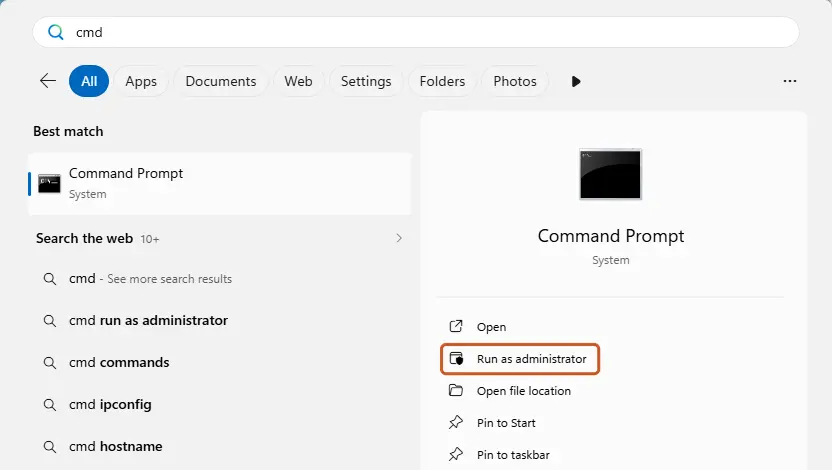
    Search for cmd and choose Run as administrator
    Search for cmd and choose Run as administrator. Screenshot: Windows 11 26H2
  2. Flush the DNS cache

    Type the command below and press Enter. Windows forgets the website addresses it looked up earlier and asks for them again.

    ipconfig /flushdns
  3. Reset Winsock

    Type the command below and press Enter. It returns the Windows sockets catalog to its default state.

    netsh winsock reset
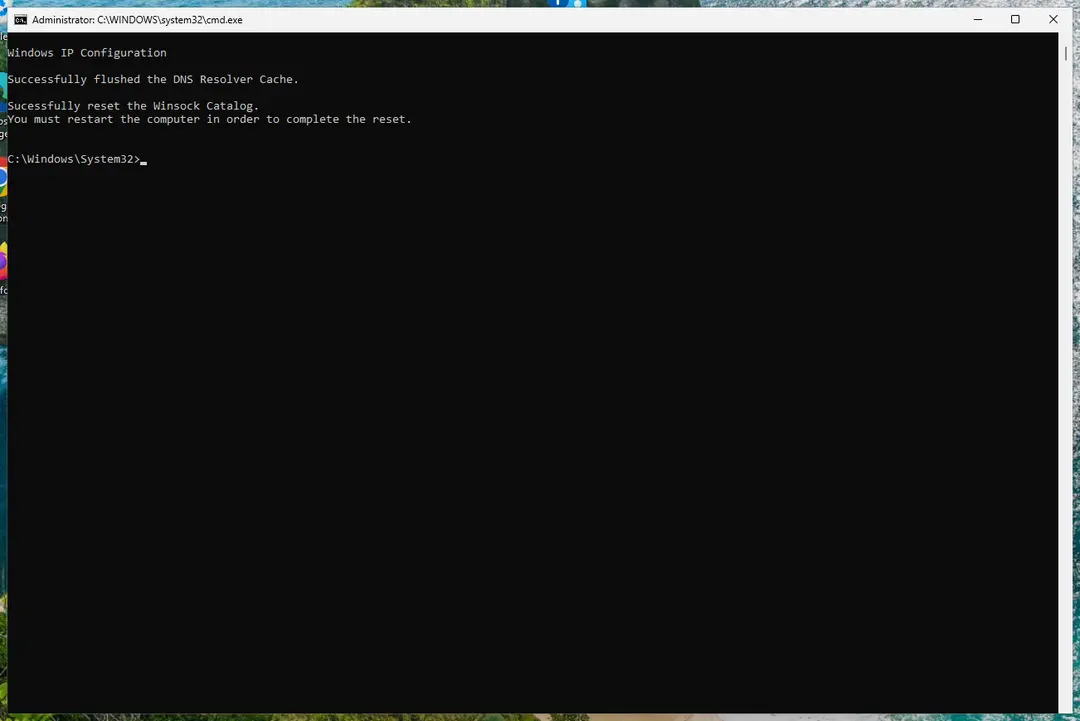
    Command Prompt confirms the DNS cache flush and the Winsock reset
    Both commands report success; the Winsock reset asks for a restart. Screenshot: Windows 11 26H2
  4. Reset TCP/IP

    Type the command below and press Enter. If you entered an IP address or DNS server by hand, note it first: you may need to enter it again.

    netsh int ip reset
  5. Get a new IP address

    Run these two commands one after the other. The connection drops for a moment between them.

    ipconfig /release
    ipconfig /renew
  6. Restart the PC

    Restart Windows so the Winsock and TCP/IP resets take effect, then test the connection. If it still does not work, continue with the network reset below.

  7. Open Network reset

    Open Settings > Network & internet > Advanced network settings and select Network reset.
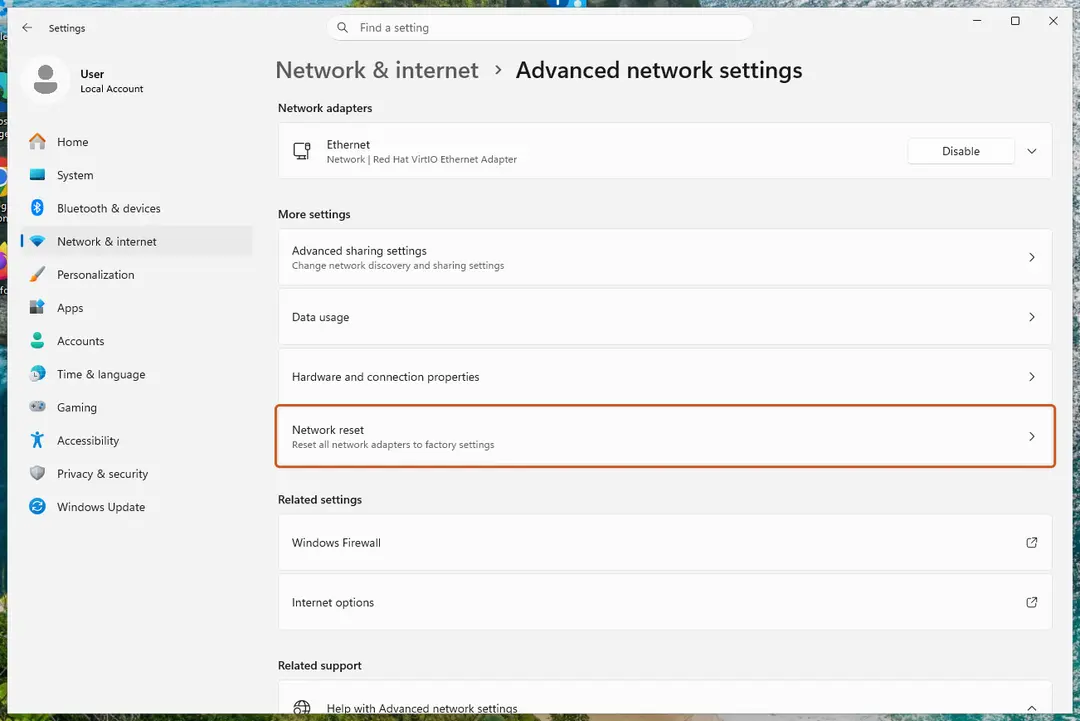
    Advanced network settings: Network reset
    Network reset is under More settings in Advanced network settings. Screenshot: Windows 11 26H2
  8. Reset now

    Select Reset now, then Yes to confirm. Windows removes and reinstalls all network adapters and restarts the PC.
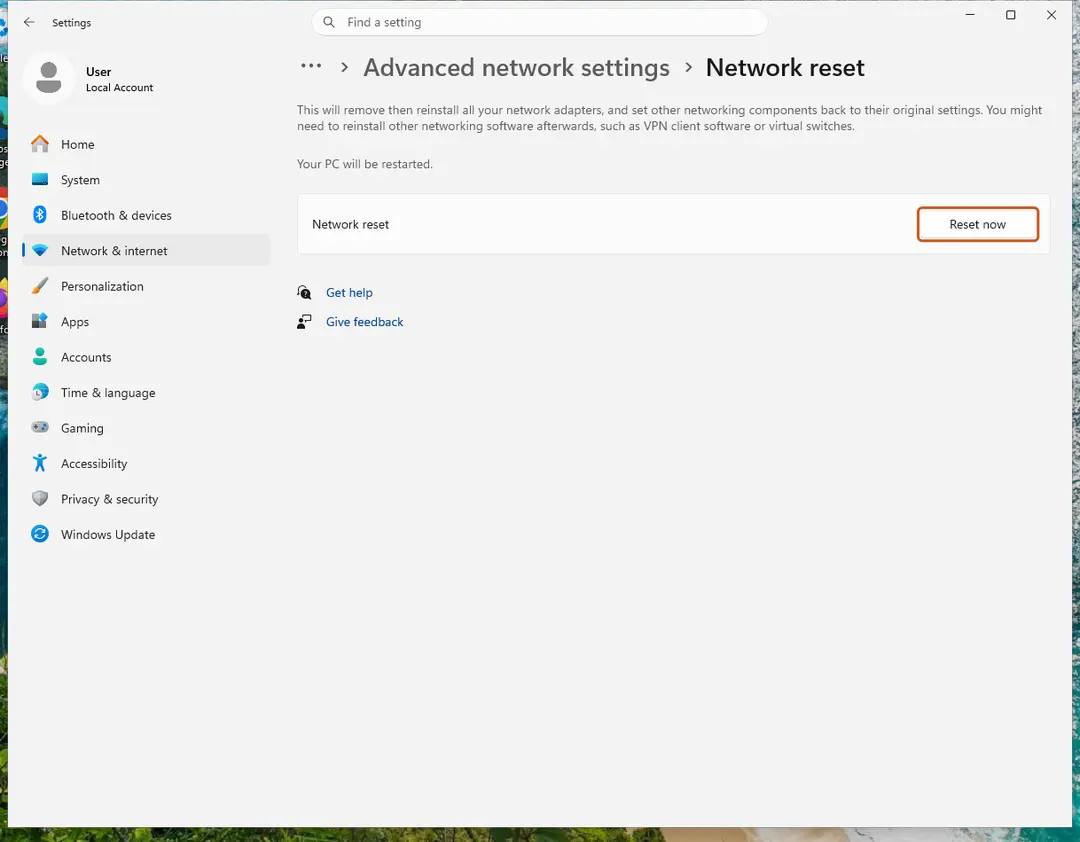
    Network reset page with the Reset now button
    Network reset warns that VPN software or virtual switches may need to be reinstalled. Screenshot: Windows 11 26H2
  9. Reconnect

    After the restart, connect to your Wi-Fi network again (you will need its password) and reinstall or reconfigure VPN software if it stopped working.

Steps checked against Microsoft Support: Fix Wi-Fi connection issues in Windows (Mar 2026); our Windows 11 26H2 screenshots on Oct 3, 2026.

What each step changes

StepWhat it doesRestart
ipconfig /flushdnsClears the list of website addresses Windows has looked up. Fixes sites that moved or open the wrong page.No
netsh winsock resetResets the Windows sockets catalog that programs use to connect. Helps after VPN, proxy or security software left it broken.Yes
netsh int ip resetReturns TCP/IP settings to their defaults.Yes
ipconfig /release, /renewGives up the current IP address and asks the router for a new one.No
Network resetRemoves and reinstalls all network adapters and sets networking components back to their original settings. Saved Wi-Fi networks are lost.Yes, automatic

Browsers keep their own DNS cache

Chrome, Edge and Firefox can still use an old address after ipconfig /flushdns. Clear the browser's own cache too, or simply close and reopen the browser:

  • Chrome: open chrome://net-internals/#dns and select Clear host cache.
  • Edge: open edge://net-internals/#dns and select Clear host cache.
  • Firefox: open about:networking#dns and select Clear DNS Cache.

If the connection still does not work

Restart the modem and router, and check whether other devices on the same network can connect. If only this PC fails, update or reinstall the network adapter driver: see Update, roll back or reinstall a driver. If a program you installed blocks the network, start Windows in Safe Mode with Networking to test without it: see Start Windows or a Mac in Safe Mode.

Used in 99 guides

How to fix "This site can't be reached" in Chrome on Windows?

How to fix GeForce Now error 0x800b1004 in Windows?

How to fix "Oops! Something went wrong" error on YouTube?

How to fix "You're offline. Check your connection" on YouTube?

How to fix “No Route” error in Discord?

How to fix Discord stuck at gray screen on Windows?

How to fix Netflix proxy error (netflix.com/proxy)?

How to fix Steam error code 118?

How to fix Steam integration on GOG Galaxy not working?

How to fix "You were disconnected from Blizzard services" error in Windows?

How to fix "The network security key isn't correct" error in Windows 11

How to fix Valorant error code 38?

How to fix "We couldn't connect to the update service" Windows update error?

youtube.com/activate: how to sign in to YouTube on a TV with the activation code

How to fix Website Online but Isn't Responding to Connection Attempts?

How to fix "The connection was terminated by the remote computer" error in Windows?

How to fix Windows Update error 0x800704C6

How to fix "Sorry, we couldn't connect you" error in Microsoft Teams?

How to fix "Incorrect PSK provided for network SSID" in Windows

How to fix "WLAN Extensibility Module has stopped" network error in Windows

How to fix Microsoft Store error 0x80048839?

How to fix "Your Remote Desktop Services session has ended" error in Windows?

How to fix Windows Update error 0x80d05001

How to fix PuTTy Fatal Error: Network Connection timed out?

How to fix error code 0x80240438 on Windows 10?

Fix: A connection to the Windows Metadata and Internet Services (WMIS) could not be established

How to fix Monster Hunter World error code 50382-MW1 in Windows?

How to fix "Security or Firewall Settings might be blocking the connection" in Windows?

How to fix “There was an error trying to load your shopping cart” error on Steam?

How to fix Microsoft Store error 0x800704C6

How to fix OneDrive error 0x8004da9a in Windows?

How to fix Steam error code 106 in Windows?

How to Fix Windows Update Error 0x8024001f?

How to fix Microsoft Store error 0x800713AB?

How to fix Service Control Manager Error 7001 in Windows?

How to fix Microsoft Store error 0x8D050003 in Windows

How to fix Epic Games error code LS-0013 in Windows?

How to fix OneDrive error 0x8004e4c3 in Windows?

How to fix error AADSTS90100: Login parameter is empty or not valid error in Windows?

How to fix SSL_ERROR_HANDSHAKE_FAILURE_ALERT error in Windows?

How to fix socket error 10013 in Windows?

How to fix "Product Activation Failed" error in Epic Store?

How to fix DirectX error "Setup could not download the file" in Windows?

TAP-Windows Adapter V9: what it is and how to fix or remove it on Windows 11 and 10

How to fix Grounded "Hosting Game Error" in Windows?

How to fix Microsoft account login error 0x80048820 in Windows?

How to fix USB tethering not working in Windows (Remote NDIS based Internet Sharing Device)

How to fix Microsoft Edge translator not working?

How to fix GeForce NOW 0x0000012E error in Windows?

How to fix "No Network Connection [2603]: Please check your network settings" in OneDrive?

How to fix Microsoft Store error 0x80D03805 on Windows

How to fix Microsoft Teams error "We've run into an issue" in Windows?

How to fix Network List Service (netprofm.dll) high CPU in Windows?

How to fix Office 365 sign-in error 0xcaa70010 in Windows?

How to fix GeForce Now error 0xC192000C in Windows?

How to fix Steam error "No download source" in Windows?

How to fix "System error 6118 has occurred" in Command Prompt?

How to fix Windows update error 0x800B010F?

How to fix Steam error code 50 in Windows?

How to fix Error 1068: The dependency service or group failed to start in Windows?

How to fix "This Wi-Fi network uses an older security standard" in Windows

How to fix 0x80048823 error in Windows?

[Fix] Error 1075: The dependency service does not exist or has been marked for deletion

How to fix Proxy Authentication error 2606 in OneDrive?

How to fix 0x80072F0D error in Windows?

How to fix Kernel-PnP Event ID 411 in Windows?

How to fix INET_E_DOWNLOAD_FAILURE on IE and Edge?

Your device is offline. Try a different sign-in method: how to fix it in Windows?

How to fix "Windows is still setting up the class configuration for this device. (Code 56)"

How to fix Microsoft Office installation error 0-2060 in Windows?

How to fix printer error 0x00000002 "Operation failed" in Windows?

How to fix "The network you are using may require you to visit its login page" error in Windows

How to fix printer error 0x00000003 in Windows?

How to fix WiFi icon is not showing on taskbar in Windows?

How to fix error 0x80070043 - The network name cannot be found in Windows?

How to fix Microsoft Office installation error 30182-1011 in Windows?

QTS1081B driver: how to install it on Windows 11 and Windows 10 when it fails

How to fix "We can't set up mobile hotspot" error in Windows?

7q6ca error: how to fix Microsoft Office error 2147483661 (error tag 7q6ca) in Windows?

How to fix ERR_PROXY_CONNECTION_FAILED error?

How to fix "The network path was not found" with an Error Code 0x80070035 on Windows?

How to fix error code 109 "Unable to connect to server" on Steam?

How to fix Steam error code: 105 (Unable to connect to Server)?

How to fix Xbox app error 0x89235106 in Windows?

How to fix Microsoft Teams error 0xcaa80000 in Windows?

How to fix ERR_SOCKET_NOT_CONNECTED error in Google Chrome?

How to fix Google Chrome error ERR_ADDRESS_INVALID in Windows?

How to fix ERR_NETWORK_ACCESS_DENIED error in Chrome?

How to fix VAN 0 Error Code in Valorant?

How to fix streaming error code 232001 in Windows?

How to fix error code VAL 51 in Valorant?

How to fix Diablo 4 Error 300008 "Your request has timed out"?

How to fix printer error code 0x00000040 in Windows?

How to fix Steam error code 2 in Windows?

How to fix "Something went wrong while attempting to sign you in" Steam error in Windows?

How to fix "sent an invalid response" ERR_SSL_PROTOCOL_ERROR on Google Chrome?

How to fix DNS_PROBE_POSSIBLE error in Chrome or other browsers?

How to fix ERR_QUIC_PROTOCOL_ERROR on Google Chrome?

How to fix slow download speed in Microsoft Store?

Sources

  1. Microsoft Support: Fix Wi-Fi connection issues in Windows (network commands and network reset) (read Oct 3, 2026)

Questions and experiences

Ask about this page: members and our editors answer. Reading is open; writing needs a free account.

0 comments

…

4,322 members already hereThey read, write, comment and vote. 0 verified · 31 joined this year