
How to fix error code 0x80240438 on Windows 10?

Prefer to fix it yourself? The manual steps follow.
- 7methods
- 5 to 25 minutes
- Medium
Applies to Windows 11 and Windows 10, home PCs with a leftover update policy and PCs managed through WSUS or Configuration Manager
7 methods in this guide
Hello all. I can't find relevant information on how to fix Windows 10 error code 0x80240438. It shows only when I try to download apps from Microsoft Store. Maybe you have any solutions?
Error 0x80240438 means that the Windows update client found no route to Microsoft's servers. Your internet usually works fine: a company update policy, a proxy or a VPN sends the request somewhere else. Check the update policies first, then let optional features and the Store reach Windows Update again.
0x80240438 is WU_E_PT_ENDPOINT_UNREACHABLE: there is no route to the Microsoft endpoint. Most often an update policy keeps the PC away from Windows Update. Run reg query "HKLM\SOFTWARE\Policies\Microsoft\Windows\WindowsUpdate" /s as administrator (Method 1). For Add-WindowsCapability and RSAT, allow optional features from Windows Update (Method 2). For the Store, clear the blocking policy (Method 3). On a work PC, ask IT.
| Error | 0x80240438, named WU_E_PT_ENDPOINT_UNREACHABLE in the Windows Update agent: "There is no route or network connectivity to the endpoint." |
|---|---|
| Where it appears | Add-WindowsCapability in PowerShell, Settings > Optional features, Microsoft Store downloads, the Windows Update scan and the logs of management tools. |
| Main cause | A WSUS policy such as Do not connect to any Windows Update Internet locations, or an optional feature policy that never asks Windows Update, so the client has no way out to Microsoft. |
| Fastest fix | Read the update policy key with one reg query command (Method 1), then allow downloads from Windows Update in Group Policy (Methods 2 and 3). |
| Also written as | 80240438, error code = 0x80240438, ox80240438, HRESULT: 0x80240438, and as a signed number 0x80240438(-2145123272). |
| Affects | Windows 11 and Windows 10, mostly work or school PCs, former work PCs and PCs where a tool changed the update settings. |
| Microsoft's status | Not a bug of one update. Microsoft documents that the internet block policy may stop the Microsoft Store and that WSUS PCs need a policy change to get optional features. |
| Not the same as | 0x800F0954 and 0x800F0950, the optional feature errors that appear when the feature payload cannot be found, often on the same WSUS PCs. |
| Time to fix | 2 minutes for the check, 5 to 15 minutes for a policy change and restart. |
Facts checked on 15 October 2026. Steps written for Windows 11 (25H2 and 26H2) and Windows 10 22H2.
What error code 0x80240438 means
The Windows Update agent names 0x80240438 WU_E_PT_ENDPOINT_UNREACHABLE. Its description reads: "There is no route or network connectivity to the endpoint". The endpoint is the Microsoft server that the update client wants to talk to: Windows Update, the Microsoft Store download service or the source of optional features.
Microsoft's public list of Windows Update error codes on Microsoft Learn does not include this code, so most pages guess at it. The name says what matters: the request never reached Microsoft. Nothing is damaged on your PC, and no update file is corrupt. Something on the way, usually a policy, sends the request nowhere.
| What you see | Where | What it tells you |
|---|---|---|
| Add-WindowsCapability : Add-WindowsCapability failed. Error code = 0x80240438 | PowerShell, when you add RSAT, OpenSSH or another optional feature | The feature payload must come from Windows Update, and the client is not allowed or able to reach it. |
| Something went wrong on our end. Wait a bit and then try again. The error code is 0x80240438, in case you need it. | Microsoft Store on Windows 10, when you install or update an app | The Store download goes through the update client, which has no route to Microsoft. |
| Windows Update failed to check for updates with error 0x80240438. | Event logs and update scripts | The update scan could not reach its server. |
| Scan failed with error = 0x80240438. or OnSearchComplete - Failed to end search job. Error = 0x80240438 | Logs of Configuration Manager and other management tools | The managed PC cannot reach its WSUS server or the gateway in front of it. |
| 0x80240438(-2145123272) | Scripts and management consoles | The same code written as a signed decimal number. |
Microsoft says that the policy Do not connect to any Windows Update Internet locations may cause connections to public services such as the Microsoft Store, Windows Update client policies and Delivery Optimization to stop working. Your browser is not affected, so the PC looks online while the update client is cut off.
Why error 0x80240438 appears
The causes below are ranked by how often they fit the queries that bring readers to this page. Each one points to the method that removes it.
| Cause | How often | How to tell | Fix |
|---|---|---|---|
| The PC gets updates from WSUS or Configuration Manager, and Do not connect to any Windows Update Internet locations is enabled. | Most often | reg query shows DoNotConnectToWindowsUpdateInternetLocations with 0x1, often with UseWUServer. | Method 1, then Method 3 or your IT team |
| Optional features may only come from WSUS, which does not hold the payload for RSAT, OpenSSH or .NET 3.5. | Often, with Add-WindowsCapability | The error appears when adding a feature, while normal updates still install. | Method 2, or Method 5 |
| A leftover proxy, a VPN or a firewall rule stops the update client's connection. | Sometimes | netsh winhttp show proxy lists a proxy server, or the error goes away with the VPN off. | Method 4 |
| A former work PC or a tweaking tool left the WSUS policy behind with no server that works. | Sometimes | The PC is yours, but Settings says some settings are managed by your organization. | Method 3 |
| The policy is fixed, but the Store or update cache still holds the failed job. | Rarely | reg query finds nothing, and the error stays. | Methods 6 and 7 |
Turning off the firewall, disabling IPv6 or clearing the Store cache, which many pages list for this code, do not touch the update policy. They rarely remove the cause, so they are either last here or left out.
How to fix error code 0x80240438
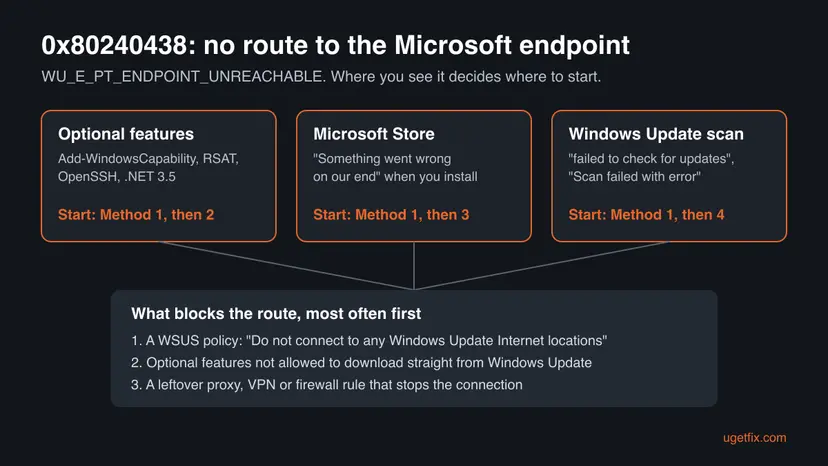
Method 1 tells you in two minutes which case you have. Methods 2 and 3 change the policy that blocks the route and solve most cases. Method 4 is for a proxy or VPN. Method 5 installs a feature without Windows Update. Methods 6 and 7 clear the caches once the route is open.
| What you see or have | Start with |
|---|---|
| You do not know yet why the error appears. | Method 1 |
| Add-WindowsCapability, RSAT, OpenSSH or .NET 3.5 fails with 0x80240438. | Method 2 |
| Microsoft Store says Something went wrong on our end, on your own PC. | Method 3 |
| The policy key is empty, but you use a VPN, a proxy or a strict firewall. | Method 4 |
| A managed PC where you may not change policies, and you need the feature now. | Method 5 |
| The policies are clean and the Store or Windows Update still fails. | Method 6, then Method 7 |
Fix 1. Check which update policy blocks the route to Microsoft
2 minutesNo riskEveryone, first. It takes two minutes and decides which method you need.
0x80240438 means the update client has no route to Microsoft. On most PCs that see it, a policy in this registry key tells the client to stay on an intranet server or never contact Windows Update.
- Press Win + S, type
cmd, right-click Command Prompt and select Run as administrator. - Type
reg query "HKLM\SOFTWARE\Policies\Microsoft\Windows\WindowsUpdate" /sand press Enter. - Look for DoNotConnectToWindowsUpdateInternetLocations with the value
0x1. That is the policy that cuts off the Store and optional features. - Look under the
AUsubkey for UseWUServer with0x1, and in the main key for WUServer with a server address. - If Windows says it was unable to find the key, there is no update policy. Go to Method 4.
- Type
gpresult /rand press Enter. Domain policies listed under Computer Settings mean the PC is still managed.
reg query "HKLM\SOFTWARE\Policies\Microsoft\Windows\WindowsUpdate" /s
gpresult /rIf the PC belongs to an organization, do not change anything. Send IT the error code and the output of both commands. They decide whether the PC may contact Windows Update for optional features and the Store.
It worked if: You know whether a WSUS policy, the internet block policy or no policy at all is set on the PC.
If not: If the error came from Add-WindowsCapability, go to Method 2. If it came from the Store on your own PC, go to Method 3.
Fix 2. Let optional features download directly from Windows Update
5 minutesLow riskAdd-WindowsCapability, Settings > Optional features, RSAT, OpenSSH or .NET 3.5 fail with 0x80240438 on Windows Pro, Education or Enterprise.
Microsoft says a PC that uses WSUS for servicing needs this policy to fetch optional feature files from Windows Update. Without it, the client asks a server that does not have them, or nobody at all.
This changes how a managed PC gets feature files. The organization may undo it at the next policy refresh. On your own PC, note the old setting so you can put it back.
- Press Win + R, type
gpedit.mscand select OK. - Go to Computer Configuration > Administrative Templates > System.
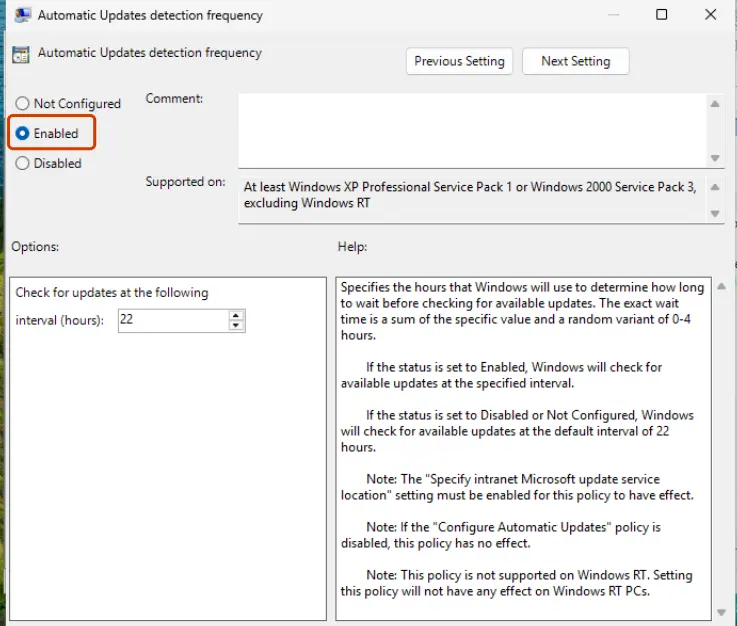
- Double-click Specify settings for optional component installation and component repair.
- Select Enabled.
- Tick Download repair content and optional features directly from Windows Update instead of Windows Server Update Services (WSUS). Older Windows 10 builds call it Contact Windows Update directly to download repair content instead of Windows Server Update Services (WSUS).
- Make sure Never attempt to download payload from Windows Update is not ticked, then select OK.
- Open Command Prompt as administrator, run
gpupdate /force, thennet stop wuauservandnet start wuauserv. - Run the same Add-WindowsCapability command again, or add the feature in Settings > System > Optional features.
gpupdate /force
net stop wuauserv
net start wuauserv
Get-WindowsCapability -Name RSAT* -Online | Add-WindowsCapability -Online
More on the editor: Open the Local Group Policy Editor. If the feature then fails with 0x800F0950 instead, it is a different problem: Fix error code 0x800F0950.
It worked if: Add-WindowsCapability ends with Online : True and RestartNeeded, and the feature shows as installed in Optional features.
If not: If the PC also has the internet block policy, the feature still cannot reach Microsoft. Clear it in Method 3, or install from media in Method 5.
Fix 3. Turn off the policy that blocks Windows Update Internet locations
10 minutesRead the warningYour own PC, with DoNotConnectToWindowsUpdateInternetLocations or a leftover WSUS policy in Method 1. Typical for Microsoft Store errors and former work laptops.
Microsoft documents that this policy may stop the Microsoft Store, Windows Update client policies and Delivery Optimization. Setting it back to Not Configured gives the update client its route to Microsoft again.
This changes where the PC gets its updates. Export HKLM\SOFTWARE\Policies\Microsoft\Windows\WindowsUpdate before you touch it, so a double-click on the saved .reg file brings it back. Step by step: Back up the registry before editing it. Never do this on a PC your organization still manages.
- On Windows Pro, Education or Enterprise, press Win + R, type
gpedit.mscand select OK. - Go to Computer Configuration > Administrative Templates > Windows Components > Windows Update. On Windows 11 the policies may sit in Manage updates offered from Windows Server Update Service.
- Set Do not connect to any Windows Update Internet locations to Not Configured.
- If the PC no longer uses a company server, also set Specify intranet Microsoft update service location to Not Configured, then run
gpupdate /force. - On Windows Home, or if the values stay after
gpupdate, open Command Prompt as administrator and run thereg deletecommands below. - Restart the PC and run the
reg queryfrom Method 1 again.
reg delete "HKLM\SOFTWARE\Policies\Microsoft\Windows\WindowsUpdate" /v DoNotConnectToWindowsUpdateInternetLocations /f
reg delete "HKLM\SOFTWARE\Policies\Microsoft\Windows\WindowsUpdate\AU" /v UseWUServer /f
net stop wuauserv
net start wuauserv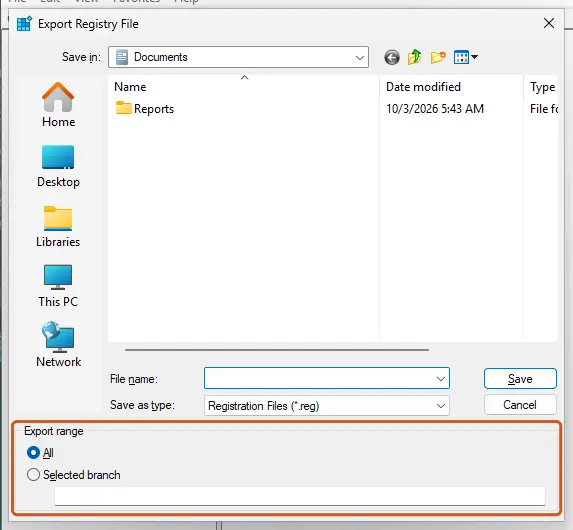
If the values come back after a restart, a tool that blocks updates or a domain policy writes them again. Undo the tool's setting, or ask whoever manages the PC.
It worked if: The reg query no longer shows the blocking values, the Store installs apps, and Check for updates in Settings finds updates.
If not: If the key was empty from the start, look at the proxy and VPN in Method 4.
Fix 4. Reset the WinHTTP proxy and test without the VPN
5 minutesLow riskThe policy key is empty, or you use a VPN, a proxy, a filtering app or a strict firewall rule.
The update client does not use the browser's proxy settings but its own WinHTTP proxy. A leftover entry there, or a VPN that drops Microsoft's addresses, leaves the client with no route while web pages still open.
- Open Command Prompt as administrator.
- Type
netsh winhttp show proxyand press Enter. Direct access (no proxy server) is the normal answer on a home PC. - If a proxy server is listed and you do not use one, type
netsh winhttp reset proxyand press Enter. - Restart the update service with
net stop wuauservandnet start wuauserv. - Disconnect any VPN or filtering app for one test, then retry the Store download, the feature or Check for updates.
- Connect the VPN again when the test is over.
netsh winhttp show proxy
netsh winhttp reset proxy
net stop wuauserv
net start wuauserv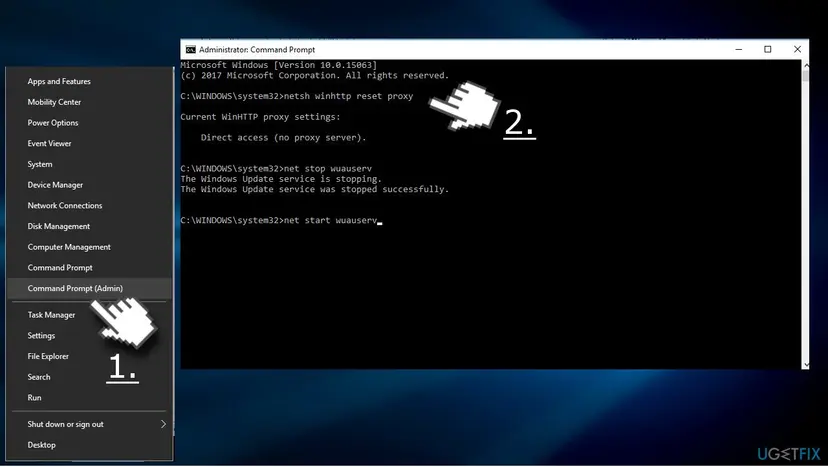
If the PC has other network problems as well, reset the network stack: Reset the network and flush DNS.
It worked if: netsh winhttp show proxy shows Direct access, and the download or scan passes the point where it stopped with 0x80240438.
If not: If the error only goes away with the VPN off, add an exception for Windows Update in the VPN app or ask its support. On a managed PC, IT has to open the route.
Fix 5. Install the optional feature from installation media instead
15 minutesLow riskA managed PC where you may not change policies, or a PC with no route to Windows Update at all, and you need .NET 3.5 or another feature now.
With a local source and the LimitAccess switch, Windows takes the feature files from the media and never contacts Windows Update, so there is no endpoint left to be unreachable.
- Get Windows installation media of the same version and language as your PC, and mount the ISO with a double-click. Note its drive letter, for example
D:. - Open Command Prompt as administrator.
- For .NET Framework 3.5, run the DISM command below with your drive letter. It reads the files from
\sources\sxson the media. - For a Features on Demand package such as RSAT, use
Add-WindowsCapabilitywith-Sourcepointing to the Features on Demand media your IT team provides, and-LimitAccess. - Restart when Windows asks.
Dism /online /enable-feature /featurename:NetFx3 /All /Source:D:\sources\sxs /LimitAccessOn Windows 11 26H1 (build 28000) and later, .NET Framework 3.5 is no longer a Windows feature but a separate installer from Microsoft. The standard Windows ISO does not contain the RSAT or OpenSSH packages, so those need the Features on Demand media.
It worked if: DISM reports The operation completed successfully, and the feature works after the restart.
If not: If DISM says the source files could not be found, the media does not match your Windows version. Use matching media, or ask IT for a source share.
Fix 6. Repair and reset Microsoft Store
5 minutesLow riskThe policies are clean after Methods 1 to 4, and only the Store still fails with 0x80240438.
The Store may still hold the download that failed while the route was blocked. Clearing its cache and repairing the app makes it start the download again.
- Clear the Store cache. Press Windows + R, type wsreset.exe and select OK. A blank Command Prompt window opens; after a short while it closes and Microsoft Store opens by itself.
- Open System components. If the problem stays, select Start > Settings > System > System components. Next to Microsoft Store, select the three dots and Advanced options. If Microsoft Store is not listed there, look for it in Settings > Apps > Installed apps.
- Repair first. Scroll to Reset and select Repair. Repair keeps the app's data. Open the Store and check whether it works.
- Reset if Repair did not help. Select Reset and confirm. This deletes the Store app's data on this PC; your purchases stay in your Microsoft account. Open the Store and sign in again.
These steps were written for Windows 11 26H2 (build 26300). The full page with the other versions and what each result means: Reset the Microsoft Store
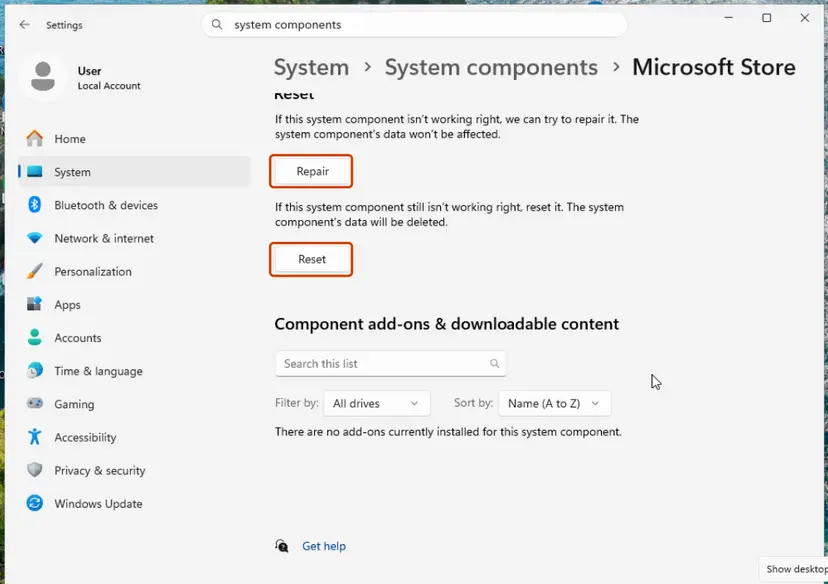
It worked if: The Store opens, and the app installs or updates without the error.
If not: Reset the update components in Method 7, because Store downloads use them too.
Fix 7. Reset the Windows Update components
10 minutesLow riskThe route is open, but the same scan or download still fails with 0x80240438.
Windows Update keeps the failed job in the SoftwareDistribution folder. Renaming it and catroot2 drops that queue, so the next scan starts fresh against Microsoft's servers.
- Open Command Prompt as administrator. Type cmd in the search box, right-click Command Prompt and select Run as administrator. Select Yes when Windows asks for permission.
- Stop the update services. Type the commands below and press Enter after each one. If Windows says that other services depend on Cryptographic Services, it stops them too. A message that a service is not started is fine.
net stop wuauserv net stop bits net stop cryptsvc - Delete the download queue files. This clears the list of downloads that the Background Intelligent Transfer Service keeps. If Windows says it cannot find the files, continue.
del "%ALLUSERSPROFILE%\Application Data\Microsoft\Network\Downloader\qmgr*.dat" - Rename the update cache folders. Renaming keeps a copy in case you need it; Windows creates new, empty folders when the services start again. If you get Access is denied, a service is still running: repeat the previous step.
ren %systemroot%\SoftwareDistribution SoftwareDistribution.old ren %systemroot%\System32\catroot2 catroot2.old - Start the services again. Type the commands below and press Enter after each one. The requested service has already been started is fine: Windows started it on its own.
net start cryptsvc net start bits net start wuauserv - Restart and check for updates. Restart the PC. Then select Start > Settings > Windows Update > Check for updates. The first check can take longer than usual because everything is downloaded again.
These steps were written for Windows 11 and Windows 10 (the steps are the same). The full page with the other versions and what each result means: Reset Windows Update components
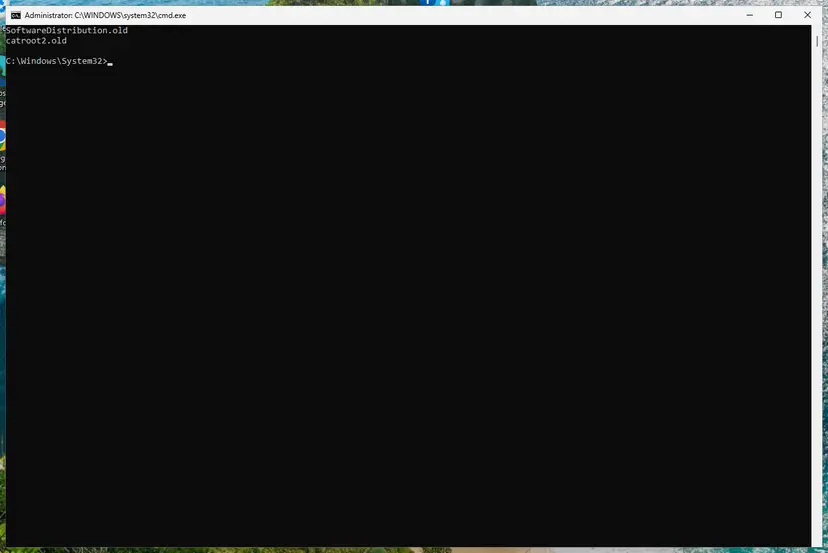
It worked if: Windows Update scans, finds updates and downloads them, and the Store works again.
If not: Read the update log as described in "If the error is still there" below.
If error 0x80240438 is still there
If the error stays, the update log shows which address the client tried to reach. That tells you whether a policy, a proxy or the server itself is the block.
- Open PowerShell as administrator, type
Get-WindowsUpdateLogand press Enter. It writes WindowsUpdate.log to your desktop. - Search the file for
0x80240438and read the lines just before it. - If they name an intranet server, the PC still uses WSUS. Run the
reg queryfrom Method 1 again. - If they name a Microsoft address, something on the network blocks it. Check the proxy, VPN and firewall in Method 4.
- For Add-WindowsCapability, the DISM log at
C:\Windows\Logs\DISM\dism.logshows where the feature files were looked for.
| Situation | What to do |
|---|---|
| Work or school PC, WSUS or Configuration Manager | Send IT the error code, the reg query output and the log lines. They can enable direct downloads for optional features, provide a source share, or check the WSUS server or the gateway the PC cannot reach. |
| Home PC, the policy comes back after a restart | A tool or a scheduled task writes it again. Undo the tool's update blocking, scan the PC with How to scan for malware with Microsoft Defender, and repeat Method 3. |
| Home PC, policies clean, proxy clean, still failing | Reinstall Windows over itself and keep your files: Reinstall Windows without losing files |
How to keep error 0x80240438 from coming back
- On a used laptop from a company or school, run the
reg queryfrom Method 1 on the first day and clear leftover update policies. - Use Pause updates in Settings > Windows Update when you want a break from updates, instead of a blocking tool.
- On WSUS PCs, set the optional component policy from Method 2 once in the domain policy, so RSAT and .NET 3.5 install for everyone.
- Do not delete update policies on a PC your employer or school still manages. Ask IT.
- Do not turn off the firewall or the antivirus for good to get past this code. Pause protection for one test at most: Turn off Microsoft Defender protection for a moment.
- Do not import registry files from forums that promise to fix the Store or Windows Update.
Windows 10 left support on 14 October 2025, and only PCs in Extended Security Updates still get its security patches. A Windows 10 PC cut off from Windows Update by this error gets none of them, so fix the route first.
Frequently asked questions
What does error code 0x80240438 mean?
It means there is no route or network connectivity to the endpoint. The Windows Update agent names it WU_E_PT_ENDPOINT_UNREACHABLE. The endpoint is the Microsoft server that Windows Update, the Microsoft Store or an optional feature install wants to reach. Usually your internet works, but a policy, a proxy or a VPN keeps the update client away from Microsoft. Start with the reg query in Method 1, which shows whether a policy is the block.
How do I fix "Add-WindowsCapability failed. Error code = 0x80240438"?
The PC almost always gets updates from WSUS or Configuration Manager, and optional features are not allowed to come from Windows Update. Enable Specify settings for optional component installation and component repair in Group Policy, tick the option to download optional features directly from Windows Update, run gpupdate /force and run the command again. That is Method 2. If you may not change the policy, install from media with -Source and -LimitAccess, Method 5.
Why does Microsoft Store show 0x80240438?
Store downloads go through the same update client as Windows Update. Microsoft documents that the policy Do not connect to any Windows Update Internet locations may stop the Microsoft Store from working. On a PC with that policy, the Store says Something went wrong on our end and gives the code 0x80240438. On your own PC, set the policy to Not Configured or remove the value after a backup, Method 3, then repair the Store in Method 6.
Is 0x80240438 a problem with my internet connection?
Rarely the connection itself. The browser can work perfectly while the update client has no route, because the client follows update policies and its own WinHTTP proxy setting. That is why restarting the router seldom helps. Check the policy key first, then run netsh winhttp show proxy. If a VPN or filtering app is on, disconnect it for one test. If the error disappears without the VPN, the VPN is the block.
What is "Windows Update failed to check for updates with error 0x80240438"?
It is the event log and script form of the same error during the update scan. The client could not reach the server it is set to use, either Windows Update or a WSUS server. On a managed PC this often means the PC cannot reach the WSUS server or the gateway in front of it, which only IT can fix. On a home PC, check for a leftover WSUS policy in Method 1 and clear it in Method 3.
What does "Scan failed with error = 0x80240438" mean in Configuration Manager?
It means the managed client tried to scan against its software update point and found no route to it. Common reasons are a client outside the company network with no working gateway, a proxy the client cannot pass, or a WSUS server that is down. The fix is on the server side: the update point, the boundary or the gateway. Collect WindowsUpdate.log from the client and give it to the administrator of the Configuration Manager site.
What is 0x80240438(-2145123272)?
It is the same error written twice: in hexadecimal and as a signed decimal number. Some scripts, PowerShell modules and management consoles print codes this way. The value -2145123272 is 0x80240438, WU_E_PT_ENDPOINT_UNREACHABLE, so the meaning and the fixes do not change. Start with the policy check in Method 1 and follow the chooser table to the method for the place where the code appeared.
Should I disable IPv6 or the firewall to fix 0x80240438?
No. Neither one sets or removes the update policies behind most cases of this code. Turning the firewall off for good leaves the PC exposed, and disabling IPv6 can break other things on modern Windows. If you suspect a firewall rule, pause your third party security app for one test and turn it back on right after. If the test helps, add an exception for Windows Update in that app instead.
The error is still there after all the methods. What now?
Run the reg query from Method 1 again. If the blocking values are back, a tool or a domain policy writes them, and Method 3 alone will not hold. If the key is clean, read WindowsUpdate.log as described in the section above to see which address fails. On a managed PC, send that to IT. On a home PC with a clean policy and proxy, an in place reinstall that keeps your files is the last step.
What if my question is in another language, such as "este error que es" or "не помогло"?
This page is in English, but the commands, policy names and registry values are the same on Windows in any language. If you are asking what the error is ("este error que es", "dice eso"), it means the update client cannot reach Microsoft, usually because of a policy. If nothing helped ("не помогло", "не помогает ничего"), run the check in Method 1 again and read the log as described in the still broken section.
Sources
- Microsoft Learn: Manage additional Windows Update settings (learn.microsoft.com)
- Microsoft Learn: .NET Framework 3.5 installation errors (learn.microsoft.com)
Did this fix work?
One click, no account. It tells the next reader which guides are worth their time.
Questions and experiences: fix error code 0x80240438 on Windows 10
Still broken, or found a fix we did not cover? Ask here: members and our editors answer. Reading is open; writing needs a free account.
…