
Reset the Microsoft Store when it is not working (wsreset)
When Microsoft Store does not open, stays blank or will not download, first clear its cache with wsreset. If that does not help, repair the Store app, and reset it as the last step.
- Time
- A few minutes
- Level
- Easy
- You need
- Nothing. Resetting signs you out of the Store, so have your Microsoft account password ready.
Before you start
- Check that the date, time and region of the PC are right: a wrong clock stops the Store from connecting.
- Install pending updates in Settings > Windows Update.
Windows 11
Steps written for Windows 11 26H2 (build 26300).
Clear the Store cache
Press Windows + R, type wsreset.exe and select OK. A blank Command Prompt window opens; after a short while it closes and Microsoft Store opens by itself.
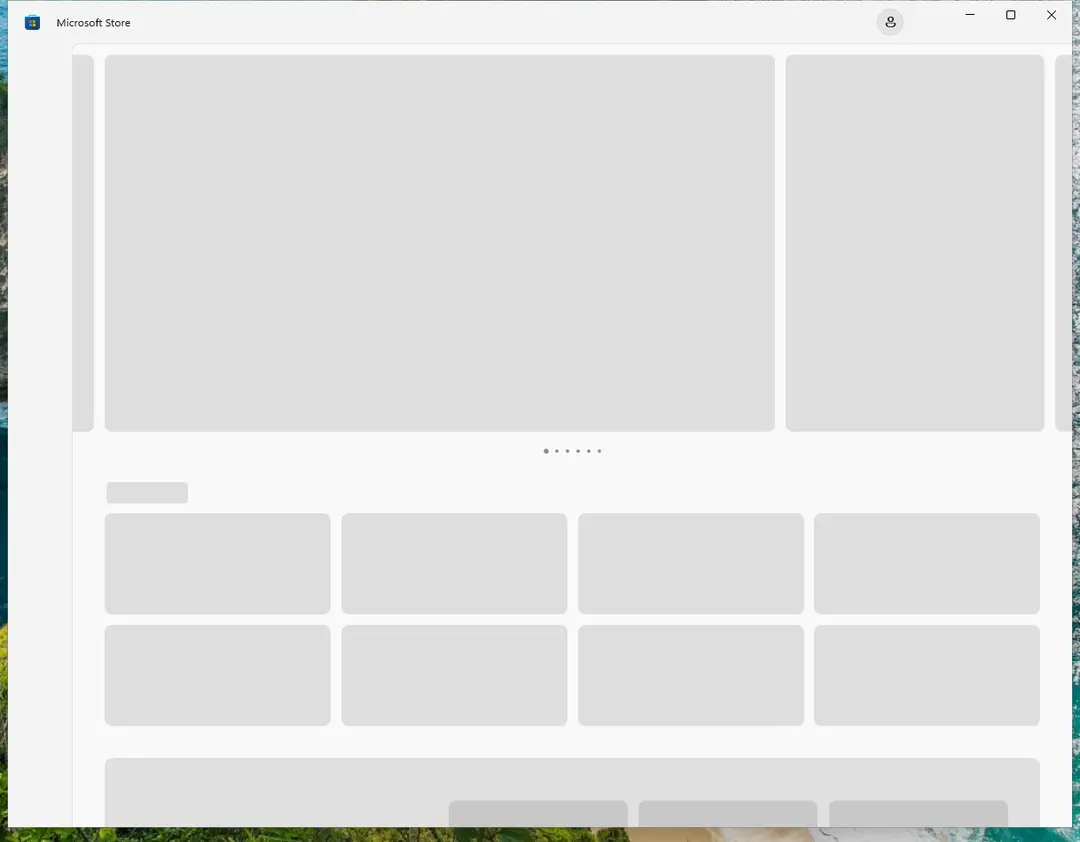
After wsreset, the Store opens and loads again. Screenshot: Windows 11 26H2 Open System components
If the problem stays, select Start > Settings > System > System components. Next to Microsoft Store, select the three dots and Advanced options. If Microsoft Store is not listed there, look for it in Settings > Apps > Installed apps.
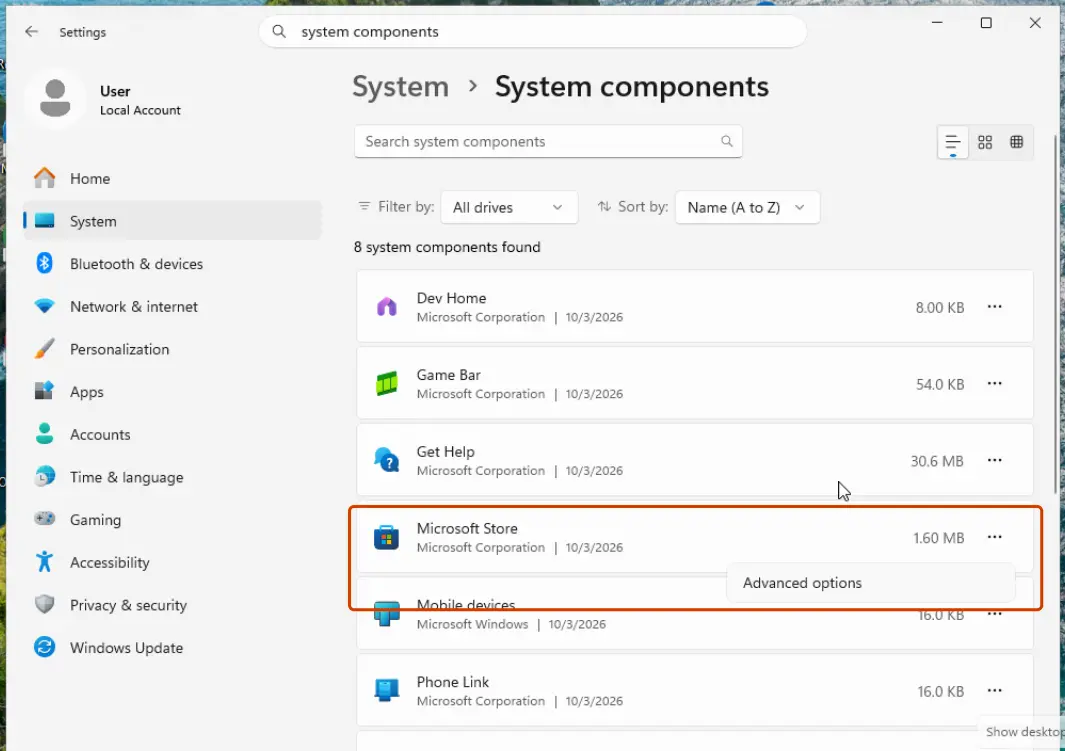
Microsoft Store is listed under System components. Screenshot: Windows 11 26H2 Repair first
Scroll to Reset and select Repair. Repair keeps the app's data. Open the Store and check whether it works.
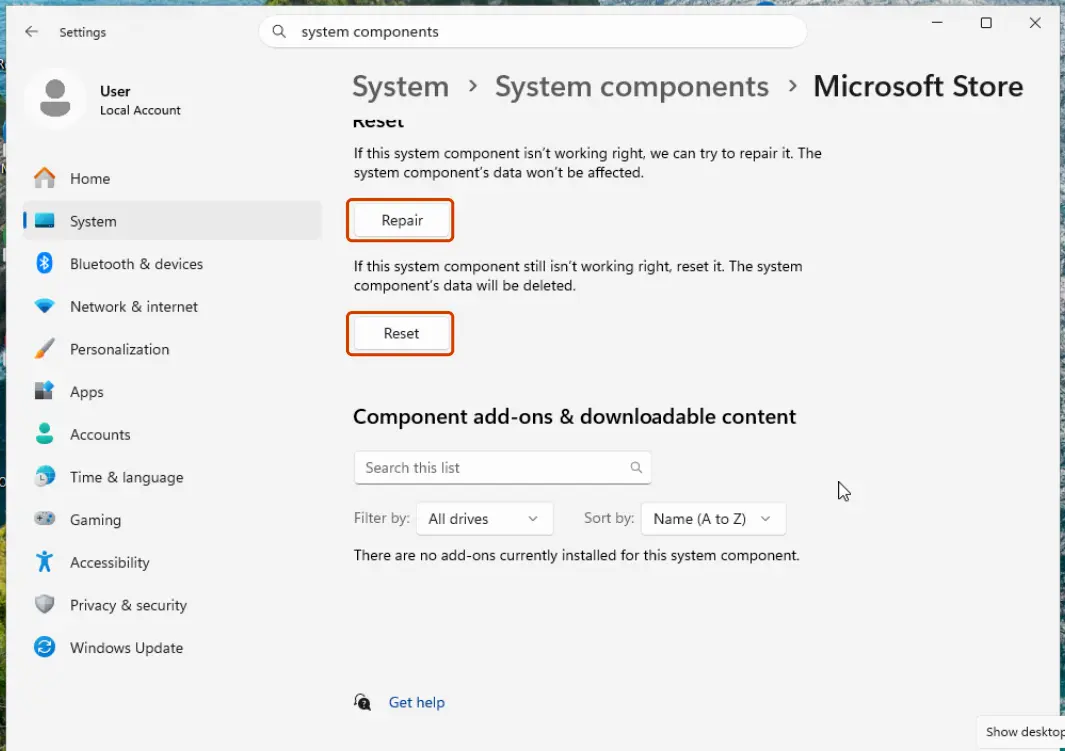
Repair keeps the app's data; Reset deletes it. Screenshot: Windows 11 26H2 Reset if Repair did not help
Select Reset and confirm. This deletes the Store app's data on this PC; your purchases stay in your Microsoft account. Open the Store and sign in again.
Windows 10
Steps written for Windows 10 22H2.
Microsoft ended support for Windows 10 on October 14, 2025. The Store can still be reset the same way as before.
Clear the Store cache
Press Windows + R, type wsreset.exe and select OK. A blank Command Prompt window opens; after a short while it closes and Microsoft Store opens by itself.
Open the Store's advanced options
Select Start > Settings > Apps > Apps & features. Select Microsoft Store, then Advanced options.
Repair first
Select Repair, then open the Store and check whether it works.
Reset if Repair did not help
Select Reset and confirm. Open the Store and sign in again.
If the Store still does not work
- Restart the PC after the reset.
- Repair system files: Run DISM and SFC to repair Windows system files.
- If the Store app is missing altogether, Microsoft offers it for download at apps.microsoft.com.
- If only one app from the Store misbehaves, repair or reset that app in the same way, or reinstall it from Library in the Store.
What a reset removes
The Store's settings and sign-in on this PC. Apps you installed from the Store stay installed, and everything you bought stays in your Microsoft account.
Used in 90 guides
How to enable Client License Service (ClipSVC) if it's not starting?
How to fix Microsoft GameInput is crashing the PC?
How to fix 0x80070102 error when playing games on Windows?
How to fix Xbox app error 0x87e50028 when launching games in Windows?
How to fix Clock app not working in Windows?
How to fix File System Error (-2147219195) in Windows?
How to fix Microsoft Store error 0x803F800B?
How to fix Wo Long: Fallen Dynasty crashes on Windows?
How to resolve Microsoft PC Manager "Coming soon" download error?
How to fix Microsoft Store error 0x800700B7
How to fix error 0x80240013 in Microsoft Store (Windows Store)
How to fix Xbox app error 0x87e0000f in Windows?
How to fix "Looks like you already own this" error when buying currency in Roblox?
How to fix Windows update error code 0x80244022?
How to fix Xbox app error code 0x87e00004 in Windows?
How to fix WindowsPackageManagerServer.exe application error in Windows?
How to fix Microsoft Store error 0x80073D21 in Windows?
How to fix Microsoft Store log in error 0x800704ec in Windows?
How to fix DTS:X Ultra not working on Windows
How to fix "Epic Games Launcher setup wizard ended prematurely" error in Windows?
How to fix "This application requires Windows App Runtime" error in Windows?
How to fix Hanging or crashing apps in Windows Store Apps troubleshooter?
How to fix Microsoft Store error 0x80048839?
How to fix error 0x80240004 in Microsoft Store and Windows Update
How to fix "Upgrade to iCloud for Windows failed" error in Windows?
How to fix Microsoft Store error 0x80073D23 in Windows?
How to fix "Error 1628: Failed to complete installation" error in Windows?
How to fix error 0x80240008 in Microsoft Store and Windows Update
How to fix error code 0x80240438 on Windows 10?
How to fix "No applicable app licenses found" error in Minecraft?
How to fix File system error (-2147163901) in Windows?
How to fix Windows Update error 0x80096004?
How to fix Microsoft Store error 0x8007000A?
How to fix Microsoft Store error 0x800704C6
How to fix Microsoft Store error 0x80073CFF?
How to fix Xbox app error 0x80073D19 in Windows?
How to fix Microsoft Store error 0x800713AB?
How to fix ms-settings:personalization-background error?
Fix "This app can't open. Check the Store for more info about Realtek Audio Console"
How to fix "Microsoft Windows App Runtime DynamicDependency LifetimeManager" error in Windows?
How to fix Microsoft Store error 0x8D050003 in Windows
How to fix error AADSTS90100: Login parameter is empty or not valid error in Windows?
How to fix Windows update error 0x80004002?
How to fix 0x87e00005 Xbox app error in Windows?
How to fix "The group or resource is not in the correct state" error on Windows
How to fix Windows update error 0x80073D06?
How to fix Microsoft Store error 0x87E00198?
How to fix Xbox app error 0x803F8007 in Windows?
How to fix Microsoft account login error 0x80048820 in Windows?
How to fix Xbox app error 0x80131522 in Windows?
How to fix Microsoft Store error 0x80248014
How to fix error 0x8024001D in Windows Update, the Standalone Installer and Microsoft Store
How to fix Windows update error 0x80073D02?
[Fix] Can't install Cross Device Experience Host in Windows?
How to fix error 0x80240037 in Microsoft Store and Windows Update
How to fix Windows update error 0x800700a1?
How to fix Microsoft Store error 0x80D03805 on Windows
How to fix File System error (-2144926975) in Windows?
How to fix File System Error (-2147416359) in Windows?
How to fix Exception error code 0xc000027b in Windows?
How to fix Microsoft Store error 0x80070483?
How to fix Xbox app is stuck at "Launching Xbox App" in Windows?
How to fix MS Paint not working in Windows 11?
How to fix "GameLaunchHelper.exe missing" error in Windows?
How to fix Windows update error 0x800B010F?
How to fix AppX Deployment Service (AppXSVC) and wsappx high CPU usage?
How to fix 0x80073cfd error in Windows?
How to fix 0x80048823 error in Windows?
How to fix sign in error CAA2000C in Windows?
How to fix can't type in WhatsApp desktop app in Windows?
How to fix Xbox app error "Content failed to load" in Windows?
How to fix Microsoft Store error "Pardon the interruption" in Windows?
How to fix 0x89240101 error in Age of Empires IV?
How to fix Xbox app error 0x87e50029 in Windows?
How to fix Event ID 10010 DistributedCOM error in Windows?
How to fix Xbox app error 0x80073CFB in Windows?
How to fix Microsoft Store error 0x8A150049?
How to fix File System error (-2015294522) in Windows?
How to fix Microsoft Store error 0x80073CF1 on Windows
How to fix "You might need to take action in another window" in Windows?
How to fix Microsoft Store error 0x80073D01?
How to fix error 0x801901f7 (The server stumbled) in Windows Update and Microsoft Store?
How to fix Microsoft Store error 0x80073CF8 on Windows
How to fix Xbox app error 0x80004005 in Windows?
How to fix Windows Store error 0x80073CF3?
How to fix Xbox app error 0x89235106 in Windows?
[Fix] Can't cancel download of apps after pressing Cancel button in Windows
How to fix error code 0x80073CF6 in Windows 10?
How to fix "Package Failed updates, dependency or conflict validation" error in Windows?
How to fix slow download speed in Microsoft Store?
Sources
- Microsoft Support: Microsoft Store doesn't open (read Oct 3, 2026)
- Microsoft Support: Fix problems with apps from Microsoft Store (read Oct 3, 2026)