
How to resolve Microsoft PC Manager "Coming soon" download error?

Prefer to fix it yourself? The manual steps follow.
- 6methods
- 5 to 20 minutes
- Easy
Applies to Windows 11, Windows 10 build 19042 and later; Microsoft PC Manager from the Microsoft Store
6 methods in this guide
I tried to install Microsoft PC Manager today, but there was no download button. Instead, it said "Coming soon." How can I get and install the app on my Windows 11 PC?
Microsoft PC Manager shows "Coming soon" in place of a download button when the app is not released in your country or region. Microsoft rolls it out region by region and has not published a date for the rest. Set the Windows region to United States, restart the Microsoft Store and install it from there.
"Coming soon" is not a fault on your PC. It means Microsoft has not released PC Manager in the region your PC reports. Open Settings > Time & language > Language & region, set Country or region to United States (or India), restart the Microsoft Store and select Get on the PC Manager page (Fix 1 and Fix 2). You can set your own region back afterwards.
| Error | "Coming soon" where the download or Get button should be, on the PC Manager website or in the Microsoft Store. |
|---|---|
| Where it appears | On pcmanager.microsoft.com and on the app's Microsoft Store page, before anything is downloaded. |
| Main cause | PC Manager is not released in your country or region. A Microsoft support answer names China, India, Hong Kong, Taiwan and the USA as the main markets, and Europe and the UK as not yet included. |
| Fastest fix | Set the Windows region to United States, restart the Store and install the app (Fix 1, Fix 2). |
| Also written as | "Microsoft PC Manager not available", "download not available", "PC Manager still not available". |
| Affects | Windows 11 and Windows 10 build 19042 or later. Older Windows 10 builds are not supported at all. |
| Microsoft's status | A gradual, region by region rollout. No end date and no official list of countries. Windows Central reported in June 2026 that the app is still limited to certain regions. |
| Store product ID | 9PM860492SZD (apps.microsoft.com/detail/9pm860492szd). |
| Time to fix | About 5 minutes with the region change. Longer only when the Store itself is broken. |
Facts checked on 16 October 2026. Steps written for Windows 11 (25H2 and 26H2) and Windows 10 22H2.
What "Coming soon" means on Microsoft PC Manager
PC Manager is Microsoft's free cleanup and boost app for Windows. Its official site, pcmanager.microsoft.com, sends you to the Microsoft Store to install it and lists the requirement "Compatible with Windows 10 (19042.0 and above), Windows 11." Where the app is released, you see a Store badge and a download button. Where it is not, the button is replaced by the words "Coming soon".
So the message is a release notice, not an error code. Nothing is broken on your PC, nothing is half installed, and no cleanup tool or repair of Windows will change it. What decides it is the country the Store and the website think you are in.
The official site has 10 language editions, from Chinese and Japanese to Portuguese (Brazil), Russian and Turkish. A language edition does not mean the app is released in that country. Microsoft does not publish a list of the countries where PC Manager can be installed.
- On the website: the download area says "Coming soon" in place of the button.
- In the Microsoft Store: the app page may show no Get button, or search may not find the app at all. We could not confirm the exact wording the Store uses in every region.
- People also search for: "Microsoft PC Manager not available", "download not available" and "why is Microsoft PC Manager not available". It is the same situation.
Why Microsoft PC Manager is not available in your region
Most often the PC's region is a country where PC Manager is not released yet. Less often the region is right but the Store still shows an old answer from its cache. Rarely the Windows build is too old, or a work PC blocks the Store.
| Cause | How often | How to tell | Fix |
|---|---|---|---|
| The Windows region is a country without PC Manager, for example in Europe or the UK. | Most often | Settings > Time & language > Language & region shows your own country. | Fix 1, Fix 2 |
| The Store keeps the old region answer in its cache. | Sometimes | You changed the region, but the Store page still has no Get button. | Fix 3 |
| Windows 10 is older than build 19042. | Rarely | winver shows a build number below 19042. | Fix 4 |
| The Store still refuses the app in your market. | Sometimes | Nothing changes after Fixes 1 to 3. | Fix 5, Fix 6 |
| A work or school PC blocks the Microsoft Store. | Rarely | The Store does not open, or says your organization blocked it. | Ask your IT team |
A Microsoft community support specialist wrote in April 2025 that the rollout is gradual and that it "may take time" before the app reaches countries such as the UK and Germany. We found no later Microsoft statement with dates.
How to get Microsoft PC Manager when it says Coming soon
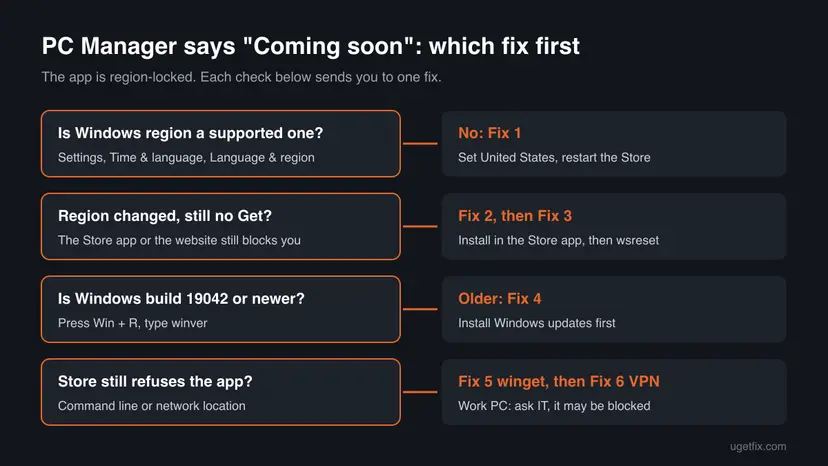
Fixes 1 and 2 are the route Microsoft support gives and work for most readers. Fixes 3 and 4 clear the Store cache and check the Windows build. Fixes 5 and 6 are for the cases where the Store still refuses.
| What you see or have | Start with |
|---|---|
| "Coming soon" on the website, and your Windows region is your own country. | Fix 1, then Fix 2 |
| You already changed the region, but the Store page still has no Get button. | Fix 3 |
| Windows 10 that has not been updated for a long time. | Fix 4 |
| You are comfortable with a command window, or the Store app is slow to load. | Fix 5 |
| Nothing above worked. | Fix 6, then the section on what to do if it is still not available |
Fix 1. Set the Windows region to United States and restart the Microsoft Store
3 minutesLow riskYour Windows region is a country where PC Manager is not released, for example in Europe.
The Microsoft Store shows apps for the country set in Windows. Microsoft's own support answer for this problem is to set the region to the United States or India, restart the Store and try again.
- Press Win + I to open Settings.
- Select Time & language, then Language & region.
- Under Region, open the list next to Country or region.
- Choose United States. India also works according to Microsoft support.
- Close the Microsoft Store if it is open. Right-click its icon on the taskbar and select Close window.
- Open the Microsoft Store again and go on to Fix 2.
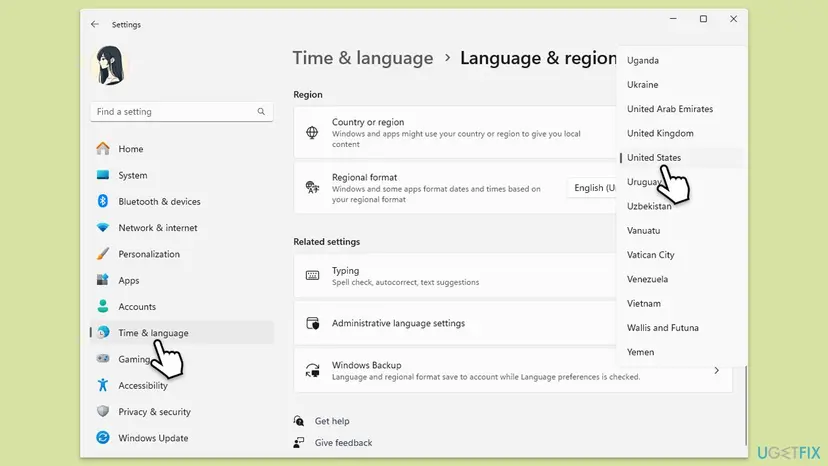
On Windows 10 the same setting is in Settings > Time & Language > Region. The page names and the list look the same apart from the layout.
Settings says that Windows and apps might use your country or region to give you local content. The Store may show other apps and prices while it is set to the United States. Your files, your Regional format and your keyboard do not change. Set your own country back once PC Manager is installed.
It worked if: The Store opens with United States content, and the PC Manager page shows a Get button.
If not: Install the app from the Store page in Fix 2. If there is still no Get button, clear the Store cache with Fix 3.
Fix 2. Install PC Manager from the Microsoft Store app
5 minutesNo riskThe website shows "Coming soon", or you changed the region in Fix 1.
The official site does not offer a file of its own. It sends you to the Microsoft Store, so the Store app is the place where the region check is made and where the install happens.
- Open Microsoft Store from the Start menu.
- Type
Microsoft PC Managerin the search box at the top and press Enter. - Open the result published by Microsoft Corporation.
- Select Get and wait for the download to finish.
- Select Open, or find Microsoft PC Manager in the Start menu.
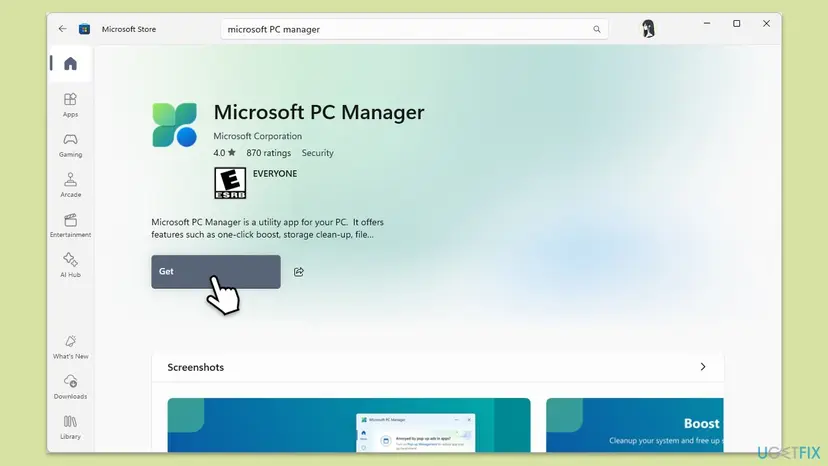
You can also open the Store page directly from a browser at apps.microsoft.com/detail/9pm860492szd and select the button that opens it in the Store app. If the browser still shows "Coming soon" after the region change, it may be showing an old copy of the page: Clear the browser cache and cookies
Install PC Manager from the Microsoft Store or from pcmanager.microsoft.com only. Files called "offline installer" on other sites are not published by Microsoft, and we could not confirm what they contain.
It worked if: The Store shows Open in place of Get, and Microsoft PC Manager starts from the Start menu.
If not: If the page still has no Get button, go on to Fix 3.
Fix 3. Clear the Microsoft Store cache with wsreset
2 minutesNo riskYou changed the region, but the Store still shows the app as not available.
The Store keeps what it has loaded for your old region in a cache. wsreset clears that cache, so the Store asks again and gets the answer for the new region.
- Press Win + R.
- Type
wsreset.exeand select OK. - Wait. A blank window opens, closes by itself after a short while, and the Microsoft Store opens.
- Search for Microsoft PC Manager again and look for the Get button.
If the Store does not open at all, or wsreset does not help, the full procedure also repairs and resets the Store app: Reset the Microsoft Store
It worked if: The Store opens fresh and the PC Manager page shows Get.
If not: Check the Windows build with Fix 4.
Fix 4. Check that Windows is build 19042 or newer
2 to 30 minutesNo riskYou use Windows 10, or the Store says the app does not work on this device.
Microsoft lists PC Manager for Windows 10 build 19042 and above and for Windows 11. On an older build the Store does not offer the app, whatever the region is.
- Press Win + R, type
winverand press Enter. - Read the OS Build number in the window. It must be 19042 or higher.
- If it is lower, open Settings > Windows Update and select Check for updates.
- Install everything offered, restart the PC and repeat Fix 2.
Build 19042 is Windows 10 version 20H2. Every Windows 11 PC meets the requirement. Microsoft ended support for Windows 10 on 14 October 2025, so a Windows 10 PC gets no new feature updates, but version 22H2 still qualifies for PC Manager. If Windows Update is stuck: Run the Windows Update troubleshooter
It worked if: winver shows build 19042 or higher, and the Store offers the app.
If not: If the build is fine, try the command line in Fix 5.
Fix 5. Install PC Manager with winget
3 minutesNo riskThe Store app is slow or keeps showing the old page, and you can use a command window.
winget, the Windows Package Manager, installs Store apps by their product ID. The ID of Microsoft PC Manager is 9PM860492SZD, so winget fetches the same Store package without the Store's page.
- Right-click Start and select Terminal (on Windows 10, Windows PowerShell).
- Type the first command below and press Enter to see whether the package is offered to you.
- Type the second command and press Enter.
- If winget asks you to accept the source agreements, type Y and press Enter.
- Wait until it reports that the package was installed, then open PC Manager from the Start menu.
Check, then install
winget show 9PM860492SZD
winget install 9PM860492SZDUsers report that this command installs PC Manager. We could not confirm whether winget applies the same region check as the Store app. If it refuses, change the region with Fix 1 first and run the command again.
It worked if: winget prints that the package was installed, and Microsoft PC Manager appears in the Start menu.
If not: If winget says the package is not available, go on to Fix 6.
Fix 6. Connect through a VPN in a supported country
10 minutesLow riskFixes 1 to 5 did not help, and the website or the Store still says the app is not available.
The website and the Store may also look at where your internet connection comes from. Microsoft support names a VPN to a supported country as the next step when the region change alone does not work.
- Connect your VPN to a server in the United States.
- Keep the Windows region from Fix 1.
- Run
wsreset.exeagain as in Fix 3. - Install PC Manager as in Fix 2.
- Disconnect the VPN when the install has finished.
We could not confirm whether the website and the Store check the network location or only the Windows region. Use this fix only if you already have a VPN you trust. PC Manager keeps working after you disconnect, according to user reports.
It worked if: The Store page shows Get while the VPN is connected, and the app installs.
If not: Read the next section: what to send to Microsoft, and what it means when a work PC blocks the Store.
If Microsoft PC Manager is still not available
There is no log file for this message, because nothing was installed. The answer comes from the Store, so check the Store first and then the account and the PC.
- The Store shows its own error code (for example a code that starts with 0x8): that is a Store problem, not the region. Search for that code on uGetFix, or use Reset the Microsoft Store.
- The Store does not open or says your organization blocked it: a work or school PC can block the Store by policy. Ask the IT team to install PC Manager for you. You cannot change this yourself.
- Every route says not available: your market is not released yet. Microsoft has not said when it will be. Check again in a few months.
- Contact Microsoft: the official site lists the address
[email protected]and a Discord server for the app. Give your country, your Windows build from winver and what the Store shows.
This is never a hardware fault. No driver, disk or memory problem causes the "Coming soon" message.
How to keep PC Manager once you have it
- Set your own country back in Language & region after the install. The Store updates installed apps either way, according to user reports.
- Keep Windows updated so the build stays above 19042.
- Note the Store ID
9PM860492SZD, so you can reinstall with winget after a Windows reset.
- Do not download PC Manager from other sites that promise an offline installer.
- Do not expect a repair tool to remove "Coming soon". It is a release decision, not a fault.
- Do not leave a VPN on for everyday use only because of this app.
Frequently asked questions
Why does Microsoft PC Manager say Coming soon?
Because Microsoft has not released PC Manager in the country or region your PC reports. The official site sends you to the Microsoft Store, and both the site and the Store show the app only where it is released. A Microsoft community support specialist named China, India, Hong Kong, Taiwan and the USA as the main markets and said the rollout to other countries is gradual. It is not a problem with your PC, your account or your Windows installation. Changing the Windows region to United States is the usual way around it.
Why is Microsoft PC Manager not available in my country?
Microsoft has not given a reason and has not published a list of countries. Its support answer only says the rollout is gradual and may take time to reach countries such as the UK and Germany. Windows Central reported in June 2026 that PC Manager is still limited to certain regions years after its release. The old version of this page guessed that local regulations were the reason. We found no Microsoft statement that confirms this, so treat it as a guess.
Is it safe to change my Windows region to the United States?
Yes, for this purpose. The Country or region setting tells Windows and apps which local content to show. Your files, programs and keyboard stay the same, and the Regional format for dates and numbers is a separate setting. The Store may show other apps and prices while the region is set to the United States. Set your own country back after PC Manager is installed. We found no Microsoft statement that the app stops working when you change the region back.
Is there an official offline installer for PC Manager?
We found none. The official site, pcmanager.microsoft.com, offers only the Microsoft Store badge and a download that goes through the Store. The old version of this page pointed to an offline installer, and we removed it because Microsoft does not publish one that we could confirm. Files with that name on download sites are not from Microsoft. If you need to install without the Store page, use winget with the Store ID 9PM860492SZD, which takes the package from the Store itself.
What are the system requirements of Microsoft PC Manager?
The official site lists Windows 10 build 19042.0 and above, and Windows 11. Build 19042 is Windows 10 version 20H2, so any Windows 10 PC that has installed the updates of the last few years qualifies. You can check your build with winver. Windows 10 itself left Microsoft support on 14 October 2025, but PC Manager still lists it. The app needs the Microsoft Store to install, so a PC where the Store is removed or blocked cannot get it in the normal way.
Does clearing the browser cache fix the Coming soon message?
Only in one case: you already changed the region and the browser still shows an old copy of the website. The message itself comes from the release region, not from your browser, so clearing the cache alone does not make the download appear. Install from the Microsoft Store app instead, as in Fix 2. If you want to rule the cache out, the steps for Chrome, Edge and Firefox are in our procedure for clearing the browser cache.
Will a VPN let me download Microsoft PC Manager?
It can help when changing the Windows region was not enough. Microsoft support lists a VPN to a supported country as the step after the region change. We could not confirm whether the Store checks your network location or only the Windows region, so try Fix 1 to Fix 5 first. If you use a VPN, use one you already trust, choose a United States server, install the app and disconnect. You do not need to keep the VPN on to use PC Manager afterwards.
What is Microsoft PC Manager, and do I need it?
It is a free Microsoft app that gathers maintenance tools in one window: cleanup of temporary files, a boost button, storage management, pop-up management, a health check and a toolbox of Windows tools. Most of these features also exist in Windows itself, for example Storage Sense and the startup apps list in Settings. So if PC Manager is not available in your country, you lose convenience rather than features. The same tasks can be done by hand with the Windows tools.
I searched in another language or for something else (is ts safe, 다운로드가 안돼, حل مشكلة, dùng, downloadfout outlook). Is this page for me?
This page is about one thing: Microsoft PC Manager showing "Coming soon" or "not available" in place of a download. If that is your problem, the fixes apply in every Windows language, and the buttons sit in the same places. If your download problem is with Outlook or another program, this page will not help, because the cause there is different. Search uGetFix for the program name and the exact message you see on the screen.
Sources
- Microsoft: Microsoft PC Manager official site (pcmanager.microsoft.com)
- Microsoft Q&A: Pc Manager still not available (answer by Microsoft Community support) (learn.microsoft.com)
- Windows Central: Microsoft's PC Manager is still locked to a handful of regions (June 2026) (windowscentral.com)
Did this fix work?
One click, no account. It tells the next reader which guides are worth their time.
Questions and experiences: resolve Microsoft PC Manager "Coming soon" download error
Still broken, or found a fix we did not cover? Ask here: members and our editors answer. Reading is open; writing needs a free account.
…