
Run the Windows Update troubleshooter
The Windows Update troubleshooter checks the services and files that Windows Update needs and repairs common problems on its own. On Windows 11 it runs in the Get Help app.
- Time
- A few minutes
- Level
- Easy
- You need
- An internet connection. An administrator account for some repairs.
Before you start
- Write down the error code Windows Update shows, if any (for example 0x80070002). It helps if the troubleshooter does not fix the problem.
- Restart the PC once and try the update again: a pending restart blocks many updates.
Windows 11
Steps written for Windows 11 (screenshots: 26H2).
Open Troubleshoot settings
Select Start > Settings > System > Troubleshoot.
Open the list of troubleshooters
Select Other troubleshooters.
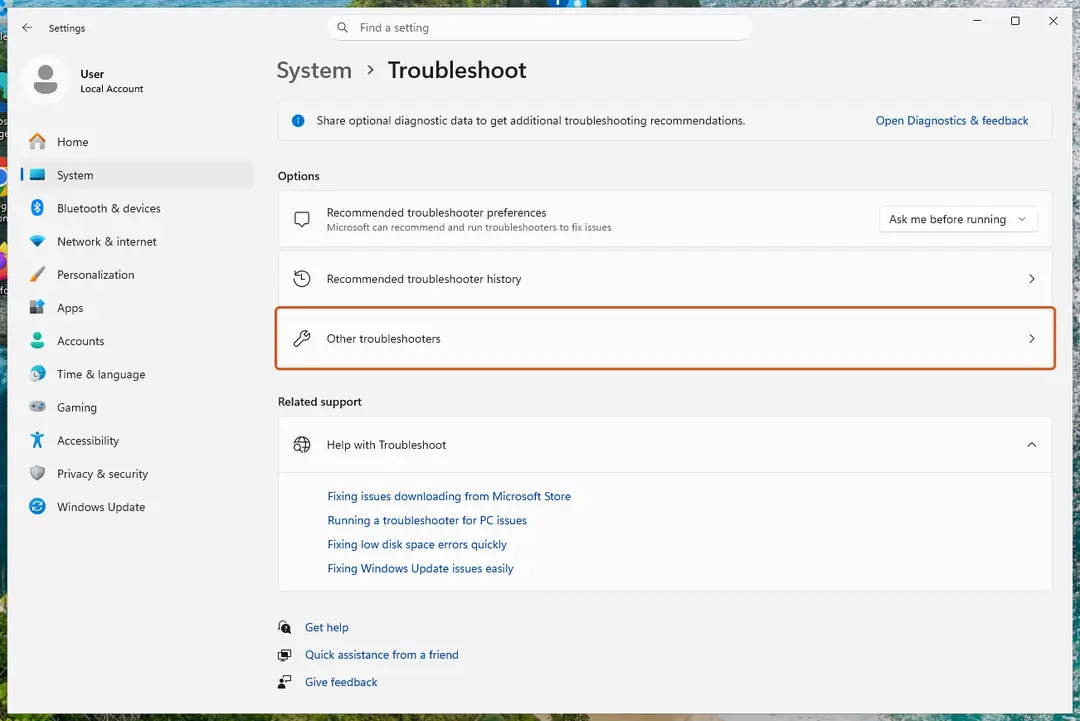
Settings, System, Troubleshoot: select Other troubleshooters. Screenshot: Windows 11 26H2 Run the Windows Update troubleshooter
Under Most frequent, select Run next to Windows Update. The Get Help app opens and starts the checks.
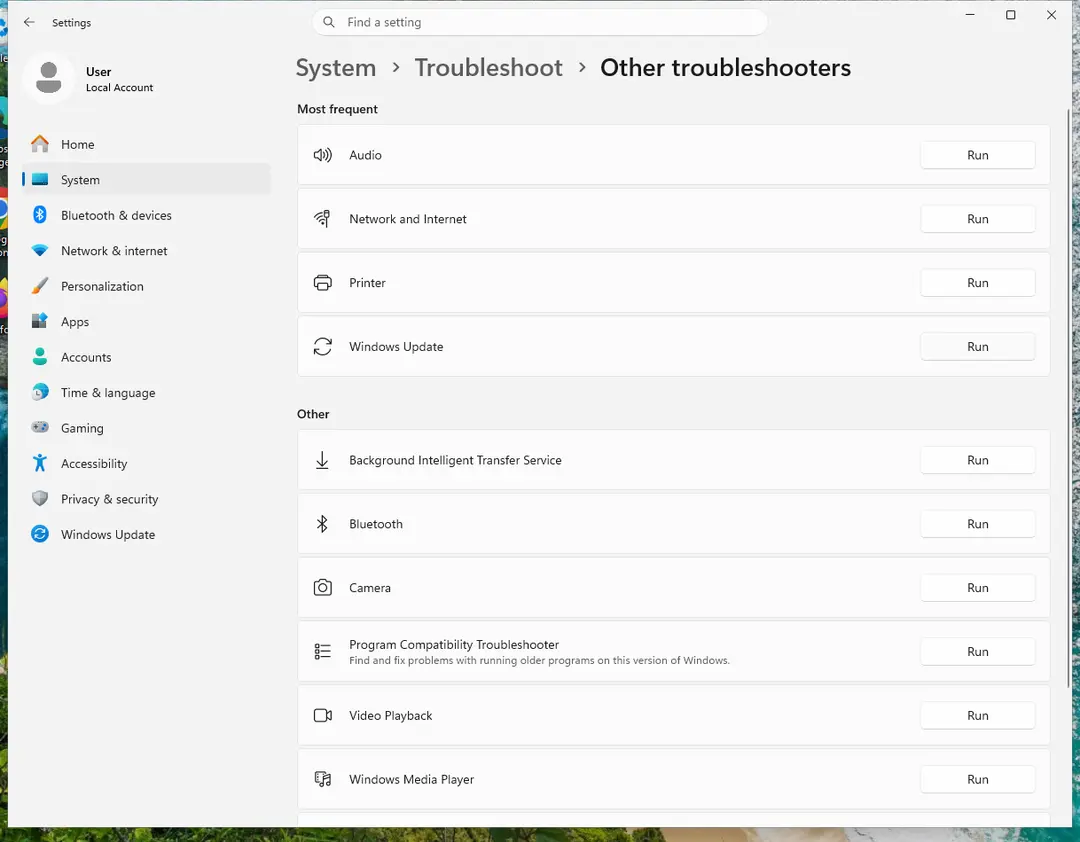
Windows Update is in the Most frequent group; select Run on its row. Screenshot: Windows 11 26H2 Read the result
Wait until Get Help finishes. If it found and fixed a problem, it says so and asks whether this solved the problem. Answer the question so it can offer the next step.
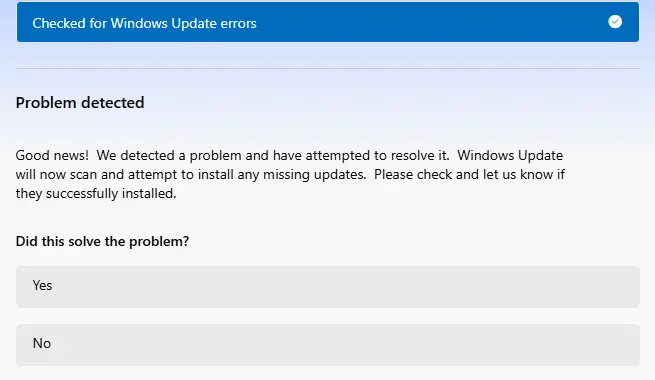
Get Help reports what it found and asks if the problem is solved. Screenshot: Windows 11 26H2 Restart the PC
Restart when the troubleshooter finishes, even if it does not ask you to.
Check for updates again
Select Start > Settings > Windows Update > Check for updates, and install the updates it finds.
Windows 10
Steps written for Windows 10 22H2.
Microsoft ended support for Windows 10 on October 14, 2025. The troubleshooter still runs the same way.
Open the extra troubleshooters
Select Start > Settings > Update & Security > Troubleshoot > Additional troubleshooters.
Run the Windows Update troubleshooter
Under Get up and running, select Windows Update > Run the troubleshooter, and follow its steps.
Restart the PC
Restart when the troubleshooter finishes.
Check for updates again
Select Start > Settings > Update & Security > Windows Update > Check for updates, and install the updates it finds.
If Run does nothing or shows an error
Open the Get Help app from Start, type windows update troubleshooter in its search box and follow the steps it shows. This is the same troubleshooter, started directly.
What common error codes point to
Microsoft lists these causes for the most frequent Windows Update errors:
- 0x8007000d: damaged Windows Update files or update cache. Try Reset Windows Update components.
- 0x800705b4: the update took too long or was interrupted.
- 0x800f0922: not enough disk space, or a problem with .NET Framework or other components. See Free up disk space and delete temporary files.
- 0x80070057 or 0x80080005: damaged files, permission problems or wrong system settings. Try Run DISM and SFC to repair Windows system files.
- 0xC1900101: an incompatible driver. See Update, roll back or reinstall a driver.
- 0x80070002: the update failed to install.
If updates still fail
- Repair system files: Run DISM and SFC to repair Windows system files.
- Clear the update cache and restart the update services: Reset Windows Update components.
- Download and install the failing update by hand: Install an update from the Microsoft Update Catalog.
Used in 105 guides
How to fix Windows stuck at shutting down screen?
How to fix Modern Setup Host high CPU usage in Windows 10 and 11?
How to fix Windows update stuck on "Working on updates"?
Bluebook not opening on Windows: fix "An unexpected error has occurred"
How to fix Discord stuck at gray screen on Windows?
How to fix Microsoft GameInput is crashing the PC?
How to fix 0x80070102 error when playing games on Windows?
How to fix Windows update error 0x800f0987?
How to fix Clock app not working in Windows?
How to fix Windows update error 0x8007370D?
How to fix 0x800f0821 error when installing optional features in Windows?
How to fix Entry Point Not Found error in Windows?
How to fix Microsoft Store error 0x803F800B?
How to fix TPM event id 14 when playing Valorant?
How to resolve Microsoft PC Manager "Coming soon" download error?
How to fix Windows update error 0x800F0223?
How to fix Windows update error 0x800706ba?
How to fix Windows update error 0x8007065e?
How to fix Windows update error 0x80071160?
How to fix error 0x80240013 in Microsoft Store (Windows Store)
How to fix "We couldn't connect to the update service" Windows update error?
How to fix Windows update error 0x800705b9?
How to fix Windows Error Code 0x800706BE?
How to fix Windows update error 0xc190011f?
How to fix Windows update error 0x80188309?
How to fix Windows update error code 0x80244022?
How to fix Windows Update error 0x800704C6
How to fix Windows update error 0x80244007?
How to fix IntelliGo Extension 100.1.4.1273 download error in Windows
[Fix] Protection definition update failed error code: 2147023293
How to fix "You're not up to date" but no updates available in Windows?
How to fix error 0x80240004 in Microsoft Store and Windows Update
How to fix Windows update error 0x80020010?
How to fix Windows update error 0x8024a22d?
How to fix Windows Update error 0x80d05001
How to fix Windows update error 0x80240022?
How to fix error 0x80240008 in Microsoft Store and Windows Update
How to fix Windows update error 0xC80003FA?
How to fix Windows update error 0x8024a203?
Fix: A connection to the Windows Metadata and Internet Services (WMIS) could not be established
How to fix Windows Update error 0x80096004?
How to fix Windows update error 0xc8000444?
How to fix Windows Update error 0x800B010A?
How to fix State Repository Service high CPU usage in Windows?
How to fix Windows update error 0x800f0989?
How to fix NVIDIA LocalSystem Container stopped working in Windows?
How to fix Windows update error 0x80070050?
How to fix ELEX II crashing on startup in Windows 11 and 10
How to Fix Windows Update Error 0x8024001f?
How to fix Windows update error 0x800B0003?
How to fix Windows update error 0xc1900401?
Make sure your face is centered in the frame: how to fix Windows Hello setup in Windows 11
How to fix UtcSvc high CPU usage in Windows?
How to fix Windows update error 0x80004002?
How to fix Windows 11 24H2 update fails to install?
How to fix Windows update error 0x800f0983?
How to fix OneDriveSetup.exe - Entry Point not Found error in Windows?
How to fix Windows Update error 0x8007041D?
How to fix Windows update error 0x8024401F?
How to fix Windows update error 0x80072f76?
How to fix 0x8024200B error on Windows?
How to fix Windows update error 0xc1900131?
How to fix Camera app error 0xA00F4240 in Windows?
How to fix Windows update error 0x800700a1?
How to fix Windows update error code (-2147024864)?
How to fix Windows update error 0x8024402D?
How to fix wfs.exe missing in Windows?
How to fix "Unable to save" Photos app error in Windows?
How to fix Missing entry: PcaWallpaperAppDetect error in Windows?
How to fix Event 4502 "Windows Recovery Environment servicing failed" error in Windows?
How to fix Windows update error 0x80244018?
How to fix Windows update error 0x800f0835?
How to fix "Get the newer version of Windows to stay up to date" error?
How to fix Cryptographic Services high CPU or disk usage in Windows?
How to fix troubleshooter error "I'm sorry. I was unable to run the Windows Update diagnostic"?
How to fix MS Paint not working in Windows 11?
How to fix Windows update error 0xc1900403?
How to fix Windows update error 0x800f0905?
How to fix Windows update error 0x800f0991?
How to fix Windows update error 0x8024000b?
How to fix Windows Update error 0x800f0985 in Windows?
How to fix 0x80072F0D error in Windows?
How to fix Event ID 1796 (TPM-WMI) in Windows?
How to fix Windows update error 0x80240035?
How to fix Windows update error 0x8024500c?
How to fix Windows update error 0x80070306?
How to fix Windows update error 0x80244017?
How to fix Windows update error 0x80242008 in Windows?
How to fix File System error (-2015294522) in Windows?
How to fix Microsoft Store error 0x80073CF1 on Windows
How to fix Camera app error 0xA00F4293 in Windows?
How to fix error 0x801901f7 (The server stumbled) in Windows Update and Microsoft Store?
How to fix Microsoft Store error 0x80073CF8 on Windows
How to fix error 0xA00F4241 in Windows?
How to fix Windows stuck on "Updates are underway" screen?
How to fix PCASVC.dll (PcaWallpaperAppDetect) error in Windows?
How to fix Windows Store error 0x80073CF3?
How to fix Windows update error 0x80070302?
How to fix VAN 0 Error Code in Valorant?
How to fix Windows update error 0x80070433?
How to fix Windows update error 0x800f0993?
How to fix error code 0x80073CF6 in Windows 10?
How to fix Windows update error 0x800711c7?
How to fix NVIDIA Installer cannot continue error code 0xE6000000 in Windows?
How to fix KB5121003 errors in Windows 11?
Sources
- Microsoft Support: Windows Update Troubleshooter (read Oct 3, 2026)
- Microsoft Support: Troubleshoot problems updating Windows (read Oct 3, 2026)
- Microsoft Support: Windows troubleshooters (Get Help) (read Oct 3, 2026)