
How to fix Windows update error 0x800B0003?

Prefer to fix it yourself? The manual steps follow.
- 6methods
- 10 to 40 minutes
- Medium
Applies to Windows 11 and Windows 10, cumulative updates, the Malicious Software Removal Tool and other Windows Update downloads
6 methods in this guide
Every time I attempt to update Windows, I receive the following message: "There were problems downloading some updates, but we'll try again later. If you keep seeing this, try searching the web or contacting support for help. This error code might help: (0x800b0003)." What does this mean, and how do I fix it?
Error 0x800B0003 means Windows downloaded an update but its signature check could not recognise the file, so Windows refused to install it. Most often the download is damaged or cut off. Clear the Windows Update download folder first, then rebuild the signature catalog folder catroot2.
0x800B0003 is a signature check error, TRUST_E_SUBJECT_FORM_UNKNOWN: Windows could not recognise the form of a downloaded update file, so it would not trust it. The file is usually damaged or incomplete. Stop the update services, empty C:\Windows\SoftwareDistribution\Download and check for updates again (Fix 1). If it stays, rebuild the catroot2 folder (Fix 2) or install that one update by hand (Fix 3).
| Error | 0x800B0003, named TRUST_E_SUBJECT_FORM_UNKNOWN by Microsoft: "The form specified for the subject is not one supported or known by the specified trust provider." |
|---|---|
| Where it appears | Settings > Windows Update, while an update downloads or right before it installs. Windows 11 shows Download error - 0x800b0003 next to the update, Windows 10 a longer message that ends in (0x800b0003). |
| Main cause | The downloaded update file is damaged or incomplete, so the signature check cannot read it. |
| Fastest fix | Empty the Windows Update download folder and download the update again (Fix 1). |
| Also written as | 800B0003, 0x800b0003, (0x800b0003), Download error - 0x800b0003, error 0x800B0003, and in logs TRUST_E_SUBJECT_FORM_UNKNOWN. Not the same as 0x80070003 (see the FAQ). |
| Affects | Windows 11 and Windows 10. Reports name cumulative updates and the monthly Malicious Software Removal Tool, often after a crash, a blue screen or a forced shutdown. |
| Microsoft's status | Not a known bug of one update. It is a general code of the Windows trust and signature checks (Winerror.h), so it points at the file or at the checking parts, not at your network. |
| Close relatives | 0x800B0001 is an unknown trust provider, 0x800B0004 a file that is not trusted for the action, 0x800B0100 a file with no signature. |
| Time to fix | 10 minutes for Fix 1 and Fix 2. 20 to 40 minutes for system file repair, and about an hour for an in-place repair. |
Facts checked on 15 October 2026. Steps written for Windows 11 (25H2 and 26H2) and Windows 10 22H2.
What Windows update error 0x800B0003 means
Microsoft's list of security and setup error codes names 0x800B0003 TRUST_E_SUBJECT_FORM_UNKNOWN and gives this description: "The form specified for the subject is not one supported or known by the specified trust provider". Put simply, Windows was asked to check the digital signature of a file and could not tell what kind of file it was looking at.
Every Windows update is signed by Microsoft. After the download, Windows checks that signature before it installs anything. A file that is cut off, overwritten with other data or broken on the disk no longer looks like a signed update package, so the check gives up with this code. Windows Update then says it will try again later and fails the same way, because it reuses the broken file it already has.
| What you see | Where | What it tells you |
|---|---|---|
| There were problems downloading some updates, but we'll try again later. If you keep seeing this, try searching the web or contacting support for help. This error code might help: (0x800b0003) | Settings > Update & Security > Windows Update on Windows 10 | The download finished or stopped, and the signature check refused the file. |
| Download error - 0x800b0003 | Next to one update in Settings > Windows Update on Windows 11 | The same refusal for that one update. Other updates in the list may install fine. |
| 0x800B0003 next to an update name | Settings > Windows Update > Update history | Which update (its KB number) failed, for Fix 3. |
TRUST_E_SUBJECT_FORM_UNKNOWN or 0x800B0003 | WindowsUpdate.log | The file name that failed the check, read it as in "If the error is still there". |
Codes that start with 0x800B00 come from the trust checks of Windows, the part that decides whether a file is genuine. The download reached your PC. The problem is the file on your disk or the parts that check it, so start with the download folder, not with the router.
Why Windows update error 0x800B0003 appears
The signature check needs two things: a complete update file and working check components. On a home PC the reasons it fails are, from the most likely to the least likely:
| Cause | How often | How to tell | Fix |
|---|---|---|---|
| The update file in the download folder is damaged or incomplete, for example after a crash, a power cut or a lost connection. | Most often | The error started after a blue screen, a forced shutdown or a long pause in the download. | Fix 1 |
| The catroot2 folder, where Cryptographic Services keeps the signature catalogs, is damaged. | Often | Several updates fail with 0x800B0003 or other 0x800B codes, not only one. | Fix 2 |
| One update package keeps arriving broken through Windows Update. | Sometimes | The same KB number fails again and again while all other updates install. | Fix 3 |
| The system drive ran out of space while the update downloaded or unpacked. | Sometimes | Drive C: shows a red bar in File Explorer, or only a few GB are free. | Fix 4 |
| Windows system files that take part in the check are damaged. | Rarely | Other things also misbehave after a crash, for example File Explorer or the taskbar stops responding. | Fix 5, Fix 6 |
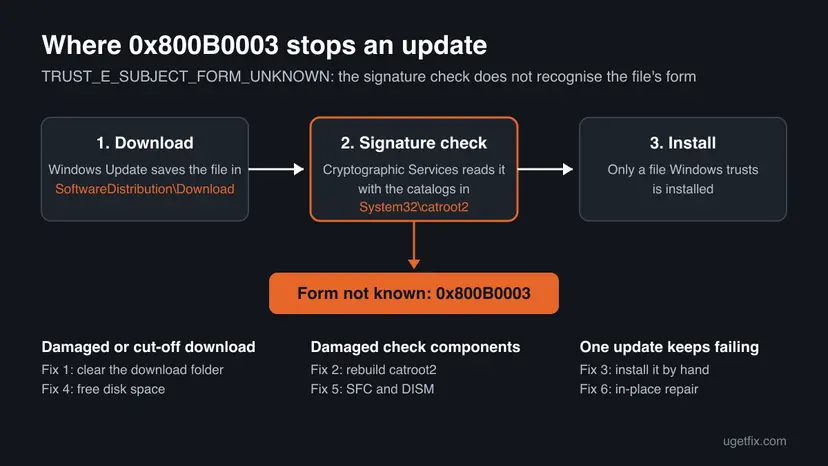
Users report the error after a blue screen or a frozen PC, which fits a file that was being written when Windows stopped. A VPN or proxy gives other codes, such as 0x800B010F for a certificate name mismatch, so they are not methods on this page.
How to fix Windows update error 0x800B0003
Fixes 1 and 2 replace the broken download and the signature catalogs, and solve most cases. Fix 3 gets one stubborn update past Windows Update. Fixes 4 and 5 remove what damaged the file. Fix 6 repairs Windows itself and keeps your files.
| What you see or have | Start with |
|---|---|
| The error appeared after a crash, blue screen, power cut or forced shutdown. | Fix 1 |
| Several different updates fail with 0x800B0003 or other 0x800B codes. | Fix 2 |
| Only one update, often the Malicious Software Removal Tool, keeps failing. | Fix 3 |
| Drive C: is almost full. | Fix 4, then Fix 1 |
| Fixes 1 to 3 did not help, or other parts of Windows also misbehave. | Fix 5, then Fix 6 |
Fix 1. Empty the Windows Update download folder and download the update again
10 minutesLow riskEveryone, first. It replaces the damaged file that the signature check refuses.
Windows Update keeps reusing the file it already downloaded, so a broken file fails the check every time. With the Download folder empty, Windows has to fetch a fresh copy, which then passes the signature check.
- Press Win + S, type
cmd, right-click Command Prompt and select Run as administrator. Select Yes. - Type
net stop wuauservand press Enter. Then typenet stop bitsand press Enter. - Press Win + R, paste
C:\Windows\SoftwareDistribution\Downloadand press Enter. - Press Ctrl + A to select everything in the folder and press Delete. If Windows asks for permission, select Continue.
- Back in Command Prompt, type
net start wuauservand press Enter, thennet start bitsand press Enter. - Open Settings > Windows Update and select Check for updates. On Windows 10 open Settings > Update & Security > Windows Update.
net stop wuauserv
net stop bits
net start wuauserv
net start bits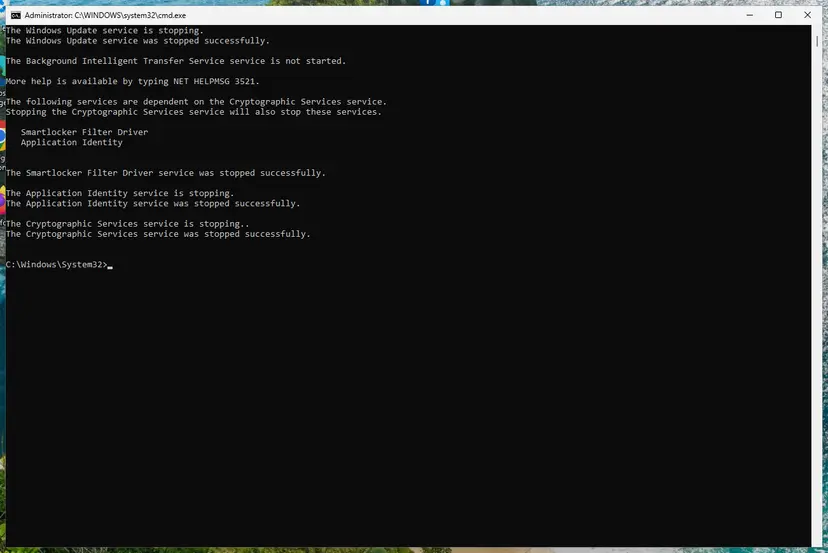
The Download folder holds only update files that are waiting to install. Deleting them does not remove installed updates, your files or your apps. Windows downloads what it still needs.
It worked if: The update downloads from the start, the progress goes past the point where it failed, and it installs without 0x800B0003.
If not: The download is new, so the check components are the next suspect. Rebuild catroot2 in Fix 2.
Fix 2. Rebuild the catroot2 signature catalogs and restart Cryptographic Services
10 minutesLow riskA fresh download still fails, or several updates fail with 0x800B codes.
Cryptographic Services keeps the catalogs it uses to check update signatures in C:\Windows\System32\catroot2. When that folder is damaged, even a good file can fail the trust check. Renaming it makes Windows build a clean one.
- Open Command Prompt as administrator. Type cmd in the search box, right-click Command Prompt and select Run as administrator. Select Yes when Windows asks for permission.
- Stop the update services. Type the commands below and press Enter after each one. If Windows says that other services depend on Cryptographic Services, it stops them too. A message that a service is not started is fine.
net stop wuauserv net stop bits net stop cryptsvc - Delete the download queue files. This clears the list of downloads that the Background Intelligent Transfer Service keeps. If Windows says it cannot find the files, continue.
del "%ALLUSERSPROFILE%\Application Data\Microsoft\Network\Downloader\qmgr*.dat" - Rename the update cache folders. Renaming keeps a copy in case you need it; Windows creates new, empty folders when the services start again. If you get Access is denied, a service is still running: repeat the previous step.
ren %systemroot%\SoftwareDistribution SoftwareDistribution.old ren %systemroot%\System32\catroot2 catroot2.old - Start the services again. Type the commands below and press Enter after each one. The requested service has already been started is fine: Windows started it on its own.
net start cryptsvc net start bits net start wuauserv - Restart and check for updates. Restart the PC. Then select Start > Settings > Windows Update > Check for updates. The first check can take longer than usual because everything is downloaded again.
These steps were written for Windows 11 and Windows 10 (the steps are the same). The full page with the other versions and what each result means: Reset Windows Update components
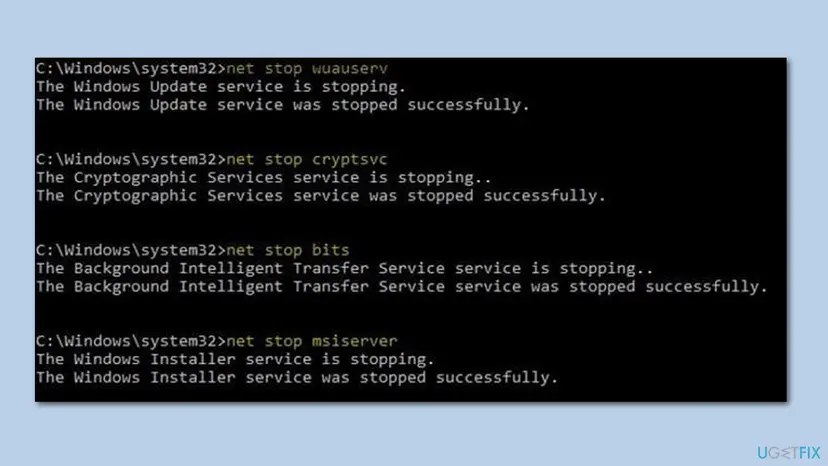
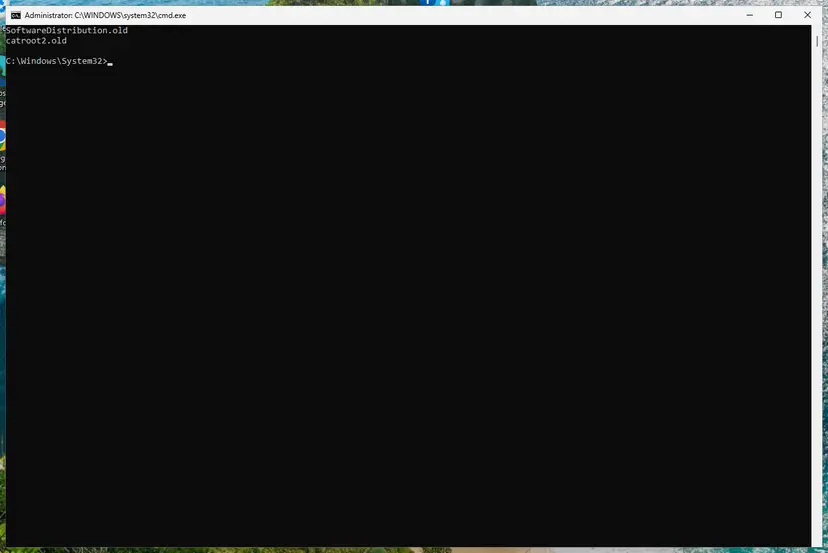
It worked if: After the restart a new, empty catroot2 folder exists next to catroot2.old, and Windows Update downloads and installs the update.
If not: If only one update still fails, install it by hand in Fix 3.
Fix 3. Install the failing update by hand from the Microsoft Update Catalog
10 minutesLow riskOne update keeps failing while the others install, or you need it now.
The catalog file comes through your browser as a complete package, and the installer checks that file instead of the copy Windows Update keeps getting wrong.
- Check your Windows version. Press Windows key + R, type winver and press Enter. Note the version (for example 25H2) and the OS build.
- Find the KB number. Open Settings > Windows Update. A failed or pending update is listed with its KB number; earlier ones are under Update history.
- Check the processor type. Open Settings > System > About and look at System type: an x64-based PC needs the x64 file, an ARM-based PC (for example Snapdragon) needs the arm64 file.
- Search the catalog. Open the Microsoft Update Catalog at catalog.update.microsoft.com in your browser, type the KB number (for example KB5124010) in the search box and press Enter.
- Pick the right row. Find the row whose title names your Windows version and your processor type (x64-based or arm64-based) and select Download on that row.
- Download every file listed. A window lists one or more .msu links. Download all of them into one empty folder, for example C:\packages. On Windows 11 24H2 and later the list can include earlier checkpoint updates that the new one needs.
- Install a single file. If there is only one file, double-click it and confirm the installation in the Windows Update Standalone Installer.
These steps were written for Windows 11 24H2 and later; Windows 10 22H2. The full page with the other versions and what each result means: Install an update from the Microsoft Update Catalog
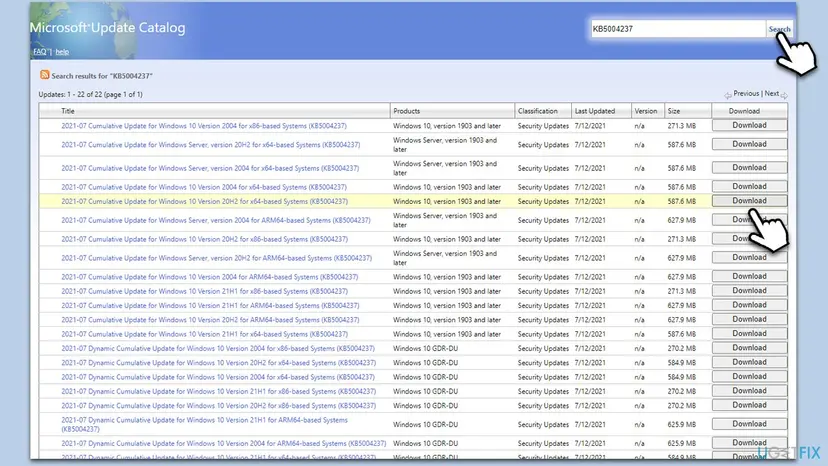
If the failing item is the Windows Malicious Software Removal Tool, Microsoft also offers it as a standalone download. It is replaced every month, so a missed copy is not a security gap once the next one installs.
It worked if: The installer finishes and the update is listed under Settings > Windows Update > Update history as installed.
If not: If the catalog file also fails with 0x800B0003, the check itself is broken. Free disk space in Fix 4 and repair system files in Fix 5.
Fix 4. Free disk space on drive C: so the update can download and unpack in full
10 minutesLow riskDrive C: is nearly full, or the download stopped part way.
An update that runs out of room while it downloads or unpacks leaves a file that is shorter than it should be. The signature check cannot read such a file and stops with 0x800B0003.
- Open Storage settings. Select Start > Settings > System > Storage. The top of the page shows how full the drive is and what uses the space.
- Open Cleanup recommendations. Under Storage management, select Cleanup recommendations.
- Clean up what Windows suggests. Open each group (Temporary files, Large or unused files, Files synced to the cloud, Unused apps), check the items you do not need and select Clean up in that group.
- Delete more temporary files. Go back to Storage and select Temporary files. Windows lists the types it can remove with their size. Check the ones you do not need and remove them. Leave Downloads unchecked unless you have checked that folder.
- Turn on Storage Sense. Back on Storage, turn the Storage Sense switch on. Windows then deletes temporary files on its own when the drive runs low.
- Choose what Storage Sense cleans. Select Storage Sense to open its page. Check the box for cleaning temporary files, then choose when it runs and how long files may stay in the Recycle Bin and Downloads before they are deleted.
- Run it now. Select Run Storage Sense now at the bottom of the page.
- Clean up system files with Disk Cleanup. Type disk cleanup in the search box on the taskbar and open Disk Cleanup. Choose drive C: and select OK, then select Clean up system files and choose C: again.
- Delete the files. Check the types of files you want to remove (select a name to see what it is), select OK, then Delete files.
These steps were written for Windows 11 (screenshots: 26H2). The full page with the other versions and what each result means: Free up disk space and delete temporary files
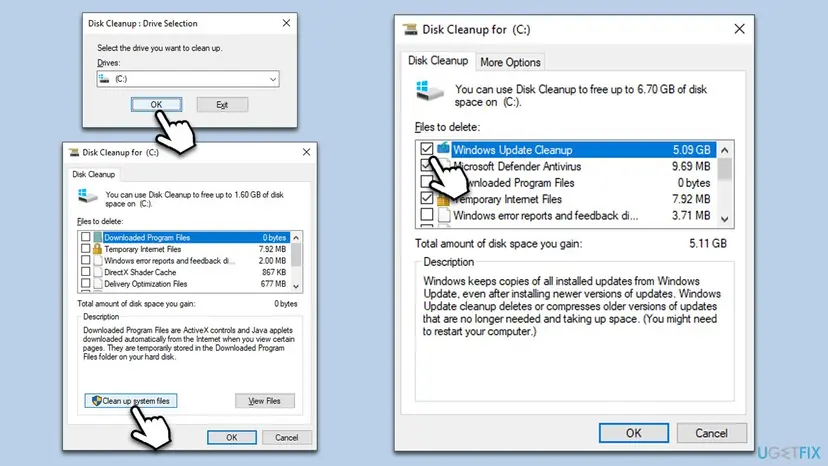
It worked if: Drive C: has several GB free, and after Fix 1 the update downloads in full.
If not: Run Fix 1 again so the update downloads into the freed space, then try Fix 5.
Fix 5. Repair Windows system files with DISM and SFC
20 to 40 minutesLow riskThe error came after a crash or blue screen, or Fixes 1 to 4 did not help.
The trust check runs on Windows system files. A crash can damage them, and then every update fails the check. DISM repairs the Windows image, SFC then replaces damaged system files from it.
- Open an elevated command window. Right-click Start and select Terminal (Admin), or type cmd in the search box, right-click Command Prompt and select Run as administrator. Select Yes when Windows asks for permission.
- Run DISM first. Type the command below and press Enter. DISM downloads clean copies of damaged components from Windows Update, so it can take several minutes. Wait until it says The operation completed successfully.
DISM.exe /Online /Cleanup-Image /RestoreHealth - Run System File Checker. In the same window, type the command below and press Enter. Do not close the window until the verification reaches 100%.
sfc /scannow - Read the result and restart. Compare the last message with the table below this guide, then restart the PC so that repaired files are loaded.
These steps were written for Windows 11 24H2 and 25H2. The full page with the other versions and what each result means: Run DISM and SFC to repair Windows system files
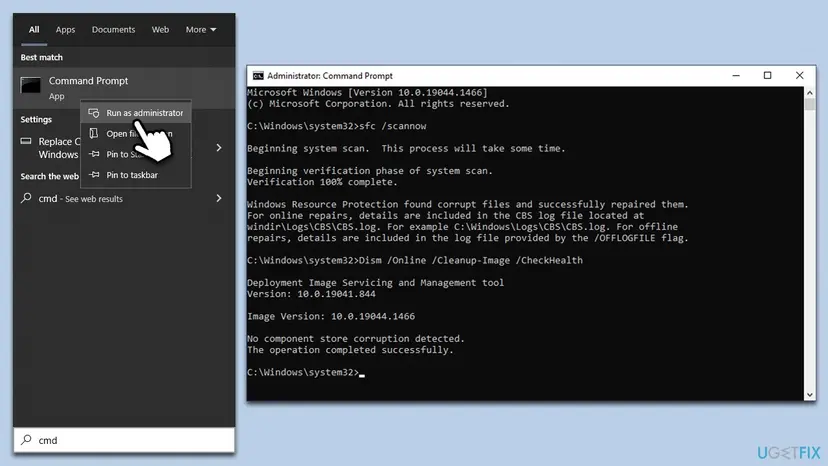
It worked if: SFC reports that it found no integrity violations or that it repaired the files, and the update installs after a restart.
If not: Repair Windows in place, Fix 6.
Fix 6. Repair Windows in place and keep your files and apps
About 1 hourLow riskNothing above helped, or many updates fail.
An in-place repair replaces all Windows files, the trust check parts included, with a fresh copy and brings the PC to the latest version. Your files, apps and most settings stay.
On Windows 11, Settings > System > Recovery > Fix problems using Windows Update reinstalls the current version. On Windows 10 use the installation media from Microsoft.
- Open Recovery in Settings. Open Settings > System > Recovery. Next to Fix problems using Windows Update, select Reinstall now. This keeps your apps, files and settings.
- Start the reinstall. Choose whether the PC may restart on its own 15 minutes after the installation, then select OK.
- Wait and restart. Windows Update downloads and installs a repair copy of your current Windows version. Keep the PC plugged in and online, and restart it when asked.
These steps were written for Windows 11 22H2 and later. The full page with the other versions and what each result means: Reinstall Windows without losing files
Back up important files first even though they are kept: Back up your files (Windows Backup, File History, Time Machine)
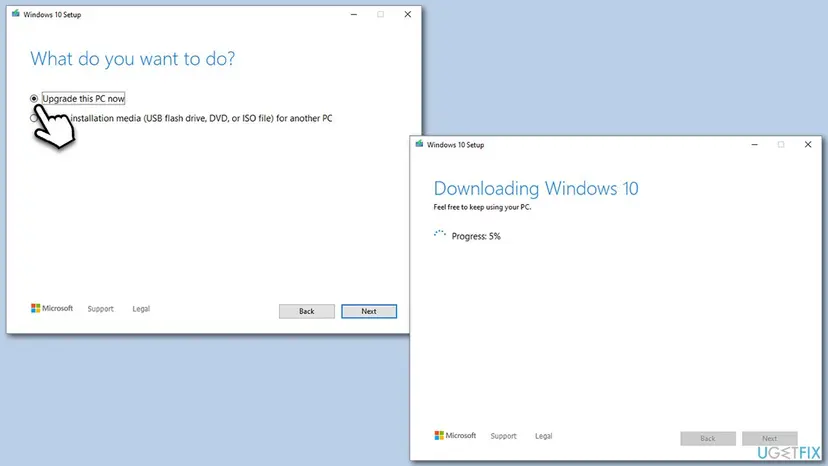
It worked if: Windows restarts on the repaired system, and Windows Update shows the PC as up to date.
If not: Read "If the error is still there" below.
If the error 0x800B0003 is still there
When the error stays after an in-place repair, the logs name the file that failed the check. That tells you whether it is one update package, a driver or a disk problem.
- Open PowerShell as administrator, type
Get-WindowsUpdateLogand press Enter. It writes WindowsUpdate.log to your desktop. - Open the file and search for
800B0003. Note the update name or KB number on the lines around it. - Open
C:\Windows\Logs\CBS\CBS.logand search for the same time. Lines withTRUST_E_SUBJECT_FORM_UNKNOWNname the file that the check refused.
| What the log shows | What to do |
|---|---|
| Always the same KB number | Hide or skip that update and wait for the next month's cumulative update, which replaces it. |
| Different files every time, or files fail after each restart | Check the drive for errors, a failing disk breaks files as they are written: Check a disk for errors (chkdsk) |
| A driver or third-party package | Install that driver from the device maker's website instead of Windows Update. |
Send Microsoft support or a forum the KB number, the lines around 800B0003 in WindowsUpdate.log and your Windows version from Settings > System > About.
How to keep error 0x800B0003 from coming back
- Let updates finish downloading and installing before you shut down, and use Update and restart or Update and shut down.
- Keep at least several GB free on drive C:, so updates can download and unpack in full.
- After a blue screen or a power cut, run Fix 1 before the next update attempt.
- Do not hold the power button while Windows says it is working on updates.
- Do not delete files in catroot2 by hand while Cryptographic Services runs; rename the folder as in Fix 2.
- Do not turn off your antivirus for good to get an update through.
If a different certificate code appears on the same PC, for example a name mismatch, the cause is on the network instead: How to fix Windows update error 0x800B010F.
Frequently asked questions
What does error code 0x800B0003 mean on Windows 10 and Windows 11?
It means the Windows signature check could not recognise the form of a file it was asked to check. Microsoft names the code TRUST_E_SUBJECT_FORM_UNKNOWN. With Windows Update, the file is almost always a downloaded update that is damaged or incomplete, so Windows refuses to install it. The code is the same on Windows 10 and Windows 11, and so are the fixes. Clear the update download folder first (Fix 1), then rebuild catroot2 (Fix 2).
What does "Download error - 0x800b0003" mean in Windows 11?
It is the Windows 11 way of showing the same error next to one update in Settings > Windows Update. The word download does not mean your internet failed. It means the update could not get past the step after the download, the signature check. Select Retry once. If it fails again, empty the Download folder as in Fix 1, so Windows gets a new copy of that update.
What is "verify sig error 0x800b0003"?
It is a log or setup message that says a signature verification (verify sig) failed with 0x800B0003. It points at the same cause: a file whose signature could not be checked because Windows did not recognise its form. We could not confirm which exact program writes this wording. If you see it while installing an update, use Fix 1 and Fix 3 on this page. If you see it while installing another program, download that installer again from its maker, because the copy you have is probably damaged.
Is 0x80070003 the same error as 0x800B0003?
No. 0x80070003 is a different code that means the system cannot find the path specified. Windows Update shows it when a folder or file it expects is missing, often in the SoftwareDistribution folder. The two codes differ by one letter group, so people mix them up. Resetting the update components with Reset Windows Update components helps with both, but the cause of 0x80070003 is a missing path, not a failed signature check.
What is error 0x8D050003?
It is a different code, not a spelling of 0x800B0003. We could not confirm its official meaning from a Microsoft source, so this page does not give fixes for it. If it appears in Windows Update, the generic repairs on this page, the component reset and the system file check, are safe to try. Look up the exact code with the name of the program that shows it.
Why does 0x800B0003 appear with the Malicious Software Removal Tool?
The Malicious Software Removal Tool comes through Windows Update every month as its own download, so a damaged copy of it fails the same signature check. Users report this case in Microsoft's forum. Microsoft also offers the tool as a standalone download, and each month's version replaces the last one. Install it by hand as in Fix 3, or clear the download folder (Fix 1) and let Windows fetch it again.
Can a blue screen or a crash cause error 0x800B0003?
Yes, that is a common pattern in user reports. When Windows stops while an update is being written to the disk, the file can stay half written, and the signature check cannot read it later. A crash can also damage system files. Run Fix 1 to replace the download and Fix 5 to repair system files. If blue screens keep coming back, check the drive with chkdsk and look for the cause of the crashes first.
Does the Windows Update troubleshooter fix 0x800B0003?
It can restart the update services and clear some caches, and it is safe to try: Run the Windows Update troubleshooter. It does not always delete a damaged file in the Download folder, though, which is the usual cause here. Fix 1 does that directly and takes about the same time, so start there.
Is error 0x800B0003 a sign of malware?
Usually not. The common causes are a broken download, a damaged catroot2 folder or a full disk. But a file that Windows cannot check can also be a file that something changed. If the error stays after Fix 1 and Fix 2, or other programs also report signature errors, run a full scan with Microsoft Defender: How to scan for malware with Microsoft Defender.
Does Windows 10 still get the updates that fail with 0x800B0003?
Windows 10 left support on 14 October 2025. Windows 10 22H2 still gets security updates only through Extended Security Updates, and Microsoft Defender still gets its definition updates. The fixes on this page work the same on Windows 10 and Windows 11. If your PC can run Windows 11, moving to it is the long term answer.
Sources
- Microsoft Learn: COM Error Codes (Security and Setup), Winerror.h (learn.microsoft.com)
- Microsoft Q&A: Error 0x800b0003 (Malicious Software Removal Tool, Windows 10) (learn.microsoft.com)
- Microsoft Q&A: Windows error (0x800b0003) when trying to update Windows after a blue screen (learn.microsoft.com)
Did this fix work?
One click, no account. It tells the next reader which guides are worth their time.
Questions and experiences: fix Windows update error 0x800B0003
Still broken, or found a fix we did not cover? Ask here: members and our editors answer. Reading is open; writing needs a free account.
…