
How to fix Windows update error 0xc1900401?

Prefer to fix it yourself? The manual steps follow.
- 7methods
- 5 minutes to 2 hours
- Intermediate
Applies to Windows 11 (24H2, 25H2, 26H2) and Windows 10 22H2, updates from Settings > Windows Update and .msu files from the Microsoft Update Catalog
7 methods in this guide
Hello. I need help with the update error 0xc1900401. I get the failed install error message and cannot fix the problem with the options found online. The SFC tool showed and solved nothing. Forums and Reddit offer nothing better. I need serious help, because I am devastated at this point.
Error 0xc1900401 means Windows found nothing in the update that it can install on this PC. Microsoft lists it as MOSETUP_E_UA_NO_PACKAGES_TO_DOWNLOAD, "No packages to be downloaded." Check first whether your PC already has a newer update, because then there is nothing to fix.
0xc1900401 says the update has no package for this PC. Most often the update is already included in a newer cumulative update you have, or the .msu file is for another Windows version or system type. Compare your build with the update's build (Fix 1). If you do need it, download the matching file (Fix 2). If Windows Update itself shows the error, reset its cache (Fix 3).
| Error | 0xc1900401, Microsoft's name MOSETUP_E_UA_NO_PACKAGES_TO_DOWNLOAD, description "No packages to be downloaded." |
|---|---|
| Where it appears | In the Windows Update Standalone Installer after you open an .msu file, as Installer encountered an error: 0xc1900401, and in Settings > Windows Update > Update history as a failed install. |
| Main cause | The update does not apply to this PC: a newer cumulative update already contains it, or the file is for another version (24H2, 25H2, Windows 10) or system type (x64, arm64). |
| Fastest fix | Check your OS build against the update's build (Fix 1). If your build is newer, the update is not needed. |
| Also written as | 0xC1900401, 0XC1900401, error 0xc1900401, installer encountered an error 0xc1900401, and the typos oxc1900401 and 0x1900401. |
| Affects | Windows 11 and Windows 10 22H2. Windows 10 left support on 14 October 2025. |
| Microsoft's status | A documented setup error code in the Update Agent group 0xC1900400 to 0xC1900405, not a known bug of one release. |
| Where the cause is written | Update history, the WindowsUpdate.log made by Get-WindowsUpdateLog, and C:\Windows\Logs\CBS\CBS.log for an .msu install. |
| Time to fix | 5 minutes to check the build. 15 minutes for the right file or a Windows Update reset. Up to 2 hours for a new Windows version. |
Facts checked on 15 October 2026. Steps written for Windows 11 25H2 and 26H2 monthly and out-of-band updates, Windows 10 22H2.
What error 0xc1900401 means
Microsoft's table of modern setup error codes gives 0xc1900401 one line: MOSETUP_E_UA_NO_PACKAGES_TO_DOWNLOAD, "No packages to be downloaded." An update is a bundle of packages, one for each Windows version and system type. Windows looked into the bundle, found no package that fits this PC in its current state, and stopped.
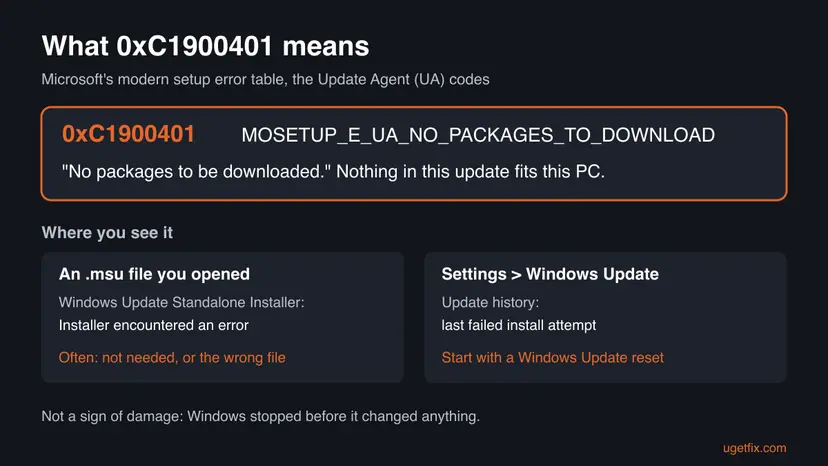
| Code | What Microsoft's table says | What it tells you |
|---|---|---|
| 0xC1900401 | MOSETUP_E_UA_NO_PACKAGES_TO_DOWNLOAD, "No packages to be downloaded." | Nothing in the update fits this PC. It is not needed, or it is the wrong file. |
| 0xC1900402 | MOSETUP_E_UA_UPDATE_CANNOT_BE_MERGED, also described as "No packages to be downloaded." | A close relative. Microsoft's table repeats the same description, so treat it the same way. |
| 0xC1900400 | MOSETUP_E_UA_VERSION_MISMATCH, "An unexpected version of Update Agent client was encountered." | The update component is out of step. A Windows Update reset helps. |
| 0xC1900403 | MOSETUP_E_UA_CORRUPT_PAYLOAD_FILES, "Payload files were corrupt." | The download is damaged. See our guide to 0xc1900403. |
0xc1900401 stops the install before anything is changed. It is not a sign of corrupt system files, which is why SFC, as the reader above found, shows and solves nothing.
Why Windows shows 0xc1900401
The code is about applicability, not damage. So the useful question is not "what is broken" but "why does this update not fit my PC". Each cause below points to a fix.
| Cause | How often | How to tell | Fix |
|---|---|---|---|
| The update is already included in a newer cumulative update you have. | Most often | You installed an older or out-of-band KB by hand, and winver shows a higher build than the KB's page. | Fix 1 |
The .msu file is for another Windows version or system type. | Often | The Catalog line says 24H2, 25H2 or Windows 10, or x64 or arm64, and it is not what Settings > System > About shows. | Fix 2 |
| Windows Update holds an offer that no longer matches the PC. | Sometimes | The error is listed in Update history, and you did not open any file yourself. | Fix 3, Fix 4 |
| A new Windows version is offered but will not prepare. | Sometimes | The failing item is a version such as 25H2 or 26H2, not a KB. | Fix 5 |
| The servicing stack or component store is out of step. | Rarely | Several different updates fail, not only one. | Fix 6, Fix 7 |
On the Sysnative forum in June 2026, a Windows 11 25H2 user got 0xc1900401 from out-of-band update KB5077744. A Windows Update analyst there pointed out that the PC already ran build 26200.8655 from the June cumulative update KB5094126, which made the older update unnecessary.
Where the logs show what failed
You do not need the logs for Fix 1 and Fix 2. Read them when the error appears in Windows Update without a file you opened, or when you ask for help.
| Log | Where | What to look for |
|---|---|---|
| Update history | Settings > Windows Update > Update history | The name and KB number of the update that failed, and the date of the last failed attempt. |
| Windows Update log | Run Get-WindowsUpdateLog in Terminal (Admin). It writes WindowsUpdate.log to your desktop. | Search for 0xc1900401 and read the update title on the same lines. |
| Component servicing log | C:\Windows\Logs\CBS\CBS.log | After an .msu install, lines near the end that name the package and say it is not applicable. |
Help forums such as Sysnative ask for CBS.log and the Windows Update log before they look at a failing update. Collect them before you try again, because new attempts add to them.
How to fix Windows update error 0xc1900401
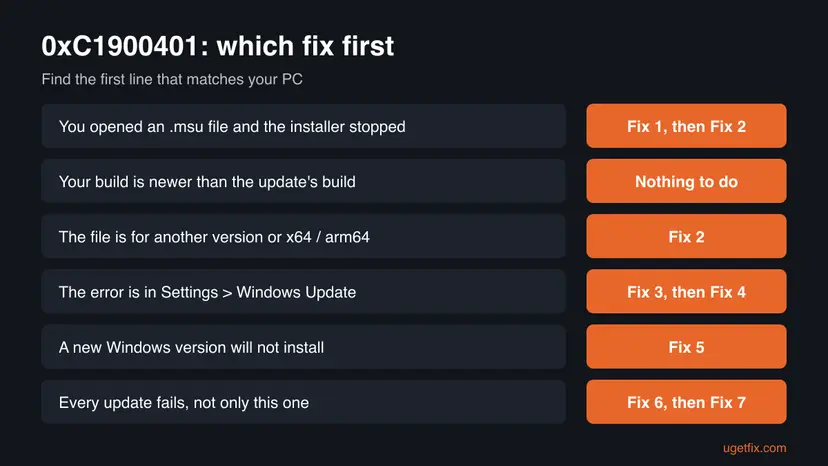
Fix 1 and Fix 2 answer the cause Microsoft's name points to: the update does not fit the PC. Fix 3 and Fix 4 repair Windows Update when the error shows there. Fix 5 installs a new Windows version without the stored offer. Fix 6 and Fix 7 repair Windows itself and come last.
| What you see or have | Start with |
|---|---|
You opened an .msu file and got Installer encountered an error: 0xc1900401. | Fix 1, then Fix 2 |
| You installed an older or out-of-band update by hand. | Fix 1 |
| You are not sure the file matches your version or x64 / arm64. | Fix 2 |
| Update history lists 0xc1900401 and you opened no file. | Fix 3, then Fix 4 |
| The failing item is a new Windows version. | Fix 5 |
| Several different updates fail. | Fix 6, then Fix 7 |
Fix 1. Check whether you need the update at all: compare your build with the update
5 minutesNo riskEveryone who got the error from an .msu file, and anyone who installs an older or out-of-band update by hand.
Monthly cumulative updates carry the fixes of the earlier ones. If your PC already has a newer one, the older update has no package left to install, and Windows reports exactly that with 0xc1900401.
- Press Win + R, type
winverand press Enter. - Note the line OS Build, for example
26200.8655. The number before the dot is the version family, the number after it is the update level. - Open the support page of the update that failed. Search for its KB number on support.microsoft.com.
- Read the OS builds in the page title, for example "OS Builds 26200.8655 and 26100.8655".
- If the number before the dot matches and your number after the dot is the same or higher, your PC already has this update or a newer one.
- Open Settings > Windows Update > Update history and check that the latest cumulative update is listed as installed.
| Build starts with | Windows version |
|---|---|
| 26200 | Windows 11, version 25H2 |
| 26100 | Windows 11, version 24H2 |
| 19045 | Windows 10, version 22H2 |
An out-of-band update fixes one problem between two monthly releases. Once the next monthly update is installed, you do not need the out-of-band one any more, and its .msu file can fail with 0xc1900401.
It worked if: Your build is the same as or newer than the update's build. There is nothing to install, and you can delete the .msu file.
If not: If your build is older, the update is needed but the file may not match. Go to Fix 2.
Fix 2. Download the file that matches your Windows version and system type
15 minutesLow riskYour build is older than the update, or you are not sure which line of the Catalog you downloaded.
The Update Catalog lists one file per Windows version and per system type. A 24H2 file on a 25H2 PC, or an arm64 file on an x64 PC, contains no package for it, and the standalone installer stops with 0xc1900401.
- Open Settings > System > About. Note System type (x64-based or ARM-based) under Device specifications.
- Scroll to Windows specifications and note Version, for example 25H2.
- Open the Microsoft Update Catalog and search for the KB number.
- Pick the line whose title names your version and your system type, and select Download.
- Restart the PC, then double-click the new
.msufile and select Yes.
With screenshots of the Catalog: Install an update from the Microsoft Update Catalog
A few updates need another one installed first, such as a servicing stack update. The KB page lists this under prerequisites. Install that one first, then this file.
It worked if: The Windows Update Standalone Installer finishes and asks for a restart. Update history lists the KB as installed.
If not: If the matching file still fails with 0xc1900401, let Windows Update install it instead: run Fix 3, then check for updates.
Fix 3. Reset the Windows Update cache so it checks again from zero
10 minutesLow riskUpdate history lists 0xc1900401, or the update fails both from Settings and from the file.
Windows Update keeps what it found and downloaded in C:\Windows\SoftwareDistribution. When that record no longer matches the PC, it keeps offering an update with nothing to install. Renaming the folder, together with catroot2, makes Windows scan and download again.
- Open Command Prompt as administrator. Type cmd in the search box, right-click Command Prompt and select Run as administrator. Select Yes when Windows asks for permission.
- Stop the update services. Type the commands below and press Enter after each one. If Windows says that other services depend on Cryptographic Services, it stops them too. A message that a service is not started is fine.
net stop wuauserv
net stop bits
net stop cryptsvc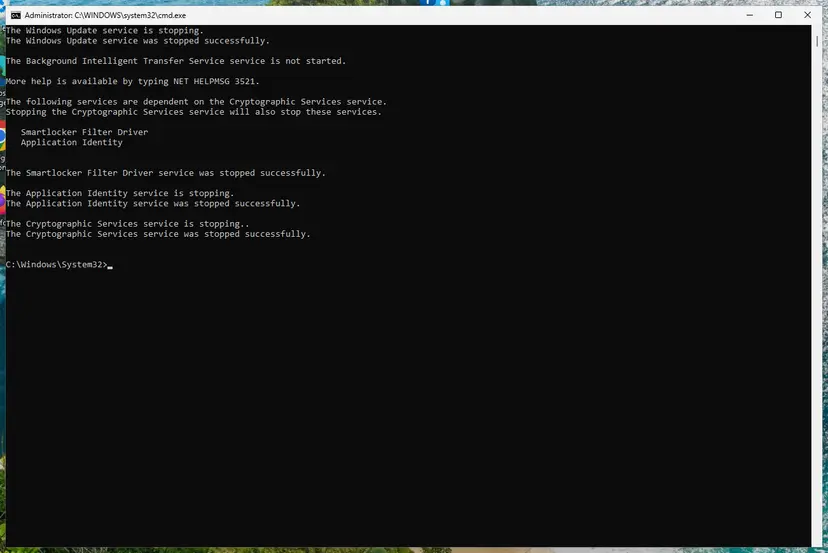
The update services are stopped. Screenshot: Windows 11 26H2. - Delete the download queue files. This clears the list of downloads that the Background Intelligent Transfer Service keeps. If Windows says it cannot find the files, continue.
del "%ALLUSERSPROFILE%\Application Data\Microsoft\Network\Downloader\qmgr*.dat" - Rename the update cache folders. Renaming keeps a copy in case you need it; Windows creates new, empty folders when the services start again. If you get Access is denied, a service is still running: repeat the previous step.
ren %systemroot%\SoftwareDistribution SoftwareDistribution.old
ren %systemroot%\System32\catroot2 catroot2.old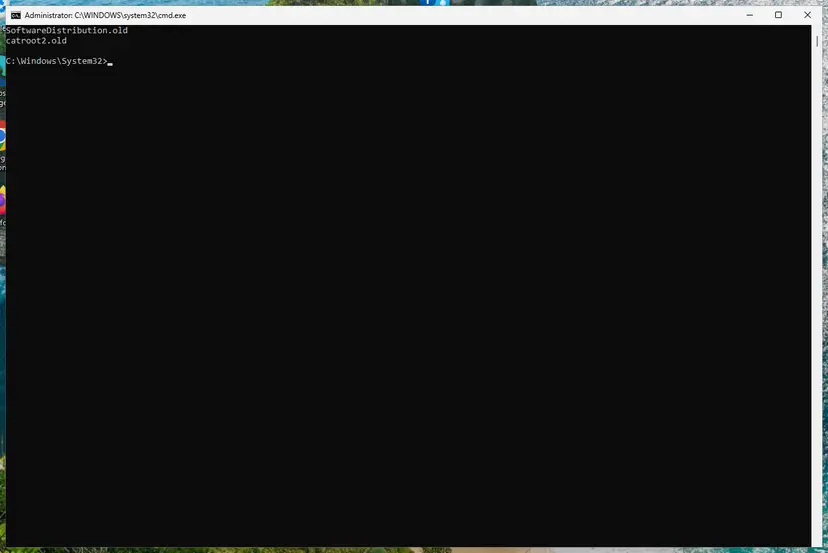
Both folders now end in .old. Screenshot: Windows 11 26H2. - Start the services again. Type the commands below and press Enter after each one. The requested service has already been started is fine: Windows started it on its own.
net start cryptsvc
net start bits
net start wuauserv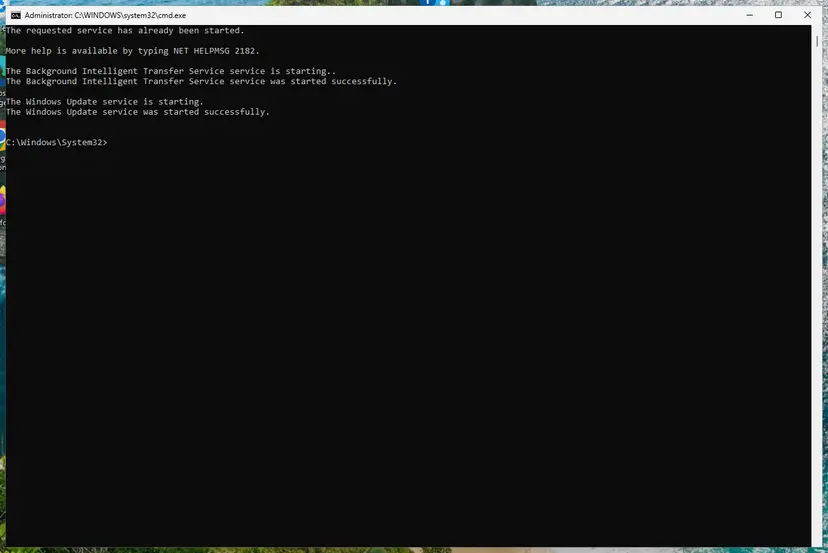
BITS and Windows Update are running again. Screenshot: Windows 11 26H2. - Restart and check for updates. Restart the PC. Then select Start > Settings > Windows Update > Check for updates. The first check can take longer than usual because everything is downloaded again.
These steps were written for Windows 11 and Windows 10 (the steps are the same). The full page with the other versions and what each result means: Reset Windows Update components
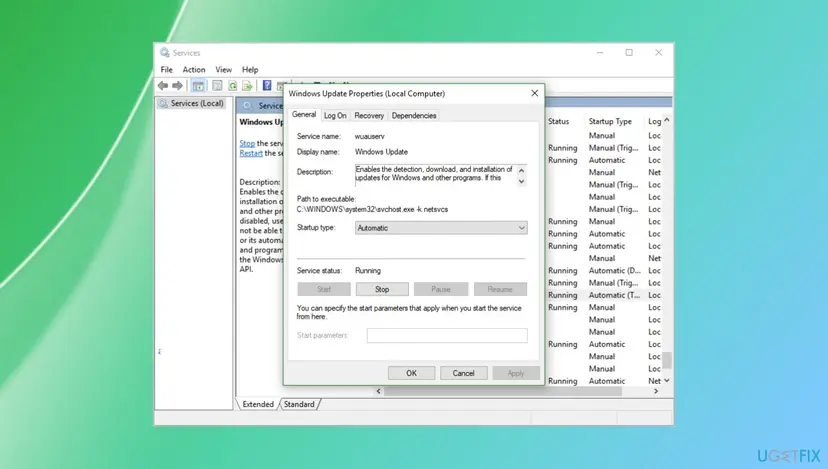
- Restart the PC after the services are started again.
- Open Settings > Windows Update and select Check for updates.
Update history can look empty after the reset, because its list lived in the renamed folder. Delete SoftwareDistribution.old and catroot2.old once updates work.
It worked if: Windows Update scans again. The update installs, or it is no longer offered because it does not apply.
If not: If the same item fails again, run the troubleshooter in Fix 4.
Fix 4. Run the Windows Update troubleshooter
5 minutesNo riskFix 3 did not help, or you would rather let Windows check its update services first.
The troubleshooter checks the update services, their startup settings and pending operations, which a cache reset does not. It was the first step a Microsoft Q&A answer suggested for 0xc1900401 in Update history.
- Open Troubleshoot settings. Select Start > Settings > System > Troubleshoot.
- Open the list of troubleshooters. Select Other troubleshooters.
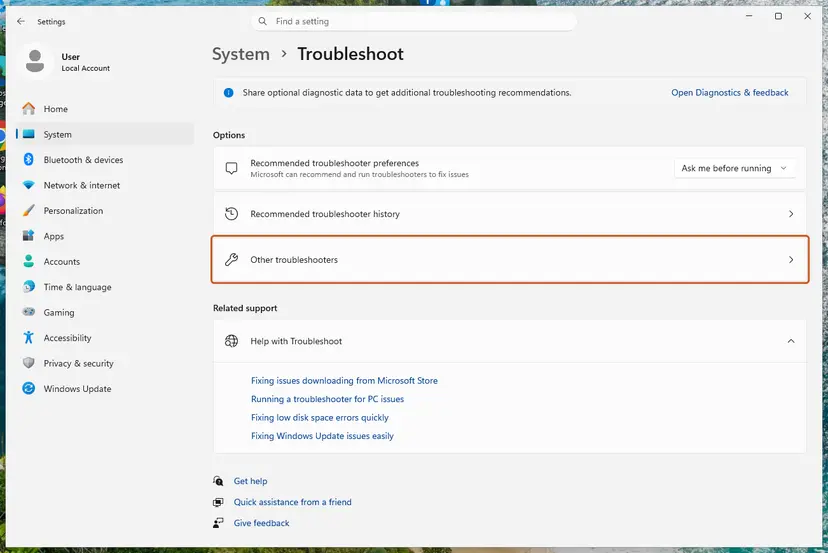
Settings, System, Troubleshoot: select Other troubleshooters. Screenshot: Windows 11 26H2. - Run the Windows Update troubleshooter. Under Most frequent, select Run next to Windows Update. The Get Help app opens and starts the checks.
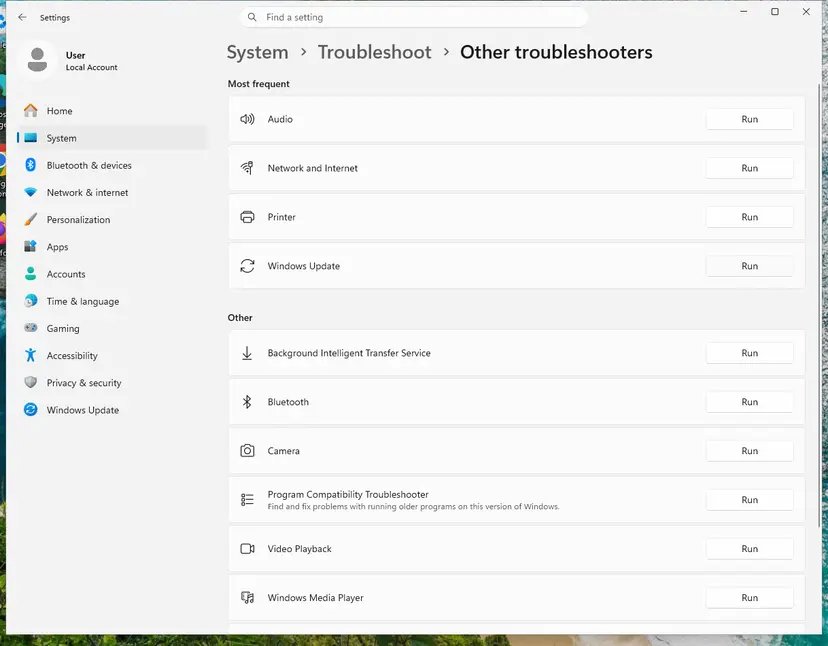
Windows Update is in the Most frequent group; select Run on its row. Screenshot: Windows 11 26H2. - Read the result. Wait until Get Help finishes. If it found and fixed a problem, it says so and asks whether this solved the problem. Answer the question so it can offer the next step.
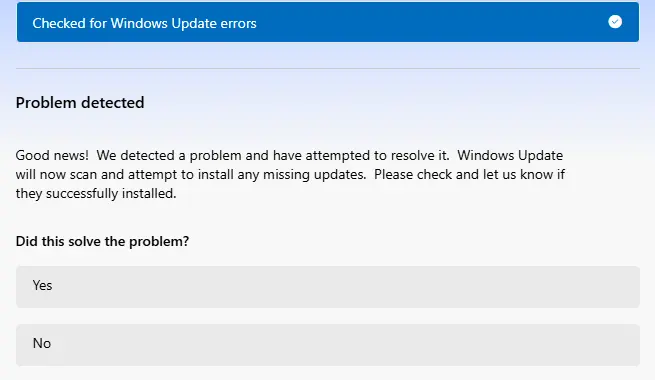
Get Help reports what it found and asks if the problem is solved. Screenshot: Windows 11 26H2. - Restart the PC. Restart when the troubleshooter finishes, even if it does not ask you to.
- Check for updates again. Select Start > Settings > Windows Update > Check for updates, and install the updates it finds.
These steps were written for Windows 11 (screenshots: 26H2). The full page with the other versions and what each result means: Run the Windows Update troubleshooter
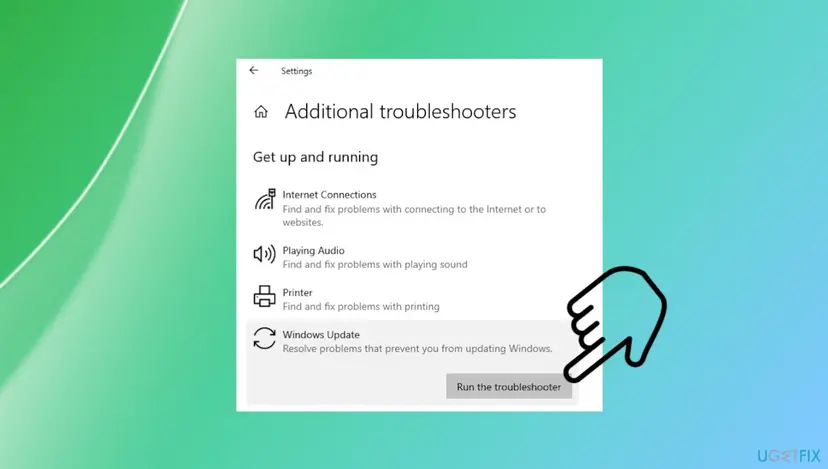
It worked if: The troubleshooter lists what it repaired, and the next check for updates finishes without 0xc1900401.
If not: If a new Windows version is the item that fails, use Fix 5. Otherwise go to Fix 6.
Fix 5. Install the new Windows version with the Installation Assistant or the ISO
1 to 2 hoursLow riskThe failing item is a feature update, a new Windows 11 version, and Fix 3 and Fix 4 did not help.
Both tools download the whole version as one package for your PC and run Setup from it. They do not depend on the package list that Windows Update says it cannot find.
- Back up your important files first: Back up your files (Windows Backup, File History, Time Machine).
- Open Microsoft's Download Windows 11 page.
- Under Windows 11 Installation Assistant, select Download Now and run the file. Or download the Windows 11 Disk Image (ISO).
- For the ISO, right-click it, select Mount, and double-click
setup.exe. - Choose to keep personal files and apps, and keep the PC plugged in until Setup finishes.
- After the last restart, open Settings > Windows Update and install what is left.
Windows 10 22H2 is the last Windows 10 version, so no newer Windows 10 feature update exists. If the PC meets the requirements, the Installation Assistant upgrades it to Windows 11 and keeps files and apps. Windows 10 stopped getting free security fixes on 14 October 2025.
It worked if: Setup finishes and Settings > System > About shows the new version.
If not: If Setup fails with a different code, look that code up; it names the real block. Otherwise go to Fix 6.
Fix 6. Repair the component store and system files with DISM and SFC
20 to 40 minutesLow riskSeveral different updates fail, not only one.
Windows decides which package applies from its component store. If the store's record of what is installed is wrong, updates can look as if they do not apply. DISM repairs the store; SFC then repairs system files from it. SFC alone, as the reader found, does not touch the store.
- Open an elevated command window. Right-click Start and select Terminal (Admin), or type cmd in the search box, right-click Command Prompt and select Run as administrator. Select Yes when Windows asks for permission.
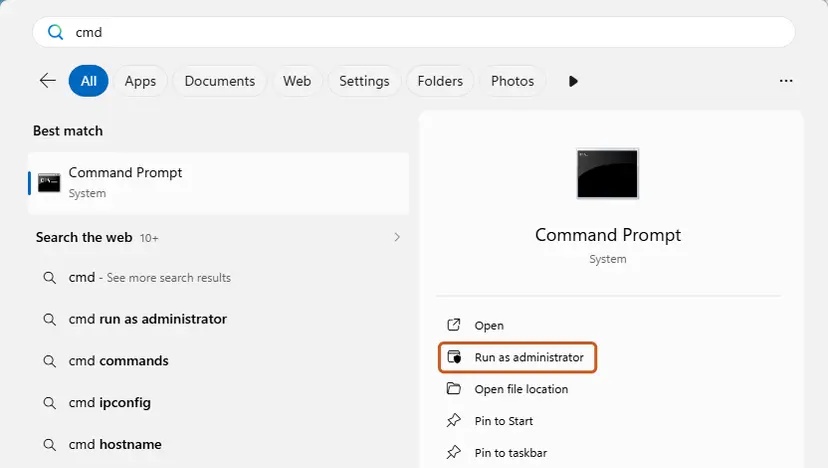
Search for cmd and choose Run as administrator. Screenshot: Windows 11 26H2. - Run DISM first. Type the command below and press Enter. DISM downloads clean copies of damaged components from Windows Update, so it can take several minutes. Wait until it says The operation completed successfully.
DISM.exe /Online /Cleanup-Image /RestoreHealth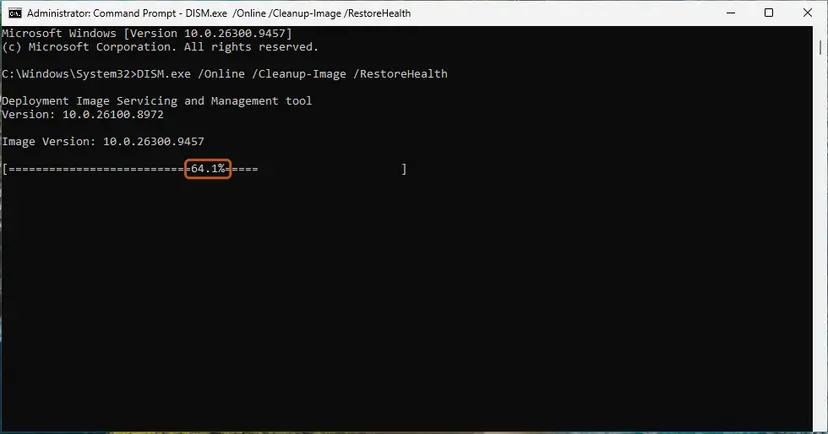
DISM /RestoreHealth running. Screenshot: Windows 11 26H2. - Run System File Checker. In the same window, type the command below and press Enter. Do not close the window until the verification reaches 100%.
sfc /scannow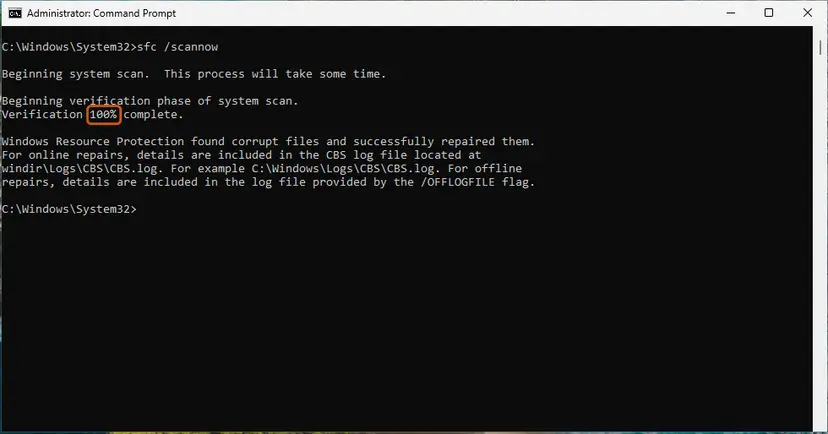
sfc /scannow at 100%. Screenshot: Windows 11 26H2. - Read the result and restart. Compare the last message with the table below this guide, then restart the PC so that repaired files are loaded.
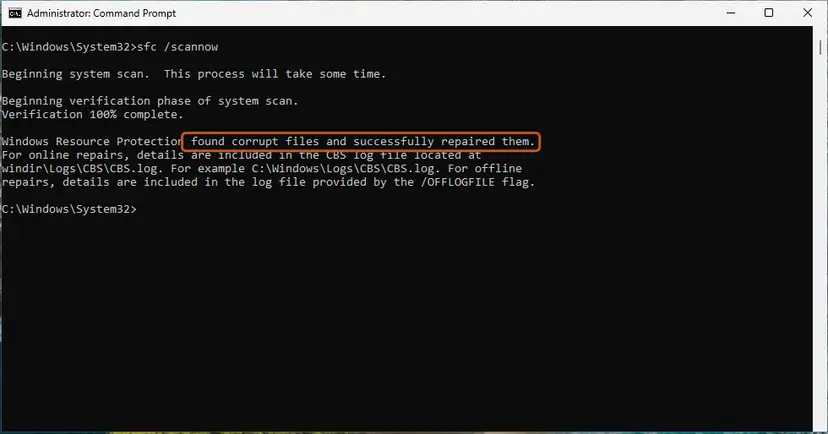
The result line tells you what SFC did. Screenshot: Windows 11 26H2.
These steps were written for Windows 11 24H2 and 25H2. The full page with the other versions and what each result means: Run DISM and SFC to repair Windows system files
It worked if: DISM reports that the restore operation completed, and SFC reports no integrity violations or that it repaired them.
If not: Run Fix 3 once more and check for updates. If updates still fail on Windows 11, use Fix 7.
Fix 7. Reinstall the current Windows 11 version with Fix problems using Windows Update
1 hour or moreLow riskWindows 11, and updates still fail after Fix 1 to Fix 6.
This recovery option downloads a fresh copy of the version you run and reinstalls it, keeping apps, files and settings. It rebuilds the servicing records that decide which update packages apply.
- Open Settings > System > Recovery.
- Next to Fix problems using Windows Update, select Reinstall now.
- Choose whether the PC may restart on its own, then select OK.
- Keep the PC plugged in and online until it finishes.
- Open Settings > Windows Update and check for updates.
More options, including Reset this PC: Reinstall Windows without losing files
It worked if: Windows restarts on the same version, and the next check installs the updates the PC needs.
If not: Read the section below and collect the logs before you ask for help.
If error 0xc1900401 is still there
First ask whether it is still a problem. If your build is current and Update history shows the latest cumulative update as installed, an old failed entry with 0xc1900401 can stay in the list and needs no action.
| What you find | What to do |
|---|---|
| Your build is current, only an old entry shows the error | Nothing. The list keeps failed attempts; the PC is up to date. |
| A work or school PC, updates from the IT department | Ask them. Their update server decides which packages your PC is offered. |
CBS.log names a package that is not applicable | Download the matching file again with Fix 2, or let Windows Update install it. |
| Several updates fail after Fix 6 and Fix 7 | Post the logs on Microsoft Q&A or a Windows Update help forum, with the details below. |
- What to send: the code 0xc1900401, the KB number or version that failed, and your OS build from
winver. - Say whether you opened an
.msufile or the error came from Windows Update. - Attach
WindowsUpdate.logfromGet-WindowsUpdateLogandC:\Windows\Logs\CBS\CBS.log, and list the fixes you tried.
Unlike download and install crashes, 0xc1900401 is a decision Windows makes about which package fits. We found no source that ties it to failing drives or memory.
How to keep 0xc1900401 from coming back
- Let Windows Update pick updates for you; it offers only what fits.
- Check
winverbefore you install a KB by hand. - Match the Catalog line to your version and to x64 or arm64.
- Install the latest cumulative update rather than an older single fix.
- Do not install old out-of-band updates after a newer monthly update.
- Do not download
.msufiles from sites other than Microsoft. - Do not run SFC again and again for this code; it does not address it.
- Do not stay on Windows 10: it no longer gets free security fixes.
Frequently asked questions
What does error 0xc1900401 mean?
It means Windows found no package in the update that it can install on this PC. Microsoft's setup error table names it MOSETUP_E_UA_NO_PACKAGES_TO_DOWNLOAD with the description "No packages to be downloaded." Most often the update is already included in a newer cumulative update on the PC, or the file is for another Windows version or system type. Nothing on the PC is damaged. Compare your build with the update's build first (Fix 1).
Why does the installer say it encountered an error 0xc1900401?
That message comes from the Windows Update Standalone Installer, which opens when you double-click an .msu file. It tells you the file holds no package for this PC. Run winver and compare your OS build with the builds on the update's support page. If yours is the same or newer, you do not need the file. If yours is older, download the Catalog line that names your version and system type (Fix 2).
What is the Windows Update Standalone Installer error 0xc1900401?
It is the same code shown by wusa.exe, the program that installs .msu files outside Windows Update. The installer reads the file, asks Windows which of its packages apply, and stops when none do. A common case is an out-of-band update installed by hand after a newer monthly update, as in a June 2026 Sysnative thread about KB5077744 on Windows 11 25H2. Check Fix 1 before anything else.
Is 0xc1900401 a Windows 11 or a Windows 10 error?
Both. The code comes from the same update engine and has the same meaning on Windows 11 and Windows 10 22H2. On Windows 10 it often appears when someone installs a Windows 11 file, or an old KB, by hand. Remember that Windows 10 22H2 is the last Windows 10 version and left support on 14 October 2025, so a PC that can run Windows 11 is better moved to it (Fix 5).
Why did SFC find nothing?
Because 0xc1900401 is not caused by damaged system files. SFC checks protected Windows files and repairs them from the component store. The error says only that the update had nothing to install for this PC, so SFC has nothing to find, which matches the reader's experience above. DISM in Fix 6 can help when several updates fail, because it repairs the component store, but for one update the build check in Fix 1 matters more.
Is it safe to ignore 0xc1900401?
Yes, when your PC already has a newer cumulative update. Check with winver and Update history: if the latest monthly update is installed, the failed one is not needed and the entry can stay in the list. It is not safe to ignore when your build is older than the update and no newer update is installed, because then the PC is missing security fixes. In that case use Fix 2 or Fix 3.
How do I know if I have x64 or arm64 Windows?
Open Settings > System > About and read System type under Device specifications. It says x64-based processor for most desktop PCs and laptops with Intel or AMD chips, and ARM-based processor for PCs with Snapdragon chips. The Microsoft Update Catalog lists both for most updates, and they are easy to mix up in the list. A file for the wrong type always fails, often with 0xc1900401.
Is it the same as error 0x1900401 or oxc1900401?
Yes. Both are typos of 0xc1900401: one drops the c, the other uses the letter o instead of the zero. The real code always starts with 0x, then C19, which marks Windows setup and update errors. If your screen shows 0xC1900101 or 0xC1900200, those are different codes with different meanings: a rollback during setup and a PC that does not meet the requirements.
I searched in another language. Does this page apply to me?
Yes. The error code is the same in every language of Windows; only the words around it are translated. If you asked "what is this error" or "how do I fix it", the short answer is: the update has nothing to install on your PC. Check your build with winver (Fix 1). If you run Windows 10, the same steps apply, with the Windows 10 paths given in Fix 4.
Sources
- Microsoft Learn: Windows 10 upgrade resolution procedures (modern setup error codes, 0XC1900401 MOSETUP_E_UA_NO_PACKAGES_TO_DOWNLOAD and the 0XC19004xx group) (learn.microsoft.com)
- Microsoft Q&A: How to fix Error 0xc1900401 (failed install in Update history, troubleshooter, DISM and Media Creation Tool suggested) (learn.microsoft.com)
- Sysnative Forums: W11 25H2 and 0xc1900401 (KB5077744 superseded by KB5094126, build 26200.8655) (sysnative.com)
Did this fix work?
One click, no account. It tells the next reader which guides are worth their time.
Questions and experiences: fix Windows update error 0xc1900401
Still broken, or found a fix we did not cover? Ask here: members and our editors answer. Reading is open; writing needs a free account.
…