
How to fix Modern Setup Host high CPU usage in Windows 10 and 11?

Prefer to fix it yourself? The manual steps follow.
- 9methods
- 5 to 90 minutes
- Intermediate
Applies to Windows 11, Windows 10; PCs where Windows Update is preparing a feature update
9 methods in this guide
I noticed my PC performance going down at random times. Once I opened the Task Manager, I noticed that Modern Setup Host CPU usage was through the roof - it reached 100% at peaks. I can't work like this and I wonder if anything could be done about this? Can I disable the Setup Host CPU process altogether?
Modern Setup Host (SetupHost.exe) is the Windows process that downloads and prepares a feature update, so it works hard while an update is being set up. A few busy minutes are normal. If it stays high for hours, the update is stuck or the PC cannot keep up, and the fixes below deal with each case.
Modern Setup Host is part of a Windows update, not a virus. First check Settings > Windows Update and Task Manager to see whether an update is really being prepared (Fix 1), and let a plugged-in PC finish it. If you need the CPU now, end the task or pause updates (Fix 2 and Fix 3). If it never finishes, free disk space (Fix 4), run the update troubleshooter (Fix 5) and test with a clean boot (Fix 6).
| Error | No error window. Task Manager shows Modern Setup Host with high CPU, often with high disk and network use too, and the PC feels slow. |
|---|---|
| Where it appears | Task Manager, Processes tab, under Background processes. The file is SetupHost.exe. |
| Main cause | Windows is downloading or preparing a feature update. It stays busy for long when the update is stuck, the disk is slow or nearly full, or update files are damaged. |
| Fastest fix | Let the update finish while the PC is plugged in. If you cannot wait, End task in Task Manager or pause updates in Settings (Fix 2 and Fix 3), then fix the cause. |
| The file | SetupHost.exe in the hidden $WINDOWS.~BT\Sources folder on the system drive, created by Windows during an update. |
| Also written as | Windows Modern Setup Host, modern host setup, SetupHost.exe, Modern Setup Host process. |
| Normal behavior | Busy for several minutes while an update is prepared. Microsoft does not publish a CPU figure or a run time for it, so judge by hours, not minutes. |
| Affects | Windows 10 22H2 and Windows 11 (25H2 and 26H2). Windows 10 left support on 14 October 2025, and a PC without Extended Security Updates gets no new feature update to prepare. |
| Time to fix | 5 minutes for Fix 1 to Fix 3; 30 to 90 minutes for the repair steps in Fix 4 to Fix 8. |
Facts checked on 16 October 2026. Steps written for Windows 11 (25H2 and 26H2) and Windows 10 22H2.
What is Modern Setup Host in Task Manager?
Modern Setup Host is the name Task Manager shows for SetupHost.exe. Users on Microsoft's own Q&A site report that it runs from C:\$WINDOWS.~BT\Sources, and a Microsoft Q&A answer says it downloads and prepares your computer to install a new version of Windows 10. So this is the Windows Setup program that Windows Update starts for a feature update, the yearly kind of update, not for the small monthly ones.
That explains the symptoms. Setup unpacks files, checks the system and copies data, so CPU, disk and network use all go up together. If you ask what is Modern Setup Host in Windows 11, the answer is the same: the Windows 11 feature update uses the same Setup process, and Microsoft's Q&A lists reports from Windows 11 22H2 as well.
- Name in Task Manager
- Modern Setup Host, under Background processes.
- File
SetupHost.exe, inC:\$WINDOWS.~BT\Sources(a hidden folder that Windows creates during an update).- What it does
- Microsoft Q&A answer: it downloads and prepares the PC for a new Windows version. Users add that it appears together with Dism Host Servicing Process.
- Is it a virus?
- No. It is a Windows file. Malware can copy its name, so Fix 9 checks the folder.
- Can you remove it?
- No need. Windows deletes the
$WINDOWS.~BTfolder after the update, or you can remove it with Disk Cleanup once no update is pending.
Microsoft does not publish a support article about this process. The facts above come from the Windows Update FAQ and from answers on Microsoft Q&A, so treat any detail that is not on a Microsoft page as what users report.
When Modern Setup Host high CPU is normal and when it is a problem
Because Microsoft gives no run time for Setup, use what you can see on screen. The table links each situation to a decision.
| What you see | What it means | What to do |
|---|---|---|
| High CPU and disk for 10 to 60 minutes after Windows Update showed a download or Preparing | A feature update is being prepared, as designed | Plug in the PC and wait (Fix 1) |
| The same high use for many hours, or the process appears again every time you start the PC | The update is stuck or keeps failing and restarting | Fix 4 to Fix 8 |
| High use only on a PC with a nearly full or very slow drive | The disk cannot keep up with Setup | Fix 4 |
| Windows Update shows no update at all, yet Modern Setup Host runs | A failed update left Setup behind, or the process is not the Windows one | Fix 5 to Fix 9 |
SetupHost.exe runs from a folder other than $WINDOWS.~BT | Possibly a fake file | Fix 9 |
Windows 10 left support on 14 October 2025. A Windows 10 22H2 PC that is not enrolled in Extended Security Updates gets no new updates from Windows Update, so a Setup that keeps running there is more likely a leftover of an old failed update, and Fix 8 helps most.
What causes Modern Setup Host high CPU, most common first
Microsoft names no single cause. The order below follows what Microsoft's answers say about the process and what users report, from most to least common.
| Cause | How often | Start with |
|---|---|---|
| A feature update is being prepared and the PC is simply busy. | Most often | Fix 1 |
| The system drive is nearly full or slow, so Setup takes much longer. | Often | Fix 4 |
| A damaged Windows Update cache or stopped update service makes the update fail and start again. | Often | Fix 5 and Fix 8 |
| Another program or a third-party antivirus scans every file Setup writes. | Sometimes | Fix 6 |
| Damaged Windows system files. | Sometimes | Fix 7 |
| Malware using the name Modern Setup Host or SetupHost.exe. | Rarely | Fix 9 |
Do not disable the Windows Update service to stop this. Microsoft says you cannot stop updates entirely; the supported way is a temporary pause (Fix 3). A disabled service also breaks the security updates that you do need.
How to fix Modern Setup Host high CPU usage
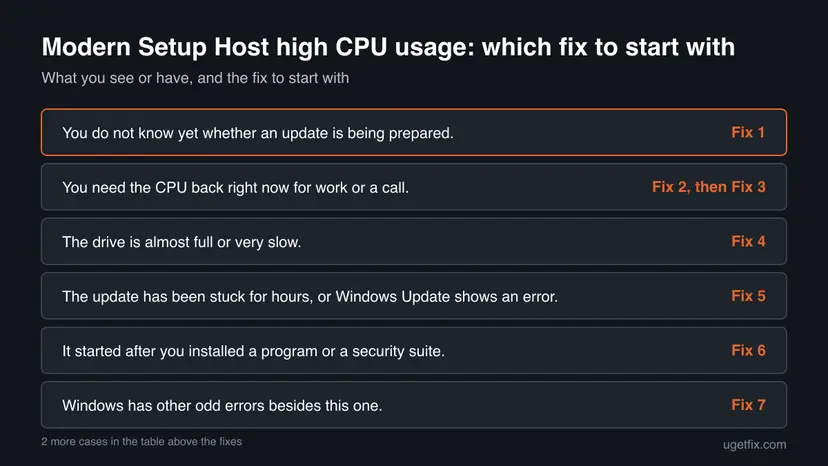
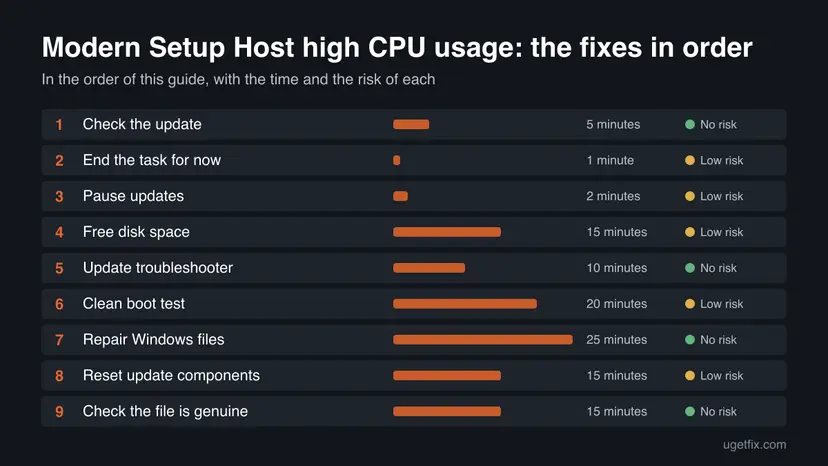
Fix 1 tells you whether this is a normal update. Fix 2 and Fix 3 give the processor back right now. Fixes 4 to 8 remove the reason the update never ends, and Fix 9 checks that the file is the Windows one.
| What you see or have | Start with |
|---|---|
| You do not know yet whether an update is being prepared. | Fix 1 |
| You need the CPU back right now for work or a call. | Fix 2, then Fix 3 |
| The drive is almost full or very slow. | Fix 4 |
| The update has been stuck for hours, or Windows Update shows an error. | Fix 5 |
| It started after you installed a program or a security suite. | Fix 6 |
| Windows has other odd errors besides this one. | Fix 7 |
| Windows Update shows no new update, or it fails again and again. | Fix 8 |
| The file runs from an unusual folder or the PC acts strangely. | Fix 9 |
Fix 1. Check whether Windows is preparing an update
5 minutesNo riskAlways first, because most high use is a normal feature update that only needs time.
Modern Setup Host exists to prepare Windows updates. If Windows Update shows a download or install in progress, the CPU use has a reason and the right move is to let it end, not to fight the process.
- Press Win + I, open Windows Update (Windows 10: Update & Security > Windows Update) and read the status line.
- If it says Downloading, Installing or Restart required, an update is in progress. Plug in a laptop and keep it awake.
- Press Ctrl + Shift + Esc, open the Performance tab and watch Disk and CPU for ten minutes.
- Click Update history and note the failed updates. A feature update that fails again and again keeps starting Setup.
- If the PC shows Restart required, restart it so Windows can finish the job.
It worked if: You know whether an update is running. A healthy one finishes and Modern Setup Host disappears from Task Manager.
If not: If the update is not moving after a few hours, or Windows Update shows nothing and Setup still runs, continue with Fix 2 for relief and then Fix 4.
Fix 2. End the Modern Setup Host task for now
1 minuteLow riskYou need the processor or disk right away and can accept that the update stops.
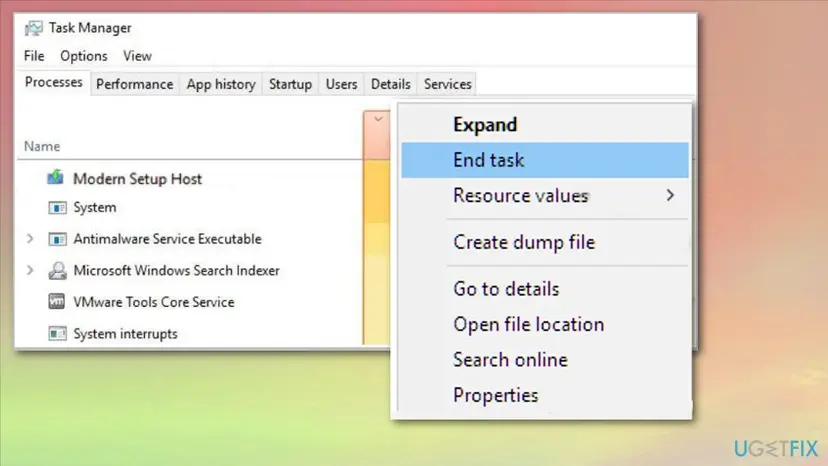
Ending the process stops the work at once. A user on Microsoft Q&A reported that disk use fell to normal as soon as Modern Setup Host was ended. It is only a pause, because Windows Update starts Setup again later.
- Press Ctrl + Shift + Esc to open Task Manager.
- On the Processes tab find Modern Setup Host (on the Details tab it is
SetupHost.exe). - Right-click it and select End task.
- Save your work. If the update is half done, Windows may show it again at the next start.
Full steps for a program that will not close: Close a frozen app (Task Manager, Force Quit)
It worked if: CPU and disk use fall to normal at once.
If not: If it returns within minutes, use Fix 3 to pause updates, then look for the reason with Fix 4 to Fix 8.
Fix 3. Pause Windows updates for a short time
2 minutesLow riskModern Setup Host keeps restarting and you need a quiet PC for a day or a week.
The old advice was to disable the Windows Update service. Microsoft says you cannot stop updates entirely, but you can pause them, which keeps the service and the security fixes intact. A pause only delays the update.
- Press Win + I and open Windows Update.
- Windows 11: next to Pause updates, choose how long. Windows 10: select Pause updates for 7 days or open Advanced options and pick a resume date.
- Restart the PC.
- Run Fix 4 to Fix 8 during the pause, then select Resume updates and check for updates again.
After the pause limit Windows asks you to install the latest updates before you can pause again. That is Microsoft's rule, not a fault.
It worked if: Windows stops starting new update work, so Modern Setup Host stays idle during the pause.
If not: If it still runs, an old update is already half installed. Use Fix 5 and Fix 8 to clear it.
Fix 4. Free disk space so Setup can finish
15 minutesLow riskThe system drive is nearly full or slow, which makes Setup run much longer.
Microsoft's Windows Update FAQ says to free space when there is not enough disk space for an update. Users also report that Modern Setup Host runs for very long on slow or crowded drives, so room and speed matter.
- Open Settings > System > Storage (Windows 10: System > Storage) and check how full drive C is.
- Delete files you do not need, uninstall apps you do not use and move large files to another drive.
- Run the storage cleanup so temporary files and old update files are removed.
- Restart, then check Windows Update again.
Detailed steps with the cleanup tools: Free up disk space and delete temporary files
It worked if: Several gigabytes of free space on drive C, and the update runs to the end faster.
If not: If space is fine and it is still stuck, run Fix 5.
Fix 5. Run the Windows Update troubleshooter
10 minutesNo riskThe update has been stuck or failing for hours, or Windows Update shows an error.
The troubleshooter checks the Windows Update services and settings that start and feed Setup, and fixes the ones it can. Microsoft lists it as the first tool when updates will not install.
- Windows 11: open Settings > System > Troubleshoot > Other troubleshooters and select Run next to Windows Update.
- Windows 10: open Settings > Update & Security > Troubleshoot > Additional troubleshooters, select Windows Update and Run the troubleshooter.
- Apply the fixes it offers and restart the PC.
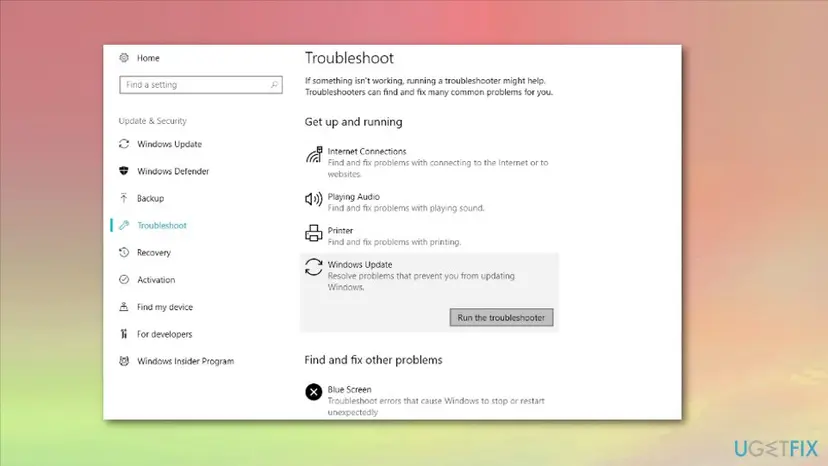
Step by step: Run the Windows Update troubleshooter
It worked if: The troubleshooter reports a fix or no problem, and Windows Update can check again.
If not: If it finds nothing, continue with Fix 6.
Fix 6. Run a clean boot to find a conflicting program
20 minutesLow riskThe CPU stayed high after you installed a program, a driver or a security suite.
A background program or a third-party antivirus can scan or lock every file Setup writes. A clean boot starts Windows with only essential drivers and startup programs, so Microsoft uses it to isolate software conflicts.
- Follow the clean boot steps in the procedure below, using msconfig and Task Manager.
- Restart and check Windows Update and Task Manager.
- If the high use is gone, turn items back on half at a time until it returns.
- When finished, set Normal Startup so the PC starts as usual.
Full steps for Windows 10 and 11: How to perform a clean boot in Windows
If the problem disappears, uninstall the most recent program you added, starting with a third-party antivirus or tuning tool, then try the update again.
It worked if: With only Microsoft items running, Modern Setup Host finishes quickly or stays idle.
If not: If it still uses high CPU in a clean boot, the cause is in Windows itself. Go to Fix 7.
Fix 7. Repair Windows system files with DISM and SFC
25 minutesNo riskWindows shows other errors, or the update fails with damaged files.
Setup relies on Windows system files and the component store. Microsoft Q&A answers for this problem suggest SFC and DISM, because damaged files can make an update fail and start again.
- Right-click Start and open Terminal (Admin) (Windows 10: Windows PowerShell (Admin)).
- Run
DISM /Online /Cleanup-Image /RestoreHealthand wait until it reaches 100 %. - Run
sfc /scannowand wait for the result. - Restart the PC and check Task Manager.
Step by step: Run DISM and SFC to repair Windows system files
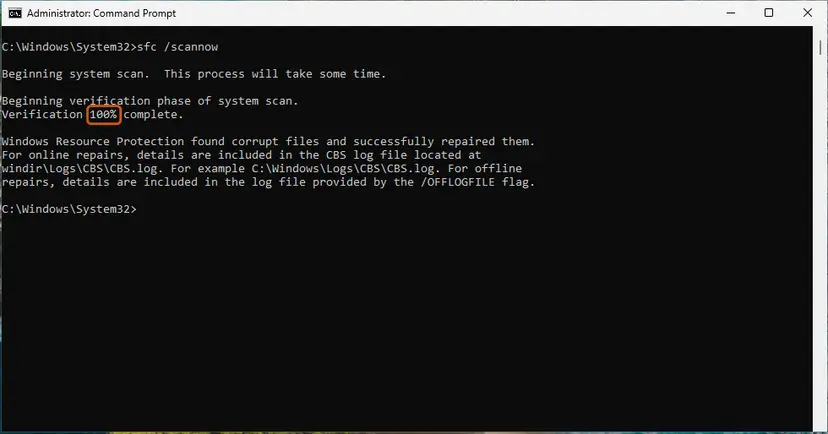
It worked if: SFC reports no integrity violations or that it repaired them.
If not: If it cannot repair files, go to Fix 8.
Fix 8. Reset the Windows Update components
15 minutesLow riskWindows Update fails again and again, shows no update, or Setup keeps coming back.
A damaged update cache or a stopped update service makes a feature update fail and restart. Resetting the services and clearing the SoftwareDistribution and catroot2 folders gives Windows Update a clean start.
- Open the library procedure below and run its commands in an administrator window.
- Let the services stop, the folders be renamed and the services start again.
- Restart the PC.
- Open Windows Update and select Check for updates.
Commands and pictures: Reset Windows Update components
The reset removes the cached update download. Windows downloads it again, which can take a while and use data on a metered connection.
It worked if: Windows Update checks cleanly and the update either installs or is no longer offered, and Modern Setup Host goes quiet.
If not: If it fails again with an error code, search for that code on this site and continue with Fix 9.
Fix 9. Check that SetupHost.exe is the real Windows file
15 minutesNo riskNo update is shown, the PC acts strangely, or the process runs from an odd folder.
Malware sometimes copies the name of a Windows process to hide its own CPU use. The real Modern Setup Host runs from the $WINDOWS.~BT\Sources folder while an update is prepared, so a file anywhere else deserves a scan.
- In Task Manager open the Details tab and right-click
SetupHost.exe. - Select Open file location.
- The folder should be
C:\$WINDOWS.~BT\Sources. If it isAppData,TemporProgramData, treat it as suspect. - Run a full scan with Microsoft Defender and read the result.
Scan steps: How to scan for malware with Microsoft Defender
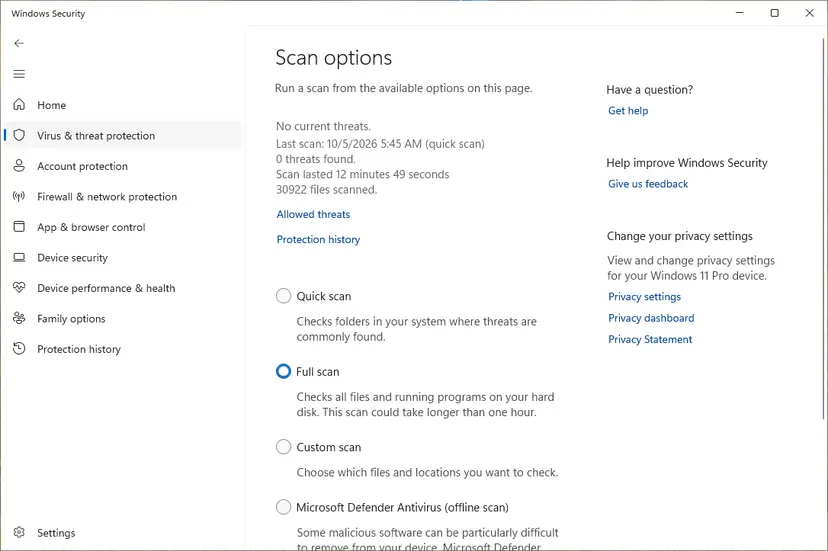
It worked if: The file opens in the $WINDOWS.~BT folder, or Defender found and removed a fake one.
If not: If the file is genuine and the CPU stays high, see the section below for what to check and send to support.
If Modern Setup Host still uses high CPU: where to look
Task Manager shows only the moment. These places show what Setup did and whether the update is moving:
| What to check | Where | What it tells you |
|---|---|---|
| Update status and failed updates | Settings > Windows Update > Update history | Which update fails, and how many times. |
| Whether Setup files exist | File Explorer, show hidden items, the $WINDOWS.~BT folder on drive C | A folder that exists with no update in progress is a leftover of a failed update. |
| Free space | Settings > System > Storage | Whether drive C has room for the update. |
| Disk speed | Task Manager > Performance > Disk | A disk at 100 % active time points at the drive, not the CPU. |
| Windows version | Win + R, winver | Which release you run, to match it against the update that fails. |
If you ask Microsoft or a support forum for help, send the Windows version, the failing update from Update history, the free space on drive C, how long the CPU stays high and what you already tried.
A drive with errors or a failing hard disk makes Setup run for very long. If the PC is also slow without Modern Setup Host, back up your files and have the drive checked before you reinstall or upgrade.
How to keep Modern Setup Host from taking over your PC again
- Keep at least 20 GB free on drive C before a feature update.
- Leave a plugged-in PC on until the update says it is done.
- Install monthly updates so the next feature update starts from a healthy base.
- Uninstall tuning tools and extra antivirus suites that scan every file.
- Do not disable the Windows Update service. Pause updates in Settings instead.
- Do not delete the
$WINDOWS.~BTfolder while an update is in progress. - Do not download
SetupHost.exefrom file sites. - Do not power off the PC during Setup.
Windows 10 left support on 14 October 2025. Moving to Windows 11 or enrolling in Extended Security Updates is the long-term answer for a PC that keeps preparing old Windows 10 updates.
Frequently asked questions
What is Modern Setup Host in Task Manager?
Modern Setup Host is the name Task Manager shows for SetupHost.exe, the Windows Setup program that Windows Update starts to prepare a feature update. Microsoft Q&A answers describe it as the process that downloads and prepares your computer to install a new Windows version. It runs from the hidden $WINDOWS.~BT\Sources folder, which Windows creates during an update. High CPU, disk and network use while it runs is expected for a while. It is not a virus, though malware can copy the name.
What is Modern Setup Host in Windows 10?
In Windows 10, Modern Setup Host is the Setup process of a feature update such as a new version of Windows 10. Users on Microsoft Q&A see it together with Dism Host Servicing Process. Windows 10 left support on 14 October 2025, so a PC without Extended Security Updates gets no new update to prepare. If the process still runs there, check Update history for a failed older update (Fix 1) and clear it with Fix 5 or Fix 8.
What is Modern Setup Host in Windows 11?
On Windows 11 it is the same idea: SetupHost.exe prepares and installs a feature update, such as the move to a newer Windows 11 version. Microsoft Q&A lists reports of high disk use from Windows 11 22H2. The fixes in this guide are the same as for Windows 10: check the update status first, free disk space, run the update troubleshooter and repair system files.
Is Modern Setup Host a virus?
No. The real Modern Setup Host is a Windows file used during updates and sits in the $WINDOWS.~BT\Sources folder. Microsoft Q&A answers do say that high use can come from a system configuration error or malware, so it is worth confirming the location. Open the file location from the Details tab in Task Manager. If it is in AppData, Temp or ProgramData, run a full Microsoft Defender scan (Fix 9).
Can I disable Modern Setup Host altogether?
You can end the task for a moment, but you should not remove it. Windows needs it to install feature updates. Ending it in Task Manager is a pause, because Windows Update starts it again. Microsoft says you cannot stop updates entirely, and the supported way is to pause them in Settings for a limited time. Disabling the Windows Update service is not advised, since it also stops security fixes.
How long should Modern Setup Host run?
Microsoft gives no time for it, so any figure you read is a guess. A feature update can keep the CPU and disk busy for a long time on a slow or nearly full drive, and it needs a restart to finish. A few minutes to an hour with the update shown in Windows Update is normal. Many hours with no progress, or a process that returns after every start, means the update is stuck (Fix 4, Fix 5 and Fix 8).
Is it safe to end the Modern Setup Host process?
It is low risk when you do it for a moment. A user on Microsoft Q&A reported that disk use dropped to normal as soon as the process was ended. But if Windows was in the middle of preparing an update, the update restarts later, and a failed attempt can show an error. Do not end it during the restart phase when Windows says not to turn off the PC.
Why does Modern Setup Host use so much disk and network?
Setup downloads the update, unpacks it into the $WINDOWS.~BT folder and checks the system, which uses the network, the disk and the CPU in that order. On a slow hard drive or a drive with little free space this takes far longer. Microsoft's Windows Update FAQ advises freeing disk space when a PC lacks room for an update, so check free space first (Fix 4).
Can a third-party antivirus cause Modern Setup Host high CPU?
Users report that it can. A security suite that scans every file Setup writes slows the update and raises CPU use. A clean boot (Fix 6) shows quickly whether a program or the antivirus is involved. Do not turn the antivirus off as a fix. If the clean boot cures the problem, update the suite or replace it, and try the update again.
Why is Modern Setup Host high CPU not fixed after I reset Windows Update?
The reset only helps when the update cache or services are the cause. If the drive is almost full, a program interferes or Windows files are damaged, Setup keeps struggling. Work through the other fixes in order: free space (Fix 4), clean boot (Fix 6), then DISM and SFC (Fix 7). If Windows Update then offers the update again, let it finish while plugged in.
Sources
- Microsoft Support: Windows Update FAQ (pausing updates, free disk space, feature updates) (support.microsoft.com)
- Microsoft Support: How to perform a clean boot in Windows (support.microsoft.com)
- Microsoft Q&A: Windows 10 Modern setup host: What does it do? (users report) (learn.microsoft.com)
Did this fix work?
One click, no account. It tells the next reader which guides are worth their time.
Questions and experiences: fix Modern Setup Host high CPU usage in Windows 10 and 11
Still broken, or found a fix we did not cover? Ask here: members and our editors answer. Reading is open; writing needs a free account.
…