
Force quit a frozen app on Windows
When an app stops responding, end it with Task Manager. Anything you have not saved in that app is lost; your other apps and files are not affected.
- Time
- Under a minute
- Level
- Easy
Before you start
- Wait a little first: an app that is busy with a large file or a slow network can recover on its own.
- Force quitting loses unsaved work in that app only. Save what you can in your other apps.
Windows 11 and 10
Steps written for Windows 11 and Windows 10 (the steps are the same).
Try to close it normally
Select the app's window and press Alt + F4, or select Close (the X). If Windows offers to close the app or wait for it, choose to close it.
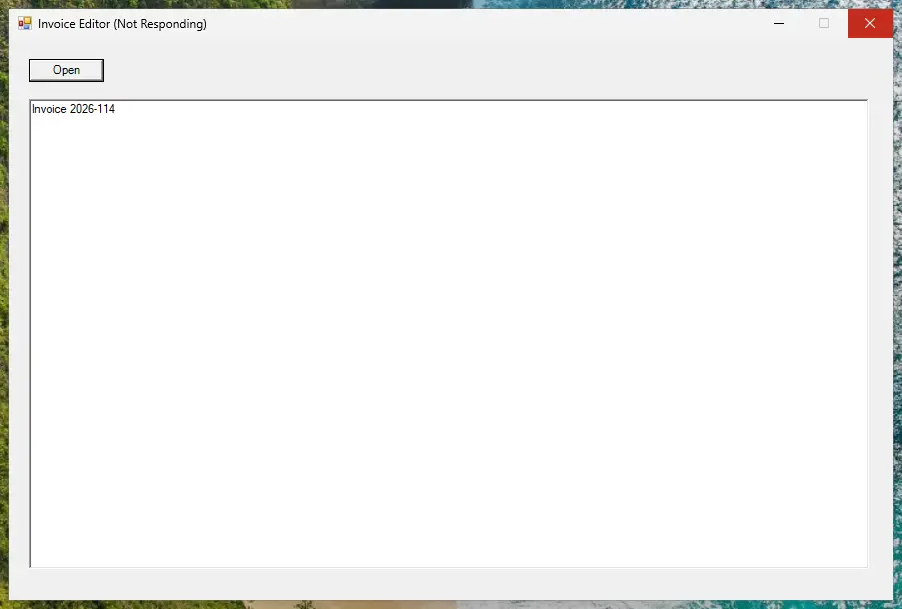
A frozen app shows Not Responding in its title bar. Screenshot: Windows 11 26H2 Open Task Manager
Press Ctrl + Shift + Esc. Task Manager opens on the Processes page. On Windows 10, if you see only a short list of apps, select More details.
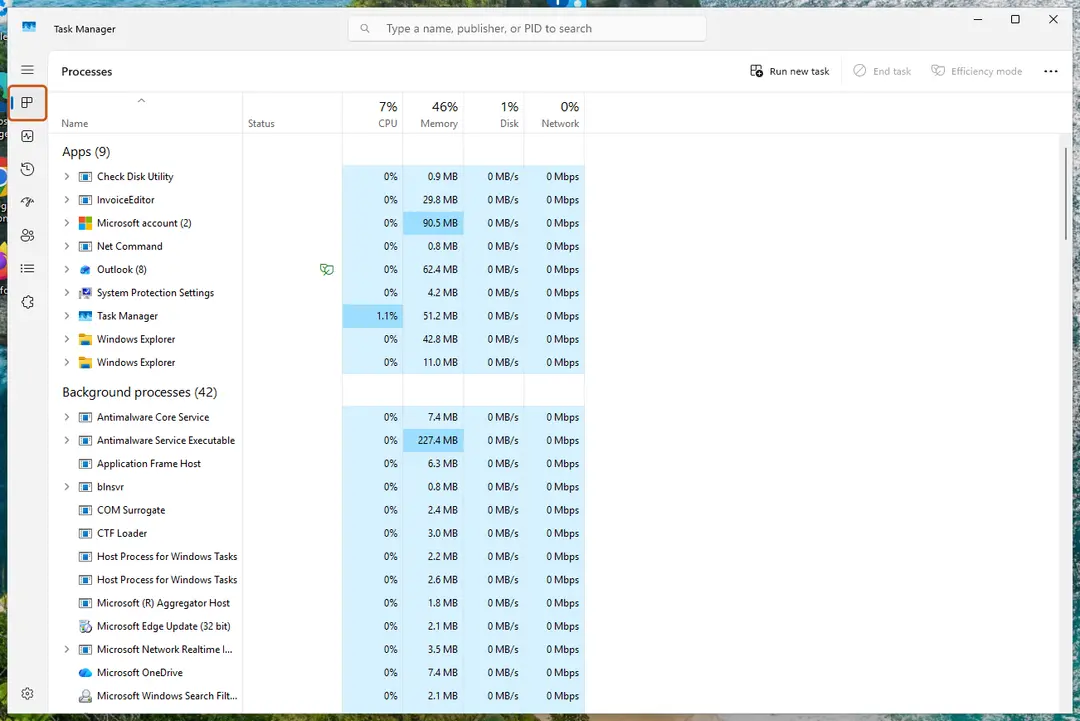
Task Manager opens on the Processes page, with your open apps listed under Apps. Screenshot: Windows 11 26H2 End the frozen app
Under Apps, select the app that is not responding, then select End task at the top. You can also right-click the app and select End task.
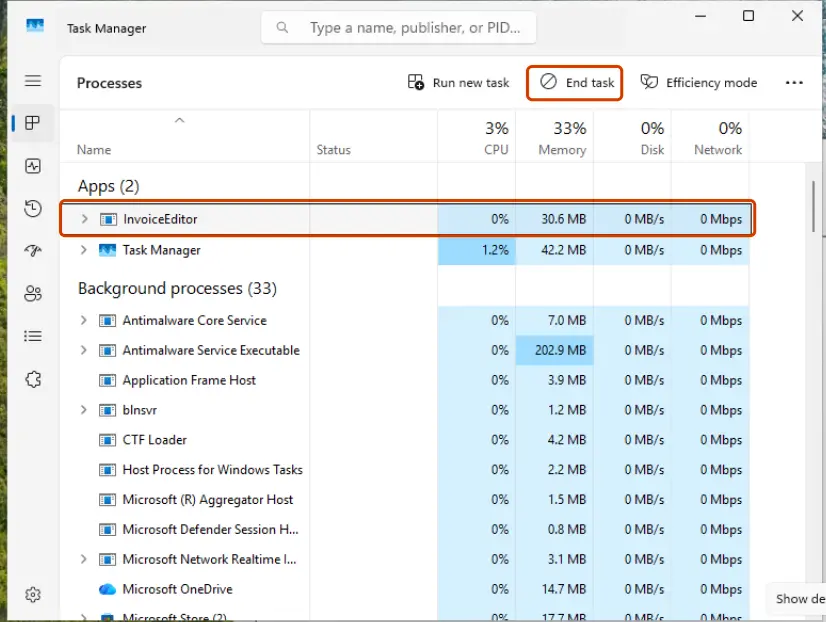
Select the frozen app, then End task. Screenshot: Windows 11 26H2 Open the app again
Start the app as usual. Many apps offer to recover the document you were working on.
End an app from the command line (Windows)
If Task Manager will not open or the app does not end, open Terminal or Command Prompt and end every app that Windows marks as not responding:
taskkill /f /fi "status eq not responding"
Or end one program by its file name (run tasklist to see the names):
taskkill /im <name>.exe /f
An app that runs as administrator can only be ended from a command window opened as administrator.
End a task from the taskbar (Windows 11)
Windows 11 can add End task to the menu you get when you right-click an app on the taskbar. The switch is in Settings > System, on the page with settings for developers. It is off by default.
If the whole PC is frozen
- Press Ctrl + Alt + Delete and select Task Manager. This screen often still works when the desktop does not.
- If only the taskbar, Start or the desktop are stuck, follow Restart File Explorer.
- If nothing responds, press and hold the power button until the PC turns off, then start it again. Unsaved work in all apps is lost.
If the same app keeps freezing
- Install the app's updates and Windows updates.
- Repair Windows system files: Run DISM and SFC to repair Windows system files.
- Remove the app and install a fresh copy: Uninstall a program or app in Windows.
- Start Windows with only the basic drivers to see whether other software is the cause: Start Windows or a Mac in Safe Mode.
Used in 81 guides
How to uninstall Bonjour on Windows 11 and 10
How to use the Steam Notes feature: open, pin and manage notes
How to fix Modern Setup Host high CPU usage in Windows 10 and 11?
How to Uninstall Tor Browser on Windows 11 and 10
Bluebook not opening on Windows: fix "An unexpected error has occurred"
How to uninstall UltraViewer completely and stop remote access
How to fix Discord stuck at gray screen on Windows?
How to fix Discord stream stuck on loading in Windows?
How to fix Discord green screen and camera not working in Windows?
How to fix RESULT_CODE_HUNG error in MS Edge and Google Chrome?
How to uninstall TeraCopy on Windows
How to fix "You were disconnected from Blizzard services" error in Windows?
How to fix Background Task Host high CPU usage in Windows 11?
How to fix app is opening as background processes in Windows?
How to fix Valorant error code 38?
How to fix ".exe has stopped working" error on Windows 10 and Windows 11?
How to fix "Looks like you already own this" error when buying currency in Roblox?
How to fix Steam “Failed loading profile data” error in Windows?
How to fix "JavaScript error occurred in the main process" error?
How to fix "Insufficient Memory" error while using a Canon printer?
How to fix "Unknown Hard Error" on Windows 10?
How to fix Hanging or crashing apps in Windows Store Apps troubleshooter?
[Fix] Can't paste pictures in Paint on Windows
How to fix Riot Client not launching in Windows?
How to uninstall Advanced IP Scanner completely
How to uninstall Opera Stable, and should you remove it?
How to fix Microsoft Office error 0-2031 in Windows?
How to fix “There was an error trying to load your shopping cart” error on Steam?
How to fix "We can't start this add-in because it isn't set up properly" in Office?
How to fix MSI Afterburner "Failed to start scanning" error in Windows?
How to fix Teams error "There was a problem reaching this app" in Windows?
How to fix "Unable to find the Ubisoft Game Launcher" error in Windows?
How to fix Epic Games error code LS-0013 in Windows?
How to fix Microsoft Office error code 147-0 in Windows
How to fix Steam Client WebHelper high CPU usage?
How to fix OneDrive error 0x8007018b in Windows?
How to fix 0xA00F429F camera error in Windows?
DesktopWindowXamlSource: what the empty taskbar window is and how to remove it
How to fix high CPU usage by Conhost.exe (Console Window Host)?
How to fix "A connection to the Steam VAC servers could not be made" error in Windows?
How to fix GeForce NOW 0x0000012E error in Windows?
How to fix “Sorry, but you're not permitted to view these materials at this time” on Steam
How to fix "Can't start your camera" error 0xA00F429E in Windows?
How to fix GeForce Now error 0xC192000C in Windows?
How to fix Microsoft Teams error code 3399614475 (Tag 4usqa) in Windows?
How to fix VMware "Failed to start the virtual machine" error in Windows?
How to fix webcam error code 0xA00F4271 (0x80070001) on Windows?
How to fix Assertion failed: C++ Runtime Library Expression vulcan_ error?
How to fix MS Paint not working in Windows 11?
How to fix Xbox app is stuck at "Launching Xbox App" in Windows?
How to fix Steam error code 50 in Windows?
How to fix 0x800700aa error in Windows?
How to fix can't type in WhatsApp desktop app in Windows?
How to fix StartMenuExperienceHost.exe error in Windows?
What is Web Indexing Service (Bright Data) and how to uninstall it in Windows
How to fix "Sorry, something went wrong and Word was unable to start" error in Windows?
How to fix Microsoft Store error 0x80073CF1 on Windows
How to fix "The operation was canceled by the user (0x4C7)" error on Steam?
How to fix "You might need to take action in another window" in Windows?
How to fix Camera app error 0xA00F4293 in Windows?
How to fix “There was a problem loading this web content” error on Steam?
How to fix FIFA 22 not launching in Windows?
How to fix Microsoft Store error 0x80073CF8 on Windows
How to fix "Steam must be running to play this game" error in Windows?
How to fix error 0xA00F4241 in Windows?
How to fix "Another instance of application is already running" error in Windows?
How to fix Alt + F4 not working in Windows?
How to fix Microsoft Office installation error 0-2035?
How to fix Corel VideoStudio not opening in Windows?
How to fix "The exception unknown software exception (0xe0000008)" error in Windows?
How to fix Discord error "A fatal Javascript error occurred" in Windows?
How to remove the red dot on the Discord icon (taskbar, tray, iPhone, Android and Mac)
How to fix Microsoft Office error code 30015-25 (1006) in Windows?
How to remove red crosshair in the middle of the screen in Windows?
How to fix WhatsApp error "Your microphone is unavailable or in-use on another app" in Windows?
How to fix WhatsApp white screen error?
How to fix "Something went wrong while attempting to sign you in" Steam error in Windows?
How to fix Steam error code 2 in Windows?
How to recover unsaved Snipping Tool video in Windows?
How to uninstall BlueStacks completely from Windows 11 and 10
How to fix NVIDIA Installer cannot continue error code 0xE6000000 in Windows?
Sources
- Microsoft Learn: taskkill command reference (read Oct 3, 2026)