
How to fix "The operation was canceled by the user (0x4C7)" error on Steam?

Prefer to fix it yourself? The manual steps follow.
- 6methods
- 1 minute for the first fix, 5 to 30 minutes for the repairs
- Easy
Applies to Games started from Steam on Windows 11 or Windows 10
6 methods in this guide
Hello. I installed a new game from Steam, but I can't play it because every time I try to launch it I receive the "operation was canceled by the user (0x4C7)" error. How do I fix this?
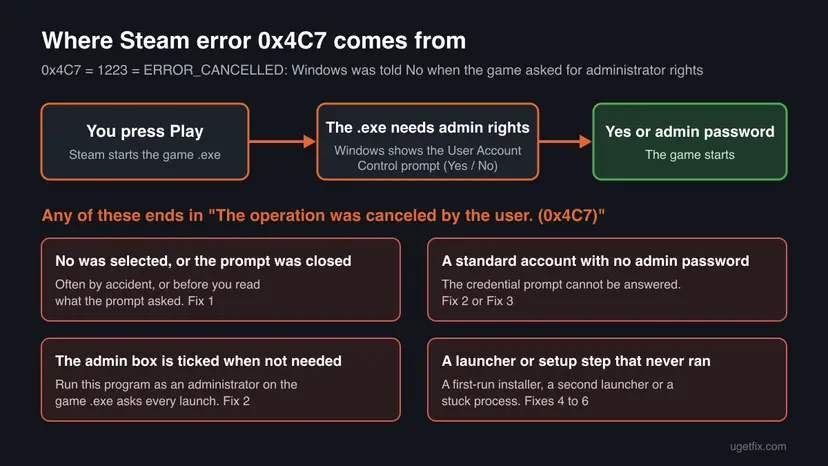
Steam shows "The operation was canceled by the user (0x4C7)" when the game asked Windows for administrator rights and the User Account Control prompt was answered No, closed, or could not be answered. Nothing is broken. Press Play again and select Yes on the prompt, or enter an administrator password if Windows asks for one.
0x4C7 is the Windows code ERROR_CANCELLED. The game, or a launcher it starts, asked for administrator rights, and the User Account Control prompt got No, was closed, or needed a password you do not have. Start with Fix 1: press Play again and select Yes on the prompt. If you cannot or do not want to approve it, clear Run this program as an administrator on the game's .exe (Fix 2).
| Error | Failed to start process for this game: "The operation was canceled by the user. (0x4C7)" |
|---|---|
| Where it appears | In a Steam window right after you press Play, often after a Windows prompt asked "Do you want to allow this app to make changes to your device?" |
| Main cause | The game's .exe, or a launcher or setup step it runs, needs administrator rights, and the User Account Control prompt was answered No, closed, or left without an administrator password. |
| Fastest fix | Press Play again and select Yes on the User Account Control prompt (Fix 1). |
| Also written as | 0x4C7, ox4c7, error 1223, ERROR_CANCELLED, "The operation was cancelled by the user", "Failed to start process for this game", and the same text in other languages. |
| What the code is | A standard Windows error. Microsoft's list of system error codes gives ERROR_CANCELLED, 1223 (0x4C7), "The operation was canceled by the user." Steam only passes it on. |
| Vendor status | Not a Steam bug and not a known issue with a patch. It is how Windows reports a declined elevation request. We found no Steam Support page for this code. |
| Affects | Any Steam game whose .exe or launcher asks for administrator rights, on Windows 11 and Windows 10. Windows 10 left support on 14 October 2025, which does not change this error. |
| Time to fix | 1 minute for Fixes 1 and 2. 5 to 30 minutes for the restart, the file check and a clean boot. |
Facts checked on 15 October 2026. Steps written for the Steam client on Windows 11 (25H2 and 26H2) and Windows 10 22H2, read against Microsoft's list of Windows system error codes and Microsoft's description of how User Account Control works.
What "The operation was canceled by the user (0x4C7)" means on Steam
0x4C7 is not a Steam code. It is the hexadecimal form of Windows error 1223, which Microsoft lists as ERROR_CANCELLED. Its text is "The operation was canceled by the user", word for word. When Steam cannot start a game's process, it shows the Windows reason word for word, so you see Failed to start process for this game: "The operation was canceled by the user. (0x4C7)"
The "user" in the message is you, or the absence of you. A program that needs an administrator's full access token cannot get it silently. Microsoft explains that "the user must explicitly provide consent by selecting Yes or by providing administrator credentials." When that does not happen, Windows refuses to start the program and returns code 1223. Steam then shows the error.
| What you see or type | What it is | Same cause? |
|---|---|---|
| Failed to start process for this game: "The operation was canceled by the user. (0x4C7)" | Steam's launch error with the Windows reason | Yes |
| 0x4C7, ox4c7, steam 0x4c7, error 0x4c7 steam | The code alone, often with the letter O typed for the zero | Yes |
| The operation was cancelled by the user | British spelling of the same Windows text | Yes |
| Error 1223 or ERROR_CANCELLED | The same code in decimal and by name, as tools and logs show it | Yes |
| Error: the operation was canceled. | A shorter text used by other programs for a stopped task, such as a download | Not always |
The prompt that was "canceled" may have opened for a second only, appeared on another monitor, or come from a launcher the game starts on its first run. Users report pressing No by accident, or not knowing why a game asked for changes to the device. Either way, Windows treats an unanswered request as a No.
What causes the 0x4C7 error on Steam, from most to least likely
Microsoft names only the end of the chain: a request for administrator rights that got no consent. Which program asked differs from game to game. The order below is ours, from the reports readers and forum users give with this code. Valve and Microsoft publish no numbers.
| Cause | How to tell | Fix |
|---|---|---|
| The User Account Control prompt was answered No or closed. | You saw a Windows prompt asking to allow changes and dismissed it, or the error appeared a moment after one flashed up. | Fix 1 |
| The game's .exe is set to run as administrator. | Run this program as an administrator is ticked on the Compatibility tab of the .exe, often from an older guide or a tweak tool. | Fix 2 |
| A standard Windows account without an administrator password. | The prompt asks for a user name and password instead of showing Yes and No. | Fix 3 |
| A first-run installer or second launcher asks for rights. | A new game, or the first start after an update. Some games install a runtime, an anti-cheat service or open a publisher launcher first. | Fix 4 |
| A stuck game or Steam process. | It began after the game crashed or Steam hung during the launch. | Fix 4 |
| Damaged or missing game files. | One game only, after a crash, a cleaner program or an antivirus alert. | Fix 5 |
| A security program that blocks elevation. | Several games fail the same way, or it began after you installed security or tune-up software. | Fix 6 |
Many guides, including our old one, tell you to tick Run this program as an administrator to cure 0x4C7. That box is what makes Windows ask in the first place. If the game ran fine without it, ticking it only adds a prompt you can cancel. Fix 2 explains when to clear it and when to keep it.
How to fix "The operation was canceled by the user (0x4C7)" on Steam
Fixes 1 to 3 deal with the User Account Control prompt itself and take a minute each. Fix 4 lets a first-run step finish and clears a stuck launch. Fixes 5 and 6 check the game files and look for a program that blocks the request.
| What you see or did | Start with |
|---|---|
| A Windows prompt asked to allow changes and you selected No or closed it. | Fix 1 |
| The prompt appears every time and you do not want to approve it. | Fix 2 |
| The prompt asks for an administrator user name and password you do not have. | Fix 3, then Fix 2 |
| A new game, or the first start after a game update. | Fix 1, then Fix 4 |
| It began after the game crashed or Steam froze. | Fix 4 |
| Several games fail with 0x4C7. | Fix 2, then Fix 6 |
Fix 1. Press Play again and select Yes on the User Account Control prompt
1 minuteLow riskEveryone starts here, and above all if you saw a Windows prompt and dismissed it, or are not sure what you clicked.
Microsoft's description of User Account Control says the user "must explicitly provide consent by selecting Yes or by providing administrator credentials". A Yes gives the game the rights it asked for, so Windows no longer returns code 1223.
- Close the Steam error window.
- Open Library in Steam, select the game and press Play.
- Watch for a prompt titled User Account Control with the question Do you want to allow this app to make changes to your device? The rest of the screen is dimmed while it is open.
- Read the program name and Verified publisher line. It should be the game, its publisher or a launcher you know.
- Select Yes.
- If a second prompt follows, for an installer or a launcher, read it and select Yes again.
Microsoft explains that the prompt opens on the secure desktop: Windows dims your screen, and only Windows itself can draw on it. "When the user selects Yes or No, the desktop switches back to the user desktop." If you press a key while the game is loading, you can answer the prompt without meaning to.
A Yes gives the program full control of Windows. Approve it only when the prompt names the game, its publisher or its launcher. If the program name is unknown or the publisher is Unknown, select No and check the game's files with Fix 5 first.
It worked if: The game's splash screen or launcher opens and Steam shows the game as running.
If not: If no prompt appears at all and the error comes at once, or you do not want to approve it, go to Fix 2. If the prompt asks for a password, go to Fix 3.
Fix 2. Clear "Run this program as an administrator" on the game's .exe
3 minutesLow riskThe prompt appears on every launch, you are on a standard account, or several games fail with 0x4C7.
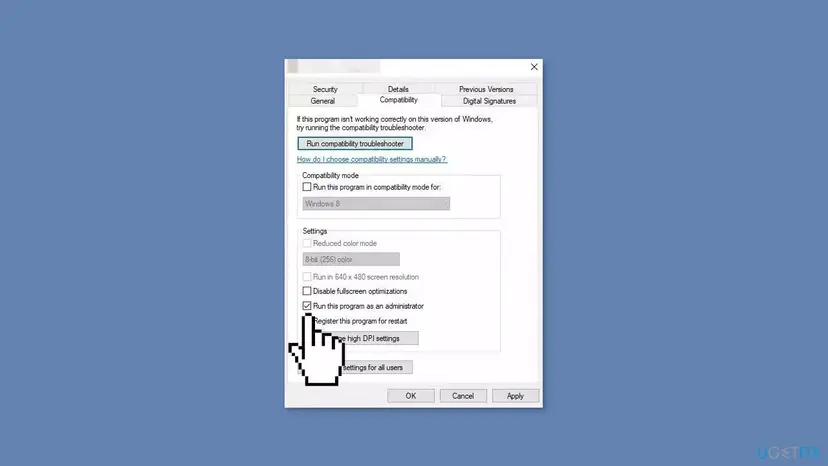
The box on the Compatibility tab forces Windows to ask for administrator rights each time the .exe starts. Most games do not need it. When it is cleared, Windows starts the game with normal rights and there is no prompt to cancel.
- In the Steam Library, right-click the game and select Manage > Browse local files.
- Find the game's main .exe file in the folder that opens.
- Right-click it, select Properties and open the Compatibility tab.
- If Run this program as an administrator is ticked, clear it.
- If the box is grey, select Change settings for all users and clear it there as well.
- Select Apply and OK.
- Do the same for Steam if it is ticked there: right-click
C:\Program Files (x86)\Steam\steam.exeand open Properties > Compatibility. - Start Steam normally and press Play.
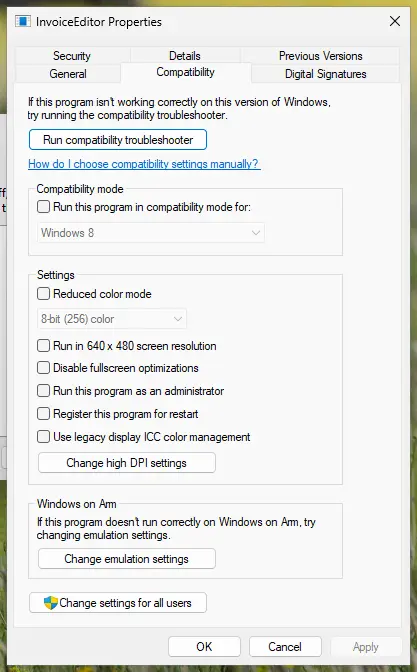
Some games are built to need administrator rights and ask for them even with the box cleared. Then the request comes from the game itself, and the only way through is to approve it (Fix 1) or have an administrator do so (Fix 3). The Compatibility tab in detail: How to run a program as administrator or in compatibility mode
It worked if: The game starts without a User Account Control prompt and without the error.
If not: If the prompt still appears, the game or its launcher asks for the rights itself. Approve it with Fix 1, or get an administrator to do it with Fix 3.
Fix 3. Get an administrator to approve the prompt when you have no admin password
5 minutesLow riskThe prompt shows boxes for a user name and password instead of Yes and No, or you know your Windows account is a standard one.
Microsoft: the credential prompt "is presented when a standard user attempts to perform a task that requires a user's administrative access token." A standard account cannot answer it alone, so the request is canceled and Steam shows 0x4C7.
- Press Win + I, open Accounts and look under your name. Administrator or Standard user is written there on Windows 11 and Windows 10.
- If it says Standard user, ask the person who manages the PC to come to it.
- Press Play in Steam and let them type their administrator password into the prompt.
- If the game asks on every launch, ask them to try Fix 2 with you first. Many games run without the box ticked.
- On a school, work or library PC, contact the IT staff. They may block elevation on purpose.
Tools and tricks that promise to skip the administrator password, or to switch User Account Control off for good, weaken the protection of the whole PC. They are also against the rules of most schools and workplaces. Ask the administrator to approve the game once instead.
It worked if: The administrator's password is accepted and the game starts. With Fix 2 done as well, later launches need no password.
If not: If the game needs administrator rights every time and the administrator will not approve it, the game cannot run on that account. The other fixes cannot change that.
Fix 4. Close Steam fully, end stuck processes and let the first-run setup finish
5 minutesNo riskA new game, the first start after a game update, or the error began after the game crashed or Steam froze.
Many games run a setup step on the first launch: a runtime, an anti-cheat service or the publisher's own launcher, and each one can ask for administrator rights. A crashed launch can leave such a step or the game process half-open, so the next request fails. A clean start lets each step ask once more.
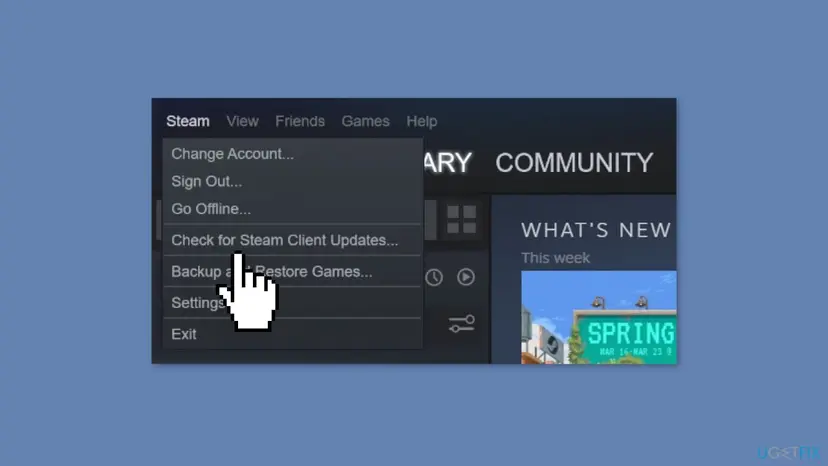
- Open the Steam menu and select Exit. Closing the window only hides Steam.
- Press Ctrl + Shift + Esc to open Task Manager.
- On Processes, select the game, any launcher of its publisher and any entry starting with Steam, and select End task for each.
- Start Steam again. Open the Steam menu and select Check for Steam Client Updates... if Steam does not update by itself.
- Press Play. Answer Yes to every prompt that names the game, its publisher, a runtime or its launcher.
- If a publisher launcher opens, sign in to it and let it finish before you press Play again.
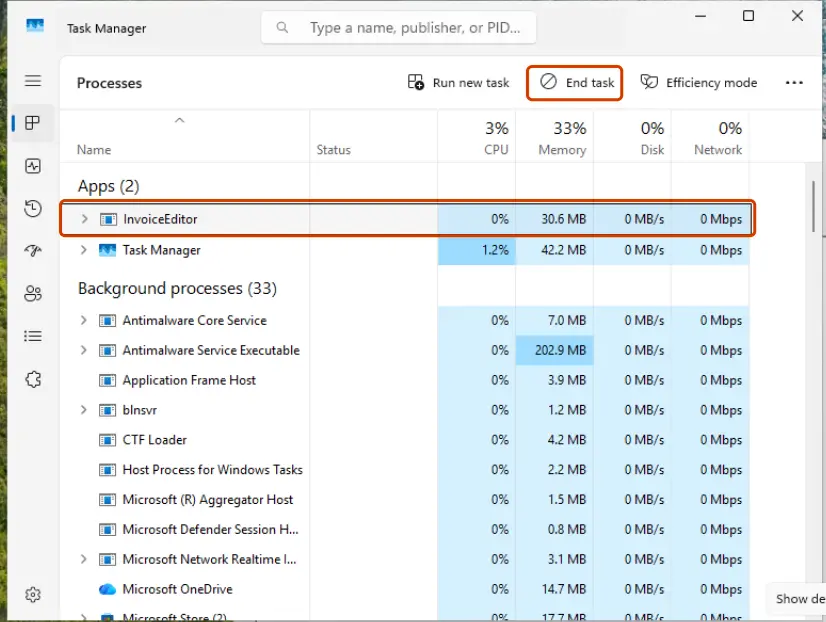
Users on Reddit and the Steam Community report 0x4C7 with new installs of games that open a publisher launcher, such as Need for Speed Heat and The Sims 4, and after a crash. Those are reports, not a list from Valve. Step by step for Task Manager: Close a frozen app (Task Manager, Force Quit)
It worked if: The setup steps finish once, the game opens, and later launches go straight to the game.
If not: If only this game still fails, check its files with Fix 5.
Fix 5. Verify the game's files in Steam
5 to 30 minutes, by the size of the gameLow riskOne game fails while others start, especially after a crash, a cleaner program or an antivirus alert.
If a launcher or setup file in the game folder is missing or damaged, the request for rights can fail or point at the wrong program. Verifying downloads the original files again, including the installers the game runs on its first start.
- Restart and open Steam. Restart your computer and launch Steam.
- Open the game's menu. Right-click the game in your Library, or open the game's Library page and select the gear icon on the far right.
- Open Properties. Select Properties in the menu.
- Verify the files. Select the Installed Files tab and select Verify integrity of game files.
- Wait for the result. Steam checks the game's files. This can take several minutes.
These steps were written for Steam on Windows. The full page with the other versions and what each result means: How to verify game files in Steam, Epic Games, Xbox app, EA app, Battle.net and GOG Galaxy
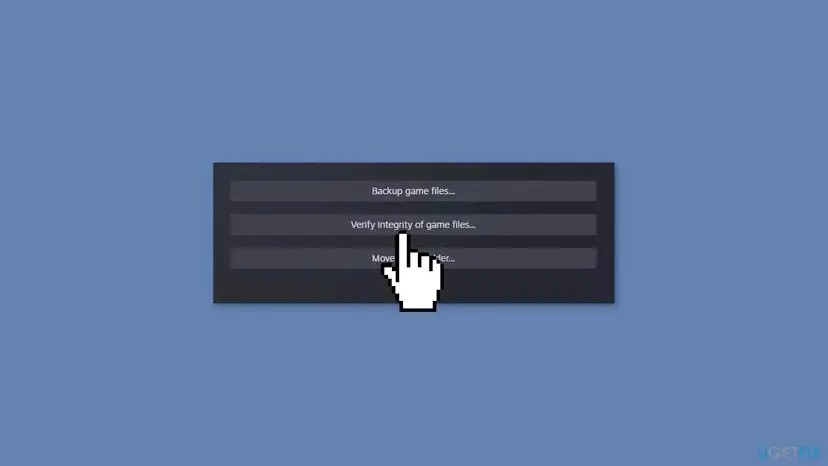
If verifying finds nothing, uninstall the game from the Library with Manage > Uninstall, restart the PC and install it again. Then press Play and approve the first-run prompts as Fix 1 shows.
It worked if: Steam reports that all files were validated, or that it reacquired some, and the game starts after you approve its prompt.
If not: If several games fail the same way, a program on the PC may be in the way. Go to Fix 6.
Fix 6. Find the program that blocks the request with a clean boot
10 to 15 minutesLow riskSeveral games fail with 0x4C7, or the error began after you installed security software, a tune-up tool or a game overlay.
A program that watches new processes can stop an elevation request before you answer it, and Steam then reports the cancel. A clean boot starts Windows with Microsoft services only and shows whether such a program is the cause.
- In your security program, add the game folder and
C:\Program Files (x86)\Steamto its exceptions. - Try the game from the Library. If it still fails, do a clean boot. Step by step: How to perform a clean boot in Windows
- After the restart, start Steam and press Play, then answer the prompt with Yes.
- If the game starts now, turn the services and startup apps back on in small groups until the error returns. The last group holds the cause.
- Update, set up or remove that program, then undo the clean boot as the procedure shows.
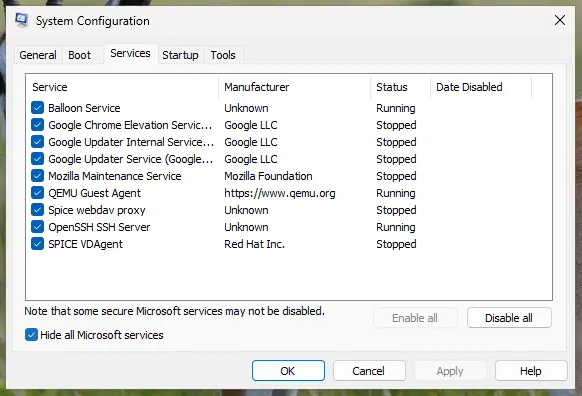
If the game starts only without your security program, the answer is an exception for Steam and the game folder in that program. Keep real-time protection on. To test once, pause it for one launch and turn it on again: Turn off Microsoft Defender protection for a moment
It worked if: The game starts after a clean boot, or the clean boot points at one program you can update or set up.
If not: If the error stays after a clean boot, the request is coming from the game itself. Contact the game's support as described below.
If Steam still shows 0x4C7: what to check and whom to ask
The error has no log of its own in Steam: the code is the answer Windows gave when the process was refused. What helps support most is knowing which program asked for rights and what the prompt looked like.
- Press Play and read the User Account Control prompt before you answer. Note the program name and the publisher.
- Take a screenshot of the Steam error window afterwards.
- Note your account type from Settings > Accounts: administrator or standard user.
- Note whether Run this program as an administrator was ticked on the game's .exe.
- In the Steam Library, open the game's page and select Support to reach its publisher. Send the screenshot and the list above.
- When it is the account: a standard user on a PC someone else manages cannot approve the request. Only the administrator can, as Fix 3 shows.
- When it is a policy: on a school or work PC, the IT staff may block elevation. No setting you can reach changes that.
- When the prompt names an unknown program: do not approve it. Scan the PC first: How to scan for malware with Microsoft Defender
- When it is not a legal copy: see the FAQ. This page does not help with that.
How to keep the 0x4C7 error from coming back
- Read the User Account Control prompt before you answer it.
- Answer Yes to prompts that name the game, its publisher or its launcher.
- Leave Run this program as an administrator cleared unless the game needs it.
- Let a new game finish its first-run setup before you press any key.
- Exit Steam through the Steam menu after a crash, before you try again.
- Do not switch User Account Control off to avoid the prompt.
- Do not tick the administrator box for games that run without it.
- Do not approve a prompt for a program you do not recognise.
- Do not use tools that promise to bypass an administrator password.
- Do not let a cleaner program remove files from the game or Steam folders.
The rule behind the error is short. If the game asks for administrator rights, someone with those rights has to say Yes. Keep the box cleared where it is not needed, and answer the prompt when it is.
Frequently asked questions
What does 0x4C7 mean on Steam?
It means Windows refused to start the game because a request for administrator rights was canceled. 0x4C7 is the hexadecimal form of Windows error 1223, which Microsoft lists as ERROR_CANCELLED. Its text is "The operation was canceled by the user". Steam shows the code when it cannot start the game's process. The request comes from the game's .exe, a launcher or a setup step, and it ends with this code when the User Account Control prompt gets No, is closed, or needs a password nobody enters. Press Play again and select Yes, as Fix 1 shows.
I don't have the admin password. Can I still play?
Only if the game can run without administrator rights. First try Fix 2: clear Run this program as an administrator on the game's .exe, if you are allowed to change it. Many games then start with no prompt at all. If the game itself asks for rights, a standard account cannot approve it, because Windows shows a credential prompt that needs an administrator's password. Ask the person who manages the PC to enter it once. On school or work PCs, ask the IT staff. Do not use tools that claim to bypass the password.
Why does the game ask for administrator rights at all?
Usually for a setup step, not for the game itself. On the first launch, or after an update, many games install a runtime, an anti-cheat service or the publisher's launcher, and changing Windows needs administrator rights. Some games also have the administrator box ticked on their .exe by an old guide or a tweak tool. A few are built to ask on every start. Read the program name on the prompt: it tells you which part is asking.
I selected Yes and it still says 0x4C7. What now?
Then a second request was canceled, or something answered for you. Watch for a second prompt after the first: a launcher or installer can ask again a moment later. Close Steam fully and end any leftover game or launcher process in Task Manager, as Fix 4 shows, then press Play and answer each prompt. If the error still comes, verify the game files with Fix 5. When several games fail the same way, a security program may block the request, which Fix 6 tests with a clean boot.
Can I stop the User Account Control prompt for good?
No. User Account Control is what keeps programs from making changes to Windows without your approval. Microsoft explains that a program needing an administrator token "can't silently install when UAC is enabled", and that is the point. Switching it off removes a protection for every program, not only the game. The error has a simpler cure: answer the prompt with Yes, or clear the administrator box on the game's .exe when the game does not need it.
Is "The operation was canceled by the user" a virus?
No. The text is a standard Windows message for a canceled request, and Steam only passes it on. It does not mean anything harmful happened. The thing to watch is the prompt before it: approve only a program whose name and publisher you recognise, such as the game or its launcher. If the prompt named a program you do not know, do not approve it, and scan the PC with Microsoft Defender before you try again.
Does 0x4C7 mean my Windows 11 or Windows 10 is broken?
No. The code reports a decision, not damage: a request was not approved. It appears the same way on Windows 11 25H2 and 26H2 and on Windows 10 22H2. Windows 10 left support on 14 October 2025, which does not cause this error, but updates to the game and its launchers may stop supporting it in time. System file repairs and driver updates, which older guides suggest, do not change the answer to a User Account Control prompt.
I searched in Russian, Japanese or Portuguese. Is this the same error?
Yes. Readers search for the Russian "не удалось запустить процесс для игры 0x4c7" (failed to start the game's process), the Japanese "このゲームのプロセスを開始できませんでした 0x4C7" and questions such as "erro 0x4c7 steam". Steam translates its own words, while the Windows part of the message follows the language of Windows. The cause is the same everywhere: a canceled request for administrator rights. Only the names on the buttons differ, so follow the order of the steps here.
Can I fix 0x4C7 on a cracked copy of a game?
This page does not help with that. On a copy from Steam the error has a clear cause and the fixes here work without risk. On a copy downloaded from outside Steam, the program asking for administrator rights may not be the game at all, and approving it can give malware full control of the PC. If a prompt names a program you do not know, select No and scan the PC with Microsoft Defender.
Sources
- Microsoft Learn: System Error Codes (1000-1299), ERROR_CANCELLED 1223 (0x4C7) (learn.microsoft.com)
- Microsoft Learn: How User Account Control works (consent prompt, credential prompt, secure desktop) (learn.microsoft.com)
- Reddit, r/SatisfactoryGame: Game won't launch (user report that selecting No on the prompt gives 0x4C7, used only as a report) (reddit.com)
Did this fix work?
One click, no account. It tells the next reader which guides are worth their time.
Questions and experiences: fix "The operation was canceled by the user (0x4C7)" error on Steam
Still broken, or found a fix we did not cover? Ask here: members and our editors answer. Reading is open; writing needs a free account.
…